

Tiny11 is an unofficial NTDEV project that repackages Windows 11 into a lighter installation for older PCs, gaining new attention after Windows 10 support ended on October 14, 2025, because many still-functional machines cannot meet Microsoft’s TPM 2.0 and processor requirements. It is not a magic extension of Windows 10, and it is not a supported branch of Windows 11. It is a community workaround arriving at exactly the moment Microsoft’s hardware line in the sand has become a household problem. The appeal is obvious; the risk is the point.
Windows 10’s end of free support was always going to be more than a calendar event. It became a sorting mechanism for hundreds of millions of PCs: machines that can move cleanly to Windows 11, machines that can buy a little more time through Extended Security Updates, and machines that remain perfectly usable in the physical sense but stranded by policy.
That is the opening Tiny11 walks through. Microsoft’s Windows 11 requirements were not merely a bump in RAM or disk space. They placed hardware-backed security features such as TPM 2.0 and newer CPU generations at the center of eligibility, turning the upgrade from a software decision into a hardware audit.
For enthusiasts, that invites tinkering. For households, schools, charities, small offices, and repair shops, it creates a more uncomfortable question: should a computer that still browses, prints, edits documents, and runs line-of-business software be retired because the official upgrade path says no?
Tiny11’s popularity is therefore not hard to understand. It offers a story Microsoft cannot: keep the PC, keep Windows, remove the cruft, and dodge the hardware gate. But that story becomes more fragile the moment the machine is used for banking, business email, customer records, or anything that depends on predictable patching.
The reported removals are exactly the sort of things that irritate power users: Mail, Calendar, Weather, Alarms, Solitaire, Media Player, Microsoft Edge, and OneDrive integration. To a certain kind of Windows user, that list reads less like missing functionality and more like spring cleaning.
That is why Tiny11’s message lands. Microsoft has spent years making Windows more account-driven, cloud-connected, and commercially instrumented. Tiny11 responds with a minimalist counteroffer: what if Windows 11 were just Windows, and what if it ran on the hardware people already own?
The problem is that Windows is not merely an interface and a start menu. It is a servicing model, a driver ecosystem, a security architecture, and a compliance boundary. Once a community image starts cutting pieces away, the burden shifts from Redmond’s release machinery to the person at the keyboard.
That distinction matters because Windows security is cumulative. Defender signatures, cumulative updates, servicing stack updates, driver blocks, Smart App Control decisions, kernel mitigations, browser patches, and certificate handling are not decorative extras. They are the plumbing that keeps a general-purpose PC survivable on the modern internet.
If a Tiny11 installation does not receive updates in the same regular, predictable way as a supported Windows 11 build, the user has traded one end-of-support problem for another. Worse, the new problem may be less visible. Windows 10 at least tells users plainly that the support clock has run out; an unofficial Windows 11 image can look modern while living outside the normal guarantee structure.
There is also the supply-chain issue. Downloading a prebuilt operating system image from anywhere other than Microsoft asks the user to trust that nothing unwanted has been added while unwanted components were removed. For hobbyists who verify hashes, inspect scripts, isolate test machines, and rebuild from official media, that risk can be managed. For ordinary users searching for “Windows 11 for old laptop,” it is a trap waiting to be disguised as convenience.
But safer is not the same as supported. Running a script against official install media does not convert an unsupported PC into a supported one. It does not make the CPU appear on Microsoft’s compatibility list, does not conjure a TPM 2.0 module, and does not create an OEM driver testing pipeline for hardware the Windows 11 ecosystem has effectively left behind.
The builder method also assumes a level of technical confidence that many Windows 10 holdouts do not have. Mounting an ISO, running PowerShell scripts, creating bootable USB media with a tool such as Rufus, changing firmware boot settings, and clean-installing an operating system are routine tasks for forum regulars. They are not routine for the person trying to keep a 2017 family laptop useful for another year.
That gap is where bad outcomes happen. A user who does not understand the difference between a Microsoft ISO, a community script, and a prebuilt modified image is also unlikely to have a tested backup, a recovery drive, or a plan for missing drivers. The Tiny11 pathway may be technically interesting, but it is not a consumer safety rail.
Still, Microsoft’s Windows 11 requirements were not pulled from thin air. TPM-backed identity protection, Secure Boot, virtualization-based security, memory integrity, and newer driver assumptions are all part of a security posture Microsoft wants to make baseline rather than optional. Windows is too large a target for the company to keep treating every legacy configuration as equally supportable forever.
The hard part is that both claims can be true. Microsoft can be right that modern Windows security depends on a newer hardware floor, and users can be right that discarding working PCs because of that floor feels wasteful and coercive. Tiny11 exists in the emotional space between those truths.
For IT departments, the calculation is less emotional. Unsupported or semi-supported operating system images are usually nonstarters for regulated environments, cyber insurance questionnaires, audit trails, and incident response. A clever workaround that saves a few hundred dollars per endpoint can become indefensible after a breach.
For consumers, Microsoft’s ESU approach has been unusually visible because Windows 10’s installed base remains enormous. For businesses and schools, the logic is more familiar: buy time, inventory hardware, prioritize replacement, and avoid turning a migration problem into an emergency.
The ESU route is boring because it preserves responsibility. Microsoft remains the update source. The operating system remains the one actually installed and supported for that purpose. Admins can document the decision, monitor it, and set a retirement date.
Tiny11 does the opposite. It may solve the emotional problem of “I want Windows 11 on this PC,” but it muddies the operational problem of “What exactly am I running, who supports it, and what happens on Patch Tuesday?” That may be acceptable on a spare laptop in a workshop. It is much harder to justify on a device that matters.
But this advice sometimes underrates why people stay on Windows. They may rely on a specific printer utility, accounting package, assistive device, game launcher, VPN client, scanner workflow, or family muscle memory. “Use Linux” is easy to write and harder to live with when the user’s actual dependency graph includes years of Windows-only habits.
That is Tiny11’s advantage. It does not ask users to leave the Windows ecosystem. It promises continuity: the same app universe, the same basic desktop model, the same familiar control panels and file paths, but with less weight and fewer Microsoft add-ons.
The catch is that continuity without support can become an illusion. If the machine’s role is casual browsing and experimentation, an unofficial Windows build may be a tolerable hobbyist compromise. If the role is dependable computing, then the less exciting alternatives — ESU, a supported Windows 11 PC, or a carefully planned non-Windows migration — are usually more honest.
What has changed is the risk environment. In the Windows XP and Windows 7 eras, running old hardware past its prime was already risky, but the modern threat model is harsher. Credential theft, ransomware, browser zero-days, malicious ads, signed-driver abuse, and supply-chain attacks have turned the everyday PC into a more exposed endpoint.
At the same time, Windows has become more service-like. The operating system is no longer just a boxed release with occasional service packs. It is a continuously serviced platform whose health depends on Microsoft’s update cadence and telemetry-informed compatibility decisions.
That makes unofficial minimalism harder. Removing consumer-facing apps is one thing. Preserving the servicing assumptions of a modern Windows release while modifying its installation footprint is another. The more Windows becomes a cloud-connected, policy-driven, security-layered platform, the less room there is for a casual “diet Windows” to remain harmless.
The worst audience is the person most desperate for it: someone with one aging PC, no backup, limited budget, and a need to keep using Windows safely. For that user, Tiny11’s promise is seductive precisely because the official options feel expensive or inconvenient. Unfortunately, that is also the user least equipped to recover when a modified install breaks activation, drivers, updates, or applications.
There is a middle category: repair shops, refurbishers, homelab users, and small-business techs trying to stretch hardware responsibly. They may be able to use Tiny11-like techniques in controlled cases, but they should be blunt with users about what is being installed. A machine sold or returned as “Windows 11” when it is really an unsupported modified build is not a bargain; it is a disclosure problem.
This is where the community needs discipline. Enthusiast tools are valuable when they are framed honestly. They become dangerous when they are marketed as if Microsoft’s support model is a nuisance that can be wished away.
That does not make every workaround equally wise. The right question is not whether Tiny11 can install on an old PC. The right question is what the user gives up to make that installation possible.
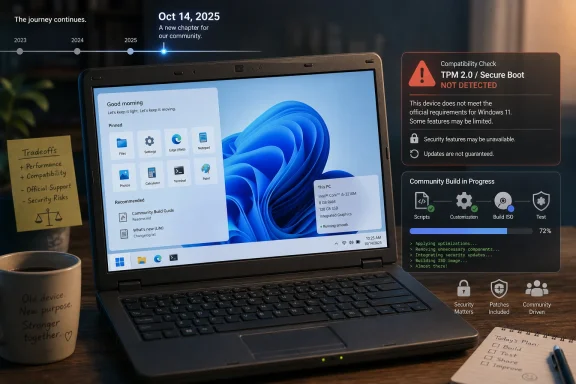 Microsoft’s Hardware Deadline Created the Tiny11 Moment
Windows 10’s end of free support was always going to be more than a calendar event. It became a sorting mechanism for hundreds of millions of PCs: machines that can move cleanly to Windows 11, machines that can buy a little more time through Extended Security Updates, and machines that remain perfectly usable in the physical sense but stranded by policy.That is the opening Tiny11 walks through. Microsoft’s Windows 11 requirements were not merely a bump in RAM or disk space. They placed hardware-backed security features such as TPM 2.0 and newer CPU generations at the center of eligibility, turning the upgrade from a software decision into a hardware audit.
For enthusiasts, that invites tinkering. For households, schools, charities, small offices, and repair shops, it creates a more uncomfortable question: should a computer that still browses, prints, edits documents, and runs line-of-business software be retired because the official upgrade path says no?
Tiny11’s popularity is therefore not hard to understand. It offers a story Microsoft cannot: keep the PC, keep Windows, remove the cruft, and dodge the hardware gate. But that story becomes more fragile the moment the machine is used for banking, business email, customer records, or anything that depends on predictable patching.
Tiny11 Is Less a Product Than a Protest Build
Tiny11 is often described as a stripped-down Windows 11, but that phrase understates the politics of the thing. It is Windows 11 reworked to feel less like a platform for Microsoft’s services and more like an operating system in the old desktop sense: smaller, quieter, and less eager to drag the user into bundled apps and cloud integrations.The reported removals are exactly the sort of things that irritate power users: Mail, Calendar, Weather, Alarms, Solitaire, Media Player, Microsoft Edge, and OneDrive integration. To a certain kind of Windows user, that list reads less like missing functionality and more like spring cleaning.
That is why Tiny11’s message lands. Microsoft has spent years making Windows more account-driven, cloud-connected, and commercially instrumented. Tiny11 responds with a minimalist counteroffer: what if Windows 11 were just Windows, and what if it ran on the hardware people already own?
The problem is that Windows is not merely an interface and a start menu. It is a servicing model, a driver ecosystem, a security architecture, and a compliance boundary. Once a community image starts cutting pieces away, the burden shifts from Redmond’s release machinery to the person at the keyboard.
A Smaller Windows Can Also Mean a Smaller Safety Net
The most important sentence in any Tiny11 discussion is not about performance. It is about trust. A lighter Windows image may boot faster and consume fewer resources, but the real question is whether the user can trust the source, the build process, and the long-term update behavior.That distinction matters because Windows security is cumulative. Defender signatures, cumulative updates, servicing stack updates, driver blocks, Smart App Control decisions, kernel mitigations, browser patches, and certificate handling are not decorative extras. They are the plumbing that keeps a general-purpose PC survivable on the modern internet.
If a Tiny11 installation does not receive updates in the same regular, predictable way as a supported Windows 11 build, the user has traded one end-of-support problem for another. Worse, the new problem may be less visible. Windows 10 at least tells users plainly that the support clock has run out; an unofficial Windows 11 image can look modern while living outside the normal guarantee structure.
There is also the supply-chain issue. Downloading a prebuilt operating system image from anywhere other than Microsoft asks the user to trust that nothing unwanted has been added while unwanted components were removed. For hobbyists who verify hashes, inspect scripts, isolate test machines, and rebuild from official media, that risk can be managed. For ordinary users searching for “Windows 11 for old laptop,” it is a trap waiting to be disguised as convenience.
The Builder Route Is Safer, But Not Safe in the Microsoft Sense
The more defensible Tiny11 path is to create the image yourself from Microsoft’s official Windows 11 ISO using the project’s builder scripts. That approach narrows the trust problem because the base operating system comes from Microsoft rather than an unknown repackaged download. It also makes the modification process more transparent for users willing to read what the scripts do.But safer is not the same as supported. Running a script against official install media does not convert an unsupported PC into a supported one. It does not make the CPU appear on Microsoft’s compatibility list, does not conjure a TPM 2.0 module, and does not create an OEM driver testing pipeline for hardware the Windows 11 ecosystem has effectively left behind.
The builder method also assumes a level of technical confidence that many Windows 10 holdouts do not have. Mounting an ISO, running PowerShell scripts, creating bootable USB media with a tool such as Rufus, changing firmware boot settings, and clean-installing an operating system are routine tasks for forum regulars. They are not routine for the person trying to keep a 2017 family laptop useful for another year.
That gap is where bad outcomes happen. A user who does not understand the difference between a Microsoft ISO, a community script, and a prebuilt modified image is also unlikely to have a tested backup, a recovery drive, or a plan for missing drivers. The Tiny11 pathway may be technically interesting, but it is not a consumer safety rail.
Microsoft’s Position Is Cold, But Not Incoherent
It is tempting to cast Microsoft as the villain here, and there is plenty of material for that argument. Windows 10 was widely deployed, broadly liked, and capable of running acceptably on hardware that Windows 11 rejects. The environmental optics of nudging users toward replacement PCs are terrible, especially when many affected systems are not slow, broken, or obsolete for their owners’ actual needs.Still, Microsoft’s Windows 11 requirements were not pulled from thin air. TPM-backed identity protection, Secure Boot, virtualization-based security, memory integrity, and newer driver assumptions are all part of a security posture Microsoft wants to make baseline rather than optional. Windows is too large a target for the company to keep treating every legacy configuration as equally supportable forever.
The hard part is that both claims can be true. Microsoft can be right that modern Windows security depends on a newer hardware floor, and users can be right that discarding working PCs because of that floor feels wasteful and coercive. Tiny11 exists in the emotional space between those truths.
For IT departments, the calculation is less emotional. Unsupported or semi-supported operating system images are usually nonstarters for regulated environments, cyber insurance questionnaires, audit trails, and incident response. A clever workaround that saves a few hundred dollars per endpoint can become indefensible after a breach.
The Windows 10 ESU Program Is the Boring Option for a Reason
Extended Security Updates are not glamorous. They do not make an old PC feel new, and they do not solve the Windows 11 eligibility problem. What they do offer is a managed bridge: continued security fixes for Windows 10 machines that cannot yet move, without pretending those machines have become modern Windows 11 devices.For consumers, Microsoft’s ESU approach has been unusually visible because Windows 10’s installed base remains enormous. For businesses and schools, the logic is more familiar: buy time, inventory hardware, prioritize replacement, and avoid turning a migration problem into an emergency.
The ESU route is boring because it preserves responsibility. Microsoft remains the update source. The operating system remains the one actually installed and supported for that purpose. Admins can document the decision, monitor it, and set a retirement date.
Tiny11 does the opposite. It may solve the emotional problem of “I want Windows 11 on this PC,” but it muddies the operational problem of “What exactly am I running, who supports it, and what happens on Patch Tuesday?” That may be acceptable on a spare laptop in a workshop. It is much harder to justify on a device that matters.
Linux and ChromeOS Flex Are Not Windows, Which Is the Whole Problem
The standard answer to old Windows hardware is to install a lightweight Linux distribution or ChromeOS Flex. Technically, that advice is often sound. A machine that struggles with modern Windows may be perfectly adequate for a browser-first Linux desktop, and ChromeOS Flex can turn aging hardware into a low-maintenance web terminal.But this advice sometimes underrates why people stay on Windows. They may rely on a specific printer utility, accounting package, assistive device, game launcher, VPN client, scanner workflow, or family muscle memory. “Use Linux” is easy to write and harder to live with when the user’s actual dependency graph includes years of Windows-only habits.
That is Tiny11’s advantage. It does not ask users to leave the Windows ecosystem. It promises continuity: the same app universe, the same basic desktop model, the same familiar control panels and file paths, but with less weight and fewer Microsoft add-ons.
The catch is that continuity without support can become an illusion. If the machine’s role is casual browsing and experimentation, an unofficial Windows build may be a tolerable hobbyist compromise. If the role is dependable computing, then the less exciting alternatives — ESU, a supported Windows 11 PC, or a carefully planned non-Windows migration — are usually more honest.
Unsupported Windows Has Always Had a Fan Base
Tiny11 is not an isolated phenomenon. Windows history is full of tools and communities that slimmed, patched, bypassed, themed, or resurrected Microsoft operating systems in ways Microsoft never intended. Enthusiasts have always wanted more control over Windows than Microsoft is willing to provide.What has changed is the risk environment. In the Windows XP and Windows 7 eras, running old hardware past its prime was already risky, but the modern threat model is harsher. Credential theft, ransomware, browser zero-days, malicious ads, signed-driver abuse, and supply-chain attacks have turned the everyday PC into a more exposed endpoint.
At the same time, Windows has become more service-like. The operating system is no longer just a boxed release with occasional service packs. It is a continuously serviced platform whose health depends on Microsoft’s update cadence and telemetry-informed compatibility decisions.
That makes unofficial minimalism harder. Removing consumer-facing apps is one thing. Preserving the servicing assumptions of a modern Windows release while modifying its installation footprint is another. The more Windows becomes a cloud-connected, policy-driven, security-layered platform, the less room there is for a casual “diet Windows” to remain harmless.
The Real Audience Is Smaller Than the Hype Suggests
Tiny11’s best audience is not the average Windows 10 user. It is the technically literate hobbyist who understands the trade, has noncritical hardware, can rebuild from scratch, and knows how to verify the source of an ISO or script. That user can treat Tiny11 as an experiment rather than an answer.The worst audience is the person most desperate for it: someone with one aging PC, no backup, limited budget, and a need to keep using Windows safely. For that user, Tiny11’s promise is seductive precisely because the official options feel expensive or inconvenient. Unfortunately, that is also the user least equipped to recover when a modified install breaks activation, drivers, updates, or applications.
There is a middle category: repair shops, refurbishers, homelab users, and small-business techs trying to stretch hardware responsibly. They may be able to use Tiny11-like techniques in controlled cases, but they should be blunt with users about what is being installed. A machine sold or returned as “Windows 11” when it is really an unsupported modified build is not a bargain; it is a disclosure problem.
This is where the community needs discipline. Enthusiast tools are valuable when they are framed honestly. They become dangerous when they are marketed as if Microsoft’s support model is a nuisance that can be wished away.
The Tiny11 Bargain, Stated Plainly
Tiny11 deserves attention because it exposes a genuine failure in the Windows transition story. Microsoft has made a defensible security argument for Windows 11’s hardware requirements, but it has not made the human consequences disappear. Millions of users are left choosing among replacement hardware, paid or conditional support extensions, platform migration, or unofficial workarounds.That does not make every workaround equally wise. The right question is not whether Tiny11 can install on an old PC. The right question is what the user gives up to make that installation possible.
- Tiny11 may make Windows 11 feel lighter on aging hardware, but it does not turn unsupported hardware into supported hardware.
- Building Tiny11 from an official Microsoft ISO is preferable to downloading a prebuilt image, but it still leaves users outside Microsoft’s normal recommendation path.
- Devices used for banking, business, school administration, customer data, or shared family accounts should prioritize predictable security updates over minimalism.
- Windows 10 Extended Security Updates are a more conservative bridge for users who need time rather than a hobby project.
- Linux distributions and ChromeOS Flex are better long-term fits for some old PCs, but they require honest testing against the user’s real applications and peripherals.
- Tiny11 is best treated as an enthusiast experiment, not as a mainstream migration strategy for the post-Windows 10 era.
References
- Primary source: TechRepublic
Published: Tue, 26 May 2026 16:29:31 GMT

‘Tiny11’ Gives Windows 10 Users a Risky Upgrade Path
Tiny11 can help older Windows 10 PCs run a lighter Windows 11 build, but the unofficial project comes with security and support tradeoffs.www.techrepublic.com
- Official source: support.microsoft.com
- Official source: learn.microsoft.com

Windows 10 reaching end of support - Microsoft Lifecycle
Announcing Windows 10 reaching end of support.learn.microsoft.com - Official source: microsoft.com
End of support for Windows 10, Windows 8.1, and Windows 7 | Microsoft Windows
Make a smooth transition to Windows 11 from your unsupported operating system with help from Microsoft. Enjoy the benefits of upgrading to a Windows 11 PC.www.microsoft.com
- Related coverage: windowscentral.com

Windows 10 reaches end of support: Discover how to keep your device secure beyond October 2025
Windows 10 support ended on Tuesday, October 14. That means Windows 10 PCs will no longer receive security updates automatically, and you must take action to ensure these devices remain secure when connected to the internet. www.windowscentral.com
- Related coverage: windowslatest.com

Microsoft gives up, extends Windows 10's support for free if you meet the requirements
Windows 10 support is NOT ending on October 14, 2025, if you're ready to link your Microsoft account and sync Settings to the cloud. www.windowslatest.com

- Related coverage: arstechnica.com
Office apps on Windows 10 are no longer tied to its October 2025 end-of-support date
Windows 10 will stop getting free security updates on October 14, 2025. arstechnica.com
- Official source: news.microsoft.com
Bleiben Sie sicher: mit Windows 11, Copilot+ PCs und Windows 365, bevor der Support für Windows 10 endet | News Center Microsoft
Der Support für Windows 10 endet am 14. Oktober 2025. Microsoft hat im Windows-Blog Aktualisierungen zum Extended Security Updates (ESU)-Programm für Windows 10 veröffentlicht, das im Oktober 2024 angekündigt wurde. Die Aktualisierungen sind: Für Privatnutzer*innen: Ein Einrichtungsassistent... news.microsoft.com
- Related coverage: tomshardware.com

Windows 10 support ends today — here's who's affected and what you need to do
Update if you can, upgrade if you can't, or at least get the extended support license.www.tomshardware.com
- Related coverage: pcworld.com

Installing Windows 11 on old PCs is incredibly risky. Here’s why
Running Windows 11 on older, incompatible hardware isn’t just limiting—it’s downright problematic. www.pcworld.com
- Related coverage: windowsforum.com

Windows 10 Ends Oct 14, 2025: ESU Bridge to 2026
Microsoft’s formal retirement of Windows 10 is now official and imminent: free support and monthly security updates end on October 14, 2025, and the company has rolled out a consumer-focused bridge — the Windows 10 Consumer Extended Security Updates (ESU) program — to give households and small... windowsforum.com
- Related coverage: techradar.com
Almost half of global endpoints still run Windows 10, despite reaching end-of-life - and leaving organizations exposed
Windows 10 EoL is herewww.techradar.com
- Related coverage: atomicdata.com
- Related coverage: transparity.com
- Related coverage: cincodias.elpais.com
