
Jul 3, 2010 Replies: 1 Thread Author I'd noticed my Skype status wasn't being displayed anywhere on the web, So I set out in search of a solution. It turned out to be a simple setting I'd missed, go figure. So here it is: Open Skype, navigate to Options, then to Privacy. Last edited: Jul 3, 2010 Click to expand...
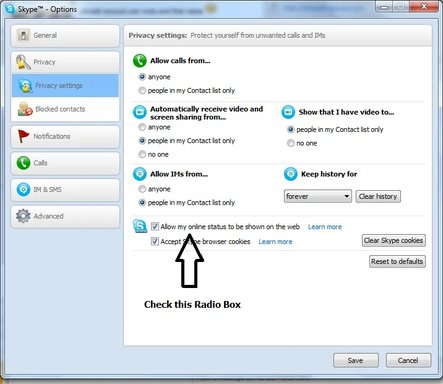
I'd noticed my Skype status wasn't being displayed anywhere on the web, So I set out in search of a solution. It turned out to be a simple setting I'd missed, go figure. So here it is: Open Skype, navigate to Options, then to Privacy.
Jimbo22 Essential Member Joined Aug 27, 2008 Messages 5,037 Jul 27, 2010 #2 To turn off Skype pop up advertisement messages as well as Skype tip and help messages.....here you go. Link Removed
To turn off Skype pop up advertisement messages as well as Skype tip and help messages.....here you go. Link Removed