

Thurrott’s “Switcher 2026” examines Paul Thurrott’s latest attempt, published in May 2026, to replace Notion with a file-based, Markdown-friendly notes system, with the new open-source app Tolaria emerging as the most promising but still incomplete candidate. The larger story is not simply one writer’s app-hopping. It is the widening gap between the polished convenience of cloud productivity suites and the growing desire among power users to own the files that increasingly contain their lives.
Notion won because it made personal databases, notes, documents, and collaboration feel like one coherent workspace. It also won by asking users to accept a trade: trust the service, trust the sync layer, trust the export button, and stop worrying about where the work actually lives. For many people, that bargain remains perfectly sensible. For Windows enthusiasts, sysadmins, and anyone who has ever been burned by a migration, acquisition, outage, or half-working export, it is starting to look less like convenience and more like dependency.
The most revealing part of Thurrott’s search is that he does not seem to hate Notion. He uses it every day. His complaints are not about a broken interface, a missing button, or a dramatic failure of the product. They are about architecture.
That matters because architecture is where productivity software hides its politics. A cloud workspace can feel calm and frictionless precisely because the service owns the hard parts: storage, permissions, collaboration, search, AI integration, syncing, and recovery. The user gets a URL and a login. The vendor gets the database.
For casual notes, that may be fine. For years of show notes, book research, shared family documents, and accumulated personal knowledge, it becomes a different calculation. The question stops being “Which app do I like?” and becomes “If this company changed terms, shut down, broke sync, or made export worse, how quickly could I get back to work?”
That is why Markdown keeps reappearing in these debates. Markdown is not magic, and it is not even especially elegant once tables, embeds, backlinks, and metadata enter the picture. But a folder full of Markdown files remains one of the few productivity formats ordinary users can inspect, copy, grep, sync, back up, version, and open in a dozen unrelated applications.
Notion’s appeal is that it hides the filesystem. The counterargument is that hiding the filesystem also hides the user’s escape route.
But “offline mode” and “local-first” are not the same thing. Offline mode is a product feature. Local-first is a design philosophy. The first says, “You can keep working when the network drops.” The second says, “Your data exists locally as a first-class object, and sync is a convenience layered on top.”
That distinction is exactly where power users tend to get stuck. A page cached for offline access is useful on an airplane. It is not the same as a directory of durable files sitting in a folder that can be mirrored to OneDrive, backed up to a NAS, committed to Git, or opened instantly in another editor.
This is not a trivial preference dressed up as ideology. It changes disaster recovery. It changes compliance. It changes automation. It changes whether a user can build scripts around their notes, index them with local search tools, or hand the folder to a future self without first asking a vendor’s export function to behave.
Notion’s offline work makes the product more practical. It does not fully answer the underlying anxiety that the workspace remains a service before it is a set of user-owned files.
Yet each alternative charges its own tax. Obsidian’s core strength is also its sprawl: the moment a user wants a Notion-like workflow, the plugin ecosystem becomes both a blessing and a maintenance surface. Joplin is more conventional, and for many people more trustworthy, but it does not feel like a drop-in replacement for Notion’s flexible database-and-document hybrid. Anytype is ambitious, but ambition in note apps often arrives as a new mental model to learn.
Thurrott’s criteria expose the trap. The ideal replacement should be free, open source, Markdown-based, file-based, offline-first, pleasant to write in, available on Windows and mobile, syncable through arbitrary services, and capable of sharing selected pages with other people. That sounds reasonable until you realize it describes several products at once and none of them completely.
The hard part is not taking notes. The hard part is replacing the bundle Notion offers: editing, hierarchy, databases, collaboration, sharing, sync, mobile access, web access, and a social expectation that other people can open what you send them.
A folder of Markdown files solves ownership. It does not automatically solve collaboration. A polished cloud workspace solves collaboration. It does not automatically solve ownership. The modern notes market is mostly a long argument about which pain users prefer.
That combination explains why it caught Thurrott’s attention. It is not merely another Markdown editor, and it is not simply another Notion clone. It sits in the increasingly important middle ground between personal knowledge base, developer workflow, and AI context store.
The timing is also notable. In 2026, the notes app is no longer just a place to write things down. It is becoming a corpus for AI agents. Users who once wanted their notes to be searchable now want them to be usable as context. That creates a fresh reason to care about plain files: AI tools, local scripts, command-line utilities, and version-control systems already understand folders of text better than they understand proprietary workspaces.
Tolaria’s Git integration points in that direction. Git is overkill for many writers and terrifying for normal users, but for developers, technical writers, and sysadmins, it is a familiar answer to history, branching, review, and rollback. A notes app that treats Git as a natural companion is making a bet about its audience.
It is also making a bet about the future of productivity software: that the next wave of serious tools will not just store user knowledge, but expose it cleanly to other tools.
For a WindowsForum audience, this is not cosmetic nitpicking. Windows users have lived through enough Electron ports, half-adapted menu structures, strange update mechanisms, and unsigned installers to know that platform fit affects trust. A note-taking app is not a game you try for a weekend. It is infrastructure. If it is going to hold years of writing, it has to feel like it belongs on the machine.
Tolaria’s Windows availability is therefore a meaningful step, not the finish line. The app has to behave like a good Windows citizen: signed installers, predictable updates, proper shell language, keyboard shortcut customization, high-DPI sanity, and clean file associations. These are boring requirements, which is why they matter.
The Ctrl+K conflict Thurrott describes is a small example with a larger lesson. Keyboard shortcuts are muscle memory. In a writing app, muscle memory is not an accessory; it is the interface. When the command palette intercepts the hyperlink shortcut, the app is not merely missing a preference pane. It is interrupting the writer at exactly the wrong moment.
Young software earns patience. Daily-driver software earns scrutiny.
Single-user local-first apps can be wonderfully clean. The moment another person enters the workflow, the product needs permissions, identity, conflict resolution, presence, invitations, read-only views, public links, and sometimes real-time coauthoring. Those features are not decorations. They are the reason Notion became sticky.
A Git-backed vault can support collaboration in a technical sense, but that does not make it a family-friendly or newsroom-friendly sharing model. Asking collaborators to understand commits, branches, merge conflicts, and remotes is not a Notion replacement. It is a hiring filter.
This is where the productivity market keeps rediscovering why cloud services exist. Collaboration is much easier when the vendor controls the canonical copy and mediates every edit. Local-first collaboration can be done, but it is hard. It must reconcile user ownership with shared state, and it must do so without turning every shared notebook into a distributed-systems seminar.
Until Tolaria or a similar tool solves this gracefully, Notion remains hard to displace for users whose notes are also social objects. A private knowledge base can move to Markdown. A shared production workflow is stickier.
Notion’s mobile app may not be everyone’s favorite writing environment, but it completes the loop. A grocery list, show note, travel plan, family document, or research scrap often becomes useful precisely because it is available when the user is not sitting at a desk.
File-based systems can technically work on mobile through cloud storage providers and third-party editors. That is not the same as a coherent mobile client. A user can edit Markdown files in a synced folder on a phone, but then questions multiply. Does frontmatter stay intact? Are attachments handled correctly? Does the app preserve links? Does sync race with desktop edits? Can the user create a new note in the right place without thinking about paths?
For enthusiasts, those are solvable annoyances. For a daily workflow, they are drag. The best productivity tools win by removing tiny decisions. The worst migrations fail because they introduce dozens of tiny decisions the old tool had absorbed.
A credible Notion replacement does not necessarily need to match Notion feature for feature. It does need to preserve the user’s rhythm. Without mobile, that rhythm breaks.
AI tools work best when they can see context. A pile of Markdown files in a local repository is context. It can be indexed, searched, summarized, embedded, diffed, and passed to agents without waiting for a cloud workspace to expose the right API or permission layer. The humblest format in the room suddenly looks like the most flexible.
Tolaria’s first-run AI choices, including integrations with tools such as Claude Code, Codex, Gemini, and local or open alternatives, hint at where this category is going. The note app is becoming less like a digital binder and more like a working directory for human and machine collaboration.
That future favors tools with transparent storage. If a user wants an AI agent to update documentation, summarize a research vault, refactor a knowledge base, or generate drafts from notes, files are easier to reason about than opaque workspaces. Git history adds another advantage: when an agent changes something, the user can inspect the diff.
This does not mean every notes app needs AI bolted onto the sidebar. In fact, many should resist the temptation. The more important point is that AI raises the value of portability. The user’s archive should not be trapped in whichever productivity suite added the flashiest chatbot last quarter.
But open source is not a substitute for product maturity. Users still need installers, documentation, updates, issue triage, design judgment, and a sustainable maintainer model. The graveyard of promising note apps is full of projects that had the right philosophy and not enough follow-through.
The challenge is especially sharp for “everything app” replacements. A focused Markdown editor can be maintained by a small team because its boundaries are clear. A Notion alternative invites endless expansion: databases, properties, kanban views, calendars, web clipping, mobile sync, sharing, publishing, backlinks, templates, AI, permissions, and importers. Every user arrives with a different definition of “basic.”
This is why Thurrott’s search feels both personal and universal. He is not asking for every feature in Notion. He is asking for the subset that happens to define his life. Another user’s essential list would be different, and equally reasonable.
Open source can make that diversity survivable through plugins and forks. It can also fragment the experience until only hobbyists remain. The winning tool will need more than an admirable license. It will need ruthless product taste.
A more realistic goal is to replace the parts of Notion that should never have required a proprietary cloud database in the first place. Personal notes, drafts, research, documentation, and long-lived knowledge bases are excellent candidates for Markdown and local storage. Shared operational workflows, collaborative show notes, and permissioned family spaces may remain better served by a cloud tool.
That hybrid outcome may offend the switcher’s instinct. We want one elegant answer. We want to move everything, delete the old account, and declare victory. But productivity tools tend to resist clean breaks because work itself is messy.
Thurrott’s own use case points toward a split-brain future. Tolaria could become the place where private notes, drafts, and Markdown writing live. Notion could remain the place where collaboration-heavy notebooks live until a local-first tool makes sharing invisible enough for non-technical collaborators. That is not a failure. It may be the sane migration path.
The risk, of course, is that two systems become another kind of lock-in: not vendor lock-in, but workflow lock-in. The more places knowledge lives, the more search, memory, and habit begin to fracture. Any switch must account not only for file ownership, but for cognitive overhead.
That does not mean everyone should abandon Notion tomorrow. It does mean users should classify their information. Some data is transient and can live happily in a service. Some is collaborative and benefits from a managed cloud workspace. Some is archival, personal, regulated, or simply too important to entrust entirely to an opaque store.
The strongest case for apps like Tolaria is not that they are prettier than Notion or more fashionable than Obsidian. It is that they restore leverage where leverage matters. If the app fails, the files remain. If the sync provider changes, another can replace it. If AI workflows evolve, the archive is already in a form machines and humans can use.
That kind of resilience is easy to undervalue when everything is working. It becomes priceless only after something breaks.
Notion won because it made personal databases, notes, documents, and collaboration feel like one coherent workspace. It also won by asking users to accept a trade: trust the service, trust the sync layer, trust the export button, and stop worrying about where the work actually lives. For many people, that bargain remains perfectly sensible. For Windows enthusiasts, sysadmins, and anyone who has ever been burned by a migration, acquisition, outage, or half-working export, it is starting to look less like convenience and more like dependency.
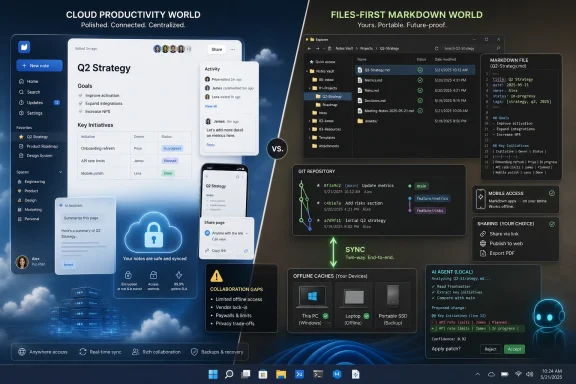 The Notion Problem Is Really a File Ownership Problem
The most revealing part of Thurrott’s search is that he does not seem to hate Notion. He uses it every day. His complaints are not about a broken interface, a missing button, or a dramatic failure of the product. They are about architecture.That matters because architecture is where productivity software hides its politics. A cloud workspace can feel calm and frictionless precisely because the service owns the hard parts: storage, permissions, collaboration, search, AI integration, syncing, and recovery. The user gets a URL and a login. The vendor gets the database.
For casual notes, that may be fine. For years of show notes, book research, shared family documents, and accumulated personal knowledge, it becomes a different calculation. The question stops being “Which app do I like?” and becomes “If this company changed terms, shut down, broke sync, or made export worse, how quickly could I get back to work?”
That is why Markdown keeps reappearing in these debates. Markdown is not magic, and it is not even especially elegant once tables, embeds, backlinks, and metadata enter the picture. But a folder full of Markdown files remains one of the few productivity formats ordinary users can inspect, copy, grep, sync, back up, version, and open in a dozen unrelated applications.
Notion’s appeal is that it hides the filesystem. The counterargument is that hiding the filesystem also hides the user’s escape route.
The Offline Mode Arrived, but the Trust Gap Remains
One complication for the anti-Notion argument is that Notion’s offline story has improved. The old complaint that Notion simply did not have a serious offline mode is no longer cleanly true in 2026. Notion now promotes offline functionality for desktop and mobile users, with pages available for offline viewing and editing.But “offline mode” and “local-first” are not the same thing. Offline mode is a product feature. Local-first is a design philosophy. The first says, “You can keep working when the network drops.” The second says, “Your data exists locally as a first-class object, and sync is a convenience layered on top.”
That distinction is exactly where power users tend to get stuck. A page cached for offline access is useful on an airplane. It is not the same as a directory of durable files sitting in a folder that can be mirrored to OneDrive, backed up to a NAS, committed to Git, or opened instantly in another editor.
This is not a trivial preference dressed up as ideology. It changes disaster recovery. It changes compliance. It changes automation. It changes whether a user can build scripts around their notes, index them with local search tools, or hand the folder to a future self without first asking a vendor’s export function to behave.
Notion’s offline work makes the product more practical. It does not fully answer the underlying anxiety that the workspace remains a service before it is a set of user-owned files.
The Usual Alternatives Still Come With Their Own Taxes
The obvious replacements are obvious for a reason. Obsidian gives users local Markdown files, a strong plugin ecosystem, and a mature cross-platform presence. Joplin offers open-source credibility, encryption options, sync targets, and mobile apps. Anytype leans into local-first and privacy-minded positioning while trying to preserve some of the structured-object feel that makes Notion attractive.Yet each alternative charges its own tax. Obsidian’s core strength is also its sprawl: the moment a user wants a Notion-like workflow, the plugin ecosystem becomes both a blessing and a maintenance surface. Joplin is more conventional, and for many people more trustworthy, but it does not feel like a drop-in replacement for Notion’s flexible database-and-document hybrid. Anytype is ambitious, but ambition in note apps often arrives as a new mental model to learn.
Thurrott’s criteria expose the trap. The ideal replacement should be free, open source, Markdown-based, file-based, offline-first, pleasant to write in, available on Windows and mobile, syncable through arbitrary services, and capable of sharing selected pages with other people. That sounds reasonable until you realize it describes several products at once and none of them completely.
The hard part is not taking notes. The hard part is replacing the bundle Notion offers: editing, hierarchy, databases, collaboration, sharing, sync, mobile access, web access, and a social expectation that other people can open what you send them.
A folder of Markdown files solves ownership. It does not automatically solve collaboration. A polished cloud workspace solves collaboration. It does not automatically solve ownership. The modern notes market is mostly a long argument about which pain users prefer.
Tolaria Enters Through the Power-User Door
Tolaria is interesting because it does not pretend the filesystem is an implementation detail. Its pitch is files-first, Markdown-first, Git-friendly, and AI-aware. Notes are Markdown files with frontmatter. Vaults can be connected to Git. The app presents a polished writing environment over a structure that remains legible outside the app.That combination explains why it caught Thurrott’s attention. It is not merely another Markdown editor, and it is not simply another Notion clone. It sits in the increasingly important middle ground between personal knowledge base, developer workflow, and AI context store.
The timing is also notable. In 2026, the notes app is no longer just a place to write things down. It is becoming a corpus for AI agents. Users who once wanted their notes to be searchable now want them to be usable as context. That creates a fresh reason to care about plain files: AI tools, local scripts, command-line utilities, and version-control systems already understand folders of text better than they understand proprietary workspaces.
Tolaria’s Git integration points in that direction. Git is overkill for many writers and terrifying for normal users, but for developers, technical writers, and sysadmins, it is a familiar answer to history, branching, review, and rollback. A notes app that treats Git as a natural companion is making a bet about its audience.
It is also making a bet about the future of productivity software: that the next wave of serious tools will not just store user knowledge, but expose it cleanly to other tools.
Windows Support Is Necessary but Not Sufficient
The Windows angle matters because many promising productivity apps still arrive as Mac-first experiences with Windows added later. Thurrott’s early notes on Tolaria show the usual seams. A SmartScreen warning on install is not surprising for a young app, but it is friction. A “Reveal in Finder” command on Windows is minor, but it is a tell. These details do not doom a product. They do remind Windows users that cross-platform support is not the same as Windows-native polish.For a WindowsForum audience, this is not cosmetic nitpicking. Windows users have lived through enough Electron ports, half-adapted menu structures, strange update mechanisms, and unsigned installers to know that platform fit affects trust. A note-taking app is not a game you try for a weekend. It is infrastructure. If it is going to hold years of writing, it has to feel like it belongs on the machine.
Tolaria’s Windows availability is therefore a meaningful step, not the finish line. The app has to behave like a good Windows citizen: signed installers, predictable updates, proper shell language, keyboard shortcut customization, high-DPI sanity, and clean file associations. These are boring requirements, which is why they matter.
The Ctrl+K conflict Thurrott describes is a small example with a larger lesson. Keyboard shortcuts are muscle memory. In a writing app, muscle memory is not an accessory; it is the interface. When the command palette intercepts the hyperlink shortcut, the app is not merely missing a preference pane. It is interrupting the writer at exactly the wrong moment.
Young software earns patience. Daily-driver software earns scrutiny.
Sharing Is the Wall Local-First Apps Keep Hitting
The most serious obstacle for Tolaria is not Markdown editing, Git, or even mobile support. It is sharing. Thurrott’s Notion use is not solitary. He shares Windows Weekly notes with collaborators, shares a notebook with his wife, and shares other notes as needed. That requirement changes the problem completely.Single-user local-first apps can be wonderfully clean. The moment another person enters the workflow, the product needs permissions, identity, conflict resolution, presence, invitations, read-only views, public links, and sometimes real-time coauthoring. Those features are not decorations. They are the reason Notion became sticky.
A Git-backed vault can support collaboration in a technical sense, but that does not make it a family-friendly or newsroom-friendly sharing model. Asking collaborators to understand commits, branches, merge conflicts, and remotes is not a Notion replacement. It is a hiring filter.
This is where the productivity market keeps rediscovering why cloud services exist. Collaboration is much easier when the vendor controls the canonical copy and mediates every edit. Local-first collaboration can be done, but it is hard. It must reconcile user ownership with shared state, and it must do so without turning every shared notebook into a distributed-systems seminar.
Until Tolaria or a similar tool solves this gracefully, Notion remains hard to displace for users whose notes are also social objects. A private knowledge base can move to Markdown. A shared production workflow is stickier.
Mobile Is Not Optional Anymore
The missing mobile app is another practical barrier. It is tempting for desktop-first users to wave this away, especially if most serious writing happens at a keyboard. But notes are not only written; they are captured, checked, amended, photographed, shared, and referenced in motion.Notion’s mobile app may not be everyone’s favorite writing environment, but it completes the loop. A grocery list, show note, travel plan, family document, or research scrap often becomes useful precisely because it is available when the user is not sitting at a desk.
File-based systems can technically work on mobile through cloud storage providers and third-party editors. That is not the same as a coherent mobile client. A user can edit Markdown files in a synced folder on a phone, but then questions multiply. Does frontmatter stay intact? Are attachments handled correctly? Does the app preserve links? Does sync race with desktop edits? Can the user create a new note in the right place without thinking about paths?
For enthusiasts, those are solvable annoyances. For a daily workflow, they are drag. The best productivity tools win by removing tiny decisions. The worst migrations fail because they introduce dozens of tiny decisions the old tool had absorbed.
A credible Notion replacement does not necessarily need to match Notion feature for feature. It does need to preserve the user’s rhythm. Without mobile, that rhythm breaks.
AI Makes Plain Text More Valuable, Not Less
There is a delicious irony in the timing of Tolaria’s arrival. The rise of AI assistants could have strengthened cloud silos by making users more dependent on the platforms that host their data. Instead, it is also making plain text newly attractive.AI tools work best when they can see context. A pile of Markdown files in a local repository is context. It can be indexed, searched, summarized, embedded, diffed, and passed to agents without waiting for a cloud workspace to expose the right API or permission layer. The humblest format in the room suddenly looks like the most flexible.
Tolaria’s first-run AI choices, including integrations with tools such as Claude Code, Codex, Gemini, and local or open alternatives, hint at where this category is going. The note app is becoming less like a digital binder and more like a working directory for human and machine collaboration.
That future favors tools with transparent storage. If a user wants an AI agent to update documentation, summarize a research vault, refactor a knowledge base, or generate drafts from notes, files are easier to reason about than opaque workspaces. Git history adds another advantage: when an agent changes something, the user can inspect the diff.
This does not mean every notes app needs AI bolted onto the sidebar. In fact, many should resist the temptation. The more important point is that AI raises the value of portability. The user’s archive should not be trapped in whichever productivity suite added the flashiest chatbot last quarter.
Open Source Helps, but It Does Not Magically Create a Product
Tolaria’s open-source status is an important part of the appeal. It gives technical users a way to inspect the project, understand its direction, and imagine a future beyond one vendor’s priorities. In a category built around trust, that matters.But open source is not a substitute for product maturity. Users still need installers, documentation, updates, issue triage, design judgment, and a sustainable maintainer model. The graveyard of promising note apps is full of projects that had the right philosophy and not enough follow-through.
The challenge is especially sharp for “everything app” replacements. A focused Markdown editor can be maintained by a small team because its boundaries are clear. A Notion alternative invites endless expansion: databases, properties, kanban views, calendars, web clipping, mobile sync, sharing, publishing, backlinks, templates, AI, permissions, and importers. Every user arrives with a different definition of “basic.”
This is why Thurrott’s search feels both personal and universal. He is not asking for every feature in Notion. He is asking for the subset that happens to define his life. Another user’s essential list would be different, and equally reasonable.
Open source can make that diversity survivable through plugins and forks. It can also fragment the experience until only hobbyists remain. The winning tool will need more than an admirable license. It will need ruthless product taste.
The Real Replacement May Be a Smaller Notion, Not a Better One
The phrase “Notion replacement” may be misleading. Notion is not one product in the way a Markdown editor is one product. It is a document editor, database builder, wiki, lightweight project manager, collaboration layer, publishing tool, and increasingly an AI workspace. Replacing all of that is a recipe for disappointment.A more realistic goal is to replace the parts of Notion that should never have required a proprietary cloud database in the first place. Personal notes, drafts, research, documentation, and long-lived knowledge bases are excellent candidates for Markdown and local storage. Shared operational workflows, collaborative show notes, and permissioned family spaces may remain better served by a cloud tool.
That hybrid outcome may offend the switcher’s instinct. We want one elegant answer. We want to move everything, delete the old account, and declare victory. But productivity tools tend to resist clean breaks because work itself is messy.
Thurrott’s own use case points toward a split-brain future. Tolaria could become the place where private notes, drafts, and Markdown writing live. Notion could remain the place where collaboration-heavy notebooks live until a local-first tool makes sharing invisible enough for non-technical collaborators. That is not a failure. It may be the sane migration path.
The risk, of course, is that two systems become another kind of lock-in: not vendor lock-in, but workflow lock-in. The more places knowledge lives, the more search, memory, and habit begin to fracture. Any switch must account not only for file ownership, but for cognitive overhead.
The Migration Argument Is Really About Leverage
For Windows users and IT pros, the deeper lesson is leverage. A user with files has leverage. A user with exports has less leverage. A user with only a login has the least.That does not mean everyone should abandon Notion tomorrow. It does mean users should classify their information. Some data is transient and can live happily in a service. Some is collaborative and benefits from a managed cloud workspace. Some is archival, personal, regulated, or simply too important to entrust entirely to an opaque store.
The strongest case for apps like Tolaria is not that they are prettier than Notion or more fashionable than Obsidian. It is that they restore leverage where leverage matters. If the app fails, the files remain. If the sync provider changes, another can replace it. If AI workflows evolve, the archive is already in a form machines and humans can use.
That kind of resilience is easy to undervalue when everything is working. It becomes priceless only after something breaks.
The Switcher’s Scorecard Has Changed
The practical lesson from this round of app searching is that “Notion alternative” is too broad a category to be useful unless the user first defines the failure they are trying to escape. Thurrott’s criteria are unusually clear, which is why Tolaria stands out even with obvious gaps.- A serious Notion replacement for power users must treat local files as first-class data, not merely as an export format.
- Markdown remains valuable because it gives users portability, searchability, scriptability, and a credible exit path.
- Notion’s offline mode improves the product, but it does not turn Notion into a local-first system.
- Tolaria is promising because it combines a polished writing interface with Markdown files, Git workflows, and AI-aware assumptions.
- Tolaria is not yet a complete Notion replacement for users who depend on mobile apps, sharing, read-only publishing, or coauthoring.
- The most realistic migration may be selective, with private knowledge moving to local files while collaboration-heavy work stays in a cloud workspace for now.
References
- Primary source: thurrott.com
Published: Mon, 25 May 2026 18:13:46 GMT
Switcher 2026: The Quest for a Notion Replacement ⭐ - Thurrott.com
I use Notion every day, but I've also been trying to replace this "everything app" with something else for years.www.thurrott.com - Related coverage: notionbackups.com
Notion Offline Mode: How It Works, Limitations & Data Safety (2026) - Notion Backups
Notion's offline mode lets you work without internet — but it has real limitations. Learn how it works, what doesn't sync, and how to protect your data from sync conflicts and loss. notionbackups.com
- Related coverage: notion.com
Working offline in Notion—Everything you need to know
With Notion’s offline functionality, your most important pages stay accessible and editable—no internet required. Whether you’re flying, commuting through dead zones, or working from a café with spotty Wi‑Fi, your projects are always within reach, keeping you productive wherever you are.www.notion.com - Related coverage: unanswered.io
Does Notion Work Offline? Full 2026 Guide
Learn how Notion's offline mode works in 2026: enable it on desktop/mobile, supported features, limitations, sync behavior, and best practices for flights or no-signal areas.unanswered.io - Official source: github.com
notion-alternative · GitHub Topics · GitHub
GitHub is where people build software. More than 150 million people use GitHub to discover, fork, and contribute to over 420 million projects. github.com
- Related coverage: insiderllm.com
