

A UK Department for Business and Trade pilot ran Microsoft 365 Copilot from October to December 2024 with 1,000 licences across Word, Outlook, Teams, Excel, PowerPoint, and the standalone Copilot app, and found high employee satisfaction but no robust evidence of productivity gains. That is the sentence Microsoft’s enterprise sales teams would rather not lead with, because it captures the central contradiction of the AI office boom. Workers liked the assistant, some groups benefited meaningfully, and specific writing tasks got faster. But the promised conversion of those task wins into measurable organizational productivity remained stubbornly out of reach.
The UK pilot matters because it tested Microsoft 365 Copilot in the place where the product is supposed to be strongest: the everyday bureaucracy of email, meetings, documents, decks, and internal research. This was not a science-fiction deployment of autonomous agents replacing departments. It was the practical version of the AI pitch: put a generative assistant inside the software workers already use, then watch the friction come out of the workday.
On the surface, Microsoft would find plenty to like. Most users said they were satisfied. Many found Copilot useful in daily work. Written tasks such as drafting, summarising email, and turning meetings into notes were the obvious winners, which is exactly where large language models have looked most credible since the first wave of ChatGPT adoption.
But the study’s more important finding is that liking a tool is not the same as proving it makes an organization more productive. The pilot found time savings in some narrow activities and time costs in others. It also found that colleagues outside the pilot did not observe a visible change in output. That distinction is not pedantic; it is the entire economic question hanging over enterprise AI.
Microsoft’s challenge is not to show that Copilot can help someone produce a first draft faster. It is to show that the license fee, training burden, security overhead, governance work, verification cost, and workflow disruption add up to a net gain. The UK government trial suggests that question is still open.
That tells us something important about the way AI is entering office work. Copilot may be valuable even when it does not yet show up as measurable productivity. It can reduce the intimidation of a blank page. It can summarise a tedious thread. It can help a worker who is tired, dyslexic, hard of hearing, visually impaired, or writing in a second language get through tasks with less friction.
Those are real benefits. The study’s reported gains among neurodiverse staff, workers with hearing or vision difficulties, and non-native English speakers should not be treated as a footnote. For some employees, Copilot appears less like a productivity hack and more like an accessibility layer. That may be one of the most defensible uses of generative AI in the enterprise: not replacing skilled workers, but lowering the cognitive tax attached to routine communication.
The problem is that Microsoft has not priced or marketed Copilot merely as a workplace comfort feature. It has sold it as a productivity engine. Those are different claims, and the evidence needed for one does not automatically satisfy the other.
That kind of acceleration is psychologically powerful. A worker who saves 40 minutes drafting a paper or 20 minutes summarising a thread will remember the moment. The gain feels concrete because the avoided annoyance is concrete.
But office work is not a sequence of isolated stopwatch tests. A draft still has to be checked. A summary still has to be trusted. A deck still has to match the political and factual reality of the organization. A meeting note that misses nuance can create more work than it saves.
The UK findings captured this trade-off neatly. Some activities became faster, while others became slower. Scheduling reportedly took longer with Copilot. Image generation added time. Presentations and code reviews often required more verification. The assistant did not simply remove work; it moved work around.
That is the uncomfortable truth beneath many AI productivity claims. Generative AI often compresses the creation phase while expanding the review phase. For low-risk, low-stakes tasks, that can be an obvious win. For government, legal, security, finance, engineering, and policy work, verification is not a bureaucratic nuisance. It is the work.
That matters because aggregate productivity results can conceal a wide spread of outcomes. A tool can be useful in Word, tolerable in Outlook, awkward in PowerPoint, and actively counterproductive in Excel, yet still be marketed under one unified brand. For IT departments, this complicates evaluation. You are not buying a single capability; you are buying a portfolio of AI surfaces with different maturity levels.
This is an old Microsoft pattern. The company’s enterprise power has always come from bundling, integration, and administrative gravity. If a feature ships inside the Microsoft 365 estate, it gains immediate legitimacy because procurement, identity, compliance, and user familiarity already point in Microsoft’s direction.
But AI strains that model. A mediocre ribbon button is annoying. A mediocre autocomplete is harmless enough. A mediocre AI assistant can produce convincing wrong answers, waste verification time, and change user behavior in subtle ways. The old enterprise software bargain — broad integration in exchange for some unevenness — becomes harder to defend when the unevenness speaks in complete sentences.
That is a much higher bar. A worker may save time on a draft and spend it in another meeting. A manager may receive more documents but not better decisions. A team may communicate more frequently while becoming no more effective. The metrics that make AI look good at the individual task level can evaporate when measured at the team or department level.
This is why the UK trial is more valuable than another vendor survey claiming that AI saves hours per week. Self-reported time savings are useful signals, but they are not the same as realized productivity. If a worker says Copilot saved 90 minutes, the next question is what happened to those 90 minutes. Were they spent on higher-value work, absorbed by checking AI output, lost to context switching, or simply converted into a less stressful day?
The last possibility is not bad. Reducing stress has value. But if the business case is productivity, the organization has to show that saved time becomes improved output. The DBT pilot could not robustly show that conversion.
Copilot’s outputs can be useful precisely because they are fluent. They can also be dangerous for the same reason. A bad summary that sounds tentative is easy to catch. A bad summary that sounds authoritative can slip into a briefing, a policy paper, or a customer response. The more polished the output, the more disciplined the review process must become.
This is why claims about AI-generated work need to include the checking burden. In the UK trial, nearly a third of staff reportedly said presentations and code reviews required more verification when Copilot was used. That is not a minor implementation detail. It is the difference between “the AI did the work” and “the AI produced an artifact that a human then had to audit.”
For sysadmins and IT leaders, this should sound familiar. Automation rarely eliminates responsibility. It changes where responsibility sits. The script that saves an hour can also take down a service if nobody understands it. The AI assistant that drafts a document can also launder a factual error into an official-looking paragraph.
But usage is not value. A feature can be frequently used because it is helpful, because it is novel, because it is pushed into the interface, or because employees feel they are expected to use it. Adoption metrics say that something is happening. They do not prove the thing happening is worth the money.
The UK pilot avoided the worst version of this trap by combining usage data with diaries, interviews, and observed exercises. That mixed-method approach is exactly what organizations need if they are serious about evaluating AI. Telemetry tells you where to look. It does not tell you whether the work got better.
There is also a selection problem. In the DBT pilot, about 70 percent of licences went to volunteers, with the rest randomly assigned to broaden representation. Volunteers are often more motivated, more curious, and more forgiving. If even a partly self-selected group reports high satisfaction but the organization cannot find clear productivity gains, that should make buyers cautious about assuming broader rollouts will automatically perform better.
That points toward a more mature procurement model. Instead of asking whether every employee needs Copilot, organizations should ask which workers, teams, and workflows have the clearest use cases. A neurodiverse employee who benefits from summarisation and drafting assistance may get significant value. A policy specialist producing sensitive analysis may spend more time checking than writing. A manager drowning in meetings may find Teams summaries useful. A spreadsheet-heavy analyst may not.
This is where enterprise IT can bring discipline to the AI rush. Licences should follow evidence, not executive vibes. If a department can show that Copilot improves accessibility, retention, onboarding, or specific document workflows, that is a legitimate case. If it can only show that people enjoy having a chatbot in the sidebar, the case is weaker.
The accessibility angle also complicates the backlash. It would be too easy to read the UK trial as “Copilot does not work.” The more accurate reading is that Copilot does not yet prove the broad productivity story Microsoft wants to sell. Some users may still find it deeply useful, and organizations should not ignore that just because the aggregate productivity number disappoints.
This does not mean the AI boom is fake. It means the enterprise version is messier than the keynote version. General-purpose technologies often take years to reshape work because the hard part is not the tool; it is the redesign of process, management, incentives, and accountability around the tool.
The PC did not make every office productive the day it arrived. Email sped communication and created inbox hell. Collaboration suites made remote work easier and multiplied notifications. Every major productivity technology has produced both gains and new burdens. Generative AI is following the same pattern, except at greater speed and with more extravagant promises.
For Microsoft, the danger is not that Copilot fails outright. The danger is that customers conclude it is another expensive layer in an already crowded Microsoft 365 stack — useful in places, overhyped in others, and difficult to justify at scale without careful targeting.
Windows users have watched Copilot move from novelty to strategic centerpiece. The branding has appeared in taskbars, keyboards, browsers, admin portals, and productivity apps. Microsoft clearly sees AI as the next interface layer for its ecosystem. The company is not merely adding features; it is trying to change how users ask software to do work.
That makes the UK pilot a useful reality check. If Copilot cannot yet demonstrate broad productivity gains in the Microsoft 365 environment, users should be skeptical of claims that AI integration automatically improves Windows itself. An assistant can be convenient without being transformative. It can be impressive in a demo and marginal in daily use. It can be helpful for one person and clutter for another.
The Windows lesson is simple: integration is not adoption, and adoption is not value. Microsoft can place Copilot everywhere, but it cannot force the productivity gains to materialize. Those have to emerge from better workflows, better models, better user control, and clearer boundaries.
That means defining approved use cases before buying thousands of licences. It means deciding which data Copilot can touch, which outputs require human review, and which tasks are off-limits. It means training users not just in prompting, but in skepticism. It means measuring results by workflow, not by aggregate enthusiasm.
The pilot also suggests that organizations should avoid one-size-fits-all licence allocation. The departments most likely to benefit may be those with high volumes of low-risk writing, meeting-heavy workflows, accessibility needs, or repetitive summarisation tasks. The least promising areas may be those where accuracy, domain nuance, or structured data analysis dominate.
This is not glamorous work. It is the work that separates enterprise technology from executive theater. AI rollouts fail when leaders buy the narrative and outsource the details to users. They succeed when IT, security, legal, accessibility teams, and business units decide what the tool is actually for.
But that same integration makes weak spots more visible. If Copilot produces a poor result in a standalone chatbot, the user may blame the chatbot. If it produces a poor result inside Excel or Outlook, the failure feels like part of Microsoft 365. The brand promise becomes broader, and so does the disappointment.
There is also the risk of interface fatigue. Many users already feel crowded by notifications, ribbons, sidebars, recommendations, banners, and nudges. AI features that appear before they are consistently useful can feel less like assistance and more like another demand on attention. In productivity software, attention is the scarce resource.
Microsoft has the advantage of distribution, but distribution can backfire if customers feel they are being drafted into a beta test. The UK pilot is valuable because it gives organizations permission to ask harder questions before turning on the next AI toggle.
If AI saves time on drafting but the organization still requires the same approvals, the same meetings, the same reporting formats, and the same inbox rituals, the saved time gets reabsorbed. If Copilot creates more drafts, managers may get more material to review rather than better decisions. If meeting summaries make it easier to attend less carefully, the organization may produce more records of meetings without reducing the number of meetings.
The productivity problem is therefore partly managerial. AI tools can expose broken workflows, but they do not automatically fix them. A department that wants gains from Copilot may need to change how it handles meetings, documents, approvals, knowledge management, and internal communication. That is harder than buying licences.
This is where the AI industry’s language of “assistants” and “agents” becomes misleading. The assistant can help with a task. Productivity comes from redesigning the system around the task. Without that redesign, AI becomes a faster way to feed the same old machine.
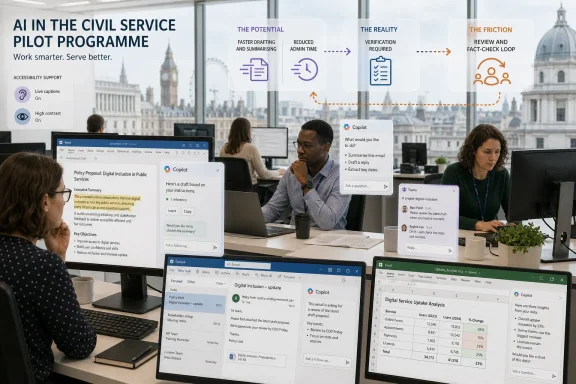 Copilot’s Hardest Test Was Not Whether People Liked It
The UK pilot matters because it tested Microsoft 365 Copilot in the place where the product is supposed to be strongest: the everyday bureaucracy of email, meetings, documents, decks, and internal research. This was not a science-fiction deployment of autonomous agents replacing departments. It was the practical version of the AI pitch: put a generative assistant inside the software workers already use, then watch the friction come out of the workday.On the surface, Microsoft would find plenty to like. Most users said they were satisfied. Many found Copilot useful in daily work. Written tasks such as drafting, summarising email, and turning meetings into notes were the obvious winners, which is exactly where large language models have looked most credible since the first wave of ChatGPT adoption.
But the study’s more important finding is that liking a tool is not the same as proving it makes an organization more productive. The pilot found time savings in some narrow activities and time costs in others. It also found that colleagues outside the pilot did not observe a visible change in output. That distinction is not pedantic; it is the entire economic question hanging over enterprise AI.
Microsoft’s challenge is not to show that Copilot can help someone produce a first draft faster. It is to show that the license fee, training burden, security overhead, governance work, verification cost, and workflow disruption add up to a net gain. The UK government trial suggests that question is still open.
The Office Assistant Is Becoming a Workplace Mood Tool
The most striking result is not that Copilot failed to deliver clear productivity gains. It is that users still broadly approved of it. Satisfaction above 70 percent is not trivial, especially in a government technology pilot where participants are rarely shy about disappointment.That tells us something important about the way AI is entering office work. Copilot may be valuable even when it does not yet show up as measurable productivity. It can reduce the intimidation of a blank page. It can summarise a tedious thread. It can help a worker who is tired, dyslexic, hard of hearing, visually impaired, or writing in a second language get through tasks with less friction.
Those are real benefits. The study’s reported gains among neurodiverse staff, workers with hearing or vision difficulties, and non-native English speakers should not be treated as a footnote. For some employees, Copilot appears less like a productivity hack and more like an accessibility layer. That may be one of the most defensible uses of generative AI in the enterprise: not replacing skilled workers, but lowering the cognitive tax attached to routine communication.
The problem is that Microsoft has not priced or marketed Copilot merely as a workplace comfort feature. It has sold it as a productivity engine. Those are different claims, and the evidence needed for one does not automatically satisfy the other.
The Time Savings Were Real, but So Were the New Chores
The trial’s task-level findings are familiar to anyone who has used generative AI seriously inside office workflows. Copilot can be very good at getting you from nothing to something. It can turn scattered notes into a plausible structure. It can summarise a document well enough to orient you. It can draft an email that is better than staring at a blank compose window.That kind of acceleration is psychologically powerful. A worker who saves 40 minutes drafting a paper or 20 minutes summarising a thread will remember the moment. The gain feels concrete because the avoided annoyance is concrete.
But office work is not a sequence of isolated stopwatch tests. A draft still has to be checked. A summary still has to be trusted. A deck still has to match the political and factual reality of the organization. A meeting note that misses nuance can create more work than it saves.
The UK findings captured this trade-off neatly. Some activities became faster, while others became slower. Scheduling reportedly took longer with Copilot. Image generation added time. Presentations and code reviews often required more verification. The assistant did not simply remove work; it moved work around.
That is the uncomfortable truth beneath many AI productivity claims. Generative AI often compresses the creation phase while expanding the review phase. For low-risk, low-stakes tasks, that can be an obvious win. For government, legal, security, finance, engineering, and policy work, verification is not a bureaucratic nuisance. It is the work.
Microsoft Sold a Copilot, but Buyers Got a Bundle of Uneven Assistants
Part of the difficulty is that “Microsoft 365 Copilot” sounds like one product, but users experience it as a set of uneven behaviors scattered across applications. Copilot in Word is not Copilot in Excel. Meeting summaries in Teams are not image generation. Outlook drafting is not data analysis. A standalone chat interface is not the same thing as an assistant embedded in a spreadsheet.That matters because aggregate productivity results can conceal a wide spread of outcomes. A tool can be useful in Word, tolerable in Outlook, awkward in PowerPoint, and actively counterproductive in Excel, yet still be marketed under one unified brand. For IT departments, this complicates evaluation. You are not buying a single capability; you are buying a portfolio of AI surfaces with different maturity levels.
This is an old Microsoft pattern. The company’s enterprise power has always come from bundling, integration, and administrative gravity. If a feature ships inside the Microsoft 365 estate, it gains immediate legitimacy because procurement, identity, compliance, and user familiarity already point in Microsoft’s direction.
But AI strains that model. A mediocre ribbon button is annoying. A mediocre autocomplete is harmless enough. A mediocre AI assistant can produce convincing wrong answers, waste verification time, and change user behavior in subtle ways. The old enterprise software bargain — broad integration in exchange for some unevenness — becomes harder to defend when the unevenness speaks in complete sentences.
The Productivity Metric Is Where the AI Story Gets Serious
The pilot’s cautious conclusion should not be mistaken for proof that Copilot is useless. It is proof that productivity is hard to measure, especially in knowledge work. The question is not whether one user can produce one document faster. The question is whether the organization produces more useful output, at the same or better quality, with the same or fewer resources.That is a much higher bar. A worker may save time on a draft and spend it in another meeting. A manager may receive more documents but not better decisions. A team may communicate more frequently while becoming no more effective. The metrics that make AI look good at the individual task level can evaporate when measured at the team or department level.
This is why the UK trial is more valuable than another vendor survey claiming that AI saves hours per week. Self-reported time savings are useful signals, but they are not the same as realized productivity. If a worker says Copilot saved 90 minutes, the next question is what happened to those 90 minutes. Were they spent on higher-value work, absorbed by checking AI output, lost to context switching, or simply converted into a less stressful day?
The last possibility is not bad. Reducing stress has value. But if the business case is productivity, the organization has to show that saved time becomes improved output. The DBT pilot could not robustly show that conversion.
Verification Is the Tax Nobody Wants to Put in the Demo
Every major enterprise AI deployment runs into the same hidden cost: trust calibration. Users must learn when the tool is likely to help, when it is likely to hallucinate, and when it should not be used at all. That learning process is slow, informal, and often invisible to executives reading adoption dashboards.Copilot’s outputs can be useful precisely because they are fluent. They can also be dangerous for the same reason. A bad summary that sounds tentative is easy to catch. A bad summary that sounds authoritative can slip into a briefing, a policy paper, or a customer response. The more polished the output, the more disciplined the review process must become.
This is why claims about AI-generated work need to include the checking burden. In the UK trial, nearly a third of staff reportedly said presentations and code reviews required more verification when Copilot was used. That is not a minor implementation detail. It is the difference between “the AI did the work” and “the AI produced an artifact that a human then had to audit.”
For sysadmins and IT leaders, this should sound familiar. Automation rarely eliminates responsibility. It changes where responsibility sits. The script that saves an hour can also take down a service if nobody understands it. The AI assistant that drafts a document can also launder a factual error into an official-looking paragraph.
Adoption Dashboards Are Not the Same as Outcomes
Microsoft’s telemetry advantage is enormous. The company can show organizations how often Copilot is used, where it is invoked, and which applications see engagement. For a CIO under pressure to modernize, those dashboards can be seductive. Usage looks like progress.But usage is not value. A feature can be frequently used because it is helpful, because it is novel, because it is pushed into the interface, or because employees feel they are expected to use it. Adoption metrics say that something is happening. They do not prove the thing happening is worth the money.
The UK pilot avoided the worst version of this trap by combining usage data with diaries, interviews, and observed exercises. That mixed-method approach is exactly what organizations need if they are serious about evaluating AI. Telemetry tells you where to look. It does not tell you whether the work got better.
There is also a selection problem. In the DBT pilot, about 70 percent of licences went to volunteers, with the rest randomly assigned to broaden representation. Volunteers are often more motivated, more curious, and more forgiving. If even a partly self-selected group reports high satisfaction but the organization cannot find clear productivity gains, that should make buyers cautious about assuming broader rollouts will automatically perform better.
The Accessibility Story May Be Stronger Than the Productivity Story
One of the most important lessons from the pilot is that the value of Copilot may be uneven in a way that argues against blanket deployment. Some workers appear to benefit more than others. Some tasks are better suited to the model. Some accessibility needs are better matched to what generative AI can do today.That points toward a more mature procurement model. Instead of asking whether every employee needs Copilot, organizations should ask which workers, teams, and workflows have the clearest use cases. A neurodiverse employee who benefits from summarisation and drafting assistance may get significant value. A policy specialist producing sensitive analysis may spend more time checking than writing. A manager drowning in meetings may find Teams summaries useful. A spreadsheet-heavy analyst may not.
This is where enterprise IT can bring discipline to the AI rush. Licences should follow evidence, not executive vibes. If a department can show that Copilot improves accessibility, retention, onboarding, or specific document workflows, that is a legitimate case. If it can only show that people enjoy having a chatbot in the sidebar, the case is weaker.
The accessibility angle also complicates the backlash. It would be too easy to read the UK trial as “Copilot does not work.” The more accurate reading is that Copilot does not yet prove the broad productivity story Microsoft wants to sell. Some users may still find it deeply useful, and organizations should not ignore that just because the aggregate productivity number disappoints.
The AI Boom Keeps Colliding With the Spreadsheet
The broader context is the mismatch between AI rhetoric and operational evidence. Technology executives describe a workplace on the edge of reinvention. Investors price companies as if white-collar automation is arriving quickly. Vendors talk about agents, copilots, digital labor, and compressed workweeks. Then a real department runs a pilot and discovers that the assistant makes some tasks faster, some tasks slower, and the overall productivity impact hard to prove.This does not mean the AI boom is fake. It means the enterprise version is messier than the keynote version. General-purpose technologies often take years to reshape work because the hard part is not the tool; it is the redesign of process, management, incentives, and accountability around the tool.
The PC did not make every office productive the day it arrived. Email sped communication and created inbox hell. Collaboration suites made remote work easier and multiplied notifications. Every major productivity technology has produced both gains and new burdens. Generative AI is following the same pattern, except at greater speed and with more extravagant promises.
For Microsoft, the danger is not that Copilot fails outright. The danger is that customers conclude it is another expensive layer in an already crowded Microsoft 365 stack — useful in places, overhyped in others, and difficult to justify at scale without careful targeting.
Windows Users Are Already Living With the Enterprise Experiment
For WindowsForum readers, this story is not confined to Whitehall or procurement departments. Microsoft’s AI strategy runs through Windows, Edge, Office, Teams, GitHub, Security Copilot, Azure, and the broader management stack. The enterprise Copilot experiment is also the consumer Windows experiment, just with different licensing and governance.Windows users have watched Copilot move from novelty to strategic centerpiece. The branding has appeared in taskbars, keyboards, browsers, admin portals, and productivity apps. Microsoft clearly sees AI as the next interface layer for its ecosystem. The company is not merely adding features; it is trying to change how users ask software to do work.
That makes the UK pilot a useful reality check. If Copilot cannot yet demonstrate broad productivity gains in the Microsoft 365 environment, users should be skeptical of claims that AI integration automatically improves Windows itself. An assistant can be convenient without being transformative. It can be impressive in a demo and marginal in daily use. It can be helpful for one person and clutter for another.
The Windows lesson is simple: integration is not adoption, and adoption is not value. Microsoft can place Copilot everywhere, but it cannot force the productivity gains to materialize. Those have to emerge from better workflows, better models, better user control, and clearer boundaries.
IT Departments Should Treat Copilot Like a Platform, Not a Perk
The wrong response to the UK findings would be to banish Copilot reflexively. The equally wrong response would be to roll it out broadly because employees like it. The right response is to treat it as a platform requiring governance, measurement, and staged deployment.That means defining approved use cases before buying thousands of licences. It means deciding which data Copilot can touch, which outputs require human review, and which tasks are off-limits. It means training users not just in prompting, but in skepticism. It means measuring results by workflow, not by aggregate enthusiasm.
The pilot also suggests that organizations should avoid one-size-fits-all licence allocation. The departments most likely to benefit may be those with high volumes of low-risk writing, meeting-heavy workflows, accessibility needs, or repetitive summarisation tasks. The least promising areas may be those where accuracy, domain nuance, or structured data analysis dominate.
This is not glamorous work. It is the work that separates enterprise technology from executive theater. AI rollouts fail when leaders buy the narrative and outsource the details to users. They succeed when IT, security, legal, accessibility teams, and business units decide what the tool is actually for.
Microsoft’s Best Argument Is Also Its Biggest Liability
Microsoft’s strongest pitch is that Copilot lives where people already work. That is why the product can spread so quickly. It sits inside Word, Outlook, Teams, Excel, PowerPoint, and the identity and compliance fabric that enterprises already trust.But that same integration makes weak spots more visible. If Copilot produces a poor result in a standalone chatbot, the user may blame the chatbot. If it produces a poor result inside Excel or Outlook, the failure feels like part of Microsoft 365. The brand promise becomes broader, and so does the disappointment.
There is also the risk of interface fatigue. Many users already feel crowded by notifications, ribbons, sidebars, recommendations, banners, and nudges. AI features that appear before they are consistently useful can feel less like assistance and more like another demand on attention. In productivity software, attention is the scarce resource.
Microsoft has the advantage of distribution, but distribution can backfire if customers feel they are being drafted into a beta test. The UK pilot is valuable because it gives organizations permission to ask harder questions before turning on the next AI toggle.
The Real Productivity Gain May Require Less AI, More Redesign
The most optimistic reading of the study is that Copilot is an immature but promising tool whose benefits will grow as users learn it and models improve. That may be true. The least useful reading is that the answer is simply more training. Training helps, but it does not solve the structural problem.If AI saves time on drafting but the organization still requires the same approvals, the same meetings, the same reporting formats, and the same inbox rituals, the saved time gets reabsorbed. If Copilot creates more drafts, managers may get more material to review rather than better decisions. If meeting summaries make it easier to attend less carefully, the organization may produce more records of meetings without reducing the number of meetings.
The productivity problem is therefore partly managerial. AI tools can expose broken workflows, but they do not automatically fix them. A department that wants gains from Copilot may need to change how it handles meetings, documents, approvals, knowledge management, and internal communication. That is harder than buying licences.
This is where the AI industry’s language of “assistants” and “agents” becomes misleading. The assistant can help with a task. Productivity comes from redesigning the system around the task. Without that redesign, AI becomes a faster way to feed the same old machine.
Whitehall’s Copilot Trial Leaves Microsoft With a Narrower, More Honest Pitch
The practical reading is not that Microsoft 365 Copilot has no value. It is that its value is specific, uneven, and still too dependent on context to support sweeping productivity claims. For IT leaders, that is not a reason to panic. It is a reason to test like adults.- Organizations should measure Copilot by workflow outcomes rather than satisfaction scores or raw usage dashboards.
- The strongest near-term cases appear to be drafting, summarisation, meeting support, and accessibility-related assistance.
- Any productivity calculation must include verification time, training effort, governance overhead, and the cost of slower tasks.
- Broad licence rollouts should be harder to justify than targeted deployments tied to specific teams and measurable use cases.
- Microsoft’s integration advantage makes Copilot easy to deploy, but it does not remove the need for careful local evaluation.
- The UK government pilot strengthens the case for cautious adoption, not for either wholesale rejection or unquestioning enthusiasm.
References
- Primary source: TechRepublic
Published: Thu, 04 Jun 2026 06:10:05 GMT
Microsoft Copilot Study in UK: No Evidence of Productivity Gains
The UK government’s Microsoft 365 Copilot trial found staff satisfied and tasks eased, but no clear productivity gains, raising doubts about AI’s workplace impact.www.techrepublic.com
- Related coverage: gov.uk
Microsoft 365 Copilot pilot: DBT evaluation report - GOV.UK
An evaluation of the Microsoft 365 Copilot pilot by the Department for Business and Trade (DBT), which took place from October to December 2024.www.gov.uk
- Related coverage: computing.co.uk
UK government trial of Microsoft 365 Copilot reveals no clear productivity boost
A recent three-month trial of Microsoft's M365 Copilot within a UK government department has found no definitive evidence of improved productivity, despite some promising results ...www.computing.co.uk - Related coverage: theregister.com
M365 Copilot fails to up productivity in UK government trial
: AI tech shows promise writing emails or summarizing meetings. Don't bother with anything more complexwww.theregister.com - Related coverage: assets.publishing.service.gov.uk
The Evaluation of the M365 Copilot Pilot in the Department for Business and Trade
PDF documentassets.publishing.service.gov.uk
- Related coverage: resultsense.com
- Related coverage: genemarks.com
Small Business Technology Roundup: Microsoft CoPilot Does Not Improve Productivity And ChatGPT Projects Are Free - GeneMarks.com
(This column originally appeared in Forbes) Here are five things in tech that happened this week and how they affect your small business. Did you miss...www.genemarks.com - Related coverage: techbriefly.com
UK study: Microsoft 365 Copilot boosts satisfaction, not productivity - TechBriefly
A recent UK government pilot program evaluating Microsoft 365 Copilot revealed high levels of user satisfaction but failed to demonstrate any tangible gains in productivity. The Department for Business and Trade conducted the study, which spanned from October to December 2024. The initiative...techbriefly.com - Related coverage: cio-online.com
Le gouvernement britannique ne voit pas les gains de productivité de Microsoft Copilot
Bas� sur un test � grande �chelle, un rapport d'un minist�re britannique ne parvient pas � associer un quelconque gain de productivit� aux usages de l'IA. www.cio-online.com
- Related coverage: itpro.com
UK government programmers trialed AI coding assistants from Microsoft, GitHub, and Google – here's what they found | IT Pro
A UK government trial of AI coding tools shows developers are unlocking time savings and efficiency gains – but experts have raised concerns about code quality.www.itpro.com - Related coverage: windowscentral.com
Shadow AI tools threaten UK privacy, Microsoft warns | Windows Central
A new Microsoft study says AI could save the UK economy 12.1 billion per year, but warns Shadow AI tools pose serious privacy and security risks.www.windowscentral.com - Related coverage: pcgamer.com
Using 'trillions of anonymised productivity signals', Microsoft thinks nearly half of people like AI in their work | PC Gamer
There's dozens of us who don't!www.pcgamer.com - Official source: cdn-dynmedia-1.microsoft.com
Security Copilot: Evidence of Productivity Gains in Live Operations
Accessible PDFcdn-dynmedia-1.microsoft.com
