

Google Chrome before version 150.0.7871.47 on Windows and Mac contains CVE-2026-14056, a Media input-validation flaw disclosed June 30, 2026, that could let an attacker who already compromised Chrome’s renderer process attempt a sandbox escape through a crafted video file. The uncomfortable part is not that this specific bug carries Chromium’s own “Low” severity label. It is that the vulnerability sits in the messy borderland where browser media handling, sandbox boundaries, CVE scoring, and enterprise patch hygiene all collide. For Windows users and administrators, the right answer is simple: update Chrome, then verify that Chromium-based browsers in the fleet have caught up.
The National Vulnerability Database describes CVE-2026-14056 as “insufficient validation of untrusted input in Media,” affecting Google Chrome before 150.0.7871.47. Google’s Chrome Releases blog tied the fix to the Stable Channel update for desktop published Tuesday, June 30, 2026, which promoted Chrome 150 to stable for Windows, macOS, and Linux.
That wording matters. This is not described as a one-click remote code execution bug where a random web page immediately owns the machine. The attacker must first have compromised the renderer process, then use a crafted video file to potentially escape the sandbox. In Chrome’s architecture, that “already compromised renderer” condition is the difference between a standalone disaster and a chainable component.
But defenders should not mistake “chainable” for “academic.” Modern browser exploitation often works as a sequence: one flaw gets code running inside a renderer, another flaw weakens process isolation, and a third step reaches data, persistence, or the operating system. A sandbox escape is valuable precisely because it can turn a contained compromise into something with broader consequences.
The oddity here is the severity split. The CVE record says Chromium rated the issue Low, while CISA’s ADP enrichment assigned a CVSS 3.1 score of 9.6, Critical, with high impacts to confidentiality, integrity, and availability. NVD itself had not supplied its own CVSS score when the record was viewed, and the page was marked “Modified After Enrichment.”
That mismatch is not just bureaucratic trivia. It is a warning that severity labels are arguments, not laws of physics.
CVE-2026-14056 lives in that boundary story. The flaw is in Media, which is exactly the kind of subsystem users and administrators rarely think about but browsers exercise all day. Video decoding, playback controls, codecs, hardware acceleration, and media parsing all sit close to complex native code and historically bug-prone input paths.
A crafted video file is not exotic bait. It can be embedded in a page, attached to a workflow, shared in a collaboration tool, or routed through a normal-looking web application. The CVE description does not say that any of those delivery paths are confirmed exploit mechanisms for this bug, but the general attack surface is familiar: browsers are asked to process untrusted media constantly.
That is why Chrome’s own Low severity deserves context. Google may be judging the bug in isolation, with the renderer-compromise prerequisite heavily lowering its immediate exploitability. CISA’s CVSS vector, by contrast, appears to model the consequences of a successful chain more aggressively. Both views can be internally coherent, and both can be useful.
For IT teams, the practical conclusion is not to debate which label is philosophically purer. The practical conclusion is that any bug described as a potential sandbox escape belongs on the short patch list.
That scale changes how administrators should read CVE-2026-14056. This is not a lonely patch for a single media bug. It is one entry in a broad Chrome 150 security sweep that includes memory safety issues, component bugs, and other flaws with varying exploit preconditions.
Google also repeated its standard warning that access to bug details and links may remain restricted until most users have updated. That is normal Chrome security practice, but it creates a predictable information gap. Defenders are asked to move before researchers, exploit developers, and administrators all have the same technical detail.
That asymmetry is frustrating but rational. Publishing full exploit-relevant detail before the patch has saturated the user base would help attackers as much as defenders. In the meantime, version numbers become the operational truth.
For WindowsForum readers, that means the important string is not the CVSS debate. It is 150.0.7871.47 for Windows and Mac, and the matching patched build stream for other platforms and Chromium derivatives.
Then there is the “Modified After Enrichment” banner, which says the CVE record changed after NVD enrichment was completed and that enrichment data may need amendment. In plain English: the record is still settling. That is not unusual in the first days after disclosure, but it is exactly why blindly ingesting vulnerability feeds into dashboards can produce noisy results.
A security team may see “Chromium security severity: Low” in one field and “9.6 Critical” in another. A vulnerability management platform may prioritize it as urgent. A browser team may argue it is only dangerous after a renderer compromise. A compliance report may care mainly that a vulnerable CPE exists.
None of those readings is entirely wrong. They are different lenses on the same object. The vendor severity is often closer to exploitability in context; CVSS is often closer to theoretical impact under its scoring model; SSVC-style data tries to encode decision-making factors such as exploitation status and technical impact.
The CISA-ADP SSVC entry listed exploitation as “none,” automatable as “no,” and technical impact as “total.” That combination captures the tension better than a single number. There was no public signal of active exploitation in that field, but if the bug were successfully used as part of a chain, the impact could be severe.
If the CPE is missing, delayed, or malformed, organizations can undercount exposure. If it is too broad, they can drown in false positives. In the first day or two after disclosure, both outcomes are common enough that mature teams treat vulnerability metadata as provisional.
The “Are we missing a CPE?” prompt on NVD pages is not decoration. It reflects a real weakness in the vulnerability ecosystem: product naming, versioning, platform-specific builds, and vendor update channels do not map cleanly into a single universal database. Chrome complicates this further because the Chromium engine is reused across browsers that do not all ship patches on Google’s schedule.
For Google Chrome itself, the remediation boundary is clean: update to 150.0.7871.47 or later on Windows and Mac, and ensure Linux and other platform builds are on their corresponding fixed release. For Microsoft Edge, Brave, Vivaldi, Opera, and other Chromium-based browsers, administrators need vendor-specific patched builds rather than assuming Chrome’s version string applies directly.
That is a subtle but important distinction. Chromium is the upstream project; Chrome is Google’s browser; Edge and others carry Chromium code with their own release trains, feature flags, and enterprise policies. A Chrome CVE can signal risk across the ecosystem without providing a one-size-fits-all version answer.
In enterprise environments, the problem is less about whether Google shipped a fix and more about whether policy, packaging, restart behavior, and user habits allow it to land. Chrome can be managed through enterprise policies, software distribution tools, endpoint management platforms, and update controls. Those layers are useful, but every layer is also a place where old builds can linger.
The most common failure mode is the long-lived browser session. Users suspend laptops, keep dozens of tabs open, and avoid restarts for days. Admin dashboards may report that an update is available or staged, while the actual running browser process remains older than the fixed version.
There is also a visibility issue. Many vulnerability scanners inventory installed versions, not active processes. Some endpoint tools detect the file version on disk after update, even if the user has not restarted into the new build. For a sandbox-escape-class browser issue, that distinction is not pedantic.
The better operational habit is to verify both installed version and restart completion. In high-risk environments, forced browser relaunch windows may be justified. That is annoying for users, but so is explaining why a browser patch was “installed” while the vulnerable process stayed alive.
Media pipelines are particularly unforgiving because browsers try to make playback seamless. A modern web page may negotiate codecs, preload content, use hardware acceleration, render thumbnails, and interact with GPU or media services before a user thinks of the file as something they “opened.” The attack surface is not limited to someone double-clicking a suspicious attachment.
Chrome’s process isolation mitigates this class of risk, but the CVE exists because mitigation boundaries are still software. They depend on validation, message passing, permissions checks, memory safety, and component hardening. A failure in any one place may be harmless alone and dangerous in combination.
That is why the renderer prerequisite should reassure only up to a point. Yes, an attacker needs another step. No, that does not make the issue irrelevant. Browser exploit chains are built from exactly these steps.
For defenders, the right mental model is layered failure. A renderer compromise is bad; a sandbox escape after renderer compromise is worse; an unpatched fleet with delayed restarts is how “worse” becomes operationally plausible.
Microsoft Edge is the obvious Windows concern. Edge uses Chromium but ships under Microsoft’s versioning and update infrastructure. A Chrome version such as 150.0.7871.47 does not translate directly into an Edge version number. Administrators need to watch Microsoft’s Edge release notes and endpoint inventory rather than treating Chrome’s fixed build as universal proof of remediation.
The same logic applies to alternative browsers. Some follow Chromium stable closely; others use extended stable or customized release cadences. A browser can be “based on Chromium 150” and still require vendor confirmation that a particular security fix has landed.
This is where vulnerability scanners can mislead. Some tools flag based on browser name and version; others infer risk from embedded Chromium versions; still others wait for vendor advisories. In the days immediately after a Chrome security release, those tools may disagree.
That disagreement does not mean administrators should panic. It means they should prioritize exposed browsers, verify vendor updates, and avoid assuming that a quiet dashboard equals a patched endpoint.
CVE-2026-14056 follows that pattern. The public description gives defenders enough to understand the class of risk: untrusted input, Media, compromised renderer, sandbox escape, crafted video file. It does not provide exploit mechanics, crash details, proof-of-concept code, or a deep root-cause analysis.
That leaves room for speculation, and speculation is where bad security writing often goes off the rails. There is no public basis in the provided record to claim active exploitation. There is no public basis to say this bug alone gives an attacker full remote compromise from a clean browser state. There is also no good reason to shrug at a sandbox escape candidate in a major browser release.
The honest reading is narrower and stronger: Google fixed a media validation flaw in Chrome 150 that could matter as part of a browser exploit chain, and the metadata ecosystem is currently describing its severity in conflicting ways. That is enough to justify rapid patch verification.
In security operations, not every urgent action requires a cinematic exploit story. Sometimes the sober version is more useful: a high-value boundary had a bug, the fix is available, and the version check is cheap.
For administrators, the checklist is broader. Confirm policy is not pinning Chrome to an older release. Confirm update services are healthy. Confirm browsers have actually restarted. Confirm Edge and other Chromium-based browsers are tracked separately. Confirm vulnerability management tools are not relying on stale enrichment data from the first hours after publication.
The NVD change history is especially relevant here. The CVE was received from Chrome on June 30, then modified by CISA-ADP and NIST on July 1. In that window, fields such as CVSS, CWE, CPE, and reference types changed. Automated systems that ingested the record early may not have the same view as systems that ingested it later.
That is not an argument against automation. It is an argument against treating vulnerability automation as an oracle. Feeds accelerate triage; humans still need to understand what the feed is saying and when it last refreshed.
The best enterprise response is boring in the way good security often is. Patch quickly, verify broadly, document exceptions, and keep an eye on downstream Chromium vendors.
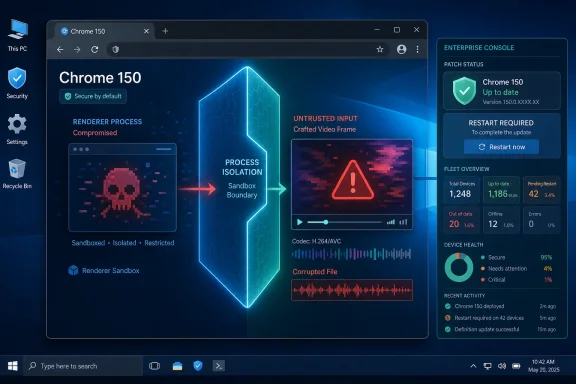 Chrome’s “Low” Label Hides a Very High-Stakes Boundary
The National Vulnerability Database describes CVE-2026-14056 as “insufficient validation of untrusted input in Media,” affecting Google Chrome before 150.0.7871.47. Google’s Chrome Releases blog tied the fix to the Stable Channel update for desktop published Tuesday, June 30, 2026, which promoted Chrome 150 to stable for Windows, macOS, and Linux.That wording matters. This is not described as a one-click remote code execution bug where a random web page immediately owns the machine. The attacker must first have compromised the renderer process, then use a crafted video file to potentially escape the sandbox. In Chrome’s architecture, that “already compromised renderer” condition is the difference between a standalone disaster and a chainable component.
But defenders should not mistake “chainable” for “academic.” Modern browser exploitation often works as a sequence: one flaw gets code running inside a renderer, another flaw weakens process isolation, and a third step reaches data, persistence, or the operating system. A sandbox escape is valuable precisely because it can turn a contained compromise into something with broader consequences.
The oddity here is the severity split. The CVE record says Chromium rated the issue Low, while CISA’s ADP enrichment assigned a CVSS 3.1 score of 9.6, Critical, with high impacts to confidentiality, integrity, and availability. NVD itself had not supplied its own CVSS score when the record was viewed, and the page was marked “Modified After Enrichment.”
That mismatch is not just bureaucratic trivia. It is a warning that severity labels are arguments, not laws of physics.
The Browser Sandbox Is the Product, Not a Footnote
Chrome’s sandbox is one of the central security promises of the modern web. The browser assumes hostile content will be encountered constantly, then tries to limit what that content can touch. Renderer processes handle web pages under tight restrictions, while more privileged components are supposed to remain guarded behind process boundaries, brokers, permissions checks, and hardened interfaces.CVE-2026-14056 lives in that boundary story. The flaw is in Media, which is exactly the kind of subsystem users and administrators rarely think about but browsers exercise all day. Video decoding, playback controls, codecs, hardware acceleration, and media parsing all sit close to complex native code and historically bug-prone input paths.
A crafted video file is not exotic bait. It can be embedded in a page, attached to a workflow, shared in a collaboration tool, or routed through a normal-looking web application. The CVE description does not say that any of those delivery paths are confirmed exploit mechanisms for this bug, but the general attack surface is familiar: browsers are asked to process untrusted media constantly.
That is why Chrome’s own Low severity deserves context. Google may be judging the bug in isolation, with the renderer-compromise prerequisite heavily lowering its immediate exploitability. CISA’s CVSS vector, by contrast, appears to model the consequences of a successful chain more aggressively. Both views can be internally coherent, and both can be useful.
For IT teams, the practical conclusion is not to debate which label is philosophically purer. The practical conclusion is that any bug described as a potential sandbox escape belongs on the short patch list.
Chrome 150 Was Already a Heavy Security Release
Google’s June 30 Stable Channel post said Chrome 150.0.7871.46 for Linux and 150.0.7871.46/.47 for Windows and Mac would roll out over the following days and weeks. The same post said the update included hundreds of security fixes, with numerous Critical entries listed near the top of the advisory. Malwarebytes separately characterized the release as another unusually large Chrome security update and noted the same desktop version line.That scale changes how administrators should read CVE-2026-14056. This is not a lonely patch for a single media bug. It is one entry in a broad Chrome 150 security sweep that includes memory safety issues, component bugs, and other flaws with varying exploit preconditions.
Google also repeated its standard warning that access to bug details and links may remain restricted until most users have updated. That is normal Chrome security practice, but it creates a predictable information gap. Defenders are asked to move before researchers, exploit developers, and administrators all have the same technical detail.
That asymmetry is frustrating but rational. Publishing full exploit-relevant detail before the patch has saturated the user base would help attackers as much as defenders. In the meantime, version numbers become the operational truth.
For WindowsForum readers, that means the important string is not the CVSS debate. It is 150.0.7871.47 for Windows and Mac, and the matching patched build stream for other platforms and Chromium derivatives.
CVSS Is Doing What CVSS Always Does: Making a Mess Look Precise
The NVD page for CVE-2026-14056 is a miniature lesson in vulnerability metadata. The Chrome source submitted the CVE on June 30, 2026. CISA-ADP added a CVSS 3.1 vector on July 1, scoring it 9.6 Critical. NIST’s initial analysis later added a CPE configuration for Google Chrome versions before 150.0.7871.47, while the page continued to show that NVD had not yet provided its own CVSS assessment.Then there is the “Modified After Enrichment” banner, which says the CVE record changed after NVD enrichment was completed and that enrichment data may need amendment. In plain English: the record is still settling. That is not unusual in the first days after disclosure, but it is exactly why blindly ingesting vulnerability feeds into dashboards can produce noisy results.
A security team may see “Chromium security severity: Low” in one field and “9.6 Critical” in another. A vulnerability management platform may prioritize it as urgent. A browser team may argue it is only dangerous after a renderer compromise. A compliance report may care mainly that a vulnerable CPE exists.
None of those readings is entirely wrong. They are different lenses on the same object. The vendor severity is often closer to exploitability in context; CVSS is often closer to theoretical impact under its scoring model; SSVC-style data tries to encode decision-making factors such as exploitation status and technical impact.
The CISA-ADP SSVC entry listed exploitation as “none,” automatable as “no,” and technical impact as “total.” That combination captures the tension better than a single number. There was no public signal of active exploitation in that field, but if the bug were successfully used as part of a chain, the impact could be severe.
The CPE Question Is Not Cosmetic
The user-facing NVD page showed a Google Chrome CPE configuration added during NIST’s initial analysis: Chrome versions up to, but excluding, 150.0.7871.47. That matters because CPEs are how many scanners and asset tools connect a CVE to installed software.If the CPE is missing, delayed, or malformed, organizations can undercount exposure. If it is too broad, they can drown in false positives. In the first day or two after disclosure, both outcomes are common enough that mature teams treat vulnerability metadata as provisional.
The “Are we missing a CPE?” prompt on NVD pages is not decoration. It reflects a real weakness in the vulnerability ecosystem: product naming, versioning, platform-specific builds, and vendor update channels do not map cleanly into a single universal database. Chrome complicates this further because the Chromium engine is reused across browsers that do not all ship patches on Google’s schedule.
For Google Chrome itself, the remediation boundary is clean: update to 150.0.7871.47 or later on Windows and Mac, and ensure Linux and other platform builds are on their corresponding fixed release. For Microsoft Edge, Brave, Vivaldi, Opera, and other Chromium-based browsers, administrators need vendor-specific patched builds rather than assuming Chrome’s version string applies directly.
That is a subtle but important distinction. Chromium is the upstream project; Chrome is Google’s browser; Edge and others carry Chromium code with their own release trains, feature flags, and enterprise policies. A Chrome CVE can signal risk across the ecosystem without providing a one-size-fits-all version answer.
Windows Admins Should Treat This as a Patch-Verification Problem
On unmanaged PCs, Chrome’s auto-update system usually does the right thing, provided the browser is restarted. That caveat is doing a lot of work. A machine can download an update and still keep running vulnerable code until the user closes and relaunches the browser.In enterprise environments, the problem is less about whether Google shipped a fix and more about whether policy, packaging, restart behavior, and user habits allow it to land. Chrome can be managed through enterprise policies, software distribution tools, endpoint management platforms, and update controls. Those layers are useful, but every layer is also a place where old builds can linger.
The most common failure mode is the long-lived browser session. Users suspend laptops, keep dozens of tabs open, and avoid restarts for days. Admin dashboards may report that an update is available or staged, while the actual running browser process remains older than the fixed version.
There is also a visibility issue. Many vulnerability scanners inventory installed versions, not active processes. Some endpoint tools detect the file version on disk after update, even if the user has not restarted into the new build. For a sandbox-escape-class browser issue, that distinction is not pedantic.
The better operational habit is to verify both installed version and restart completion. In high-risk environments, forced browser relaunch windows may be justified. That is annoying for users, but so is explaining why a browser patch was “installed” while the vulnerable process stayed alive.
Media Bugs Are a Reminder That “Don’t Click Weird Links” Is Not a Strategy
The crafted-video-file detail is useful, but it should not lead to folk remedies. Users cannot reliably identify weaponized media by appearance. Administrators cannot train employees to distinguish a harmless video container from one designed to tickle a parser bug. Security awareness has a role, but it does not replace patching a browser that processes untrusted content by design.Media pipelines are particularly unforgiving because browsers try to make playback seamless. A modern web page may negotiate codecs, preload content, use hardware acceleration, render thumbnails, and interact with GPU or media services before a user thinks of the file as something they “opened.” The attack surface is not limited to someone double-clicking a suspicious attachment.
Chrome’s process isolation mitigates this class of risk, but the CVE exists because mitigation boundaries are still software. They depend on validation, message passing, permissions checks, memory safety, and component hardening. A failure in any one place may be harmless alone and dangerous in combination.
That is why the renderer prerequisite should reassure only up to a point. Yes, an attacker needs another step. No, that does not make the issue irrelevant. Browser exploit chains are built from exactly these steps.
For defenders, the right mental model is layered failure. A renderer compromise is bad; a sandbox escape after renderer compromise is worse; an unpatched fleet with delayed restarts is how “worse” becomes operationally plausible.
The Chromium Ecosystem Turns One Fix Into Many Deadlines
Chrome may be the reference point, but Windows users increasingly live in a Chromium monoculture. Microsoft Edge, Brave, Vivaldi, Opera, Arc, and many embedded browser surfaces depend on Chromium code in one way or another. That creates a security benefit when upstream fixes move quickly, and a security liability when downstream patch timing varies.Microsoft Edge is the obvious Windows concern. Edge uses Chromium but ships under Microsoft’s versioning and update infrastructure. A Chrome version such as 150.0.7871.47 does not translate directly into an Edge version number. Administrators need to watch Microsoft’s Edge release notes and endpoint inventory rather than treating Chrome’s fixed build as universal proof of remediation.
The same logic applies to alternative browsers. Some follow Chromium stable closely; others use extended stable or customized release cadences. A browser can be “based on Chromium 150” and still require vendor confirmation that a particular security fix has landed.
This is where vulnerability scanners can mislead. Some tools flag based on browser name and version; others infer risk from embedded Chromium versions; still others wait for vendor advisories. In the days immediately after a Chrome security release, those tools may disagree.
That disagreement does not mean administrators should panic. It means they should prioritize exposed browsers, verify vendor updates, and avoid assuming that a quiet dashboard equals a patched endpoint.
Google’s Disclosure Style Prioritizes Patch Saturation Over Technical Curiosity
Google’s Chrome advisories are famously sparse when fixes first ship. The company lists CVEs, components, severity ratings, reporter information where available, and sometimes rewards, while restricting bug details until enough users have updated. Security researchers may grumble, but this is a rational tradeoff for a browser with billions of users.CVE-2026-14056 follows that pattern. The public description gives defenders enough to understand the class of risk: untrusted input, Media, compromised renderer, sandbox escape, crafted video file. It does not provide exploit mechanics, crash details, proof-of-concept code, or a deep root-cause analysis.
That leaves room for speculation, and speculation is where bad security writing often goes off the rails. There is no public basis in the provided record to claim active exploitation. There is no public basis to say this bug alone gives an attacker full remote compromise from a clean browser state. There is also no good reason to shrug at a sandbox escape candidate in a major browser release.
The honest reading is narrower and stronger: Google fixed a media validation flaw in Chrome 150 that could matter as part of a browser exploit chain, and the metadata ecosystem is currently describing its severity in conflicting ways. That is enough to justify rapid patch verification.
In security operations, not every urgent action requires a cinematic exploit story. Sometimes the sober version is more useful: a high-value boundary had a bug, the fix is available, and the version check is cheap.
The Patch Is Simple; Proving It Landed Is the Work
For individual Windows users, the practical path is familiar. Open Chrome’s About page, let it check for updates, and relaunch when prompted. The target is Chrome 150.0.7871.47 or later on Windows.For administrators, the checklist is broader. Confirm policy is not pinning Chrome to an older release. Confirm update services are healthy. Confirm browsers have actually restarted. Confirm Edge and other Chromium-based browsers are tracked separately. Confirm vulnerability management tools are not relying on stale enrichment data from the first hours after publication.
The NVD change history is especially relevant here. The CVE was received from Chrome on June 30, then modified by CISA-ADP and NIST on July 1. In that window, fields such as CVSS, CWE, CPE, and reference types changed. Automated systems that ingested the record early may not have the same view as systems that ingested it later.
That is not an argument against automation. It is an argument against treating vulnerability automation as an oracle. Feeds accelerate triage; humans still need to understand what the feed is saying and when it last refreshed.
The best enterprise response is boring in the way good security often is. Patch quickly, verify broadly, document exceptions, and keep an eye on downstream Chromium vendors.
The Chrome 150 Media Flaw Leaves Five Practical Signals
CVE-2026-14056 is not the loudest Chrome bug of the year, and it may never become one. Its value is as a clear example of how browser security actually works in 2026: exploit chains, sandbox boundaries, delayed metadata, and patch operations all matter more than any single severity word.- Google fixed CVE-2026-14056 in Chrome 150.0.7871.47 for Windows and Mac as part of the June 30, 2026 Stable Channel update.
- The vulnerability requires a prior renderer compromise, but the possible next step is a sandbox escape through crafted video media.
- Chromium’s Low severity and CISA-ADP’s Critical CVSS score reflect different scoring assumptions rather than a simple factual contradiction.
- NVD’s CPE entry identifies Google Chrome versions before 150.0.7871.47 as affected, but early CVE metadata should be treated as subject to change.
- Windows administrators should verify actual browser relaunches, not merely update availability or installed file replacement.
- Other Chromium-based browsers need their own vendor-confirmed fixes and should not be assumed safe solely because Google Chrome has updated.
References
- Primary source: NVD / Chromium
Published: 2026-07-03T07:00:40-07:00
NVD - CVE-2026-14056
 nvd.nist.gov
- Security advisory: MSRC
Published: 2026-07-03T07:00:40-07:00
Original feed URL
Security Update Guide - Microsoft Security Response Center
 msrc.microsoft.com
- Related coverage: cvefeed.io
CVE-2026-14056 - Google Chrome Media Sandbox Escape
Insufficient validation of untrusted input in Media in Google Chrome prior to 150.0.7871.47 allowed a remote attacker who had compromised the renderer process to potentially perform a sandbox escape via a crafted video file. (Chromium security severity: Low)cvefeed.io - Related coverage: radar.offseq.com
CVE-2026-14056: Insufficient validation of untrusted input in Google Chrome - Live Threat Intelligence - Threat Radar | OffSeq.com
Detailed information about CVE-2026-14056: Insufficient validation of untrusted input in Google Chrome affecting Google Chrome. Get real-time updates, technicalradar.offseq.com
