

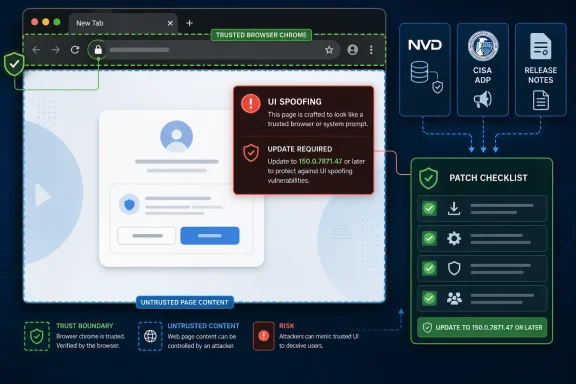
Google Chrome before version 150.0.7871.47 contains CVE-2026-14013, a medium-severity SVG implementation flaw disclosed on June 30, 2026, that can allow a remote attacker to spoof user-interface information through a crafted HTML page. The narrow technical description makes this sound like another routine browser bug, but the interesting part is not the acronym soup around SVG. It is the way a “medium” UI flaw exposes the fragile trust contract between browser chrome, web content, vulnerability databases, and enterprise patch pipelines. NVD, CISA’s ADP enrichment, and Google’s Chrome release notes all point to the same practical answer: update Chrome, and treat UI spoofing as a real security boundary even when it does not carry the drama of code execution.
CVE-2026-14013 is not a memory-corruption monster. It is not described as a sandbox escape, a V8 type-confusion bug, or a zero-day under active exploitation. The description now circulating through NVD and mirrored vulnerability feeds is more modest: inappropriate implementation in SVG allowed UI spoofing via a crafted HTML page in Chrome versions before 150.0.7871.47.
That modesty is exactly why it matters. Browser security is often discussed as if only remote code execution counts, but the browser is also the place where users decide whether a site is authentic, whether a login prompt is trustworthy, whether a payment page is what it claims to be, and whether a permission request belongs to the browser or the page. UI spoofing attacks live in that murky layer between “the machine is compromised” and “the user was tricked,” which is where many real incidents begin.
CISA’s ADP entry gives the vulnerability a CVSS 3.1 score of 4.3, with network attack vector, low attack complexity, no privileges required, and user interaction required. That is a classic medium: not wormable, not silent, not catastrophic by itself, but plausible at Internet scale if folded into phishing, malvertising, or credential-harvesting campaigns. The impact is listed against integrity rather than confidentiality or availability, which fits a spoofing bug: the attacker is not necessarily stealing data directly through the flaw, but altering what the user believes they are seeing.
The Chrome side of the record says the fix arrived with the stable desktop update to 150.0.7871.47. NVD added the affected CPE configuration on July 1, 2026, after the CVE was received from Chrome on June 30. That chronology matters because many organizations do not patch from headlines; they patch from inventory tools, vulnerability scanners, and CPE-mapped feeds. For them, a browser flaw is not fully “real” until it becomes machine-actionable.
The important point is not that SVG is uniquely dangerous. It is that SVG sits in the same visual stack the browser uses to tell users what is page content and what is trusted interface. If an implementation mistake allows page-controlled material to create the wrong visual impression, the attacker does not need to break encryption or steal a cookie from memory. They need the user to believe a false interface.
That is why CWE-451, “User Interface Misrepresentation of Critical Information,” is a useful classification here. It frames the bug as a deception problem, not merely a rendering oddity. A page that can misrepresent critical information may be able to influence a user’s decision at precisely the moment the browser is supposed to provide trustworthy context.
In older security thinking, spoofing sometimes got dismissed as “just phishing.” Modern browser design has moved beyond that. Address bars, permission chips, lock indicators, file-download warnings, payment UI, sign-in prompts, and browser-managed dialogs are all attempts to create dependable boundaries between user agency and web content. A bug that weakens those boundaries deserves attention even when it does not hand an attacker a shell.
That delay is normal, but it is also consequential. Vulnerability management platforms often depend on CPE mappings to connect a CVE to installed software. If a CVE exists before the CPE is enriched, scanners may display incomplete information, mis-rank the exposure, or fail to tie the vulnerability cleanly to affected assets. The result is not usually a dramatic security failure; it is a period of operational ambiguity.
The “Are we missing a CPE?” prompt on NVD pages has become an accidental symbol of modern patch management. Security teams live between vendor advisories, NVD enrichment, CISA scoring, distro trackers, browser auto-update telemetry, and endpoint management consoles. Each source may be correct within its lane, but none is the entire truth at the same moment.
For Windows administrators, this is especially familiar. Chrome may update itself, but managed environments often pin versions, stagger rollouts, test business-critical web apps, or rely on third-party patch tools. A CVE without a clean CPE can sit awkwardly in dashboards until the metadata catches up. CVE-2026-14013 is a reminder that metadata is part of the patch, not paperwork after the fact.
User interaction is not rare on the web. It is the default condition of browsing. Users click links, open documents, approve prompts, scroll pages, accept cookies, authenticate to services, and respond to workflows designed to move them quickly from uncertainty to action. A crafted HTML page that can spoof UI does not need to defeat an attentive security engineer in a lab; it needs to fool a distracted person during an otherwise ordinary session.
That does not mean CVE-2026-14013 should be treated like an actively exploited critical zero-day. CISA’s SSVC data, according to the ADP enrichment, lists exploitation as “none,” automatable as “no,” and technical impact as “partial.” Those are meaningful constraints. They suggest this is a patch-now-through-normal-channels issue, not a rip-the-network-cables-out emergency.
But “normal channels” should still mean prompt deployment. Browser vulnerabilities age badly. Details withheld at publication may become clearer later, proofs of concept may emerge, and attackers routinely chain low- and medium-severity browser bugs with social engineering. A UI spoofing issue is particularly chainable because it improves the believability of whatever comes next.
CVE-2026-14013 landed among a cluster of Chrome 150-era UI spoofing and browser-interface issues visible in public vulnerability feeds. That clustering does not prove a single systemic failure, and we should be careful not to overread sparse CVE descriptions. But it does show how many separate browser components participate in the user’s sense of trust.
PageInfo, Autofill, Downloads, WebAppInstalls, CSS, SVG, and network UI are not exotic corners of Chrome. They are part of the daily choreography of browsing. If any of them lets web content masquerade as browser truth, the browser’s carefully constructed trust model gets chipped away.
This is why browser patching has become less like installing an application update and more like maintaining a security appliance. Chrome, Edge, Brave, Vivaldi, and other Chromium-based browsers inherit or track much of the same underlying engine work, though release timing and affected-version statements vary by vendor. The modern browser is not merely a client; it is a managed security perimeter with tabs.
The right enterprise question is not “does this exact Chrome CPE apply to Edge?” It is “has the Chromium fix landed in every Chromium-derived browser we permit?” Those are different questions. The first belongs to the CVE record; the second belongs to asset management.
Many organizations standardize on Edge for Microsoft 365 integration while still allowing Chrome for developer tooling, SaaS compatibility, or user preference. Others have Chrome as the default browser but Edge present by default on every Windows machine. A browser flaw in one channel can become a policy problem across both.
Administrators should therefore check the Chrome version directly and separately verify Edge through Microsoft’s own release channels or endpoint management reporting. Assuming that “Chromium fixed” means “every installed Chromium browser is fixed” is how mixed-browser environments drift out of compliance. Browser monoculture is bad enough; invisible dual-browser monoculture is worse.
For defenders, the lack of public detail cuts both ways. It limits immediate attacker copycats, but it also leaves administrators with a sparse sentence and a score. Security teams must make decisions without knowing precisely what the spoof looks like, which UI element can be misrepresented, or how reliable exploitation is in real browsing conditions.
That uncertainty is not a reason to wait. It is the reason vendor severity, CVSS shape, and affected-version boundaries matter. When Google says Chrome before 150.0.7871.47 is affected, and NVD’s CPE enrichment aligns with that threshold, the action is straightforward even if the exploit narrative is not.
The healthier posture is to separate curiosity from response. Researchers can wait for more detail; administrators should patch from the available record. If the bug later turns out to be narrower than feared, the cost was a routine browser update. If it turns out to be more useful in phishing chains than the short description suggests, the patched fleet is already out of the blast radius.
Some machines sit idle for days. Some users never relaunch the browser. Some corporate images freeze browser versions while a line-of-business application is tested. Some virtual desktop pools refresh from stale templates. Some security tools report the installed browser version but miss user-profile copies or portable builds. The version check remains the only dependable control.
On Windows, the practical advice is familiar: open Chrome’s About page, let the update complete, and relaunch. In managed fleets, query the installed version through endpoint management, verify update policy, and check whether any devices remain below 150.0.7871.47. If your vulnerability scanner initially failed to flag the issue because the CPE was not present or had not synced, force a content update and rescan.
There is also a communications lesson. Telling users to “be careful with suspicious pages” is not enough for UI spoofing bugs, because the vulnerability is precisely about making visual cues less reliable. User education helps, but patched software is the control that removes the vulnerable rendering behavior from the environment.
A stronger process watches vendor release channels directly. Google’s Chrome Releases blog, Microsoft’s Edge release notes, enterprise browser management consoles, and endpoint telemetry should feed the same operational picture. NVD remains important, but it should not be the only trigger.
The reason is simple: browsers update faster than many vulnerability programs think. CVE publication, vendor release, CPE enrichment, scanner plugin availability, endpoint detection, change-ticket approval, deployment, and verification are separate events. If those events take a week to converge, a “medium” browser flaw can sit unpatched longer than a “critical” server flaw that happens to fit better into the patching calendar.
This is not an argument for panic. It is an argument for treating browsers as first-class managed assets. In 2026, the browser is where identity, productivity, payments, cloud administration, remote work, and software distribution all converge. A medium UI spoofing bug in that layer is not glamorous, but it is not trivial.
A UI spoofing flaw can make a fake sign-in flow more convincing. It can support a malicious page that appears to present trustworthy browser information. It can be paired with a lure that asks the user to install something, approve a permission, download a file, or reauthenticate to a familiar service. The CVE’s direct technical impact may be partial, but the social impact can be larger.
That distinction is why medium browser bugs deserve a different mental model from medium bugs in less-exposed software. A medium flaw in a rarely used internal utility may justify a slower maintenance window. A medium flaw in Chrome touches an application users keep open all day, connected to untrusted content from the public Internet.
The right response is proportional urgency. Do not declare an incident solely because CVE-2026-14013 exists. Do not ignore it because it requires user interaction. Patch promptly, verify versions, and watch for browser-based phishing patterns that lean on visual deception.
The most concrete lessons are operational rather than theoretical:
CVE-2026-14013 will probably not be remembered as the defining Chrome vulnerability of 2026. Its value is as a marker of the modern browser threat model: trust is rendered pixel by pixel, metadata arrives in stages, and “medium” can still matter when the vulnerable component sits between every user and the web. The organizations that handle this well will not be the ones that overreact to every CVE; they will be the ones that make browser updates boring, fast, verified, and routine before the next crafted page tests the boundary again.
 A Medium Chrome Bug Still Lands in the Trust Layer
CVE-2026-14013 is not a memory-corruption monster. It is not described as a sandbox escape, a V8 type-confusion bug, or a zero-day under active exploitation. The description now circulating through NVD and mirrored vulnerability feeds is more modest: inappropriate implementation in SVG allowed UI spoofing via a crafted HTML page in Chrome versions before 150.0.7871.47.That modesty is exactly why it matters. Browser security is often discussed as if only remote code execution counts, but the browser is also the place where users decide whether a site is authentic, whether a login prompt is trustworthy, whether a payment page is what it claims to be, and whether a permission request belongs to the browser or the page. UI spoofing attacks live in that murky layer between “the machine is compromised” and “the user was tricked,” which is where many real incidents begin.
CISA’s ADP entry gives the vulnerability a CVSS 3.1 score of 4.3, with network attack vector, low attack complexity, no privileges required, and user interaction required. That is a classic medium: not wormable, not silent, not catastrophic by itself, but plausible at Internet scale if folded into phishing, malvertising, or credential-harvesting campaigns. The impact is listed against integrity rather than confidentiality or availability, which fits a spoofing bug: the attacker is not necessarily stealing data directly through the flaw, but altering what the user believes they are seeing.
The Chrome side of the record says the fix arrived with the stable desktop update to 150.0.7871.47. NVD added the affected CPE configuration on July 1, 2026, after the CVE was received from Chrome on June 30. That chronology matters because many organizations do not patch from headlines; they patch from inventory tools, vulnerability scanners, and CPE-mapped feeds. For them, a browser flaw is not fully “real” until it becomes machine-actionable.
SVG Is Not Just Decorative Plumbing
SVG has always been more than an image format. It is a document format for vector graphics that lives inside the browser’s rendering machinery, interacts with layout, can be embedded in HTML, and historically has touched security-sensitive parsing and rendering paths. That makes it a tempting surface for bugs that are visually subtle but security-relevant.The important point is not that SVG is uniquely dangerous. It is that SVG sits in the same visual stack the browser uses to tell users what is page content and what is trusted interface. If an implementation mistake allows page-controlled material to create the wrong visual impression, the attacker does not need to break encryption or steal a cookie from memory. They need the user to believe a false interface.
That is why CWE-451, “User Interface Misrepresentation of Critical Information,” is a useful classification here. It frames the bug as a deception problem, not merely a rendering oddity. A page that can misrepresent critical information may be able to influence a user’s decision at precisely the moment the browser is supposed to provide trustworthy context.
In older security thinking, spoofing sometimes got dismissed as “just phishing.” Modern browser design has moved beyond that. Address bars, permission chips, lock indicators, file-download warnings, payment UI, sign-in prompts, and browser-managed dialogs are all attempts to create dependable boundaries between user agency and web content. A bug that weakens those boundaries deserves attention even when it does not hand an attacker a shell.
The CPE Lag Is Where the Enterprise Story Begins
The user-facing advice is easy: update Chrome to 150.0.7871.47 or later. The enterprise-facing story is less tidy. NVD’s change history shows that the CPE configuration for Google Chrome versions up to, but excluding, 150.0.7871.47 was added during NIST’s initial analysis on July 1, after Chrome had already supplied the CVE description and references.That delay is normal, but it is also consequential. Vulnerability management platforms often depend on CPE mappings to connect a CVE to installed software. If a CVE exists before the CPE is enriched, scanners may display incomplete information, mis-rank the exposure, or fail to tie the vulnerability cleanly to affected assets. The result is not usually a dramatic security failure; it is a period of operational ambiguity.
The “Are we missing a CPE?” prompt on NVD pages has become an accidental symbol of modern patch management. Security teams live between vendor advisories, NVD enrichment, CISA scoring, distro trackers, browser auto-update telemetry, and endpoint management consoles. Each source may be correct within its lane, but none is the entire truth at the same moment.
For Windows administrators, this is especially familiar. Chrome may update itself, but managed environments often pin versions, stagger rollouts, test business-critical web apps, or rely on third-party patch tools. A CVE without a clean CPE can sit awkwardly in dashboards until the metadata catches up. CVE-2026-14013 is a reminder that metadata is part of the patch, not paperwork after the fact.
“User Interaction Required” Is Not a Comfort Blanket
The CVSS vector includes UI:R, meaning exploitation requires user interaction. That will tempt some teams to downgrade urgency. They should resist the lazy version of that instinct.User interaction is not rare on the web. It is the default condition of browsing. Users click links, open documents, approve prompts, scroll pages, accept cookies, authenticate to services, and respond to workflows designed to move them quickly from uncertainty to action. A crafted HTML page that can spoof UI does not need to defeat an attentive security engineer in a lab; it needs to fool a distracted person during an otherwise ordinary session.
That does not mean CVE-2026-14013 should be treated like an actively exploited critical zero-day. CISA’s SSVC data, according to the ADP enrichment, lists exploitation as “none,” automatable as “no,” and technical impact as “partial.” Those are meaningful constraints. They suggest this is a patch-now-through-normal-channels issue, not a rip-the-network-cables-out emergency.
But “normal channels” should still mean prompt deployment. Browser vulnerabilities age badly. Details withheld at publication may become clearer later, proofs of concept may emerge, and attackers routinely chain low- and medium-severity browser bugs with social engineering. A UI spoofing issue is particularly chainable because it improves the believability of whatever comes next.
Chrome’s Security Cadence Has Become Background Radiation
Google’s stable-channel updates now arrive with a rhythm that can make individual CVEs blur together. One week it is a high-severity renderer issue; another it is a permissions bug, a downloads flaw, a PageInfo spoofing issue, or an SVG implementation mistake. For users, this can feel like noise. For defenders, it is the sound of the most important application on the endpoint being continuously repaired while under continuous attack.CVE-2026-14013 landed among a cluster of Chrome 150-era UI spoofing and browser-interface issues visible in public vulnerability feeds. That clustering does not prove a single systemic failure, and we should be careful not to overread sparse CVE descriptions. But it does show how many separate browser components participate in the user’s sense of trust.
PageInfo, Autofill, Downloads, WebAppInstalls, CSS, SVG, and network UI are not exotic corners of Chrome. They are part of the daily choreography of browsing. If any of them lets web content masquerade as browser truth, the browser’s carefully constructed trust model gets chipped away.
This is why browser patching has become less like installing an application update and more like maintaining a security appliance. Chrome, Edge, Brave, Vivaldi, and other Chromium-based browsers inherit or track much of the same underlying engine work, though release timing and affected-version statements vary by vendor. The modern browser is not merely a client; it is a managed security perimeter with tabs.
Microsoft Shops Should Read This as an Edge Story, Too
The CVE record names Google Chrome, and the affected CPE added by NVD is for Google’s browser. That is the precise scope of the published entry. Still, WindowsForum readers live in a Chromium world, and Microsoft Edge is built on Chromium even though its advisories, version numbers, and release timing are separate.The right enterprise question is not “does this exact Chrome CPE apply to Edge?” It is “has the Chromium fix landed in every Chromium-derived browser we permit?” Those are different questions. The first belongs to the CVE record; the second belongs to asset management.
Many organizations standardize on Edge for Microsoft 365 integration while still allowing Chrome for developer tooling, SaaS compatibility, or user preference. Others have Chrome as the default browser but Edge present by default on every Windows machine. A browser flaw in one channel can become a policy problem across both.
Administrators should therefore check the Chrome version directly and separately verify Edge through Microsoft’s own release channels or endpoint management reporting. Assuming that “Chromium fixed” means “every installed Chromium browser is fixed” is how mixed-browser environments drift out of compliance. Browser monoculture is bad enough; invisible dual-browser monoculture is worse.
The Public Bug Is Locked Down, and That Is a Signal
The Chromium issue tracker reference for CVE-2026-14013 is marked as requiring permission. That is not unusual for freshly disclosed browser vulnerabilities. Vendors often restrict technical details long enough to give users and enterprises time to update before exploit mechanics become easy to reproduce.For defenders, the lack of public detail cuts both ways. It limits immediate attacker copycats, but it also leaves administrators with a sparse sentence and a score. Security teams must make decisions without knowing precisely what the spoof looks like, which UI element can be misrepresented, or how reliable exploitation is in real browsing conditions.
That uncertainty is not a reason to wait. It is the reason vendor severity, CVSS shape, and affected-version boundaries matter. When Google says Chrome before 150.0.7871.47 is affected, and NVD’s CPE enrichment aligns with that threshold, the action is straightforward even if the exploit narrative is not.
The healthier posture is to separate curiosity from response. Researchers can wait for more detail; administrators should patch from the available record. If the bug later turns out to be narrower than feared, the cost was a routine browser update. If it turns out to be more useful in phishing chains than the short description suggests, the patched fleet is already out of the blast radius.
The Version Number Is the Control
Chrome’s patched desktop version here is 150.0.7871.47. In unmanaged consumer environments, Chrome’s automatic updater should carry most users forward. But “should” is doing a lot of work.Some machines sit idle for days. Some users never relaunch the browser. Some corporate images freeze browser versions while a line-of-business application is tested. Some virtual desktop pools refresh from stale templates. Some security tools report the installed browser version but miss user-profile copies or portable builds. The version check remains the only dependable control.
On Windows, the practical advice is familiar: open Chrome’s About page, let the update complete, and relaunch. In managed fleets, query the installed version through endpoint management, verify update policy, and check whether any devices remain below 150.0.7871.47. If your vulnerability scanner initially failed to flag the issue because the CPE was not present or had not synced, force a content update and rescan.
There is also a communications lesson. Telling users to “be careful with suspicious pages” is not enough for UI spoofing bugs, because the vulnerability is precisely about making visual cues less reliable. User education helps, but patched software is the control that removes the vulnerable rendering behavior from the environment.
The Scanner Dashboard Should Not Be the First Time You Learn About Browsers
CVE-2026-14013 is a good test of whether an organization’s browser process is proactive or merely reactive. If the first alert came from a vulnerability scanner after NVD added the CPE, the organization is downstream of the metadata pipeline. That is common, but it is not ideal for software as exposed as a browser.A stronger process watches vendor release channels directly. Google’s Chrome Releases blog, Microsoft’s Edge release notes, enterprise browser management consoles, and endpoint telemetry should feed the same operational picture. NVD remains important, but it should not be the only trigger.
The reason is simple: browsers update faster than many vulnerability programs think. CVE publication, vendor release, CPE enrichment, scanner plugin availability, endpoint detection, change-ticket approval, deployment, and verification are separate events. If those events take a week to converge, a “medium” browser flaw can sit unpatched longer than a “critical” server flaw that happens to fit better into the patching calendar.
This is not an argument for panic. It is an argument for treating browsers as first-class managed assets. In 2026, the browser is where identity, productivity, payments, cloud administration, remote work, and software distribution all converge. A medium UI spoofing bug in that layer is not glamorous, but it is not trivial.
The Real Risk Is the Attack Chain, Not the Single CVE
Security scoring systems have to evaluate vulnerabilities individually. Attackers do not. They combine weak signals, timing, branding, user habits, and environmental gaps into a workable path.A UI spoofing flaw can make a fake sign-in flow more convincing. It can support a malicious page that appears to present trustworthy browser information. It can be paired with a lure that asks the user to install something, approve a permission, download a file, or reauthenticate to a familiar service. The CVE’s direct technical impact may be partial, but the social impact can be larger.
That distinction is why medium browser bugs deserve a different mental model from medium bugs in less-exposed software. A medium flaw in a rarely used internal utility may justify a slower maintenance window. A medium flaw in Chrome touches an application users keep open all day, connected to untrusted content from the public Internet.
The right response is proportional urgency. Do not declare an incident solely because CVE-2026-14013 exists. Do not ignore it because it requires user interaction. Patch promptly, verify versions, and watch for browser-based phishing patterns that lean on visual deception.
The Chrome 150 Fix Leaves Administrators With Three Jobs
The immediate task is version control, but the larger task is process control. CVE-2026-14013 gives IT teams a compact checklist for how browser vulnerabilities should move from disclosure to closure.The most concrete lessons are operational rather than theoretical:
- Organizations should verify that Google Chrome is updated to 150.0.7871.47 or later on every managed Windows, macOS, and Linux endpoint where Chrome is installed.
- Security teams should refresh vulnerability scanner content after NVD and CISA enrichment changes, because early CVE records may lack the CPE mappings that drive asset correlation.
- Administrators should separately validate Chromium-based browsers such as Microsoft Edge through their own vendor release channels instead of assuming Chrome’s CPE applies to them.
- Help desks should tell users to relaunch Chrome after update installation, because a downloaded browser update does not protect the active session until the browser restarts.
- Risk owners should classify UI spoofing as a phishing-enablement issue, not as a cosmetic rendering bug, when deciding patch priority.
CVE-2026-14013 will probably not be remembered as the defining Chrome vulnerability of 2026. Its value is as a marker of the modern browser threat model: trust is rendered pixel by pixel, metadata arrives in stages, and “medium” can still matter when the vulnerable component sits between every user and the web. The organizations that handle this well will not be the ones that overreact to every CVE; they will be the ones that make browser updates boring, fast, verified, and routine before the next crafted page tests the boundary again.
References
- Primary source: NVD / Chromium
Published: 2026-07-03T07:00:51-07:00
NVD - CVE-2026-14013
 nvd.nist.gov
- Security advisory: MSRC
Published: 2026-07-03T07:00:51-07:00
Original feed URL
Security Update Guide - Microsoft Security Response Center
 msrc.microsoft.com
- Related coverage: cvefeed.io
CVE-2026-14013 - Google Chrome UI Spoofing
Inappropriate implementation in SVG in Google Chrome prior to 150.0.7871.47 allowed a remote attacker to perform UI spoofing via a crafted HTML page. (Chromium security severity: Medium)cvefeed.io - Related coverage: radar.offseq.com
CVE-2026-13837: Inappropriate implementation in Google Chrome - Live Threat Intelligence - Threat Radar | OffSeq.com
Detailed information about CVE-2026-13837: Inappropriate implementation in Google Chrome affecting Google Chrome. Get real-time updates, technical details, andradar.offseq.com
