

Google published CVE-2026-10883 on June 4, 2026, after fixing a critical ANGLE flaw in Chrome builds before 149.0.7827.53, where a crafted HTML page could trigger heap corruption through a browser graphics component used across desktop platforms. The short version is simple: update Chrome now, and do not treat this as “just another renderer bug.” The longer story is more interesting, because the vulnerability sits in the uneasy borderland between web content, GPU acceleration, and the enormous shared code base that makes modern Chromium browsers feel fast. For Windows users and administrators, this is a reminder that the browser is not merely an application on the desktop; it is one of the operating environment’s most exposed execution surfaces.
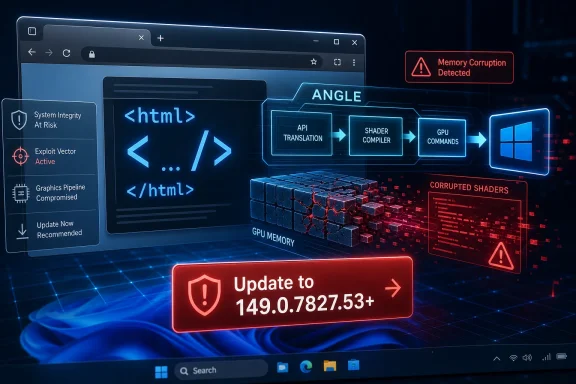
CVE-2026-10883 is described in the public record as a critical Chromium security issue involving ANGLE, the graphics translation layer Chrome uses to make web graphics APIs work consistently across platforms. NVD’s entry says Chrome versions before 149.0.7827.53 are affected, and CISA’s ADP scoring places the flaw at 8.8 under CVSS 3.1, with network attack vector, low complexity, no privileges required, and user interaction required.
That “user interaction” phrase should not comfort anyone too much. In browser vulnerability language, it usually means a victim must open or visit malicious content, not that they must click through a complicated chain of warnings. The web’s entire business model is built around fetching active content from remote parties, which is why browser bugs are always closer to the front line than their desktop-app packaging suggests.
There is also a small but telling inconsistency in the public wording. The user-facing headline says “Out of bounds write in ANGLE,” while the NVD description says “Type Confusion in ANGLE.” Both point toward memory safety failure and possible heap corruption, but they are not the same class of bug in the tidy taxonomy security teams prefer. That mismatch is not unusual in the first days of a browser CVE, when records are assembled from vendor advisories, issue tracker summaries, and third-party enrichment, but it matters for defenders trying to classify risk.
The practical takeaway is that the exact label matters less than the exploitation shape. A crafted HTML page reaches a graphics-adjacent browser component, memory is corrupted, and the vendor rated the issue critical. That is enough to move this from “watch the next monthly cycle” into “verify rollout.”
On Windows, that abstraction is especially important. A web page can use APIs such as WebGL, while the browser and its graphics stack translate those requests into calls that make sense for the operating system, driver model, and GPU. This is good engineering and a major reason browser-based applications are no longer toys. It is also why graphics code has become a recurring place for serious security bugs.
The old mental model of a browser vulnerability was JavaScript engine first, everything else second. V8 bugs still matter, and they often dominate headlines because they are easy to explain: malicious script, memory corruption, code execution. But the modern browser is an operating system in miniature, with parsers, codecs, PDF handlers, USB and Bluetooth interfaces, font stacks, sandbox brokers, AI features, password managers, and GPU pipelines.
ANGLE sits in that latter world. It is not where most users think “the web” lives, but it is exactly where untrusted web content can become complicated machine-level behavior. Whenever a browser turns declarative web content into low-level graphics work, it has to validate assumptions aggressively. A type confusion or out-of-bounds write in that path means those assumptions failed somewhere.
Security teams should resist both bad instincts. The first bad instinct is panic: treating every critical Chrome CVE as if compromise is already confirmed across the fleet. The second is complacency: assuming that because there is no known exploitation, the bug can wait until the next maintenance window. Browser patching lives in the uncomfortable middle, where a bug can move from patched advisory to exploit kit interest quickly once enough information leaks out.
Google’s usual practice is to restrict access to bug details until most users have received the fix. That buys time, but it is not a permanent shield. Attackers can diff patched and unpatched Chromium source, watch crash reports, mine issue trackers once permissions change, and test proof-of-concept ideas against older binaries. The public CVE entry does not need to contain a recipe for the window of risk to be real.
For administrators, the right posture is not “drop everything and rebuild the network.” It is “close the browser gap before the attacker economics improve.” Chrome’s auto-update mechanism helps consumers, but enterprises with update controls, VDI pools, kiosk systems, change rings, and offline images can easily lag behind the public fix.
That version nuance matters because browser update pages often show slightly different patch numbers by platform. Windows and Mac can receive paired build numbers, while Linux can land on a neighboring build string. The safe administrative habit is not to memorize one exact string for every platform, but to verify that deployed browsers are at or beyond the vendor’s fixed release for that channel.
Extended Stable deserves separate attention. Many enterprises use Extended Stable to reduce browser churn, which is reasonable, but security fixes still have to land promptly. The promise of fewer feature changes should never become an excuse for slower security hygiene, especially where web content is the attack delivery mechanism.
Managed Chrome environments should check policy before assuming automatic updates worked. Update suppression, bandwidth controls, maintenance windows, disabled background services, stale golden images, and user sessions that never restart Chrome can all leave a nominally “auto-updating” fleet stranded below the fix.
CVE-2026-10883 is listed against Google Chrome in the NVD record, not every Chromium-derived product by name. That distinction is important because downstream vendors apply Chromium patches on their own schedules and ship their own version numbers. But the architectural lesson is unavoidable: when a vulnerability sits in Chromium graphics code, Windows administrators should think in terms of the Chromium estate, not merely the Chrome installer.
Microsoft Edge is the most obvious downstream concern for Windows environments. Edge is integrated into many enterprise baselines, managed through Microsoft policies, and updated through Microsoft’s own channels. Even when Microsoft’s advisory trail lags Google’s public Chrome post or presents the fixes under aggregated Chromium security language, the operational question is still whether Edge has incorporated the relevant Chromium patch set.
Then there are Electron applications. They are not all vulnerable simply because Chrome was vulnerable; exploitability depends on the embedded Chromium version, exposed APIs, sandboxing, and how the application loads remote content. But the broader maintenance burden is real. Enterprises increasingly run dozens of Chromium-derived surfaces without having a clean inventory of them.
That is not a scandal; it is how the vulnerability disclosure machine often works. Vendor advisories land first, CVE records are populated, NVD enrichment follows, CPE configurations are added, and scanners ingest the result at different speeds. In the interim, defenders see partial metadata and have to make decisions anyway.
The CPE configuration is also revealing. The record ties vulnerable Chrome versions to Windows, Linux, and macOS platform CPEs. That helps scanners decide whether a detected Chrome installation on a given OS should be flagged, but it can also produce confusion when software inventory is incomplete or when a scanner expects a cleaner application-only mapping. The “Are we missing a CPE?” prompt on NVD pages is a quiet admission that the official taxonomy often trails reality.
A mature vulnerability process treats NVD as one input, not the source of truth. For a fast-moving browser issue, the vendor release note, installed build inventory, update telemetry, and endpoint management state are more actionable than waiting for every enrichment field to settle.
Modern browsers are packed with mitigations designed to turn memory errors into crashes instead of compromises. Site isolation, sandboxing, control-flow protections, memory allocators, process separation, and compiler hardening all raise the bar. But these defenses do not make memory corruption boring. They make exploitation harder, more expensive, and more dependent on chaining bugs together.
That is why a critical rating still matters even when user interaction is required and no public exploitation is confirmed. A single bug in ANGLE may not be enough to escape the browser sandbox or take over a Windows machine. But attackers rarely object to having one strong primitive in a chain. Browser exploitation is often about assembling pieces: renderer compromise, sandbox escape, privilege escalation, persistence, and payload delivery.
For ordinary users, this is not a call to disable hardware acceleration in a panic. Disabling acceleration can break sites, degrade performance, and is not a substitute for patching. For high-risk users or tightly controlled environments, reducing exposure to untrusted graphics-heavy content may be part of a temporary posture, but the real fix is the fixed build.
Chrome’s update model is designed to reduce that friction, but enterprises often reintroduce friction intentionally. They pin versions, stage rollouts, test extensions, delay restarts, and route updates through software distribution systems. Those controls exist for good reasons. The risk is that a control designed to prevent disruption becomes a mechanism for preserving vulnerable code.
CVE-2026-10883 is the kind of bug that should pressure those policies. If an organization cannot move a browser graphics critical within days, it should at least know why, who approved the delay, and which compensating controls are in place. “We will catch it in the next monthly bundle” is not a strategy for a remotely reachable browser memory corruption flaw.
There is also a telemetry problem. Many dashboards show that an update package was deployed, not that the browser process restarted into the patched version. Chrome can download an update and remain vulnerable until the running process exits. On shared Windows machines, VDI sessions, and always-on desktops, that distinction can stretch exposure longer than patch compliance reports suggest.
But the exceptions matter. Some users disable updates to avoid interface changes. Some run portable builds or old enterprise packages. Some live on machines where Chrome is not the only Chromium surface. Some use Chrome rarely, assume Edge is their “real” browser, and forget that stale Chrome remains installed and callable by links, apps, or file associations.
Windows users should also remember that “I use Edge” does not automatically answer the question. Edge has its own update channel and versioning. If Chrome is installed, update Chrome. If Edge is installed, update Edge. If Brave or another Chromium browser is installed, update that too. The shared engine ecosystem rewards completeness.
The best consumer security practice is not heroic. It is keeping the browser current, restarting it when prompted, and avoiding the temptation to sit on a familiar build because a new version changed a menu or moved a button.
Vendor severity and CVSS severity are not synonyms. Google’s “Critical” reflects Chromium’s internal security severity model and exploit consequence within the browser project. CVSS 8.8 maps to “High” under the CVSS 3.1 scale, based on the vector values available to CISA-ADP. Neither number is fake; they are measuring through different frameworks.
The right internal classification for most organizations should be urgent browser security update, not a philosophical debate over labels. If a browser flaw is remotely reachable through crafted web content, requires no authentication, and can corrupt heap memory, the organization should patch quickly even if the CVSS string does not cross 9.0.
Security teams should also watch for stale duplicate findings. Chrome’s version may be fixed, while old installer caches, dormant user profiles, unpacked application directories, or software inventory artifacts continue to trigger alerts. That cleanup work is dull, but it prevents real browser risk from being buried under zombie findings.
Type confusion can lead to out-of-bounds access. Out-of-bounds writes can be the observable consequence of a deeper type confusion flaw. A vulnerability may be reported one way by a researcher, categorized another way by a vendor, and normalized differently by a database. The exact internal root cause may remain hidden until most users have updated.
That uncertainty should not delay remediation. If anything, it should accelerate it. Public ambiguity means defenders have less reason to build narrow assumptions about exploitability. A flaw in ANGLE that can be reached by crafted HTML and produce heap corruption belongs in the rapid browser patch lane.
There is an opposite danger, too: over-reading the public text. The record does not by itself prove sandbox escape, system-level code execution, or active exploitation. A sober reading is stronger than a sensational one. The bug is serious enough without inventing facts.
The browser sandbox has become one of the great defensive engineering achievements of the last two decades. But it is also a containment vessel for a staggering amount of risky code. Every new capability that lets a web page do more interesting work also gives browser engineers another path to secure, fuzz, validate, and patch.
Graphics is a particularly hard category because performance pressure is relentless. Slow graphics code is visible immediately. Users notice dropped frames, janky scrolling, stuttering video, and laggy canvases. Security checks that appear cheap in design can become expensive at web scale, and the code must handle a chaotic range of drivers, hardware, and platform behavior.
This does not mean the web should retreat from rich graphics. It means the security model has to assume that graphics translation layers are hostile-input parsers in practice. ANGLE is not merely plumbing. It is part of the browser’s attack surface.
This is the uncomfortable rhythm of browser security. Vendors patch fast, but the internet is uneven. Consumer machines update quietly; enterprise rings roll more slowly; embedded environments lag; secondary browsers are forgotten; offline images fossilize. A bug can be “fixed” in the vendor sense while remaining exploitable in the installed-base sense for weeks or months.
Administrators should therefore measure this CVE by exposure duration, not merely patch availability. How many endpoints still run a vulnerable build? How many cannot update automatically? How many require a browser restart? How many are in privileged browsing contexts, such as administrator workstations, jump boxes, developer machines, finance systems, or help desk desktops?
The answer will vary by organization, but the method should not. Treat browser versions as live security state, not as static software inventory. If the browser is a front door, update latency is the time that door stays unlocked after the locksmith has already delivered the new key.
 The Bug Is in the Graphics Plumbing, Not the Address Bar
CVE-2026-10883 is described in the public record as a critical Chromium security issue involving ANGLE, the graphics translation layer Chrome uses to make web graphics APIs work consistently across platforms. NVD’s entry says Chrome versions before 149.0.7827.53 are affected, and CISA’s ADP scoring places the flaw at 8.8 under CVSS 3.1, with network attack vector, low complexity, no privileges required, and user interaction required.That “user interaction” phrase should not comfort anyone too much. In browser vulnerability language, it usually means a victim must open or visit malicious content, not that they must click through a complicated chain of warnings. The web’s entire business model is built around fetching active content from remote parties, which is why browser bugs are always closer to the front line than their desktop-app packaging suggests.
There is also a small but telling inconsistency in the public wording. The user-facing headline says “Out of bounds write in ANGLE,” while the NVD description says “Type Confusion in ANGLE.” Both point toward memory safety failure and possible heap corruption, but they are not the same class of bug in the tidy taxonomy security teams prefer. That mismatch is not unusual in the first days of a browser CVE, when records are assembled from vendor advisories, issue tracker summaries, and third-party enrichment, but it matters for defenders trying to classify risk.
The practical takeaway is that the exact label matters less than the exploitation shape. A crafted HTML page reaches a graphics-adjacent browser component, memory is corrupted, and the vendor rated the issue critical. That is enough to move this from “watch the next monthly cycle” into “verify rollout.”
ANGLE Turns Web Graphics Into Attack Surface
ANGLE exists because the web won. Sites, apps, games, maps, productivity tools, video editors, design suites, and AI dashboards all expect a browser to expose hardware-accelerated graphics without caring whether the host system speaks Direct3D, OpenGL, Vulkan, Metal, or something else. ANGLE is one of the compatibility layers that makes that illusion hold.On Windows, that abstraction is especially important. A web page can use APIs such as WebGL, while the browser and its graphics stack translate those requests into calls that make sense for the operating system, driver model, and GPU. This is good engineering and a major reason browser-based applications are no longer toys. It is also why graphics code has become a recurring place for serious security bugs.
The old mental model of a browser vulnerability was JavaScript engine first, everything else second. V8 bugs still matter, and they often dominate headlines because they are easy to explain: malicious script, memory corruption, code execution. But the modern browser is an operating system in miniature, with parsers, codecs, PDF handlers, USB and Bluetooth interfaces, font stacks, sandbox brokers, AI features, password managers, and GPU pipelines.
ANGLE sits in that latter world. It is not where most users think “the web” lives, but it is exactly where untrusted web content can become complicated machine-level behavior. Whenever a browser turns declarative web content into low-level graphics work, it has to validate assumptions aggressively. A type confusion or out-of-bounds write in that path means those assumptions failed somewhere.
Critical Does Not Always Mean Known Exploitation
One of the most important details here is what the advisory does not appear to say: there is no public statement in the supplied NVD detail that CVE-2026-10883 is being exploited in the wild. That distinction matters. A critical Chrome bug without known exploitation is still urgent, but it is not the same operational event as an actively exploited zero-day.Security teams should resist both bad instincts. The first bad instinct is panic: treating every critical Chrome CVE as if compromise is already confirmed across the fleet. The second is complacency: assuming that because there is no known exploitation, the bug can wait until the next maintenance window. Browser patching lives in the uncomfortable middle, where a bug can move from patched advisory to exploit kit interest quickly once enough information leaks out.
Google’s usual practice is to restrict access to bug details until most users have received the fix. That buys time, but it is not a permanent shield. Attackers can diff patched and unpatched Chromium source, watch crash reports, mine issue trackers once permissions change, and test proof-of-concept ideas against older binaries. The public CVE entry does not need to contain a recipe for the window of risk to be real.
For administrators, the right posture is not “drop everything and rebuild the network.” It is “close the browser gap before the attacker economics improve.” Chrome’s auto-update mechanism helps consumers, but enterprises with update controls, VDI pools, kiosk systems, change rings, and offline images can easily lag behind the public fix.
The Version Number Is the Boundary Line
The most concrete line in this story is Chrome 149.0.7827.53. NVD lists Google Chrome versions before that build as vulnerable, while Google’s stable channel update for desktop moved Windows and macOS users to the 149.0.7827.53/.54 line and Linux to the corresponding fixed build. In plain terms, any Chrome desktop installation below the fixed version should be treated as exposed.That version nuance matters because browser update pages often show slightly different patch numbers by platform. Windows and Mac can receive paired build numbers, while Linux can land on a neighboring build string. The safe administrative habit is not to memorize one exact string for every platform, but to verify that deployed browsers are at or beyond the vendor’s fixed release for that channel.
Extended Stable deserves separate attention. Many enterprises use Extended Stable to reduce browser churn, which is reasonable, but security fixes still have to land promptly. The promise of fewer feature changes should never become an excuse for slower security hygiene, especially where web content is the attack delivery mechanism.
Managed Chrome environments should check policy before assuming automatic updates worked. Update suppression, bandwidth controls, maintenance windows, disabled background services, stale golden images, and user sessions that never restart Chrome can all leave a nominally “auto-updating” fleet stranded below the fix.
Windows Shops Have a Chromium Problem Whether They Use Chrome or Not
This is WindowsForum.com, so the obvious question is what this means for Windows users beyond Google Chrome itself. The answer is that Chromium has become a shared dependency of desktop life, even when the icon says something else. Microsoft Edge, Brave, Vivaldi, Opera, Electron apps, embedded web views, and application-specific Chromium runtimes all complicate the neat idea that patching “the browser” is one action.CVE-2026-10883 is listed against Google Chrome in the NVD record, not every Chromium-derived product by name. That distinction is important because downstream vendors apply Chromium patches on their own schedules and ship their own version numbers. But the architectural lesson is unavoidable: when a vulnerability sits in Chromium graphics code, Windows administrators should think in terms of the Chromium estate, not merely the Chrome installer.
Microsoft Edge is the most obvious downstream concern for Windows environments. Edge is integrated into many enterprise baselines, managed through Microsoft policies, and updated through Microsoft’s own channels. Even when Microsoft’s advisory trail lags Google’s public Chrome post or presents the fixes under aggregated Chromium security language, the operational question is still whether Edge has incorporated the relevant Chromium patch set.
Then there are Electron applications. They are not all vulnerable simply because Chrome was vulnerable; exploitability depends on the embedded Chromium version, exposed APIs, sandboxing, and how the application loads remote content. But the broader maintenance burden is real. Enterprises increasingly run dozens of Chromium-derived surfaces without having a clean inventory of them.
The NVD Record Shows the Limits of Vulnerability Databases
The NVD entry for CVE-2026-10883 is useful, but it also shows why vulnerability management cannot be outsourced entirely to a database row. At the time represented in the supplied data, NVD had not provided its own CVSS 4.0 or 3.x assessment, while CISA-ADP had contributed a CVSS 3.1 score of 8.8. The weakness mapping points to CWE-787, out-of-bounds write, while the prose description says type confusion.That is not a scandal; it is how the vulnerability disclosure machine often works. Vendor advisories land first, CVE records are populated, NVD enrichment follows, CPE configurations are added, and scanners ingest the result at different speeds. In the interim, defenders see partial metadata and have to make decisions anyway.
The CPE configuration is also revealing. The record ties vulnerable Chrome versions to Windows, Linux, and macOS platform CPEs. That helps scanners decide whether a detected Chrome installation on a given OS should be flagged, but it can also produce confusion when software inventory is incomplete or when a scanner expects a cleaner application-only mapping. The “Are we missing a CPE?” prompt on NVD pages is a quiet admission that the official taxonomy often trails reality.
A mature vulnerability process treats NVD as one input, not the source of truth. For a fast-moving browser issue, the vendor release note, installed build inventory, update telemetry, and endpoint management state are more actionable than waiting for every enrichment field to settle.
Heap Corruption Is Still the Browser Attacker’s Favorite Doorway
The phrase “heap corruption” is easy to skim past because it appears in so many CVEs. It deserves more attention. Heap corruption means the program’s memory management has gone wrong in a way that can potentially be shaped by an attacker, especially if the bug is reachable through carefully crafted input.Modern browsers are packed with mitigations designed to turn memory errors into crashes instead of compromises. Site isolation, sandboxing, control-flow protections, memory allocators, process separation, and compiler hardening all raise the bar. But these defenses do not make memory corruption boring. They make exploitation harder, more expensive, and more dependent on chaining bugs together.
That is why a critical rating still matters even when user interaction is required and no public exploitation is confirmed. A single bug in ANGLE may not be enough to escape the browser sandbox or take over a Windows machine. But attackers rarely object to having one strong primitive in a chain. Browser exploitation is often about assembling pieces: renderer compromise, sandbox escape, privilege escalation, persistence, and payload delivery.
For ordinary users, this is not a call to disable hardware acceleration in a panic. Disabling acceleration can break sites, degrade performance, and is not a substitute for patching. For high-risk users or tightly controlled environments, reducing exposure to untrusted graphics-heavy content may be part of a temporary posture, but the real fix is the fixed build.
The Enterprise Failure Mode Is Not Ignorance, It Drag
Most IT teams already know that browsers need rapid patching. The problem is not awareness; it is drag. Browser updates collide with application compatibility testing, regulated change windows, remote users, shared workstations, virtual desktops, and business units that treat every restart prompt as an outage.Chrome’s update model is designed to reduce that friction, but enterprises often reintroduce friction intentionally. They pin versions, stage rollouts, test extensions, delay restarts, and route updates through software distribution systems. Those controls exist for good reasons. The risk is that a control designed to prevent disruption becomes a mechanism for preserving vulnerable code.
CVE-2026-10883 is the kind of bug that should pressure those policies. If an organization cannot move a browser graphics critical within days, it should at least know why, who approved the delay, and which compensating controls are in place. “We will catch it in the next monthly bundle” is not a strategy for a remotely reachable browser memory corruption flaw.
There is also a telemetry problem. Many dashboards show that an update package was deployed, not that the browser process restarted into the patched version. Chrome can download an update and remain vulnerable until the running process exits. On shared Windows machines, VDI sessions, and always-on desktops, that distinction can stretch exposure longer than patch compliance reports suggest.
The Consumer Fix Is Easy, Except When It Isn’t
For home users, the advice is almost boring: open Chrome’s About page, let it update, and relaunch. The browser’s built-in updater is one of the stronger pieces of consumer security infrastructure in the software world. Most people will be protected without reading a CVE entry or knowing what ANGLE is.But the exceptions matter. Some users disable updates to avoid interface changes. Some run portable builds or old enterprise packages. Some live on machines where Chrome is not the only Chromium surface. Some use Chrome rarely, assume Edge is their “real” browser, and forget that stale Chrome remains installed and callable by links, apps, or file associations.
Windows users should also remember that “I use Edge” does not automatically answer the question. Edge has its own update channel and versioning. If Chrome is installed, update Chrome. If Edge is installed, update Edge. If Brave or another Chromium browser is installed, update that too. The shared engine ecosystem rewards completeness.
The best consumer security practice is not heroic. It is keeping the browser current, restarting it when prompted, and avoiding the temptation to sit on a familiar build because a new version changed a menu or moved a button.
Scanner Noise Will Arrive Before Clarity
Expect CVE-2026-10883 to appear in vulnerability scanners, endpoint dashboards, software composition inventories, and compliance exports with varying precision. Some tools will flag Chrome below 149.0.7827.53 cleanly. Others may flag platform combinations awkwardly. Some may treat CISA’s 8.8 score as “High,” while Google’s Chromium severity says “Critical.” That discrepancy can confuse prioritization meetings if nobody explains the difference.Vendor severity and CVSS severity are not synonyms. Google’s “Critical” reflects Chromium’s internal security severity model and exploit consequence within the browser project. CVSS 8.8 maps to “High” under the CVSS 3.1 scale, based on the vector values available to CISA-ADP. Neither number is fake; they are measuring through different frameworks.
The right internal classification for most organizations should be urgent browser security update, not a philosophical debate over labels. If a browser flaw is remotely reachable through crafted web content, requires no authentication, and can corrupt heap memory, the organization should patch quickly even if the CVSS string does not cross 9.0.
Security teams should also watch for stale duplicate findings. Chrome’s version may be fixed, while old installer caches, dormant user profiles, unpacked application directories, or software inventory artifacts continue to trigger alerts. That cleanup work is dull, but it prevents real browser risk from being buried under zombie findings.
The Discrepancy in the Description Is a Signal, Not an Excuse
The “out-of-bounds write” versus “type confusion” wording is worth pausing on because it reflects a broader problem in public vulnerability consumption. Defenders want crisp labels: one CVE, one component, one weakness, one score, one patch. Modern software supply chains rarely oblige.Type confusion can lead to out-of-bounds access. Out-of-bounds writes can be the observable consequence of a deeper type confusion flaw. A vulnerability may be reported one way by a researcher, categorized another way by a vendor, and normalized differently by a database. The exact internal root cause may remain hidden until most users have updated.
That uncertainty should not delay remediation. If anything, it should accelerate it. Public ambiguity means defenders have less reason to build narrow assumptions about exploitability. A flaw in ANGLE that can be reached by crafted HTML and produce heap corruption belongs in the rapid browser patch lane.
There is an opposite danger, too: over-reading the public text. The record does not by itself prove sandbox escape, system-level code execution, or active exploitation. A sober reading is stronger than a sensational one. The bug is serious enough without inventing facts.
The Web Platform Keeps Buying Capability With Complexity
CVE-2026-10883 is one data point in a larger bargain the industry keeps making. Users want native-like applications in the browser. Developers want portable graphics, video, conferencing, gaming, AI interfaces, and creative tools. Vendors want performance that keeps users inside their ecosystem. The price is complexity, and complexity breeds memory safety bugs.The browser sandbox has become one of the great defensive engineering achievements of the last two decades. But it is also a containment vessel for a staggering amount of risky code. Every new capability that lets a web page do more interesting work also gives browser engineers another path to secure, fuzz, validate, and patch.
Graphics is a particularly hard category because performance pressure is relentless. Slow graphics code is visible immediately. Users notice dropped frames, janky scrolling, stuttering video, and laggy canvases. Security checks that appear cheap in design can become expensive at web scale, and the code must handle a chaotic range of drivers, hardware, and platform behavior.
This does not mean the web should retreat from rich graphics. It means the security model has to assume that graphics translation layers are hostile-input parsers in practice. ANGLE is not merely plumbing. It is part of the browser’s attack surface.
The Patch Window Is Where the Real Risk Lives
The disclosure date matters less than the deployment curve. Google’s fix is available, NVD’s record is public, scanners will light up, and attackers can infer where to look. The danger now is the population of machines that remain below the fixed build while enough public metadata exists to guide research.This is the uncomfortable rhythm of browser security. Vendors patch fast, but the internet is uneven. Consumer machines update quietly; enterprise rings roll more slowly; embedded environments lag; secondary browsers are forgotten; offline images fossilize. A bug can be “fixed” in the vendor sense while remaining exploitable in the installed-base sense for weeks or months.
Administrators should therefore measure this CVE by exposure duration, not merely patch availability. How many endpoints still run a vulnerable build? How many cannot update automatically? How many require a browser restart? How many are in privileged browsing contexts, such as administrator workstations, jump boxes, developer machines, finance systems, or help desk desktops?
The answer will vary by organization, but the method should not. Treat browser versions as live security state, not as static software inventory. If the browser is a front door, update latency is the time that door stays unlocked after the locksmith has already delivered the new key.
The ANGLE Fix Leaves a Short Checklist for Windows Defenders
CVE-2026-10883 is not a sprawling incident, but it is a useful test of whether a Windows environment handles browser risk with the urgency it deserves. The fix is straightforward; the ecosystem around it is not. The organizations that do well here will be the ones that can see every Chromium surface, force timely restarts, and distinguish real exposure from scanner residue.- Chrome desktop installations should be updated to 149.0.7827.53 or later on the relevant stable channel, with restart completion verified rather than assumed.
- Security teams should treat the public “Critical” Chromium severity and the CVSS 8.8 score as compatible signals of urgency, not as a contradiction that needs to be debated before patching.
- Managed Windows environments should check Edge and other Chromium-based browsers separately, because Google’s Chrome fix does not automatically prove every downstream browser is already remediated.
- Vulnerability dashboards should be reviewed for stale detections caused by old binaries, caches, golden images, or machines that downloaded the update but never relaunched the browser.
- Temporary mitigations such as restricting untrusted browsing or tightening high-risk user workflows can reduce exposure, but they should not replace installing the fixed browser build.
References
- Primary source: NVD / Chromium
Published: 2026-06-09T07:00:01-07:00
NVD - CVE-2026-10883
 nvd.nist.gov
- Security advisory: MSRC
Published: 2026-06-09T07:00:01-07:00
Original feed URL
Security Update Guide - Microsoft Security Response Center
 msrc.microsoft.com
- Related coverage: vulnerability.circl.lu
Vulnerability-Lookup
Vulnerability-Lookup - Fast vulnerability lookup correlation from different sources.vulnerability.circl.lu
