

Google Chrome on Windows before version 149.0.7827.115 is affected by CVE-2026-12013, a high-severity use-after-free flaw in the browser’s Media component disclosed on June 11, 2026, that could let a remote attacker trigger heap corruption through a crafted HTML page. The short operational answer is simple: update Chrome. The more interesting story is that this CVE shows how modern browser risk is increasingly platform-specific, memory-safety-specific, and automation-hostile in exactly the ways enterprise patch teams dislike. It also exposes a quieter but important vulnerability-management question: when a Chrome bug is “Windows only,” the CPE record is not decoration — it is the difference between a targeted alert and another noisy browser fire drill.
CVE-2026-12013 is not the kind of vulnerability disclosure that arrives with a satisfying technical autopsy. The public record says “use after free in Media,” “Google Chrome on Windows,” “prior to 149.0.7827.115,” and “crafted HTML page.” That is enough for administrators to act, but not enough for defenders to know whether the bug sits in playback state handling, media pipeline teardown, codec interaction, device capture plumbing, or some Windows-specific integration layer.
That ambiguity is normal for Chrome security fixes. Google often restricts bug details until a majority of users have received the update, particularly when a working exploit might be derived from the patch. For a browser with billions of users and a large downstream ecosystem, restraint is not merely vendor habit; it is part of the patch distribution model.
The important point is that the vulnerability does not require local access, authentication, or an already-compromised machine. The attacker’s entry point is a web page, and the user interaction requirement is the everyday act of visiting or being directed to content. That is why high-severity browser bugs deserve urgency even when they are not described as exploited in the wild.
The Windows qualifier matters. Chrome is cross-platform, but its attack surface is not identical across Windows, macOS, Linux, Android, and ChromeOS. Media handling in particular is a layer cake of browser code, sandbox boundaries, GPU acceleration, codecs, drivers, operating-system APIs, and hardware-dependent behavior. A “Chrome bug” can therefore become a “Chrome-on-Windows bug” without being a contradiction.
That is why CVE-2026-12013 is filed under CWE-416, the long-running category for use-after-free flaws. The risk is not that a video fails to play. The risk is that web content can manipulate browser state at the wrong moment and potentially turn a memory-management mistake into code execution or another form of meaningful compromise.
Chrome’s architecture is designed to make that hard. Site isolation, renderer sandboxing, process separation, heap hardening, and exploit mitigations all exist to ensure that one bug does not automatically become full system control. But “hard” is not “impossible,” and high-severity ratings exist because these bugs can become the first link in a chain.
The Media component also deserves attention because it is one of the browser’s most complicated surfaces. Media code must handle formats, buffers, streams, permissions, timing, decoding, acceleration, and device interfaces while processing content supplied by the open web. Complexity is not guilt, but in vulnerability management it is often where the interesting failures live.
That distinction matters in Windows environments where application control, email filtering, and endpoint security policies are often stronger around downloaded files than around browser-rendered content. Users are trained not to run strange attachments, but they are still paid to open links. Attackers know that, and browser vulnerabilities convert ordinary browsing into a potential execution path.
The user-interaction requirement should not be misread as comfort. In CVSS terms, “UI:R” can make a vulnerability sound less severe than a wormable network service flaw, but browser exploitation lives inside user interaction by design. A phishing message, a compromised legitimate site, an ad chain, a forum post, or a targeted link can satisfy that condition.
For Windows administrators, the practical question is not whether every user will be targeted. It is whether vulnerable Chrome builds remain in circulation after the fixed version is available. Browser patch latency is now a measurable exposure window, not a vague hygiene issue.
Chrome usually updates itself, but enterprise reality is messier. Managed devices may defer updates, freeze browser versions for app compatibility, rely on golden images that lag behind, or run in virtual desktop pools that revert after reboot. Kiosk systems and shared machines can also sit outside the happy path of consumer auto-update behavior.
The fastest validation path for an individual user remains Chrome’s About page, which triggers an update check and then asks for a relaunch. For administrators, the better answer is inventory. Chrome version reporting through endpoint management, software asset tools, vulnerability scanners, or browser management policies should be treated as the source of truth.
The relaunch requirement is a perennial weak spot. Chrome can download an update and still leave the vulnerable process running until the browser restarts. In a managed environment, that means “update deployed” and “risk removed” are not always the same event.
In plain English, the record is saying that the affected product is Chrome, but the affected condition is Chrome running on Windows. That is different from listing Chrome alone, which would imply that all platforms are affected unless otherwise constrained. It is also different from listing Windows alone, which would be wrong because the vulnerable code is not a Windows operating-system component.
So, are we missing a CPE? Based on the public NVD configuration described, not necessarily. The Chrome application CPE and the Windows operating-system CPE together express the known affected configuration. If the question is whether NVD should show a more granular Windows version range, that is a different matter, and the answer is usually no unless the vendor identifies only certain Windows releases as affected.
The confusing part is that vulnerability scanners and asset platforms do not all interpret CPE logic with equal elegance. Some tools flatten platform constraints, some overmatch browser CPEs across operating systems, and some produce false positives when the OS condition is ignored. The CPE itself may be technically adequate while downstream tooling still makes a mess of it.
Windows remains the default client platform for many enterprises, and Chrome remains one of the most widely deployed applications on those systems. The combination creates a broad, attractive target surface. A platform-specific browser bug can therefore have more real-world impact than a theoretically cross-platform flaw in a niche application.
The Windows qualifier may also hint at the bug’s shape. Media handling can cross into Windows-specific code paths for hardware acceleration, media foundation components, graphics drivers, capture devices, or protected content handling. Public advisories rarely spell that out immediately, but defenders should remember that “browser” does not mean “pure browser code.”
This is one reason browser hardening is no longer just a browser-team problem. GPU driver updates, OS media stack changes, endpoint isolation, browser policy, and exploit protection all intersect. The modern browser is an operating environment inside the operating system.
That creates an uncomfortable lag problem. Google can patch Chrome, but organizations often run multiple Chromium-based browsers and WebView-dependent applications. A clean Chrome inventory does not necessarily mean the Chromium attack surface has disappeared.
For WindowsForum readers, Microsoft Edge is the obvious next question. Edge is Chromium-based, but its update cadence, version numbering, enterprise controls, and release notes are Microsoft’s. Administrators should not assume that a Chrome CVE automatically maps one-to-one to Edge exposure, but they should check Edge’s security release status whenever a serious Chromium issue lands.
The same logic applies to Electron applications. Many desktop apps bundle Chromium in ways that do not update on Chrome’s schedule. A vulnerability in a shared browser component can therefore become a long tail of application exposure, even after Chrome itself is patched.
The difference matters. Security teams often oscillate between panic and fatigue when browser CVEs arrive in clusters. A high CVSS score should move the issue into a fast patch lane, but it should not lead to invented details about exploitation, malware campaigns, or compromise indicators that are not in the public record.
At the time reflected in the available disclosure, CVE-2026-12013 is not the same story as an actively exploited zero-day unless new reporting says otherwise. Nearby Chrome advisories may involve exploited bugs, and Chrome’s June 2026 release cadence has been busy, but CVE numbers are not interchangeable. Precision is part of defense.
The correct response is disciplined urgency. Patch the affected builds, verify the relaunch, watch for vendor follow-up, and avoid storytelling that outruns evidence.
Chrome’s auto-update model is powerful on unmanaged consumer machines, but enterprise management often adds friction. Policies can delay updates to maintain compatibility. Users can postpone relaunches. Devices can sit offline. Nonpersistent desktops can revert. Security teams may see a fixed installer in the software repository and assume victory while old browser processes remain alive.
This is why endpoint telemetry matters more than patch announcements. A useful report should show installed version, running version, last restart, update channel, OS, and policy state. If the environment cannot answer those questions quickly for Chrome on Windows, CVE-2026-12013 is not just a patch task; it is an asset-visibility test.
The good news is that browser patching is one of the areas where automation can work well. The bad news is that “usually automatic” can become an excuse for not checking. For high-severity browser flaws, trust auto-update only after telemetry proves it has finished the job.
The web has also made media ubiquitous. Video previews, conferencing, embedded players, animations, advertising, live streams, screen sharing, and device capture are routine. A component that once seemed optional now sits in the path of ordinary browsing and business workflows.
Security architecture has adapted, but not eliminated the risk. Sandboxes reduce blast radius. Site isolation makes cross-site attacks harder. Memory allocators and compiler mitigations raise exploitation cost. Yet the volume and complexity of browser media code mean the bug class keeps returning.
For defenders, the lesson is not to disable the modern web. It is to treat browsers as high-risk, high-value runtime platforms. They deserve the same inventory, update enforcement, and configuration discipline that organizations already apply to operating systems.
This is especially important in mixed environments where Linux servers, macOS laptops, Windows workstations, and VDI images all feed the same vulnerability dashboard. A single CVE can have different applicability across those populations. Treating every CVE as a flat product-version match creates noisy reports that burn analyst time and erode trust.
Administrators should examine how their tools represent CVE-2026-12013. The desired logic is straightforward: vulnerable Chrome version plus Windows platform equals affected. Chrome on non-Windows platforms should not be flagged for this specific CVE unless the vendor or database later expands the affected set.
There is also a naming wrinkle. CPE names are standardized identifiers, not marketing names, and they can look odd compared with product branding. The presence of
The right approach is to check vendor-specific advisories and installed versions rather than assuming equivalence. Edge may receive the upstream fix on its own schedule and with its own version number. WebView2 Runtime updates may be managed differently again, depending on enterprise policy and application packaging.
This is not an argument for panic across the entire Windows stack. It is an argument for mapping the browser engine footprint. Many organizations have better visibility into Office than into embedded Chromium runtimes, even though both process untrusted content in day-to-day work.
CVE-2026-12013 is Chrome-on-Windows as recorded, but it should still prompt a broader Chromium hygiene check. The cost of looking is low, and the long tail of embedded browser components has surprised administrators before.
That is precisely why it should move quickly. Human interaction is the weakest dependency in the exploit chain because attackers are good at manufacturing it. Spear-phishing, malvertising, watering-hole pages, compromised CMS installs, and injected scripts all exist to make the user’s click feel ordinary.
Heap corruption also changes the stakes. Even when public language says “potentially exploit,” security teams should hear “memory corruption in a remotely reachable parser or handler.” That is not the kind of bug to leave for the next monthly maintenance window.
For home users, the advice is direct: open Chrome’s update page, install the update, and relaunch. For enterprises, the advice is only slightly longer: enforce the update, verify the running version, and check for stragglers.
That fourth component is not trivia. In Chrome’s versioning scheme, the difference between 149.0.7827.102 and 149.0.7827.115 can be the difference between vulnerable and fixed. Major-version compliance is not enough.
This is a recurring problem in software inventory. Dashboards that roll up to “Chrome 149” may look clean while hiding vulnerable patch levels. Reports that truncate version strings for readability can erase the very information needed for remediation.
The fix is procedural as much as technical. Browser vulnerability reports should preserve full version strings, update channels, and operating-system context. Anything less turns a precise advisory into a guessing exercise.
The CPE configuration described by NVD appears to model the affected condition with Chrome plus Windows rather than Chrome alone. That is the right shape for a Windows-specific application vulnerability. If a tool is still asking “are we missing a CPE,” the better question may be whether the tool is correctly parsing compound CPE logic.
There is no need to overstate what is public. The restricted Chromium issue means the technical details are not fully visible. The advisory language does not, by itself, prove active exploitation. The vulnerability is still serious enough to demand immediate patch verification.
That balance — urgent action without speculative drama — is where browser vulnerability coverage should live.
For administrators, the work is not just pushing a package. It is proving that every vulnerable Windows endpoint has crossed the fixed-version threshold and that the running browser process has restarted. It is also checking that managed update policies are not holding back a security release.
Security teams should pay special attention to systems that commonly escape ordinary patch rhythms. Shared workstations, lab machines, kiosks, VDI pools, developer boxes, and offline laptops often become the residue of browser vulnerability exposure. They are also the systems that make a dashboard look 98 percent patched while the remaining 2 percent carries disproportionate risk.
The best organizations will use this CVE as a drill. Can they identify all Chrome-on-Windows installations? Can they distinguish installed from running versions? Can they avoid false positives on non-Windows Chrome? Can they tell whether Edge and WebView2 need separate action? Those answers matter beyond this one bug.
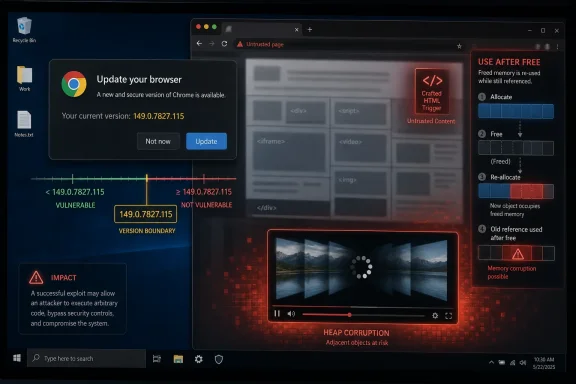 Chrome’s Latest Windows-Only Bug Is Small on Detail and Big on Signal
CVE-2026-12013 is not the kind of vulnerability disclosure that arrives with a satisfying technical autopsy. The public record says “use after free in Media,” “Google Chrome on Windows,” “prior to 149.0.7827.115,” and “crafted HTML page.” That is enough for administrators to act, but not enough for defenders to know whether the bug sits in playback state handling, media pipeline teardown, codec interaction, device capture plumbing, or some Windows-specific integration layer.That ambiguity is normal for Chrome security fixes. Google often restricts bug details until a majority of users have received the update, particularly when a working exploit might be derived from the patch. For a browser with billions of users and a large downstream ecosystem, restraint is not merely vendor habit; it is part of the patch distribution model.
The important point is that the vulnerability does not require local access, authentication, or an already-compromised machine. The attacker’s entry point is a web page, and the user interaction requirement is the everyday act of visiting or being directed to content. That is why high-severity browser bugs deserve urgency even when they are not described as exploited in the wild.
The Windows qualifier matters. Chrome is cross-platform, but its attack surface is not identical across Windows, macOS, Linux, Android, and ChromeOS. Media handling in particular is a layer cake of browser code, sandbox boundaries, GPU acceleration, codecs, drivers, operating-system APIs, and hardware-dependent behavior. A “Chrome bug” can therefore become a “Chrome-on-Windows bug” without being a contradiction.
The Phrase “Use After Free” Still Does Too Much Work
A use-after-free vulnerability is one of those security phrases that sounds almost quaint until it lands in a browser advisory. The bug class is old: software frees memory and later continues to use a reference to it. In a forgiving crash scenario, the browser falls over; in a worse scenario, an attacker shapes memory so the stale reference points somewhere useful.That is why CVE-2026-12013 is filed under CWE-416, the long-running category for use-after-free flaws. The risk is not that a video fails to play. The risk is that web content can manipulate browser state at the wrong moment and potentially turn a memory-management mistake into code execution or another form of meaningful compromise.
Chrome’s architecture is designed to make that hard. Site isolation, renderer sandboxing, process separation, heap hardening, and exploit mitigations all exist to ensure that one bug does not automatically become full system control. But “hard” is not “impossible,” and high-severity ratings exist because these bugs can become the first link in a chain.
The Media component also deserves attention because it is one of the browser’s most complicated surfaces. Media code must handle formats, buffers, streams, permissions, timing, decoding, acceleration, and device interfaces while processing content supplied by the open web. Complexity is not guilt, but in vulnerability management it is often where the interesting failures live.
The Crafted HTML Page Is the Oldest Browser Attack Story
The advisory’s phrase “crafted HTML page” may sound generic, but it is the classic browser threat model in its most compact form. A remote attacker does not need a malicious executable if the browser can be convinced to mis-handle content. The browser is the executable.That distinction matters in Windows environments where application control, email filtering, and endpoint security policies are often stronger around downloaded files than around browser-rendered content. Users are trained not to run strange attachments, but they are still paid to open links. Attackers know that, and browser vulnerabilities convert ordinary browsing into a potential execution path.
The user-interaction requirement should not be misread as comfort. In CVSS terms, “UI:R” can make a vulnerability sound less severe than a wormable network service flaw, but browser exploitation lives inside user interaction by design. A phishing message, a compromised legitimate site, an ad chain, a forum post, or a targeted link can satisfy that condition.
For Windows administrators, the practical question is not whether every user will be targeted. It is whether vulnerable Chrome builds remain in circulation after the fixed version is available. Browser patch latency is now a measurable exposure window, not a vague hygiene issue.
Version 149.0.7827.115 Is the Line Administrators Should Draw
The fixed Windows version called out for this CVE is Chrome 149.0.7827.115. Any Windows Chrome installation below that line belongs in the vulnerable bucket for CVE-2026-12013. Where fleets report 149.0.7827.114, 149.0.7827.102, or older 149 builds, the answer is not debate; it is remediation.Chrome usually updates itself, but enterprise reality is messier. Managed devices may defer updates, freeze browser versions for app compatibility, rely on golden images that lag behind, or run in virtual desktop pools that revert after reboot. Kiosk systems and shared machines can also sit outside the happy path of consumer auto-update behavior.
The fastest validation path for an individual user remains Chrome’s About page, which triggers an update check and then asks for a relaunch. For administrators, the better answer is inventory. Chrome version reporting through endpoint management, software asset tools, vulnerability scanners, or browser management policies should be treated as the source of truth.
The relaunch requirement is a perennial weak spot. Chrome can download an update and still leave the vulnerable process running until the browser restarts. In a managed environment, that means “update deployed” and “risk removed” are not always the same event.
The CPE Record Is Not a Bureaucratic Detail
The user’s question about whether a CPE is missing is exactly the right one. In the NVD record, the configuration is modeled as an AND relationship: vulnerable Google Chrome versions up to but excluding 149.0.7827.115, combined with Microsoft Windows. That structure is how NVD expresses a platform-specific application vulnerability.In plain English, the record is saying that the affected product is Chrome, but the affected condition is Chrome running on Windows. That is different from listing Chrome alone, which would imply that all platforms are affected unless otherwise constrained. It is also different from listing Windows alone, which would be wrong because the vulnerable code is not a Windows operating-system component.
So, are we missing a CPE? Based on the public NVD configuration described, not necessarily. The Chrome application CPE and the Windows operating-system CPE together express the known affected configuration. If the question is whether NVD should show a more granular Windows version range, that is a different matter, and the answer is usually no unless the vendor identifies only certain Windows releases as affected.
The confusing part is that vulnerability scanners and asset platforms do not all interpret CPE logic with equal elegance. Some tools flatten platform constraints, some overmatch browser CPEs across operating systems, and some produce false positives when the OS condition is ignored. The CPE itself may be technically adequate while downstream tooling still makes a mess of it.
Windows Specificity Cuts Both Ways
A Windows-only Chrome flaw can look less urgent to teams with mixed fleets, because macOS and Linux endpoints may not be affected by this particular CVE. That is useful for prioritization. It is also dangerous if the organization’s Windows estate is large, privileged, or operationally central.Windows remains the default client platform for many enterprises, and Chrome remains one of the most widely deployed applications on those systems. The combination creates a broad, attractive target surface. A platform-specific browser bug can therefore have more real-world impact than a theoretically cross-platform flaw in a niche application.
The Windows qualifier may also hint at the bug’s shape. Media handling can cross into Windows-specific code paths for hardware acceleration, media foundation components, graphics drivers, capture devices, or protected content handling. Public advisories rarely spell that out immediately, but defenders should remember that “browser” does not mean “pure browser code.”
This is one reason browser hardening is no longer just a browser-team problem. GPU driver updates, OS media stack changes, endpoint isolation, browser policy, and exploit protection all intersect. The modern browser is an operating environment inside the operating system.
The Risk Is Not Just Chrome, Because Chromium Is an Ecosystem
Chrome gets the headline because Google assigns the CVE and ships the patch. But Chromium is the engine room for a much larger browser ecosystem, including Microsoft Edge, Brave, Vivaldi, Opera, and embedded Chromium-based applications. Whether CVE-2026-12013 affects each downstream product depends on whether the vulnerable code path exists in that product and whether its maintainers have integrated the relevant Chromium fix.That creates an uncomfortable lag problem. Google can patch Chrome, but organizations often run multiple Chromium-based browsers and WebView-dependent applications. A clean Chrome inventory does not necessarily mean the Chromium attack surface has disappeared.
For WindowsForum readers, Microsoft Edge is the obvious next question. Edge is Chromium-based, but its update cadence, version numbering, enterprise controls, and release notes are Microsoft’s. Administrators should not assume that a Chrome CVE automatically maps one-to-one to Edge exposure, but they should check Edge’s security release status whenever a serious Chromium issue lands.
The same logic applies to Electron applications. Many desktop apps bundle Chromium in ways that do not update on Chrome’s schedule. A vulnerability in a shared browser component can therefore become a long tail of application exposure, even after Chrome itself is patched.
CVSS 8.8 Is a Prioritization Tool, Not a Prophecy
CISA’s ADP scoring gives CVE-2026-12013 a CVSS 3.1 base score of 8.8, with network attack vector, low attack complexity, no privileges required, user interaction required, unchanged scope, and high impact to confidentiality, integrity, and availability. That is a serious score, but it is not a claim that exploitation is happening everywhere. It is a structured statement about what the bug could allow under the scoring model.The difference matters. Security teams often oscillate between panic and fatigue when browser CVEs arrive in clusters. A high CVSS score should move the issue into a fast patch lane, but it should not lead to invented details about exploitation, malware campaigns, or compromise indicators that are not in the public record.
At the time reflected in the available disclosure, CVE-2026-12013 is not the same story as an actively exploited zero-day unless new reporting says otherwise. Nearby Chrome advisories may involve exploited bugs, and Chrome’s June 2026 release cadence has been busy, but CVE numbers are not interchangeable. Precision is part of defense.
The correct response is disciplined urgency. Patch the affected builds, verify the relaunch, watch for vendor follow-up, and avoid storytelling that outruns evidence.
The Patch Window Is Where Browser Security Becomes Operational
Browser vulnerabilities expose the gap between vendor engineering and enterprise operations. Google can produce the fixed build, but the organization must get it running on actual endpoints. That second half is where many patch programs quietly fail.Chrome’s auto-update model is powerful on unmanaged consumer machines, but enterprise management often adds friction. Policies can delay updates to maintain compatibility. Users can postpone relaunches. Devices can sit offline. Nonpersistent desktops can revert. Security teams may see a fixed installer in the software repository and assume victory while old browser processes remain alive.
This is why endpoint telemetry matters more than patch announcements. A useful report should show installed version, running version, last restart, update channel, OS, and policy state. If the environment cannot answer those questions quickly for Chrome on Windows, CVE-2026-12013 is not just a patch task; it is an asset-visibility test.
The good news is that browser patching is one of the areas where automation can work well. The bad news is that “usually automatic” can become an excuse for not checking. For high-severity browser flaws, trust auto-update only after telemetry proves it has finished the job.
The Media Surface Keeps Earning Its Place in Threat Models
Media vulnerabilities persist because media is hard. Browsers must parse untrusted content, coordinate timing-sensitive playback, manage buffers, hand work to hardware, and recover gracefully from malformed or hostile inputs. Each step has memory ownership questions, and memory ownership mistakes are exactly where use-after-free bugs emerge.The web has also made media ubiquitous. Video previews, conferencing, embedded players, animations, advertising, live streams, screen sharing, and device capture are routine. A component that once seemed optional now sits in the path of ordinary browsing and business workflows.
Security architecture has adapted, but not eliminated the risk. Sandboxes reduce blast radius. Site isolation makes cross-site attacks harder. Memory allocators and compiler mitigations raise exploitation cost. Yet the volume and complexity of browser media code mean the bug class keeps returning.
For defenders, the lesson is not to disable the modern web. It is to treat browsers as high-risk, high-value runtime platforms. They deserve the same inventory, update enforcement, and configuration discipline that organizations already apply to operating systems.
Scanners Need to Respect the AND
The NVD configuration for this CVE illustrates a common vulnerability-management trap. If a scanner sees “Chrome before 149.0.7827.115” and ignores the Windows condition, it may flag non-Windows systems incorrectly. If it sees “Windows” and misses the Chrome condition, it may produce nonsense. The AND is the point.This is especially important in mixed environments where Linux servers, macOS laptops, Windows workstations, and VDI images all feed the same vulnerability dashboard. A single CVE can have different applicability across those populations. Treating every CVE as a flat product-version match creates noisy reports that burn analyst time and erode trust.
Administrators should examine how their tools represent CVE-2026-12013. The desired logic is straightforward: vulnerable Chrome version plus Windows platform equals affected. Chrome on non-Windows platforms should not be flagged for this specific CVE unless the vendor or database later expands the affected set.
There is also a naming wrinkle. CPE names are standardized identifiers, not marketing names, and they can look odd compared with product branding. The presence of
google:chrome rather than a colloquial product string is not itself evidence of a missing CPE. What matters is whether the configuration accurately captures the affected application and platform.Edge, WebView, and the Corporate Default Browser Deserve Their Own Check
Windows administrators should treat Chrome remediation as necessary but not sufficient. Microsoft Edge is deeply present on Windows 10 and Windows 11 systems, and WebView2 is a quiet dependency for many desktop applications. Chromium vulnerabilities can matter beyond the browser icon users click.The right approach is to check vendor-specific advisories and installed versions rather than assuming equivalence. Edge may receive the upstream fix on its own schedule and with its own version number. WebView2 Runtime updates may be managed differently again, depending on enterprise policy and application packaging.
This is not an argument for panic across the entire Windows stack. It is an argument for mapping the browser engine footprint. Many organizations have better visibility into Office than into embedded Chromium runtimes, even though both process untrusted content in day-to-day work.
CVE-2026-12013 is Chrome-on-Windows as recorded, but it should still prompt a broader Chromium hygiene check. The cost of looking is low, and the long tail of embedded browser components has surprised administrators before.
The User Interaction Requirement Should Not Slow the Patch
A remote vulnerability with required user interaction often lands in the ambiguous middle of patch queues. It is not a server-side unauthenticated RCE. It is not a local privilege escalation that requires prior access. It is the messy browser category, where exploitation depends on persuading a person or placing content where a person will encounter it.That is precisely why it should move quickly. Human interaction is the weakest dependency in the exploit chain because attackers are good at manufacturing it. Spear-phishing, malvertising, watering-hole pages, compromised CMS installs, and injected scripts all exist to make the user’s click feel ordinary.
Heap corruption also changes the stakes. Even when public language says “potentially exploit,” security teams should hear “memory corruption in a remotely reachable parser or handler.” That is not the kind of bug to leave for the next monthly maintenance window.
For home users, the advice is direct: open Chrome’s update page, install the update, and relaunch. For enterprises, the advice is only slightly longer: enforce the update, verify the running version, and check for stragglers.
The June 2026 Chrome Cadence Rewards Teams That Track Build Numbers
CVE-2026-12013 arrived in a busy Chrome security period, with multiple updates and nearby CVEs in the same general release train. That increases the chance of confusion. Users may believe they are safe because they updated earlier in the week, while administrators may see “Chrome 149” and miss the importance of the fourth version component.That fourth component is not trivia. In Chrome’s versioning scheme, the difference between 149.0.7827.102 and 149.0.7827.115 can be the difference between vulnerable and fixed. Major-version compliance is not enough.
This is a recurring problem in software inventory. Dashboards that roll up to “Chrome 149” may look clean while hiding vulnerable patch levels. Reports that truncate version strings for readability can erase the very information needed for remediation.
The fix is procedural as much as technical. Browser vulnerability reports should preserve full version strings, update channels, and operating-system context. Anything less turns a precise advisory into a guessing exercise.
A Practical Reading of the Record
The available record supports a narrow but important conclusion: CVE-2026-12013 affects Google Chrome on Windows before 149.0.7827.115, involves a use-after-free flaw in Media, and can be triggered remotely through crafted HTML with user interaction. It is high severity, not yet fully enriched by NVD scoring in the user-provided record, and classified under CWE-416.The CPE configuration described by NVD appears to model the affected condition with Chrome plus Windows rather than Chrome alone. That is the right shape for a Windows-specific application vulnerability. If a tool is still asking “are we missing a CPE,” the better question may be whether the tool is correctly parsing compound CPE logic.
There is no need to overstate what is public. The restricted Chromium issue means the technical details are not fully visible. The advisory language does not, by itself, prove active exploitation. The vulnerability is still serious enough to demand immediate patch verification.
That balance — urgent action without speculative drama — is where browser vulnerability coverage should live.
The Fix Is Simple; Proving It Is Not
For individual Windows users, the remediation path is refreshingly boring. Update Chrome to 149.0.7827.115 or later and relaunch the browser. If Chrome says it is up to date but the version is lower than that, the device deserves closer attention.For administrators, the work is not just pushing a package. It is proving that every vulnerable Windows endpoint has crossed the fixed-version threshold and that the running browser process has restarted. It is also checking that managed update policies are not holding back a security release.
Security teams should pay special attention to systems that commonly escape ordinary patch rhythms. Shared workstations, lab machines, kiosks, VDI pools, developer boxes, and offline laptops often become the residue of browser vulnerability exposure. They are also the systems that make a dashboard look 98 percent patched while the remaining 2 percent carries disproportionate risk.
The best organizations will use this CVE as a drill. Can they identify all Chrome-on-Windows installations? Can they distinguish installed from running versions? Can they avoid false positives on non-Windows Chrome? Can they tell whether Edge and WebView2 need separate action? Those answers matter beyond this one bug.
The Build Number Is the Security Boundary This Time
CVE-2026-12013 is a small entry in a large vulnerability database, but it leaves administrators with several concrete jobs.- Chrome on Windows systems should be updated to version 149.0.7827.115 or later, not merely to the Chrome 149 major release.
- Vulnerability tools should treat the NVD configuration as Chrome plus Windows, because the platform condition is central to this CVE.
- A downloaded Chrome update should not be considered complete until the browser has relaunched and the running version is verified.
- Mixed fleets should avoid flagging non-Windows Chrome installations for this specific CVE unless later vendor data expands the affected platforms.
- Administrators should separately check Chromium-based browsers and runtimes, especially Microsoft Edge and WebView2, rather than assuming Chrome remediation covers the whole estate.
- Public technical detail is limited, so defenders should act on the fixed-version boundary while avoiding unsupported claims about active exploitation.
References
- Primary source: NVD / Chromium
Published: 2026-06-15T07:00:32-07:00
NVD - CVE-2026-12013
 nvd.nist.gov
- Security advisory: MSRC
Published: 2026-06-15T07:00:32-07:00
Original feed URL
Security Update Guide - Microsoft Security Response Center
 msrc.microsoft.com
