

On June 30, 2026, Google shipped Chrome 150 to the stable channel for Windows, macOS, and Linux, fixing CVE-2026-14107, a use-after-free flaw in Chromium’s Scheduling component that could let a remote attacker run code inside Chrome’s sandbox through a crafted HTML page. The vulnerability is awkwardly labeled “Low” by Chromium, “High” by CISA’s CVSS enrichment, and not yet scored by NIST’s own NVD analysis. That gap is the story: modern browser risk is increasingly less about one severity word and more about where the bug sits in an exploit chain. For Windows administrators, the practical answer is still simple: get Chrome to 150.0.7871.47 where applicable, verify the channel, and do not let the “Low” label lull patching queues to sleep.
CVE-2026-14107 is not being presented by Google as a known exploited zero-day, and CISA’s SSVC data says exploitation is “none” as of its July 1 update. That matters. A browser vulnerability with no observed exploitation is a different incident-response problem from a bug already being used in phishing, watering-hole, or malvertising campaigns.
But the bug class matters too. Use-after-free vulnerabilities are memory-safety failures: code keeps using an object after the program has freed it, creating a chance for an attacker to influence what now lives at that memory location. In a browser, where untrusted web content is continuously parsed, rendered, scheduled, composited, decoded, cached, and executed, that class has historically been one of the most durable paths from “weird crash” to “controlled behavior.”
Google’s Chrome Releases post lists CVE-2026-14107 as a Low-severity bug in Scheduling, reported by Google on May 15 and fixed in the broad Chrome 150 stable release. NVD’s entry uses the same core description: Chrome versions before 150.0.7871.47 allowed a remote attacker to execute arbitrary code inside a sandbox via a crafted HTML page. Those two clauses sit uneasily together. “Low” suggests limited practical danger; “execute arbitrary code” suggests the part of the exploit chain where defenders should start paying attention.
That tension is not a clerical curiosity. It is how browser security actually works in 2026. A single bug may only deliver code execution inside a sandboxed renderer or browser sub-process, while a complete attack may require a second vulnerability to escape that sandbox, a third to elevate privilege, and a delivery mechanism to bring the victim to malicious content. Chromium’s severity rating appears to be assessing the individual defect in context. CISA’s 8.8 CVSS vector is assessing the impact if the network-delivered, user-triggered flaw succeeds.
CVE-2026-14107 appears deep in the long tail of the advisory, among a large block of Low-severity issues reported internally by Google. Above it in the same advisory are numerous Critical and High vulnerabilities across components such as Extensions, GPU, ANGLE, Dawn, WebUSB, Chromoting, Skia, Views, Ozone, V8, Downloads, QUIC, and others. In other words, this particular Scheduling flaw is not the star of Chrome 150. It is one item in a release that looks more like a security garbage truck backing up to the curb.
That is precisely why it is easy to miss. Security teams triage by severity, exploit status, exposure, and operational pain. If a Chrome update contains dozens of higher-severity entries, the Low item becomes a footnote. If a vulnerability database then displays an 8.8 High score from CISA-ADP, the footnote suddenly becomes a source of confusion.
This is not just a Chrome problem. It is a vulnerability-management problem created by overlapping scoring systems. Vendor severity, CVSS, SSVC, NVD enrichment, EPSS, exploit-in-the-wild flags, and product-specific patch notes all describe different aspects of risk. Treating any one of them as the final truth is how organizations either overreact to noise or underreact to browser bugs that adversaries can chain later.
That creates the obvious question: are we missing a CPE, or is the version boundary wrong?
The most cautious reading is that NVD’s CPE enrichment is not yet fully aligned with the vendor description. NVD itself says its own CVSS assessment has not yet been provided, and its page shows CPE data as part of ongoing enrichment. The Chrome source data, meanwhile, identifies 150.0.7871.47 as the fixed threshold in the CVE description, while the release channel text shows platform-specific build numbers around .46 and .47.
For WindowsForum readers, that distinction matters most on Windows and macOS, where the advisory explicitly names 150.0.7871.46/.47. If your fleet reports 150.0.7871.47, there is little ambiguity. If it reports 150.0.7871.46, the safe answer is to verify against Google’s channel state and push to the newest available stable build rather than argue with a vulnerability scanner. In enterprise patching, “latest available stable” is often a better target than “the first build someone believes is fixed.”
The CPE issue also affects scanners. A scanner relying on NVD’s “excluding 150.0.7871.46” boundary may treat .46 differently from a scanner using the CVE text’s “prior to 150.0.7871.47.” That can produce false positives, false negatives, or inconsistent compliance dashboards. Security teams should document the discrepancy rather than silently suppressing it. The right operational note is: Google’s advisory and CVE description should be considered primary; NVD enrichment may lag or encode platform nuance imperfectly.
But browser exploits are often built as chains. A renderer or process-level code execution bug becomes the first foothold; a sandbox escape becomes the second; local privilege escalation or credential theft becomes the third. A vulnerability like CVE-2026-14107 may not be sufficient on its own to own a Windows endpoint, but it can still be valuable as one piece of a chain.
This is why “no known exploitation” is not the same as “no defensive urgency.” Attackers do not need every bug to be a complete exploit. They need reusable primitives: memory corruption here, type confusion there, a policy bypass somewhere else, and a user interaction path that blends into normal browsing. A Low-severity Scheduling use-after-free may be unremarkable in isolation and useful in combination.
The crafted HTML trigger also keeps the exposure broad. There is no requirement in the description for local access or authentication. The CVSS vector contributed by CISA-ADP uses network attack vector, low attack complexity, no privileges required, and user interaction required. That is the browser-risk bargain in one line: the victim has to load or interact with content, but the attacker does not need an account on the machine.
Modern Chromium is not a single-threaded page viewer. It is a distributed application runtime with process isolation, task scheduling, GPU acceleration, site isolation, service workers, extensions, media pipelines, and platform integrations. Scheduling code helps determine when work happens and in what order. Object lifetime errors in that world can become difficult to reason about, especially when asynchronous tasks outlive the objects they expect to use.
A use-after-free in scheduling hints at a classic lifetime-management problem: something is queued, canceled, freed, or reordered, and then later touched as if it were still valid. In the benign case, that crashes. In the adversarial case, an attacker shapes timing, memory layout, and object reuse until the stale pointer becomes leverage.
That does not mean CVE-2026-14107 is known to be weaponized in that way. Google’s bug details are restricted, as is common until enough users have updated. It does mean defenders should avoid the lazy mental model that Low browser bugs are just UI annoyances. In a large, concurrent browser engine, boring subsystems can become security boundaries by accident.
A detailed bug report can be a blueprint. It may include reproduction steps, crash traces, commit references, affected functions, test cases, and discussion of why a patch works. Releasing all of that while a large share of the installed base remains vulnerable would compress the window between disclosure and weaponization.
The result is an information asymmetry that IT teams have to live with. Attackers may reverse patches anyway. Defenders may have to patch based on sparse descriptions. Scanner vendors may race to interpret version boundaries with incomplete data. This is not ideal, but the alternative is worse: handing exploit developers a map before auto-update has done its work.
For enterprise Windows environments, the policy implication is clear. Do not wait for the bug tracker to become public before treating the update as meaningful. If the browser is exposed to arbitrary web content, the patch is the control. The explanation can arrive later.
That is especially true in mixed-browser organizations. Microsoft Edge shares Chromium foundations, but Edge release timing, Microsoft’s own packaging, and enterprise policies can differ. A Chrome CVE does not automatically mean the exact same Edge version is exposed in the same way, but Chromium bugs should trigger a quick check of Chromium-based browser inventory. The right question is not “Do we use Chrome?” It is “Which Chromium-based browsers and embedded runtimes are present, and which update channels control them?”
Windows admins should also watch for stale side-by-side installs. Consumer Chrome, enterprise Chrome, portable Chromium builds, developer-channel browsers, Electron applications, WebView2-dependent apps, and vendor-bundled browsers may not share the same update mechanism. CVE-2026-14107 is specifically a Google Chrome CVE, but the broader pattern should prompt inventory hygiene. If users can browse untrusted content through an outdated Chromium surface, the estate is larger than the Chrome icon on the taskbar.
The operational fix is not exotic. Force browser update checks, require relaunches, monitor version telemetry, and treat “pending restart” as an exposure state. Chrome can download updates quietly, but the new code does not fully take over until the browser restarts. In real offices, where users keep windows open for weeks, relaunch discipline is a security control.
They are answering different questions. Chromium’s severity may account for sandbox containment, exploitability assumptions, internal architecture, and whether the bug can do more than crash or execute within a constrained process. CVSS, by design, often compresses “remote code execution after user interaction” into a high numeric score when the theoretical impact is severe. SSVC adds a decision-support frame: exploitation none, automatable no, technical impact total.
The confusion comes when dashboards flatten these into one color. A red box appears in a vulnerability-management console; a Chrome advisory says Low; a risk committee asks why the same issue is both routine and urgent. The answer is that browser vulnerabilities are compositional. They acquire or lose practical severity depending on mitigations, chaining potential, exploit availability, and deployment reality.
A mature program should not blindly accept the highest number, but it also should not dismiss it. The better posture is to patch browsers quickly by class, then reserve deep triage for exceptions. Browsers process hostile input by design. If there is a stable security update for a memory-safety bug reachable through crafted HTML, the default should be acceleration, not debate.
This is exactly the kind of mismatch that causes scanners to light up differently across tools. One product may flag anything below .47. Another may treat .46 as fixed. A third may wait for updated CPE data. A fourth may key off package metadata rather than browser-reported version strings.
The right response is boring but important. Create a vulnerability-management note that cites the vendor advisory date, the Chrome stable channel version, the CVE description, and the NVD discrepancy. Then standardize the remediation target to the newest available stable Chrome build for each platform. If your scanner insists that a fully updated machine is vulnerable, open a vendor case with the evidence. If your scanner says a .46 Windows build is clean while Chrome offers .47, update anyway.
This is not a case for panic. There is no public evidence in the available advisories that CVE-2026-14107 is being exploited in the wild. It is, however, a case for not letting metadata ambiguity become a patch delay. CPEs are useful for automation. They are not more authoritative than the vendor’s shipping update.
This is the browser maintenance paradox. The most secure browser is often the one that updates constantly, but constant updates become operational noise. Users complain about relaunches. Admins worry about extension compatibility. Developers discover that a business-critical web app behaves differently after a point release. Security teams, meanwhile, see another long list of CVEs and another set of scanner exceptions.
Chrome 150 also arrives in a period when enterprises are already dealing with extension ecosystem changes, privacy controls, web platform churn, and the continuing tension between consumer-paced browser updates and enterprise change control. A security update that also advances the stable channel can touch far more than security. That reality tempts organizations to slow-roll updates.
For a memory-safety browser flaw, slow-rolling should be the exception. The web is too exposed, exploit development is too fast, and browser sandboxes are too central to endpoint defense. Enterprises can and should test rings, but those rings need deadlines measured in days, not quarters.
Start by checking whether Chrome stable on Windows endpoints is at 150.0.7871.47 or newer, or at the latest build offered by Google’s stable channel if a newer point release has already superseded it. Pay attention to machines that have downloaded an update but not relaunched. Those are common in real fleets and easy to miss if inventory data only refreshes on reboot.
Then check policy. Chrome enterprise policies can defer updates, pin versions, or alter update behavior. Those controls are useful when a release breaks a critical workflow, but they become liabilities when nobody remembers they exist. If update deferrals are in place, this is the sort of release that should trigger an exception review.
Finally, communicate in plain language. Users do not need a lecture on use-after-free exploitation. They need to know that leaving the browser open indefinitely can leave old code running after security fixes are available. A forced relaunch window may be unpopular, but it is more defensible than a month of silent exposure.
That mixture is normal now. Browser defense is layered, and vulnerability disclosure is layered too. A single severity label is rarely the full story. For administrators, the right abstraction is broader: memory-safety bugs in a web-exposed browser deserve rapid patching unless there is a specific reason to hold back.
The consumer version of this advice is even simpler. Open Chrome’s About page, let it update, and relaunch. If the browser says it is managed by an organization, the organization owns the timeline. If it does not, the user does.
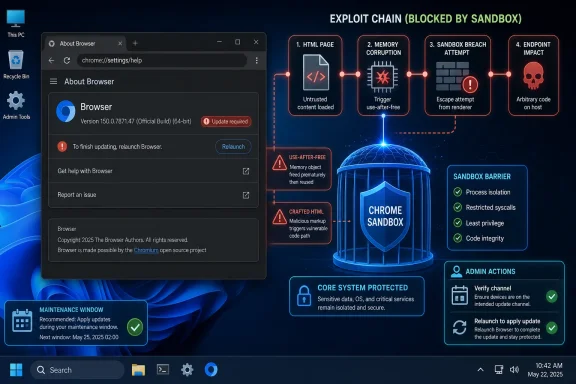 A Low-Severity Chrome Bug Can Still Belong in a High-Risk Patch Window
CVE-2026-14107 is not being presented by Google as a known exploited zero-day, and CISA’s SSVC data says exploitation is “none” as of its July 1 update. That matters. A browser vulnerability with no observed exploitation is a different incident-response problem from a bug already being used in phishing, watering-hole, or malvertising campaigns.But the bug class matters too. Use-after-free vulnerabilities are memory-safety failures: code keeps using an object after the program has freed it, creating a chance for an attacker to influence what now lives at that memory location. In a browser, where untrusted web content is continuously parsed, rendered, scheduled, composited, decoded, cached, and executed, that class has historically been one of the most durable paths from “weird crash” to “controlled behavior.”
Google’s Chrome Releases post lists CVE-2026-14107 as a Low-severity bug in Scheduling, reported by Google on May 15 and fixed in the broad Chrome 150 stable release. NVD’s entry uses the same core description: Chrome versions before 150.0.7871.47 allowed a remote attacker to execute arbitrary code inside a sandbox via a crafted HTML page. Those two clauses sit uneasily together. “Low” suggests limited practical danger; “execute arbitrary code” suggests the part of the exploit chain where defenders should start paying attention.
That tension is not a clerical curiosity. It is how browser security actually works in 2026. A single bug may only deliver code execution inside a sandboxed renderer or browser sub-process, while a complete attack may require a second vulnerability to escape that sandbox, a third to elevate privilege, and a delivery mechanism to bring the victim to malicious content. Chromium’s severity rating appears to be assessing the individual defect in context. CISA’s 8.8 CVSS vector is assessing the impact if the network-delivered, user-triggered flaw succeeds.
Chrome 150 Was Not a One-Bug Security Release
The broader Chrome 150 release is the backdrop administrators should care about. Google said the stable promotion included 433 security fixes, with the release rolling out over the coming days or weeks across Windows, Mac, and Linux. That is not a typo-sized patch. It is a reminder that Chrome’s security posture depends on a high-volume, high-tempo fix pipeline, not the drama of any single CVE.CVE-2026-14107 appears deep in the long tail of the advisory, among a large block of Low-severity issues reported internally by Google. Above it in the same advisory are numerous Critical and High vulnerabilities across components such as Extensions, GPU, ANGLE, Dawn, WebUSB, Chromoting, Skia, Views, Ozone, V8, Downloads, QUIC, and others. In other words, this particular Scheduling flaw is not the star of Chrome 150. It is one item in a release that looks more like a security garbage truck backing up to the curb.
That is precisely why it is easy to miss. Security teams triage by severity, exploit status, exposure, and operational pain. If a Chrome update contains dozens of higher-severity entries, the Low item becomes a footnote. If a vulnerability database then displays an 8.8 High score from CISA-ADP, the footnote suddenly becomes a source of confusion.
This is not just a Chrome problem. It is a vulnerability-management problem created by overlapping scoring systems. Vendor severity, CVSS, SSVC, NVD enrichment, EPSS, exploit-in-the-wild flags, and product-specific patch notes all describe different aspects of risk. Treating any one of them as the final truth is how organizations either overreact to noise or underreact to browser bugs that adversaries can chain later.
The Version Numbers Are Messier Than the Headline
The user-facing remediation sounds tidy: update Chrome to 150.0.7871.47 or later. The actual release text is messier. Google’s post says Chrome 150.0.7871.46 for Linux and 150.0.7871.46/.47 for Windows and Mac contains fixes and improvements. NVD’s description says Google Chrome prior to 150.0.7871.47 is affected. NVD’s change history also shows an added CPE configuration for Chrome versions up to, but excluding, 150.0.7871.46.That creates the obvious question: are we missing a CPE, or is the version boundary wrong?
The most cautious reading is that NVD’s CPE enrichment is not yet fully aligned with the vendor description. NVD itself says its own CVSS assessment has not yet been provided, and its page shows CPE data as part of ongoing enrichment. The Chrome source data, meanwhile, identifies 150.0.7871.47 as the fixed threshold in the CVE description, while the release channel text shows platform-specific build numbers around .46 and .47.
For WindowsForum readers, that distinction matters most on Windows and macOS, where the advisory explicitly names 150.0.7871.46/.47. If your fleet reports 150.0.7871.47, there is little ambiguity. If it reports 150.0.7871.46, the safe answer is to verify against Google’s channel state and push to the newest available stable build rather than argue with a vulnerability scanner. In enterprise patching, “latest available stable” is often a better target than “the first build someone believes is fixed.”
The CPE issue also affects scanners. A scanner relying on NVD’s “excluding 150.0.7871.46” boundary may treat .46 differently from a scanner using the CVE text’s “prior to 150.0.7871.47.” That can produce false positives, false negatives, or inconsistent compliance dashboards. Security teams should document the discrepancy rather than silently suppressing it. The right operational note is: Google’s advisory and CVE description should be considered primary; NVD enrichment may lag or encode platform nuance imperfectly.
The Sandbox Clause Is the Real Risk Signal
The phrase “inside a sandbox” can sound reassuring, but it should not be read as “harmless.” Chrome’s sandbox is a major defense boundary, designed to contain renderer compromise and limit what malicious web content can do. If arbitrary code execution remains trapped inside that boundary, the attacker’s reach is constrained. That is good engineering.But browser exploits are often built as chains. A renderer or process-level code execution bug becomes the first foothold; a sandbox escape becomes the second; local privilege escalation or credential theft becomes the third. A vulnerability like CVE-2026-14107 may not be sufficient on its own to own a Windows endpoint, but it can still be valuable as one piece of a chain.
This is why “no known exploitation” is not the same as “no defensive urgency.” Attackers do not need every bug to be a complete exploit. They need reusable primitives: memory corruption here, type confusion there, a policy bypass somewhere else, and a user interaction path that blends into normal browsing. A Low-severity Scheduling use-after-free may be unremarkable in isolation and useful in combination.
The crafted HTML trigger also keeps the exposure broad. There is no requirement in the description for local access or authentication. The CVSS vector contributed by CISA-ADP uses network attack vector, low attack complexity, no privileges required, and user interaction required. That is the browser-risk bargain in one line: the victim has to load or interact with content, but the attacker does not need an account on the machine.
Scheduling Is Boring Until It Is Security-Critical
“Scheduling” is not the sort of component name that makes headlines. It evokes queues, timers, tasks, and the invisible choreography that keeps a browser responsive while pages load scripts, paint pixels, handle input, perform network work, and juggle background activity. That invisibility is exactly why such bugs deserve respect.Modern Chromium is not a single-threaded page viewer. It is a distributed application runtime with process isolation, task scheduling, GPU acceleration, site isolation, service workers, extensions, media pipelines, and platform integrations. Scheduling code helps determine when work happens and in what order. Object lifetime errors in that world can become difficult to reason about, especially when asynchronous tasks outlive the objects they expect to use.
A use-after-free in scheduling hints at a classic lifetime-management problem: something is queued, canceled, freed, or reordered, and then later touched as if it were still valid. In the benign case, that crashes. In the adversarial case, an attacker shapes timing, memory layout, and object reuse until the stale pointer becomes leverage.
That does not mean CVE-2026-14107 is known to be weaponized in that way. Google’s bug details are restricted, as is common until enough users have updated. It does mean defenders should avoid the lazy mental model that Low browser bugs are just UI annoyances. In a large, concurrent browser engine, boring subsystems can become security boundaries by accident.
Google’s Restricted Bug Details Are a Feature, Not a Cover-Up
The Chrome Releases post repeats Google’s standard warning that access to bug details and links may remain restricted until a majority of users are updated with a fix. That policy frustrates researchers, scanner vendors, and administrators who want to understand exactly what they are patching. It is also a rational response to the exploit-development economics of browser bugs.A detailed bug report can be a blueprint. It may include reproduction steps, crash traces, commit references, affected functions, test cases, and discussion of why a patch works. Releasing all of that while a large share of the installed base remains vulnerable would compress the window between disclosure and weaponization.
The result is an information asymmetry that IT teams have to live with. Attackers may reverse patches anyway. Defenders may have to patch based on sparse descriptions. Scanner vendors may race to interpret version boundaries with incomplete data. This is not ideal, but the alternative is worse: handing exploit developers a map before auto-update has done its work.
For enterprise Windows environments, the policy implication is clear. Do not wait for the bug tracker to become public before treating the update as meaningful. If the browser is exposed to arbitrary web content, the patch is the control. The explanation can arrive later.
Microsoft Shops Still Own the Chrome Risk
Chrome may be Google’s browser, but in Windows environments the operational burden often lands on Microsoft-centered IT teams. The browser is installed on managed Windows clients, used to reach Microsoft 365, Azure portals, SaaS admin consoles, line-of-business applications, identity providers, webmail, HR systems, and developer tools. A Chrome bug is therefore not an island outside the Windows estate. It is part of the Windows endpoint attack surface.That is especially true in mixed-browser organizations. Microsoft Edge shares Chromium foundations, but Edge release timing, Microsoft’s own packaging, and enterprise policies can differ. A Chrome CVE does not automatically mean the exact same Edge version is exposed in the same way, but Chromium bugs should trigger a quick check of Chromium-based browser inventory. The right question is not “Do we use Chrome?” It is “Which Chromium-based browsers and embedded runtimes are present, and which update channels control them?”
Windows admins should also watch for stale side-by-side installs. Consumer Chrome, enterprise Chrome, portable Chromium builds, developer-channel browsers, Electron applications, WebView2-dependent apps, and vendor-bundled browsers may not share the same update mechanism. CVE-2026-14107 is specifically a Google Chrome CVE, but the broader pattern should prompt inventory hygiene. If users can browse untrusted content through an outdated Chromium surface, the estate is larger than the Chrome icon on the taskbar.
The operational fix is not exotic. Force browser update checks, require relaunches, monitor version telemetry, and treat “pending restart” as an exposure state. Chrome can download updates quietly, but the new code does not fully take over until the browser restarts. In real offices, where users keep windows open for weeks, relaunch discipline is a security control.
The CVSS Fight Is a Symptom of a Bigger Browser-Scoring Problem
CISA-ADP gives CVE-2026-14107 a CVSS 3.1 base score of 8.8 High, with network attack vector, low complexity, no privileges required, user interaction required, unchanged scope, and high confidentiality, integrity, and availability impact. Chromium labels it Low. NVD has not yet provided its own base score. None of those facts is necessarily wrong.They are answering different questions. Chromium’s severity may account for sandbox containment, exploitability assumptions, internal architecture, and whether the bug can do more than crash or execute within a constrained process. CVSS, by design, often compresses “remote code execution after user interaction” into a high numeric score when the theoretical impact is severe. SSVC adds a decision-support frame: exploitation none, automatable no, technical impact total.
The confusion comes when dashboards flatten these into one color. A red box appears in a vulnerability-management console; a Chrome advisory says Low; a risk committee asks why the same issue is both routine and urgent. The answer is that browser vulnerabilities are compositional. They acquire or lose practical severity depending on mitigations, chaining potential, exploit availability, and deployment reality.
A mature program should not blindly accept the highest number, but it also should not dismiss it. The better posture is to patch browsers quickly by class, then reserve deep triage for exceptions. Browsers process hostile input by design. If there is a stable security update for a memory-safety bug reachable through crafted HTML, the default should be acceleration, not debate.
The CPE Discrepancy Deserves a Ticket, Not a War Room
The NVD change history is unusually relevant here because it appears to encode a threshold that does not cleanly match the CVE prose. The CVE description says “prior to 150.0.7871.47.” The NVD CPE addition shown in the change history says versions up to, excluding, 150.0.7871.46. The Chrome release post says Linux is 150.0.7871.46 and Windows/Mac are 150.0.7871.46/.47.This is exactly the kind of mismatch that causes scanners to light up differently across tools. One product may flag anything below .47. Another may treat .46 as fixed. A third may wait for updated CPE data. A fourth may key off package metadata rather than browser-reported version strings.
The right response is boring but important. Create a vulnerability-management note that cites the vendor advisory date, the Chrome stable channel version, the CVE description, and the NVD discrepancy. Then standardize the remediation target to the newest available stable Chrome build for each platform. If your scanner insists that a fully updated machine is vulnerable, open a vendor case with the evidence. If your scanner says a .46 Windows build is clean while Chrome offers .47, update anyway.
This is not a case for panic. There is no public evidence in the available advisories that CVE-2026-14107 is being exploited in the wild. It is, however, a case for not letting metadata ambiguity become a patch delay. CPEs are useful for automation. They are not more authoritative than the vendor’s shipping update.
Chrome’s Patch Velocity Is Becoming Its Own Administrative Burden
The Chrome 150 advisory’s 433 security fixes are impressive and unsettling in equal measure. On one hand, the Chromium security apparatus is finding, classifying, and fixing a large number of defects before known exploitation. On the other, the volume makes it increasingly hard for administrators to distinguish emergency risk from background radiation.This is the browser maintenance paradox. The most secure browser is often the one that updates constantly, but constant updates become operational noise. Users complain about relaunches. Admins worry about extension compatibility. Developers discover that a business-critical web app behaves differently after a point release. Security teams, meanwhile, see another long list of CVEs and another set of scanner exceptions.
Chrome 150 also arrives in a period when enterprises are already dealing with extension ecosystem changes, privacy controls, web platform churn, and the continuing tension between consumer-paced browser updates and enterprise change control. A security update that also advances the stable channel can touch far more than security. That reality tempts organizations to slow-roll updates.
For a memory-safety browser flaw, slow-rolling should be the exception. The web is too exposed, exploit development is too fast, and browser sandboxes are too central to endpoint defense. Enterprises can and should test rings, but those rings need deadlines measured in days, not quarters.
The Windows Admin Playbook Is Shorter Than the Advisory
There is a tendency in vulnerability management to overcomplicate browser updates because the advisories are long and the scoring is inconsistent. CVE-2026-14107 does not require that. It requires disciplined execution.Start by checking whether Chrome stable on Windows endpoints is at 150.0.7871.47 or newer, or at the latest build offered by Google’s stable channel if a newer point release has already superseded it. Pay attention to machines that have downloaded an update but not relaunched. Those are common in real fleets and easy to miss if inventory data only refreshes on reboot.
Then check policy. Chrome enterprise policies can defer updates, pin versions, or alter update behavior. Those controls are useful when a release breaks a critical workflow, but they become liabilities when nobody remembers they exist. If update deferrals are in place, this is the sort of release that should trigger an exception review.
Finally, communicate in plain language. Users do not need a lecture on use-after-free exploitation. They need to know that leaving the browser open indefinitely can leave old code running after security fixes are available. A forced relaunch window may be unpopular, but it is more defensible than a month of silent exposure.
The Real Lesson Is to Patch the Class, Not Argue the Adjective
CVE-2026-14107 is a useful case study because it refuses to fit neatly into a severity bucket. It is a Low Chromium bug with a High CVSS enrichment. It enables code execution, but inside a sandbox. It has no observed exploitation, but it is reachable through crafted web content. Its version boundary is clear enough to patch and messy enough to annoy scanner teams.That mixture is normal now. Browser defense is layered, and vulnerability disclosure is layered too. A single severity label is rarely the full story. For administrators, the right abstraction is broader: memory-safety bugs in a web-exposed browser deserve rapid patching unless there is a specific reason to hold back.
The consumer version of this advice is even simpler. Open Chrome’s About page, let it update, and relaunch. If the browser says it is managed by an organization, the organization owns the timeline. If it does not, the user does.
The Practical Signal Hidden in CVE-2026-14107
This release does not call for alarmism, but it does call for clean execution. The vulnerability is not known to be exploited, yet it sits in the kind of browser attack surface that defenders cannot afford to treat casually.- Organizations should target Chrome 150.0.7871.47 or the newest available stable build on Windows and macOS, while verifying platform-specific guidance for Linux builds.
- Security teams should document the apparent mismatch between NVD’s CPE threshold and the CVE description instead of letting scanner disagreement stall remediation.
- Administrators should treat pending browser relaunches as unresolved exposure, because downloaded updates do not fully protect users until the old browser processes exit.
- Enterprises using Microsoft-centered endpoint management should still inventory Chrome and other Chromium-based surfaces, because the browser risk lives on Windows even when the vendor is Google.
- The absence of known exploitation lowers incident urgency, but it does not justify deferring a web-reachable memory-safety fix across ordinary patch cycles.
References
- Primary source: NVD / Chromium
Published: 2026-07-03T07:00:34-07:00
NVD - CVE-2026-14107
 nvd.nist.gov
- Security advisory: MSRC
Published: 2026-07-03T07:00:34-07:00
Original feed URL
Security Update Guide - Microsoft Security Response Center
 msrc.microsoft.com
- Related coverage: cvefeed.io
CVE-2026-14107 - Google Chrome Use-After-Free
Use after free in Scheduling in Google Chrome prior to 150.0.7871.47 allowed a remote attacker to execute arbitrary code inside a sandbox via a crafted HTML page. (Chromium security severity: Low)cvefeed.io
