

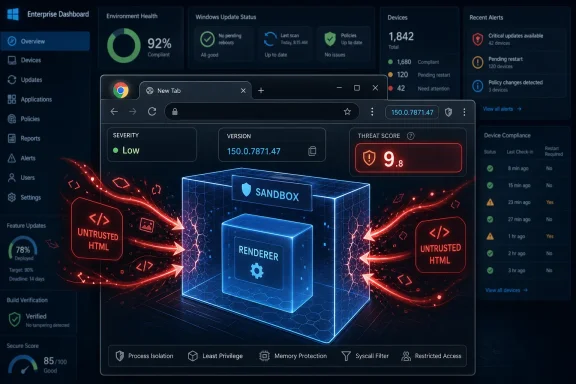
Google fixed CVE-2026-14095 in the Chrome 150 stable desktop release on June 30, 2026, after documenting a low-severity Browser-component validation flaw that could let an attacker who had already compromised the renderer process potentially escape the sandbox through a crafted HTML page. The National Vulnerability Database record, updated July 1, makes the bug look stranger than Google’s own label does: Chrome calls it low severity, while CISA’s ADP scoring gives it a 9.6 critical CVSS 3.1 score. That mismatch is the real story. CVE-2026-14095 is less a standalone panic button than a reminder that browser risk is increasingly about exploit chains, ambiguous metadata, and whether administrators can translate messy vulnerability feeds into sane patch policy.
On Google’s Chrome Releases blog, CVE-2026-14095 appears deep in the long security-fix list for Chrome 150.0.7871.46 on Linux and 150.0.7871.46/.47 on Windows and Mac. Google describes the issue as “Insufficient validation of untrusted input in Browser,” reported internally by Google on May 14, 2026, and assigns it Chromium’s low security severity.
NVD’s entry, sourced from Chrome and published June 30, carries the more explicit impact language: Chrome prior to 150.0.7871.47 allowed a remote attacker who had already compromised the renderer process to potentially perform a sandbox escape using crafted HTML. That single sentence is doing a lot of work. It says the bug is remote in delivery, browser-based in trigger, and dangerous only after another foothold has already been achieved.
That is why the severity split is not necessarily a contradiction. Chromium severity often reflects the bug in isolation and the conditions required to exploit it. CISA’s ADP CVSS vector, by contrast, models the consequences if the weakness is used successfully: network attack vector, low attack complexity, no privileges required, user interaction required, changed scope, and high impact to confidentiality, integrity, and availability.
For Windows admins, that distinction matters more than the headline score. A vulnerability that cannot start an attack chain may still finish one. Browser sandbox escapes are precisely the kind of flaws that turn “the malicious page compromised a renderer” into “the malicious page may now reach beyond the renderer’s cage.”
CVE-2026-14095 sits at the uncomfortable seam between those worlds. The affected component is “Browser,” not V8, not Blink, not a graphics library. That means the bug is described as a validation or policy-enforcement failure in the more privileged side of Chrome’s architecture, the side that decides which requests from less-trusted code are acceptable.
The NVD description’s phrase “who had compromised the renderer process” is not a footnote. It is the prerequisite. A crafted HTML page alone is not described as enough to break out of Chrome; the attacker first needs another vulnerability, misconfiguration, or exploit primitive that gives control inside the renderer.
But exploit chains are not theoretical in browser security. Attackers routinely combine an initial code execution or type confusion bug with a second-stage sandbox escape. The first bug gets code running inside the browser’s lowest-trust chamber; the second asks the operating system-facing machinery to do something it should have rejected.
That is why low-severity sandbox-adjacent bugs can be operationally important. They may not be the match, but they can be the oxygen.
That difference is not just trivia for vulnerability-database completists. Patch automation, asset scanners, and compliance dashboards often key off CPE ranges and version comparisons. If a feed says the cutoff is .46 while the CVE text says .47, the result can be noisy false positives, false confidence, or platform-specific ambiguity that must be resolved by human review.
The likely explanation is platform packaging. Google’s Chrome desktop releases often carry slightly different build numbers across operating systems, and the June 30 advisory explicitly distinguishes Linux from Windows and Mac. In that context, a Windows machine on 150.0.7871.46 may not mean the same thing as a Linux machine on 150.0.7871.46.
Still, security teams should not hand-wave this away. If your fleet is mostly Windows, the safer operational threshold is to confirm Chrome reports 150.0.7871.47 or later where that build is offered. If your fleet includes Linux, compare against the exact platform build in Google’s stable-channel advisory and your distribution’s packaging.
NVD’s own page flags the record as “Modified After Enrichment,” meaning the CVE data changed after NVD enrichment work had already been completed. That warning is a polite way of saying the metadata may still be catching up with the vendor record. In an era when vulnerability management is increasingly automated, those little status flags are not decoration; they are part of the risk signal.
CISA’s vector includes user interaction, which makes sense for a browser flaw: the victim generally has to load or interact with attacker-controlled content. It also says the attack is not automatable under the SSVC entry and that exploitation was “none” at the time of CISA’s assessment. In other words, the same record that gives a critical impact score also says there is no known exploitation and no easy automation signal.
This is the paradox of CVSS in one tidy case study. CVSS is very good at describing worst-case impact under a set of assumptions. It is less good at telling a patch manager how frightened to be at 9:00 a.m. on a Wednesday when the bug is chained, non-public in detail, not known exploited, and already fixed in an auto-updating browser.
CISA’s SSVC data is arguably more useful than the 9.6 by itself. “Exploitation: none” lowers urgency compared with an in-the-wild zero-day. “Automatable: no” reduces mass-scanning assumptions. “Technical impact: total” keeps the issue from being dismissed.
That is the right posture: do not call it an emergency on the same level as an actively exploited Chrome zero-day, but do not bury it because Chrome’s internal severity says low.
The advisory lists critical flaws, high-severity flaws, medium issues, and a long tail of low-severity bugs across components such as Extensions, GPU, ANGLE, Dawn, V8, Skia, WebUSB, Views, Bluetooth, Ozone, Fullscreen, Downloads, Settings, Enterprise, Network, CSS, DevTools, and more. CVE-2026-14095 is one row in that long tail, but it shares the release vehicle with far more obviously dangerous memory-safety bugs.
That context changes the patch calculus. If an organization is debating whether CVE-2026-14095 alone deserves emergency treatment, it may be asking the wrong question. Chrome 150’s stable update is not a boutique fix for one obscure validation bug; it is a broad security release that closes hundreds of issues, including critical and high-severity vulnerabilities.
Browser updates also do not exist in isolation anymore. Microsoft Edge, Brave, Vivaldi, Opera, and many embedded browser scenarios depend on Chromium code, though vendors ship on their own schedules and may not map every Chrome CVE in the same way. For WindowsForum readers, Chrome’s advisory is often the first sign of risk that will ripple across Chromium-based browsers and WebView-adjacent estate planning.
That does not mean every Chromium browser is vulnerable in the same build range. It means administrators should treat Chrome’s stable release as the opening bell and then verify the update channels for every Chromium-derived browser actually deployed in their environment.
That is why validation flaws in the Browser component feel different from rendering bugs. A renderer compromise is dangerous, but it is expected in the threat model; the sandbox exists because web content cannot be trusted. A browser-process policy mistake is dangerous because it may represent the trusted side accepting an input or request it should have rejected.
Enterprise Chrome deployments add even more policy surface. Administrators configure extension allowlists, URL filtering, Safe Browsing settings, download restrictions, certificate behavior, sign-in boundaries, password manager controls, and update policy. Those controls are essential, but they also make the browser a dense security-policy engine rather than a simple document viewer.
CVE-2026-14095 is not described publicly in enough detail to say which policy boundary failed. Google’s issue tracker entry is permission-restricted, consistent with the Chrome team’s practice of limiting bug details until most users are updated. But the public description is enough to place the bug in the family of issues that security engineers should respect: untrusted input reaching privileged decision-making code.
For defenders, that means the mitigation is not clever tuning. It is patching, fast enough that the exploit window closes before chained exploitation becomes practical.
The practical problem is restart debt. Chrome may download an update but leave the old process running until the user relaunches. A browser with the right package staged but the wrong binary still executing is not patched in the way security teams care about.
On managed Windows fleets, the situation depends on policy. Enterprises that defer browser updates for compatibility testing may have good reasons, but Chrome’s security release cadence leaves little room for leisurely approvals when hundreds of fixes are bundled into a stable push. The right compromise is not “never defer”; it is to measure deferral in days, not weeks, for stable security releases that include sandbox-relevant bugs.
Admins should also remember the user-profile angle. Chrome installs and updates can vary depending on whether the deployment is machine-wide or user-level, whether Google Update is healthy, and whether endpoint management tools inventory the active executable path rather than merely the installed product record.
If a vulnerability scanner flags CVE-2026-14095, the best first response is not to argue with the severity label. It is to confirm the running Chrome version, restart lag, platform-specific build, and whether the scanner’s CPE logic is using the corrected threshold.
CPE data is the plumbing of vulnerability management. It decides whether a CVE attaches to a product in a scanner, whether a dashboard turns red, whether a service ticket opens, and whether a compliance report claims an exception. When that plumbing is incomplete or version-confused, vulnerability management becomes less about risk and more about reconciling databases.
This is especially tricky for browsers because the product is cross-platform, fast-moving, and often auto-updating outside traditional OS patch cycles. Chrome on Windows is not serviced by Windows Update in the same way Edge is. Chrome on Linux may be managed through distribution packages or Google’s repository. Chrome on macOS has its own updater path and permissions model.
So, are we missing a CPE here? Possibly, but the better answer is that CPE alone is an inadequate representation of the operational question. The real question is whether the endpoint is running a vulnerable Chrome build on a platform for which Google shipped a fixed version.
That is not as elegant as a green or red scanner cell. It is, however, how real patch verification works.
To be fair, CVE-2026-14095’s prerequisite makes it less straightforward than a one-click remote code execution bug. The attacker must first compromise the renderer. That prerequisite may require another vulnerability, a malicious file path, a renderer logic flaw, or a chain not publicly described. Without that first step, the public record does not support treating CVE-2026-14095 as a standalone system compromise.
But the history of browser exploitation shows that attackers do not think in CVEs one at a time. They think in paths. Initial renderer compromise plus sandbox escape plus post-exploitation payload is the classic high-value chain, especially against targets where phishing, watering-hole pages, malvertising, or compromised legitimate sites can drive victims into attacker-controlled content.
That is why administrators should be careful with phrases like “requires renderer compromise.” In a design document, that is a substantial condition. In an exploit marketplace, it is a slot waiting to be filled.
The sane risk statement is narrower but still serious: CVE-2026-14095 is not known to be exploited and is not described as independently sufficient for compromise, but it belongs to a class of flaws that can become highly consequential when paired with another browser bug.
There is no public exploit code in the record, and CISA’s SSVC entry says exploitation was not observed at the time of assessment. That argues against panic. But Google’s advisory also says bug details may remain restricted until most users are updated, which means defenders should not mistake limited public detail for limited exploitability.
The priority should rise in environments where browsers are exposed to untrusted web content all day, where users have access to sensitive SaaS sessions, where endpoint detection depends heavily on browser containment, or where previous Chrome update deferrals have left machines behind the stable channel. In those environments, a potential sandbox escape is not theoretical background noise.
It is also worth tracking Chromium-based siblings. Microsoft Edge users should verify Edge’s own version and security notes rather than assuming Chrome’s build number maps directly. The same goes for other Chromium browsers and managed application runtimes that package Chromium components.
The broader lesson is that patch management cannot be governed by one severity label. Vendor severity, CVSS, SSVC, exploitation status, update availability, asset exposure, and exploit-chain role all matter. CVE-2026-14095 is a neat example because each signal points in a slightly different direction.
Here is the practical read for WindowsForum’s audience:
 The “Low” Chrome Bug That Looks Critical Everywhere Else
On Google’s Chrome Releases blog, CVE-2026-14095 appears deep in the long security-fix list for Chrome 150.0.7871.46 on Linux and 150.0.7871.46/.47 on Windows and Mac. Google describes the issue as “Insufficient validation of untrusted input in Browser,” reported internally by Google on May 14, 2026, and assigns it Chromium’s low security severity.NVD’s entry, sourced from Chrome and published June 30, carries the more explicit impact language: Chrome prior to 150.0.7871.47 allowed a remote attacker who had already compromised the renderer process to potentially perform a sandbox escape using crafted HTML. That single sentence is doing a lot of work. It says the bug is remote in delivery, browser-based in trigger, and dangerous only after another foothold has already been achieved.
That is why the severity split is not necessarily a contradiction. Chromium severity often reflects the bug in isolation and the conditions required to exploit it. CISA’s ADP CVSS vector, by contrast, models the consequences if the weakness is used successfully: network attack vector, low attack complexity, no privileges required, user interaction required, changed scope, and high impact to confidentiality, integrity, and availability.
For Windows admins, that distinction matters more than the headline score. A vulnerability that cannot start an attack chain may still finish one. Browser sandbox escapes are precisely the kind of flaws that turn “the malicious page compromised a renderer” into “the malicious page may now reach beyond the renderer’s cage.”
Chrome’s Sandbox Still Works Until the Chain Finds a Door
Modern Chrome security is built around compartmentalization. The renderer process is supposed to handle dangerous web content inside a constrained environment, while the browser process brokers privileged operations such as file access, device interaction, navigation decisions, and operating-system integration. The sandbox is the architectural bet that hostile web code can be contained even when a memory corruption bug or logic error gives an attacker execution inside a renderer.CVE-2026-14095 sits at the uncomfortable seam between those worlds. The affected component is “Browser,” not V8, not Blink, not a graphics library. That means the bug is described as a validation or policy-enforcement failure in the more privileged side of Chrome’s architecture, the side that decides which requests from less-trusted code are acceptable.
The NVD description’s phrase “who had compromised the renderer process” is not a footnote. It is the prerequisite. A crafted HTML page alone is not described as enough to break out of Chrome; the attacker first needs another vulnerability, misconfiguration, or exploit primitive that gives control inside the renderer.
But exploit chains are not theoretical in browser security. Attackers routinely combine an initial code execution or type confusion bug with a second-stage sandbox escape. The first bug gets code running inside the browser’s lowest-trust chamber; the second asks the operating system-facing machinery to do something it should have rejected.
That is why low-severity sandbox-adjacent bugs can be operationally important. They may not be the match, but they can be the oxygen.
The Version Number Confusion Is Not a Clerical Detail
The record contains one especially awkward detail: the affected-version language points to Chrome before 150.0.7871.47, while NVD’s initial CPE configuration reportedly listed Google Chrome versions up to, but excluding, 150.0.7871.46. Google’s advisory itself says Chrome 150.0.7871.46 shipped for Linux and 150.0.7871.46/.47 shipped for Windows and Mac.That difference is not just trivia for vulnerability-database completists. Patch automation, asset scanners, and compliance dashboards often key off CPE ranges and version comparisons. If a feed says the cutoff is .46 while the CVE text says .47, the result can be noisy false positives, false confidence, or platform-specific ambiguity that must be resolved by human review.
The likely explanation is platform packaging. Google’s Chrome desktop releases often carry slightly different build numbers across operating systems, and the June 30 advisory explicitly distinguishes Linux from Windows and Mac. In that context, a Windows machine on 150.0.7871.46 may not mean the same thing as a Linux machine on 150.0.7871.46.
Still, security teams should not hand-wave this away. If your fleet is mostly Windows, the safer operational threshold is to confirm Chrome reports 150.0.7871.47 or later where that build is offered. If your fleet includes Linux, compare against the exact platform build in Google’s stable-channel advisory and your distribution’s packaging.
NVD’s own page flags the record as “Modified After Enrichment,” meaning the CVE data changed after NVD enrichment work had already been completed. That warning is a polite way of saying the metadata may still be catching up with the vendor record. In an era when vulnerability management is increasingly automated, those little status flags are not decoration; they are part of the risk signal.
CISA’s 9.6 Score Says More About Consequence Than Likelihood
The loudest number in the NVD entry is not from NIST. NVD had not provided its own CVSS 4.0, 3.x, or 2.0 assessment at the time reflected in the record, while CISA’s ADP entry supplied a CVSS 3.1 base score of 9.6 critical. That number can look absurd next to Chromium’s low severity label, unless you read the vector.CISA’s vector includes user interaction, which makes sense for a browser flaw: the victim generally has to load or interact with attacker-controlled content. It also says the attack is not automatable under the SSVC entry and that exploitation was “none” at the time of CISA’s assessment. In other words, the same record that gives a critical impact score also says there is no known exploitation and no easy automation signal.
This is the paradox of CVSS in one tidy case study. CVSS is very good at describing worst-case impact under a set of assumptions. It is less good at telling a patch manager how frightened to be at 9:00 a.m. on a Wednesday when the bug is chained, non-public in detail, not known exploited, and already fixed in an auto-updating browser.
CISA’s SSVC data is arguably more useful than the 9.6 by itself. “Exploitation: none” lowers urgency compared with an in-the-wild zero-day. “Automatable: no” reduces mass-scanning assumptions. “Technical impact: total” keeps the issue from being dismissed.
That is the right posture: do not call it an emergency on the same level as an actively exploited Chrome zero-day, but do not bury it because Chrome’s internal severity says low.
Chrome 150 Was a Security Train, Not a Single Patch
CVE-2026-14095 landed as part of an unusually large Chrome 150 stable-channel security update. Google’s June 30 release post says the update includes 433 security fixes, a volume that dwarfs the normal user-facing experience of “Chrome restarted and my tabs came back.” The number itself is a reminder that browser security is now continuous industrial maintenance.The advisory lists critical flaws, high-severity flaws, medium issues, and a long tail of low-severity bugs across components such as Extensions, GPU, ANGLE, Dawn, V8, Skia, WebUSB, Views, Bluetooth, Ozone, Fullscreen, Downloads, Settings, Enterprise, Network, CSS, DevTools, and more. CVE-2026-14095 is one row in that long tail, but it shares the release vehicle with far more obviously dangerous memory-safety bugs.
That context changes the patch calculus. If an organization is debating whether CVE-2026-14095 alone deserves emergency treatment, it may be asking the wrong question. Chrome 150’s stable update is not a boutique fix for one obscure validation bug; it is a broad security release that closes hundreds of issues, including critical and high-severity vulnerabilities.
Browser updates also do not exist in isolation anymore. Microsoft Edge, Brave, Vivaldi, Opera, and many embedded browser scenarios depend on Chromium code, though vendors ship on their own schedules and may not map every Chrome CVE in the same way. For WindowsForum readers, Chrome’s advisory is often the first sign of risk that will ripple across Chromium-based browsers and WebView-adjacent estate planning.
That does not mean every Chromium browser is vulnerable in the same build range. It means administrators should treat Chrome’s stable release as the opening bell and then verify the update channels for every Chromium-derived browser actually deployed in their environment.
The Browser Process Is Where Enterprise Policy Becomes Attack Surface
The most interesting word in this CVE is not “sandbox.” It is “Browser.” In Chromium architecture, the browser process is not simply the window frame around the web; it is the trusted coordinator that enforces boundaries, talks to the operating system, brokers access to devices and storage, and carries much of the enterprise policy weight that administrators rely on.That is why validation flaws in the Browser component feel different from rendering bugs. A renderer compromise is dangerous, but it is expected in the threat model; the sandbox exists because web content cannot be trusted. A browser-process policy mistake is dangerous because it may represent the trusted side accepting an input or request it should have rejected.
Enterprise Chrome deployments add even more policy surface. Administrators configure extension allowlists, URL filtering, Safe Browsing settings, download restrictions, certificate behavior, sign-in boundaries, password manager controls, and update policy. Those controls are essential, but they also make the browser a dense security-policy engine rather than a simple document viewer.
CVE-2026-14095 is not described publicly in enough detail to say which policy boundary failed. Google’s issue tracker entry is permission-restricted, consistent with the Chrome team’s practice of limiting bug details until most users are updated. But the public description is enough to place the bug in the family of issues that security engineers should respect: untrusted input reaching privileged decision-making code.
For defenders, that means the mitigation is not clever tuning. It is patching, fast enough that the exploit window closes before chained exploitation becomes practical.
Windows Users Should Check the Build, Not the Badge
On unmanaged Windows PCs, Chrome’s auto-update machinery usually does the right thing quietly. Users can still force the check by opening Chrome’s About page and restarting the browser when prompted. The relevant build for this advisory is Chrome 150.0.7871.47 or later on Windows and Mac, according to Google’s stable-channel release language and the CVE description.The practical problem is restart debt. Chrome may download an update but leave the old process running until the user relaunches. A browser with the right package staged but the wrong binary still executing is not patched in the way security teams care about.
On managed Windows fleets, the situation depends on policy. Enterprises that defer browser updates for compatibility testing may have good reasons, but Chrome’s security release cadence leaves little room for leisurely approvals when hundreds of fixes are bundled into a stable push. The right compromise is not “never defer”; it is to measure deferral in days, not weeks, for stable security releases that include sandbox-relevant bugs.
Admins should also remember the user-profile angle. Chrome installs and updates can vary depending on whether the deployment is machine-wide or user-level, whether Google Update is healthy, and whether endpoint management tools inventory the active executable path rather than merely the installed product record.
If a vulnerability scanner flags CVE-2026-14095, the best first response is not to argue with the severity label. It is to confirm the running Chrome version, restart lag, platform-specific build, and whether the scanner’s CPE logic is using the corrected threshold.
NVD’s CPE Problem Is a Warning to Scanner-Driven Security
The user-submitted NVD excerpt includes the familiar prompt: “Are we missing a CPE here? Please let us know.” For this CVE, that line lands with extra irony because the record’s change history already shows how delicate the product-matching layer can be. NVD enrichment added a CPE configuration tying Google Chrome to Windows, Linux kernel, and macOS operating-system CPEs, then the visible page still indicated that CPEs were loading in the known affected software section.CPE data is the plumbing of vulnerability management. It decides whether a CVE attaches to a product in a scanner, whether a dashboard turns red, whether a service ticket opens, and whether a compliance report claims an exception. When that plumbing is incomplete or version-confused, vulnerability management becomes less about risk and more about reconciling databases.
This is especially tricky for browsers because the product is cross-platform, fast-moving, and often auto-updating outside traditional OS patch cycles. Chrome on Windows is not serviced by Windows Update in the same way Edge is. Chrome on Linux may be managed through distribution packages or Google’s repository. Chrome on macOS has its own updater path and permissions model.
So, are we missing a CPE here? Possibly, but the better answer is that CPE alone is an inadequate representation of the operational question. The real question is whether the endpoint is running a vulnerable Chrome build on a platform for which Google shipped a fixed version.
That is not as elegant as a green or red scanner cell. It is, however, how real patch verification works.
Sandbox Escapes Are Where “User Interaction Required” Stops Being Comforting
Security advisories often list user interaction as though it were a major mitigating factor. In browser land, it is often just another way of saying the victim must browse the web. A crafted HTML page is not an exotic delivery mechanism; it is the basic unit of the modern internet.To be fair, CVE-2026-14095’s prerequisite makes it less straightforward than a one-click remote code execution bug. The attacker must first compromise the renderer. That prerequisite may require another vulnerability, a malicious file path, a renderer logic flaw, or a chain not publicly described. Without that first step, the public record does not support treating CVE-2026-14095 as a standalone system compromise.
But the history of browser exploitation shows that attackers do not think in CVEs one at a time. They think in paths. Initial renderer compromise plus sandbox escape plus post-exploitation payload is the classic high-value chain, especially against targets where phishing, watering-hole pages, malvertising, or compromised legitimate sites can drive victims into attacker-controlled content.
That is why administrators should be careful with phrases like “requires renderer compromise.” In a design document, that is a substantial condition. In an exploit marketplace, it is a slot waiting to be filled.
The sane risk statement is narrower but still serious: CVE-2026-14095 is not known to be exploited and is not described as independently sufficient for compromise, but it belongs to a class of flaws that can become highly consequential when paired with another browser bug.
The Patch Policy Should Follow the Chain, Not the Label
The operational answer for Windows users is simple: update Chrome and restart it. The operational answer for enterprises is only slightly more complicated: verify Chrome’s active version across the fleet, shorten any deferral window for Chrome 150, and watch for scanner logic that may mishandle the .46/.47 distinction.There is no public exploit code in the record, and CISA’s SSVC entry says exploitation was not observed at the time of assessment. That argues against panic. But Google’s advisory also says bug details may remain restricted until most users are updated, which means defenders should not mistake limited public detail for limited exploitability.
The priority should rise in environments where browsers are exposed to untrusted web content all day, where users have access to sensitive SaaS sessions, where endpoint detection depends heavily on browser containment, or where previous Chrome update deferrals have left machines behind the stable channel. In those environments, a potential sandbox escape is not theoretical background noise.
It is also worth tracking Chromium-based siblings. Microsoft Edge users should verify Edge’s own version and security notes rather than assuming Chrome’s build number maps directly. The same goes for other Chromium browsers and managed application runtimes that package Chromium components.
The broader lesson is that patch management cannot be governed by one severity label. Vendor severity, CVSS, SSVC, exploitation status, update availability, asset exposure, and exploit-chain role all matter. CVE-2026-14095 is a neat example because each signal points in a slightly different direction.
The Signal Inside This Chrome CVE Is Smaller Than the Noise Around It
CVE-2026-14095 is not the Chrome bug that should cause everyone to unplug the network. It is also not a bug to ignore because the Chrome list says “Low.” Its importance lies in the gap between isolated severity and chained consequence.Here is the practical read for WindowsForum’s audience:
- Chrome users on Windows and macOS should be on 150.0.7871.47 or later, while Linux administrators should compare against Google’s platform-specific Chrome 150.0.7871.46 stable build and any downstream package guidance.
- The bug requires a compromised renderer process first, so the public record describes it as a potential second-stage sandbox escape rather than a standalone drive-by compromise.
- CISA’s 9.6 CVSS score reflects severe impact if exploitation succeeds, while its SSVC data says exploitation was not observed and the issue was not considered automatable at assessment time.
- NVD’s modified-after-enrichment warning and version-range awkwardness mean scanners may need validation against Google’s advisory rather than blind acceptance of a single CPE match.
- Enterprises should treat the June 30 Chrome 150 release as a broad security update, not merely as the fix for one low-severity CVE.
- Restart completion matters, because a downloaded Chrome update does not protect a user who keeps running the old browser process.
References
- Primary source: NVD / Chromium
Published: 2026-07-03T07:00:23-07:00
NVD - CVE-2026-14095
 nvd.nist.gov
- Security advisory: MSRC
Published: 2026-07-03T07:00:23-07:00
Original feed URL
Security Update Guide - Microsoft Security Response Center
 msrc.microsoft.com
- Related coverage: cvefeed.io
CVE-2026-14095 - Google Chrome Sandbox Escape
Insufficient policy enforcement in Browser in Google Chrome prior to 150.0.7871.47 allowed a remote attacker who had compromised the renderer process to potentially perform a sandbox escape via a crafted HTML page. (Chromium security severity: Low)cvefeed.io
