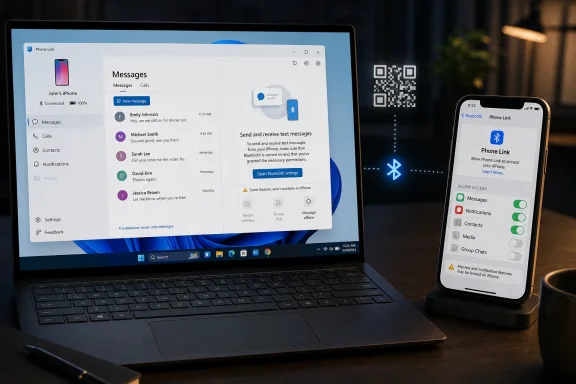
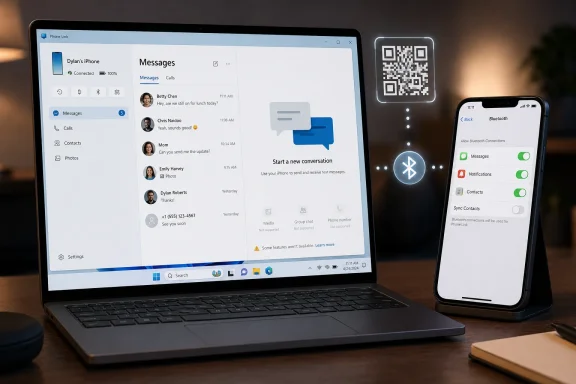
Apple Messages can be used on a Windows 11 PC through Microsoft’s Phone Link app, which pairs an iPhone over Bluetooth with Link to Windows for iOS, then exposes recent one-to-one texts, contacts, calls, and notifications inside Windows after the required permissions are enabled. That is the practical answer, but not the whole story. Microsoft has built a bridge into Apple’s messaging world, yet the bridge is narrow, supervised, and full of warning signs. For Windows users with iPhones, Phone Link is less an iMessage client than a useful compromise between ecosystems that still do not really want to meet.
The important distinction is that Phone Link does not turn a Windows PC into a Mac. It does not install Apple’s Messages app, synchronize the full iMessage database, or give Windows a native seat at Apple’s blue-bubble table. Instead, it relays a limited slice of messaging activity from an iPhone to a PC through Bluetooth and system notification permissions.
That design explains both the usefulness and the frustration. When it works, the experience feels almost obvious: your phone is nearby, your PC is in front of you, and typing a short reply on a real keyboard is better than pecking at glass. But the moment you expect continuity in the Apple sense — old threads, rich media, group chats, seamless handoff — the illusion breaks.
Microsoft’s pitch is convenience, not parity. Phone Link for iPhone gives Windows users enough access to reduce context switching during the workday, especially for basic texts and quick replies. It does not give them the deep Messages integration that Apple reserves for its own hardware.
That is why guides like PCMag Australia’s are useful, but also why they need a sharper frame. The setup steps are not hard. The real issue is knowing what kind of tool you are setting up before you start relying on it.
The permissions matter more than the QR code. On the iPhone, the user has to go into Bluetooth settings, tap the information icon beside the PC, and enable options such as message notifications, contact syncing, and system notification sharing. Without those switches, Phone Link may appear connected while the feature everyone wants — messages — remains incomplete or silent.
This is classic modern Windows integration: a Microsoft account, a Store-era app, a mobile companion app, and a permissions trail split across two operating systems. None of that is especially surprising in 2026. What is notable is that the most important settings live not in Phone Link itself but inside iOS’s Bluetooth device permissions, which makes troubleshooting feel less intuitive than the initial pairing flow suggests.
The result is a setup experience that looks consumer-friendly but behaves like a permissions puzzle. If a Windows admin were documenting this for a help desk, the QR code would be the easy part. The support script would focus on Bluetooth state, iOS notification previews, contact sync, and whether the user expects old messages to appear.
This distinction will catch people because every major messaging app has trained users to expect cloud history. Open WhatsApp Desktop, Teams, Slack, Signal Desktop, or Apple Messages on a Mac, and the assumption is that conversations have durable state. Phone Link for iPhone does not behave that way, because it is not plugging into Apple’s messaging backend with Apple’s blessing in the way a Mac does.
The PCMag walkthrough describes seeing recent conversations and suggested contacts, then replying from the Windows app. That is the correct mental model: this is a recent activity view, not an archive. It is good for “Can you send me the code?” and “I’m running five minutes late.” It is poor for searching a month-old thread or recovering context from an ongoing family chat.
For casual users, this limitation is annoying. For business users, it is clarifying. If your workflow depends on message retention, auditability, records management, or consistent cross-device history, Phone Link for iPhone should not be treated as a system of record. It is a convenience layer, and convenience layers have a habit of being mistaken for infrastructure until something goes missing.
This matters because group messaging is no longer an edge case. Families, school groups, friend circles, small businesses, volunteer organizations, and project teams all run through group threads. A tool that handles only one-to-one texts is useful, but it excludes a large share of the messaging that actually makes phones feel socially indispensable.
It also prevents Phone Link from becoming a true iMessage substitute for Windows. Apple’s lock-in is not just about blue bubbles as a cultural artifact; it is about the accumulated friction of shared history, photos, reactions, group identities, read states, and social expectation. Microsoft can relay a message, but it cannot recreate the social machinery around Apple Messages from outside the platform.
That is why the limitation should not be described as a small caveat at the end of a how-to guide. For many iPhone owners, group chats are the main event. Phone Link can make Windows a better desk companion, but it does not dissolve the boundary between the Windows PC and the iPhone.
A modern message thread is rarely just text. It is screenshots, receipts, calendar images, memes, voice notes, reactions, location pins, and the casual media debris of everyday life. Strip those away and you still have communication, but you no longer have the full social or operational value of the conversation.
Microsoft’s Android story is broader here, especially with selected devices and deeper integration paths. The iPhone story is more constrained because Apple controls the messaging stack and the permissions model. Phone Link is therefore doing what it can through exposed mechanisms rather than what users might assume from a native messaging client.
That makes the PCMag instructions accurate but easy to overread. Yes, you can send a message from Windows. No, that does not mean your PC has become a full participant in Apple Messages. The difference will show up the first time someone sends a photo you need to act on, or when you try to continue a media-heavy thread without picking up the phone.
That goal is sensible. Many professionals live in mixed ecosystems: Windows laptop at work, iPhone in pocket, maybe an iPad at home, perhaps a Mac in the household but not on the corporate desk. The old assumption that Apple users are all-in on Apple hardware has been false for years. Microsoft is serving the messy reality of enterprise and consumer device ownership.
But the feature’s strengths are strongest in low-emotion, low-complexity scenarios. A two-factor code arrives. A colleague asks whether you are joining a call. A spouse needs a quick answer. A delivery driver texts from outside. In those cases, Phone Link reduces friction and keeps your attention on the larger screen.
It is weaker where messaging becomes collaboration. Long threads, group plans, image approvals, shared screenshots, and emotionally sensitive conversations all push users back to the iPhone. That is not a failure of the setup guide; it is the boundary of the product.
This is platform strategy disguised as a permissions model. Apple’s Messages app is a pillar of ecosystem continuity, especially in markets where iMessage has strong cultural weight. Letting Windows become a first-class Messages endpoint would reduce one of the everyday reasons people choose or keep Macs.
Microsoft, meanwhile, has every incentive to blur that boundary. Windows is no longer competing only against macOS as an operating system; it is competing against the gravitational pull of device ecosystems. If an iPhone owner can stay productive on Windows without feeling punished, Microsoft protects the relevance of the PC in a phone-centered world.
Phone Link therefore sits in a familiar middle ground. It is good enough to be useful, not good enough to be threatening. That balance may be frustrating for users, but strategically it makes perfect sense.
There are also policy questions. Some organizations disable Phone Link or restrict cross-device features because they complicate data boundaries. If business messages, one-time passcodes, customer screenshots, or personal texts appear on a corporate PC, the line between personal device and managed endpoint becomes blurrier.
That does not mean organizations should ban it by default. For many shops, Phone Link is harmless and helpful, especially where employees use corporate Windows devices alongside personal phones. But IT should make an explicit decision rather than allowing the feature to drift into use without guidance.
The sensible posture is documentation and expectation-setting. Tell users that iPhone support is limited to recent, connected-session messaging and does not support full group or media behavior. Tell them where the iOS Bluetooth permissions live. Tell them that if a conversation matters, the authoritative copy remains on the phone.
The first control is user behavior. If you use Phone Link while presenting, streaming, or sharing your screen, message previews can become accidental disclosure. If your Windows account is unlocked in a shared space, the PC may expose content that the phone would otherwise keep private.
The second control is device hygiene. A properly secured Windows 11 PC with disk encryption, a strong sign-in method, current patches, and sensible lock timing is a better companion than a neglected machine. Phone Link does not change the fundamentals; it simply raises the value of getting them right.
The third control is expectation. Users should understand that pairing devices is a trust relationship. If a PC is temporary, shared, unmanaged, or borrowed, linking an iPhone for messages is a bad bargain. The convenience is not worth extending personal communications onto a machine you do not fully control.
Microsoft’s shift is pragmatic. Windows does not need to own the phone to benefit from the phone. It needs to reduce the number of moments when the user leaves the PC, gets pulled into a mobile app, and forgets what they were doing on the larger screen.
That is where Phone Link succeeds. It keeps small interruptions small. It lets the PC absorb just enough of the phone’s surface area to preserve focus. For users who spend hours in Word, Excel, browsers, terminals, design tools, ticketing systems, or remote consoles, that is not trivial.
The feature also fits Microsoft’s broader pattern of making Windows a place where other ecosystems can be partially domesticated. Android apps, cloud clipboard features, Microsoft 365, Edge sync, OneDrive camera uploads, and Phone Link all point in the same direction. Windows is less a walled garden than a busy airport terminal, and the iPhone gate is open only partway.
But the more interesting story is what the guide normalizes. It treats Apple Messages on Windows as a practical thing a mainstream user might reasonably want to do. That alone marks a shift from the older world where cross-platform messaging convenience was either impossible, unofficial, or reserved for people willing to tolerate hacks.
The story also shows how far the industry remains from true interoperability. The user does not get to choose a preferred desktop messaging client that fully participates in Apple Messages. Instead, they get a vendor-mediated relay with platform-specific exceptions. The experience is better than nothing, but it is not openness.
That distinction matters as regulators, platform owners, and competitors continue fighting over messaging lock-in. Users tend to describe the problem in simple terms — “I want my texts on my computer.” The industry answers with conditional verbs: sync, relay, mirror, notify, pair. Each word hides a different level of access and control.
On that measure, Phone Link for iPhone is useful for the desk-bound Windows user who wants quick replies and basic notification handling. It is especially handy for people who already live in Microsoft’s account ecosystem and do not mind installing Link to Windows on the iPhone. The setup cost is low, and the payoff is immediate in the right scenarios.
The app is less compelling for users who want to replace their phone during the workday. If your messaging life is built around group chats, media sharing, reactions, and deep history, the Windows experience will feel like a thin terminal into a much richer world. You will still pick up the iPhone often.
That is the honest bargain. Phone Link does not liberate Apple Messages from Apple’s ecosystem. It gives Windows users a periscope into it.
That mental model also makes troubleshooting less mysterious. If messages do not appear, check whether the iPhone and PC are still connected over Bluetooth. Check whether iOS permissions for message notifications, contacts, and system notifications are enabled. Check whether the conversation involves a group or media type Phone Link does not support.
Users should also be careful when judging reliability. A tool that works beautifully for one-to-one texts can still fail the moment the conversation changes shape. That is not intermittent magic; it is product scope.
The best use is therefore intentional. Keep Phone Link open for quick replies. Use it for plain-text exchanges. Do not depend on it for complete history, complex threads, or anything where missing context could create confusion.
 Microsoft Built a Side Door, Not an Apple Messages App
The important distinction is that Phone Link does not turn a Windows PC into a Mac. It does not install Apple’s Messages app, synchronize the full iMessage database, or give Windows a native seat at Apple’s blue-bubble table. Instead, it relays a limited slice of messaging activity from an iPhone to a PC through Bluetooth and system notification permissions.That design explains both the usefulness and the frustration. When it works, the experience feels almost obvious: your phone is nearby, your PC is in front of you, and typing a short reply on a real keyboard is better than pecking at glass. But the moment you expect continuity in the Apple sense — old threads, rich media, group chats, seamless handoff — the illusion breaks.
Microsoft’s pitch is convenience, not parity. Phone Link for iPhone gives Windows users enough access to reduce context switching during the workday, especially for basic texts and quick replies. It does not give them the deep Messages integration that Apple reserves for its own hardware.
That is why guides like PCMag Australia’s are useful, but also why they need a sharper frame. The setup steps are not hard. The real issue is knowing what kind of tool you are setting up before you start relying on it.
The Setup Is Simple Because the Architecture Is Constrained
The process starts in Windows 11’s Phone Link app, where the user chooses iPhone rather than Android and pairs the phone by scanning a QR code. The iPhone then opens Microsoft’s Link to Windows app, requests Bluetooth access, and walks the user through the pairing prompts. Once both sides agree, Windows can start acting as a companion endpoint for certain phone functions.The permissions matter more than the QR code. On the iPhone, the user has to go into Bluetooth settings, tap the information icon beside the PC, and enable options such as message notifications, contact syncing, and system notification sharing. Without those switches, Phone Link may appear connected while the feature everyone wants — messages — remains incomplete or silent.
This is classic modern Windows integration: a Microsoft account, a Store-era app, a mobile companion app, and a permissions trail split across two operating systems. None of that is especially surprising in 2026. What is notable is that the most important settings live not in Phone Link itself but inside iOS’s Bluetooth device permissions, which makes troubleshooting feel less intuitive than the initial pairing flow suggests.
The result is a setup experience that looks consumer-friendly but behaves like a permissions puzzle. If a Windows admin were documenting this for a help desk, the QR code would be the easy part. The support script would focus on Bluetooth state, iOS notification previews, contact sync, and whether the user expects old messages to appear.
The Missing Inbox Is the Feature, Not the Bug
The first disappointment for many users is that Phone Link does not display the full iPhone Messages history. Microsoft’s own support language is careful here: iPhone messaging through Phone Link is tied to messages sent and received while the phone and PC are paired and connected. That means the PC is not a forensic mirror of the iPhone’s database; it is a live companion surface.This distinction will catch people because every major messaging app has trained users to expect cloud history. Open WhatsApp Desktop, Teams, Slack, Signal Desktop, or Apple Messages on a Mac, and the assumption is that conversations have durable state. Phone Link for iPhone does not behave that way, because it is not plugging into Apple’s messaging backend with Apple’s blessing in the way a Mac does.
The PCMag walkthrough describes seeing recent conversations and suggested contacts, then replying from the Windows app. That is the correct mental model: this is a recent activity view, not an archive. It is good for “Can you send me the code?” and “I’m running five minutes late.” It is poor for searching a month-old thread or recovering context from an ongoing family chat.
For casual users, this limitation is annoying. For business users, it is clarifying. If your workflow depends on message retention, auditability, records management, or consistent cross-device history, Phone Link for iPhone should not be treated as a system of record. It is a convenience layer, and convenience layers have a habit of being mistaken for infrastructure until something goes missing.
Group Chats Remain the Wall Around the Garden
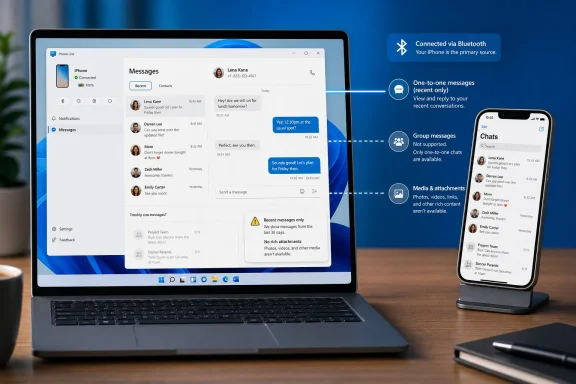
The most consequential limitation is group messaging. Phone Link for iPhone does not support creating or replying to group messages in the way users expect from Apple Messages. In some cases, group-related replies may surface awkwardly as individual conversations, which is less a feature than a reminder that the relay has only partial understanding of what iOS is doing.This matters because group messaging is no longer an edge case. Families, school groups, friend circles, small businesses, volunteer organizations, and project teams all run through group threads. A tool that handles only one-to-one texts is useful, but it excludes a large share of the messaging that actually makes phones feel socially indispensable.
It also prevents Phone Link from becoming a true iMessage substitute for Windows. Apple’s lock-in is not just about blue bubbles as a cultural artifact; it is about the accumulated friction of shared history, photos, reactions, group identities, read states, and social expectation. Microsoft can relay a message, but it cannot recreate the social machinery around Apple Messages from outside the platform.
That is why the limitation should not be described as a small caveat at the end of a how-to guide. For many iPhone owners, group chats are the main event. Phone Link can make Windows a better desk companion, but it does not dissolve the boundary between the Windows PC and the iPhone.
Attachments Expose the Difference Between Texting and Messaging
The attachment limits are just as revealing. Phone Link for iPhone can handle plain text and some emoji-style input from Windows, but it does not support sending images, video, GIFs, Memoji, or rich attachments in the way users expect from their iPhone. Again, this is not merely a missing flourish. It defines the product category.A modern message thread is rarely just text. It is screenshots, receipts, calendar images, memes, voice notes, reactions, location pins, and the casual media debris of everyday life. Strip those away and you still have communication, but you no longer have the full social or operational value of the conversation.
Microsoft’s Android story is broader here, especially with selected devices and deeper integration paths. The iPhone story is more constrained because Apple controls the messaging stack and the permissions model. Phone Link is therefore doing what it can through exposed mechanisms rather than what users might assume from a native messaging client.
That makes the PCMag instructions accurate but easy to overread. Yes, you can send a message from Windows. No, that does not mean your PC has become a full participant in Apple Messages. The difference will show up the first time someone sends a photo you need to act on, or when you try to continue a media-heavy thread without picking up the phone.
This Is a Windows Productivity Feature Wearing an Apple Costume
The best way to understand Phone Link for iPhone is as a Windows productivity feature, not an Apple compatibility feature. Microsoft wants the PC to remain the center of daily work, even when the user’s phone is an iPhone. If a notification, call, or short reply can be handled without leaving the keyboard, Windows feels more complete.That goal is sensible. Many professionals live in mixed ecosystems: Windows laptop at work, iPhone in pocket, maybe an iPad at home, perhaps a Mac in the household but not on the corporate desk. The old assumption that Apple users are all-in on Apple hardware has been false for years. Microsoft is serving the messy reality of enterprise and consumer device ownership.
But the feature’s strengths are strongest in low-emotion, low-complexity scenarios. A two-factor code arrives. A colleague asks whether you are joining a call. A spouse needs a quick answer. A delivery driver texts from outside. In those cases, Phone Link reduces friction and keeps your attention on the larger screen.
It is weaker where messaging becomes collaboration. Long threads, group plans, image approvals, shared screenshots, and emotionally sensitive conversations all push users back to the iPhone. That is not a failure of the setup guide; it is the boundary of the product.
Apple’s Silence Is Part of the Product Design
Apple does not need to block Phone Link aggressively for the experience to remain limited. The current arrangement already preserves Apple’s hierarchy: iPhone first, Mac best, Windows acceptable only at the margins. Microsoft gets enough access to advertise iPhone support, while Apple’s own hardware still offers the superior Messages experience.This is platform strategy disguised as a permissions model. Apple’s Messages app is a pillar of ecosystem continuity, especially in markets where iMessage has strong cultural weight. Letting Windows become a first-class Messages endpoint would reduce one of the everyday reasons people choose or keep Macs.
Microsoft, meanwhile, has every incentive to blur that boundary. Windows is no longer competing only against macOS as an operating system; it is competing against the gravitational pull of device ecosystems. If an iPhone owner can stay productive on Windows without feeling punished, Microsoft protects the relevance of the PC in a phone-centered world.
Phone Link therefore sits in a familiar middle ground. It is good enough to be useful, not good enough to be threatening. That balance may be frustrating for users, but strategically it makes perfect sense.
For IT Departments, Convenience Comes With Support Debt
In managed environments, Phone Link for iPhone creates a predictable support problem. Users will see that Windows can “do iMessage” and assume it should behave like Messages on a Mac. When history is missing, group chats misbehave, or attachments fail, the help desk inherits expectations created by a feature that looks simpler than it is.There are also policy questions. Some organizations disable Phone Link or restrict cross-device features because they complicate data boundaries. If business messages, one-time passcodes, customer screenshots, or personal texts appear on a corporate PC, the line between personal device and managed endpoint becomes blurrier.
That does not mean organizations should ban it by default. For many shops, Phone Link is harmless and helpful, especially where employees use corporate Windows devices alongside personal phones. But IT should make an explicit decision rather than allowing the feature to drift into use without guidance.
The sensible posture is documentation and expectation-setting. Tell users that iPhone support is limited to recent, connected-session messaging and does not support full group or media behavior. Tell them where the iOS Bluetooth permissions live. Tell them that if a conversation matters, the authoritative copy remains on the phone.
The Security Story Is Mostly About Visibility
From a security perspective, Phone Link is not automatically alarming, but it changes where sensitive content can appear. Messages that once lived only on a locked phone may now appear on a Windows desktop, in a notification banner, or in an app visible during screen sharing. That is a practical risk, not a theoretical one.The first control is user behavior. If you use Phone Link while presenting, streaming, or sharing your screen, message previews can become accidental disclosure. If your Windows account is unlocked in a shared space, the PC may expose content that the phone would otherwise keep private.
The second control is device hygiene. A properly secured Windows 11 PC with disk encryption, a strong sign-in method, current patches, and sensible lock timing is a better companion than a neglected machine. Phone Link does not change the fundamentals; it simply raises the value of getting them right.
The third control is expectation. Users should understand that pairing devices is a trust relationship. If a PC is temporary, shared, unmanaged, or borrowed, linking an iPhone for messages is a bad bargain. The convenience is not worth extending personal communications onto a machine you do not fully control.
The PC Finally Gets a Seat at the Phone’s Table
Despite all these caveats, Phone Link for iPhone is still worth taking seriously. A decade ago, Windows often treated the phone as an accessory or a rival. Today, the PC’s survival as a daily hub depends on acknowledging that the phone is the primary personal device for many users.Microsoft’s shift is pragmatic. Windows does not need to own the phone to benefit from the phone. It needs to reduce the number of moments when the user leaves the PC, gets pulled into a mobile app, and forgets what they were doing on the larger screen.
That is where Phone Link succeeds. It keeps small interruptions small. It lets the PC absorb just enough of the phone’s surface area to preserve focus. For users who spend hours in Word, Excel, browsers, terminals, design tools, ticketing systems, or remote consoles, that is not trivial.
The feature also fits Microsoft’s broader pattern of making Windows a place where other ecosystems can be partially domesticated. Android apps, cloud clipboard features, Microsoft 365, Edge sync, OneDrive camera uploads, and Phone Link all point in the same direction. Windows is less a walled garden than a busy airport terminal, and the iPhone gate is open only partway.
The PCMag Guide Gets the Steps Right, but the Stakes Are Bigger
The PCMag Australia walkthrough is a straightforward consumer service piece: install the pieces, pair the devices, enable the permissions, send the message. It is useful because most people do not want a platform theory lecture when they are just trying to stop squinting at a phone screen. The instructions meet that need.But the more interesting story is what the guide normalizes. It treats Apple Messages on Windows as a practical thing a mainstream user might reasonably want to do. That alone marks a shift from the older world where cross-platform messaging convenience was either impossible, unofficial, or reserved for people willing to tolerate hacks.
The story also shows how far the industry remains from true interoperability. The user does not get to choose a preferred desktop messaging client that fully participates in Apple Messages. Instead, they get a vendor-mediated relay with platform-specific exceptions. The experience is better than nothing, but it is not openness.
That distinction matters as regulators, platform owners, and competitors continue fighting over messaging lock-in. Users tend to describe the problem in simple terms — “I want my texts on my computer.” The industry answers with conditional verbs: sync, relay, mirror, notify, pair. Each word hides a different level of access and control.
The Keyboard Win Is Real, Even If the Ecosystem Win Is Not
It would be too cynical to dismiss Phone Link because it is incomplete. Many good tools are incomplete. The test is whether the constraint is clear enough that users can benefit without being misled.On that measure, Phone Link for iPhone is useful for the desk-bound Windows user who wants quick replies and basic notification handling. It is especially handy for people who already live in Microsoft’s account ecosystem and do not mind installing Link to Windows on the iPhone. The setup cost is low, and the payoff is immediate in the right scenarios.
The app is less compelling for users who want to replace their phone during the workday. If your messaging life is built around group chats, media sharing, reactions, and deep history, the Windows experience will feel like a thin terminal into a much richer world. You will still pick up the iPhone often.
That is the honest bargain. Phone Link does not liberate Apple Messages from Apple’s ecosystem. It gives Windows users a periscope into it.
The Practical Advice Is to Treat Phone Link Like a Live Remote
The cleanest mental model is that Phone Link is a live remote control for recent phone activity. It is not backup software, not an archive, not a compliance tool, and not Apple Messages for Windows. If the phone is nearby, paired, and permitted, Windows can help you handle small interactions.That mental model also makes troubleshooting less mysterious. If messages do not appear, check whether the iPhone and PC are still connected over Bluetooth. Check whether iOS permissions for message notifications, contacts, and system notifications are enabled. Check whether the conversation involves a group or media type Phone Link does not support.
Users should also be careful when judging reliability. A tool that works beautifully for one-to-one texts can still fail the moment the conversation changes shape. That is not intermittent magic; it is product scope.
The best use is therefore intentional. Keep Phone Link open for quick replies. Use it for plain-text exchanges. Do not depend on it for complete history, complex threads, or anything where missing context could create confusion.
The Blue Bubble Reaches Windows, but Only as a Shadow
The most concrete takeaways are not complicated, which is exactly why they are worth stating plainly. Phone Link for iPhone is a useful feature when judged as a convenience tool and a disappointing one when judged as a full Apple Messages client. Windows users should adopt it with both appreciation and restraint.- You need Windows 11, Microsoft’s Phone Link app, Microsoft’s Link to Windows app on the iPhone, a Microsoft account, Bluetooth pairing, and the right iOS permissions enabled.
- The setup flow is easy, but the critical message and contact permissions are tucked into the iPhone’s Bluetooth settings for the paired PC.
- Phone Link shows recent one-to-one messaging activity rather than a complete Apple Messages archive.
- Group messaging, image and video sharing, GIFs, Memoji, and richer attachment behavior remain outside the iPhone experience in Phone Link.
- The feature is best for short replies, notification triage, and reducing phone pickups during Windows work sessions.
- Users and IT departments should treat the iPhone as the authoritative messaging device and Phone Link as a convenience surface.
References
- Primary source: PCMag Australia
Published: Tue, 26 May 2026 17:22:37 GMT
Stop Squinting at Your iPhone. Here's How to Use Apple Messages on a Windows PC
The Messages app is built into macOS, but what about Windows? With Microsoft's Phone Link app, you can respond to texts right from your computer as you work.au.pcmag.com - Official source: support.microsoft.com
Troubleshooting for messages in the Phone Link | Microsoft Support
Troubleshooting for messages in the Phone Linksupport.microsoft.com - Official source: learn.microsoft.com
Not receiving messages in Phone Link App with iOS - Microsoft Q&A
Hi, I connected my iPhone in the Phone Link app. I can send messages but the messages i receive do not appear in the app. How can i solve this?learn.microsoft.com - Official source: microsoft.com
Use Phone Link to Sync Your Android or iPhone to Your Windows Computer | Microsoft
Sync your smartphone and Windows computer wirelessly using Microsoft Phone Link. Text, call, back up photos, and more no matter if you have an Android or an iPhone.www.microsoft.com - Related coverage: scscc.club
- Related coverage: filebrowser.clouddirect.net