

Valorant’s 2026 PC requirements still make an unusually generous promise for a modern competitive shooter: a Windows 10 or Windows 11 64-bit PC with 4GB of RAM can enter the queue, while genuinely high-refresh competitive play starts around a Core i5-9400F or Ryzen 5 2600X paired with a GTX 1050 Ti-class GPU. That is the simple answer, but it is not the whole story. Riot’s shooter remains light on graphics hardware and heavier on platform trust, which means the real compatibility test increasingly happens in firmware settings rather than on the GPU box. For WindowsForum readers, Valorant is less a story about whether an old PC can draw the game and more about whether Windows, Vanguard, and your motherboard agree that the machine is allowed to play.
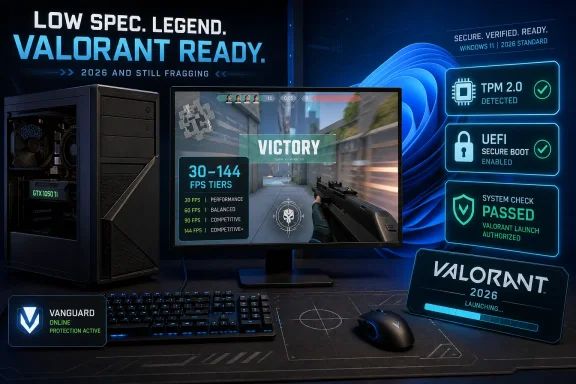
Valorant launched on Windows on June 2, 2020, and its hardware floor still looks like it belongs to another era. Riot’s official tiers divide the PC experience into Minimum at 30 FPS, Recommended at 60 FPS, and High-End at 144 FPS or better. The striking part is not that the game scales down; plenty of esports titles do. The striking part is how far down Riot still lets it go.
The minimum CPU tier lists an Intel Core i3-540 or AMD Athlon 200GE. The GPU floor is similarly forgiving, with Intel HD 4000 or AMD Radeon R5 220 listed for 30 FPS. That is not a typo or a nostalgic courtesy line buried in an old launcher page. In 2026, the official message remains that Valorant was built to run on machines that would be laughed out of the room by many contemporary multiplayer shooters.
The recommended 60 FPS tier is only a modest step up: Intel i3-4150 or AMD Ryzen 3 1200 on the CPU side, and a GeForce GT 730 or Radeon R7 240 on graphics. For a game where readability, hit registration, and low latency matter more than cinematic lighting, this is exactly the right priority. Valorant is not trying to sell you a graphics card; it is trying to keep the competitive population broad.
The high-end tier is where the modern esports expectation appears. Riot lists an Intel i5-9400F or AMD Ryzen 5 2600X, plus a GTX 1050 Ti, Radeon R7 370, or Intel Arc A310, for 144 FPS and above. That is still low by 2026 gaming standards, but it marks the point where Valorant stops being merely playable and starts feeling like the game most serious players believe they are actually playing.
Valorant itself is lean, but Windows is not standing still while the match runs. Discord, browser tabs, capture tools, RGB utilities, mouse software, overlays, audio suites, and driver control panels all nibble away at memory. A PC with 4GB of RAM may launch the game, but it is living too close to the edge for a smooth modern Windows experience.
That is why 8GB should be considered the practical basement, and 16GB remains the sensible target for competitive players. This is not because Valorant suddenly became a memory hog. It is because the PC around Valorant has become busier.
There is a useful distinction here between minimum requirement and minimum frustration. Riot’s published requirement answers the first question. Most players shopping used parts, tuning an older laptop, or troubleshooting stutter should care more about the second.
That matters because many PCs that are graphically capable of running Valorant are messy from a platform-security perspective. A desktop assembled over years of upgrades may have TPM disabled in firmware. A machine migrated from legacy BIOS settings may not be configured for Secure Boot. A user who installed Windows 11 through unofficial workarounds may find that Valorant is less forgiving than Windows Setup was.
This is where the usual “can you run it?” framing becomes misleading. A system can have enough CPU, enough GPU, enough memory, and enough storage, yet still be blocked before the match loads. Riot’s requirement is not merely a performance recommendation; it is an enforcement boundary tied to anti-cheat.
For Windows 10 users, the story has historically been less strict, though Riot has continued to expand Vanguard’s use of platform security checks. For Windows 11 users, the practical checklist is clear: TPM 2.0 must be present and enabled, Secure Boot must be enabled, and the installation must be aligned with modern UEFI expectations rather than legacy compatibility habits.
That trade-off has always been the bargain. Riot gives players a shooter that runs on cheap hardware, updates frequently, and maintains a major esports presence. In return, players accept an anti-cheat model that reaches into parts of Windows normally reserved for drivers, security tools, and system software.
For administrators and power users, this is not a philosophical footnote. Kernel anti-cheat changes the risk model of a machine. It can collide with virtualization settings, driver policies, firmware configuration, and enterprise hardening baselines. A home gaming PC can usually be adjusted until Vanguard is happy. A managed endpoint may not have that freedom.
Riot has also been moving toward a future where Vanguard’s startup behavior can be less intrusive on sufficiently secured systems. Recent reporting around Vanguard On-Demand points toward a model where the anti-cheat driver may load only when a Riot game launches, but only on PCs that satisfy stricter modern security prerequisites. The direction is clear: Riot wants less always-on friction, but not at the expense of deeper platform trust.
That means the long-term trajectory is not “Valorant gets easier to run on anything.” It is more subtle. Valorant remains easy to render, but the machines that get the best anti-cheat experience may increasingly be those with the most complete Windows security configuration.
Most mainstream processors from the last decade satisfy the requirement. The danger zone is older hardware that otherwise looks acceptable on paper. A system may meet the rough CPU branding tier or appear fast enough for a lightweight shooter, but if it lacks the required instruction support, Valorant will not run properly.
This is one of the reasons spec tables can be deceptive. “Core i3” or “Athlon” labels cover many years of silicon, and the name on the sticker is not always enough. The instruction set matters because modern games and anti-cheat systems assume certain CPU capabilities even when the graphics workload is modest.
The same is true of ARM-based Windows devices, which Riot does not support for Valorant PC. That rules out a growing class of Windows laptops, even as Microsoft and Qualcomm continue pushing ARM PCs into the mainstream. Valorant is a Windows game, but not every Windows machine is a Valorant machine.
The safe practical answer in 2026 is to budget roughly 40GB to 60GB of free space. Some installations may consume less, especially fresh ones. Others may creep upward depending on patch history and local files. The exact number matters less than the margin.
This is especially relevant on older systems, because the same PCs that benefit from Valorant’s low GPU requirements often have small SSDs. A 128GB boot drive that once felt generous can become cramped after Windows updates, driver packages, restore points, and a few live-service games. A failed patch because the disk is nearly full is a very different problem from a low frame rate, but it ends the night just as quickly.
The better advice is boring but reliable: leave headroom. Valorant does not need a premium NVMe drive to be enjoyable, but it does need enough free space for updates to land cleanly. On Windows, “barely enough” storage is an invitation to weird launcher failures.
Valorant is built around angles, recoil discipline, crosshair placement, and reaction windows that feel punishingly small. A higher refresh monitor will not magically fix bad positioning, but it does reduce the gap between what the server, the system, and the player perceive. In a tactical shooter, that gap is the game.
The good news is that Riot’s high-end tier is still reachable without boutique hardware. A GTX 1050 Ti-class GPU is old by 2026 standards. A six-core Ryzen 5 2600X is hardly exotic. Even Intel’s Arc A310 appearing in the high-end column makes the point: this is not a game demanding flagship rasterization muscle.
The more important bottlenecks are often configuration and consistency. Background apps, thermal throttling, old drivers, single-channel memory, and crowded storage can all drag a theoretically qualified PC below the feel of a proper competitive setup. Valorant rewards smoothness more than spectacle, and that makes system hygiene part of performance.
On PC, Valorant remains a mouse-and-keyboard tactical shooter with Vanguard at the center of its competitive integrity model. On console, Riot had to solve input, aiming, platform matchmaking, and certification problems differently. The shared name does not mean the same system constraints apply.
For Windows users, the console version mostly reinforces how deliberate the PC version’s design has been. Riot wants Valorant everywhere it can preserve competitive credibility, but it is not willing to blur every boundary to get there. That is why PC players still need to care about Vanguard, Windows security settings, and the specific hardware support matrix.
The console release also shows why low PC requirements remain strategically important. Valorant’s audience is global, competitive, and long-tail. A game like this lives not only on new hardware sales but on dorm-room laptops, older desktops, budget builds, and recycled office towers with a GPU added later.
A Windows 10 64-bit or Windows 11 64-bit installation is required, with Riot listing Windows 10 build 19041 or newer. DirectX 11 is the graphics API baseline. Dedicated or discrete GPUs at the minimum tier need 1GB of VRAM, though integrated graphics remain part of the official low-end story.
Checking the obvious specs is straightforward. Windows Settings will show processor and installed RAM. Task Manager’s Performance tab will identify the GPU. The
The harder part is interpretation. If a PC barely clears the minimum tier, expect compromises and keep graphics settings conservative. If it clears the recommended tier, 60 FPS should be realistic with sane settings. If it clears the high-end tier but still feels bad, the issue is likely not Riot’s table; it is thermals, drivers, background load, memory configuration, or platform settings.
Competitive players often prefer lower settings even on strong hardware because clarity beats ornament. Valorant’s art direction helps here. The game is readable by design, with clean silhouettes and maps that do not depend on photorealistic clutter. Turning down visual extras rarely feels like vandalizing the experience.
NVIDIA Reflex is worth enabling on supported GeForce hardware, particularly from the GTX 900 series onward. Its purpose is not to increase frame rate in the traditional sense, but to reduce system latency. In a game built around peeks, flicks, and narrow timing windows, latency reduction can matter as much as raw FPS.
Still, settings cannot solve every problem. If the machine is memory-starved, thermally throttling, or stuck behind firmware requirements, no texture slider will save it. Valorant is forgiving, not magical.
That has broader implications beyond Valorant. PC gaming used to treat system requirements as a question of performance. Increasingly, multiplayer games also treat them as a question of trust. Anti-cheat, secure boot chains, TPMs, virtualization-based protections, and driver policies are becoming part of the gaming vocabulary whether players asked for them or not.
For enthusiasts, this can feel like mission creep. For competitive players exhausted by cheaters, it can feel like overdue enforcement. For IT pros, it looks like consumer gaming adopting the language and mechanisms of endpoint security, sometimes with less transparency and fewer administrative controls than enterprise software would require.
Valorant is therefore a useful preview of where Windows gaming is headed. The spec sheet still lists CPUs and GPUs, but the decisive line may be buried in firmware. The next time a game says your PC is unsupported, it may not mean your graphics card is too slow. It may mean your platform is insufficiently attestable.
But the upgrade path can be narrower for old systems than the graphics requirements imply. A pre-UEFI desktop, a system without TPM 2.0, or a machine running Windows 11 in an unsupported configuration may become a project rather than a quick install. Likewise, ARM Windows laptops are simply out, regardless of how modern they feel in every other respect.
That creates a split market. A cheap but modern-enough x86 PC with the right firmware configuration is often a better Valorant machine than an older enthusiast tower with more raw graphics horsepower but outdated platform assumptions. In Riot’s world, age is not just measured in frames per second. It is measured in security features.
For parents, students, and budget players, the winning move is to check firmware and Windows status before spending on a GPU. For sysadmins managing gaming-capable labs, esports rooms, or shared PCs, the winning move is to standardize Secure Boot, TPM, and driver baselines before users start filing mysterious Vanguard errors.
The concrete takeaways are simple enough, but they point to a larger shift in PC gaming:
 Riot’s Shooter Still Treats Old PCs as First-Class Citizens
Valorant launched on Windows on June 2, 2020, and its hardware floor still looks like it belongs to another era. Riot’s official tiers divide the PC experience into Minimum at 30 FPS, Recommended at 60 FPS, and High-End at 144 FPS or better. The striking part is not that the game scales down; plenty of esports titles do. The striking part is how far down Riot still lets it go.The minimum CPU tier lists an Intel Core i3-540 or AMD Athlon 200GE. The GPU floor is similarly forgiving, with Intel HD 4000 or AMD Radeon R5 220 listed for 30 FPS. That is not a typo or a nostalgic courtesy line buried in an old launcher page. In 2026, the official message remains that Valorant was built to run on machines that would be laughed out of the room by many contemporary multiplayer shooters.
The recommended 60 FPS tier is only a modest step up: Intel i3-4150 or AMD Ryzen 3 1200 on the CPU side, and a GeForce GT 730 or Radeon R7 240 on graphics. For a game where readability, hit registration, and low latency matter more than cinematic lighting, this is exactly the right priority. Valorant is not trying to sell you a graphics card; it is trying to keep the competitive population broad.
The high-end tier is where the modern esports expectation appears. Riot lists an Intel i5-9400F or AMD Ryzen 5 2600X, plus a GTX 1050 Ti, Radeon R7 370, or Intel Arc A310, for 144 FPS and above. That is still low by 2026 gaming standards, but it marks the point where Valorant stops being merely playable and starts feeling like the game most serious players believe they are actually playing.
The 4GB RAM Line Is Official, Not Necessarily Sensible
Riot lists 4GB of RAM across all three performance tiers, and technically that is the number buyers and upgraders need to know. It is also the number most experienced Windows users should treat with caution. A clean test bench and a real gaming desktop are not the same thing.Valorant itself is lean, but Windows is not standing still while the match runs. Discord, browser tabs, capture tools, RGB utilities, mouse software, overlays, audio suites, and driver control panels all nibble away at memory. A PC with 4GB of RAM may launch the game, but it is living too close to the edge for a smooth modern Windows experience.
That is why 8GB should be considered the practical basement, and 16GB remains the sensible target for competitive players. This is not because Valorant suddenly became a memory hog. It is because the PC around Valorant has become busier.
There is a useful distinction here between minimum requirement and minimum frustration. Riot’s published requirement answers the first question. Most players shopping used parts, tuning an older laptop, or troubleshooting stutter should care more about the second.
Windows 11 Moves the Gate From the GPU to the Firmware Menu
The most important Valorant compatibility wrinkle is not the CPU tier or the GPU tier. It is the Windows 11 security stack. Riot’s Vanguard anti-cheat requires TPM 2.0 and UEFI Secure Boot on Windows 11 systems, and Valorant will refuse to launch when those checks fail.That matters because many PCs that are graphically capable of running Valorant are messy from a platform-security perspective. A desktop assembled over years of upgrades may have TPM disabled in firmware. A machine migrated from legacy BIOS settings may not be configured for Secure Boot. A user who installed Windows 11 through unofficial workarounds may find that Valorant is less forgiving than Windows Setup was.
This is where the usual “can you run it?” framing becomes misleading. A system can have enough CPU, enough GPU, enough memory, and enough storage, yet still be blocked before the match loads. Riot’s requirement is not merely a performance recommendation; it is an enforcement boundary tied to anti-cheat.
For Windows 10 users, the story has historically been less strict, though Riot has continued to expand Vanguard’s use of platform security checks. For Windows 11 users, the practical checklist is clear: TPM 2.0 must be present and enabled, Secure Boot must be enabled, and the installation must be aligned with modern UEFI expectations rather than legacy compatibility habits.
Vanguard Is the Real System Requirement Nobody Can Ignore
Valorant’s low hardware requirements are inseparable from Riot’s high anti-cheat ambitions. Vanguard operates at the kernel level, which is why it has remained one of the most controversial pieces of software in PC gaming. It is also why Riot can plausibly argue that competitive integrity depends on controls deeper than the game client itself.That trade-off has always been the bargain. Riot gives players a shooter that runs on cheap hardware, updates frequently, and maintains a major esports presence. In return, players accept an anti-cheat model that reaches into parts of Windows normally reserved for drivers, security tools, and system software.
For administrators and power users, this is not a philosophical footnote. Kernel anti-cheat changes the risk model of a machine. It can collide with virtualization settings, driver policies, firmware configuration, and enterprise hardening baselines. A home gaming PC can usually be adjusted until Vanguard is happy. A managed endpoint may not have that freedom.
Riot has also been moving toward a future where Vanguard’s startup behavior can be less intrusive on sufficiently secured systems. Recent reporting around Vanguard On-Demand points toward a model where the anti-cheat driver may load only when a Riot game launches, but only on PCs that satisfy stricter modern security prerequisites. The direction is clear: Riot wants less always-on friction, but not at the expense of deeper platform trust.
That means the long-term trajectory is not “Valorant gets easier to run on anything.” It is more subtle. Valorant remains easy to render, but the machines that get the best anti-cheat experience may increasingly be those with the most complete Windows security configuration.
CPU Instructions Are the Hidden Cutoff for Ancient Hardware
Riot’s specs also note that the CPU must support SSE 4.2 or AVX. For most players, this is background noise. For anyone trying to revive a very old office desktop or hand-me-down laptop, it can be the difference between a clever budget build and a dead end.Most mainstream processors from the last decade satisfy the requirement. The danger zone is older hardware that otherwise looks acceptable on paper. A system may meet the rough CPU branding tier or appear fast enough for a lightweight shooter, but if it lacks the required instruction support, Valorant will not run properly.
This is one of the reasons spec tables can be deceptive. “Core i3” or “Athlon” labels cover many years of silicon, and the name on the sticker is not always enough. The instruction set matters because modern games and anti-cheat systems assume certain CPU capabilities even when the graphics workload is modest.
The same is true of ARM-based Windows devices, which Riot does not support for Valorant PC. That rules out a growing class of Windows laptops, even as Microsoft and Qualcomm continue pushing ARM PCs into the mainstream. Valorant is a Windows game, but not every Windows machine is a Valorant machine.
Storage Is the One Number Riot Leaves Fuzzy
Unlike CPU, GPU, RAM, OS, and DirectX requirements, storage is the awkward blank in the otherwise tidy story. Riot does not publish a single fixed Valorant install-size number in the same way it publishes its performance tiers. Third-party estimates vary because the live game changes through patches, cosmetics, maps, agents, and launcher behavior.The safe practical answer in 2026 is to budget roughly 40GB to 60GB of free space. Some installations may consume less, especially fresh ones. Others may creep upward depending on patch history and local files. The exact number matters less than the margin.
This is especially relevant on older systems, because the same PCs that benefit from Valorant’s low GPU requirements often have small SSDs. A 128GB boot drive that once felt generous can become cramped after Windows updates, driver packages, restore points, and a few live-service games. A failed patch because the disk is nearly full is a very different problem from a low frame rate, but it ends the night just as quickly.
The better advice is boring but reliable: leave headroom. Valorant does not need a premium NVMe drive to be enjoyable, but it does need enough free space for updates to land cleanly. On Windows, “barely enough” storage is an invitation to weird launcher failures.
The 144 FPS Tier Is the Real Competitive Baseline
Riot’s three-tier structure is technically useful, but it undersells how competitive players think. Thirty frames per second is playable in the dictionary sense. Sixty frames per second is comfortable for casual play. In Valorant, though, 144 FPS is where the game’s design starts to align with the expectations of its audience.Valorant is built around angles, recoil discipline, crosshair placement, and reaction windows that feel punishingly small. A higher refresh monitor will not magically fix bad positioning, but it does reduce the gap between what the server, the system, and the player perceive. In a tactical shooter, that gap is the game.
The good news is that Riot’s high-end tier is still reachable without boutique hardware. A GTX 1050 Ti-class GPU is old by 2026 standards. A six-core Ryzen 5 2600X is hardly exotic. Even Intel’s Arc A310 appearing in the high-end column makes the point: this is not a game demanding flagship rasterization muscle.
The more important bottlenecks are often configuration and consistency. Background apps, thermal throttling, old drivers, single-channel memory, and crowded storage can all drag a theoretically qualified PC below the feel of a proper competitive setup. Valorant rewards smoothness more than spectacle, and that makes system hygiene part of performance.
The Console Expansion Did Not Change the PC Contract
Valorant arrived on PlayStation 5 and Xbox Series X|S in August 2024 after beta testing, but the console launch did not turn the PC version into an afterthought. Riot treated console as a separate competitive environment rather than simply dumping controller players into PC lobbies. That decision matters because it preserved the assumptions behind the PC requirements.On PC, Valorant remains a mouse-and-keyboard tactical shooter with Vanguard at the center of its competitive integrity model. On console, Riot had to solve input, aiming, platform matchmaking, and certification problems differently. The shared name does not mean the same system constraints apply.
For Windows users, the console version mostly reinforces how deliberate the PC version’s design has been. Riot wants Valorant everywhere it can preserve competitive credibility, but it is not willing to blur every boundary to get there. That is why PC players still need to care about Vanguard, Windows security settings, and the specific hardware support matrix.
The console release also shows why low PC requirements remain strategically important. Valorant’s audience is global, competitive, and long-tail. A game like this lives not only on new hardware sales but on dorm-room laptops, older desktops, budget builds, and recycled office towers with a GPU added later.
How to Read the Specs Without Fooling Yourself
The cleanest way to evaluate a PC for Valorant is to separate rendering performance from launch eligibility. Rendering performance is the old-school question: CPU, GPU, RAM, and display target. Launch eligibility is the modern Riot question: Windows version, CPU instruction support, Secure Boot, TPM, and unsupported architectures.A Windows 10 64-bit or Windows 11 64-bit installation is required, with Riot listing Windows 10 build 19041 or newer. DirectX 11 is the graphics API baseline. Dedicated or discrete GPUs at the minimum tier need 1GB of VRAM, though integrated graphics remain part of the official low-end story.
Checking the obvious specs is straightforward. Windows Settings will show processor and installed RAM. Task Manager’s Performance tab will identify the GPU. The
winver command will confirm the Windows build. On Windows 11, tpm.msc and the System Information panel can help confirm TPM and Secure Boot status.The harder part is interpretation. If a PC barely clears the minimum tier, expect compromises and keep graphics settings conservative. If it clears the recommended tier, 60 FPS should be realistic with sane settings. If it clears the high-end tier but still feels bad, the issue is likely not Riot’s table; it is thermals, drivers, background load, memory configuration, or platform settings.
Settings Tweaks Still Matter on the Margins
Valorant’s visual settings are not as punishing as those in blockbuster single-player games, but they still matter on low-end systems. Material Quality, Texture Quality, and Detail Quality are sensible first targets because they can free performance without destroying competitive readability. Anti-aliasing is another easy place to claw back frames, especially on older integrated or entry-level graphics.Competitive players often prefer lower settings even on strong hardware because clarity beats ornament. Valorant’s art direction helps here. The game is readable by design, with clean silhouettes and maps that do not depend on photorealistic clutter. Turning down visual extras rarely feels like vandalizing the experience.
NVIDIA Reflex is worth enabling on supported GeForce hardware, particularly from the GTX 900 series onward. Its purpose is not to increase frame rate in the traditional sense, but to reduce system latency. In a game built around peeks, flicks, and narrow timing windows, latency reduction can matter as much as raw FPS.
Still, settings cannot solve every problem. If the machine is memory-starved, thermally throttling, or stuck behind firmware requirements, no texture slider will save it. Valorant is forgiving, not magical.
The Cheap-PC Victory Comes With a Security Price
The most interesting thing about Valorant in 2026 is the contradiction at its center. Riot has made one of the most accessible competitive shooters from a hardware standpoint while also making one of the least casual demands on the Windows platform itself. A potato PC may run the match, but only if the operating system and firmware pass muster.That has broader implications beyond Valorant. PC gaming used to treat system requirements as a question of performance. Increasingly, multiplayer games also treat them as a question of trust. Anti-cheat, secure boot chains, TPMs, virtualization-based protections, and driver policies are becoming part of the gaming vocabulary whether players asked for them or not.
For enthusiasts, this can feel like mission creep. For competitive players exhausted by cheaters, it can feel like overdue enforcement. For IT pros, it looks like consumer gaming adopting the language and mechanisms of endpoint security, sometimes with less transparency and fewer administrative controls than enterprise software would require.
Valorant is therefore a useful preview of where Windows gaming is headed. The spec sheet still lists CPUs and GPUs, but the decisive line may be buried in firmware. The next time a game says your PC is unsupported, it may not mean your graphics card is too slow. It may mean your platform is insufficiently attestable.
The Valorant Upgrade Path Is Narrower Than It Looks
The practical buying advice is refreshingly modest. If your goal is 60 FPS, almost any reasonably maintained desktop or laptop from the last several years should be in the conversation. If your goal is 144 FPS, a used midrange CPU and an old entry-level gaming GPU can still be enough. Valorant is one of the rare modern games where the words “budget build” do not require an apology.But the upgrade path can be narrower for old systems than the graphics requirements imply. A pre-UEFI desktop, a system without TPM 2.0, or a machine running Windows 11 in an unsupported configuration may become a project rather than a quick install. Likewise, ARM Windows laptops are simply out, regardless of how modern they feel in every other respect.
That creates a split market. A cheap but modern-enough x86 PC with the right firmware configuration is often a better Valorant machine than an older enthusiast tower with more raw graphics horsepower but outdated platform assumptions. In Riot’s world, age is not just measured in frames per second. It is measured in security features.
For parents, students, and budget players, the winning move is to check firmware and Windows status before spending on a GPU. For sysadmins managing gaming-capable labs, esports rooms, or shared PCs, the winning move is to standardize Secure Boot, TPM, and driver baselines before users start filing mysterious Vanguard errors.
A Spec Sheet That Says More About Windows Than Valorant
The useful 2026 reading of Valorant’s requirements is not “this game runs on anything.” It is “this game runs on almost any sufficiently trusted Windows x86 PC.” That extra phrase does a lot of work.The concrete takeaways are simple enough, but they point to a larger shift in PC gaming:
- Valorant’s minimum tier targets 30 FPS on very old x86 hardware, including Intel HD 4000-class integrated graphics.
- Riot’s recommended tier is aimed at 60 FPS and remains modest enough for older budget desktops and laptops.
- The high-end tier targets 144 FPS or better with hardware around an i5-9400F or Ryzen 5 2600X and a GTX 1050 Ti-class GPU.
- Windows 11 players need TPM 2.0 and UEFI Secure Boot enabled because Vanguard enforces platform-security requirements.
- A practical Valorant PC should have more than the official 4GB of RAM, with 16GB remaining the comfortable target for competitive play.
- Players should budget roughly 40GB to 60GB of free storage because Riot does not publish one fixed install-size number and live-service games grow over time.
References
- Primary source: Sam Lover
Published: 2026-07-03T12:10:08.822813
Valorant PC System Requirements (2026) – Minimum and Recommended Specs
Valorant’s system requirements cover three tiers: Minimum (30 FPS), Recommended (60 FPS), and High-End (144+ FPS), confirmed directly from Riot Games’ official specs page. The good news is that Riot built this tactical shooter to run on genuinely old hardware, so most players...samlover.com - Related coverage: news.xbox.com
Xbox Series X|S 版『VALORANT』が正式サービス開始 - XBOX Wire Japan
Xbox Series X|S 版『VALORANT』の正式サービスに伴って、ゲーム サポート内容についてご紹介しますnews.xbox.com - Related coverage: gamespot.com
Valorant Is Now In Open Beta For Xbox Series X|S And PlayStation 5 - GameSpot
Valorant will support cross-play between consoles.www.gamespot.com - Related coverage: en.as.com
Valorant is finally available on PlayStation 5 and Xbox Series X|S - Meristation
After a prolonged open beta on consoles, Riot Games has officially launched Valorant on PlayStation 5 and Xbox Series X|S.en.as.com - Related coverage: windowslatest.com
Riot Games' Valorant game is enforcing TPM 2.0 on Windows 11
Windows 11 is finally arriving on October 5 and it will officially require newer processors with TPM 2.0 and Secure Boot. One of the hottest topics in Microsoft’s community is whether or not you can get Windows 11 on PC via Windows Update, and a lot of users are confused. Microsoft has... www.windowslatest.com
- Related coverage: xboxera.com
Valorant launches for Xbox and PS5 | DayOne
This article is about the surprise launch of Valorant on Xbox and PS5 after a short beta period earlier last weekxboxera.com
- Related coverage: kitguru.net
Valorant is now available on PS5 and Xbox Series X/S | KitGuru
After a week of open beta testing, Riot is today rolling out Valorant on Xbox Series X/S and PS5. Thwww.kitguru.net - Related coverage: support-valorant.riotgames.com
Riot Games Support
Find answers to your questions and get help with your Riot Games account.support-valorant.riotgames.com
