

WebView2 application owners should enable Adobe’s PDF reader first for tested, low-risk applications and keep untested PDF workflows on the existing reader only while they complete validation before the legacy reader’s scheduled September 2026 removal. Microsoft scheduled the phased enterprise rollout for Edge Stable beginning with version 141 in October 2025 and completing in March 2026, but that schedule does not prove that every organization or embedded application deployment has already changed.
WindowsForum user reports make the practical distinction clear: Edge and the WebView2 Runtime are related components, but they are managed and experienced differently. Users may open a PDF directly in Edge, while a line-of-business application may display invoices, reports, forms, contracts, or generated documents inside its own WebView2-based window. Browser acceptance testing alone does not establish that those embedded workflows are ready.
Microsoft separates the controls accordingly:
Use this compact operating model before making broad changes:
The policy name is
For Intune Settings Catalog, create or edit a Windows configuration profile, then browse or search settings under Microsoft Edge WebView2 for Configure the list of WebView2 applications that use the new PDF reader. Enter the same list values used in Group Policy.
The policy is a list. Add one identifier per list entry; do not combine multiple applications into a single comma-separated value. The supported entry formats are:
Use the actual executable name or AUMID from the application inventory, not the examples above. Microsoft’s NewPDFReaderWebView2List policy reference should be the authoritative source for the current policy behavior, supported versions, and management-template details. Confirm that the installed Edge WebView2 ADMX templates and Intune setting catalog expose the policy before building production deployment profiles.
For the Edge browser itself, configure
After either policy changes, restart the affected browser or application. Microsoft documents restart as necessary before the WebView2 policy change takes effect.
Build an application inventory with at least these fields:
WindowsForum discussions about Edge, WebView2 servicing, and Chromium-related security updates point to the same operational lesson: embedded web components deserve an inventory and ownership model of their own. That is not an argument for an immediate all-app reader change. It is an argument against leaving embedded document behavior unmanaged because it is not visible in ordinary browser configuration reports.
Ask application owners direct questions:
It should not become an indefinite default. Microsoft’s published plan calls for the legacy PDF engine in the built-in Edge reader to be removed in September 2026. The relevant work is therefore not simply “turn on Adobe.” It is to make sure every WebView2 PDF workflow has a documented status before the fallback is no longer available.
A valid exception should include:
The policy split also belongs in change records. “Enable the new PDF reader” is not an adequate implementation description. The record should state whether the change affects Edge, a named WebView2 application, a set of identified applications, or all applicable applications through
What happens if
Microsoft documents that WebView2 applications continue using the existing WebView2 PDF reader when the policy is disabled or unconfigured. That is a temporary compatibility state ahead of the legacy engine’s scheduled September 2026 removal.
The practical path is to make WebView2 PDF behavior intentional: configure Edge separately, pilot named WebView2 applications, document exceptions and rollback ownership, and expand only after representative workflows pass testing.
WindowsForum user reports make the practical distinction clear: Edge and the WebView2 Runtime are related components, but they are managed and experienced differently. Users may open a PDF directly in Edge, while a line-of-business application may display invoices, reports, forms, contracts, or generated documents inside its own WebView2-based window. Browser acceptance testing alone does not establish that those embedded workflows are ready.
Microsoft separates the controls accordingly:
NewPDFReaderEnabledcontrols the Adobe-powered reader in Microsoft Edge.NewPDFReaderWebView2Listcontrols which WebView2-hosted applications use the new reader.
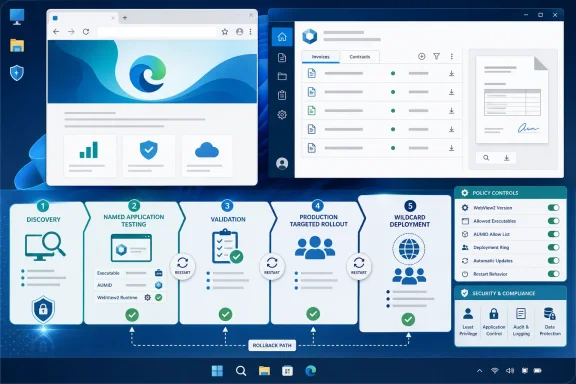 Implement the Policy as an Application Rollout
Use this compact operating model before making broad changes:| Scope | Policy action | Deployment state | Required follow-up |
|---|---|---|---|
| Microsoft Edge browser | Configure NewPDFReaderEnabled | Enable or manage according to the browser rollout decision | Restart Edge and test browser PDF workflows |
| Selected WebView2 applications | Configure NewPDFReaderWebView2List with an app identifier | Add only tested executables or AUMIDs | Restart the affected application and retest |
| Untested WebView2 applications | Do not add them to NewPDFReaderWebView2List | Leave the WebView2 policy disabled or unconfigured for those apps | Assign an owner and validation date |
| Broad estate rollout | Add * only after named-app validation is complete | Treat as a production expansion, not a pilot | Monitor support volume and retain a rollback plan |
Group Policy and Intune deployment
For Group Policy, configure the WebView2 setting at:Computer Configuration > Administrative Templates > Microsoft Edge WebView2 > Configure the list of WebView2 applications that use the new PDF readerThe policy name is
NewPDFReaderWebView2List.For Intune Settings Catalog, create or edit a Windows configuration profile, then browse or search settings under Microsoft Edge WebView2 for Configure the list of WebView2 applications that use the new PDF reader. Enter the same list values used in Group Policy.
The policy is a list. Add one identifier per list entry; do not combine multiple applications into a single comma-separated value. The supported entry formats are:
| Target type | Example list value | Use case |
|---|---|---|
| Executable name | ContosoInvoices.exe | A traditional desktop application identified by its executable |
| Application User Model ID (AUMID) | Contoso.InvoiceViewer_12345abcde!App | A packaged application or application identity that uses an AUMID |
| All applicable apps | * | A validated, organization-wide WebView2 rollout |
For the Edge browser itself, configure
NewPDFReaderEnabled separately under the applicable Microsoft Edge policy category. Do not treat that browser policy as a substitute for the WebView2 application list.After either policy changes, restart the affected browser or application. Microsoft documents restart as necessary before the WebView2 policy change takes effect.
Start With Discovery, Not the Wildcard
The most avoidable failure is an application that quietly uses WebView2 for PDF preview but was never included in browser testing. The application may not identify itself as a browser-dependent workflow to either desktop engineering or its business owner.Build an application inventory with at least these fields:
| Field | Why it matters |
|---|---|
| Application name and version | Identifies the tested release, not just the product family |
| Business owner | Approves workflow testing and user-impact decisions |
| Technical owner or vendor contact | Handles defects, packaging, or application updates |
| WebView2 PDF use confirmed? | Separates affected apps from applications that do not render PDFs through WebView2 |
| Target identifier | Records executable name or AUMID for NewPDFReaderWebView2List |
| Test status | Not started, in progress, passed, failed, or not applicable |
| Rollback owner | Identifies who can remove the app from the policy list if a defect appears |
| Exception expiry | Prevents temporary legacy-reader exceptions from becoming permanent |
Ask application owners direct questions:
- Does the application display PDFs inside its own window?
- Does it use WebView2 for that display path?
- Which documents are business-critical: generated reports, customer records, contracts, forms, regulated records, or downloaded attachments?
- Who can approve a compatibility result?
- Who can authorize a rollback if users report a failure?
Run a Pilot-to-Production Workflow
A controlled rollout can be simple, provided it is traceable.- Select pilot applications. Choose low-risk applications with active business and technical owners. Prefer applications with representative test documents and a known deployment path.
- Record the identifier. Document whether the policy will target the application by executable name or AUMID. Store the exact value in the change record.
- Deploy a named policy entry. Add only the pilot application’s identifier to
NewPDFReaderWebView2List. Do not use*during the first phase. - Restart and validate. Restart the application after policy delivery. If the application remains open, its observed behavior may reflect the prior policy state rather than a failed deployment.
- Complete recommended operational testing. Microsoft’s policy documentation establishes the control and restart requirement; it does not prescribe a universal validation checklist. As an operational recommendation, test the tasks users actually perform: opening and viewing documents, page navigation, search, print, download, save, and any document interaction central to the application’s workflow.
- Capture evidence and decision. Record the tested document set, tester, result, issues found, and owner approval. A “PDF opened” result is not enough for an application that depends on printing, downloads, form interactions, or document handoff.
- Expand by application wave. Add successful applications to the list in manageable groups. Monitor help-desk tickets and application-owner feedback after each wave.
- Use the wildcard only as a final expansion decision. The
*value is useful when the organization has completed enough discovery and validation to accept the wider blast radius. It is not a shortcut for discovering applications after they change.
Treat the Legacy Reader as a Time-Limited Exception
IfNewPDFReaderWebView2List is disabled or not configured, WebView2 applications continue using the existing PDF reader. That creates a useful compatibility position for applications that are still being tested or require vendor work.It should not become an indefinite default. Microsoft’s published plan calls for the legacy PDF engine in the built-in Edge reader to be removed in September 2026. The relevant work is therefore not simply “turn on Adobe.” It is to make sure every WebView2 PDF workflow has a documented status before the fallback is no longer available.
A valid exception should include:
- the application name and version;
- the specific PDF workflow that has not passed validation;
- the business and technical owner;
- the current mitigation or vendor case;
- the rollback or support contact;
- a next test date; and
- an expiry date before the September 2026 transition.
NewPDFReaderWebView2List, redeploy policy, restart the application, and confirm that it returns to the existing reader while the exception is investigated. That rollback should be owned by the same team that approved the application’s pilot entry.The policy split also belongs in change records. “Enable the new PDF reader” is not an adequate implementation description. The record should state whether the change affects Edge, a named WebView2 application, a set of identified applications, or all applicable applications through
*.Frequently Asked Questions
Does enabling the new reader in Microsoft Edge also change WebView2 applications?
No.NewPDFReaderEnabled controls Microsoft Edge, while NewPDFReaderWebView2List separately controls the PDF reader used by targeted WebView2 applications.What happens if NewPDFReaderWebView2List is not configured?
Microsoft documents that WebView2 applications continue using the existing WebView2 PDF reader when the policy is disabled or unconfigured. That is a temporary compatibility state ahead of the legacy engine’s scheduled September 2026 removal.Can administrators test one application before changing every WebView2 app?
Yes. The policy can target an executable name or an Application User Model ID. The* wildcard can target all apps, but it is better reserved for a later, validated rollout.When does a policy change take effect?
Microsoft says the affected application or browser must be restarted for the policy change to take effect.The practical path is to make WebView2 PDF behavior intentional: configure Edge separately, pilot named WebView2 applications, document exceptions and rollback ownership, and expand only after representative workflows pass testing.
References
- Primary source: learn.microsoft.com
Microsoft Edge WebView2 Policy Documentation | Microsoft Learn
Windows and Mac documentation for all policies supported by the Microsoft Edge WebView2learn.microsoft.com - Independent coverage: techcommunity.microsoft.com
- Primary source: WindowsForum
Edge and WebView2 Updates on Windows 10 Extend Security to 2028 | Windows Forum
Windows 10 will reach its official end of support on October 14, 2025, but one critical piece of the platform — Microsoft Edge and the WebView2 runtime —...windowsforum.com
