

Microsoft lists CVE-2026-12465 in the Security Update Guide because the flaw is in Chromium open-source code consumed by Microsoft Edge, and the entry documents that an updated Edge release has incorporated the upstream fix and is no longer vulnerable. That answer is simple, but it points to a larger reality of modern browser security: Edge is a Microsoft product with a Google-shaped engine room. When Chromium ships a security fix, Microsoft has to make the risk legible to Windows administrators who do not manage “Chromium” as a product but absolutely do manage Edge.
The most important thing about CVE-2026-12465 is not that it says “Chrome” in the vulnerability description. It is that the affected component lives in Chromium, the open-source browser project that underpins Google Chrome, Microsoft Edge, and several other modern browsers. Microsoft Edge is not a reskinned Chrome, but it does inherit a large body of Chromium code, including security-sensitive plumbing that processes web content.
That is why this CVE appears in Microsoft’s Security Update Guide. The guide is not limited to bugs written by Microsoft engineers. It is a customer-facing risk ledger for Microsoft products, and Edge is a Microsoft product that consumes third-party open-source code.
For Windows users, this distinction can feel pedantic until the patch window opens. A flaw in Chromium’s handling of untrusted input may be assigned by Chrome’s vulnerability process, described in Chrome-flavored language, and fixed first in the Chromium project. But if the vulnerable code is present in Edge, Microsoft customers need a Microsoft advisory, a Microsoft version number, and a Microsoft update path.
Microsoft’s Security Update Guide exists so administrators can answer operational questions. Is a Microsoft product affected? Is there a fixed version? Is there customer action required? Is the issue already addressed by an automatically updating component? For Edge, those questions often overlap with Chromium advisories because Edge’s security posture depends partly on upstream Chromium fixes.
This is also why these entries can read oddly. A vulnerability may be described as being in “Google Chrome prior to” a certain version because that is how the CVE record was written. Microsoft then documents the same underlying issue to say, in effect, that the Chromium-based Edge build has absorbed the repair.
There is a quiet but important trust model here. Microsoft is not claiming authorship of every bug in the guide. It is claiming responsibility for telling its customers when a Microsoft-distributed product is exposed to that bug.
The specific component name, Metrics, may make the issue sound less threatening than a flaw in V8 or the GPU stack. That would be a mistake. Browser components that collect, transform, or transmit diagnostic data still sit inside a complex, privileged application that constantly crosses trust boundaries.
“Untrusted input” is the key phrase. A browser cannot assume that data is safe merely because it arrived through a normal-looking web page, renderer process, profile state, or internal interface. Modern browser exploitation often depends on pushing malformed data through a path that developers expected to be routine.
Microsoft’s advisory language is deliberately sparse because detailed exploit mechanics are often withheld until users have had time to update. That is standard practice across browser vendors. It frustrates researchers and administrators who want full technical clarity immediately, but it reduces the odds that attackers can turn advisory prose into working exploit chains before the installed base catches up.
But shared code also creates shared exposure. When a bug lands in a common component, it may affect multiple browsers even if only one vendor’s name appears prominently in early advisories. For administrators, that means a Chrome bulletin should often trigger a broader mental query: what about Edge, WebView2, Brave, Opera, Electron apps, and other Chromium-derived software?
Microsoft’s Security Update Guide is one answer to that complexity. It translates upstream Chromium vulnerability activity into the Microsoft patch-management universe. The guide is where a Windows shop can confirm that Edge has moved from “inherits the bug” to “contains the fix.”
This is especially important because Edge is not just a browser icon on the taskbar. It is tied into Windows through default handlers, enterprise policy, WebView2-based applications, and authentication workflows. A vulnerable browser engine can become a risk even for users who swear they “never use Edge.”
That page shows the installed version and normally triggers an update check. If an update is available, Edge will download it. In many cases, the browser must be restarted before the fixed version is actually running.
For Google Chrome, the equivalent path is the three-dot menu, Help, then About Google Chrome, or the direct address
The relaunch is not clerical. Browsers can download an update and still keep the vulnerable old process alive until the application restarts. On managed systems, that gap can be where patch compliance looks better in a dashboard than it is on the endpoint.
That creates a familiar mismatch. Security teams read that a vulnerability is fixed in the latest Edge release. Desktop teams ask whether the update has reached all rings. Help desks discover that some users have not relaunched the browser in days. Application owners worry that a browser update might break a line-of-business workflow built on WebView2 or legacy web assumptions.
None of that makes delaying browser updates wise. It means browser patching has become a first-class enterprise discipline, closer to endpoint security than to casual application maintenance. Edge, Chrome, and WebView2 move too quickly and carry too much attack surface to be treated as background utilities.
For Microsoft shops, the Security Update Guide is useful because it gives Edge vulnerabilities the same administrative gravity as Windows, Office, Exchange, or Azure-related advisories. The Chromium origin of the bug does not reduce its relevance. If anything, it expands the blast radius.
A user might not launch Edge directly and still interact with Chromium-based rendering through Teams-adjacent workflows, identity prompts, enterprise portals, custom internal apps, or third-party desktop software. The precise exposure depends on the application and runtime version, but the architectural point is clear: Chromium is now part of the Windows application substrate.
This is where advisory wording can undersell the operational issue. A CVE that appears to be “a browser bug” may be relevant to software that looks nothing like a browser to the end user. Security teams increasingly need inventory that distinguishes Edge Stable, Edge Extended Stable, Edge Beta or Dev where present, and WebView2 Runtime installations.
Microsoft’s documentation of Chromium CVEs in its own guide is part of that inventory story. It acknowledges that the dependency is not someone else’s problem once it ships as part of the Microsoft platform experience.
Metrics systems in browsers can include diagnostic counters, stability reporting, performance measurements, experiment data, and other instrumentation. They are part of how vendors understand whether browsers crash, misbehave, or regress at scale. Like any component that processes data, they can contain validation mistakes.
The security issue is not that metrics exist. The security issue is whether data moving through that subsystem was checked rigorously enough before being used. That is why the fix is an updated browser version, not a user preference toggle.
Users who want to review diagnostic-data settings can do so separately in Edge’s privacy settings, but toggling telemetry preferences should not be confused with patching a CVE. A vulnerable code path remains a vulnerable code path until the fixed build is installed and running.
That matters because modern software security is increasingly about inherited risk. Operating systems ship open-source libraries. Browsers embed media parsers, graphics stacks, compression libraries, JavaScript engines, and networking components. Desktop apps bundle runtimes. Cloud agents carry dependencies that few customers can name.
In that world, vulnerability ownership is no longer as simple as “who wrote the original bug?” The better question is “who shipped the affected code to the user, and who is responsible for delivering the fix?” For Edge users, that answer is Microsoft, even when the bug originates upstream in Chromium.
The Security Update Guide entry is therefore not an oddity. It is an artifact of modern software accountability.
A browser left open for days can remain on an older running build even after the update has been staged. That is particularly common in environments where users rarely reboot, where browser sessions are treated as workspaces, or where restart prompts are suppressed to avoid disruption.
Administrators should also remember that multiple channels can coexist. A developer may have Edge Stable and Edge Dev. A test machine may carry Chrome Beta. A VDI image may include a stale browser that resets on login. A server used for administrative portals may have an outdated browser because nobody thinks of it as an endpoint.
The advisory answers whether Microsoft has shipped a fix. The local version check answers whether a particular machine has received it. The running-process question answers whether the risk has actually dropped.
For home users, the action is simple: open
This is the new normal for browser security. The browser is not one application; it is a fast-moving platform layer. Chromium is not one vendor’s private concern; it is shared infrastructure. Microsoft’s guide is doing what a serious platform vendor should do: documenting the inherited flaw where Microsoft customers will actually look for remediation.
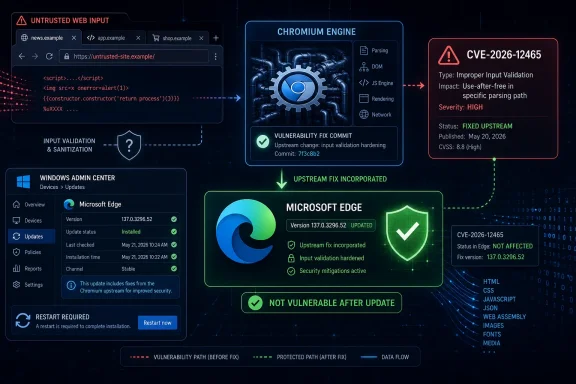 Edge Is Microsoft’s Browser, but Chromium Is the Shared Attack Surface
The most important thing about CVE-2026-12465 is not that it says “Chrome” in the vulnerability description. It is that the affected component lives in Chromium, the open-source browser project that underpins Google Chrome, Microsoft Edge, and several other modern browsers. Microsoft Edge is not a reskinned Chrome, but it does inherit a large body of Chromium code, including security-sensitive plumbing that processes web content.That is why this CVE appears in Microsoft’s Security Update Guide. The guide is not limited to bugs written by Microsoft engineers. It is a customer-facing risk ledger for Microsoft products, and Edge is a Microsoft product that consumes third-party open-source code.
For Windows users, this distinction can feel pedantic until the patch window opens. A flaw in Chromium’s handling of untrusted input may be assigned by Chrome’s vulnerability process, described in Chrome-flavored language, and fixed first in the Chromium project. But if the vulnerable code is present in Edge, Microsoft customers need a Microsoft advisory, a Microsoft version number, and a Microsoft update path.
The Security Update Guide Is Doing Inventory, Not Brand Policing
The user-facing confusion is understandable: if a CVE says Google Chrome, why is Microsoft publishing it? The answer is that vulnerability management is product-centric, not brand-centric. Enterprises do not patch a philosophical dependency; they patch installed software.Microsoft’s Security Update Guide exists so administrators can answer operational questions. Is a Microsoft product affected? Is there a fixed version? Is there customer action required? Is the issue already addressed by an automatically updating component? For Edge, those questions often overlap with Chromium advisories because Edge’s security posture depends partly on upstream Chromium fixes.
This is also why these entries can read oddly. A vulnerability may be described as being in “Google Chrome prior to” a certain version because that is how the CVE record was written. Microsoft then documents the same underlying issue to say, in effect, that the Chromium-based Edge build has absorbed the repair.
There is a quiet but important trust model here. Microsoft is not claiming authorship of every bug in the guide. It is claiming responsibility for telling its customers when a Microsoft-distributed product is exposed to that bug.
“Insufficient Validation” Is Boring Language for a Serious Class of Browser Bugs
CVE-2026-12465 is described as an insufficient validation of untrusted input issue in Metrics. That phrase sounds like a lint warning wearing a suit, but in browser security it deserves attention. Browsers are machines for accepting hostile input at planetary scale: HTML, JavaScript, images, fonts, media streams, GPU commands, extension data, synchronization state, telemetry records, and countless internal messages.The specific component name, Metrics, may make the issue sound less threatening than a flaw in V8 or the GPU stack. That would be a mistake. Browser components that collect, transform, or transmit diagnostic data still sit inside a complex, privileged application that constantly crosses trust boundaries.
“Untrusted input” is the key phrase. A browser cannot assume that data is safe merely because it arrived through a normal-looking web page, renderer process, profile state, or internal interface. Modern browser exploitation often depends on pushing malformed data through a path that developers expected to be routine.
Microsoft’s advisory language is deliberately sparse because detailed exploit mechanics are often withheld until users have had time to update. That is standard practice across browser vendors. It frustrates researchers and administrators who want full technical clarity immediately, but it reduces the odds that attackers can turn advisory prose into working exploit chains before the installed base catches up.
Chromium Makes Browser Security Faster and Messier at the Same Time
The Chromium ecosystem gives Microsoft a security advantage: Edge benefits from a vast upstream project with constant fuzzing, research, and bug fixing. When a vulnerability is found in Chromium, the fix can propagate into Edge more quickly than if Microsoft were maintaining a wholly separate browser engine. That shared model is one reason the browser market moved so decisively toward Chromium-based products.But shared code also creates shared exposure. When a bug lands in a common component, it may affect multiple browsers even if only one vendor’s name appears prominently in early advisories. For administrators, that means a Chrome bulletin should often trigger a broader mental query: what about Edge, WebView2, Brave, Opera, Electron apps, and other Chromium-derived software?
Microsoft’s Security Update Guide is one answer to that complexity. It translates upstream Chromium vulnerability activity into the Microsoft patch-management universe. The guide is where a Windows shop can confirm that Edge has moved from “inherits the bug” to “contains the fix.”
This is especially important because Edge is not just a browser icon on the taskbar. It is tied into Windows through default handlers, enterprise policy, WebView2-based applications, and authentication workflows. A vulnerable browser engine can become a risk even for users who swear they “never use Edge.”
The Version Number Is the Patch, Not the Advisory
The practical question in the CVE entry — how to see the browser version — is the one that matters most after the advisory has done its job. In Microsoft Edge, users can check the installed version by opening Edge, selecting the three-dot menu, choosing Help and feedback, and then selecting About Microsoft Edge. The same page can be reached directly by typingedge://settings/help into the address bar.That page shows the installed version and normally triggers an update check. If an update is available, Edge will download it. In many cases, the browser must be restarted before the fixed version is actually running.
For Google Chrome, the equivalent path is the three-dot menu, Help, then About Google Chrome, or the direct address
chrome://settings/help. Chrome also checks for updates on that page and usually asks for a relaunch after installing one.The relaunch is not clerical. Browsers can download an update and still keep the vulnerable old process alive until the application restarts. On managed systems, that gap can be where patch compliance looks better in a dashboard than it is on the endpoint.
Enterprise IT Has to Track Edge as a Living Component
In consumer Windows, Edge’s update machinery usually keeps the browser current without much drama. In enterprise Windows, the story is more complicated. Administrators may control update channels, defer updates, manage restart behavior, or rely on endpoint-management tooling that reports versions at intervals rather than in real time.That creates a familiar mismatch. Security teams read that a vulnerability is fixed in the latest Edge release. Desktop teams ask whether the update has reached all rings. Help desks discover that some users have not relaunched the browser in days. Application owners worry that a browser update might break a line-of-business workflow built on WebView2 or legacy web assumptions.
None of that makes delaying browser updates wise. It means browser patching has become a first-class enterprise discipline, closer to endpoint security than to casual application maintenance. Edge, Chrome, and WebView2 move too quickly and carry too much attack surface to be treated as background utilities.
For Microsoft shops, the Security Update Guide is useful because it gives Edge vulnerabilities the same administrative gravity as Windows, Office, Exchange, or Azure-related advisories. The Chromium origin of the bug does not reduce its relevance. If anything, it expands the blast radius.
WebView2 Is the Quiet Reason Edge CVEs Matter Beyond Edge
One reason Windows administrators should pay attention to Chromium-based Edge advisories is WebView2. Many Windows applications embed web content using the Edge WebView2 Runtime, which is also built on Chromium. That means the browser engine is not confined to the browser window.A user might not launch Edge directly and still interact with Chromium-based rendering through Teams-adjacent workflows, identity prompts, enterprise portals, custom internal apps, or third-party desktop software. The precise exposure depends on the application and runtime version, but the architectural point is clear: Chromium is now part of the Windows application substrate.
This is where advisory wording can undersell the operational issue. A CVE that appears to be “a browser bug” may be relevant to software that looks nothing like a browser to the end user. Security teams increasingly need inventory that distinguishes Edge Stable, Edge Extended Stable, Edge Beta or Dev where present, and WebView2 Runtime installations.
Microsoft’s documentation of Chromium CVEs in its own guide is part of that inventory story. It acknowledges that the dependency is not someone else’s problem once it ships as part of the Microsoft platform experience.
The Metrics Component Should Not Be Misread as Telemetry Panic
Because CVE-2026-12465 references Metrics, some users may leap to a privacy conclusion: if the bug is in metrics, is this about Microsoft or Google tracking users? That is not the useful reading of the advisory. In vulnerability nomenclature, a component name identifies where the flaw lives, not necessarily a scandal about the feature’s purpose.Metrics systems in browsers can include diagnostic counters, stability reporting, performance measurements, experiment data, and other instrumentation. They are part of how vendors understand whether browsers crash, misbehave, or regress at scale. Like any component that processes data, they can contain validation mistakes.
The security issue is not that metrics exist. The security issue is whether data moving through that subsystem was checked rigorously enough before being used. That is why the fix is an updated browser version, not a user preference toggle.
Users who want to review diagnostic-data settings can do so separately in Edge’s privacy settings, but toggling telemetry preferences should not be confused with patching a CVE. A vulnerable code path remains a vulnerable code path until the fixed build is installed and running.
Microsoft’s Wording Is a Small Lesson in Software Supply Chains
The sentence “Chromium Open Source Software consumed by Microsoft Edge” is corporate prose, but it is unusually candid corporate prose. It tells the reader that Edge is assembled from both Microsoft code and upstream open-source components. It also tells the reader that Microsoft is tracking vulnerabilities through that supply chain.That matters because modern software security is increasingly about inherited risk. Operating systems ship open-source libraries. Browsers embed media parsers, graphics stacks, compression libraries, JavaScript engines, and networking components. Desktop apps bundle runtimes. Cloud agents carry dependencies that few customers can name.
In that world, vulnerability ownership is no longer as simple as “who wrote the original bug?” The better question is “who shipped the affected code to the user, and who is responsible for delivering the fix?” For Edge users, that answer is Microsoft, even when the bug originates upstream in Chromium.
The Security Update Guide entry is therefore not an oddity. It is an artifact of modern software accountability.
The Real Patch Test Is the Running Process
Checking the version number is necessary, but it is only the first half of verification. The second half is ensuring the updated browser has restarted. Edge and Chrome both make this relatively obvious on the About page, but large organizations need policy and telemetry to enforce it.A browser left open for days can remain on an older running build even after the update has been staged. That is particularly common in environments where users rarely reboot, where browser sessions are treated as workspaces, or where restart prompts are suppressed to avoid disruption.
Administrators should also remember that multiple channels can coexist. A developer may have Edge Stable and Edge Dev. A test machine may carry Chrome Beta. A VDI image may include a stale browser that resets on login. A server used for administrative portals may have an outdated browser because nobody thinks of it as an endpoint.
The advisory answers whether Microsoft has shipped a fix. The local version check answers whether a particular machine has received it. The running-process question answers whether the risk has actually dropped.
The CVE Belongs in Microsoft’s Guide Because Users Belong to Microsoft’s Update Pipeline
There is a tendency to treat cross-vendor browser CVEs as bookkeeping noise. That is risky. The entire value of the Security Update Guide is that it lets Microsoft customers stay inside a Microsoft support and update frame while still being warned about inherited Chromium defects.For home users, the action is simple: open
edge://settings/help, let Edge check for updates, and restart if prompted. For administrators, the action is broader: verify Edge versions across the fleet, watch WebView2 runtime coverage, enforce relaunch where needed, and avoid assuming that Chrome advisories stop at Chrome.This is the new normal for browser security. The browser is not one application; it is a fast-moving platform layer. Chromium is not one vendor’s private concern; it is shared infrastructure. Microsoft’s guide is doing what a serious platform vendor should do: documenting the inherited flaw where Microsoft customers will actually look for remediation.
The Version Check Is the Part Users Can Control
CVE-2026-12465 is not a reason to panic, but it is a useful reminder that the browser’s brand name is less important than the engine and version underneath it. The advisory exists because Microsoft Edge consumed affected Chromium code, and the remedy is to run a fixed Edge build rather than debate whether the CVE “belongs” to Google or Microsoft.- Microsoft includes the CVE because Microsoft Edge is based on Chromium and may inherit Chromium vulnerabilities.
- The Security Update Guide entry documents that the latest Microsoft Edge release contains the relevant upstream fix.
- Users can check Edge by opening
edge://settings/helpor by using the menu path through Help and feedback to About Microsoft Edge. - Chrome users can perform the equivalent check at
chrome://settings/help. - Installing the update is not enough if the browser has not restarted into the fixed version.
- Enterprise administrators should also account for WebView2 and non-Stable browser channels when validating exposure.
References
- Primary source: MSRC
Published: 2026-06-19T13:52:46-07:00
Security Update Guide - Microsoft Security Response Center
 msrc.microsoft.com
- Related coverage: radar.offseq.com
CVE-2026-11095: Insufficient validation of untrusted input in Google Chrome - Live Threat Intelligence - Threat Radar | OffSeq.com
Detailed information about CVE-2026-11095: Insufficient validation of untrusted input in Google Chrome affecting Google Chrome. Get real-time updates, technicalradar.offseq.com - Official source: learn.microsoft.com
Release notes for Microsoft Edge Security Updates | Microsoft Learn
Release notes for Microsoft Edge Security Updateslearn.microsoft.com - Related coverage: www2.gov.bc.ca
- Related coverage: mphasis.com
Zero-day Vulnerability in Chrome
Google has released a security update for the Chrome browser that addresses close to a dozen vulnerabilities, including a zero-day flaw that is being exploited in the wild.www.mphasis.com
- Related coverage: aha.org
h isac tlp white microsoft edge addresses exploited zero day vulnerability cve 2024 7971 8 23 2024
PDF documentwww.aha.org
- Related coverage: infosecurity-magazine.com
Google Releases Patch for Chrome Vulnerability Exploited in the Wild - Infosecurity Magazine
The flaw, CVE-2026-11645, can allow a remote attacker to execute arbitrary code inside a sandbox via a crafted HTML pagewww.infosecurity-magazine.com
- Related coverage: sentinelone.com
CVE-2026-7924: Google Chrome Information Disclosure Flaw
CVE-2026-7924 is an information disclosure vulnerability in Google Chrome. Learn about its impact, affected versions, and mitigation methods.www.sentinelone.com
