

DirectX 12 still stutters on Windows 11 in 2026 because the API gives game engines more direct control over shader compilation, pipeline setup, and CPU scheduling, leaving smooth frame delivery dependent on developer implementation, hardware-specific caches, storefront support, and driver behavior rather than one universal Windows fix. That is the uncomfortable answer behind years of forum threads, benchmark graphs, and “try DX11” advice. DX12 is not a failed API, but it did move complexity closer to the game. In an industry that ships across Steam, Epic, Xbox PC, Battle.net, custom launchers, and a zoo of GPU drivers, that complexity keeps turning into hitching.
Microsoft’s pitch for DirectX 12 was always plausible: reduce driver overhead, expose modern GPU features, let engines use multi-core CPUs more intelligently, and give developers the tools needed for ray tracing, mesh shaders, variable-rate shading, and other hardware-era features that DX11 could only awkwardly approximate. On paper, it was the right API for the 2020s. In practice, the bargain came with a clause that many players never saw.
DX11 did more of the hidden work in the driver. DX12 expects the application to be explicit about work submission, resource state, pipeline objects, and shader preparation. That explicitness is why a well-built DX12 renderer can scale beautifully, but it is also why a half-baked one can feel worse than its older DX11 path even when average frame rates look higher.
The crucial difference is not visible in a marketing slide. A benchmark may report 112 frames per second instead of 103, but the player feels the single 90-millisecond stall when a new effect appears. Modern PC gaming’s most persistent problem is not low frame rate in the old sense; it is bad frame pacing, the sudden uneven delivery of frames that makes a powerful machine feel briefly broken.
That is why DirectX 12 has become the API everyone uses and the API everyone complains about. It enabled the modern Windows graphics stack, yet it also made performance quality more dependent on whether a studio did the tedious, platform-specific work that consoles hide behind fixed hardware and centralized certification.
In the best case, the game compiles what it needs before play begins. Players may stare at a progress bar on first launch, but once the game starts, frame times are stable. In the worst case, the engine compiles shaders on demand, during gameplay, the first time a player sees a new effect, area, enemy, spell, weather condition, or material combination.
That is where the familiar hitch comes from. The GPU is not necessarily too weak. The CPU is not necessarily overloaded in the traditional sense. The engine has simply hit a piece of rendering work that was not prepared in advance, and the frame has to wait while the software catches up.
This is why the same game can feel smooth after an hour and awful after a driver update. Driver changes can invalidate shader caches, forcing a new round of compilation. Players experience this as déjà vu: the system did the work before, the game ran fine yesterday, and then the next launch begins another pilgrimage through stutter country.
The PC makes this harder than consoles because there is no single target. A PlayStation or Xbox build can ship with assumptions about the CPU, GPU, memory layout, driver stack, and storage behavior. A Windows game has to account for Nvidia, AMD, and Intel GPUs across multiple generations, different drivers, different CPU architectures, different storage devices, and different storefront delivery systems.
That is the right architectural direction. It moves shader preparation away from the player’s first few minutes of gameplay and toward a distribution pipeline that can be managed by stores, developers, hardware vendors, and Microsoft. It also borrows a bit of console logic for the PC: if the platform can know more about the target machine before launch, it can do more work ahead of time.
The catch is that this kind of fix only works when the whole chain participates. The game has to support it. The store has to deliver it. The GPU vendor has to provide the compiler path. The driver has to cooperate. The installed game version, driver version, and hardware ID all have to line up closely enough for the precompiled data to be useful.
That is not a reason to dismiss Advanced Shader Delivery. It is a reason to understand its limits. The technology can improve future games and selected current games, but it cannot magically repair every DX12 title that shipped with an incomplete pre-warm step, poor pipeline management, or an engine that discovers too much of its rendering workload while the player is already moving.
Nvidia’s Auto Shader Compilation points at the same problem from the driver ecosystem side. By recompiling shaders in the background after driver updates, it can reduce the recurring pain of cache invalidation. That is meaningful, especially for players who update drivers often. But it is still a mitigation, not a universal cure, because it cannot invent a perfect shader cache for every game scenario the application itself has failed to expose.
That trade tells us something important. Many gamers do not actually care whether the average frame rate is 8 percent higher if the experience is visibly uneven. A stable 90 frames per second can feel better than a 120 average that repeatedly dives into visible hitches. The human eye is not reading a benchmark table; it is reacting to rhythm.
DX11’s relative smoothness in some titles comes from its older abstraction model. The driver handles more. The application has less explicit control, but it also has fewer chances to mismanage the pipeline. DX12 removes that safety net in exchange for power, which is a good deal only when the developer uses that power responsibly.
This is where the conversation gets uncomfortable for publishers. Shader stutter is not a mysterious force of nature. It is often the visible symptom of shipping before the PC version has been fully profiled across enough hardware, driver states, and gameplay paths. It is quality assurance debt, paid in milliseconds.
The trouble is that PC players have been trained to debug what studios ship. They clear caches, change renderer modes, toggle overlays, disable resizable BAR, cap frame rates, roll back drivers, delete config files, move games between SSDs, and compare arcane settings across forum posts. Some of those steps help in specific cases. The broader absurdity is that a premium platform experience has come to depend on rituals.
This is why the GPU upgrade treadmill has become less reliable as advice. A faster graphics card helps when the workload is GPU-bound, but it does little when the engine is choking on draw calls, entity updates, physics, animation, AI, networking, asset streaming, or scripting. The bottleneck has moved from pixels to orchestration.
AMD’s X3D processors have become popular among gamers for precisely this reason. Their large L3 cache can keep more of a game’s working data close to the CPU cores, reducing trips to slower memory and improving performance in cache-sensitive titles. The effect is not magic, and it varies by game, but in CPU-limited scenarios it can be the difference between smooth pacing and periodic stalls.
The rise of X3D as the default high-end gaming recommendation is also an indictment of software complexity. We are not merely rendering prettier scenes. We are simulating denser ones, streaming more data, layering more systems, and asking engines to juggle more work per frame. Cache has become a gaming feature because modern games are not just graphics workloads.
That distinction matters for Windows 11 users trying to diagnose stutter. Not every hitch is shader compilation. Not every stutter is a driver problem. Some are asset streaming. Some are CPU scheduling. Some are engine traversal. Some are background tasks. Some are badly synchronized frame generation. The symptom looks similar, but the fix depends on where the frame got stuck.
Developers know the exact CPU, GPU, memory pool, storage baseline, operating environment, and certification requirements. They can precompile aggressively. They can test the same hardware every player owns. They can make assumptions that would be reckless on PC. The result is not always higher fidelity, but it is often better predictability.
The PC’s flexibility is real and valuable. It supports ultrawide monitors, high refresh rates, modding, older games, multiple input devices, custom stores, exotic hardware, and settings menus that console players never see. That openness is why the platform remains the enthusiast default.
But openness has a cost. Every optional path becomes another testing matrix. Every GPU vendor has its own compiler behavior. Every storefront has its own update pipeline. Every user’s machine may be carrying overlays, monitoring tools, RGB software, capture hooks, antivirus scans, and driver remnants. Windows gaming is not one platform so much as a federation of machines pretending to be one.
That is why Microsoft’s recent work matters. Advanced Shader Delivery, DirectX tooling improvements, better GPU crash dumps, and deeper coordination with hardware vendors are attempts to bring console-like predictability to PC without killing PC openness. The question is not whether Microsoft understands the problem. The question is whether its incentives can force enough of the ecosystem to participate.
The engine’s popularity magnifies every weakness. When a custom engine stutters, it is that game’s problem. When Unreal titles stutter across genres, players see a pattern. The diagnosis may be oversimplified, but the frustration is earned.
The deeper issue is that modern engines are built for scale, not certainty. They support vast content pipelines, multiple platforms, dynamic materials, procedural systems, streaming worlds, ray tracing paths, upscalers, frame generation, and live-service updates. That flexibility makes games possible that would have been unthinkable a decade ago. It also creates more opportunities for a pipeline state to be encountered late.
This is where developer discipline matters. A studio that builds a complete shader precompilation pass, records representative gameplay traces, validates caches after driver changes, and profiles frame times across real consumer hardware can ship a smooth DX12 game. A studio that treats PC performance as a post-launch patch lane will not.
The frustrating part is that players can name examples on both sides. Some DX12 games are excellent. Others are infamous. That inconsistency proves the API is not inherently doomed, but it also proves that the ecosystem has tolerated too much variance.
This is because frame generation is downstream of the problem. It can interpolate motion, but it cannot fully erase a long CPU stall, a shader compilation hitch, or an asset streaming pause. If the game fails to deliver a real frame on time, the presentation layer has less useful information to work with.
The same is true of upscaling. DLSS, FSR, XeSS, and temporal reconstruction can reduce GPU pressure, but they do not solve CPU bottlenecks or shader pipeline delays. A player may lower internal resolution and see no improvement because the GPU was never the limiting factor. That experience feels irrational until you look at frame-time graphs.
This is why PC performance advice has become more specialized. “Lower settings” used to be the universal prescription. In 2026, the better question is which setting hits which subsystem. Crowd density, draw distance, simulation quality, ray tracing, texture streaming, shader cache behavior, and frame caps all stress different parts of the machine.
A good Windows gaming stack should not require every player to become a performance analyst. Yet the current DX12 era rewards exactly that kind of literacy. Enthusiasts can tune around many problems. Ordinary players mostly learn that the expensive box under the desk still stutters.
But it is too easy to make Windows the villain and stop there. Many of the worst stutter cases persist across clean installs, powerful hardware, and tuned systems because the game itself is doing expensive work at the wrong time. The operating system can smooth the road, but it cannot make a late shader compile free.
That said, Windows has a special responsibility because PC gaming is now one of Microsoft’s strategic pillars. The company sells the OS, the DirectX stack, the Xbox app, Game Pass, development tools, and the broader pitch that Windows is the best place to play. If the user experience routinely feels less polished than consoles, Microsoft cannot shrug and point only at developers.
The company’s recent direction suggests it knows this. Better shader delivery, better diagnostics, and more console-like tooling all point toward a platform owner trying to impose order without closing the platform. That is the right instinct. The danger is that partial adoption will create another split: games that participate in the new pipeline and games that leave players in the old one.
For admins and power users, the lesson is similarly mixed. Keep drivers current, but expect cache rebuilds. Prefer games with explicit shader precompilation. Use frame caps to stabilize CPU-bound titles. Do not assume a GPU upgrade will fix a stutter problem. And when a DX11 mode is smoother, do not treat using it as a failure of your machine.
The issue is that none of these pieces is universal. Advanced Shader Delivery needs adoption. Driver-side fixes vary by vendor and game. Larger CPU cache helps some titles more than others. Storefront support will matter. Older games may never be updated. Smaller studios may not have the tools or QA budget to validate every path.
That unevenness is the defining trait of PC gaming. The best cases will look terrific. A well-supported DX12 game on a modern Windows 11 machine with a good CPU, fast storage, mature drivers, and precompiled shaders can feel every bit as polished as a console release while running at settings consoles cannot touch. The worst cases will still send players to forums looking for launch parameters and cache folders.
The next few years will therefore be less about whether DX12 is good and more about whether the ecosystem can make good DX12 ordinary. That means boring infrastructure: shader databases, pipeline tracing, storefront integration, reliable cache invalidation, driver coordination, and honest frame-time testing before launch. The glamorous features depend on the unglamorous plumbing.
DirectX 12 is still the future of Windows gaming, but the future arrived with a maintenance bill. Microsoft and the GPU vendors are now building systems to pay that bill earlier, in the store, in the driver, and in the tooling developers use before release. Until those systems become routine rather than exceptional, Windows 11 gaming will keep living with the contradiction that defines the platform: the most powerful consumer gaming machines in the world, still occasionally brought to their knees by work that should have happened before the first frame.
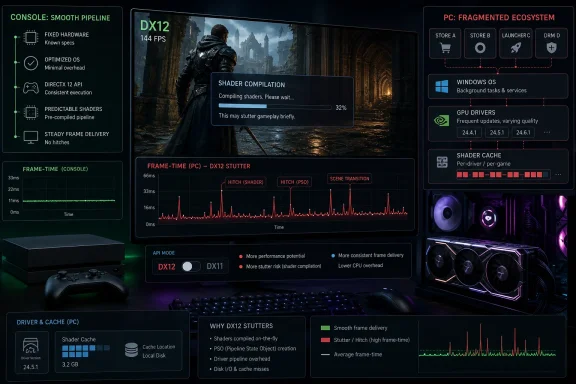 DirectX 12 Won the API War and Inherited the Blame
Microsoft’s pitch for DirectX 12 was always plausible: reduce driver overhead, expose modern GPU features, let engines use multi-core CPUs more intelligently, and give developers the tools needed for ray tracing, mesh shaders, variable-rate shading, and other hardware-era features that DX11 could only awkwardly approximate. On paper, it was the right API for the 2020s. In practice, the bargain came with a clause that many players never saw.DX11 did more of the hidden work in the driver. DX12 expects the application to be explicit about work submission, resource state, pipeline objects, and shader preparation. That explicitness is why a well-built DX12 renderer can scale beautifully, but it is also why a half-baked one can feel worse than its older DX11 path even when average frame rates look higher.
The crucial difference is not visible in a marketing slide. A benchmark may report 112 frames per second instead of 103, but the player feels the single 90-millisecond stall when a new effect appears. Modern PC gaming’s most persistent problem is not low frame rate in the old sense; it is bad frame pacing, the sudden uneven delivery of frames that makes a powerful machine feel briefly broken.
That is why DirectX 12 has become the API everyone uses and the API everyone complains about. It enabled the modern Windows graphics stack, yet it also made performance quality more dependent on whether a studio did the tedious, platform-specific work that consoles hide behind fixed hardware and centralized certification.
Shader Compilation Became the Tax Players Pay Up Front, Mid-Game, or Both
The signature DX12 stutter is shader compilation stutter. Shaders are small programs that tell the GPU how to render lighting, materials, shadows, particles, reflections, post-processing, and countless other effects. Before a GPU can execute them efficiently, they often need to be compiled for a specific driver, GPU architecture, and pipeline state.In the best case, the game compiles what it needs before play begins. Players may stare at a progress bar on first launch, but once the game starts, frame times are stable. In the worst case, the engine compiles shaders on demand, during gameplay, the first time a player sees a new effect, area, enemy, spell, weather condition, or material combination.
That is where the familiar hitch comes from. The GPU is not necessarily too weak. The CPU is not necessarily overloaded in the traditional sense. The engine has simply hit a piece of rendering work that was not prepared in advance, and the frame has to wait while the software catches up.
This is why the same game can feel smooth after an hour and awful after a driver update. Driver changes can invalidate shader caches, forcing a new round of compilation. Players experience this as déjà vu: the system did the work before, the game ran fine yesterday, and then the next launch begins another pilgrimage through stutter country.
The PC makes this harder than consoles because there is no single target. A PlayStation or Xbox build can ship with assumptions about the CPU, GPU, memory layout, driver stack, and storage behavior. A Windows game has to account for Nvidia, AMD, and Intel GPUs across multiple generations, different drivers, different CPU architectures, different storage devices, and different storefront delivery systems.
Microsoft’s New Fix Admits the Old Model Wasn’t Enough
Microsoft’s Advanced Shader Delivery is an important development because it is an admission, dressed in SDK language, that the existing PC model is too fragmented for players to keep absorbing the cost. The idea is straightforward: precompile shaders for known hardware and driver combinations, distribute them before the player launches the game, and reduce the need for local compilation at the worst possible moment.That is the right architectural direction. It moves shader preparation away from the player’s first few minutes of gameplay and toward a distribution pipeline that can be managed by stores, developers, hardware vendors, and Microsoft. It also borrows a bit of console logic for the PC: if the platform can know more about the target machine before launch, it can do more work ahead of time.
The catch is that this kind of fix only works when the whole chain participates. The game has to support it. The store has to deliver it. The GPU vendor has to provide the compiler path. The driver has to cooperate. The installed game version, driver version, and hardware ID all have to line up closely enough for the precompiled data to be useful.
That is not a reason to dismiss Advanced Shader Delivery. It is a reason to understand its limits. The technology can improve future games and selected current games, but it cannot magically repair every DX12 title that shipped with an incomplete pre-warm step, poor pipeline management, or an engine that discovers too much of its rendering workload while the player is already moving.
Nvidia’s Auto Shader Compilation points at the same problem from the driver ecosystem side. By recompiling shaders in the background after driver updates, it can reduce the recurring pain of cache invalidation. That is meaningful, especially for players who update drivers often. But it is still a mitigation, not a universal cure, because it cannot invent a perfect shader cache for every game scenario the application itself has failed to expose.
The DX11 Escape Hatch Is Embarrassing Because It Works
The most damning advice in PC gaming remains the simplest: switch to DirectX 11 if the game lets you. Players do it not because DX11 is more advanced, but because it often produces steadier frame times. It may leave performance on the table, and it may disable modern rendering features, but it can feel better.That trade tells us something important. Many gamers do not actually care whether the average frame rate is 8 percent higher if the experience is visibly uneven. A stable 90 frames per second can feel better than a 120 average that repeatedly dives into visible hitches. The human eye is not reading a benchmark table; it is reacting to rhythm.
DX11’s relative smoothness in some titles comes from its older abstraction model. The driver handles more. The application has less explicit control, but it also has fewer chances to mismanage the pipeline. DX12 removes that safety net in exchange for power, which is a good deal only when the developer uses that power responsibly.
This is where the conversation gets uncomfortable for publishers. Shader stutter is not a mysterious force of nature. It is often the visible symptom of shipping before the PC version has been fully profiled across enough hardware, driver states, and gameplay paths. It is quality assurance debt, paid in milliseconds.
The trouble is that PC players have been trained to debug what studios ship. They clear caches, change renderer modes, toggle overlays, disable resizable BAR, cap frame rates, roll back drivers, delete config files, move games between SSDs, and compare arcane settings across forum posts. Some of those steps help in specific cases. The broader absurdity is that a premium platform experience has come to depend on rituals.
CPU Bottlenecks Are the Other Half of the Stutter Story
Shader compilation gets most of the attention because it produces dramatic hitches, but it is not the only reason Windows 11 games stutter. A growing number of titles are CPU-bound in the scenes players care about most: city hubs, raids, simulation layers, open-world traversal, dense combat, and multiplayer chaos. In those moments, the graphics card may be waiting while the CPU prepares the next frame.This is why the GPU upgrade treadmill has become less reliable as advice. A faster graphics card helps when the workload is GPU-bound, but it does little when the engine is choking on draw calls, entity updates, physics, animation, AI, networking, asset streaming, or scripting. The bottleneck has moved from pixels to orchestration.
AMD’s X3D processors have become popular among gamers for precisely this reason. Their large L3 cache can keep more of a game’s working data close to the CPU cores, reducing trips to slower memory and improving performance in cache-sensitive titles. The effect is not magic, and it varies by game, but in CPU-limited scenarios it can be the difference between smooth pacing and periodic stalls.
The rise of X3D as the default high-end gaming recommendation is also an indictment of software complexity. We are not merely rendering prettier scenes. We are simulating denser ones, streaming more data, layering more systems, and asking engines to juggle more work per frame. Cache has become a gaming feature because modern games are not just graphics workloads.
That distinction matters for Windows 11 users trying to diagnose stutter. Not every hitch is shader compilation. Not every stutter is a driver problem. Some are asset streaming. Some are CPU scheduling. Some are engine traversal. Some are background tasks. Some are badly synchronized frame generation. The symptom looks similar, but the fix depends on where the frame got stuck.
Consoles Look Smoother Because They Are Narrower
The obvious comparison is consoles, and it is not flattering to the PC. A midrange console can often deliver a more consistent experience than a vastly more expensive Windows tower. That does not mean the console is more powerful. It means the software target is narrower.Developers know the exact CPU, GPU, memory pool, storage baseline, operating environment, and certification requirements. They can precompile aggressively. They can test the same hardware every player owns. They can make assumptions that would be reckless on PC. The result is not always higher fidelity, but it is often better predictability.
The PC’s flexibility is real and valuable. It supports ultrawide monitors, high refresh rates, modding, older games, multiple input devices, custom stores, exotic hardware, and settings menus that console players never see. That openness is why the platform remains the enthusiast default.
But openness has a cost. Every optional path becomes another testing matrix. Every GPU vendor has its own compiler behavior. Every storefront has its own update pipeline. Every user’s machine may be carrying overlays, monitoring tools, RGB software, capture hooks, antivirus scans, and driver remnants. Windows gaming is not one platform so much as a federation of machines pretending to be one.
That is why Microsoft’s recent work matters. Advanced Shader Delivery, DirectX tooling improvements, better GPU crash dumps, and deeper coordination with hardware vendors are attempts to bring console-like predictability to PC without killing PC openness. The question is not whether Microsoft understands the problem. The question is whether its incentives can force enough of the ecosystem to participate.
Unreal Engine Made the Problem Famous, but It Did Not Create It
Unreal Engine has become the public face of shader stutter because so many high-profile PC releases use it and because its problems are easy to notice. The pattern is familiar: a technically ambitious game launches, reviewers mention traversal hitching or shader stutter, players discover a maze of settings, and patches slowly improve the worst cases. Unreal is not alone, but it is everywhere.The engine’s popularity magnifies every weakness. When a custom engine stutters, it is that game’s problem. When Unreal titles stutter across genres, players see a pattern. The diagnosis may be oversimplified, but the frustration is earned.
The deeper issue is that modern engines are built for scale, not certainty. They support vast content pipelines, multiple platforms, dynamic materials, procedural systems, streaming worlds, ray tracing paths, upscalers, frame generation, and live-service updates. That flexibility makes games possible that would have been unthinkable a decade ago. It also creates more opportunities for a pipeline state to be encountered late.
This is where developer discipline matters. A studio that builds a complete shader precompilation pass, records representative gameplay traces, validates caches after driver changes, and profiles frame times across real consumer hardware can ship a smooth DX12 game. A studio that treats PC performance as a post-launch patch lane will not.
The frustrating part is that players can name examples on both sides. Some DX12 games are excellent. Others are infamous. That inconsistency proves the API is not inherently doomed, but it also proves that the ecosystem has tolerated too much variance.
Frame Generation Can Hide Low Frame Rates, Not Bad Frames
Frame generation has complicated the conversation because it can make performance numbers look better while leaving underlying stutter exposed. Technologies such as DLSS Frame Generation and competing approaches synthesize additional frames between rendered ones. When the base frame pacing is good, the result can be impressively smooth. When the base frame pacing is unstable, generated frames may amplify the sense that something is off.This is because frame generation is downstream of the problem. It can interpolate motion, but it cannot fully erase a long CPU stall, a shader compilation hitch, or an asset streaming pause. If the game fails to deliver a real frame on time, the presentation layer has less useful information to work with.
The same is true of upscaling. DLSS, FSR, XeSS, and temporal reconstruction can reduce GPU pressure, but they do not solve CPU bottlenecks or shader pipeline delays. A player may lower internal resolution and see no improvement because the GPU was never the limiting factor. That experience feels irrational until you look at frame-time graphs.
This is why PC performance advice has become more specialized. “Lower settings” used to be the universal prescription. In 2026, the better question is which setting hits which subsystem. Crowd density, draw distance, simulation quality, ray tracing, texture streaming, shader cache behavior, and frame caps all stress different parts of the machine.
A good Windows gaming stack should not require every player to become a performance analyst. Yet the current DX12 era rewards exactly that kind of literacy. Enthusiasts can tune around many problems. Ordinary players mostly learn that the expensive box under the desk still stutters.
Windows 11 Is Not Innocent, but It Is Not the Whole Culprit
Windows 11 often gets blamed because it is the visible platform. That blame is partly fair. Windows carries background services, security layers, driver models, scheduler decisions, hybrid CPU complexities, and update behavior that can affect games. A bad driver, a misbehaving overlay, or an OS regression can absolutely ruin frame pacing.But it is too easy to make Windows the villain and stop there. Many of the worst stutter cases persist across clean installs, powerful hardware, and tuned systems because the game itself is doing expensive work at the wrong time. The operating system can smooth the road, but it cannot make a late shader compile free.
That said, Windows has a special responsibility because PC gaming is now one of Microsoft’s strategic pillars. The company sells the OS, the DirectX stack, the Xbox app, Game Pass, development tools, and the broader pitch that Windows is the best place to play. If the user experience routinely feels less polished than consoles, Microsoft cannot shrug and point only at developers.
The company’s recent direction suggests it knows this. Better shader delivery, better diagnostics, and more console-like tooling all point toward a platform owner trying to impose order without closing the platform. That is the right instinct. The danger is that partial adoption will create another split: games that participate in the new pipeline and games that leave players in the old one.
For admins and power users, the lesson is similarly mixed. Keep drivers current, but expect cache rebuilds. Prefer games with explicit shader precompilation. Use frame caps to stabilize CPU-bound titles. Do not assume a GPU upgrade will fix a stutter problem. And when a DX11 mode is smoother, do not treat using it as a failure of your machine.
The Coming Fix Is Real, but It Will Arrive Unevenly
The pieces of a better Windows gaming experience are now visible. Advanced Shader Delivery can shift shader preparation into the distribution layer. Nvidia’s background compilation can reduce repeat pain after driver updates. AMD’s cache-heavy CPUs can soften many CPU-bound workloads. Intel, AMD, Nvidia, and Microsoft all have incentives to make DX12 feel less erratic.The issue is that none of these pieces is universal. Advanced Shader Delivery needs adoption. Driver-side fixes vary by vendor and game. Larger CPU cache helps some titles more than others. Storefront support will matter. Older games may never be updated. Smaller studios may not have the tools or QA budget to validate every path.
That unevenness is the defining trait of PC gaming. The best cases will look terrific. A well-supported DX12 game on a modern Windows 11 machine with a good CPU, fast storage, mature drivers, and precompiled shaders can feel every bit as polished as a console release while running at settings consoles cannot touch. The worst cases will still send players to forums looking for launch parameters and cache folders.
The next few years will therefore be less about whether DX12 is good and more about whether the ecosystem can make good DX12 ordinary. That means boring infrastructure: shader databases, pipeline tracing, storefront integration, reliable cache invalidation, driver coordination, and honest frame-time testing before launch. The glamorous features depend on the unglamorous plumbing.
The Practical Map for a Stutter-Prone DX12 World
For WindowsForum readers, the important point is not that every DX12 game is doomed. It is that the old performance instinct — buy a faster GPU and turn down a few settings — is no longer enough. Smoothness now depends on where the game’s frame time is being lost.- A game that stutters only when new effects or areas appear is likely exposing shader compilation or asset streaming problems.
- A game that slows down in cities, raids, battles, or simulation-heavy scenes is likely hitting CPU, cache, or engine-thread limits.
- A game that stutters again after every driver update may be rebuilding or invalidating its shader cache.
- A DX11 mode that feels smoother than DX12 is a legitimate workaround when frame pacing matters more than peak features.
- Advanced Shader Delivery and vendor-side compilation tools should improve future titles first, while older games will remain inconsistent unless developers patch them.
DirectX 12 is still the future of Windows gaming, but the future arrived with a maintenance bill. Microsoft and the GPU vendors are now building systems to pay that bill earlier, in the store, in the driver, and in the tooling developers use before release. Until those systems become routine rather than exceptional, Windows 11 gaming will keep living with the contradiction that defines the platform: the most powerful consumer gaming machines in the world, still occasionally brought to their knees by work that should have happened before the first frame.
References
- Primary source: Windows Report
Published: 2026-06-02T17:10:07.533495
Why DirectX 12 Still Stutters on Windows 11 in 2026
DirectX 12 promised smoother gaming on Windows 11. Five years in, shader stutter and CPU bottlenecks still define the experience. windowsreport.com
- Official source: devblogs.microsoft.com
Advanced Shader Delivery: What’s New at GDC 2026 - DirectX Developer Blog
Today we announced the innovation we’re bringing in solving shader compilation for the ecosystem at our GDC Talk: Advanced Shader Delivery for Windows.devblogs.microsoft.com - Official source: developer.microsoft.com
GDC 2026: DirectX is Bringing Console-Level Developer Tools to Windows
The DirectX team is currently working to bring console-level GPU developer tools to Windows, beginning with a wave of new DirectX tooling features.developer.microsoft.com - Related coverage: windowscentral.com
Microsoft to roll out new Xbox mode for Windows 11 in April | Windows Central
At GDC 2026, Microsoft outlined the future of PC and Xbox game development, positioning Windows as the foundation for the next-generation of gaming via unified GDK.www.windowscentral.com - Related coverage: tomshardware.com
Intel's new feature can improve game loading times by up to 3x — Precompiled Shader Delivery comes to Arc Xe2 and Xe3 GPUs following DirectX SDK release | Tom's Hardware
Support doesn't extend to Alchemist for now.www.tomshardware.com
