

Security Boulevard’s syndicated ISHIR post argues that Microsoft 365 Copilot deployments are disappointing many enterprises in July 2026 not because the assistant is weak, but because companies bought individual productivity gains without designing orchestration across Microsoft 365, Dynamics 365, Azure AI, Fabric, and Power Platform. That is the right diagnosis, even if the prescription is messier than the marketing copy admits. Copilot can shorten the workday’s small chores, but it cannot by itself redesign the enterprise that produces those chores. The problem is no longer whether AI can help a user write faster; it is whether the business knows what work should happen next.
Microsoft 365 Copilot entered the enterprise with an unusually clean pitch: put generative AI inside the applications where knowledge workers already live. Word drafts, Outlook rewrites, Teams summaries, Excel analysis, PowerPoint generation, and chat grounded in organizational data all sounded like a direct line from license spend to time savings. At $30 per user per month for enterprise add-on licensing, it was never a toy deployment, but it was easy to describe in budget meetings.
The first wave of results was always going to be uneven. Some employees use Copilot constantly; others treat it as a novelty that appears when they remember the button exists. Some roles are rich with repeatable writing, summarization, and synthesis work; others live inside line-of-business systems, approvals, exception handling, and customer escalations where a better paragraph is not the bottleneck.
That gap is now showing up in the tone of the market. Executives who approved broad Copilot pilots are asking why the business still feels recognizably the same. Emails are better. Meeting notes are cleaner. Internal decks appear faster. Yet customer onboarding still crosses five teams, contract approvals still disappear into inboxes, and managers still chase status updates by hand.
This is not a failure of Copilot so much as a category error. Microsoft 365 Copilot is an assistant embedded in a productivity suite; business transformation is an operating-model problem. Buying the former and expecting the latter is like buying every employee a faster laptop and wondering why the procurement workflow still takes three weeks.
This is the dirty secret of many enterprise AI pilots. They are measured where AI is easiest to observe: minutes saved, drafts created, prompts submitted, meetings summarized, and documents searched. Those are useful metrics, but they are not the same as shorter sales cycles, lower support costs, fewer compliance misses, faster hiring, or improved cash collection.
Microsoft knows this, which is why its own Copilot story has steadily moved from in-app assistance toward agents, connectors, Copilot Studio, Microsoft Graph grounding, Fabric data integration, and extensibility. The company’s message has changed from “AI helps you work in Office” to “AI becomes part of how work is coordinated.” That evolution is telling. The assistant layer was the beachhead, not the destination.
For WindowsForum readers who have watched Microsoft platform strategies for decades, this should feel familiar. Microsoft rarely stops at the front-end feature. The company turns the visible product into a control plane, then invites developers, administrators, partners, and customers to wire the rest of the enterprise into it. Copilot is following the same path.
Marketing experiments with content generation. Sales uses meeting summaries and CRM guidance. Finance builds Power BI narratives. HR prototypes chatbots for policy questions. IT builds Azure AI projects. Security teams test their own copilots for incident triage. The organization can honestly say it is adopting AI, while still failing to create a shared system of execution.
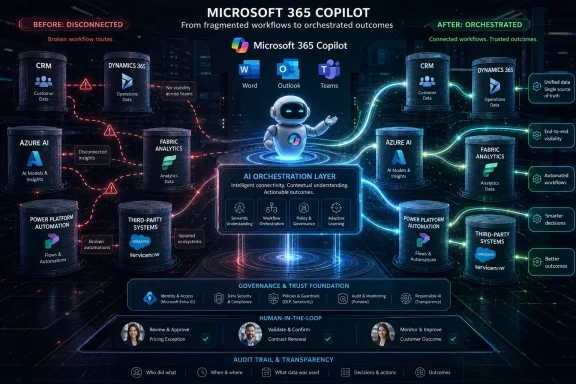
That is what makes “AI orchestration” more than a consultant’s phrase. The point is not to add yet another chatbot. It is to decide how agents, data sources, business applications, approvals, identities, and human supervisors coordinate work across departmental boundaries. In other words, orchestration is the difference between scattered intelligence and operational intelligence.
Without that orchestration, enterprises risk recreating the very fragmentation AI was supposed to solve. Every department gets a smarter local tool. No department gets a smarter company. The result is a patchwork of isolated productivity gains that look impressive in demos and strangely underwhelming in quarterly business reviews.
The problem is that architecture diagrams can make orchestration look cleaner than it is. A line connecting Teams to Dynamics to Fabric to Power Automate is not the same as a business process that has owners, service-level expectations, exception paths, audit trails, and security boundaries. Enterprises do not fail because they lack boxes on a diagram; they fail because the arrows between those boxes represent politics, data quality, permissions, legacy assumptions, and unresolved accountability.
Microsoft Graph and Copilot connectors help bring external data into the Copilot world. Copilot Studio helps organizations build agents and actions. Power Automate can move tasks through workflows. Fabric can consolidate and govern analytical data. These are important pieces, but they do not answer the harder question: who is allowed to let an agent act, on whose behalf, against which system, under what policy, with what rollback plan?
That is where the article’s argument becomes most useful for IT leaders. If your Copilot deployment is not changing business outcomes, the next move is probably not a larger prompt-training webinar. It is process architecture. It is identity architecture. It is data architecture. It is governance architecture. The AI layer exposes the weakness of those foundations faster than previous generations of software did.
Copilot can make some of this work less painful. It can summarize the thread, draft the reminder, pull context from documents, and help compose the update. But if the employee remains responsible for knowing which system to check, which person to chase, which exception to escalate, and which data source is authoritative, then AI has merely polished the manual workaround.
That matters because manual coordination is not just inefficient; it is invisible to executives. The hours spent nudging, copying, searching, reformatting, and reconciling rarely appear as a line item. They are absorbed into the workday and rediscovered only when someone maps the process end to end.
AI orchestration promises to attack that hidden tax. A well-designed agentic workflow could detect that a new enterprise customer has signed, gather required documents, open onboarding tasks, route compliance checks, update Dynamics records, notify the account team, and flag missing information before a human asks for status. The human remains accountable, but no longer serves as the router for every packet of business activity.
Microsoft Fabric is designed to address part of this by bringing data engineering, warehousing, real-time analytics, data science, and business intelligence into a more unified environment. But Fabric does not magically resolve the semantic fights that have haunted enterprises for years. What counts as an active customer? Which revenue number is official? Is the CRM pipeline more current than the forecast spreadsheet? Who owns the truth when operational systems disagree?
Copilot makes these conflicts more visible because people expect conversational systems to answer with confidence. A human analyst might explain that the number depends on the source. An AI assistant may produce a plausible answer that masks messy lineage unless the organization has done the hard governance work. In a boardroom, a confident wrong answer is worse than a slow right one.
This is why orchestration must include data governance, not just workflow automation. Agents need trusted sources, metadata, permissions, context, and escalation rules. They need to know not only what they can retrieve but what they can rely on. Otherwise, enterprise AI becomes a faster way to circulate ambiguity.
Microsoft has been moving steadily in this direction through Copilot Studio, Microsoft 365 agents, extensibility options, connectors, and agent administration controls. The pitch is appealing: let employees build or use specialized agents grounded in enterprise data, operating through familiar Microsoft 365 surfaces, and governed through tenant controls. For IT departments already managing Microsoft estates, that is a powerful proposition.
It is also a governance headache. Once agents can perform actions, administrators must think about permissions, data leakage, auditability, lifecycle management, prompt injection, connector sprawl, and the difference between a harmless internal answer and an externally visible business action. The agent that drafts a customer reply is useful. The agent that sends it, updates the opportunity, and changes a discount field is a different class of system.
The right response is not to freeze agent adoption. It is to stop pretending that agent creation is merely a citizen-developer feature. Enterprises need an agent inventory, approval workflows, environment strategy, testing standards, logging, red-team exercises, and clear human-in-the-loop rules. The more useful agents become, the less acceptable it is for them to be unmanaged.
A Teams transcript may reveal that a customer is unhappy. Dynamics may show an opportunity at risk. A support platform may contain unresolved tickets. Finance may know the account is on credit hold. A contract system may contain renewal language that changes the commercial options. No single assistant is useful enough unless it can reason across that context while respecting the different permissions and owners attached to each source.
That is where orchestration becomes strategic rather than tactical. The goal is not to dump every data source into a model’s context window. The goal is to build a governed fabric of retrieval, reasoning, and action where the right system is consulted at the right moment for the right purpose. This is architecture, not enthusiasm.
For Microsoft-centric shops, the temptation will be to frame the whole answer as “more Microsoft.” Sometimes that will be reasonable. But serious enterprises should resist monoculture thinking. The orchestration layer must account for third-party systems, legacy applications, regulated data, and business processes that do not begin or end inside Microsoft 365.
A more honest ROI model starts with a process ledger. Pick a workflow that matters: customer onboarding, quote-to-cash, procurement approval, incident response, employee onboarding, month-end close, contract review, or claims handling. Measure cycle time, rework, handoffs, error rates, customer touchpoints, escalation frequency, and labor hours before introducing AI. Then use Copilot, agents, connectors, and automation to remove specific bottlenecks.
This is less glamorous than announcing an enterprise-wide AI rollout, but it is more likely to survive CFO scrutiny. It also forces the organization to decide where AI is allowed to act and where it should only advise. Not every process wants the same level of autonomy. A marketing approval workflow and a financial control process should not be treated as equivalent just because both involve documents and messages.
The irony is that narrower deployments may produce broader credibility. A successful orchestrated workflow with measurable cycle-time reduction teaches the enterprise more than a broad Copilot license deployment with vague satisfaction scores. The former changes how work moves. The latter may only change how work is described.
Copilot’s grounding in Microsoft Graph means it generally respects existing permissions, but that is only comforting if those permissions are healthy. Many SharePoint sites, Teams channels, and file libraries contain years of oversharing. The assistant did not create that problem. It simply made it searchable, summarizable, and easier to stumble across.
Agents add another layer. An agent with access to shared tenant data, external connectors, or workflow actions is not just answering questions; it is participating in enterprise operations. That requires controls over who can create agents, which connectors can be used, what actions require approval, how outputs are logged, and how retired agents are decommissioned.
The best governance programs will not frame this as saying no. They will create paved roads. Approved data sources, reusable connector patterns, standard review processes, security baselines, environment separation, and monitoring give business teams a way to build safely. Without those paved roads, users will either do nothing or build around IT.
Buyers should not dismiss the argument because it comes from a consultant. They should interrogate it. Ask which processes will be redesigned first. Ask which systems will be authoritative. Ask how agents will be tested. Ask who owns failures. Ask whether the roadmap includes security review, data cleanup, adoption metrics, and measurable business outcomes rather than a parade of demos.
The phrase AI orchestration strategy can become empty very quickly if it is not tied to named workflows and accountable owners. A useful strategy says, for example, that customer onboarding will move from a manually coordinated email-and-spreadsheet process to an agent-assisted workflow spanning CRM, contract storage, identity provisioning, finance review, and customer communications. It names the systems, data, permissions, humans, exceptions, and metrics.
That is the difference between transformation and theater. Enterprises do not need another abstract AI maturity model. They need fewer handoffs, fewer duplicate records, fewer mystery approvals, and fewer meetings whose only purpose is finding out what happened in another meeting.
That means Copilot programs should be paired with process discovery. Where do employees switch applications most often? Which approvals require repeated follow-up? Which reports are manually assembled? Which customer requests cross departments? Which workflows stop when a particular person is on vacation? These are the places where individual AI assistance will not be enough.
It also means IT needs a stronger partnership with operations. The people who understand the pain of a broken process are rarely the people who understand Graph connectors, Power Platform environments, Entra permissions, Fabric workspaces, and Copilot Studio governance. Orchestration is where those worlds have to meet.
The organizations that get this right will look less like they are “rolling out AI” and more like they are rebuilding business plumbing. That may not generate the same excitement as a keynote demo, but it is where durable value lives. The enterprise does not become intelligent because every employee gets a chatbot. It becomes intelligent when the system knows how to move work.
 Copilot Was Sold as a Productivity Upgrade, Then Judged Like a Transformation Program
Microsoft 365 Copilot entered the enterprise with an unusually clean pitch: put generative AI inside the applications where knowledge workers already live. Word drafts, Outlook rewrites, Teams summaries, Excel analysis, PowerPoint generation, and chat grounded in organizational data all sounded like a direct line from license spend to time savings. At $30 per user per month for enterprise add-on licensing, it was never a toy deployment, but it was easy to describe in budget meetings.The first wave of results was always going to be uneven. Some employees use Copilot constantly; others treat it as a novelty that appears when they remember the button exists. Some roles are rich with repeatable writing, summarization, and synthesis work; others live inside line-of-business systems, approvals, exception handling, and customer escalations where a better paragraph is not the bottleneck.
That gap is now showing up in the tone of the market. Executives who approved broad Copilot pilots are asking why the business still feels recognizably the same. Emails are better. Meeting notes are cleaner. Internal decks appear faster. Yet customer onboarding still crosses five teams, contract approvals still disappear into inboxes, and managers still chase status updates by hand.
This is not a failure of Copilot so much as a category error. Microsoft 365 Copilot is an assistant embedded in a productivity suite; business transformation is an operating-model problem. Buying the former and expecting the latter is like buying every employee a faster laptop and wondering why the procurement workflow still takes three weeks.
The Assistant Can Help the Worker, but the Process Still Owns the Company
The ISHIR argument lands because it separates individual acceleration from organizational throughput. A salesperson can summarize a customer meeting in seconds, but that does not automatically update the CRM, trigger a pricing review, notify legal, assign a follow-up task, and surface a renewal risk to finance. The worker becomes faster at producing fragments of work while the company remains slow at moving those fragments across the machine.This is the dirty secret of many enterprise AI pilots. They are measured where AI is easiest to observe: minutes saved, drafts created, prompts submitted, meetings summarized, and documents searched. Those are useful metrics, but they are not the same as shorter sales cycles, lower support costs, fewer compliance misses, faster hiring, or improved cash collection.
Microsoft knows this, which is why its own Copilot story has steadily moved from in-app assistance toward agents, connectors, Copilot Studio, Microsoft Graph grounding, Fabric data integration, and extensibility. The company’s message has changed from “AI helps you work in Office” to “AI becomes part of how work is coordinated.” That evolution is telling. The assistant layer was the beachhead, not the destination.
For WindowsForum readers who have watched Microsoft platform strategies for decades, this should feel familiar. Microsoft rarely stops at the front-end feature. The company turns the visible product into a control plane, then invites developers, administrators, partners, and customers to wire the rest of the enterprise into it. Copilot is following the same path.
The New Silo Is the AI Silo
The old enterprise integration problem was that every department bought its own application. Sales had CRM, finance had ERP, support had ticketing, HR had HCM, and operations had a constellation of spreadsheets that everyone pretended were temporary. The modern version is that every department now wants its own AI assistant.Marketing experiments with content generation. Sales uses meeting summaries and CRM guidance. Finance builds Power BI narratives. HR prototypes chatbots for policy questions. IT builds Azure AI projects. Security teams test their own copilots for incident triage. The organization can honestly say it is adopting AI, while still failing to create a shared system of execution.
That is what makes “AI orchestration” more than a consultant’s phrase. The point is not to add yet another chatbot. It is to decide how agents, data sources, business applications, approvals, identities, and human supervisors coordinate work across departmental boundaries. In other words, orchestration is the difference between scattered intelligence and operational intelligence.
Without that orchestration, enterprises risk recreating the very fragmentation AI was supposed to solve. Every department gets a smarter local tool. No department gets a smarter company. The result is a patchwork of isolated productivity gains that look impressive in demos and strangely underwhelming in quarterly business reviews.
Microsoft’s Stack Is Ready for This Story, but Not Magically Ready for Your Business
The ISHIR post frames Microsoft 365, Dynamics 365, Azure AI, Microsoft Fabric, and Power Platform as the natural architecture for enterprise AI orchestration. That is broadly correct. Microsoft has assembled a serious stack: productivity data in Microsoft 365, business records in Dynamics, automation in Power Platform, analytics in Fabric, identity and governance through Entra and Purview, and model-driven reasoning through Azure AI and Copilot services.The problem is that architecture diagrams can make orchestration look cleaner than it is. A line connecting Teams to Dynamics to Fabric to Power Automate is not the same as a business process that has owners, service-level expectations, exception paths, audit trails, and security boundaries. Enterprises do not fail because they lack boxes on a diagram; they fail because the arrows between those boxes represent politics, data quality, permissions, legacy assumptions, and unresolved accountability.
Microsoft Graph and Copilot connectors help bring external data into the Copilot world. Copilot Studio helps organizations build agents and actions. Power Automate can move tasks through workflows. Fabric can consolidate and govern analytical data. These are important pieces, but they do not answer the harder question: who is allowed to let an agent act, on whose behalf, against which system, under what policy, with what rollback plan?
That is where the article’s argument becomes most useful for IT leaders. If your Copilot deployment is not changing business outcomes, the next move is probably not a larger prompt-training webinar. It is process architecture. It is identity architecture. It is data architecture. It is governance architecture. The AI layer exposes the weakness of those foundations faster than previous generations of software did.
The Human Integration Layer Is Where ROI Goes to Die
Every enterprise has a hidden integration platform, and it is called the employee. People copy customer names from emails into CRM fields. They paste spreadsheet values into PowerPoint. They forward attachments from one department to another. They ask in Teams whether legal has reviewed the contract. They remind managers to approve expenses. They reconcile two systems that disagree and then create a third spreadsheet to explain the discrepancy.Copilot can make some of this work less painful. It can summarize the thread, draft the reminder, pull context from documents, and help compose the update. But if the employee remains responsible for knowing which system to check, which person to chase, which exception to escalate, and which data source is authoritative, then AI has merely polished the manual workaround.
That matters because manual coordination is not just inefficient; it is invisible to executives. The hours spent nudging, copying, searching, reformatting, and reconciling rarely appear as a line item. They are absorbed into the workday and rediscovered only when someone maps the process end to end.
AI orchestration promises to attack that hidden tax. A well-designed agentic workflow could detect that a new enterprise customer has signed, gather required documents, open onboarding tasks, route compliance checks, update Dynamics records, notify the account team, and flag missing information before a human asks for status. The human remains accountable, but no longer serves as the router for every packet of business activity.
Decision Latency Is the Enterprise AI Metric Nobody Wants to Own
One of the stronger points in the syndicated post is its focus on decision latency. Enterprises are drowning in data and still waiting for answers. The issue is not that dashboards do not exist; it is that the data needed for a decision is scattered across systems, normalized differently, permissioned inconsistently, and interpreted through departmental lenses.Microsoft Fabric is designed to address part of this by bringing data engineering, warehousing, real-time analytics, data science, and business intelligence into a more unified environment. But Fabric does not magically resolve the semantic fights that have haunted enterprises for years. What counts as an active customer? Which revenue number is official? Is the CRM pipeline more current than the forecast spreadsheet? Who owns the truth when operational systems disagree?
Copilot makes these conflicts more visible because people expect conversational systems to answer with confidence. A human analyst might explain that the number depends on the source. An AI assistant may produce a plausible answer that masks messy lineage unless the organization has done the hard governance work. In a boardroom, a confident wrong answer is worse than a slow right one.
This is why orchestration must include data governance, not just workflow automation. Agents need trusted sources, metadata, permissions, context, and escalation rules. They need to know not only what they can retrieve but what they can rely on. Otherwise, enterprise AI becomes a faster way to circulate ambiguity.
Agents Raise the Stakes From Suggestion to Execution
The industry’s shift from copilots to agents changes the risk model. A copilot suggests, drafts, summarizes, and explains. An agent can plan, call tools, trigger workflows, update records, and coordinate with other agents. That movement from language to action is where the productivity story becomes an operations story.Microsoft has been moving steadily in this direction through Copilot Studio, Microsoft 365 agents, extensibility options, connectors, and agent administration controls. The pitch is appealing: let employees build or use specialized agents grounded in enterprise data, operating through familiar Microsoft 365 surfaces, and governed through tenant controls. For IT departments already managing Microsoft estates, that is a powerful proposition.
It is also a governance headache. Once agents can perform actions, administrators must think about permissions, data leakage, auditability, lifecycle management, prompt injection, connector sprawl, and the difference between a harmless internal answer and an externally visible business action. The agent that drafts a customer reply is useful. The agent that sends it, updates the opportunity, and changes a discount field is a different class of system.
The right response is not to freeze agent adoption. It is to stop pretending that agent creation is merely a citizen-developer feature. Enterprises need an agent inventory, approval workflows, environment strategy, testing standards, logging, red-team exercises, and clear human-in-the-loop rules. The more useful agents become, the less acceptable it is for them to be unmanaged.
The Microsoft 365 Boundary Is Too Small for the Real Enterprise
One reason Copilot deployments disappoint is that Microsoft 365 captures a large share of knowledge work but not the whole business. The facts that matter often live in Salesforce, ServiceNow, Workday, SAP, Oracle, Jira, custom line-of-business systems, data warehouses, file shares, intranets, and email archives no one wants to admit still matter. Microsoft’s ecosystem can reach many of these through connectors and APIs, but reach is not the same as coherence.A Teams transcript may reveal that a customer is unhappy. Dynamics may show an opportunity at risk. A support platform may contain unresolved tickets. Finance may know the account is on credit hold. A contract system may contain renewal language that changes the commercial options. No single assistant is useful enough unless it can reason across that context while respecting the different permissions and owners attached to each source.
That is where orchestration becomes strategic rather than tactical. The goal is not to dump every data source into a model’s context window. The goal is to build a governed fabric of retrieval, reasoning, and action where the right system is consulted at the right moment for the right purpose. This is architecture, not enthusiasm.
For Microsoft-centric shops, the temptation will be to frame the whole answer as “more Microsoft.” Sometimes that will be reasonable. But serious enterprises should resist monoculture thinking. The orchestration layer must account for third-party systems, legacy applications, regulated data, and business processes that do not begin or end inside Microsoft 365.
ROI Requires a Process Ledger, Not a Prompt Leaderboard
The easiest Copilot ROI stories focus on personal productivity. If a user saves 20 minutes per day, multiply that by headcount, salary, and working days. The spreadsheet looks good, and the business case almost writes itself. The trouble is that saved minutes do not automatically become saved money, faster revenue, or better service.A more honest ROI model starts with a process ledger. Pick a workflow that matters: customer onboarding, quote-to-cash, procurement approval, incident response, employee onboarding, month-end close, contract review, or claims handling. Measure cycle time, rework, handoffs, error rates, customer touchpoints, escalation frequency, and labor hours before introducing AI. Then use Copilot, agents, connectors, and automation to remove specific bottlenecks.
This is less glamorous than announcing an enterprise-wide AI rollout, but it is more likely to survive CFO scrutiny. It also forces the organization to decide where AI is allowed to act and where it should only advise. Not every process wants the same level of autonomy. A marketing approval workflow and a financial control process should not be treated as equivalent just because both involve documents and messages.
The irony is that narrower deployments may produce broader credibility. A successful orchestrated workflow with measurable cycle-time reduction teaches the enterprise more than a broad Copilot license deployment with vague satisfaction scores. The former changes how work moves. The latter may only change how work is described.
Governance Is Not the Brake; It Is the Transmission
Security-minded readers will recognize the pattern immediately. A new platform arrives with a promise of acceleration. Business units want to experiment. IT is told not to block innovation. Then someone discovers that the platform touches sensitive data, inherits permissions nobody has reviewed in years, and can expose poor information hygiene at machine speed.Copilot’s grounding in Microsoft Graph means it generally respects existing permissions, but that is only comforting if those permissions are healthy. Many SharePoint sites, Teams channels, and file libraries contain years of oversharing. The assistant did not create that problem. It simply made it searchable, summarizable, and easier to stumble across.
Agents add another layer. An agent with access to shared tenant data, external connectors, or workflow actions is not just answering questions; it is participating in enterprise operations. That requires controls over who can create agents, which connectors can be used, what actions require approval, how outputs are logged, and how retired agents are decommissioned.
The best governance programs will not frame this as saying no. They will create paved roads. Approved data sources, reusable connector patterns, standard review processes, security baselines, environment separation, and monitoring give business teams a way to build safely. Without those paved roads, users will either do nothing or build around IT.
The Consultant Pitch Is Right, but Buyers Should Demand Specificity
The ISHIR post eventually becomes a services pitch, which is unsurprising given its origin. It argues that successful AI orchestration requires business-process understanding, enterprise architecture, integration, governance, and change management. That is true. It is also the kind of sentence every digital transformation vendor has written for a decade.Buyers should not dismiss the argument because it comes from a consultant. They should interrogate it. Ask which processes will be redesigned first. Ask which systems will be authoritative. Ask how agents will be tested. Ask who owns failures. Ask whether the roadmap includes security review, data cleanup, adoption metrics, and measurable business outcomes rather than a parade of demos.
The phrase AI orchestration strategy can become empty very quickly if it is not tied to named workflows and accountable owners. A useful strategy says, for example, that customer onboarding will move from a manually coordinated email-and-spreadsheet process to an agent-assisted workflow spanning CRM, contract storage, identity provisioning, finance review, and customer communications. It names the systems, data, permissions, humans, exceptions, and metrics.
That is the difference between transformation and theater. Enterprises do not need another abstract AI maturity model. They need fewer handoffs, fewer duplicate records, fewer mystery approvals, and fewer meetings whose only purpose is finding out what happened in another meeting.
The Next Copilot Rollout Should Start With the Work, Not the Tool
For administrators and IT leaders, the practical lesson is not to abandon Microsoft 365 Copilot. It is to stop treating deployment as the finish line. Licensing, enablement, and prompt training are the first mile. The hard part begins when the organization asks which work should be redesigned because AI now exists.That means Copilot programs should be paired with process discovery. Where do employees switch applications most often? Which approvals require repeated follow-up? Which reports are manually assembled? Which customer requests cross departments? Which workflows stop when a particular person is on vacation? These are the places where individual AI assistance will not be enough.
It also means IT needs a stronger partnership with operations. The people who understand the pain of a broken process are rarely the people who understand Graph connectors, Power Platform environments, Entra permissions, Fabric workspaces, and Copilot Studio governance. Orchestration is where those worlds have to meet.
The organizations that get this right will look less like they are “rolling out AI” and more like they are rebuilding business plumbing. That may not generate the same excitement as a keynote demo, but it is where durable value lives. The enterprise does not become intelligent because every employee gets a chatbot. It becomes intelligent when the system knows how to move work.
The Copilot Bill Comes Due in Workflows, Not Licenses
The lesson from this debate is not that Microsoft 365 Copilot is overhyped or that orchestration is a magic cure. It is that enterprises are now being forced to reconcile AI ambition with process reality. The next phase will reward organizations that can connect tools, data, governance, and accountability into working systems.- Microsoft 365 Copilot is strongest as an individual productivity assistant, not as a standalone engine for enterprise transformation.
- AI orchestration becomes necessary when business outcomes depend on work crossing departments, applications, and data boundaries.
- Microsoft’s platform pieces are increasingly aligned around agents, connectors, Fabric, Power Platform, and Copilot Studio, but customers still have to design the operating model.
- The most credible ROI cases will come from named processes with measured cycle-time, quality, cost, and customer-impact improvements.
- Governance should define safe paths for agent creation, data access, workflow actions, and auditability instead of merely slowing adoption.
- Enterprises should treat AI silos as the new application silos and design against fragmentation before every department builds its own disconnected assistant.
References
- Primary source: Security Boulevard
Published: Fri, 03 Jul 2026 17:48:45 GMT
Your Microsoft 365 Copilot Isn’t the Problem. Your Enterprise Has No AI Orchestration Strategy. - Security Boulevard
Many organizations invested heavily in Microsoft 365 Copilot expecting an immediate leap in productivity. The business case looked compelling. Employees would write documents faster, summarize...Read More The post Your Microsoft 365 Copilot Isn’t the Problem. Your Enterprise Has No AI...securityboulevard.com - Official source: microsoft.com
Microsoft 365 Copilot Plans and Pricing—AI for Enterprise | Microsoft 365
Explore Copilot plans and pricing for enterprise. Learn how AI for business can boost productivity and streamline workflows across your organization.www.microsoft.com
- Related coverage: epcgroup.net
Microsoft 365 Copilot Pricing 2026: True Per-User Cost | EPC Group
Microsoft 365 Copilot pricing 2026: $30/user/mo + E3/E5/Business Premium prereqs, Copilot Pro vs Studio, EA discounts, ROI, phased rollout.www.epcgroup.net - Related coverage: datastudios.org
Microsoft Copilot pricing tiers: Microsoft 365 plans, Business vs Enterprise
Microsoft Copilot has become a cornerstone of AI-powered productivity across Word, Excel, Outlook, Teams, PowerPoint, and more. As of 2025, Copilot is available through a structured licensing model that spans Business and Enterprise plans, each with its own pricing tiers, entitlement boundaries... www.datastudios.org
- Related coverage: velosio.com
Microsoft 365 Copilot Pricing Calculator (2026)| Velosio
Calculate your real Microsoft 365 Copilot cost - base plan plus add-on, small-business vs enterprise, and the July 1, 2026 changes. Free, instant, verified pricing.www.velosio.com - Related coverage: windowscentral.com
Microsoft 365 Copilot launches at $30 per person per month | Windows Central
Microsoft's long-awaited AI-powered experience, Microsoft 365 Copilot, is finally shipping to broad availability across Word, Excel, PowerPoint, and Teams.www.windowscentral.com
- Related coverage: atonementlicensing.com
Microsoft 365 Copilot Pricing 2026: True Cost Decoded
Microsoft 365 Copilot lists at $30 per user per month. Realised cost lands at $66 to $87 after the E3 or E5 prerequisite. Get the 2026 pricing math.atonementlicensing.com
- Official source: news.microsoft.com
Microsoft’s 2025 Work Trend Index Report reveals the rise of the Frontier Firm, marking a new era of workforce dynamics - CEE Multi-Country News Center
The report underscores how intelligence on demand, hybrid human-AI agent teams, and evolving workplace structures are reshaping business operations and talent strategies. As organizations worldwide navigate the next wave of workplace transformation, Microsoft’s fifth annual Work Trend Index...news.microsoft.com - Related coverage: aguidetocloud.com
Microsoft 365 Copilot — Complete Guide, Pricing &
Microsoft 365 Copilot — AI in every Office app, grounded on your data. $30/user/month add-on. Requirements and plans. Free licensing guide. Updated 2026.www.aguidetocloud.com - Related coverage: medhacloud.com
Microsoft 365 Copilot Licensing Guide 2026 — Pricing, Prerequisites & Which Plans Include Copilot | Medha Cloud
Complete Microsoft 365 Copilot licensing guide. $30/user/mo requires E3, E5, Business Standard or Premium. Copilot Studio pricing, Security Copilot costs, Power Automate & Power BI AI add-ons explained.medhacloud.com
- Related coverage: tomshardware.com
Microsoft says 'Transformation Paradox' holding back AI adoption in the workplace — 45% of respondents say it's safer to focus on current goals, rather than AI innovation | Tom's Hardware
“Employees are ready to reinvent how they work, but the system around them continues to reinforce the old way.”www.tomshardware.com - Related coverage: techradar.com
'Every business leader knows the world is changing, but far fewer have a clear picture of what to do about it': Microsoft flags the changing world of AI at work, and why "Frontier Firms" are leading the way | TechRadar
Microsoft digs deep into how businesses are using AIwww.techradar.com - Official source: cdn-dynmedia-1.microsoft.com
Microsoft Copilot for Microsoft 365
Microsoft Copilot for Microsoft 365cdn-dynmedia-1.microsoft.com
- Related coverage: dashboard.adoptify.ai
- Related coverage: hbs.net
- Official source: techcommunity.microsoft.com
- Related coverage: pubsec.ai
Full Case Study Forrester Research NTTEI Study Copilot for Microsoft 365 for Public Sector
PDF documentpubsec.ai
- Related coverage: itsguru.com
Comprehensive Guide to Microsoft 365 Copilot: Is It Worth the Cost? / How to Use It on Mac
PDF documentwww.itsguru.com
- Official source: support.microsoft.com
Understand Copilot connectors | Microsoft Support
Understand Copilot connectorssupport.microsoft.com - Official source: learn.microsoft.com
Extend the capabilities of your agent - Microsoft Copilot Studio | Microsoft Learn
Extend your agents with topics, knowledge, tools, and other agents.learn.microsoft.com - Official source: developer.microsoft.com
Microsoft 365 Copilot | Extend and Customize Copilot
Extend, enrich, and customize Microsoft Microsoft 365 Copilot. Explore Copilot extensibility options such as agents, API plugins, and Copilot connectors to expand AI-powered productivity, skills, and creativity.developer.microsoft.com - Related coverage: m365maps.com
- Official source: adoption.microsoft.com
