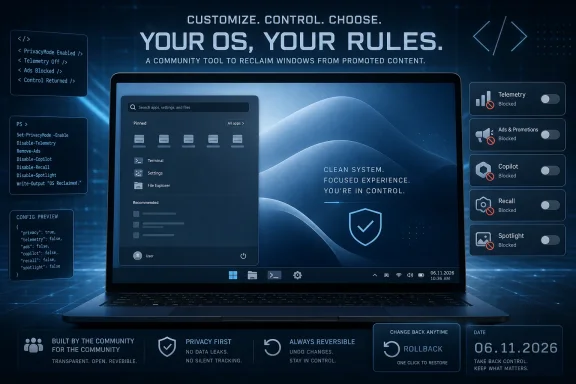
Win11Debloat 06.10.2026 is a new open-source PowerShell release from the Raphire project, published on June 10, 2026, that adds SYSTEM-account support, logged-in user targeting, automatic detection of previous tweaks, and expanded Windows 11 Start menu controls. The update is not just another “remove the junk” script refresh. It shows how far the Windows customization underground has moved from hobbyist cleanup into deployment tooling for administrators who increasingly treat Windows 11’s consumer-facing defaults as something to be managed, not accepted.
The timing matters because Microsoft’s modern Windows strategy keeps blending operating-system features, cloud services, advertising surfaces, and AI hooks into one experience. Win11Debloat’s popularity is a signal that a meaningful slice of the Windows community wants a different bargain: keep the platform, strip the nagging, and make the machine feel owned by the person or organization that paid for it. The 06.10.2026 release sharpens that bargain by making reversibility and automation less of an afterthought.
Win11Debloat began life in familiar territory: a PowerShell script for people who install Windows, see a Start menu full of apps they never requested, and immediately reach for a cleanup tool. That genre has existed for years, and it tends to attract equal parts enthusiasm and suspicion. Enthusiasts see efficiency; administrators see risk; Microsoft sees, at least implicitly, a challenge to the curated Windows experience it is trying to ship.
What makes this release notable is that it is less about one-click catharsis and more about state management. The headline feature is the ability to detect tweaks previously applied for the logged-in user and expose them for undoing. That moves Win11Debloat away from the old model of “run a script and hope you remember what it did” and toward a more understandable configuration model.
That distinction matters. A cleanup tool that only removes things is a chainsaw. A cleanup tool that can identify, display, and reverse earlier changes starts to resemble a policy interface, even if it remains community-maintained and unofficial.
The project’s feature list also shows how the definition of “bloat” has widened. It no longer means only preinstalled games, trialware, or OEM cruft. In 2026, bloat includes telemetry prompts, lock-screen suggestions, Microsoft 365 promotion in Settings, Edge advertising surfaces, Copilot hooks, Recall controls, AI features in bundled apps, and interface experiments such as the Drag Tray.
That breadth is why Win11Debloat keeps attracting power users. It is not merely uninstalling apps; it is expressing a philosophy of Windows ownership.
Win11Debloat exists in the space between those two realities. It does not replace Windows with a stripped-down unofficial build, nor does it ask users to live in the Registry Editor for an afternoon. Instead, it packages a set of widely desired reversions and suppressions into a tool that can be run interactively or from the command line.
The release notes for 06.10.2026 make clear that the project is responding to administrators as much as home users. Support for running under the SYSTEM account is a deployment feature. Support for applying changes to users who are still logged in is a fleet-management feature. Improved logging and exception handling are not the kind of changes that trend on social media, but they are exactly the kind of changes that matter when a script is part of a provisioning workflow.
This is the uncomfortable part for Microsoft. If the company’s default Windows experience were broadly accepted as neutral and productivity-enhancing, tools like Win11Debloat would remain niche. Their continuing popularity suggests that Windows 11’s default posture is increasingly viewed as something to remediate.
Until a script behaves correctly under SYSTEM, it may work beautifully on a technician’s bench and awkwardly everywhere else. User profiles, registry hives, app packages, permissions, and interactive prompts all become more complicated once the human sitting at the keyboard is no longer the execution context. Win11Debloat’s new support for SYSTEM therefore expands where the tool can realistically live.
The release also says this work made it possible to apply changes to users who are still logged in. That is a practical improvement with real operational consequences. In many environments, the cleanest time to customize a profile is before the user ever signs in, but the real world rarely cooperates so neatly.
For managed deployments, this could reduce the friction of bringing existing machines into a desired configuration. For smaller IT shops, it may make Win11Debloat easier to fold into remote support routines. For enthusiasts, it means the project is being hardened in ways that should improve reliability even outside enterprise scenarios.
There is still a line administrators should not casually cross. Running a community script with elevated privileges across a fleet is an act of trust, and trust should be earned by reviewing code, pinning versions, testing in rings, and documenting every change. But the presence of SYSTEM support shows the project is no longer pretending that desktop cleanup happens only one laptop at a time.
Win11Debloat has long emphasized that changes can be reversed and that many removed apps can be restored through the Microsoft Store. The new detection-and-undo capability makes that promise more concrete. Instead of relying only on documentation or memory, users can see which supported tweaks are already in place and reverse them by unchecking the corresponding setting.
That sounds simple, but it changes the psychology of using the tool. Reversible customization is less intimidating than irreversible cleanup. It also encourages experimentation by reducing the penalty for getting a preference wrong.
This is particularly important now that the tool reaches into AI-related Windows features. Disabling a suggestion surface is one thing. Disabling Recall, Click to Do, app-level AI analysis features, or AI services is more consequential because Microsoft is actively evolving those components. A reversible switch is not just convenience; it is insurance against a moving platform.
Microsoft has spent the last several years trying to make AI a native part of Windows. The company’s argument is that local and cloud-assisted AI can help users search, summarize, create, remember, and automate. The counterargument, represented by tools like Win11Debloat, is that many users do not want ambient analysis or assistant surfaces embedded throughout the desktop.
Recall is the most obvious flashpoint because it touches privacy, security, and trust. Even when Microsoft changes its defaults, adds controls, or improves encryption and authentication around sensitive features, the deeper issue remains: some users do not want the operating system observing their workflow in the first place. Win11Debloat turns that discomfort into a checklist.
The same is true at smaller scale for Paint, Notepad, and Edge. Microsoft sees AI features in familiar apps as democratized capability. Critics see formerly simple utilities becoming another venue for account prompts, cloud hooks, and feature creep.
Win11Debloat’s response is blunt: give users a way out. Whether that is viewed as empowerment or vandalism depends on one’s relationship to the Windows roadmap.
The Start menu is where Microsoft’s product strategy and user muscle memory collide. Users want a launcher. Microsoft wants a launcher, a recommendation surface, a discovery engine, and sometimes a promotional slot. Every generation of Windows reopens the question of who gets to decide what appears there.
Win11Debloat’s Start menu controls sit inside a larger set of features that can remove or replace pinned apps, hide recommended sections, disable Bing web results in search, and suppress Store suggestions. That is not just tidying. It is a rejection of the Start menu as a content channel.
For administrators, the value is consistency. A clean Start menu makes onboarding easier, reduces help desk noise, and prevents users from mistaking promotional tiles or suggested apps for sanctioned tools. For enthusiasts, the value is aesthetic and philosophical: the launcher should launch, not advertise.
The fact that tools like Win11Debloat spend so much effort on Start and Search is telling. Microsoft can build richer shells, but Windows users still judge the operating system by how quickly it gets out of their way.
The project is trying to consolidate app removal into a more flexible model. That is good engineering hygiene, even when it creates short-term migration work for administrators. The release note flags the change directly, which is exactly what admins need when something may break an automation job.
This is where open-source maintenance differs from abandoned tweakware. A maintainer willing to remove old switches, clean up logging, fix quoting bugs, and tighten file exclusions is doing the unglamorous work that keeps a utility usable beyond its first burst of popularity.
The nested quoting fix in
Debloat tools walk a narrow path when they remove inbox or Store-delivered components. Some apps are obvious candidates for removal in most business environments. Others look optional until a workflow depends on them.
Adding warnings is a tacit admission that not all removals are equal. Removing a consumer promotion is not the same as removing a shell-adjacent tool. Removing a legacy app is not the same as removing a component Microsoft may assume exists in documentation, support flows, or future experiences.
This is why mature debloating needs friction in the right places. One-click tools are satisfying, but a few well-placed confirmations can prevent a cleanup session from turning into a troubleshooting session.
The new fixes around Sysprep and undo registry files matter in that context. The release notes mention missing keys for disabling Recall and Windows suggested content, animation settings not being set for new users, and a typo in a Game Bar integration registry file. These are not glamorous fixes, but they are the connective tissue of reliable provisioning.
A setting that works only for the current user is useful. A setting that survives imaging, applies to new users, and can be undone predictably is operationally valuable.
This is also where the project’s audience splits. Home users care about immediate visual cleanup. IT professionals care about repeatability, idempotence, logging, and whether the next Windows feature update will undo half the work. Win11Debloat 06.10.2026 appears aimed squarely at that second audience without abandoning the first.
Not every default is harmful. Not every service is spyware. Not every bundled app is dead weight. A script that improves one user’s laptop can break another user’s workflow if applied without understanding.
For organizations, the responsible approach is to treat Win11Debloat as source material, not magic. Review the options. Test on representative hardware. Confirm what happens after cumulative updates and feature upgrades. Decide which changes are policy, which are preference, and which are too brittle to standardize.
Power users should take the same lesson at smaller scale. The reversibility improvements make experimentation safer, but they do not remove the need to know what is being changed. A Windows install can be made cleaner, but it can also be made stranger.
This is the paradox of modern Windows. Microsoft is trying to make the platform more valuable by integrating services and intelligence. But the more Windows behaves like a managed experience owned by Microsoft, the more some users reach for tools that make it behave like a local operating system again.
Win11Debloat is not a rebellion against Windows so much as a demand for a different Windows. Its users are not necessarily fleeing to Linux or macOS. Many are Windows loyalists who know exactly which parts of the platform they want and which parts they consider clutter.
That should worry Microsoft more than outright hostility. The harshest critics often leave. The persistent debloat community stays, documents every annoyance, and automates around it.
The broader reading is more interesting. Community tools are increasingly filling the gap between Microsoft’s default Windows experience and the experience many users actually want. That gap now includes AI features, advertising surfaces, app provisioning, search behavior, Start menu layout, privacy settings, and shell preferences.
This release also shows that the debloat category is professionalizing. The best tools in the space are no longer just collections of registry hacks wrapped in bravado. They are becoming configurable, reversible, logged, and automation-friendly.
That does not make them risk-free. It makes them harder to dismiss.
The timing matters because Microsoft’s modern Windows strategy keeps blending operating-system features, cloud services, advertising surfaces, and AI hooks into one experience. Win11Debloat’s popularity is a signal that a meaningful slice of the Windows community wants a different bargain: keep the platform, strip the nagging, and make the machine feel owned by the person or organization that paid for it. The 06.10.2026 release sharpens that bargain by making reversibility and automation less of an afterthought.
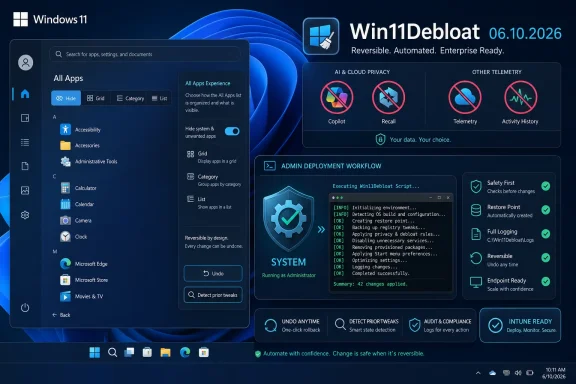 The Debloat Script Has Become a Management Layer
Win11Debloat began life in familiar territory: a PowerShell script for people who install Windows, see a Start menu full of apps they never requested, and immediately reach for a cleanup tool. That genre has existed for years, and it tends to attract equal parts enthusiasm and suspicion. Enthusiasts see efficiency; administrators see risk; Microsoft sees, at least implicitly, a challenge to the curated Windows experience it is trying to ship.What makes this release notable is that it is less about one-click catharsis and more about state management. The headline feature is the ability to detect tweaks previously applied for the logged-in user and expose them for undoing. That moves Win11Debloat away from the old model of “run a script and hope you remember what it did” and toward a more understandable configuration model.
That distinction matters. A cleanup tool that only removes things is a chainsaw. A cleanup tool that can identify, display, and reverse earlier changes starts to resemble a policy interface, even if it remains community-maintained and unofficial.
The project’s feature list also shows how the definition of “bloat” has widened. It no longer means only preinstalled games, trialware, or OEM cruft. In 2026, bloat includes telemetry prompts, lock-screen suggestions, Microsoft 365 promotion in Settings, Edge advertising surfaces, Copilot hooks, Recall controls, AI features in bundled apps, and interface experiments such as the Drag Tray.
That breadth is why Win11Debloat keeps attracting power users. It is not merely uninstalling apps; it is expressing a philosophy of Windows ownership.
Microsoft’s Windows 11 Defaults Are the Real Opponent
The Windows bloatware debate is often framed as a fight between purists and convenience. Microsoft bundles apps and services because it wants Windows to feel complete out of the box, and because Windows is now a front door to Microsoft 365, Edge, Bing, Copilot, OneDrive, Xbox, Store apps, and cloud identity. Users object because the same integration can feel like a sales funnel on hardware they already bought.Win11Debloat exists in the space between those two realities. It does not replace Windows with a stripped-down unofficial build, nor does it ask users to live in the Registry Editor for an afternoon. Instead, it packages a set of widely desired reversions and suppressions into a tool that can be run interactively or from the command line.
The release notes for 06.10.2026 make clear that the project is responding to administrators as much as home users. Support for running under the SYSTEM account is a deployment feature. Support for applying changes to users who are still logged in is a fleet-management feature. Improved logging and exception handling are not the kind of changes that trend on social media, but they are exactly the kind of changes that matter when a script is part of a provisioning workflow.
This is the uncomfortable part for Microsoft. If the company’s default Windows experience were broadly accepted as neutral and productivity-enhancing, tools like Win11Debloat would remain niche. Their continuing popularity suggests that Windows 11’s default posture is increasingly viewed as something to remediate.
SYSTEM Support Turns a Desktop Tweak into a Deployment Primitive
The most important technical change in this release is support for running the script under the SYSTEM account. In Windows administration, that is not a cosmetic milestone. SYSTEM context is how many enterprise software deployment tools, remote management agents, provisioning workflows, and endpoint automation systems execute tasks.Until a script behaves correctly under SYSTEM, it may work beautifully on a technician’s bench and awkwardly everywhere else. User profiles, registry hives, app packages, permissions, and interactive prompts all become more complicated once the human sitting at the keyboard is no longer the execution context. Win11Debloat’s new support for SYSTEM therefore expands where the tool can realistically live.
The release also says this work made it possible to apply changes to users who are still logged in. That is a practical improvement with real operational consequences. In many environments, the cleanest time to customize a profile is before the user ever signs in, but the real world rarely cooperates so neatly.
For managed deployments, this could reduce the friction of bringing existing machines into a desired configuration. For smaller IT shops, it may make Win11Debloat easier to fold into remote support routines. For enthusiasts, it means the project is being hardened in ways that should improve reliability even outside enterprise scenarios.
There is still a line administrators should not casually cross. Running a community script with elevated privileges across a fleet is an act of trust, and trust should be earned by reviewing code, pinning versions, testing in rings, and documenting every change. But the presence of SYSTEM support shows the project is no longer pretending that desktop cleanup happens only one laptop at a time.
Reversibility Is the Feature That Makes the Tool Less Reckless
The addition of an option to show and undo previously applied tweaks is the release’s most user-friendly change, but it is also the one that makes the project more defensible. A common criticism of debloat scripts is that they bundle too many opinions into a single action. Users run them in frustration, then later discover that a feature, app association, background service, or workflow they actually needed has disappeared.Win11Debloat has long emphasized that changes can be reversed and that many removed apps can be restored through the Microsoft Store. The new detection-and-undo capability makes that promise more concrete. Instead of relying only on documentation or memory, users can see which supported tweaks are already in place and reverse them by unchecking the corresponding setting.
That sounds simple, but it changes the psychology of using the tool. Reversible customization is less intimidating than irreversible cleanup. It also encourages experimentation by reducing the penalty for getting a preference wrong.
This is particularly important now that the tool reaches into AI-related Windows features. Disabling a suggestion surface is one thing. Disabling Recall, Click to Do, app-level AI analysis features, or AI services is more consequential because Microsoft is actively evolving those components. A reversible switch is not just convenience; it is insurance against a moving platform.
The AI Backlash Is Now a Windows Configuration Category
One of the striking things about Win11Debloat’s current feature set is how much of it is aimed at AI integration. The script offers controls for Microsoft Copilot, Windows Recall, Click to Do, the WSAIFabricSvc AI service, AI features in Edge, and AI features in Paint and Notepad. That list would have sounded oddly futuristic in the Windows 10 era; in Windows 11, it reads like a reaction to the operating system’s current direction.Microsoft has spent the last several years trying to make AI a native part of Windows. The company’s argument is that local and cloud-assisted AI can help users search, summarize, create, remember, and automate. The counterargument, represented by tools like Win11Debloat, is that many users do not want ambient analysis or assistant surfaces embedded throughout the desktop.
Recall is the most obvious flashpoint because it touches privacy, security, and trust. Even when Microsoft changes its defaults, adds controls, or improves encryption and authentication around sensitive features, the deeper issue remains: some users do not want the operating system observing their workflow in the first place. Win11Debloat turns that discomfort into a checklist.
The same is true at smaller scale for Paint, Notepad, and Edge. Microsoft sees AI features in familiar apps as democratized capability. Critics see formerly simple utilities becoming another venue for account prompts, cloud hooks, and feature creep.
Win11Debloat’s response is blunt: give users a way out. Whether that is viewed as empowerment or vandalism depends on one’s relationship to the Windows roadmap.
Start Menu Control Is Still a Proxy War for Ownership
The 06.10.2026 release adds more options for changing the All Apps view in the Start menu, including Hide, Grid, Category, and List. On paper, this is a modest interface tweak. In practice, Start menu behavior remains one of the most emotionally charged areas of Windows customization.The Start menu is where Microsoft’s product strategy and user muscle memory collide. Users want a launcher. Microsoft wants a launcher, a recommendation surface, a discovery engine, and sometimes a promotional slot. Every generation of Windows reopens the question of who gets to decide what appears there.
Win11Debloat’s Start menu controls sit inside a larger set of features that can remove or replace pinned apps, hide recommended sections, disable Bing web results in search, and suppress Store suggestions. That is not just tidying. It is a rejection of the Start menu as a content channel.
For administrators, the value is consistency. A clean Start menu makes onboarding easier, reduces help desk noise, and prevents users from mistaking promotional tiles or suggested apps for sanctioned tools. For enthusiasts, the value is aesthetic and philosophical: the launcher should launch, not advertise.
The fact that tools like Win11Debloat spend so much effort on Start and Search is telling. Microsoft can build richer shells, but Windows users still judge the operating system by how quickly it gets out of their way.
Removed Parameters Show a Project Growing Up
This release removes the-RemoveCommApps and -RemoveW11Outlook command-line parameters, directing users toward the broader -RemoveApps parameter instead. That may irritate anyone with old scripts depending on those switches, but it is also a sign of necessary cleanup. Tools that accumulate one-off parameters forever eventually become as cluttered as the systems they were designed to simplify.The project is trying to consolidate app removal into a more flexible model. That is good engineering hygiene, even when it creates short-term migration work for administrators. The release note flags the change directly, which is exactly what admins need when something may break an automation job.
This is where open-source maintenance differs from abandoned tweakware. A maintainer willing to remove old switches, clean up logging, fix quoting bugs, and tighten file exclusions is doing the unglamorous work that keeps a utility usable beyond its first burst of popularity.
The nested quoting fix in
Run.bat for paths with spaces is a perfect example. Nobody downloads a tool because its batch file handles awkward paths correctly. But everyone notices when it does not.The Windows Terminal Warning Is a Small Lesson in Blast Radius
The release adds confirmation dialogs and a warning for Windows Terminal removal. That is a sensible guardrail because Windows Terminal is not just another optional app for many users. It is the default command-line host experience for a growing portion of Windows power users, developers, and administrators.Debloat tools walk a narrow path when they remove inbox or Store-delivered components. Some apps are obvious candidates for removal in most business environments. Others look optional until a workflow depends on them.
Adding warnings is a tacit admission that not all removals are equal. Removing a consumer promotion is not the same as removing a shell-adjacent tool. Removing a legacy app is not the same as removing a component Microsoft may assume exists in documentation, support flows, or future experiences.
This is why mature debloating needs friction in the right places. One-click tools are satisfying, but a few well-placed confirmations can prevent a cleanup session from turning into a troubleshooting session.
Audit Mode Support Keeps the OEM and MSP Crowd Interested
Win11Debloat’s support for Windows Audit mode remains one of its more important features for deployment professionals. Audit mode is the phase where system builders, IT teams, and managed service providers can customize an installation before it is generalized and handed to a user. A debloat tool that works cleanly there can shape the first-run experience instead of patching it after the fact.The new fixes around Sysprep and undo registry files matter in that context. The release notes mention missing keys for disabling Recall and Windows suggested content, animation settings not being set for new users, and a typo in a Game Bar integration registry file. These are not glamorous fixes, but they are the connective tissue of reliable provisioning.
A setting that works only for the current user is useful. A setting that survives imaging, applies to new users, and can be undone predictably is operationally valuable.
This is also where the project’s audience splits. Home users care about immediate visual cleanup. IT professionals care about repeatability, idempotence, logging, and whether the next Windows feature update will undo half the work. Win11Debloat 06.10.2026 appears aimed squarely at that second audience without abandoning the first.
The Risk Is Not That Debloating Exists, but That It Becomes Ritual
There is a temptation in Windows communities to treat debloating as a mandatory rite. Install Windows, run the script, remove the apps, disable the telemetry, restore the old context menu, turn off suggestions, and only then begin using the machine. That ritual says something important about user frustration, but it can also become lazy administration.Not every default is harmful. Not every service is spyware. Not every bundled app is dead weight. A script that improves one user’s laptop can break another user’s workflow if applied without understanding.
For organizations, the responsible approach is to treat Win11Debloat as source material, not magic. Review the options. Test on representative hardware. Confirm what happens after cumulative updates and feature upgrades. Decide which changes are policy, which are preference, and which are too brittle to standardize.
Power users should take the same lesson at smaller scale. The reversibility improvements make experimentation safer, but they do not remove the need to know what is being changed. A Windows install can be made cleaner, but it can also be made stranger.
Microsoft Created the Market It Now Has to Live With
The existence of a popular Win11Debloat release in mid-2026 is not an accident, nor is it simply a failure of user education. Microsoft created the conditions by making Windows more assertive. The operating system now recommends, advertises, syncs, remembers, promotes, suggests, and assists in ways that many users experience as noise.This is the paradox of modern Windows. Microsoft is trying to make the platform more valuable by integrating services and intelligence. But the more Windows behaves like a managed experience owned by Microsoft, the more some users reach for tools that make it behave like a local operating system again.
Win11Debloat is not a rebellion against Windows so much as a demand for a different Windows. Its users are not necessarily fleeing to Linux or macOS. Many are Windows loyalists who know exactly which parts of the platform they want and which parts they consider clutter.
That should worry Microsoft more than outright hostility. The harshest critics often leave. The persistent debloat community stays, documents every annoyance, and automates around it.
The 06.10.2026 Release Draws a Clearer Line
The practical reading of this update is straightforward. Win11Debloat is easier to integrate into deployments, safer to reverse, and better aligned with the current Windows 11 feature set. It removes some older command-line affordances, improves reliability, and adds guardrails where removal could have broader consequences.The broader reading is more interesting. Community tools are increasingly filling the gap between Microsoft’s default Windows experience and the experience many users actually want. That gap now includes AI features, advertising surfaces, app provisioning, search behavior, Start menu layout, privacy settings, and shell preferences.
This release also shows that the debloat category is professionalizing. The best tools in the space are no longer just collections of registry hacks wrapped in bravado. They are becoming configurable, reversible, logged, and automation-friendly.
That does not make them risk-free. It makes them harder to dismiss.
The Admin’s Shortcut Is Also Microsoft’s Warning Sign
The most concrete lesson from Win11Debloat 06.10.2026 is that cleanup has become part of Windows operations, not just Windows hobbyism. The release is worth attention because its changes map directly to real deployment pain.- Win11Debloat 06.10.2026 adds SYSTEM-account support, making it more practical for endpoint management, provisioning, and remote automation scenarios.
- The script can now detect previously applied tweaks for the logged-in user and expose them for easier reversal.
- Administrators can apply supported changes to users who are still logged in, reducing the need for perfectly timed maintenance windows.
- The release expands Start menu All Apps view controls with Hide, Grid, Category, and List options.
- The old
-RemoveCommAppsand-RemoveW11Outlookparameters have been removed, so existing automation should be checked before upgrading. - New warnings around Windows Terminal removal reflect a more careful approach to changes that can affect developer and administrator workflows.
References
- Primary source: Neowin
Published: Thu, 11 Jun 2026 04:41:15 GMT
Win11Debloat 06.10.2026 - Neowin
Win11Debloat is a simple PowerShell script that declutters Windows 10/11 by removing bloatware, disabling telemetry, and stripping unwanted features for a faster, cleaner, more private system. www.neowin.net
- Official source: github.com
Releases · Raphire/Win11Debloat · GitHub
A simple, lightweight PowerShell script that allows you to remove pre-installed apps, disable telemetry, as well as perform various other changes to declutter and customize your Windows experience. Win11Debloat works for both Windows 10 and Windows 11. - Releases · Raphire/Win11Debloat github.com
- Related coverage: newreleases.io
Raphire/Win11Debloat 2026.05.10 on GitHub
New release Raphire/Win11Debloat version 2026.05.10 Release 2026.05.10 on GitHub. newreleases.io
- Related coverage: anonhaven.com
Win11Debloat Strips Telemetry, Copilot from Windows 10 and 11 | AnonHaven
Win11Debloat, a PowerShell script, removes 60+ preinstalled apps, disables telemetry, and strips Copilot and Recall from Windows. Now with a full GUI. anonhaven.com