

The rise of Windows 11 debloat scripts says as much about Microsoft’s modern desktop strategy as it does about user frustration. A growing number of power users want a cleaner install, fewer prompts, less telemetry, and fewer bundled apps, and tools like Win11Debloat promise that in a few minutes instead of an afternoon of manual cleanup. The appeal is obvious, but so are the trade-offs: many debloat utilities make surface-level changes, while the more aggressive ones can weaken servicing, complicate troubleshooting, or create long-term maintenance headaches. That tension is why this debate refuses to go away.
Windows 11 has become a kind of split personality platform. On one hand, it is still the familiar desktop operating system people rely on for work, games, and general computing. On the other hand, it increasingly behaves like a delivery vehicle for Microsoft services, promotional surfaces, AI features, and Store-linked apps that many users never asked for in the first place. That shift has created a strong emotional market for “debloat” tools, because they seem to offer control without the tedium of clicking through every menu by hand. s understandable. A fresh Windows install can feel crowded with preinstalled apps, web search integrations, recommendations, taskbar extras, and sign-in nudges that make the desktop feel less neutral than older versions of the OS. For some people, that clutter is merely annoying. For others, it is a reason to seek out tools that strip Windows back into something quieter, more local, and more user-owned.
But the category al contradiction. The more a tool removes, disables, or rewrites, the more trust it demands. A script that runs with administrator privileges can change services, settings, startup behavior, update behavior, and privacy-related toggles in seconds. That speed is the selling point, yet it is also what makes these tools feel simultaneously magical and dangerous.
The most important question is not whethar. It clearly is. The real question is whether the user-visible gains justify the hidden costs. The evidence in the source material suggests that for many people the answer is “sometimes, but only for modest cleanup,” not “yes, wholesale system surgery.”
The script is especially appealing to users who want quick wins. It can remove itemsMicrosoft Teams, OneNote, Copilot, Recall, and Xbox Game Bar, depending on the workflow used and the version being targeted. It also strips out some of the smaller irritations people associate with Windows 11, including taskbar clutter, search web results, MSN-style recommendations, and other promotional or suggested surfaces.
That distinction matters because Windows users do not all have the same tolerance for risk. A gamer with a dedicated SSD may baggressive tweaks than an office worker on a production laptop. A hobbyist may welcome the chance to experiment, while a normal home user may simply want fewer distractions and less friction. Win11Debloat’s relative restraint is part of why it resonates.
There is also an emotional economy at work. People like visible changes. A cleaner Start menu, fewer startup annoyances, and a desktop that feels less commercial are easy to appreciate immedihe benefits of staying within supported Windows settings are often less dramatic and less screenshot-friendly, even if they are safer over time.
That means the psychological benefit can exceed the technical one. Users often feel the machine is “fixed” because it looks cleaner, not because its architecture has changed in any meaningful way. That is not inherently bad, but it doneed to stay grounded.
That is a meaningful finding because it undercuts a common myth in the debloat space: the idea that Windows is wasting huge amounts of memory on junk. In practice, the operating system’s startup footprint is already fairly lean, and many frustrations stem more from design choices, bundled service than from raw resource waste.
The source material repeatedly stresses that the most aggressive tools are the least defensible. Tiny gains in memory use do not justify breaking update paths or heavily altering servicing behavior. In that sense, the entire category risks overpromising because it sells a visible reduction while quietly shifting the machine’s risk profil 11 already uses a modest amount of memory.
2. Debloat tools usually trim cosmetic clutter more than core overhead.
3. The biggest gains are often difficult to feel in real use.
4. Aggressive changes can create delayed side effects.
5. A cleaner desktop can disguise the absence of real optimization.
That is the practical lesson users keep bufeels slow, the problem is more likely to be hardware, browser load, storage performance, or workflow complexity than a handful of bundled Windows apps.
Tiny11 is often framed as a more radical option because it builds a trimmed Windows image rather than cleaning up after installation. That can appeal to users who want a more minimal starting point, but the testing described in the source material suggests the actual memory benefits remain modest. In other words, the look and feel change more than the engine underneath.
That is where Win11Debloat occupies aground. It assumes you will install Windows normally, then remove what you do not want. That workflow is easier to understand, easier to repeat, and less likely to blow up future servicing than a heavily modified ISO. Still, even this approach can become annoying if Microsoft reintroduces items during feature updates.
Win11Debloat reportedly disables somehaviors, app-launch tracking, diagnostic data settings, tips, suggestions, and a range of ad-like surfaces. For privacy-conscious users, that is meaningful. But it is still not the same as abolishing telemetry, and it does not remove the platform’s built-in support relationship with Microsoft.
This is why manual Settings changes still matter. Users can uninstall apps, reduce tailored experiences, reviisable consumer surfaces without giving a third-party script deep control over the machine. That route is less dramatic, but it is also more transparent.
That matters because changes like disabling Fast Startup or setting services to manual start can subtly alter how the system behaves. SSometimes it simply shifts work from boot time to application launch time or from one session to the next. Either way, it is a trade-off, not a free optimization.
For gamers, this distinction can be especially important. Fewer background distractions may sound ideal, but stability, drivers, overlays, and update behavior matter just as much as a trimmed Start menu. A script that makes Windows prettier but less predictable is not necessarily a win for gaming use cases.
That said, no script with administrator-level access is truly risk-free. Even a relatively restrained utility can make registry changes, alter defaults, and remove components that later prove inconvenient to restore. The fact that it is less risky than other debloat tools does not mea
The strongest case for Win11Debloat is that it reflects a real user demand Microsoft has not fully solved on its own. People clearly want a quieter Windows 11, and they want it without a long manual cleanup session. The tool’s opportunity is not just removing clutter, but demonsfault experience many users wish Windows shipped with in the first place.
The next real improvement probably will not come from a more aggressive cleanup script. It will come from Microsoft making Windows less noisy, less promotional, and easier to configure through supported tools. If that happens, utilities like Win11Debloat may remain popular among enthusiasts, but they will look more like optional polish than necessary first aid.
Watch for a few things in particular:
Source: I used Win11Debloat on my PC, and I could never install Windows without it again
 Overview
Windows 11 has become a kind of split personality platform. On one hand, it is still the familiar desktop operating system people rely on for work, games, and general computing. On the other hand, it increasingly behaves like a delivery vehicle for Microsoft services, promotional surfaces, AI features, and Store-linked apps that many users never asked for in the first place. That shift has created a strong emotional market for “debloat” tools, because they seem to offer control without the tedium of clicking through every menu by hand. s understandable. A fresh Windows install can feel crowded with preinstalled apps, web search integrations, recommendations, taskbar extras, and sign-in nudges that make the desktop feel less neutral than older versions of the OS. For some people, that clutter is merely annoying. For others, it is a reason to seek out tools that strip Windows back into something quieter, more local, and more user-owned.But the category al contradiction. The more a tool removes, disables, or rewrites, the more trust it demands. A script that runs with administrator privileges can change services, settings, startup behavior, update behavior, and privacy-related toggles in seconds. That speed is the selling point, yet it is also what makes these tools feel simultaneously magical and dangerous.
The most important question is not whethar. It clearly is. The real question is whether the user-visible gains justify the hidden costs. The evidence in the source material suggests that for many people the answer is “sometimes, but only for modest cleanup,” not “yes, wholesale system surgery.”
What Win11Debloat Actually Changes
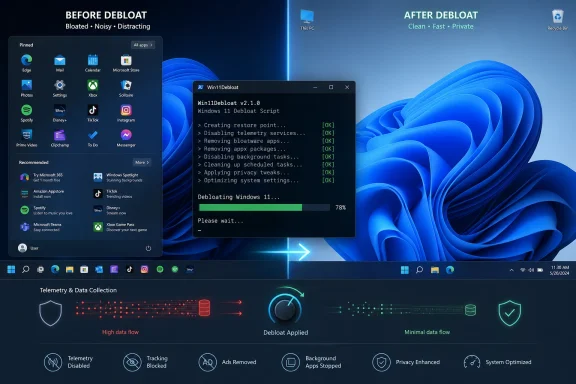
Win11Debloat is atts not behave like the most extreme tools in the category. It is generally framed as a relatively surface-level cleanup script, one that removes unwanted apps and tweaks a selection of settings without trying to reinvent Windows itself. That makes it feel safer than tools that rewrite servicing behavior or build heavily modified Windows images.The script is especially appealing to users who want quick wins. It can remove itemsMicrosoft Teams, OneNote, Copilot, Recall, and Xbox Game Bar, depending on the workflow used and the version being targeted. It also strips out some of the smaller irritations people associate with Windows 11, including taskbar clutter, search web results, MSN-style recommendations, and other promotional or suggested surfaces.
The appeal of a low-friction cleanup
What makes this approach compelling is not just what it removes Unlike more invasive debloat utilities, Win11Debloat does not try to disable core update infrastructure or reshape the operating system into a custom fork. That means the tool fits more comfortably into the “clean up what you don’t want” camp than into the “alter how Windows functions” camp.That distinction matters because Windows users do not all have the same tolerance for risk. A gamer with a dedicated SSD may baggressive tweaks than an office worker on a production laptop. A hobbyist may welcome the chance to experiment, while a normal home user may simply want fewer distractions and less friction. Win11Debloat’s relative restraint is part of why it resonates.
- Removes bundled apps and consumer extras
- Disables some advertising and suggestion surfaces
- Adjusts a number of registry-backed preferences
- ystem far closer to stock Windows than custom-image tools
- Can be rerun after updates if Microsoft brings some items back
Why Users Keep Reaching for Debloat Tools
The user frustration behind debloat tools is real, and it has only grown as Windows 11 has leaned harder into cloud servicetions, and promotional integration. That is why the word “debloat” has become so culturally sticky: it sounds less like hacking and more like restoring the OS to a cleaner, calmer baseline.There is also an emotional economy at work. People like visible changes. A cleaner Start menu, fewer startup annoyances, and a desktop that feels less commercial are easy to appreciate immedihe benefits of staying within supported Windows settings are often less dramatic and less screenshot-friendly, even if they are safer over time.
Clean UI versus real system gains
This is where the category can become misleading. A debloat tool may create a system that looks substantially leaner, yet the actual gains can be minimal. Fresh Windows 11 aairly efficient baseline, and the source material repeatedly notes that the biggest reductions are often around 100MB to 200MB at boot rather than the transformative savings many users expect.That means the psychological benefit can exceed the technical one. Users often feel the machine is “fixed” because it looks cleaner, not because its architecture has changed in any meaningful way. That is not inherently bad, but it doneed to stay grounded.
- Cleaner appearance can create a stronger sense of ownership
- Reduced nags and suggestions improve day-to-day comfort
- Visual changes are easier to notice than performance changes
- The satisfaction is real even when the numbers are not dramatic
- Emothe same as system optimization
What the Reported Testing Suggests
The strongest argument in favor of caution is that the measurable gains appear modest. Across the tools discussed in the source material, the reported improvement in memory use was tiny, especially considering the level of trust users arsh Windows 11 was already sitting around 1.9GB to 2.1GB of RAM on boot in the cited testing, and the debloat tools did not materially transform that baseline.That is a meaningful finding because it undercuts a common myth in the debloat space: the idea that Windows is wasting huge amounts of memory on junk. In practice, the operating system’s startup footprint is already fairly lean, and many frustrations stem more from design choices, bundled service than from raw resource waste.
Why RAM numbers can mislead
Memory savings are also a tricky metric because they can hide other costs. A tool may save a little RAM by changing services to manual start, disabling Fast Startup, or turning off other conveniences, but the user then pays in boot behavior, latency, or odd interactions later. That ishine is not automatically the “better” machine.The source material repeatedly stresses that the most aggressive tools are the least defensible. Tiny gains in memory use do not justify breaking update paths or heavily altering servicing behavior. In that sense, the entire category risks overpromising because it sells a visible reduction while quietly shifting the machine’s risk profil 11 already uses a modest amount of memory.
2. Debloat tools usually trim cosmetic clutter more than core overhead.
3. The biggest gains are often difficult to feel in real use.
4. Aggressive changes can create delayed side effects.
5. A cleaner desktop can disguise the absence of real optimization.
That is the practical lesson users keep bufeels slow, the problem is more likely to be hardware, browser load, storage performance, or workflow complexity than a handful of bundled Windows apps.
How Win11Debloat Differs from Tiny11 and Other Alternatives
Win11Debloat is only one of several ways users try to tame Windows 11. The source material contrasts it with Tiny11, Tiny11 Builder, and even more aggressive variants like Tiny11 Core Builder, which go substantially further in altering Windows’ structure. That comparison is useful because it shows where crm surgery begins.Tiny11 is often framed as a more radical option because it builds a trimmed Windows image rather than cleaning up after installation. That can appeal to users who want a more minimal starting point, but the testing described in the source material suggests the actual memory benefits remain modest. In other words, the look and feel change more than the engine underneath.
Image-based customizationcleanup
There is a psychological difference between editing a live system and building a custom image. Custom images make users feel as if they are authoring their own operating system, which creates a much stronger sense of control. Yet that sense of control does not necessarily translate to real-world efficiency or supportability.That is where Win11Debloat occupies aground. It assumes you will install Windows normally, then remove what you do not want. That workflow is easier to understand, easier to repeat, and less likely to blow up future servicing than a heavily modified ISO. Still, even this approach can become annoying if Microsoft reintroduces items during feature updates.
- Win11Debloat is comparatively conservative
- Tiny11 changes the elf
- More aggressive tools can undermine Windows Update
- Post-install cleanup is usually easier to reason about
- Image-based customization may age poorly as Windows evolves
The Telemetry and Privacy Debate
Telemetry is one of the biggest reasons people reach for debloat tools, but it is also where the promises tend to get overstated. Microsoft’s own position is that Windows requires a baseline of diagnostic data to support security, servicing, troubleshooting, and device health. That means a script can reduce some visible features, but it cannot turn a consumer Windows installation into a truly zero-data system.Win11Debloat reportedly disables somehaviors, app-launch tracking, diagnostic data settings, tips, suggestions, and a range of ad-like surfaces. For privacy-conscious users, that is meaningful. But it is still not the same as abolishing telemetry, and it does not remove the platform’s built-in support relationship with Microsoft.
What can actually be reduced
The more measured interpretation is that these tools can reduce noise and some data-sharing behaviors, not eliminate all sis an important distinction because many users interpret “disable telemetry” as a total shutdown, when the actual effect is usually more limited. In supportable Windows editions, some diagnostic pathways simply remain part of how the OS works.This is why manual Settings changes still matter. Users can uninstall apps, reduce tailored experiences, reviisable consumer surfaces without giving a third-party script deep control over the machine. That route is less dramatic, but it is also more transparent.
- Required diagnostic data is not fully removable in consumer Windows
- Optional data and tailored experiences can often be reduced
- Privacy gains are usually partial, not absolute
- Supported settings changes are easier to reverse
- “Telemetry off” is often shorthaniption
Performance, Startup Behavior, and Real-World Trade-Offs
The article’s most important practical point is that debloat tools are often sold as performance enhancers when they are really preference engines. A more minimal interface can make Windows feel snappier, but that sensation is not always backed by measurable gains. The testing described in the source material found that the desktop got cleaner long before the machine got meaningfully faster.That matters because changes like disabling Fast Startup or setting services to manual start can subtly alter how the system behaves. SSometimes it simply shifts work from boot time to application launch time or from one session to the next. Either way, it is a trade-off, not a free optimization.
Faster-feeling is not the same as faster
There is a reason users often describe debloated Windows as “cleaner” rather than “faster.” Cleaner is a user experience judgment. Faster is an engineering claim. The source material repeatedly indicates that the second claim is much harder to subrst.For gamers, this distinction can be especially important. Fewer background distractions may sound ideal, but stability, drivers, overlays, and update behavior matter just as much as a trimmed Start menu. A script that makes Windows prettier but less predictable is not necessarily a win for gaming use cases.
- Lower improve perceived responsiveness
- Disabling Fast Startup changes power-cycle behavior
- Manual service start can delay dependent components
- Performance impressions are often subjective
- Stability often matters more than cosmetic minimalism
Safety, Reversibility, and Why This Tool Feels Different
One reason Win11Debloat stands out is that it is described as more reversible than many alternatives. Thesizes that it does not make the kind of deep system changes that are likely to break updates or critical OS features. That makes it a more comfortable recommendation for users who want cleanup without full-scale modification.That said, no script with administrator-level access is truly risk-free. Even a relatively restrained utility can make registry changes, alter defaults, and remove components that later prove inconvenient to restore. The fact that it is less risky than other debloat tools does not mea
Reinstallable does not mean harmless
A recurring argument in favor of debloat tools is that most removed items can simply be reinstalled from the Microsoft Store if needed. That is true in some cases, but it does not eliminate the possibility of side effects, reintroduced clutter after updates, or changed behavior that is not obvious until later. A tool can be reversible in principle while still being annoye comparison with the more aggressive options is what makes this point clear. Tiny11 Core crosses into disabling Windows Update, which the source material treats as a line that should not be crossed on a general-purpose PC. Win11Debloat, by contrast, stays on the more defensible side of that line.- Reversithan structural changes
- Restore options matter more than one-time convenience
- Store apps can often be added back later
- Future updates can reintroduce clutter
- Safety is relative, not absolute
The strongest case for Win11Debloat is that it reflects a real user demand Microsoft has not fully solved on its own. People clearly want a quieter Windows 11, and they want it without a long manual cleanup session. The tool’s opportunity is not just removing clutter, but demonsfault experience many users wish Windows shipped with in the first place.
- Quick cleanup after reinstalling Windows
- Less promotional clutter in the Start menu and taskbar
- Lower annoyance from suggestions, tips, and ads
- Better privacy posture for users who want fewer consumer surfaces
- More control without the complexity of custom ISO building
- Reversible-ish changes compared with more extreme debloat methods
- A useful middle ground betweecking the OS apart
Risks and Concerns
The central riskc cleanliness with actual system health. A Windows install can look wonderful after debloating and still be less supportable, harder to troubleshoot, or more fragile after the next update. The danger often appears later, which is exactly why people underestimate it.- Scripts can make changes the user does not fully understand
- Update-related settings are the most dangerous area
- Future Windows updates may reintroduce clutter or conflict with tweaks
- Privacy wins are often overstated
- Troubleshooting becomes harder when multiple changes are bundled
- The tool author’s preferences may not match the user’s needs
- Aggressive cleanup can reduce supportability without delivering much speed
Looking Ahead
If Windows debloat tools continue to grow in popularity, the most interesting outcome may not be technical at all. It may be a signal to Microsoft that the default still feels too crowded, too opinionated, and too eager to surface things users did not explicitly choose. In that sense, debloat scripts are feedback as much as they are utilities.The next real improvement probably will not come from a more aggressive cleanup script. It will come from Microsoft making Windows less noisy, less promotional, and easier to configure through supported tools. If that happens, utilities like Win11Debloat may remain popular among enthusiasts, but they will look more like optional polish than necessary first aid.
Watch for a few things in particular:
- Whether Microsoft keeps reducing consumer-facing clutter
- Whether Windows 11 setup becomes less promot Whether privacy and diagnostic controls become easier to understand
- Whether update-related changes remain the most dangerous part of debloating
- Whether users continue preferring reversible cleanup over custom images
Source: I used Win11Debloat on my PC, and I could never install Windows without it again
