

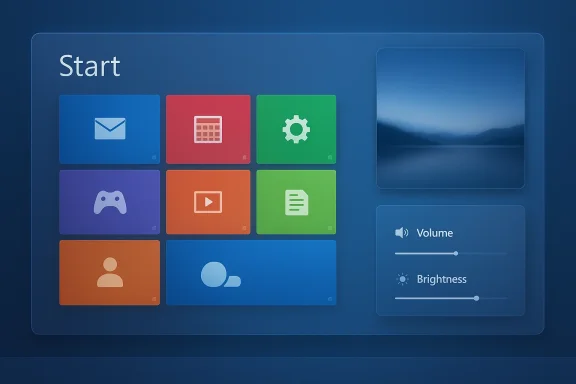
If you thought Windows 8’s tile‑based “Metro” era was dead and buried, a small but ambitious open‑source project has other plans: Win8DE recreates the Windows 8 Start screen, lock screen and on‑screen display as a Wayland shell for Linux, and the result is equal parts nostalgia, design experiment and warning for tinkering desktop enthusiasts. The project, published publicly by developer er‑bharat, bundles modular components for the Start screen, lock screen, wallpaper management and OSD controls and is intentionally built to run on modern Wayland compositors like Labwc and Hyprland rather than trying to be a GNOME or KDE replacement.
Tinkerers and touch‑device owners will find genuine value in Win8DE; cautious deployers should treat it as an experiment, test in isolated environments and verify driver and compositor compatibility before trusting it on a production machine. If you want to try it, read the code, review the build scripts and keep a fallback session ready — the experiment is half nostalgia, half design probe, and wholly worth a look for the adventurous.
Source: Hackaday The Windows Interface You Didn’t Like, For Linux
 Background
Why Windows 8 still matters (for better and worse)
Windows 8 arrived in 2012 as Microsoft’s bold attempt to unify desktop and touch experiences under a tile‑first design language that prioritized large, tappable tiles and full‑screen apps. The interface — originally inspired by Microsoft’s phone and media device UI direction and later called Metro or Modern UI — was deliberately touch‑first, but on mouse‑and‑keyboard desktops it fractured user workflows and provoked strong criticism from both reviewers and industry figures. Over time Microsoft dialed back the experiment: Windows 8.1 softened some changes and Windows 10 returned a desktop‑first Start menu model that absorbed a few tile concepts but largely scrapped the full‑screen Start screen. This historical context explains both the visceral reaction many people have to seeing Windows 8’s look again and the curiosity behind Win8DE: the tile‑first model has real strengths on touch devices, and Linux’s modular graphics stack makes it feasible for hobbyists to reimagine that interaction without shipping proprietary assets or Microsoft binaries.Overview: What is Win8DE?
A shell, not a full desktop environment
Win8DE is best understood as a Wayland shell layer: it provides a cohesive user‑facing environment (Start screen, lock screen, OSD, wallpaper and settings app) while delegating lower‑level concerns — session handling, power management, distribution integration — to the underlying compositor and the Linux distribution. It is not a drop‑in replacement for long‑mature desktop environments like GNOME or KDE Plasma; it’s a deliberately focused reimagining of Windows 8’s surface that runs atop modern compositors. Key components included in the public repository and described by early coverage:- Win8Start — the full‑screen tile Start screen with drag/drop and tile sizes
- Win8Lock — animated lock screen
- Win8OSD — on‑screen overlays for volume/brightness
- Win8Wall — wallpaper management utility
- Win8Settings — a lightweight settings UI for accent colors and backgrounds
Why build a Windows‑8‑style shell for Linux?
Design curiosity and practical niches
At first glance Win8DE looks like nostalgia turned into code. But beneath the joke is a defensible design hypothesis: tile‑first interfaces are excellent for touch and hybrid form factors. The original Windows 8 UI wasn’t universally bad — it was optimized for a different input model. Win8DE explores that design space in 2026 with modern compositing technologies and current hardware capabilities. For tablet owners, kiosk systems, educational devices, or anyone wanting a large‑type, visually simple launcher, the tile metaphor can be highly usable.A public experiment rather than a commercial product
The project is openly developed on GitHub and framed as a community experiment rather than a commercial rebrand. That matters: the codebase’s modularity (separating start, lock, OSD) lowers the barrier for targeted fixes, and the choice of QML/Python and small binaries (as reported in the repository summaries) invites contributors familiar with those technologies. This choice makes the project a useful case study for how desktop shells can be built with a compact toolchain.Under the hood: Wayland, compositors and technical trade‑offs
Why Wayland is the right choice here
Win8DE targets Wayland rather than X11, and that’s not just trend‑following. Wayland provides a modern compositor‑centric architecture that simplifies zero‑copy rendering, gives the shell better control over overlays and animations, and aligns with current Linux desktop progress. Wayland’s approach reduces buffer copies and can lower input latency and visual tearing when compositors and drivers are implemented well, which is important for a UI that relies on fluid animations and full‑screen transitions.Compositor dependence — both a strength and a liability
Because Win8DE is a shell layer, it depends on the compositor to manage windows, input and session details. That makes the project lightweight but also fragile in the face of compositor API changes. The README and community reporting cite Labwc and Hyprland as known targets — two compositors with different design goals: Labwc favors minimalism while Hyprland emphasizes smooth animation and advanced effects. If your hardware or compositor setup is atypical (multi‑GPU laptops, exotic displays), expect extra work to get everything behaving reliably.The NVIDIA variable
A practical caveat for many Linux users is graphics driver behavior: historically, proprietary NVIDIA drivers lagged on some Wayland features and forced compositors to carry alternative codepaths. That gap has narrowed in recent years as vendors added GBM support and compositors matured, but multi‑monitor setups, hybrid GPU laptops and older drivers still invite surprises. Test Win8DE in a disposable environment before trusting it on a daily machine.The user experience: what Win8DE does well — and where it will struggle
Strengths
- Touch and tablet friendliness: Large tappable tiles, horizontal paging and full‑screen touch targets map well to tablet ergonomics.
- Simplicity and focus: The tile grid reduces visual clutter and can make frequently used apps and information easier to access.
- Modular UI elements: Separating start, lock and OSD means each piece can be improved independently and replaced if needed.
- Playful, differentiated aesthetic: For users tired of the same GNOME/KDE look, the Win8 style is an unmistakable alternative and a conversation piece.
Limitations and usability gaps
- Desktop workflows: Windowed multitasking, heavyweight productivity work and fine mouse gestures are less natural in a tile‑first full‑screen shell. The classic desktop still wins for productivity‑heavy users.
- App integration and system settings: Because Win8DE delegates system services to the compositor and distro, deep integration (power profiles, distribution‑specific features, system installers) may feel fragmentary.
- Legacy X11 apps: XWayland allows many X11 applications to run on Wayland, but some edge cases can show odd behavior (input focus, resizing, decorations).
- Discoverability and muscle memory: Users conditioned on a traditional desktop paradigm will face friction; Win8DE is less about converting those users and more about providing an alternative for specific contexts.
Security, maintenance and legal considerations
Security posture
Small projects often include convenience scripts and install helpers. That’s practical for testers but raises security hygiene questions: always review install scripts before running them with elevated privileges, and prefer local builds until you’re comfortable with the code. The repository includes build/install scripts, so exercise standard open‑source caution when adopting any third‑party code into a production environment.Maintenance risk
Win8DE is a tiny, community‑driven project. That’s fine for experimentation, but maintenance depends on volunteers. Expect that compositor API changes or distribution updates may require manual fixes or local patches. If you adopt Win8DE for daily use, have the technical ability to troubleshoot or accept the possibility of breakage when underlying libraries change.Legal grey areas
Recreating a look and feel sits in a legal grey zone. Win8DE intentionally avoids shipping Microsoft binaries or exact assets and omits particularly contentious features like the Charms menu. But anyone building commercial derivatives should consult legal guidance. For hobbyist and personal use, the safer approach is to use original assets or community‑created ones rather than distributing Microsoft copyrighted visual assets.How to try Win8DE safely (a practical walkthrough)
- Create a disposable environment: use a VM that supports Wayland or a spare test machine. Don’t overwrite your daily driver.
- Clone the repository locally: read the README and inspect build/install scripts before running anything. The project provides both build.sh and install.sh flows; prefer building to a local bin directory first.
- Configure a separate compositor session: keep your primary compositor configuration untouched and create a new session entry for the Win8 session so you can choose it at login.
- Test with default themes and minimal external integrations first: confirm tile layout, lock/unlock and OSD work before adding live tile integrations or system hooks.
- If you rely on NVIDIA hardware, verify driver version and compositor compatibility first; use recent drivers that support modern Wayland buffer mechanisms.
- Keep a fallback session handy: make sure you can switch back to GNOME, KDE or a simple Hyprland session if problems appear.
What the Win8DE experiment tells us about desktop design
The right tool for the right device
One enduring lesson of Windows 8’s history is that interface design must match the input model and context of use. Win8DE implicitly argues that tile‑first UIs still have untapped value on Linux when paired with modern compositing and hardware. For tablet vendors, kiosk builders and certain accessibility scenarios, this interface is not a regression — it is a sensible, deliberate choice.Open source as design archaeology
Projects like Win8DE are a form of design archaeology: enthusiasts preserve and re‑interpret interface ideas that mainstream vendors abandoned. That’s valuable for the community — it keeps options alive, spurs UX debate and highlights tradeoffs that polished mainstream solutions often hide. The fact that a small repo can reconstruct an entire era of UI demonstrates how far the Linux graphics stack and toolkit ecosystems have matured.A testbed for live tiles and modular UIs
An interesting technical dimension is Win8DE’s approach to live tiles and modular tile logic (reports indicate QML plus optional Python scripts can power dynamic tile behavior). This hybrid approach lowers the barrier to experimenting with live tiles without locking the project into heavy compiled stacks — a pragmatic choice for community contributions.Risks that could stop Win8DE from gaining traction
- Perception problem: Windows 8’s cultural reputation is still largely negative among mainstream users; that baggage will keep many people from giving Win8DE a fair trial outside of enthusiasts.
- Integration overhead: Because Win8DE is a shell layer, distro maintainers and packagers must decide whether to support it officially; without packaging or upstream distro support, adoption will remain niche.
- Maintenance and compatibility: A small contributor base and frequent compositor evolution increase the long‑term maintenance load. If the repo’s authors stop contributing, community forking or patching will decide its fate.
- Unverifiable low‑level claims: Some third‑party write‑ups assert specific implementation details (e.g., GTK/libwnck internals, Cairo acceleration or X11 fallback architectures) that are inconsistent across reports. Those claims should be treated as unverified until the repository README or source files are inspected directly. Always confirm low‑level technical assertions against the repo itself before planning deployments.
Final appraisal: for whom is Win8DE interesting?
Win8DE is a niche gem: a technically coherent, playful reimagining of a notorious UI that does not pretend to be an enterprise‑grade desktop environment. It will be most compelling to:- Tablet and kiosk builders seeking a simple, touch‑friendly shell.
- UI researchers and UX students who want a live example of tile‑first design logic.
- Linux tinkerers who enjoy unusual desktop experiments and don’t mind occasional breakage.
- Nostalgic users who genuinely preferred the Windows 8 look and want a way to keep it alive without running outdated Microsoft OS versions.
Conclusion
Win8DE is more than an internet curiosity: it’s a small, focused experiment that brings a controversial but deliberately designed UI back into circulation, rebuilt with contemporary Linux graphics technology. It highlights the enduring truth that UI decisions are context dependent — what fails spectacularly on one class of device can excel on another. The project also serves as a reminder of the strengths of open source: anyone can resurrect, rework and learn from past designs, and in doing so contribute to a richer ecosystem of choice.Tinkerers and touch‑device owners will find genuine value in Win8DE; cautious deployers should treat it as an experiment, test in isolated environments and verify driver and compositor compatibility before trusting it on a production machine. If you want to try it, read the code, review the build scripts and keep a fallback session ready — the experiment is half nostalgia, half design probe, and wholly worth a look for the adventurous.
Source: Hackaday The Windows Interface You Didn’t Like, For Linux
