

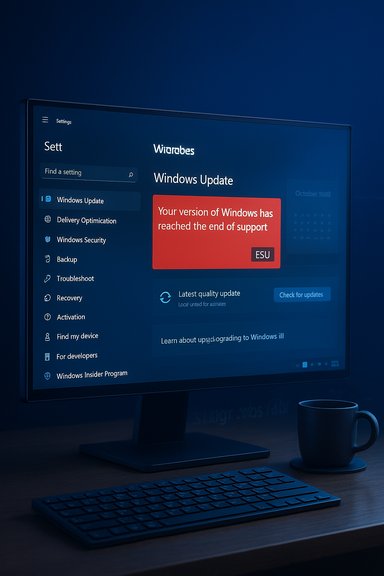
Microsoft has confirmed a display bug in Windows 10 that is incorrectly warning some users their systems “have reached the end of support,” even when those devices are still eligible for Extended Security Updates (ESU) or are running supported Long-Term Servicing Channel (LTSC) releases. The false alert has caused confusion and concern because it appears in Windows Update and explicitly claims, “Your device is no longer receiving security updates,” a statement that — in many reported cases — is simply not true.
Microsoft ended mainstream support for consumer Windows 10 on October 14, 2025, and offered an Extended Security Updates program (ESU) to allow eligible systems to continue receiving critical and important security fixes through a limited, paid (or opt-in) program. Consumer enrollment options include syncing settings to a Microsoft account, redeeming Microsoft Rewards points, or a one-time purchase — all of which permit ESU coverage through October 13, 2026. These program rules are what make the false “end of support” banner so alarming to users who believe they missed the cutoff. At the same time, several Windows 10 SKUs — notably Windows 10 version 22H2 Pro, Education, Enterprise, and certain LTSC and IoT LTSC releases — remain entitled to updates under ESU or distinct LTSC timelines that extend beyond October 2025. Microsoft has recognized that the end-of-support notice may appear incorrectly after devices installed the October 2025 cumulative updates (the final servicing branch for 22H2), and it has characterized the issue as a display error rather than a loss of update entitlement.
Source: Forbes Microsoft Confirms Giving Windows 10 Users Worrying ‘Out Of Support’ Message
 Background
Microsoft ended mainstream support for consumer Windows 10 on October 14, 2025, and offered an Extended Security Updates program (ESU) to allow eligible systems to continue receiving critical and important security fixes through a limited, paid (or opt-in) program. Consumer enrollment options include syncing settings to a Microsoft account, redeeming Microsoft Rewards points, or a one-time purchase — all of which permit ESU coverage through October 13, 2026. These program rules are what make the false “end of support” banner so alarming to users who believe they missed the cutoff. At the same time, several Windows 10 SKUs — notably Windows 10 version 22H2 Pro, Education, Enterprise, and certain LTSC and IoT LTSC releases — remain entitled to updates under ESU or distinct LTSC timelines that extend beyond October 2025. Microsoft has recognized that the end-of-support notice may appear incorrectly after devices installed the October 2025 cumulative updates (the final servicing branch for 22H2), and it has characterized the issue as a display error rather than a loss of update entitlement. What happened: a technical snapshot
How the bug surfaced
After the October 2025 cumulative rollout (builds in the 19045.x family for 22H2), some devices — including enterprise-managed endpoints, Azure-hosted VMs, and consumer machines enrolled in ESU — began showing a banner in Settings > Windows Update reading “Your version of Windows has reached the end of support.” In many reports, the alert persisted after checking for updates and even on systems that were demonstrably receiving cumulative updates. The problem appears tied to the Windows Update client’s lifecycle messaging logic rather than to the update delivery pipeline itself.Which systems were affected
- Windows 10 version 22H2 Pro, Education, and Enterprise when enrolled in ESU.
- Windows 10 Enterprise LTSC 2021 and Windows 10 IoT Enterprise LTSC 2021 in reported cases.
- Azure-hosted Windows 10 VMs and Azure Virtual Desktop instances where ESU entitlement should be provided automatically in cloud environments were also flagged in Microsoft Q&A threads.
Why this is not simply cosmetic to some admins
For businesses and managed environments, lifecycle messages feed into monitoring and compliance dashboards. A misreported “end of support” state can trigger automated remediation workflows, compliance alerts, service tickets, or even unnecessary upgrades. For consumers, the message can cause panic and unnecessary purchases or migrations to Windows 11 when a valid, supported option (ESU) is still in place.Microsoft’s position and remediation
Microsoft has acknowledged the issue and indicated the alert “might incorrectly display in the Windows Update Settings page.” The company emphasized that affected devices with active ESU licensing or supported LTSC versions will continue to receive security updates even if the banner appears. Microsoft has also indicated that a server-side/cloud configuration update is being rolled out to clear the incorrect message from affected clients. What Microsoft has done (and what it says it will do):- Confirmed the issue is a display bug, not a complete loss of update delivery.
- Asserted that devices with valid ESU entitlements will continue to receive updates, including the forthcoming monthly security rollups.
- Deployed a cloud configuration fix (server-side) intended to remove the erroneous message rather than asking end users to apply a client-side patch.
Verifying the facts: what the record shows
To keep coverage accurate and verifiable, the most important claims are validated against Microsoft’s public documentation and independent reporting:- Windows 10 reached end of mainstream support on October 14, 2025. Microsoft’s lifecycle pages and support documentation state this date explicitly.
- The consumer ESU program allows enrollment up to October 13, 2026, and provides a path to receive critical and important security updates through that date for eligible Windows 10 devices. Enrollment options and pricing (including the free option via settings sync or the paid $30 option) are published by Microsoft.
- Microsoft’s technical guidance for enabling and activating ESU — including the use of slmgr.vbs to install and activate ESU MAK keys and how to verify activation with slmgr.vbs /dlv — is documented in Microsoft Learn. Those steps remain the authoritative method for activating purchased ESU keys or verifying ESU activation status on physical devices.
- Independent outlets and enterprise-focused sites have reproduced Microsoft’s acknowledgment and described the display-only nature of the bug while confirming that security updates have continued to be delivered.
Why this matters: security and user trust
The bug is significant for three overlapping reasons:- Security perception vs. reality. When users believe their machine is no longer receiving security updates, they may stop using it for internet-connected activities, hastily upgrade, or take other disruptive actions. That harms user trust in Microsoft’s lifecycle communications.
- Operational risk for IT. False lifecycle alerts can trigger automated compliance responses, create noise in monitoring systems, and waste IT resources on unnecessary verification. For organizations managing thousands of endpoints, even a short-lived misreport can create hundreds of false positives.
- Upgrade coercion concerns. The banner’s messaging — coupled with persistent full-screen upgrade prompts for Windows 11 that many users have seen over the past months — feeds the narrative that Microsoft is nudging or pressuring users to upgrade to Windows 11. While offering migration options is normal, incorrect lifecycle messaging is a poor way to push transitions. Independent reporting has noted that the message does not clear until users take actions that Microsoft prefers (like upgrading), which fueled further complaints.
Practical guidance for users and administrators
If you encounter the “Your version of Windows has reached the end of support” message but believe your system should still receive updates, follow this checklist to validate entitlement and confirm update delivery:Quick checks (for all users)
- Open Settings > Update & Security > Windows Update and click Check for updates. If updates download and install, check Build and KB numbers after the process completes.
- Confirm your Windows 10 version: press Win + R, type winver, and press Enter. You should see version 22H2 or the LTSC SKU you expect. If you’re on an older feature update branch, lifecycle-related banners can be accurate.
- Reboot if pending updates exist; some lifecycle messages clear after a successful update and restart.
Verify ESU enrollment and activation (for ESU customers)
- If you purchased ESU via volume licensing or manage ESU keys, validate that the ESU MAK is installed and activated by running these steps from an elevated Command Prompt:
- Install ESU key (if not already installed):
slmgr.vbs /ipk <ESU MAK> - Activate ESU key:
slmgr.vbs /ato <Activation ID> - Verify license status:
slmgr.vbs /dlv
Microsoft documents these steps and provides activation IDs for each ESU year; the output of slmgr.vbs /dlv will show the ESU program name and license status if activation succeeded. - For Windows 365 / Azure scenarios, verify entitlement via the Microsoft 365 admin center or Intune as described in Microsoft’s cloud ESU guidance. Many Azure-hosted VMs are automatically entitled, but on-prem or third-party virtualization may require manual activation.
Administrator checks (enterprise / managed fleets)
- Query the registry key Microsoft uses for ESU subscription checks to confirm the device has the EnableESUSubscriptionCheck flag set (HKLM\SOFTWARE\Microsoft\Windows NT\CurrentVersion\SoftwareProtectionPlatform\ESU). Microsoft’s guidance shows how to check this registry value and key via PowerShell or MDM policies.
- Inspect Event Viewer for ESU-specific event IDs (for Windows 365 ESU scenarios, Event ID 113 under Microsoft > Windows > ClipESU confirms successful license activation).
- For Azure VM customers, check the Azure Update Manager and Microsoft tenant billing/licensing to verify that ESU entitlement has been applied to the subscription (Azure VMs in Microsoft-hosted environments are generally covered automatically).
When to escalate to Microsoft support
- You have completed the above verification steps and your device is enrolled/activated for ESU but still fails to receive security updates (not merely showing an incorrect banner).
- Your organization’s compliance tooling reports an alert tied to lifecycle status that cannot be reconciled with update delivery logs.
- Azure-hosted VMs report end-of-support in the OS but Microsoft-reported entitlement (in the admin center) suggests they should be receiving ESU updates. In such cases, open a support incident with Microsoft and provide logs, event IDs, and update history.
Risk assessment: what could go wrong if this isn’t fixed quickly
- False upgrades and infrastructure churn: Organizations may accelerate device replacement or upgrade cycles unnecessarily, incurring cost and operational disruption.
- Misaligned security posture: If admins assume a device is out-of-support and isolate or decommission it prematurely, they risk misallocating scarce remediation resources. Conversely, if the message is ignored in environments where it is accurate, real unprotected endpoints may remain exposed. This is a classic signal-to-noise problem.
- User trust erosion: Repeated lifecycle messaging errors can lower confidence in vendor communications, making future genuine notifications less likely to receive prompt attention.
- Compliance reporting issues: Automated compliance engines relying on Windows-provided lifecycle flags may deliver incorrect compliance states to auditors or management, creating unnecessary remediation workloads and audit headaches.
The broader context: ESU, Windows 11 nudges, and lifecycle management
Microsoft’s ESU program provides a transitional safety net for customers who cannot immediately upgrade to Windows 11, but it is explicitly time-limited (consumer ESU through October 13, 2026; extended commercial options exist with multi-year renewals). The existence of a paid or opt-in ESU program is standard industry practice when a widely deployed OS reaches its end-of-support milestone. Microsoft’s published enrollment mechanics and activation process are designed to be clear, but real-world complexity (different entitlement models for consumer, commercial, and cloud scenarios) increases the chance for operational hiccups. At the same time, Microsoft’s product strategy has pushed Windows 11 as the preferred long-term platform, with incentives and nudges to upgrade. The visual nature of the erroneous “end-of-support” banner — particularly when it persists until a user upgrades — has been interpreted by some observers as an aggressive nudge, even though Microsoft has stated the issue is an unintended bug. Independent reporting across consumer and enterprise outlets has highlighted the optics of the situation.Strengths in Microsoft’s response — what went right
- Rapid acknowledgement. Microsoft publicly acknowledged the issue and characterized it as a display error rather than a systemic update failure, which calmed immediate security fears for many administrators and home users.
- Server-side mitigation. Rolling out a server-side fix to clear incorrect messaging avoids forcing users to apply an additional patch during an already sensitive update window. This reduces churn and lowers the chance of introducing another client-side regression.
- Continued update delivery. According to Microsoft and multiple on-the-ground reports, cumulative and security updates continued to be offered to properly enrolled/entitled devices, which preserved real security protections even while the UI misreported the lifecycle state.
Weaknesses and open questions — where the response could improve
- Clarity for consumers. Microsoft’s public messaging needs to be explicit about which SKUs and enrollment scenarios are affected and to provide a clear, user-friendly troubleshooting path for home users who don’t manage registry keys or run activation commands.
- Telemetry and root-cause transparency. Customers and IT professionals would benefit if Microsoft published a deeper technical post-mortem explaining why the lifecycle flagging logic became desynchronized from entitlement checks after the October cumulative updates. That transparency would reduce speculation.
- Mitigation visibility. A server-side fix is efficient, but some organizations require a changelog or KB-style advisory they can ingest into change management systems. Greater visibility into when tenant-level changes happen would improve coordination.
- False-positive remediation hygiene. Microsoft should review the test coverage for lifecycle messaging and update clients to ensure that user-facing lifecycle text cannot be displayed unless entitlement checks are certain. This seems obvious in hindsight but is critical for customer trust.
Conclusion: what readers should take away
- The alarming “Your version of Windows has reached the end of support” banner seen by many Windows 10 users in November 2025 is a display bug, not a universal termination of update delivery for devices that remain entitled via ESU or LTSC schedules. Microsoft acknowledged the issue and indicated a server-side fix is being deployed.
- If you are eligible for ESU and have completed enrollment, you should continue to receive security updates; nevertheless, you should validate enrollment and activation using the documented procedures (slmgr.vbs checks, registry flags, or admin center verification for cloud scenarios). Microsoft’s ESU pages provide activation IDs and step-by-step guidance for verification.
- Administrators should double-check their monitoring workflows to avoid automated remediation triggered by the erroneous banner. For cloud and Azure-hosted VMs, confirm automatic ESU entitlement is reflected in the subscription and in update logs. If updates are missing entirely despite proper entitlement, escalate to Microsoft Support with logs and event IDs.
Source: Forbes Microsoft Confirms Giving Windows 10 Users Worrying ‘Out Of Support’ Message
