

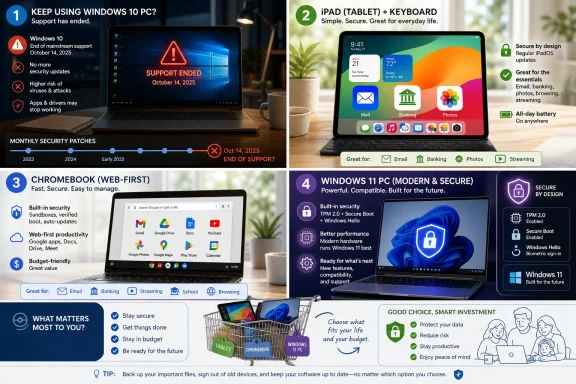
Microsoft ended mainstream support for Windows 10 on October 14, 2025, leaving many older PCs without free monthly security fixes unless they move to Windows 11, enroll in Extended Security Updates, or switch to another computing platform. That deadline has turned a once-theoretical upgrade decision into a household budget question. The answer is not always “buy another Windows PC,” but it is also not as simple as “just get an iPad.” The real story is that Microsoft’s support calendar has collided with a decade-long shift in how ordinary people actually use computers.
For years, the home PC upgrade cycle was driven by slowness. A computer took too long to boot, the fan screamed, the hard drive clicked, or a new program simply refused to run well. Windows 10’s end of support changed the psychology of replacement: a machine that still feels good enough can suddenly look obsolete because the monthly security pipeline has dried up.
That distinction matters. A retired desktop used for recipes, email, and the occasional tax document may not feel “broken” in any human sense. But an unsupported operating system connected to the internet becomes a security gamble, especially for users who do banking, health care portals, password resets, and shopping on the same machine.
Microsoft’s position is not mysterious. Windows 11 was designed around a newer baseline of hardware security, including TPM 2.0, Secure Boot, virtualization-based security, and more modern CPUs. The company can argue, credibly, that it is raising the floor for the Windows ecosystem rather than arbitrarily stranding older computers.
But for households, that argument lands differently. A PC bought in the late 2010s may still browse the web, print boarding passes, and store photos just fine. When the vendor says the operating system has aged out before the hardware has physically failed, users reasonably start asking whether they need to stay in the Windows lane at all.
That does not mean PCs are irrelevant. It means the default home PC workload has become thinner, more network-dependent, and less tied to local software. A person who once needed Quicken installed locally, a printer driver CD, a folder tree full of JPEGs, and a copy of Office may now need little more than a browser, a password manager, and a decent screen.
This is why the “do I need a new computer?” question is really two questions. The first is whether the old Windows 10 device can remain safe enough to use. The second is whether the replacement must be a Windows laptop at all. Those are related questions, but they are not the same.
The old answer was easy: buy another PC because your old PC is dying. The new answer requires a small audit of your real behavior. If the machine has become a portal to web services, the replacement can be a tablet, Chromebook, Mac, or even a phone with accessories. If the machine remains a workstation, the PC still has a strong claim.
The iPad also has a psychological advantage. It does not feel like “computer maintenance.” There are fewer driver worries, fewer system tray mysteries, fewer update rituals that interrupt a user who only wanted to check the weather. For family tech support departments — otherwise known as adult children — that simplicity has value.
But the iPad’s limits appear the moment the user stops consuming and starts arranging. File management is better than it used to be, but it is still not a traditional desktop file system. Multitasking exists, but it asks the user to learn Apple’s tablet logic rather than the windowing habits of decades of Windows use. Some websites still assume a desktop browser and a mouse. Some financial, business, medical, government, or printing workflows remain awkward.
Typing is the obvious dividing line. A tablet without a keyboard is a couch device. A tablet with a keyboard can be a productivity device, but now the price and the ergonomics change. Add Apple’s keyboard accessories and the once-cheap replacement starts drifting into laptop territory.
That is the iPad paradox. It is an excellent computer for people who no longer want a computer. It is a compromised laptop for people who still do.
For users already tempted by an iPad plus keyboard, the MacBook Neo asks a blunt question: why buy a tablet and reconstruct a laptop when you can buy a laptop? It has a built-in keyboard, a larger screen than the base iPad, a traditional clamshell design, and macOS. For people who write long emails, manage files, download statements, keep multiple browser windows open, or use desktop Office apps, those are not small advantages.
The Neo also changes Apple’s relationship to Chromebooks. For years, Apple’s cheapest mainstream laptop options were far enough above the Chromebook range that the two categories felt spiritually different. A lower-cost Mac narrows that gap and gives budget-conscious buyers a reason to consider macOS without jumping to MacBook Air pricing.
There are trade-offs. Apple’s entry-level products are often carefully segmented, and a low-cost Mac is unlikely to erase the upsell pressure toward more storage, more memory, or a more capable Air. Still, the existence of a sub-$700 Mac reframes the replacement conversation. A user leaving Windows 10 no longer has to choose only between a $350 tablet and a $900-plus “real” laptop.
For WindowsForum readers, the key point is not that the MacBook Neo is automatically better than a PC. It is that the old PC industry’s most predictable refuge — “Windows is the affordable laptop platform” — is less secure when Apple is willing to fight closer to the floor.
ChromeOS is built around the modern truth of home computing: the browser is the platform. That makes the system easier to secure, easier to reset, and harder to clutter with decades of Windows habits. It also makes Chromebooks less intimidating for users who do not care what an executable file is and do not want to care.
The price range is attractive, too. Many Chromebooks sit between roughly $300 and $600, which puts them in the same conversation as an iPad with accessories or an entry-level MacBook Neo. The best models offer good keyboards, long battery life, fast wake, and enough performance for the web-heavy workflows that define everyday computing in 2026.
The weakness is that “web-first” can become “web-only” at the worst possible moment. Specialized Windows software will not run natively. Some printer, scanner, VPN, tax, accounting, and legacy business tools can become a scavenger hunt. Android app support helps in some cases and frustrates in others.
A Chromebook is therefore not a lesser PC. It is a different bargain. It says: if your computing life already belongs to the browser, stop paying for the overhead of a general-purpose Windows machine. If your life still depends on old software, don’t pretend the browser can save you.
There is also the underrated value of familiarity. Learning a new operating system is not free, especially for older users or small offices without IT staff. A $700 Windows laptop may be less elegant than an iPad and less novel than a MacBook Neo, but if it lets a user continue working without relearning printing, folders, window management, shortcuts, and app installation, that continuity has economic value.
The Windows ecosystem also offers the widest range of hardware. You can buy a cheap laptop, a repairable business notebook, a gaming rig, a mini PC, a workstation, a touch-screen convertible, or a desktop that reuses an existing monitor and keyboard. That variety is still Windows’ greatest strength.
The danger is buying too little Windows machine because the old PC was “just for basic stuff.” A bargain-bin laptop with minimal memory and weak storage may technically run Windows 11 but feel miserable within a year. If you are going to stay with Windows, the better question is not “what is the cheapest machine that qualifies?” but “what machine will still feel usable for five years?”
That is where the PC industry has work to do. Windows 10’s retirement created demand, but it also exposed how many people no longer know what a PC should cost, what specs matter, or why one $399 laptop feels terrible while another $599 laptop feels fine. Microsoft and its OEM partners cannot assume loyalty will survive confusion.
Security updates are not decorative. They are the routine repair work that keeps discovered vulnerabilities from becoming easy targets. Once a mainstream consumer operating system stops receiving free security fixes, the risk does not instantly explode on day one, but it does steadily worsen as new vulnerabilities are found and attackers learn which machines remain exposed.
Microsoft’s Extended Security Updates complicate the picture. They give some users a bridge, not a permanent reprieve. That bridge can be useful for households waiting for a sale, businesses managing staged replacement, or users who need more time to migrate data and software. But ESU does not turn Windows 10 back into a long-term platform for ordinary consumers.
There is also a behavioral risk. People who keep an unsupported PC often keep everything else old with it: old browsers, old utilities, forgotten plug-ins, reused passwords, and abandoned antivirus trials. The operating system deadline becomes a proxy for a broader cleanup that should have happened anyway.
Security-minded users should treat the Windows 10 cutoff as a forcing function. Back up the files. Inventory the software. Check password hygiene. Decide what platform actually fits. The worst answer is not choosing an iPad, Chromebook, Mac, or Windows 11 PC. The worst answer is drifting into an unsupported future because the old machine feels familiar.
If those tasks were email, streaming, browsing, social media, and banking, the replacement field is wide open. A tablet may be enough. A Chromebook may be better. A low-cost Mac may be more comfortable. A Windows laptop may still make sense, but it is no longer the automatic answer.
If those tasks involved downloading forms, editing Office documents, using a tax program, moving files between drives, printing labels, managing photos locally, or connecting obscure hardware, the decision gets narrower. That does not always mean Windows, but it does mean you should test the workflow before buying into a simpler device.
The mistake is shopping by category instead of workflow. “Tablet,” “laptop,” and “desktop” are shapes. They are not answers. The answer is the match between the user’s habits and the platform’s friction points.
A retired user who mostly reads and video calls may love an iPad. A student who writes papers and lives in Google Docs may be happier with a Chromebook. A family treasurer managing years of spreadsheets and PDFs may need a laptop. A small-business owner with legacy software probably needs Windows. The right replacement is personal, but the method for choosing it is not.
Microsoft would argue that security requirements matter, and they do. A modern baseline is easier to defend than an endlessly permissive ecosystem. But the trade-off is real: when software support ends before hardware utility does, the cost is shifted to consumers and the waste stream.
There are alternatives for technically confident users. Some older PCs can be repurposed with Linux, converted into dedicated offline machines, used as media boxes, or kept for limited non-sensitive tasks. But those paths are not realistic for everyone. The average person asking whether an iPad can replace a PC is not looking for a weekend operating-system project.
This is where community expertise matters. WindowsForum readers know the difference between “unsupported” and “unusable,” but they also know that unsupported internet-connected systems become everyone’s problem eventually. The responsible advice is not to shame people into buying new hardware. It is to help them avoid unsafe inertia and bad purchases.
The greenest computer is often the one you can keep using safely. Once that safety condition fails, the next-best choice is a replacement that fits the real workload and lasts long enough to justify its footprint.
That is why the entry-level fight matters. Apple’s MacBook Neo, Chromebooks, budget Windows laptops, mini PCs, and tablets are all competing for users who may not have bought a computer in seven or eight years. These buyers do not necessarily care about benchmarks. They care about whether the bank website works, whether they can print, whether the keyboard feels normal, whether their photos are safe, and whether someone in the family can help.
Microsoft’s challenge is that Windows is no longer the obvious center of that world. It remains powerful, broad, and familiar, but it is surrounded by alternatives that are simpler for many everyday tasks. The more Microsoft ties modern Windows to newer hardware, the more it invites users to reconsider the whole category.
PC makers have an opportunity if they can make the replacement path less miserable. That means clearer spec floors, fewer junk configurations, better battery life, less preinstalled clutter, and honest pricing. A good $600 Windows laptop should feel like a durable household appliance, not a compromise users regret the moment the return window closes.
The winners in this cycle will not be the companies that shout “AI PC” the loudest. They will be the ones that answer Pat’s question plainly: here is the cheapest safe device that does what you actually do.
 The Windows 10 Deadline Turned Old Habits Into New Purchases
For years, the home PC upgrade cycle was driven by slowness. A computer took too long to boot, the fan screamed, the hard drive clicked, or a new program simply refused to run well. Windows 10’s end of support changed the psychology of replacement: a machine that still feels good enough can suddenly look obsolete because the monthly security pipeline has dried up.That distinction matters. A retired desktop used for recipes, email, and the occasional tax document may not feel “broken” in any human sense. But an unsupported operating system connected to the internet becomes a security gamble, especially for users who do banking, health care portals, password resets, and shopping on the same machine.
Microsoft’s position is not mysterious. Windows 11 was designed around a newer baseline of hardware security, including TPM 2.0, Secure Boot, virtualization-based security, and more modern CPUs. The company can argue, credibly, that it is raising the floor for the Windows ecosystem rather than arbitrarily stranding older computers.
But for households, that argument lands differently. A PC bought in the late 2010s may still browse the web, print boarding passes, and store photos just fine. When the vendor says the operating system has aged out before the hardware has physically failed, users reasonably start asking whether they need to stay in the Windows lane at all.
The Everyday PC Has Been Quietly Hollowed Out
The viewer’s question in the WRDW segment is powerful because it captures a truth Microsoft, Apple, Google, and every PC maker already understand: the personal computer has lost its monopoly over personal computing. Email moved to the browser. Banking moved to apps. Photos moved to cloud libraries. Documents moved to Google Docs, Microsoft 365, and iCloud.That does not mean PCs are irrelevant. It means the default home PC workload has become thinner, more network-dependent, and less tied to local software. A person who once needed Quicken installed locally, a printer driver CD, a folder tree full of JPEGs, and a copy of Office may now need little more than a browser, a password manager, and a decent screen.
This is why the “do I need a new computer?” question is really two questions. The first is whether the old Windows 10 device can remain safe enough to use. The second is whether the replacement must be a Windows laptop at all. Those are related questions, but they are not the same.
The old answer was easy: buy another PC because your old PC is dying. The new answer requires a small audit of your real behavior. If the machine has become a portal to web services, the replacement can be a tablet, Chromebook, Mac, or even a phone with accessories. If the machine remains a workstation, the PC still has a strong claim.
The iPad Is a Computer Until It Isn’t
An iPad can replace a computer for a surprisingly large number of people. The standard 11-inch iPad starts at the kind of price that makes it look like an elegant answer to the Windows 10 cliff: familiar apps, long battery life, strong security updates, excellent video calling, a good screen, and almost no traditional maintenance burden. For email, web browsing, streaming, recipes, photos, banking, travel, and casual document editing, it is more than enough.The iPad also has a psychological advantage. It does not feel like “computer maintenance.” There are fewer driver worries, fewer system tray mysteries, fewer update rituals that interrupt a user who only wanted to check the weather. For family tech support departments — otherwise known as adult children — that simplicity has value.
But the iPad’s limits appear the moment the user stops consuming and starts arranging. File management is better than it used to be, but it is still not a traditional desktop file system. Multitasking exists, but it asks the user to learn Apple’s tablet logic rather than the windowing habits of decades of Windows use. Some websites still assume a desktop browser and a mouse. Some financial, business, medical, government, or printing workflows remain awkward.
Typing is the obvious dividing line. A tablet without a keyboard is a couch device. A tablet with a keyboard can be a productivity device, but now the price and the ergonomics change. Add Apple’s keyboard accessories and the once-cheap replacement starts drifting into laptop territory.
That is the iPad paradox. It is an excellent computer for people who no longer want a computer. It is a compromised laptop for people who still do.
Apple’s Cheap Mac Changes the Tablet Calculation
The MacBook Neo makes the iPad-vs-laptop decision more interesting because it gives Apple a lower-cost Mac that competes directly with the accessorized iPad. At around $599, it is not simply a cheaper MacBook. It is Apple admitting that the entry-level computer market matters again, especially in a post-Windows 10 upgrade wave.For users already tempted by an iPad plus keyboard, the MacBook Neo asks a blunt question: why buy a tablet and reconstruct a laptop when you can buy a laptop? It has a built-in keyboard, a larger screen than the base iPad, a traditional clamshell design, and macOS. For people who write long emails, manage files, download statements, keep multiple browser windows open, or use desktop Office apps, those are not small advantages.
The Neo also changes Apple’s relationship to Chromebooks. For years, Apple’s cheapest mainstream laptop options were far enough above the Chromebook range that the two categories felt spiritually different. A lower-cost Mac narrows that gap and gives budget-conscious buyers a reason to consider macOS without jumping to MacBook Air pricing.
There are trade-offs. Apple’s entry-level products are often carefully segmented, and a low-cost Mac is unlikely to erase the upsell pressure toward more storage, more memory, or a more capable Air. Still, the existence of a sub-$700 Mac reframes the replacement conversation. A user leaving Windows 10 no longer has to choose only between a $350 tablet and a $900-plus “real” laptop.
For WindowsForum readers, the key point is not that the MacBook Neo is automatically better than a PC. It is that the old PC industry’s most predictable refuge — “Windows is the affordable laptop platform” — is less secure when Apple is willing to fight closer to the floor.
Chromebooks Are the Most Honest Answer for Web-First Users
Chromebooks rarely get the cultural attention they deserve because they are not glamorous. They do not satisfy the enthusiast desire for maximum configurability, and they do not carry Apple’s premium aura. But for the user whose last five computer tasks were Gmail, Facebook, online banking, YouTube, and a doctor’s portal, a Chromebook may be the most honest replacement for an aging Windows 10 laptop.ChromeOS is built around the modern truth of home computing: the browser is the platform. That makes the system easier to secure, easier to reset, and harder to clutter with decades of Windows habits. It also makes Chromebooks less intimidating for users who do not care what an executable file is and do not want to care.
The price range is attractive, too. Many Chromebooks sit between roughly $300 and $600, which puts them in the same conversation as an iPad with accessories or an entry-level MacBook Neo. The best models offer good keyboards, long battery life, fast wake, and enough performance for the web-heavy workflows that define everyday computing in 2026.
The weakness is that “web-first” can become “web-only” at the worst possible moment. Specialized Windows software will not run natively. Some printer, scanner, VPN, tax, accounting, and legacy business tools can become a scavenger hunt. Android app support helps in some cases and frustrates in others.
A Chromebook is therefore not a lesser PC. It is a different bargain. It says: if your computing life already belongs to the browser, stop paying for the overhead of a general-purpose Windows machine. If your life still depends on old software, don’t pretend the browser can save you.
Windows Still Wins Where the Work Gets Messy
The traditional Windows PC remains the safest recommendation for users who do complicated, local, or specialized work. If you run industry-specific software, manage large spreadsheets, edit videos, play PC games, work with peripheral-heavy setups, or rely on old utilities that have no cloud equivalent, Windows remains the most flexible option. The same is true for many small businesses that have built years of workflow around Microsoft’s ecosystem.There is also the underrated value of familiarity. Learning a new operating system is not free, especially for older users or small offices without IT staff. A $700 Windows laptop may be less elegant than an iPad and less novel than a MacBook Neo, but if it lets a user continue working without relearning printing, folders, window management, shortcuts, and app installation, that continuity has economic value.
The Windows ecosystem also offers the widest range of hardware. You can buy a cheap laptop, a repairable business notebook, a gaming rig, a mini PC, a workstation, a touch-screen convertible, or a desktop that reuses an existing monitor and keyboard. That variety is still Windows’ greatest strength.
The danger is buying too little Windows machine because the old PC was “just for basic stuff.” A bargain-bin laptop with minimal memory and weak storage may technically run Windows 11 but feel miserable within a year. If you are going to stay with Windows, the better question is not “what is the cheapest machine that qualifies?” but “what machine will still feel usable for five years?”
That is where the PC industry has work to do. Windows 10’s retirement created demand, but it also exposed how many people no longer know what a PC should cost, what specs matter, or why one $399 laptop feels terrible while another $599 laptop feels fine. Microsoft and its OEM partners cannot assume loyalty will survive confusion.
Security Is the Real Reason Not to Coast on Windows 10
There is a tempting response to all of this: do nothing. If the old Windows 10 PC still turns on, the printer works, and the browser loads the bank website, why spend money now? For a machine that never touches the internet, that may be defensible. For most home users, it is not.Security updates are not decorative. They are the routine repair work that keeps discovered vulnerabilities from becoming easy targets. Once a mainstream consumer operating system stops receiving free security fixes, the risk does not instantly explode on day one, but it does steadily worsen as new vulnerabilities are found and attackers learn which machines remain exposed.
Microsoft’s Extended Security Updates complicate the picture. They give some users a bridge, not a permanent reprieve. That bridge can be useful for households waiting for a sale, businesses managing staged replacement, or users who need more time to migrate data and software. But ESU does not turn Windows 10 back into a long-term platform for ordinary consumers.
There is also a behavioral risk. People who keep an unsupported PC often keep everything else old with it: old browsers, old utilities, forgotten plug-ins, reused passwords, and abandoned antivirus trials. The operating system deadline becomes a proxy for a broader cleanup that should have happened anyway.
Security-minded users should treat the Windows 10 cutoff as a forcing function. Back up the files. Inventory the software. Check password hygiene. Decide what platform actually fits. The worst answer is not choosing an iPad, Chromebook, Mac, or Windows 11 PC. The worst answer is drifting into an unsupported future because the old machine feels familiar.
The Upgrade Decision Starts With Five Recent Tasks
The most useful advice in the WRDW piece is also the simplest: look at what you actually do. Not what you did in 2012. Not what you imagine “computer people” do. Not what the salesperson assumes. The last five meaningful tasks on the old PC tell the truth.If those tasks were email, streaming, browsing, social media, and banking, the replacement field is wide open. A tablet may be enough. A Chromebook may be better. A low-cost Mac may be more comfortable. A Windows laptop may still make sense, but it is no longer the automatic answer.
If those tasks involved downloading forms, editing Office documents, using a tax program, moving files between drives, printing labels, managing photos locally, or connecting obscure hardware, the decision gets narrower. That does not always mean Windows, but it does mean you should test the workflow before buying into a simpler device.
The mistake is shopping by category instead of workflow. “Tablet,” “laptop,” and “desktop” are shapes. They are not answers. The answer is the match between the user’s habits and the platform’s friction points.
A retired user who mostly reads and video calls may love an iPad. A student who writes papers and lives in Google Docs may be happier with a Chromebook. A family treasurer managing years of spreadsheets and PDFs may need a laptop. A small-business owner with legacy software probably needs Windows. The right replacement is personal, but the method for choosing it is not.
Microsoft’s Hardware Line in the Sand Has a Green Cost
There is an environmental angle that the industry still has not fully confronted. Many Windows 10 machines blocked from Windows 11 are not useless. Some are perfectly capable web and office computers by performance standards. The end of support risks pushing functional hardware toward drawers, closets, recycling bins, or landfills.Microsoft would argue that security requirements matter, and they do. A modern baseline is easier to defend than an endlessly permissive ecosystem. But the trade-off is real: when software support ends before hardware utility does, the cost is shifted to consumers and the waste stream.
There are alternatives for technically confident users. Some older PCs can be repurposed with Linux, converted into dedicated offline machines, used as media boxes, or kept for limited non-sensitive tasks. But those paths are not realistic for everyone. The average person asking whether an iPad can replace a PC is not looking for a weekend operating-system project.
This is where community expertise matters. WindowsForum readers know the difference between “unsupported” and “unusable,” but they also know that unsupported internet-connected systems become everyone’s problem eventually. The responsible advice is not to shame people into buying new hardware. It is to help them avoid unsafe inertia and bad purchases.
The greenest computer is often the one you can keep using safely. Once that safety condition fails, the next-best choice is a replacement that fits the real workload and lasts long enough to justify its footprint.
The PC Market Is Being Rebuilt Around Reluctant Buyers
The Windows 10 deadline has created a strange kind of customer: the reluctant upgrader. These are not enthusiasts chasing OLED panels, neural processing units, or the latest CPU generation. They are people who woke up to a message saying their computer’s supported life is over and now have to decode a market that has changed around them.That is why the entry-level fight matters. Apple’s MacBook Neo, Chromebooks, budget Windows laptops, mini PCs, and tablets are all competing for users who may not have bought a computer in seven or eight years. These buyers do not necessarily care about benchmarks. They care about whether the bank website works, whether they can print, whether the keyboard feels normal, whether their photos are safe, and whether someone in the family can help.
Microsoft’s challenge is that Windows is no longer the obvious center of that world. It remains powerful, broad, and familiar, but it is surrounded by alternatives that are simpler for many everyday tasks. The more Microsoft ties modern Windows to newer hardware, the more it invites users to reconsider the whole category.
PC makers have an opportunity if they can make the replacement path less miserable. That means clearer spec floors, fewer junk configurations, better battery life, less preinstalled clutter, and honest pricing. A good $600 Windows laptop should feel like a durable household appliance, not a compromise users regret the moment the return window closes.
The winners in this cycle will not be the companies that shout “AI PC” the loudest. They will be the ones that answer Pat’s question plainly: here is the cheapest safe device that does what you actually do.
The Replacement Math Has Finally Become Personal
The new buying rule is not platform loyalty. It is workload realism. Windows 10’s end of support forces the timing, but the right answer depends on behavior, not nostalgia.- An unsupported Windows 10 PC should not remain the main internet-connected household computer unless it is covered by a temporary security-update plan.
- An iPad is a strong replacement for people whose computing is mostly reading, watching, browsing, messaging, banking, and video calling.
- A keyboard-equipped iPad can become expensive enough that a MacBook Neo, Chromebook, or Windows laptop may be the more practical choice.
- A Chromebook is often the cleanest answer for users who live almost entirely in the browser and do not depend on legacy Windows software.
- A Windows 11 PC remains the best fit for specialized programs, heavy multitasking, PC gaming, complex peripherals, business workflows, and users who value continuity over simplicity.
- The smartest purchase starts with the last five things you actually did on your old computer, not with the most demanding thing you once imagined doing.
References
- Primary source: WRDW
Published: 2026-06-05T15:10:11.302289
What the Tech: Do you really need a new computer?
Email, banking, shopping, social media, streaming video, and even many work tasks happen through a web browser or an app.www.wrdw.com
- Related coverage: windowscentral.com
HP’s Windows 10 holdouts show just how hard Microsoft’s Windows 11 upgrade push really is | Windows Central
Three out of ten HP PCs are still running Windows 10.www.windowscentral.com - Related coverage: creativebloq.com
The most popular iPad is back down to a record low price ahead of Prime Day | Creative Bloq
The 128GB, wi-fi only model is down from $349 to $299.www.creativebloq.com - Related coverage: tomshardware.com
Windows 10 support ends today — here's who's affected and what you need to do | Tom's Hardware
Update if you can, upgrade if you can't, or at least get the extended support license.www.tomshardware.com
