

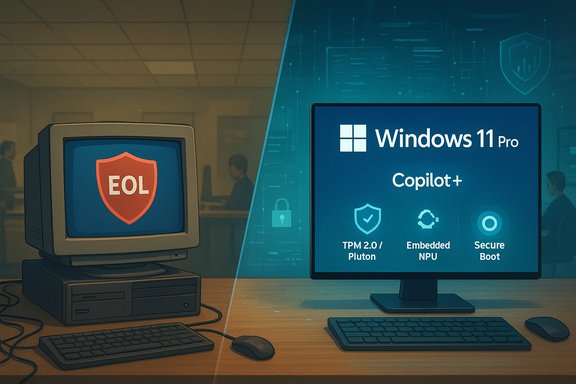
If your business is still running a 2020 PC on Windows 10, you’re no longer debating convenience versus expense — you’re choosing whether to accept an unpatched attack surface, slower AI-enabled workflows, and a growing compliance liability that can reach well beyond IT budgets. Recent industry commentary and vendor briefings warn that millions of legacy machines — many in small and medium-sized businesses — are now exposed by Windows 10’s end of support and by the rapid rise of AI-driven attacks and productivity tools that expect modern hardware.
Background / Overview
Windows 10 reached its official end-of-support milestone on October 14, 2025. After that date Microsoft stopped delivering routine security updates for mainstream Windows 10 builds unless a device is enrolled in a time-limited Extended Security Updates (ESU) program — a bridge, not a long-term solution. The effect is immediate and measurable: systems that no longer receive kernel-, driver- and platform-level patches become high-value targets for attackers who can weaponize newly discovered vulnerabilities. At the same time, the platform shift to Windows 11 and the emergence of “AI PCs” — devices that pair CPU, GPU and a Neural Processing Unit (NPU) to run AI workloads locally — have created a bifurcated market. On one side sit unsupported endpoints that will increasingly fail security and compliance checks. On the other sit new Copilot+ and AI-capable Windows 11 devices that promise on‑device AI, stronger hardware roots of trust, and modern remote management. The choices businesses make now are therefore both tactical (patching, ESU, emergency migration) and strategic (fleet refresh, endpoint architecture, data governance).Why ageing PCs are a disproportionate business risk
Unsupported systems become an attacker’s highway
When an operating system stops getting security patches, every unpatched kernel or driver bug becomes a permanent avenue for compromise. Attackers don’t need zero-day capabilities to hit unsupported systems: they can reverse-engineer patches issued for supported platforms and use that knowledge to craft exploits that succeed on older OS versions. This explains why threat actors repeatedly target legacy estates after EoL events. The practical consequence for a small business can be catastrophic: remediation, regulatory fines, lost business, and reputational damage quickly add up. The industry benchmark for breach costs is high and rising — enterprise studies report average breach costs in the multi‑million-dollar range, and SMBs are frequently estimated to face average incident costs around the $3M mark depending on sector and scale.AI arms attackers — and increases the scale of social engineering
Generative AI and other automation tools dramatically lower the effort required to craft targeted phishing, voice‑spoofing and social‑engineering campaigns. Attackers can rapidly personalize lures, generate realistic synthetic voices for business-impersonation scams, and produce tailored malware variants. An unsupported endpoint on the network — a single PC with an unpatched kernel vulnerability or a weak configuration — becomes the pivot point that lets attackers move laterally and escalate to high-impact ransomware or data theft. Where a breach would once impose recovery and legal costs, in 2025 those same events threaten business continuity and, for many SMBs, survival.Compliance and governance have a hardware dimension
Regulators have already hardened penalties for preventable privacy failures and expanded enforcement tools. In Australia, recent reforms have increased maximum civil penalties under the Privacy Act and strengthened enforcement mechanisms — meaning that failing to secure personal data is no longer only an IT failure but a governance failure that can trigger corporate penalties and, in some cases, ancillary liability pressure on officers and directors. That regulatory reality reframes an ageing PC fleet as a board-level risk that must be managed, not deferred.Modern PCs: what’s actually different (not just faster)
Security built from the silicon up
New business-class Windows 11 PCs combine hardware trust anchors that simply weren’t widely available in 2020 machines:- TPM 2.0, Secure Boot and Microsoft Pluton create a hardware-backed root of trust that protects keys, credentials and attestation. Microsoft has stated that Copilot+ PCs will enable Pluton by default to improve the chain-of-trust from boot to browser.
- Vendor-validated supply-chain assurance programs (for example, Intel’s Assured Supply Chain) provide auditable provenance for SoCs and components, helping organisations reduce risk from counterfeit or tampered parts. That program has begun rolling out on select Intel Core Ultra SKUs.
- Dedicated NPUs on modern chips offload continuous machine-learning tasks — from live captioning to on‑device threat scanning — without the battery and latency penalties of cloud processing. NPUs enable low-latency, private inference for AI assistants and also let security agents run behavioural detection locally.
Remote repair and manageability cut operational cost
Business-grade platforms built around Intel vPro and modern remote-management services give IT teams powerful out‑of‑band tools: Serial-Over-LAN, IDE-Redirect/IDER and other AMT-enabled functions let admins mount a remote ISO, boot an offline recovery environment, reimage a failed system, or gather kernel memory dumps — often without a site visit. That capability radically reduces mean-time-to-repair and the operational cost of device support compared with sending a technician down the road. Vendor documentation and community guidance show these capabilities are the foundation of modern fleet management.On-device AI: productivity, privacy, or both?
The Windows 11 Copilot+ platform and the new class of “AI PCs” are designed to run large parts of the assistant and inference layer locally. That yields three business benefits:- Privacy and data control — sensitive content (medical notes, claims assessments, financial models) can be processed on device without sending proprietary text to third‑party cloud models. Microsoft’s Copilot+ messaging explicitly promotes local inference and a combined device+cloud approach for latency/privacy trade-offs.
- Real-world productivity — features such as Recall, Cocreator and faster local image generation shorten common tasks and reduce the time staff spend on ‘administrivia’. Vendors and partners claim multi‑fold improvements on real workflows when AI is available locally.
- Edge-enabled workflows — onsite inspection tools, point-of-service automation, and transcription-based recordkeeping (e.g., medical consultations) become feasible at scale when models run locally at low latency.
The economics: sticker shock versus total cost of ownership
What businesses actually pay for new AI-capable devices
Retail and OEM pricing for commercial AI-capable laptops varies with configuration and region, but numerous first-wave Elite/Enterprise AI notebooks with Intel Core Ultra / vPro configurations list MSRP and street prices commonly in the mid‑$1,800 to $3,600 range depending on RAM, storage, and warranty. Representative business models, configured for enterprise use, often fall in the $2,000–$3,000 band — which aligns with market examples from leading OEMs. That makes the oft‑quoted “$2,500 AI PC” figure a reasonable average for a fleet-ready Windows 11 Pro device with built-in AI acceleration and vPro manageability.Payback, measured realistically
Vendors and some commissioned TCO studies claim refresh payback in months rather than years — savings driven by:- Fewer break/fix site visits thanks to remote management
- Faster user workflows from AI assistants and better hardware
- Lower energy and support costs across a modern fleet
- Avoidance of a single major breach (which alone can exceed the whole refresh cost in many SMB scenarios)
Legal and regulatory reality — Australia as a case study with global lessons
Australia’s recent privacy enforcement changes have materially increased potential financial penalties for serious or repeated privacy failures and broadened regulators’ enforcement powers. For entities subject to the Privacy Act, civil penalties have been lifted substantially, and the OAIC has expanded tools to investigate and sanction non‑compliance — meaning that weak endpoint hygiene or knowingly running unsupported software can trigger enforcement action and large fines. For boards, executives and small-business owners, this turns an IT asset‑refresh into a governance decision. Internationally, the lesson is the same: privacy enforcement is trending to heavier penalties and greater director attention. A hardware‑level defence posture — including modern devices with hardware-backed attestation, documented patching and fleet visibility — is now part of corporate risk management, not just an IT line item.Practical, prioritized steps for SMBs that must act now
- Inventory and triage (Day 0–7). Create an accurate list of endpoints, including OS, build, firmware, TPM status and whether a device is under centralized management. Prioritize outward-facing and privileged workstations.
- Short bridge where required. Enroll mission‑critical, incompatible devices in ESU only as a temporary measure and document the timeline and mitigation steps. ESU is an interim safety net, not a migration plan.
- Adopt segmented replacement and testing. Focus initial replacements on high‑risk roles (finance, HR, admins) and high‑exposure endpoints (RDP hosts, internet‑facing machines). Use pilot groups to validate device and management tooling.
- Insist on hardware features for new devices: vPro (or equivalent), TPM 2.0 / Pluton support, and an NPU for future‑proofing AI workloads. Confirm OEM options for remote imaging and fleet services.
- Consolidate endpoint detection and response (EDR) and consider vendors that have optimized for the AI PC stack. Several OEM and security vendors are already integrating NPU-accelerated telemetry and detection to reduce latency and preserve battery life on AI workloads. Dell’s commercial messaging, for example, mentions offloading security functions onto NPUs in partnership with security vendors for lower-latency detection.
- Lock down access and data governance for AI usage. Create clear policies for on‑device models, data retention, and model cataloguing. Audit use of public or shadow AI tools that staff may adopt. IBM and other analysts warn that ungoverned AI adoption increases breach risk if not controlled.
- Measure outcomes. Track incident counts, mean-time-to-repair, help-desk volume, and employee time saved after AI features are enabled. Use real metrics to validate the TCO model rather than vendor-supplied ROI statements.
What to watch for — vendor claims vs. verifiable facts
- Claims of one-size-fits-all payback windows are vendor-optimised. Device-level TCO depends on local labor rates, software portfolios, and the frequency/severity of security events. Treat “six‑month payback” as a scenario to validate, not a guarantee.
- On‑device AI reduces cloud exposure but does not eliminate governance needs. Model drift, data leakage via locally cached context, and improper model prompts remain risks. Establish audit trails and access controls.
- Supply-chain programs (e.g., Intel’s Assured Supply Chain) increase transparency but are complementary, not panaceas. They help reduce risk from tampered or counterfeit silicon but do not replace secure configuration and patching.
The real trade-offs: replace, remediate, or replatform?
- Replace (best for high‑risk, high-value endpoints): Rolling out business‑grade Windows 11 Pro Copilot+ machines with vPro management, Pluton/TMP 2.0 and NPU capability is the defensive and strategic option for firms that depend on data confidentiality and uptime. Expect typical business configurations to land in the $2k–$3k range per device; budget accordingly.
- Remediate (short-term mix): For devices that can’t be replaced immediately, tighten network segmentation, enforce least privilege, remove admin rights, and enroll as many endpoints as possible into centralized EDR/management. Use ESU as a strictly time‑bound bridge.
- Replatform (long-term alternative): Some workloads migrate off Windows entirely (Linux containers, cloud desktops) where appropriate — but that’s a project, not a quick fix. For businesses with thin clients or specialized appliances, alternative architectures can be part of a multi-year roadmap.
Conclusion
The decision to refresh a fleet of five‑year‑old PCs is rarely simple. But the risk calculus has changed: unsupported Windows 10 systems now sit at the intersection of technical vulnerability, AI‑enabled threat acceleration, and stricter regulatory exposure. Modern Windows 11 Pro Copilot+ devices with vPro manageability, hardware trust anchors and NPUs are not merely performance upgrades — they’re a new baseline for secure, private and AI‑enabled work. The cost of doing nothing is no longer hypothetical; for many SMBs, a single significant incident can easily eclipse the price of a full fleet refresh and can imperil the business itself. Prioritise inventory, temporary bridges where essential, and a phased replacement strategy that aligns security, productivity and governance goals. The time to move is now.Source: cio.com Still running a 2020 PC? Your business is at risk—both from security threats and being left behind.
