

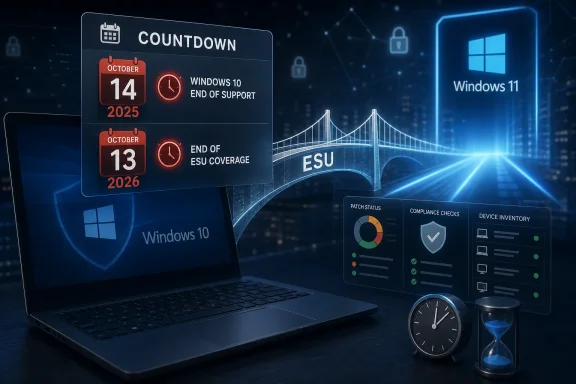
Microsoft ended standard support for Windows 10 on October 14, 2025, and while Extended Security Updates keep enrolled Windows 10 version 22H2 PCs receiving critical and important security fixes for now, the consumer ESU window closes on October 13, 2026. That makes the Cambridge Network warning less a sales pitch than a calendar problem with a hard edge. The comfortable fiction is that extended support means “supported enough.” The reality is that ESU is not a second life for Windows 10; it is a countdown timer with a security patch attached.
Windows 10 used to be sold as the operating system that would age gracefully. Its servicing model, rolling feature updates, and huge install base created the impression that it might behave less like a boxed product and more like infrastructure. For a decade, that was mostly true: Windows 10 became the default floor under home PCs, school fleets, point-of-sale systems, small-business desktops, and countless “if it isn’t broken, don’t touch it” machines.
That era is over. Microsoft’s official support line has already moved on, and the remaining Windows 10 story is now a managed retreat. The final broadly supported Windows 10 release is version 22H2, and anyone still on Windows 10 outside eligible long-term servicing channels is living inside an exception rather than the mainstream Windows lifecycle.
The danger is not that machines stopped working the morning after October 14, 2025. They did not. The danger is that nothing obvious changed, which is precisely why so many users and organizations are tempted to confuse operational normality with strategic safety.
A PC that boots, authenticates, opens Outlook, prints invoices, runs Teams, and syncs files can feel perfectly healthy while its risk profile is quietly changing. Support deadlines rarely announce themselves with smoke from the motherboard. They arrive first in procurement spreadsheets, insurance questionnaires, endpoint compliance dashboards, and vulnerability reports.
For consumers, Microsoft’s Windows 10 ESU program extends access to critical and important security updates for enrolled Windows 10 version 22H2 devices until October 13, 2026. For commercial and education customers, the ESU path can stretch further, with paid annual coverage available for up to three years after the October 2025 end-of-support date. That distinction matters, because the Cambridge Network piece frames October 2026 as the cliff, and for many home users and small environments effectively treating consumer-style ESU as the answer, that is the relevant cliff.
But ESU is not full support in the old sense. It does not mean Windows 10 gets new features. It does not mean every bug gets fixed. It does not mean hardware vendors will keep polishing drivers indefinitely, or that application vendors will keep testing forever, or that your next compliance audit will treat “we bought ourselves another year” as a durable plan.
The program is meant to reduce exposure during a transition. It is the IT equivalent of a temporary bridge installed after engineers have already condemned the old one for regular traffic. Sensible organizations use the bridge to move people across. Less sensible ones park on it.
That is why the soft language around ESU can be misleading. “Extended” sounds generous. “Security Updates” sounds reassuring. In practice, the phrase should be read as borrowed time.
Operating systems rarely become unusable at end of support. Windows 7 machines kept running after their cutoff. Windows XP systems famously lingered for years in industrial, medical, and government contexts. Unsupported does not mean dead; it means the safety assumptions around the platform stop being refreshed.
That difference is subtle enough for households and small businesses to ignore until something forces the issue. A line-of-business application may continue to run. A ten-year-old printer may still be more reliable on Windows 10 than on a newly imaged Windows 11 laptop. A receptionist’s desktop may not care about Microsoft’s lifecycle page. The budget, understandably, may care even less.
But attackers do care about old platforms, and defenders care about consistency. Once a widely deployed operating system exits mainstream support, every newly disclosed weakness becomes part of a different calculation. If a vulnerability affects both Windows 10 and Windows 11, supported Windows 11 machines receive ordinary remediation. Unsupported or partially covered Windows 10 machines become a lingering exception that must be justified, tracked, and isolated.
That exception burden grows over time. The first month after support ends may be manageable. The sixth month becomes harder. By the time ESU itself is about to expire for consumer-enrolled systems, the organization that has not already moved is no longer “waiting.” It is behind.
Windows 11’s system requirements changed the economics of the migration. TPM 2.0, Secure Boot, supported CPUs, and other baseline requirements mean many older but otherwise functional PCs cannot take the official Windows 11 upgrade path. For users who bought capable Windows 10-era machines before Microsoft drew the Windows 11 hardware line, that has always felt less like modernization and more like forced retirement.
Microsoft’s security argument is not frivolous. Hardware-backed security, modern firmware expectations, virtualization-based protection, and stronger identity plumbing are genuinely more important now than they were when Windows 10 launched in 2015. The problem is that good security architecture still collides with budgets, e-waste concerns, and the stubborn reality that a PC can be “too old for Windows 11” while still being perfectly adequate for browsing, documents, accounting, classroom work, or a warehouse terminal.
That collision is why Windows 10 has lingered. Many holdouts are not ideological. They are practical. They have devices that work, applications that behave, peripherals that are paid for, and no appetite for a hardware refresh merely because the OS lifecycle moved.
But practical delay has a shelf life. If a device cannot officially run Windows 11, the decision is not really upgrade-or-wait. It is replace-or-accept-risk. ESU only postpones when that decision must be made.
Small and midsize organizations often face the worse problem: invisible sprawl. The Windows 10 estate may be a mixture of owner-purchased laptops, old desktops under counters, donated school machines, shared office PCs, remote-worker systems, and one mysterious workstation that nobody dares reboot because it runs an ancient label printer. Everyone knows the business depends on computers. Nobody has a clean list of which computers.
That is how extended support turns from safety net into anesthetic. ESU enrollment can make the warning banner go away. It can make the next Patch Tuesday feel ordinary. It can let management defer the unpleasant discussion about whether the organization needs new PCs, a move to Windows 11, a cloud desktop model, or a proper device lifecycle policy.
The bill does not disappear. It compounds.
A rushed refresh is almost always more expensive than a planned one. Hardware bought under deadline pressure is less likely to match user needs. Compatibility testing gets skipped. Staff training becomes an afterthought. The one application that only runs correctly on an old build suddenly becomes a crisis rather than a known remediation project.
This is the part of the Windows 10 sunset that does not fit neatly into Microsoft’s product pages. The technical deadline is October 2026 for consumer ESU and later for properly licensed commercial ESU scenarios. The operational deadline is earlier, because planning, budgeting, testing, purchasing, imaging, deployment, and user support all take time.
That is where Windows 10 becomes awkward. Cyber insurance applications increasingly ask pointed questions about patching, unsupported software, endpoint protection, multifactor authentication, backups, and incident response. Suppliers and customers increasingly expect basic hygiene from partners who connect to shared systems or handle data. Regulators may not care which version of Windows you prefer, but they do care whether you have a defensible approach to managing known vulnerabilities.
An enrolled Windows 10 ESU device is easier to defend than an abandoned one. It shows the organization recognized the issue and paid for continued security coverage where available. But that defense weakens if ESU becomes the whole plan rather than a transition measure.
Unsupported software has a way of becoming a proxy for management maturity. One old PC is a device problem. A fleet of old PCs with no retirement plan is a governance problem. If a breach occurs, “we meant to upgrade later” is not a particularly strong sentence to be writing after the fact.
For schools, charities, local firms, and public-sector-adjacent suppliers, this is especially uncomfortable. These organizations often have thin IT budgets but high trust obligations. They may handle children’s data, payroll, health information, donor records, or commercially sensitive documents on systems that were never designed to be permanent infrastructure.
The Windows 10 deadline does not create those obligations. It exposes them.
If a warning screen also offers a quick way to enroll in ESU, many users will interpret that as resolution. The machine asked for attention. The user clicked the sanctioned button. The machine remained patched. Problem solved.
That is human, and Microsoft surely knows it. The company has had to balance competing incentives: push Windows 11 adoption, avoid abandoning hundreds of millions of Windows 10 users overnight, reduce security fallout, sell new PCs, support enterprise migration timelines, and avoid the public relations disaster of making usable machines feel instantly obsolete.
The result is a mixed message. Windows 10 is over, but not quite. You should upgrade, unless you cannot. You can pay or qualify for extra security updates, but only for a time. Businesses can extend longer, but at rising cost and with administrative overhead. Consumers get one more year, but the year still ends.
That complexity benefits nobody who simply wants to know whether their computer is safe. It also creates fertile ground for procrastination. When the vendor offers a button that makes today’s warning disappear, many people will choose the button over the project.
The sensible starting point is inventory. Which devices are still on Windows 10? Which version are they running? Which are enrolled in ESU? Which can officially move to Windows 11? Which fail because of firmware settings that can be changed, and which fail because of hard hardware limits? Which machines support real business functions, and which are merely convenient spares?
That inventory step sounds boring because it is. It is also the difference between a migration and a panic.
Once the estate is visible, the choices become more rational. Some Windows 10 machines can be upgraded in place after firmware checks, BIOS updates, storage cleanup, or application testing. Some should be replaced because they are too old, too slow, or too fragile to justify more labor. Some may need temporary isolation because they run specialist software or equipment. Some may be candidates for virtualization, remote app delivery, or replacement of the underlying workflow.
The point is not that every answer is Windows 11 on new hardware. The point is that every Windows 10 machine needs an answer. “It still works” is an observation, not a plan.
Home users also face a version of the same calculation, even if they do not use the language of compliance and risk registers. A family PC may store tax documents, scanned passports, saved browser sessions, photos, email, banking access, and the credentials that unlock everything else. A retired relative’s Windows 10 desktop may be the most security-sensitive machine in the house precisely because it is the least actively managed.
For consumers, the Windows 10 ESU program can be a reasonable bridge. It gives households time to decide whether to upgrade, replace, repurpose, or retire a device. It is particularly useful for people who cannot immediately afford a new PC or who need continuity while they migrate files and applications.
But the same principle applies: do not confuse the bridge with the destination. If the machine supports Windows 11, test the upgrade path while there is still time to recover calmly from problems. If it does not, decide whether the device should be replaced, moved to a less risky role, converted to another operating system, or taken offline for sensitive work.
The worst consumer outcome is the same as the worst business outcome: waking up near the deadline with no plan, no backup, no budget, and a machine full of important data.
Many people do not doubt that Windows 11 is more secure on modern hardware. They doubt that Microsoft’s push is only about security. They see ads in the Start menu, cloud nudges, Microsoft account pressure, Copilot branding, telemetry debates, and the awkward fact that a lot of perfectly usable hardware falls outside the official upgrade line. The end-of-support calendar arrives in that broader atmosphere.
That skepticism matters because forced-feeling migrations produce resistance. When users believe an upgrade serves the vendor more than the customer, they look for ways around it. They delay. They cling to older builds. They search for unsupported installation methods. They treat security advice as marketing.
Microsoft has earned some of that skepticism and some of the criticism aimed at it is too glib. Modern endpoint security really does need better hardware roots. Old firmware really is a problem. Unsupported drivers really do create risk. The PC ecosystem cannot freeze forever around 2015 assumptions.
But if Microsoft wants users to treat Windows 11 as the safer future rather than the compulsory funnel, the company has to keep proving that the future is worth the disruption. Performance, reliability, privacy controls, update quality, hardware compatibility, and fewer coercive prompts matter. The Windows 10 migration is not just a support transition. It is a referendum on whether users trust the steward of the platform.
A patched Windows 10 ESU machine today is not the same risk as an unsupported Windows 10 machine after the program ends. A business with a tested migration plan is not in the same position as a business that bought ESU to stop thinking about the problem. A school that has identified noncompliant devices is not in the same position as one discovering them during a procurement crunch.
That is why the Cambridge Network warning lands. It is not novel to say that Windows 10 is old news. It is useful to say that the window for pretending this is a distant issue has closed.
For organizations on commercial ESU, the deadline may extend beyond October 2026, but that should not be misread as permission to coast. Multi-year ESU is a tool for complex estates, not a lifestyle choice. The longer an organization keeps paying to protect old endpoints, the more it should ask why those endpoints remain irreplaceable.
For consumers and smaller deployments using the one-year ESU runway, the math is sharper. October 13, 2026, is close enough that a device review delayed until “later this year” is already flirting with trouble.
Here is the compressed version of what should happen now:
The end of Windows 10 is not a single dramatic event; it is a slow transfer of responsibility from Microsoft’s default update machinery to the judgment of every person and organization still running it. ESU can keep the lights on for a little longer, and for some commercial environments it can provide a longer runway, but it does not change the destination. By this time next year, the responsible Windows 10 holdout will look less like a loyalist and more like an exception handler, and the safest move is to make that exception smaller every month.
 Microsoft Turned Windows 10 Into a Deadline, Not a Platform
Windows 10 used to be sold as the operating system that would age gracefully. Its servicing model, rolling feature updates, and huge install base created the impression that it might behave less like a boxed product and more like infrastructure. For a decade, that was mostly true: Windows 10 became the default floor under home PCs, school fleets, point-of-sale systems, small-business desktops, and countless “if it isn’t broken, don’t touch it” machines.That era is over. Microsoft’s official support line has already moved on, and the remaining Windows 10 story is now a managed retreat. The final broadly supported Windows 10 release is version 22H2, and anyone still on Windows 10 outside eligible long-term servicing channels is living inside an exception rather than the mainstream Windows lifecycle.
The danger is not that machines stopped working the morning after October 14, 2025. They did not. The danger is that nothing obvious changed, which is precisely why so many users and organizations are tempted to confuse operational normality with strategic safety.
A PC that boots, authenticates, opens Outlook, prints invoices, runs Teams, and syncs files can feel perfectly healthy while its risk profile is quietly changing. Support deadlines rarely announce themselves with smoke from the motherboard. They arrive first in procurement spreadsheets, insurance questionnaires, endpoint compliance dashboards, and vulnerability reports.
ESU Buys Time, and That Is All It Was Designed to Do
Extended Security Updates are useful. They are also easy to misunderstand.For consumers, Microsoft’s Windows 10 ESU program extends access to critical and important security updates for enrolled Windows 10 version 22H2 devices until October 13, 2026. For commercial and education customers, the ESU path can stretch further, with paid annual coverage available for up to three years after the October 2025 end-of-support date. That distinction matters, because the Cambridge Network piece frames October 2026 as the cliff, and for many home users and small environments effectively treating consumer-style ESU as the answer, that is the relevant cliff.
But ESU is not full support in the old sense. It does not mean Windows 10 gets new features. It does not mean every bug gets fixed. It does not mean hardware vendors will keep polishing drivers indefinitely, or that application vendors will keep testing forever, or that your next compliance audit will treat “we bought ourselves another year” as a durable plan.
The program is meant to reduce exposure during a transition. It is the IT equivalent of a temporary bridge installed after engineers have already condemned the old one for regular traffic. Sensible organizations use the bridge to move people across. Less sensible ones park on it.
That is why the soft language around ESU can be misleading. “Extended” sounds generous. “Security Updates” sounds reassuring. In practice, the phrase should be read as borrowed time.
The Most Dangerous Part of the Deadline Is How Normal It Feels
The Cambridge Network article gets one thing exactly right: many people still do not feel urgency because Windows 10 still behaves like Windows 10. That is the trap.Operating systems rarely become unusable at end of support. Windows 7 machines kept running after their cutoff. Windows XP systems famously lingered for years in industrial, medical, and government contexts. Unsupported does not mean dead; it means the safety assumptions around the platform stop being refreshed.
That difference is subtle enough for households and small businesses to ignore until something forces the issue. A line-of-business application may continue to run. A ten-year-old printer may still be more reliable on Windows 10 than on a newly imaged Windows 11 laptop. A receptionist’s desktop may not care about Microsoft’s lifecycle page. The budget, understandably, may care even less.
But attackers do care about old platforms, and defenders care about consistency. Once a widely deployed operating system exits mainstream support, every newly disclosed weakness becomes part of a different calculation. If a vulnerability affects both Windows 10 and Windows 11, supported Windows 11 machines receive ordinary remediation. Unsupported or partially covered Windows 10 machines become a lingering exception that must be justified, tracked, and isolated.
That exception burden grows over time. The first month after support ends may be manageable. The sixth month becomes harder. By the time ESU itself is about to expire for consumer-enrolled systems, the organization that has not already moved is no longer “waiting.” It is behind.
Windows 11’s Hardware Line Still Shapes the Migration
If moving from Windows 10 to Windows 11 were just a software upgrade, this transition would be less fraught. It is not.Windows 11’s system requirements changed the economics of the migration. TPM 2.0, Secure Boot, supported CPUs, and other baseline requirements mean many older but otherwise functional PCs cannot take the official Windows 11 upgrade path. For users who bought capable Windows 10-era machines before Microsoft drew the Windows 11 hardware line, that has always felt less like modernization and more like forced retirement.
Microsoft’s security argument is not frivolous. Hardware-backed security, modern firmware expectations, virtualization-based protection, and stronger identity plumbing are genuinely more important now than they were when Windows 10 launched in 2015. The problem is that good security architecture still collides with budgets, e-waste concerns, and the stubborn reality that a PC can be “too old for Windows 11” while still being perfectly adequate for browsing, documents, accounting, classroom work, or a warehouse terminal.
That collision is why Windows 10 has lingered. Many holdouts are not ideological. They are practical. They have devices that work, applications that behave, peripherals that are paid for, and no appetite for a hardware refresh merely because the OS lifecycle moved.
But practical delay has a shelf life. If a device cannot officially run Windows 11, the decision is not really upgrade-or-wait. It is replace-or-accept-risk. ESU only postpones when that decision must be made.
Small Organizations Are Where “Fine for Now” Becomes Expensive Later
Large enterprises usually dislike operating system migrations, but they at least have machinery for them. They have asset inventories, endpoint management, procurement cycles, test rings, security teams, and executives who can be made to sign risk exceptions. Their migrations may be painful, but the pain is visible.Small and midsize organizations often face the worse problem: invisible sprawl. The Windows 10 estate may be a mixture of owner-purchased laptops, old desktops under counters, donated school machines, shared office PCs, remote-worker systems, and one mysterious workstation that nobody dares reboot because it runs an ancient label printer. Everyone knows the business depends on computers. Nobody has a clean list of which computers.
That is how extended support turns from safety net into anesthetic. ESU enrollment can make the warning banner go away. It can make the next Patch Tuesday feel ordinary. It can let management defer the unpleasant discussion about whether the organization needs new PCs, a move to Windows 11, a cloud desktop model, or a proper device lifecycle policy.
The bill does not disappear. It compounds.
A rushed refresh is almost always more expensive than a planned one. Hardware bought under deadline pressure is less likely to match user needs. Compatibility testing gets skipped. Staff training becomes an afterthought. The one application that only runs correctly on an old build suddenly becomes a crisis rather than a known remediation project.
This is the part of the Windows 10 sunset that does not fit neatly into Microsoft’s product pages. The technical deadline is October 2026 for consumer ESU and later for properly licensed commercial ESU scenarios. The operational deadline is earlier, because planning, budgeting, testing, purchasing, imaging, deployment, and user support all take time.
Compliance Will Move Faster Than Some PCs Do
Security support is not only about patches. It is also about proving that the organization is not knowingly running avoidable risk.That is where Windows 10 becomes awkward. Cyber insurance applications increasingly ask pointed questions about patching, unsupported software, endpoint protection, multifactor authentication, backups, and incident response. Suppliers and customers increasingly expect basic hygiene from partners who connect to shared systems or handle data. Regulators may not care which version of Windows you prefer, but they do care whether you have a defensible approach to managing known vulnerabilities.
An enrolled Windows 10 ESU device is easier to defend than an abandoned one. It shows the organization recognized the issue and paid for continued security coverage where available. But that defense weakens if ESU becomes the whole plan rather than a transition measure.
Unsupported software has a way of becoming a proxy for management maturity. One old PC is a device problem. A fleet of old PCs with no retirement plan is a governance problem. If a breach occurs, “we meant to upgrade later” is not a particularly strong sentence to be writing after the fact.
For schools, charities, local firms, and public-sector-adjacent suppliers, this is especially uncomfortable. These organizations often have thin IT budgets but high trust obligations. They may handle children’s data, payroll, health information, donor records, or commercially sensitive documents on systems that were never designed to be permanent infrastructure.
The Windows 10 deadline does not create those obligations. It exposes them.
Microsoft’s Own Messaging Has Been Too Easy to Misread
Microsoft has not exactly hidden the Windows 10 deadline. It has published lifecycle dates, upgrade guidance, ESU details, and Windows 11 requirements for years. Still, the user experience around the transition has not always communicated the seriousness of the decision.If a warning screen also offers a quick way to enroll in ESU, many users will interpret that as resolution. The machine asked for attention. The user clicked the sanctioned button. The machine remained patched. Problem solved.
That is human, and Microsoft surely knows it. The company has had to balance competing incentives: push Windows 11 adoption, avoid abandoning hundreds of millions of Windows 10 users overnight, reduce security fallout, sell new PCs, support enterprise migration timelines, and avoid the public relations disaster of making usable machines feel instantly obsolete.
The result is a mixed message. Windows 10 is over, but not quite. You should upgrade, unless you cannot. You can pay or qualify for extra security updates, but only for a time. Businesses can extend longer, but at rising cost and with administrative overhead. Consumers get one more year, but the year still ends.
That complexity benefits nobody who simply wants to know whether their computer is safe. It also creates fertile ground for procrastination. When the vendor offers a button that makes today’s warning disappear, many people will choose the button over the project.
The Sensible Migration Starts With Inventory, Not Windows 11
The worst way to approach the Windows 10 deadline is to begin with a blanket instruction: upgrade everything. The second-worst way is to begin with a blanket excuse: nothing needs to change yet.The sensible starting point is inventory. Which devices are still on Windows 10? Which version are they running? Which are enrolled in ESU? Which can officially move to Windows 11? Which fail because of firmware settings that can be changed, and which fail because of hard hardware limits? Which machines support real business functions, and which are merely convenient spares?
That inventory step sounds boring because it is. It is also the difference between a migration and a panic.
Once the estate is visible, the choices become more rational. Some Windows 10 machines can be upgraded in place after firmware checks, BIOS updates, storage cleanup, or application testing. Some should be replaced because they are too old, too slow, or too fragile to justify more labor. Some may need temporary isolation because they run specialist software or equipment. Some may be candidates for virtualization, remote app delivery, or replacement of the underlying workflow.
The point is not that every answer is Windows 11 on new hardware. The point is that every Windows 10 machine needs an answer. “It still works” is an observation, not a plan.
Home Users Are Not Exempt From the Same Logic
It is tempting to frame this as an enterprise problem. That would be too convenient.Home users also face a version of the same calculation, even if they do not use the language of compliance and risk registers. A family PC may store tax documents, scanned passports, saved browser sessions, photos, email, banking access, and the credentials that unlock everything else. A retired relative’s Windows 10 desktop may be the most security-sensitive machine in the house precisely because it is the least actively managed.
For consumers, the Windows 10 ESU program can be a reasonable bridge. It gives households time to decide whether to upgrade, replace, repurpose, or retire a device. It is particularly useful for people who cannot immediately afford a new PC or who need continuity while they migrate files and applications.
But the same principle applies: do not confuse the bridge with the destination. If the machine supports Windows 11, test the upgrade path while there is still time to recover calmly from problems. If it does not, decide whether the device should be replaced, moved to a less risky role, converted to another operating system, or taken offline for sensitive work.
The worst consumer outcome is the same as the worst business outcome: waking up near the deadline with no plan, no backup, no budget, and a machine full of important data.
The Upgrade Debate Is Really About Trust
There is a reason Windows 10’s afterlife has become emotionally charged. Microsoft’s argument is security. Users’ counterargument is trust.Many people do not doubt that Windows 11 is more secure on modern hardware. They doubt that Microsoft’s push is only about security. They see ads in the Start menu, cloud nudges, Microsoft account pressure, Copilot branding, telemetry debates, and the awkward fact that a lot of perfectly usable hardware falls outside the official upgrade line. The end-of-support calendar arrives in that broader atmosphere.
That skepticism matters because forced-feeling migrations produce resistance. When users believe an upgrade serves the vendor more than the customer, they look for ways around it. They delay. They cling to older builds. They search for unsupported installation methods. They treat security advice as marketing.
Microsoft has earned some of that skepticism and some of the criticism aimed at it is too glib. Modern endpoint security really does need better hardware roots. Old firmware really is a problem. Unsupported drivers really do create risk. The PC ecosystem cannot freeze forever around 2015 assumptions.
But if Microsoft wants users to treat Windows 11 as the safer future rather than the compulsory funnel, the company has to keep proving that the future is worth the disruption. Performance, reliability, privacy controls, update quality, hardware compatibility, and fewer coercive prompts matter. The Windows 10 migration is not just a support transition. It is a referendum on whether users trust the steward of the platform.
The Calendar Is Now the Security Control
There is a blunt way to describe the situation: the most important Windows 10 security control in 2026 is the calendar.A patched Windows 10 ESU machine today is not the same risk as an unsupported Windows 10 machine after the program ends. A business with a tested migration plan is not in the same position as a business that bought ESU to stop thinking about the problem. A school that has identified noncompliant devices is not in the same position as one discovering them during a procurement crunch.
That is why the Cambridge Network warning lands. It is not novel to say that Windows 10 is old news. It is useful to say that the window for pretending this is a distant issue has closed.
For organizations on commercial ESU, the deadline may extend beyond October 2026, but that should not be misread as permission to coast. Multi-year ESU is a tool for complex estates, not a lifestyle choice. The longer an organization keeps paying to protect old endpoints, the more it should ask why those endpoints remain irreplaceable.
For consumers and smaller deployments using the one-year ESU runway, the math is sharper. October 13, 2026, is close enough that a device review delayed until “later this year” is already flirting with trouble.
The Windows 10 Holdouts Need Dates, Decisions, and Owners
The practical answer is not panic. Panic is what happens when planning fails. The practical answer is to attach names, dates, and decisions to the remaining Windows 10 machines before the deadline becomes an emergency.Here is the compressed version of what should happen now:
- Every Windows 10 device should be identified, including shared PCs, spares, remote-worker machines, classroom systems, reception desktops, and specialist workstations.
- Every identified device should be sorted into one of three paths: upgrade to Windows 11, replace with supported hardware, or retain temporarily under a documented exception.
- Every exception should have an owner, a reason, a security mitigation, and a retirement date rather than existing as institutional folklore.
- Every user with important local data should have a verified backup before any upgrade or replacement project begins.
- Every organization relying on ESU should treat it as a migration budget line, not as evidence that the migration can be avoided.
- Every unsupported or soon-to-be-unsupported device used for banking, payroll, customer data, school records, or privileged administration should be prioritized ahead of convenience machines.
The end of Windows 10 is not a single dramatic event; it is a slow transfer of responsibility from Microsoft’s default update machinery to the judgment of every person and organization still running it. ESU can keep the lights on for a little longer, and for some commercial environments it can provide a longer runway, but it does not change the destination. By this time next year, the responsible Windows 10 holdout will look less like a loyalist and more like an exception handler, and the safest move is to make that exception smaller every month.
References
- Primary source: Cambridge Network
Published: Tue, 02 Jun 2026 07:00:00 GMT
Relying on Windows 10 extended support? Time to upgrade | Cambridge Network
Are you still running Windows 10 because “it’s fine for now”?We hear that a lot.To be fair, if you signed up for Extended Security Updates (ESU) programme, Windows 10 probably does still feel fine. It turns on. It works. It gets security updates. No drama.That feeling of safety is...www.cambridgenetwork.co.uk
- Related coverage: windowscentral.com
HP’s Windows 10 holdouts show just how hard Microsoft’s Windows 11 upgrade push really is | Windows Central
Three out of ten HP PCs are still running Windows 10.www.windowscentral.com - Official source: learn.microsoft.com
Windows 10 - release information | Microsoft Learn
Learn release information for Windows 10 releaseslearn.microsoft.com - Official source: microsoft.com
Windows 10 Extended Security Updates | Microsoft Windows
Use Windows 10 securely with the Extended Security Updates program. See how it helps protect your PC and find out how to get it.www.microsoft.com
- Related coverage: cuit.columbia.edu

Microsoft Windows 10 End of Support | Columbia University Information Technology
www.cuit.columbia.edu
- Official source: support.microsoft.com
Mises à jour de sécurité étendue de Windows 10 | Microsoft Windows
Utilisez Windows 10 en toute sécurité avec la prolongation des mises à jour de sécurité. Découvrez comment il aide à protéger votre PC et comment l’obtenir.support.microsoft.com
- Related coverage: techspot.com
Microsoft extends free Windows 10 security updates into 2026 – with a catch | TechSpot
After Windows 10 reaches end-of-life status on October 14, users who enroll in Windows Backup will continue receiving security updates through October 13, 2026, at no extra...www.techspot.com - Related coverage: tomshardware.com
Microsoft no longer permits local Windows 10 accounts if you want Consumer Extended Security Updates — support beyond EOL requires a Microsoft Account link-up even if you pay $30 | Tom's Hardware
$30 covers up to 10 machines for one yearwww.tomshardware.com - Related coverage: tomsguide.com
Windows 10 End of Life: Microsoft releases final update — everything you need to know | Tom's Guide
So long, Windows 10www.tomsguide.com - Related coverage: pcworld.com
Microsoft offers extended security updates to more Windows versions | PCWorld
Microsoft is expanding its ESU program by adding extended support for additional Windows versions.www.pcworld.com - Related coverage: as.com
Cómo seguir usando Windows 10 después del fin del soporte en octubre de 2025: así funciona el programa ESU de Microsoft - Meristation
Microsoft continuará ofreciendo una alternativa para los usuarios de Windows 10 tras el cese del soporte oficial. Así funciona el programa ESU de W10.as.com - Related coverage: cincodias.elpais.com
Cómo conseguir el soporte extendido para tu ordenador con Windows 10 | Lifestyle | SmartLife | Cinco Días
Es muy fácilcincodias.elpais.com - Related coverage: atomicdata.com
- Related coverage: euroconsumers.org
- Related coverage: transparity.com
- Related coverage: aha.org
</rdf:Alt> </dc:title> <dc:description> <rdf:Alt> <rdf:li xml:lang="x-default"/> </rdf:Alt> </dc:description> <dc:creator> <rdf:Seq> <rdf:li>Katheri
</rdf:Alt> </dc:description> <dc:creator> <rdf:Seq> <rdf:li>Katherine Higgins (SLALOM INC)www.aha.org
