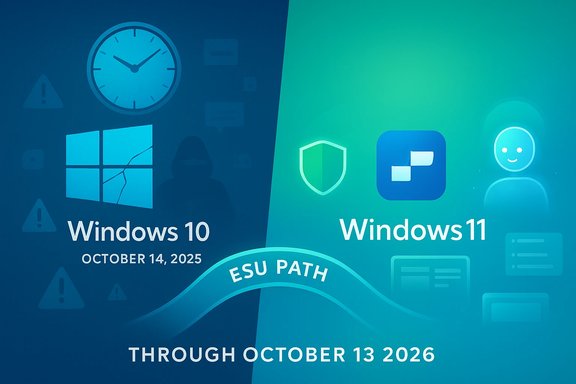
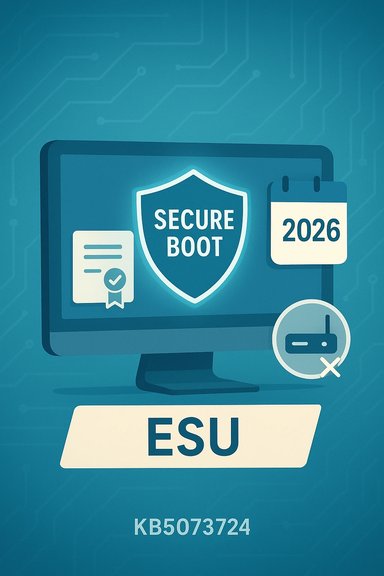
Windows 10’s era of free, vendor-supplied security updates ended with a clear calendar cut‑off on October 14, 2025, and Microsoft’s replacement path is a time‑boxed, security‑only Extended Security Updates (ESU) program that shifts the burden — and in many cases the cost — of staying protected onto users and organizations.
Microsoft published a firm lifecycle timeline for Windows 10 that culminated in the end of mainstream servicing on October 14, 2025. After that date, ordinary Windows 10 installations stopped receiving the standard monthly cumulative security and quality updates that users have relied on since the platform’s launch. Microsoft offered a limited consumer ESU path that delivers security‑only fixes for a short, one‑year window — effectively October 15, 2025 through October 13, 2026 — and commercial ESU options are available with multi‑year tiers for organizations.
This change is policy‑driven rather than technical: Windows 10 machines will continue to boot and run installed applications, but newly discovered kernel, driver, and platform vulnerabilities found after the cutoff will not receive routine Microsoft patches on unenrolled devices. That distinction — “still works” versus “still protected” — is the critical consumer and IT planning point.
Strategically, the move aligns with Microsoft’s push to accelerate adoption of Windows 11 and its associated hardware ecosystem — including “Copilot+ PC” messaging and newer silicon optimizations. The ESU program’s pricing and time‑boxing also act as an economic nudge: pay for a temporary safety valve or accelerate hardware refresh and migration to the supported platform. That incentive structure is intentionally visible in the tiered enterprise pricing and the limited consumer window.
For IT leaders, the moment is a test of planning discipline: treat ESU as an explicit, time‑limited resource to reduce transition pain, not as a deferral strategy. For consumers, the decision matrix is simpler but still consequential: if your PC is Windows 11 eligible and important to daily use, upgrading sooner rather than later retains free vendor protection; if not, weigh the short ESU cost against the cost of new hardware or alternative platforms.
(Verified: key dates, ESU window, and consumer costs are reflected in Microsoft lifecycle reporting and corroborated across multiple contemporary industry reports and community archives used to prepare this feature.
Source: Mashable https://mashable.com/article/window...-is-only-getting-one-major-update-each-year/]
 Background
Microsoft published a firm lifecycle timeline for Windows 10 that culminated in the end of mainstream servicing on October 14, 2025. After that date, ordinary Windows 10 installations stopped receiving the standard monthly cumulative security and quality updates that users have relied on since the platform’s launch. Microsoft offered a limited consumer ESU path that delivers security‑only fixes for a short, one‑year window — effectively October 15, 2025 through October 13, 2026 — and commercial ESU options are available with multi‑year tiers for organizations.This change is policy‑driven rather than technical: Windows 10 machines will continue to boot and run installed applications, but newly discovered kernel, driver, and platform vulnerabilities found after the cutoff will not receive routine Microsoft patches on unenrolled devices. That distinction — “still works” versus “still protected” — is the critical consumer and IT planning point.
What Microsoft actually announced
Dates and scope
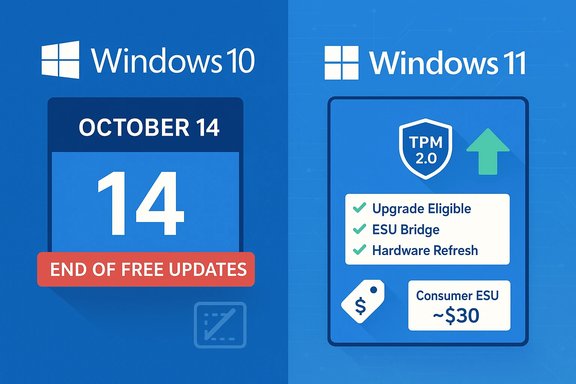
- End of mainstream support (consumer & general Windows 10 editions): October 14, 2025. After this date Microsoft ceased providing free monthly OS security updates for unenrolled consumer devices.
- Consumer ESU coverage window: October 15, 2025 → October 13, 2026. Consumer ESU provides Critical and Important security fixes only; no feature updates, no general quality fixes, and no standard technical support.
- Enterprise ESU: available through volume licensing for up to three additional years with tiered pricing intended to incentivize migration.
Consumer ESU mechanics and price signals
Microsoft introduced a consumer‑facing ESU route that can be accessed in several ways: by linking a device to a Microsoft Account with sync/backup enabled, by redeeming Microsoft Rewards points, or by purchasing an ESU license (widely reported at roughly $30 per device for the one‑year consumer option). Enterprise pricing escalates annually and is sold through volume licensing channels. The consumer ESU is purposely narrow: security‑only fixes, time‑boxed, and intended as a migration runway rather than a permanent support model.What continues and what does not
Microsoft preserved some application‑layer protections on separate schedules — for example, Microsoft Defender signature updates and some Microsoft 365 app security servicing windows — but these are not substitutes for OS‑level patching. Defender definition updates can help detect known malware, and Microsoft 365 Apps may receive security fixes on their own timetable; neither fixes kernel or driver vulnerabilities introduced in the OS itself. Microsoft’s documentation and reporting note that Defender signature updates and select Microsoft 365 app servicing continue beyond Windows 10’s OS lifecycle on separate timetables.Why Microsoft is doing this — the rationale
Microsoft’s public rationale is twofold: technical and strategic. From a technical standpoint, newer security primitives in Windows 11 (for example, virtualization‑based security enhancements, stronger driver signing models, and hardware‑rooted trust like TPM 2.0) require ongoing engineering, testing, and validation that become increasingly costly to backport across a broad span of legacy hardware and drivers. Maintaining indefinite OS servicing for older platform configurations raises engineering complexity and weakens the vendor’s ability to design forward.Strategically, the move aligns with Microsoft’s push to accelerate adoption of Windows 11 and its associated hardware ecosystem — including “Copilot+ PC” messaging and newer silicon optimizations. The ESU program’s pricing and time‑boxing also act as an economic nudge: pay for a temporary safety valve or accelerate hardware refresh and migration to the supported platform. That incentive structure is intentionally visible in the tiered enterprise pricing and the limited consumer window.
Practical implications for users and IT teams
Increased attack surface and the “forever‑day” problem
When vendor patches stop, the risk model changes. Security researchers routinely show that once a patch exists for a supported OS version, attackers can patch‑diff to discover vulnerabilities affecting older, unpatched versions — a technique that can turn vendor fixes for new OSes into a roadmap for exploits against legacy systems. This produces long‑lived “forever‑day” windows where a vulnerability remains exploitable on unpatched machines. The attacker economics are brutal: without vendor patches, exploitation scales rapidly with commodity tooling.Compliance, liability, and operational risk
Organizations subject to regulatory standards or industry compliance regimes face immediate questions: can you certify, audit, or justify production workloads on an OS that no longer receives vendor patches? Many compliance frameworks require supported, patched software. Running Windows 10 unenrolled in ESU can create audit findings, higher cyber‑insurance premiums, and potential legal exposure in the event of a breach.Software and driver compatibility drift
As third‑party vendors concentrate testing and certification efforts on supported Windows versions, older OS releases increasingly suffer from compatibility drift. Over months and years, device drivers, security agents, and some applications may stop being validated or receive degraded support, increasing operational friction for retained Windows 10 endpoints.Environmental and equity concerns
The transition has social consequences: many users run Windows 10 on older hardware that cannot meet Windows 11’s minimum requirements (TPM 2.0, Secure Boot, compatible 64‑bit CPU, and baseline memory/storage). For those users, the choices are costly: buy new hardware, pay for ESU, or accept elevated security risk. Consumer groups and advocates highlighted the disproportionate impact on lower‑income households, schools, and small nonprofits when a broadly used OS leaves the free patching ecosystem.Windows 11 upgrade requirements — the compatibility gate
Microsoft’s Windows 11 system requirements remain the gate that determines whether an in‑place upgrade is feasible:- Processor: compatible 64‑bit CPU, 1 GHz or faster with two or more cores
- Memory: minimum 4 GB RAM
- Storage: minimum 64 GB available storage
- System firmware: UEFI with Secure Boot capable
- TPM: Trusted Platform Module (TPM) version 2.0
- Graphics: DirectX 12 compatible with WDDM 2.0 driver
Options: concrete choices and trade‑offs
For individuals and small organizations, five defensible paths exist. Each has clear benefits and limitations.- Upgrade eligible PCs to Windows 11
- Benefits: continued free vendor patching, access to Windows 11 security features, integration with Microsoft’s modern stack.
- Limitations: hardware checks, driver readiness, possible user experience changes.
- Enroll in Consumer ESU (one‑year bridge)
- Benefits: continued delivery of Critical and Important security updates for the enrolled device(s); buys migration time.
- Limitations: security‑only, no feature or quality updates, minimal technical support, time‑boxed and not a long‑term solution. Cost for many users is roughly $30/year per device (or free via specific Microsoft Account/rewards routes in some regions).
- Purchase new Windows 11‑capable hardware (refresh)
- Benefits: long‑term vendor support and access to latest features and hardware security primitives.
- Limitations: up‑front expense, e‑waste concerns, procurement lead times.
- Migrate to alternative OSes or thin clients (Linux distributions, ChromeOS Flex, or Cloud PC)
- Benefits: extend usable life of older hardware or offload to cloud-hosted desktops. Can be cost‑effective for specific workloads.
- Limitations: application compatibility gaps (legacy Windows apps), user retraining, and potential integration headaches.
- Continue on Windows 10 without vendor patches (risk‑managed)
- Benefits: zero immediate cost and preserves extant setups.
- Limitations: rising cyber risk, compliance issues, eventual incompatibility with new software and drivers — not recommended for internet‑connected or mission‑critical devices.
A practical migration checklist (step‑by‑step)
- Inventory: Create a complete inventory of all endpoints, their current Windows 10 build (ideally 22H2), hardware specs, and business criticality.
- Assess Windows 11 eligibility: Use PC Health Check or vendor tools to test TPM, Secure Boot, CPU, RAM and storage requirements. Flag ineligible devices for separate treatment.
- Prioritize: Rank devices by risk exposure and business-criticality — client‑facing, internet‑connected endpoints come first.
- Choose a path for each device: upgrade, ESU, replace, migrate to Linux/Cloud, or retire. Document the rationale.
- Backup and test: Before any OS migration, verify backups and run pilot upgrades on representative hardware to validate drivers and applications.
- Harden retained Windows 10 endpoints: If ESU or retention is chosen, deploy strong endpoint protection, network segmentation, EDR tools, and strict privilege management. Treat retained Windows 10 machines as temporary enclaves.
- Plan for decommissioning: Set firm timelines to avoid technical debt — ESU should be a runway, not a permanent landing.
Cost and procurement considerations
- Consumer ESU: widely reported around $30 per device for the one‑year consumer purchase, though free enrollment routes exist when a Microsoft Account with sync or a Microsoft Rewards redemption is available. This is a short‑term cost and not intended as an indefinite service.
- Enterprise ESU: tiered, per‑device pricing that rises each renewal year; for many organizations it becomes more economical to accelerate hardware refresh than to rely on multi‑year ESU purchases.
- Hardware refresh: compare the total cost of ownership for replacement machines (procurement, deployment, disposal) against ESU pricing and the operational costs of managing legacy endpoints. For many small businesses, a staged refresh of critical devices first is the optimal compromise.
Risks, caveats and unverifiable claims to watch
- Install base estimates: industry estimates of the remaining Windows 10 install base vary widely; figures like “~550 million corporate PCs” have circulated but should be treated as estimates rather than precise counts. Use organizational inventories and vendor telemetry where possible rather than headline numbers when planning.
- Workarounds and unsanctioned tricks: community‑reported tricks to continue receiving updates or to bypass upgrade gates occasionally surface, but their reliability, legality, and security implications are mixed. Such methods can expose devices to unexpected instability or violate licensing terms; treat them as high‑risk and verify before testing in controlled environments.
- Regional variations and concessions: Microsoft made specific accommodations in some regions (for example, EEA residents) and adjusted enrollment mechanics over time. Local rules or special programs may alter the free vs paid enrollment options; always consult your Microsoft account/portal and the official enrollment flow for precise, region‑specific details.
Technical hardening for retained Windows 10 systems
If a device must remain on Windows 10 (temporary ESU or an unavoidable legacy workload), treat it as a high‑risk asset and apply layered compensations:- Strong endpoint detection and response (EDR) and centralized logging.
- Strict network segmentation and least‑privilege access for users.
- Application allow‑listing and removal of unnecessary services.
- Up‑to‑date third‑party security agents that continue to support Windows 10.
- Regular offline backups and tested recovery plans.
- Limited or no administrative internet access for retained endpoints.
The broader context: product strategy, user trust, and sustainability
Microsoft’s lifecycle strategy for Windows 10 is consistent with a long‑standing vendor pattern: software reaches an end of mainstream servicing and users are encouraged to migrate to supported platforms. That model is technically defensible but socially fraught: when a popular OS reaches EOL while still widely used, the resulting migration pressure has economic, environmental, and equity dimensions. The consumer ESU is a pragmatic concession — a short, paid runway — but it leaves open difficult questions about hardware churn, e‑waste, and how to support users on older devices without forcing immediate replacement.For IT leaders, the moment is a test of planning discipline: treat ESU as an explicit, time‑limited resource to reduce transition pain, not as a deferral strategy. For consumers, the decision matrix is simpler but still consequential: if your PC is Windows 11 eligible and important to daily use, upgrading sooner rather than later retains free vendor protection; if not, weigh the short ESU cost against the cost of new hardware or alternative platforms.
Final verdict and recommended priorities
Windows 10’s October 14, 2025 end of free vendor updates is a real and enforceable limit: the platform moved from “supported” to “legacy” from Microsoft’s servicing perspective, and the company supplied a narrowly scoped consumer ESU as a migration runway. For most readers, a pragmatic prioritization is:- Inventory devices and check Windows 11 eligibility immediately.
- Upgrade eligible and high‑value machines to Windows 11 after pilot testing.
- Use consumer ESU only as a controlled, one‑year bridge for ineligible or mission‑critical devices — enroll early and plan the endpoint’s migration or replacement before ESU expires.
- Harden and isolate any retained Windows 10 endpoints with strong EDR, segmentation, and monitoring.
- Evaluate sustainable alternatives (refurbished Windows 11 hardware, Linux distributions, or cloud desktops) where replacement is either impractical or costly.
(Verified: key dates, ESU window, and consumer costs are reflected in Microsoft lifecycle reporting and corroborated across multiple contemporary industry reports and community archives used to prepare this feature.
Source: Mashable https://mashable.com/article/window...-is-only-getting-one-major-update-each-year/]