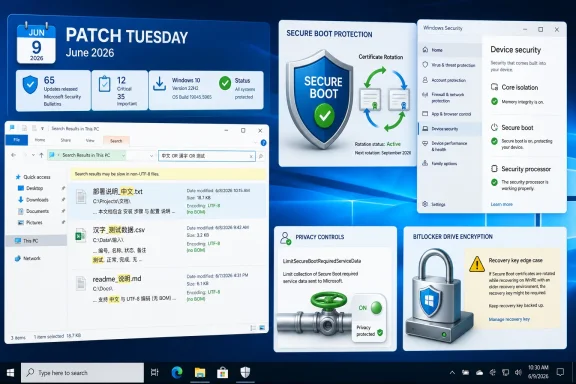
Microsoft released Windows 10 KB5094127 on June 9, 2026, for Windows 10 ESU and supported LTSC 2021 systems, raising version 22H2 to build 19045.7417 and version 21H2/LTSC 2021 to build 19044.7417 with File Explorer search fixes, Secure Boot reporting changes, and a BitLocker recovery-key warning. It is not a glamorous update, but it is one of the more revealing Windows 10 patches since the operating system crossed into its paid-support afterlife. The headline feature is a small File Explorer improvement; the real story is that Microsoft is still reshaping the boot-security plumbing of a platform it would rather users leave behind. For administrators, KB5094127 is less a routine cumulative update than a reminder that Windows 10 is now an operating system maintained under conditions, exceptions, and deadlines.
KB5094127 lands in the peculiar second life of Windows 10. For most consumer and mainstream business users, Windows 10 version 22H2 reached the end of normal support on October 14, 2025. The machines still receiving this June 2026 patch are there through Microsoft’s Extended Security Updates program, or because they sit in supported long-term servicing channels such as Windows 10 Enterprise LTSC 2021 and Windows 10 IoT Enterprise LTSC 2021.
That distinction matters because it changes the meaning of every update. During Windows 10’s mainstream life, a monthly cumulative update was the ordinary cost of staying secure. Under ESU, the same ritual becomes an explicit statement: either the device is important enough to pay for, constrained enough to justify keeping, or embedded deeply enough that moving to Windows 11 remains harder than keeping Windows 10 alive.
Microsoft’s servicing notes make that boundary plain. KB5094127 applies to Windows 10 ESU, and Microsoft continues to point non-ESU users toward upgrading to a later version of Windows. The update may appear familiar in format, but the audience has narrowed sharply.
That narrowing is why this patch deserves attention beyond its changelog. Windows 10 is no longer the default Windows estate. It is now the holdout estate: kiosks, lab systems, older fleets, regulated desktops, stubborn home PCs, and business endpoints caught between compatibility and replacement cycles.
That sounds narrow, and in one sense it is. This is not a redesign, not a new shell, and not a Windows 11 backport of a modernized Explorer experience. It is a practical fix for text handling and search presentation in one of the oldest and most heavily used parts of Windows.
But narrow does not mean trivial. File Explorer is not merely a file browser for many Windows users; it is a front end for years of local documents, network shares, redirected folders, mapped drives, and institutional habits. If search mishandles character encoding or presents text inconsistently, the bug is not cosmetic for users working across multilingual document sets or plain-text files produced by modern tools.
The UTF-8 without BOM detail is especially telling. Developers, administrators, and cross-platform workflows often generate UTF-8 text without the older Windows-friendly byte order marker. A file manager that stumbles over those files is a file manager still negotiating the cultural shift from Windows-as-the-center-of-the-desktop-universe to Windows-as-one-client-among-many.
So yes, KB5094127 improves File Explorer search. But it also shows Microsoft still sanding down legacy rough edges in Windows 10 while its engineering attention, marketing energy, and new feature bets have clearly moved elsewhere. For users staying behind, that is both reassuring and limiting.
Microsoft is continuing its long-running effort to replace older Secure Boot certificates before the 2011-era certificates begin expiring in 2026. Secure Boot is one of those features that most users notice only when something goes wrong, but it sits near the root of Windows trust. It helps ensure that the software loaded during startup has been signed by trusted authorities, making it harder for bootkits and other low-level malware to compromise a machine before the operating system is fully awake.
KB5094127 adds dynamic status reporting for Secure Boot states in the Windows Security app. That change is aimed at visibility, and visibility is overdue. A security control that operates below the normal user experience needs a clear, inspectable state, especially during a certificate transition that affects consumer PCs, enterprise fleets, and long-lived managed devices.
The update also adds a new Group Policy setting named
That detail exposes the tension at the heart of modern Windows servicing. Microsoft wants enough device signal to roll out sensitive boot-trust changes safely. Some customers want the smallest possible flow of data from endpoints to Microsoft. KB5094127 attempts to serve both goals, but it cannot erase the underlying trade-off.
That is the language of risk management, not feature delivery. Microsoft is effectively saying that not every machine should receive the same boot-trust update at the same time. In the cloud era, that is normal; rings, telemetry, holdbacks, and staged deployments are how large platforms avoid setting themselves on fire.
On Windows 10, however, the optics are different. These are often older machines, managed machines, or machines already outside the mainstream support path. The healthier and more predictable the update history, the more likely the device is to be selected for automated Secure Boot certificate renewal. The messier the endpoint, the more likely it becomes an edge case.
That creates an uncomfortable but practical truth for administrators: update reliability is no longer just about getting the monthly cumulative update installed. It is becoming part of the evidence Microsoft uses to decide whether a device is ready for deeper security changes.
For well-managed fleets, that is probably welcome. Nobody wants a boot-chain transition sprayed indiscriminately across systems with unknown firmware states, unusual BitLocker policies, or shaky update histories. For neglected fleets, it is a warning. The machines that most need careful attention may be the ones least likely to qualify cleanly for automated trust updates.
The conditions are specific. BitLocker must be enabled on the operating system drive. A Group Policy setting must explicitly configure the TPM platform validation profile for native UEFI firmware configurations, with PCR7 included. System Information must report that PCR7 binding is “Not Possible.” The Windows UEFI CA 2023 certificate must be present in the Secure Boot database, making the device eligible for the 2023-signed Windows Boot Manager to become the default. The device must also not already be running the 2023-signed Windows Boot Manager.
That is a lot of conditions, and Microsoft says the scenario is unlikely on personal devices that are not managed by IT departments. For home users, the practical message is simple: this is probably not your problem unless your PC is managed in unusually enterprise-like ways.
For IT departments, the message is different. The issue sits exactly where many enterprise pain points live: Group Policy, BitLocker, UEFI, PCR binding, Secure Boot certificates, and boot manager selection. It is the kind of interaction that can be technically reasonable and operationally miserable.
Microsoft says the recovery key should be required only once in the affected scenario, assuming the Group Policy configuration remains unchanged. That is good news, but it does not eliminate the risk. A one-time BitLocker recovery prompt is still a help-desk incident if the user does not have the key, if escrow is broken, if remote staff are traveling, or if a critical workstation is sitting in a lab with no one available to unlock it.
Administrators should treat the first restart after deployment as the operational risk point. If affected systems exist, the problem should appear immediately after installation and reboot, not days later as a mysterious intermittent failure. That makes it manageable, but only if the fleet has been audited before the update reaches production.
The recommended mitigation is not exotic. Microsoft advises enterprises to audit BitLocker Group Policy settings for explicit PCR7 inclusion and check PCR7 binding status in
That is a reasonable remediation path for a disciplined endpoint team. It is also a reminder that reasonable does not mean effortless. The organizations most likely to be affected are the ones that previously customized BitLocker validation because they had strong security reasons, inherited hardening baselines, or old device assumptions. Undoing or revisiting those choices requires more than blindly approving a patch.
This is the price of living near the hardware boundary. When Windows updates touch the boot chain, they are not merely updating files. They are negotiating with firmware, TPM measurements, certificates, boot managers, and years of administrative policy.
That difference should shape deployment strategy. A Windows 10 ESU estate should be smaller each month, better understood each month, and easier to justify each month. If the estate is growing, drifting, or poorly inventoried, ESU has become a procrastination budget rather than a transition plan.
The June 2026 update is particularly sensitive because of the Secure Boot certificate timeline. Microsoft has said devices that have not received newer certificates will continue to start and operate normally, and standard Windows updates will continue to install. That assurance matters, because it undercuts panic. The machines are not expected to turn into bricks when older certificates begin expiring.
But “continues to boot” is a low bar. The larger concern is whether devices remain able to receive future boot-level protections, revocation updates, and trust-chain changes cleanly. In security terms, a device can be operational and still be falling behind in the part of the platform users almost never see.
That is why KB5094127 should not be read as merely a June cumulative update. It is part of Microsoft’s attempt to drag the Windows boot ecosystem through a certificate renewal process without breaking enormous numbers of machines. Windows 10 ESU systems are along for that ride, whether their owners are ready or not.
Enterprise LTSC 2021 is supported until January 12, 2027. IoT Enterprise LTSC 2021 runs much longer, until January 13, 2032. Those dates matter for industrial systems, dedicated devices, medical equipment, retail endpoints, and other environments where Windows is not a general-purpose personal desktop so much as a platform component.
Yet Secure Boot certificate updates still matter there. In fact, they may matter more, because long-lived devices are exactly the systems most likely to encounter firmware quirks, frozen images, offline servicing practices, and carefully controlled outbound connectivity. A device built to last a decade cannot rely on assumptions baked into the first year of its deployment.
KB5094127’s servicing stack language also matters for these environments. The update includes servicing stack update KB5094145, version 19041.7402, and Microsoft notes additional logic related to Azure-hosted device verification using an updated certificate chain. For organizations maintaining offline images or controlled deployment media, Microsoft also calls out the importance of including
That is deep plumbing, and it will not matter to most desktop users. For image engineers and deployment teams, it is a sharp warning. Boot validation files, servicing stack prerequisites, and certificate chains are no longer background details when the update itself is part of a boot-trust transition.
A user still on Windows 10 in 2026 may be there because a machine fails Windows 11’s hardware requirements, because a business application has not been certified, because a peripheral stack depends on old drivers, or because an organization has chosen to buy time through ESU. These users are not waiting for Copilot animations or a redesigned Start menu. They need the basics to keep working.
Search is one of those basics. Multilingual text handling is one of those basics. Correctly displaying the contents of plain-text files in search results and tooltips is one of those basics. If Microsoft is going to charge for extended security updates, the operating system cannot become a museum exhibit that receives only vulnerability fixes and no usability corrections.
KB5094127 therefore demonstrates the uneasy compromise of post-mainstream Windows 10. Microsoft is not turning ESU into a feature channel. But it is still shipping selected quality improvements where they intersect with real-world reliability. That is the right balance, provided customers understand that the flow of such fixes will remain constrained.
The operating system may still look familiar, but its maintenance model has changed. Windows 10 users are not standing still in 2026. They are standing on a shrinking island that Microsoft continues to reinforce in places while building the mainland somewhere else.
That is not a fringe requirement. Government agencies, defense contractors, critical infrastructure operators, and privacy-sensitive enterprises often need explicit controls over outbound telemetry and service data. The challenge is that Windows servicing has steadily become more dependent on cloud-informed deployment logic.
By adding a policy that suppresses a Secure Boot event normally sent to Microsoft, the company is acknowledging that some customers need a stricter posture. But the surrounding context also suggests there are trade-offs. If Microsoft is using high-confidence targeting data to determine eligibility for automated certificate updates, limiting data flows may require administrators to take more responsibility for managing and verifying the transition themselves.
This is the modern Windows bargain in miniature. Microsoft offers safer, staged, intelligence-driven deployment. Enterprises reserve the right to restrict the intelligence flow. The result is not a moral victory for either side; it is a division of labor.
Organizations that enable strict traffic limits should not assume Microsoft’s automation will compensate for their constraints. They are choosing a more controlled model, which means they need the inventory, monitoring, and deployment discipline to match.
For users on capable hardware, the pressure to move is not subtle. Windows 10 ESU is a bridge, not a destination. Microsoft’s messaging around end of support, upgrade paths, and ESU all points in the same direction: keep Windows 10 secure for now, but do not mistake the extension for renewed life.
That is a hard sell in parts of the Windows community because Windows 10 remains well understood, broadly compatible, and in many workflows entirely sufficient. Not every user experiences Windows 11 as a productivity upgrade. Not every organization wants to absorb hardware refreshes, retraining, application testing, and policy changes on Microsoft’s preferred timeline.
Still, KB5094127 shows why staying behind has costs beyond the ESU invoice. Administrators must now track which Windows 10 systems are eligible for which updates, which editions are still supported, which boot certificates are present, which BitLocker policies are safe, and which machines are likely to receive phased Secure Boot changes automatically.
In other words, resisting the migration does not preserve simplicity. It often replaces a migration project with a containment project.
Administrators should know which Windows 10 devices are receiving ESU, which are LTSC, which are unmanaged stragglers, and which should already have been retired. They should know whether BitLocker recovery keys are escrowed and recoverable before installing a patch that Microsoft says could trigger a one-time recovery prompt under specific conditions.
They should also verify Secure Boot status and PCR7 binding on representative device models, not merely on a single clean test VM. The messy endpoints are the ones that matter: older laptops with firmware updates missed, systems that changed ownership, devices with custom hardening policies, and machines that have been reimaged repeatedly over several years.
For deployment teams, the update reinforces the value of staged rollouts. Push KB5094127 first to test rings that reflect real hardware diversity. Watch for recovery prompts. Confirm Secure Boot reporting in Windows Security. Validate that update installation and reboot behavior match expectations before moving to broader production rings.
For home users enrolled in ESU, the advice is simpler. Install the update, make sure you can access your BitLocker recovery key if BitLocker is enabled, and use the Windows Security app to check Secure Boot status. The known issue is unlikely to affect typical personal devices, but knowing where your recovery key lives is still basic Windows hygiene.
 Windows 10 Is Still Being Patched, But No Longer on Its Old Terms
KB5094127 lands in the peculiar second life of Windows 10. For most consumer and mainstream business users, Windows 10 version 22H2 reached the end of normal support on October 14, 2025. The machines still receiving this June 2026 patch are there through Microsoft’s Extended Security Updates program, or because they sit in supported long-term servicing channels such as Windows 10 Enterprise LTSC 2021 and Windows 10 IoT Enterprise LTSC 2021.That distinction matters because it changes the meaning of every update. During Windows 10’s mainstream life, a monthly cumulative update was the ordinary cost of staying secure. Under ESU, the same ritual becomes an explicit statement: either the device is important enough to pay for, constrained enough to justify keeping, or embedded deeply enough that moving to Windows 11 remains harder than keeping Windows 10 alive.
Microsoft’s servicing notes make that boundary plain. KB5094127 applies to Windows 10 ESU, and Microsoft continues to point non-ESU users toward upgrading to a later version of Windows. The update may appear familiar in format, but the audience has narrowed sharply.
That narrowing is why this patch deserves attention beyond its changelog. Windows 10 is no longer the default Windows estate. It is now the holdout estate: kiosks, lab systems, older fleets, regulated desktops, stubborn home PCs, and business endpoints caught between compatibility and replacement cycles.
File Explorer Gets a Small Fix With a Bigger Subtext
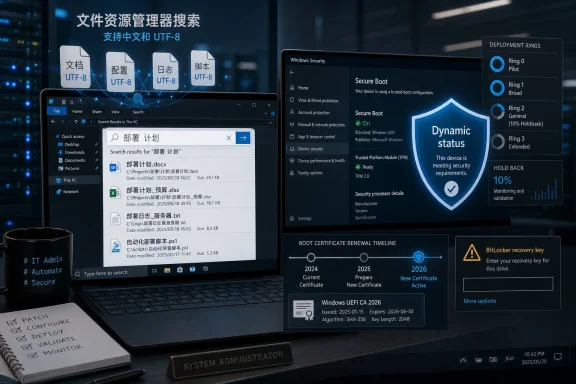
The most user-visible change in KB5094127 is an improvement to File Explorer search. Microsoft says the update improves search support for Chinese text and for UTF-8 encoded files that do not include a byte order mark. It also says text should display more clearly and consistently across search results, Content view, and tooltips.That sounds narrow, and in one sense it is. This is not a redesign, not a new shell, and not a Windows 11 backport of a modernized Explorer experience. It is a practical fix for text handling and search presentation in one of the oldest and most heavily used parts of Windows.
But narrow does not mean trivial. File Explorer is not merely a file browser for many Windows users; it is a front end for years of local documents, network shares, redirected folders, mapped drives, and institutional habits. If search mishandles character encoding or presents text inconsistently, the bug is not cosmetic for users working across multilingual document sets or plain-text files produced by modern tools.
The UTF-8 without BOM detail is especially telling. Developers, administrators, and cross-platform workflows often generate UTF-8 text without the older Windows-friendly byte order marker. A file manager that stumbles over those files is a file manager still negotiating the cultural shift from Windows-as-the-center-of-the-desktop-universe to Windows-as-one-client-among-many.
So yes, KB5094127 improves File Explorer search. But it also shows Microsoft still sanding down legacy rough edges in Windows 10 while its engineering attention, marketing energy, and new feature bets have clearly moved elsewhere. For users staying behind, that is both reassuring and limiting.
The Secure Boot Work Is the Patch’s Real Center of Gravity
The most consequential part of KB5094127 is not File Explorer. It is Secure Boot.Microsoft is continuing its long-running effort to replace older Secure Boot certificates before the 2011-era certificates begin expiring in 2026. Secure Boot is one of those features that most users notice only when something goes wrong, but it sits near the root of Windows trust. It helps ensure that the software loaded during startup has been signed by trusted authorities, making it harder for bootkits and other low-level malware to compromise a machine before the operating system is fully awake.
KB5094127 adds dynamic status reporting for Secure Boot states in the Windows Security app. That change is aimed at visibility, and visibility is overdue. A security control that operates below the normal user experience needs a clear, inspectable state, especially during a certificate transition that affects consumer PCs, enterprise fleets, and long-lived managed devices.
The update also adds a new Group Policy setting named
LimitSecureBootRequiredServiceData under the Secure Boot administrative template path. When enabled, Microsoft says Windows limits the Secure Boot service data sent to Microsoft by suppressing an event normally transmitted to the company. The policy is included in Microsoft’s Windows Restricted Traffic Limited Functionality Baseline package, which makes its intended audience clear: locked-down environments, public-sector deployments, and enterprises with strict outbound telemetry controls.That detail exposes the tension at the heart of modern Windows servicing. Microsoft wants enough device signal to roll out sensitive boot-trust changes safely. Some customers want the smallest possible flow of data from endpoints to Microsoft. KB5094127 attempts to serve both goals, but it cannot erase the underlying trade-off.
Microsoft Is Using Update Health as a Gatekeeper
The certificate rollout described in KB5094127 is not a blunt deployment. Microsoft says Windows quality updates now include additional high-confidence device targeting data, increasing the coverage of devices eligible to receive new Secure Boot certificates. Devices receive the new certificates only after showing enough successful update signals, preserving a controlled and phased rollout.That is the language of risk management, not feature delivery. Microsoft is effectively saying that not every machine should receive the same boot-trust update at the same time. In the cloud era, that is normal; rings, telemetry, holdbacks, and staged deployments are how large platforms avoid setting themselves on fire.
On Windows 10, however, the optics are different. These are often older machines, managed machines, or machines already outside the mainstream support path. The healthier and more predictable the update history, the more likely the device is to be selected for automated Secure Boot certificate renewal. The messier the endpoint, the more likely it becomes an edge case.
That creates an uncomfortable but practical truth for administrators: update reliability is no longer just about getting the monthly cumulative update installed. It is becoming part of the evidence Microsoft uses to decide whether a device is ready for deeper security changes.
For well-managed fleets, that is probably welcome. Nobody wants a boot-chain transition sprayed indiscriminately across systems with unknown firmware states, unusual BitLocker policies, or shaky update histories. For neglected fleets, it is a warning. The machines that most need careful attention may be the ones least likely to qualify cleanly for automated trust updates.
The BitLocker Warning Is Narrow, But It Is Not Noise
Microsoft has confirmed a known issue in KB5094127 involving BitLocker recovery prompts. The company says some devices with an unrecommended BitLocker Group Policy configuration may be required to enter their recovery key on the first restart after installing the update.The conditions are specific. BitLocker must be enabled on the operating system drive. A Group Policy setting must explicitly configure the TPM platform validation profile for native UEFI firmware configurations, with PCR7 included. System Information must report that PCR7 binding is “Not Possible.” The Windows UEFI CA 2023 certificate must be present in the Secure Boot database, making the device eligible for the 2023-signed Windows Boot Manager to become the default. The device must also not already be running the 2023-signed Windows Boot Manager.
That is a lot of conditions, and Microsoft says the scenario is unlikely on personal devices that are not managed by IT departments. For home users, the practical message is simple: this is probably not your problem unless your PC is managed in unusually enterprise-like ways.
For IT departments, the message is different. The issue sits exactly where many enterprise pain points live: Group Policy, BitLocker, UEFI, PCR binding, Secure Boot certificates, and boot manager selection. It is the kind of interaction that can be technically reasonable and operationally miserable.
Microsoft says the recovery key should be required only once in the affected scenario, assuming the Group Policy configuration remains unchanged. That is good news, but it does not eliminate the risk. A one-time BitLocker recovery prompt is still a help-desk incident if the user does not have the key, if escrow is broken, if remote staff are traveling, or if a critical workstation is sitting in a lab with no one available to unlock it.
The First Restart Is Where Theory Meets the Help Desk
The known issue in KB5094127 is a useful reminder that boot security is experienced by users as a black screen with a recovery prompt. The architecture may be elegant, the certificate transition may be necessary, and the policy warning may be well documented. None of that matters to the employee who sees BitLocker asking for a 48-digit key before a meeting.Administrators should treat the first restart after deployment as the operational risk point. If affected systems exist, the problem should appear immediately after installation and reboot, not days later as a mysterious intermittent failure. That makes it manageable, but only if the fleet has been audited before the update reaches production.
The recommended mitigation is not exotic. Microsoft advises enterprises to audit BitLocker Group Policy settings for explicit PCR7 inclusion and check PCR7 binding status in
msinfo32.exe before installing the update. Where the problematic configuration exists, the workaround involves setting the relevant BitLocker policy to Not Configured, forcing Group Policy refresh, and cycling BitLocker protection so bindings use the Windows-selected default PCR profile.That is a reasonable remediation path for a disciplined endpoint team. It is also a reminder that reasonable does not mean effortless. The organizations most likely to be affected are the ones that previously customized BitLocker validation because they had strong security reasons, inherited hardening baselines, or old device assumptions. Undoing or revisiting those choices requires more than blindly approving a patch.
This is the price of living near the hardware boundary. When Windows updates touch the boot chain, they are not merely updating files. They are negotiating with firmware, TPM measurements, certificates, boot managers, and years of administrative policy.
ESU Turns Patch Tuesday Into a Triage Exercise
For Windows 10 ESU customers, KB5094127 illustrates the new monthly rhythm. The patch is not optional in any meaningful security sense, but it is also not something that should be treated casually. ESU customers are paying for more time, not a return to the old status quo.That difference should shape deployment strategy. A Windows 10 ESU estate should be smaller each month, better understood each month, and easier to justify each month. If the estate is growing, drifting, or poorly inventoried, ESU has become a procrastination budget rather than a transition plan.
The June 2026 update is particularly sensitive because of the Secure Boot certificate timeline. Microsoft has said devices that have not received newer certificates will continue to start and operate normally, and standard Windows updates will continue to install. That assurance matters, because it undercuts panic. The machines are not expected to turn into bricks when older certificates begin expiring.
But “continues to boot” is a low bar. The larger concern is whether devices remain able to receive future boot-level protections, revocation updates, and trust-chain changes cleanly. In security terms, a device can be operational and still be falling behind in the part of the platform users almost never see.
That is why KB5094127 should not be read as merely a June cumulative update. It is part of Microsoft’s attempt to drag the Windows boot ecosystem through a certificate renewal process without breaking enormous numbers of machines. Windows 10 ESU systems are along for that ride, whether their owners are ready or not.
LTSC Is Not a Magic Escape Hatch
Windows 10 Enterprise LTSC 2021 and Windows 10 IoT Enterprise LTSC 2021 also appear in the KB5094127 story, and their presence can create confusion. LTSC is sometimes treated in online discussion as a way to avoid Microsoft’s faster consumer cadence. In some respects, it is. But LTSC does not exempt a device from the realities of security servicing.Enterprise LTSC 2021 is supported until January 12, 2027. IoT Enterprise LTSC 2021 runs much longer, until January 13, 2032. Those dates matter for industrial systems, dedicated devices, medical equipment, retail endpoints, and other environments where Windows is not a general-purpose personal desktop so much as a platform component.
Yet Secure Boot certificate updates still matter there. In fact, they may matter more, because long-lived devices are exactly the systems most likely to encounter firmware quirks, frozen images, offline servicing practices, and carefully controlled outbound connectivity. A device built to last a decade cannot rely on assumptions baked into the first year of its deployment.
KB5094127’s servicing stack language also matters for these environments. The update includes servicing stack update KB5094145, version 19041.7402, and Microsoft notes additional logic related to Azure-hosted device verification using an updated certificate chain. For organizations maintaining offline images or controlled deployment media, Microsoft also calls out the importance of including
boot.stl when deploying dynamic updates to existing Windows images.That is deep plumbing, and it will not matter to most desktop users. For image engineers and deployment teams, it is a sharp warning. Boot validation files, servicing stack prerequisites, and certificate chains are no longer background details when the update itself is part of a boot-trust transition.
The File Explorer Fix Is Welcome Precisely Because Windows 10 Is Old
It is tempting to dismiss the File Explorer changes in KB5094127 as a minor quality improvement beside the Secure Boot work. That would be a mistake. Small fixes matter more on mature platforms because the remaining users often have very specific reasons for staying.A user still on Windows 10 in 2026 may be there because a machine fails Windows 11’s hardware requirements, because a business application has not been certified, because a peripheral stack depends on old drivers, or because an organization has chosen to buy time through ESU. These users are not waiting for Copilot animations or a redesigned Start menu. They need the basics to keep working.
Search is one of those basics. Multilingual text handling is one of those basics. Correctly displaying the contents of plain-text files in search results and tooltips is one of those basics. If Microsoft is going to charge for extended security updates, the operating system cannot become a museum exhibit that receives only vulnerability fixes and no usability corrections.
KB5094127 therefore demonstrates the uneasy compromise of post-mainstream Windows 10. Microsoft is not turning ESU into a feature channel. But it is still shipping selected quality improvements where they intersect with real-world reliability. That is the right balance, provided customers understand that the flow of such fixes will remain constrained.
The operating system may still look familiar, but its maintenance model has changed. Windows 10 users are not standing still in 2026. They are standing on a shrinking island that Microsoft continues to reinforce in places while building the mainland somewhere else.
The Privacy Policy Detail Deserves More Attention
The newLimitSecureBootRequiredServiceData policy may be the most quietly important administrative addition in KB5094127. Microsoft’s Secure Boot certificate rollout depends partly on device targeting data and successful update signals. At the same time, some organizations use restricted traffic baselines to reduce or tightly govern communication with Microsoft services.That is not a fringe requirement. Government agencies, defense contractors, critical infrastructure operators, and privacy-sensitive enterprises often need explicit controls over outbound telemetry and service data. The challenge is that Windows servicing has steadily become more dependent on cloud-informed deployment logic.
By adding a policy that suppresses a Secure Boot event normally sent to Microsoft, the company is acknowledging that some customers need a stricter posture. But the surrounding context also suggests there are trade-offs. If Microsoft is using high-confidence targeting data to determine eligibility for automated certificate updates, limiting data flows may require administrators to take more responsibility for managing and verifying the transition themselves.
This is the modern Windows bargain in miniature. Microsoft offers safer, staged, intelligence-driven deployment. Enterprises reserve the right to restrict the intelligence flow. The result is not a moral victory for either side; it is a division of labor.
Organizations that enable strict traffic limits should not assume Microsoft’s automation will compensate for their constraints. They are choosing a more controlled model, which means they need the inventory, monitoring, and deployment discipline to match.
Windows 11 Is the Shadow in Every Windows 10 Patch
KB5094127 arrives alongside June 2026 Patch Tuesday updates for Windows 11, including KB5094126 and KB5093998. That parallel release cadence is ordinary, but it frames the bigger Windows story. Microsoft is maintaining Windows 10 because it has to; it is advancing Windows 11 because it wants to.For users on capable hardware, the pressure to move is not subtle. Windows 10 ESU is a bridge, not a destination. Microsoft’s messaging around end of support, upgrade paths, and ESU all points in the same direction: keep Windows 10 secure for now, but do not mistake the extension for renewed life.
That is a hard sell in parts of the Windows community because Windows 10 remains well understood, broadly compatible, and in many workflows entirely sufficient. Not every user experiences Windows 11 as a productivity upgrade. Not every organization wants to absorb hardware refreshes, retraining, application testing, and policy changes on Microsoft’s preferred timeline.
Still, KB5094127 shows why staying behind has costs beyond the ESU invoice. Administrators must now track which Windows 10 systems are eligible for which updates, which editions are still supported, which boot certificates are present, which BitLocker policies are safe, and which machines are likely to receive phased Secure Boot changes automatically.
In other words, resisting the migration does not preserve simplicity. It often replaces a migration project with a containment project.
The Practical Read for Admins Is Inventory First, Patch Second
The right response to KB5094127 is not panic. It is inventory.Administrators should know which Windows 10 devices are receiving ESU, which are LTSC, which are unmanaged stragglers, and which should already have been retired. They should know whether BitLocker recovery keys are escrowed and recoverable before installing a patch that Microsoft says could trigger a one-time recovery prompt under specific conditions.
They should also verify Secure Boot status and PCR7 binding on representative device models, not merely on a single clean test VM. The messy endpoints are the ones that matter: older laptops with firmware updates missed, systems that changed ownership, devices with custom hardening policies, and machines that have been reimaged repeatedly over several years.
For deployment teams, the update reinforces the value of staged rollouts. Push KB5094127 first to test rings that reflect real hardware diversity. Watch for recovery prompts. Confirm Secure Boot reporting in Windows Security. Validate that update installation and reboot behavior match expectations before moving to broader production rings.
For home users enrolled in ESU, the advice is simpler. Install the update, make sure you can access your BitLocker recovery key if BitLocker is enabled, and use the Windows Security app to check Secure Boot status. The known issue is unlikely to affect typical personal devices, but knowing where your recovery key lives is still basic Windows hygiene.
The June Patch Draws a Map of the Windows 10 Afterlife
KB5094127 is not a flashy release, but it leaves a clear map for anyone still responsible for Windows 10 in 2026. The update fixes a real File Explorer annoyance, advances Microsoft’s Secure Boot certificate transition, adds a privacy-conscious policy lever, and carries a narrowly scoped but operationally significant BitLocker warning.- Windows 10 version 22H2 ESU systems move to build 19045.7417, while version 21H2 and LTSC 2021 systems move to build 19044.7417.
- File Explorer search gains better handling for Chinese text and UTF-8 files without a byte order mark, improving consistency across search results, Content view, and tooltips.
- Secure Boot status reporting becomes more dynamic in the Windows Security app, giving users and administrators better visibility into a low-level trust feature.
- Microsoft is expanding automatic delivery of new Secure Boot certificates through higher-confidence device targeting rather than pushing the change indiscriminately.
- Some managed systems with a specific BitLocker and PCR7 policy configuration may require a recovery key on the first restart after installation.
- ESU buys time for Windows 10, but it also makes disciplined inventory, key escrow, firmware awareness, and staged deployment more important than they were during mainstream support.
References
- Primary source: Windows Report
Published: 2026-06-09T18:07:07.269443
Windows 10 KB5094127 June 2026 Patch Tuesday Update Out with File Explorer Improvements & More
Microsoft has released Windows 10 KB5094127 June 2026 Patch Tuesday update that bumps your system to Build 19045.7417 and 19044.7417. windowsreport.com
- Related coverage: notebookcheck.net
June 9 Patch Tuesday incoming as Secure Boot deadline looms - Notebookcheck News
Microsoft's June 9 Patch Tuesday is the final deployment window before 2011 Secure Boot certificates begin expiring on June 24. Unpatched devices lose security protection. www.notebookcheck.net
- Official source: learn.microsoft.com
- Related coverage: drwindows.de
Patch Tuesday Februar 2026: Frische Sicherheitsupdates für Windows 10 und 11 - Dr. Windows
Der allmonatliche Großkampftag steht wieder an und damit bekommen Windows 10 und Windows 11 auch wieder frische Sicherheitsupdates spendiert. Zusätzlich startet Microsoft ab heute auch mit der Erneuerung der Zertifikate für Secure Boot über Windows Update. Das Ganze geschieht phasenweise und in...www.drwindows.de
- Related coverage: tenforums.com
KB5078129 Windows 10 Out-of-band ESU build 19045.6812 (22H2) Jan.24
Microsoft Support: January 24, 2026 - KB5078129 (OS Builds 19045.6812 and 19044.6812) Out-of-band Windows Secure Boot certificate expiration Important: Secure Boot certificates used by most Windows devices are set to expire starting in June 2026. Thwww.tenforums.com
- Related coverage: computerworld.com
Windows 10: A guide to the updates – Computerworld
Here's what those enrolled in the Windows 10 Extended Security Updates program need to know about each monthly security update. Now updated for KB5094127, released on June 9, 2026. www.computerworld.com
- Related coverage: windowsforum.com
June 9, 2026 Patch Tuesday Prep for Windows 11: Servicing, Secure Boot, Workflows | Windows Forum
Before the June 9, 2026 Patch Tuesday window, Windows 11 administrators and power users should do three separate jobs: validate update servicing, verify...windowsforum.com - Related coverage: insights.integrity360.com
Windows 10 KB5087544: Subtle Changes with Real Security Implications
Microsoft’s May 2026 Patch Tuesday update for Windows 10, KB5087544, reflects the current reality of the platform.insights.integrity360.com - Related coverage: hologic.com
Patch Release SecurView Windows 10 LTSB 2016 (v1607) December 2025.docx
PDF documentwww.hologic.com
- Related coverage: sra.io