

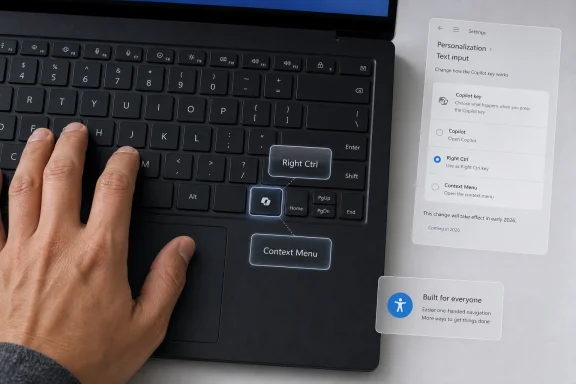
Microsoft is preparing a Windows 11 update later in 2026 that will let PCs with a dedicated Copilot key remap that key to act as either Right Ctrl or the Context Menu key. The change is small in the way keyboard settings are small: invisible to most people until the moment muscle memory breaks. It is also a concession that Microsoft’s AI-first hardware branding ran into the oldest rule of personal computing. A keyboard is not a billboard if users depend on the key you replaced.
The Copilot key was introduced as a symbol of a new Windows era, a physical shortcut meant to make Microsoft’s AI assistant feel native, immediate, and inevitable. But for many laptop buyers, it arrived less like a productivity upgrade than a tax on established workflows. On some devices, the key took the place of Right Ctrl, a quietly essential modifier for one-handed shortcuts, text navigation, accessibility tools, terminal habits, remote desktop sessions, and decades of Windows muscle memory.
Microsoft’s upcoming remapping option does not erase the original mistake. It does, however, mark an important retreat from the assumption that AI deserves privileged real estate on the PC whether or not users asked for it.
The dedicated Copilot key was never just a key. It was a hardware-level marketing statement, one that told users, OEMs, and investors that AI would no longer be merely another app or cloud service. It would be built into the shape of the PC itself.
That is why the backlash mattered. Users are accustomed to software experiments being revised, hidden behind toggles, or abandoned after a few update cycles. Hardware is different. When a manufacturer removes a familiar key and prints a new corporate priority in its place, the decision travels with the machine for years.
Microsoft framed the Copilot key as a generational change for Windows keyboards, comparable in ambition to the Windows key itself. That comparison was always risky. The Windows key became useful because it gradually accumulated system-level utility, shortcuts, and user habits across versions of the operating system. The Copilot key arrived before that social contract existed.
In other words, Microsoft tried to skip the adoption phase. It treated Copilot as if it had already become indispensable, then carved out keyboard space accordingly. Users responded by asking a simpler question: why did my new laptop lose a key I already used?
But keyboards are not used on paper. They are used by hands, in context, with habits that vary wildly between people. Right Ctrl is often part of one-handed command sequences, especially for users navigating text with arrow keys, operating with a mouse in the other hand, or relying on layouts and assistive workflows that make the right side of the keyboard more important than a spec sheet suggests.
For accessibility users, the issue is even sharper. Screen reader commands, alternative input techniques, and personalized shortcut patterns are built around consistency. Removing a modifier key can turn a familiar action into a two-handed maneuver, a remapped workaround, or a broken routine.
That is the core miscalculation. Microsoft did not merely add an AI shortcut. On some machines, it displaced an existing input affordance that already had a constituency, even if that constituency was not loud until the key disappeared.
It is also an admission that Microsoft’s first implementation was too narrow. Earlier customization options were limited, often steering the key toward Copilot, Windows Search, or Microsoft-approved app behavior rather than treating it as a general-purpose piece of keyboard hardware. That kind of customization is less about user control than about choosing which Microsoft-branded door the key opens.
Restoring Right Ctrl changes the meaning of the setting. It acknowledges that a key can be valuable even when it does not launch a service, surface an assistant, or feed an engagement metric. Sometimes the most important thing a key can do is behave exactly like the key users thought they were buying.
The Context Menu option is also worth noting. The old menu key has been disappearing from many laptop layouts for years, squeezed out by compact chassis designs and function-row compromises. Giving users the option to bring it back makes the Copilot key less of a single-purpose AI trigger and more of a configurable slot in an increasingly crowded keyboard.
But PowerToys is not the right baseline for hardware recovery. It is an excellent enthusiast utility, and in many organizations it is a perfectly acceptable tool. Still, it remains an extra install, an extra policy consideration, and an extra layer between the operating system and the keyboard.
That matters for administrators. A native Windows setting can be documented, supported, and eventually managed with the same expectations as other device configuration options. A community-favored utility, even one published by Microsoft, is not the same thing as an operating system guarantee.
It matters for ordinary users, too. If a laptop ships without Right Ctrl, the remedy should not require knowing that PowerToys exists, understanding how the Copilot key reports itself, or experimenting with shortcut mappings that may not behave exactly like a real modifier key. The fix belongs where Microsoft now appears to be putting it: in Windows itself.
The keyboard made that tension physical. A Copilot button in a taskbar can be ignored, hidden, or eventually changed. A Copilot key printed on a laptop deck is a daily reminder that someone else’s roadmap displaced your routine.
This is why the remapping change feels more important than its size. It suggests Microsoft is learning, however reluctantly, that AI features need to earn their place in Windows rather than inherit it from corporate strategy. The PC is too personal, too fragmented, and too deeply shaped by long-term habits for a single new assistant to bulldoze its way into the interface.
The company can still argue that Copilot belongs close at hand. But “close at hand” cannot mean “in the exact place where a working key used to be, with no practical way back.”
That created a predictable squeeze. Laptop makers already compress keyboards to fit speakers, thermals, larger touchpads, fingerprint readers, and thinner designs. When a new branded key becomes desirable or expected, something else often has to move.
On some systems, the casualty was the Context Menu key. On others, it was Right Ctrl. In both cases, the user experience depended less on Microsoft’s marketing slide than on the exact physical layout chosen by the device maker.
Native remapping helps smooth over that fragmentation, but it does not fully solve it. If the key behaves differently across firmware implementations, regions, device classes, or preinstalled utilities, users will still encounter a messier reality than “just change it in Settings.” Microsoft’s job now is to make the setting boringly reliable.
A company that has spent years emphasizing inclusive design should not need a backlash to understand that modifier keys matter. Keyboard-only navigation, screen readers, switch access setups, and custom shortcut patterns all depend on predictable input. Removing or repurposing a modifier key is not equivalent to changing a wallpaper default.
The problem is not that Microsoft added a new key. The problem is that the original design treated recovery as secondary. When accessibility users and power users had to explain why Right Ctrl mattered, the design process had already missed something fundamental.
The coming remap is therefore welcome, but it should also become a lesson for future AI integration. If an AI feature requires taking away a conventional control, the burden of proof should be high. If the company cannot show that the replacement improves the lives of the people most dependent on keyboard consistency, it should not ship as the default.
A sudden hardware layout change can ripple through all of that. If a user cannot perform a shortcut in a line-of-business app, the issue may look like application friction, driver weirdness, or training failure before anyone realizes the keyboard itself has changed. Multiply that across a mixed fleet of new laptops, and a branding decision becomes an operational nuisance.
Administrators will want to know whether the new setting can be managed consistently. A toggle buried in Settings is useful for individuals, but enterprises will eventually ask for policy controls, provisioning support, and documentation that makes the behavior predictable at scale.
Microsoft has a chance to get ahead of that. If the company treats Copilot-key remapping as a user preference only, it will satisfy enthusiasts but leave IT departments improvising. If it treats the remap as a genuine device configuration issue, it can turn a controversy into a better-managed transition.
The better launch would have offered a clear choice from the beginning: open Copilot, open Search, act as Right Ctrl, act as Context Menu, or choose another supported action. That would have made the key feel like additional capability rather than forced substitution.
Instead, the rollout exposed a familiar Windows 11 pattern. Microsoft often moves quickly when it wants to establish a strategic direction, then spends later updates restoring the sense that users are still in charge. The result is avoidable distrust.
That distrust is costly because Copilot itself needs user goodwill. AI assistants are not like security patches or driver updates. People will not use them deeply simply because a key exists. They will use them if they solve real problems without making the rest of the PC worse.
That distinction matters. Many Windows users are willing to try AI features when they are useful, optional, and respectful of context. Developers may welcome code assistance. Office users may value document summarization. Administrators may eventually benefit from natural-language management tooling. But none of that justifies weakening the baseline interface.
The keyboard is intimate infrastructure. It is where shortcuts become reflexes. When a company changes that layer, the change is felt more personally than a Start menu promotion or a bundled app.
Microsoft’s remapping concession is a move toward consent. It says, belatedly, that the Copilot key can be what Microsoft wants it to be or what the user needs it to be. That is the right hierarchy.
Apple, Linux desktop environments, gaming keyboard software, accessibility utilities, and third-party Windows tools have all normalized the idea that input should be adaptable. Windows itself still feels oddly conservative here. It exposes many personalization settings but leaves deep keyboard control scattered across utilities, registry edits, OEM apps, and accessibility features.
A richer native keyboard customization panel would make the Copilot-key controversy less likely to recur. It would also benefit users who never touch Copilot at all: multilingual typists, developers, left-handed mouse users, gamers, spreadsheet-heavy workers, and anyone whose productivity depends on a layout the OEM did not anticipate.
Microsoft does not need to turn Windows Settings into a macro suite. But it should provide first-class remapping for common keys, clear warnings for risky changes, per-device profiles where appropriate, and policy surfaces for managed environments. That would be a genuine platform improvement rather than a one-off repair.
But strategically, giving ground may be the healthier move. The most durable AI features in Windows will be the ones that fade into useful routines, not the ones that constantly announce themselves. If Copilot becomes valuable, users will invoke it voluntarily. If it does not, a dedicated key will not save it.
The risk for Microsoft is not that users remap the Copilot key. The risk is that they associate Copilot with intrusion. Every unwanted entry point, every broken shortcut, and every “why is this here?” moment makes the assistant feel less like help and more like overhead.
By allowing the key to become Right Ctrl or Context Menu, Microsoft reduces the symbolic pressure on Copilot. It lets the AI assistant compete on usefulness rather than placement. That is better for users, and in the long run it may be better for Copilot too.
The Copilot key was introduced as a symbol of a new Windows era, a physical shortcut meant to make Microsoft’s AI assistant feel native, immediate, and inevitable. But for many laptop buyers, it arrived less like a productivity upgrade than a tax on established workflows. On some devices, the key took the place of Right Ctrl, a quietly essential modifier for one-handed shortcuts, text navigation, accessibility tools, terminal habits, remote desktop sessions, and decades of Windows muscle memory.
Microsoft’s upcoming remapping option does not erase the original mistake. It does, however, mark an important retreat from the assumption that AI deserves privileged real estate on the PC whether or not users asked for it.
 Microsoft Turned a Key Into a Campaign Button
The dedicated Copilot key was never just a key. It was a hardware-level marketing statement, one that told users, OEMs, and investors that AI would no longer be merely another app or cloud service. It would be built into the shape of the PC itself.That is why the backlash mattered. Users are accustomed to software experiments being revised, hidden behind toggles, or abandoned after a few update cycles. Hardware is different. When a manufacturer removes a familiar key and prints a new corporate priority in its place, the decision travels with the machine for years.
Microsoft framed the Copilot key as a generational change for Windows keyboards, comparable in ambition to the Windows key itself. That comparison was always risky. The Windows key became useful because it gradually accumulated system-level utility, shortcuts, and user habits across versions of the operating system. The Copilot key arrived before that social contract existed.
In other words, Microsoft tried to skip the adoption phase. It treated Copilot as if it had already become indispensable, then carved out keyboard space accordingly. Users responded by asking a simpler question: why did my new laptop lose a key I already used?
The Right Ctrl Key Was Not Empty Space
The most revealing part of this episode is how easily Right Ctrl was treated as expendable. On paper, it can look redundant. There is already a Ctrl key on the left side of the keyboard, and many casual users may never consciously press the right one.But keyboards are not used on paper. They are used by hands, in context, with habits that vary wildly between people. Right Ctrl is often part of one-handed command sequences, especially for users navigating text with arrow keys, operating with a mouse in the other hand, or relying on layouts and assistive workflows that make the right side of the keyboard more important than a spec sheet suggests.
For accessibility users, the issue is even sharper. Screen reader commands, alternative input techniques, and personalized shortcut patterns are built around consistency. Removing a modifier key can turn a familiar action into a two-handed maneuver, a remapped workaround, or a broken routine.
That is the core miscalculation. Microsoft did not merely add an AI shortcut. On some machines, it displaced an existing input affordance that already had a constituency, even if that constituency was not loud until the key disappeared.
A Remap Is a Fix, but It Is Also an Admission
The coming Windows 11 setting will reportedly allow the Copilot key to behave as Right Ctrl or as the Context Menu key. That is a practical improvement, and for affected users it may be the difference between tolerating a new laptop and regretting the purchase.It is also an admission that Microsoft’s first implementation was too narrow. Earlier customization options were limited, often steering the key toward Copilot, Windows Search, or Microsoft-approved app behavior rather than treating it as a general-purpose piece of keyboard hardware. That kind of customization is less about user control than about choosing which Microsoft-branded door the key opens.
Restoring Right Ctrl changes the meaning of the setting. It acknowledges that a key can be valuable even when it does not launch a service, surface an assistant, or feed an engagement metric. Sometimes the most important thing a key can do is behave exactly like the key users thought they were buying.
The Context Menu option is also worth noting. The old menu key has been disappearing from many laptop layouts for years, squeezed out by compact chassis designs and function-row compromises. Giving users the option to bring it back makes the Copilot key less of a single-purpose AI trigger and more of a configurable slot in an increasingly crowded keyboard.
PowerToys Was the Workaround, Not the Answer
Windows power users have long known the answer to awkward keyboard behavior: install PowerToys, open Keyboard Manager, and start remapping. The existence of that workaround is one reason Microsoft could treat this issue as solvable outside the main Settings app.But PowerToys is not the right baseline for hardware recovery. It is an excellent enthusiast utility, and in many organizations it is a perfectly acceptable tool. Still, it remains an extra install, an extra policy consideration, and an extra layer between the operating system and the keyboard.
That matters for administrators. A native Windows setting can be documented, supported, and eventually managed with the same expectations as other device configuration options. A community-favored utility, even one published by Microsoft, is not the same thing as an operating system guarantee.
It matters for ordinary users, too. If a laptop ships without Right Ctrl, the remedy should not require knowing that PowerToys exists, understanding how the Copilot key reports itself, or experimenting with shortcut mappings that may not behave exactly like a real modifier key. The fix belongs where Microsoft now appears to be putting it: in Windows itself.
The AI Key Ran Into the PC’s Institutional Memory
The Copilot key backlash is part of a broader tension in Windows 11. Microsoft has spent the past several years trying to move Copilot from feature to fabric, placing AI entry points across the shell, apps, search experiences, and new PC branding. Users have not rejected every AI feature outright, but they have shown little patience for integration that feels compulsory, noisy, or indifferent to existing workflows.The keyboard made that tension physical. A Copilot button in a taskbar can be ignored, hidden, or eventually changed. A Copilot key printed on a laptop deck is a daily reminder that someone else’s roadmap displaced your routine.
This is why the remapping change feels more important than its size. It suggests Microsoft is learning, however reluctantly, that AI features need to earn their place in Windows rather than inherit it from corporate strategy. The PC is too personal, too fragmented, and too deeply shaped by long-term habits for a single new assistant to bulldoze its way into the interface.
The company can still argue that Copilot belongs close at hand. But “close at hand” cannot mean “in the exact place where a working key used to be, with no practical way back.”
OEMs Helped Turn a Software Debate Into a Hardware Problem
Microsoft did not build every keyboard that caused frustration. PC manufacturers choose layouts, make tradeoffs, and decide which keys to preserve on cramped laptop decks. But the Copilot key was introduced with enough platform-level force that OEMs had every incentive to treat it as part of the Windows 11 identity.That created a predictable squeeze. Laptop makers already compress keyboards to fit speakers, thermals, larger touchpads, fingerprint readers, and thinner designs. When a new branded key becomes desirable or expected, something else often has to move.
On some systems, the casualty was the Context Menu key. On others, it was Right Ctrl. In both cases, the user experience depended less on Microsoft’s marketing slide than on the exact physical layout chosen by the device maker.
Native remapping helps smooth over that fragmentation, but it does not fully solve it. If the key behaves differently across firmware implementations, regions, device classes, or preinstalled utilities, users will still encounter a messier reality than “just change it in Settings.” Microsoft’s job now is to make the setting boringly reliable.
Accessibility Should Not Arrive After the Outcry
The accessibility angle is not a side note. It is the part of the story that should make Microsoft most uncomfortable.A company that has spent years emphasizing inclusive design should not need a backlash to understand that modifier keys matter. Keyboard-only navigation, screen readers, switch access setups, and custom shortcut patterns all depend on predictable input. Removing or repurposing a modifier key is not equivalent to changing a wallpaper default.
The problem is not that Microsoft added a new key. The problem is that the original design treated recovery as secondary. When accessibility users and power users had to explain why Right Ctrl mattered, the design process had already missed something fundamental.
The coming remap is therefore welcome, but it should also become a lesson for future AI integration. If an AI feature requires taking away a conventional control, the burden of proof should be high. If the company cannot show that the replacement improves the lives of the people most dependent on keyboard consistency, it should not ship as the default.
Enterprise IT Will See a Precedent, Not Just a Preference
For businesses, this is not merely a consumer annoyance. Keyboard layouts are part of fleet predictability. Help desks write instructions. Trainers teach shortcuts. Accessibility teams validate device compatibility. Remote workers move between home setups, corporate laptops, virtual desktops, and cloud PCs.A sudden hardware layout change can ripple through all of that. If a user cannot perform a shortcut in a line-of-business app, the issue may look like application friction, driver weirdness, or training failure before anyone realizes the keyboard itself has changed. Multiply that across a mixed fleet of new laptops, and a branding decision becomes an operational nuisance.
Administrators will want to know whether the new setting can be managed consistently. A toggle buried in Settings is useful for individuals, but enterprises will eventually ask for policy controls, provisioning support, and documentation that makes the behavior predictable at scale.
Microsoft has a chance to get ahead of that. If the company treats Copilot-key remapping as a user preference only, it will satisfy enthusiasts but leave IT departments improvising. If it treats the remap as a genuine device configuration issue, it can turn a controversy into a better-managed transition.
The Setting Microsoft Should Have Shipped on Day One
The obvious criticism is that none of this should have taken so long. A dedicated AI key was always going to be controversial, and Microsoft had enough experience with Windows customization to know that users would ask for control.The better launch would have offered a clear choice from the beginning: open Copilot, open Search, act as Right Ctrl, act as Context Menu, or choose another supported action. That would have made the key feel like additional capability rather than forced substitution.
Instead, the rollout exposed a familiar Windows 11 pattern. Microsoft often moves quickly when it wants to establish a strategic direction, then spends later updates restoring the sense that users are still in charge. The result is avoidable distrust.
That distrust is costly because Copilot itself needs user goodwill. AI assistants are not like security patches or driver updates. People will not use them deeply simply because a key exists. They will use them if they solve real problems without making the rest of the PC worse.
The Backlash Was Really About Consent
The strongest reaction to the Copilot key was not anti-AI in the abstract. It was anti-presumption. Users objected to the feeling that Microsoft had decided an AI assistant deserved a permanent place under their fingers before proving that it did.That distinction matters. Many Windows users are willing to try AI features when they are useful, optional, and respectful of context. Developers may welcome code assistance. Office users may value document summarization. Administrators may eventually benefit from natural-language management tooling. But none of that justifies weakening the baseline interface.
The keyboard is intimate infrastructure. It is where shortcuts become reflexes. When a company changes that layer, the change is felt more personally than a Start menu promotion or a bundled app.
Microsoft’s remapping concession is a move toward consent. It says, belatedly, that the Copilot key can be what Microsoft wants it to be or what the user needs it to be. That is the right hierarchy.
Windows Needs Native Keyboard Customization Beyond Copilot
The broader lesson is that Windows should not treat keyboard remapping as an enthusiast edge case. Modern PCs are too diverse, and modern users are too varied, for one fixed layout philosophy to satisfy everyone.Apple, Linux desktop environments, gaming keyboard software, accessibility utilities, and third-party Windows tools have all normalized the idea that input should be adaptable. Windows itself still feels oddly conservative here. It exposes many personalization settings but leaves deep keyboard control scattered across utilities, registry edits, OEM apps, and accessibility features.
A richer native keyboard customization panel would make the Copilot-key controversy less likely to recur. It would also benefit users who never touch Copilot at all: multilingual typists, developers, left-handed mouse users, gamers, spreadsheet-heavy workers, and anyone whose productivity depends on a layout the OEM did not anticipate.
Microsoft does not need to turn Windows Settings into a macro suite. But it should provide first-class remapping for common keys, clear warnings for risky changes, per-device profiles where appropriate, and policy surfaces for managed environments. That would be a genuine platform improvement rather than a one-off repair.
Microsoft’s AI Strategy Looks Healthier When It Gives Ground
There is a temptation to read this as an embarrassment for Microsoft’s AI ambitions. In one sense, it is. A key meant to symbolize the future of Windows now needs an escape hatch back to a legacy modifier.But strategically, giving ground may be the healthier move. The most durable AI features in Windows will be the ones that fade into useful routines, not the ones that constantly announce themselves. If Copilot becomes valuable, users will invoke it voluntarily. If it does not, a dedicated key will not save it.
The risk for Microsoft is not that users remap the Copilot key. The risk is that they associate Copilot with intrusion. Every unwanted entry point, every broken shortcut, and every “why is this here?” moment makes the assistant feel less like help and more like overhead.
By allowing the key to become Right Ctrl or Context Menu, Microsoft reduces the symbolic pressure on Copilot. It lets the AI assistant compete on usefulness rather than placement. That is better for users, and in the long run it may be better for Copilot too.
The Copilot Key Becomes a Test of Windows Humility
The lesson from this reversal is concrete, not philosophical: when Microsoft changes the PC’s physical interface, it must provide an equally physical respect for old habits. The coming update does not make the Copilot key a failure, but it does prove that default choices need exits.- Microsoft plans to add a Windows 11 setting later in 2026 that lets the Copilot key act as Right Ctrl or the Context Menu key.
- The change directly addresses complaints from users whose newer laptops replaced a familiar Right Ctrl key with a dedicated AI shortcut.
- The remap is especially important for accessibility workflows, one-handed shortcuts, text navigation, and long-established productivity habits.
- PowerToys and third-party utilities helped users work around the problem, but native Settings support is the correct place for a hardware-level fix.
- The episode shows that AI integration in Windows will be judged not by how visible it is, but by whether it respects the workflows already on the machine.
References
- Primary source: Tech Times
Published: Tue, 19 May 2026 01:55:09 GMT
Microsoft Expands Windows 11 Copilot Key Customization After User Backlash
Microsoft will soon allow Windows 11 users to remap the Copilot key as Right Ctrl or Context Menu for better accessibility.www.techtimes.com - Official source: support.microsoft.com
Understand updates to the Copilot key on Windows devices | Microsoft Support
Understand updates to the Copilot key on Windows devicessupport.microsoft.com - Related coverage: windowsnews.ai
Windows 11 2026 Update Finally Adds Native Copilot Key Remapping to Settings - Windows News
The Windows 11 2026 Update finally allows remapping the dedicated Copilot key to Right Ctrl or Context Menu. Here's how it works and why users have been...windowsnews.ai - Related coverage: notebookcheck.net
Microsoft frees the Copilot key from AI - Notebookcheck News
Since 2024, Microsoft has almost forced laptop manufacturers to install a keyboard with a Copilot key. Until now, this key has been practically useless for users who did not want to use Microsoft's AI assistant. This is set to change later this year. www.notebookcheck.net
- Related coverage: windowscentral.com
NoCopilotKey fights Microsoft’s controversial keyboard change | Windows Central
Hate the Copilot dedicated button in Windows 11? A developer just gave you Ctrl again.www.windowscentral.com - Related coverage: windowsreport.com
Microsoft Will Let Windows 11 Users Remap the Copilot Key Later This Year
Microsoft will finally let Windows 11 users remap the Copilot key back to Right Ctrl or the menu key later this year. windowsreport.com
- Official source: learn.microsoft.com
Updated Windows and Microsoft 365 Copilot Chat experience | Microsoft Learn
Learn about changes to the Copilot in Windows experience for commercial environments and how to configure it for your organization.learn.microsoft.com - Related coverage: techcrunch.com
Microsoft rolls back some of its Copilot AI bloat on Windows | TechCrunch
The company is reducing Copilot entry points on Windows, starting with Photos, Widgets, Notepad, and other apps.techcrunch.com - Related coverage: windowsforum.com
Windows 11 2026 Update: Remap Copilot Key to Right Ctrl or Context Menu | Windows Forum
Microsoft says a Windows 11 update later in 2026 will let PCs with a dedicated Copilot key remap that key to either Right Ctrl or the Context menu key from...windowsforum.com - Official source: intowindows.com
How To Remove 'Ask Copilot' From Windows 11 Context Menu (Right-Click Menu)
Over the past few years, Microsoft has added its AI tool Copilot to several areas of Windows 11. The latest to get the Copilot is the file context menu orwww.intowindows.com - Official source: microsoft.com
Unlock Productivity with the Copilot Key | Microsoft Windows
Learn how to use the new Copilot key and shortcuts on Windows PCs to unlock AI features and boost productivity.www.microsoft.com
- Related coverage: techradar.com
‘Going too far without user consent’: Mozilla blasts Microsoft’s AI creep as user backlash forces Copilot to be scaled back | TechRadar
Stinging criticism aimed at Microsoftwww.techradar.com - Related coverage: itpro.com
'We are focused on fundamentals, prioritizing quality, and serving our core users better': Satya Nadella teases big Windows improvements – and changes could come this year | IT Pro
Microsoft CEO Satya Nadella appears to have extended an olive branch to Windows users following months of backlash over the direction of the operating system.www.itpro.com - Related coverage: tomsguide.com
Microsoft promises Windows 11 reset: new focus on performance, reliability and 'reducing unnecessary Copilot' AI | Tom's Guide
Microsoft is promising to fix Windows 11, here's how.www.tomsguide.com
