

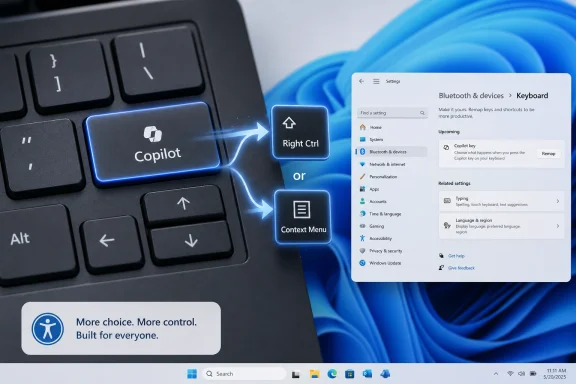
Microsoft has confirmed that a Windows 11 update later in 2026 will let users remap the dedicated Copilot key on newer PCs so it behaves as either Right Ctrl or the Context Menu key. The change is small in code and large in symbolism. After two years of treating a keyboard key as a billboard for the AI era, Microsoft is conceding that the physical PC still belongs partly to muscle memory, accessibility, and the boring productivity habits that actually keep Windows useful.
When Microsoft introduced the Copilot key in January 2024, it presented the move as the first major change to the Windows PC keyboard in nearly three decades. That was not just marketing flourish. The Windows key became a hardware-level symbol of the Windows 95 era; the Copilot key was meant to do the same for the AI PC era.
The problem is that the Windows key earned its place by becoming a general-purpose system affordance. It opened Start, anchored shortcuts, and eventually became a keyboard gateway into window management, search, screenshots, settings, emoji, virtual desktops, and more. The Copilot key, by contrast, arrived as a single-purpose invocation mechanism for a product whose usefulness varied sharply by region, account type, licensing, policy, and user preference.
That distinction matters. A key on a keyboard is not the same as an icon on a taskbar. It occupies scarce physical territory, and on many laptops the territory it occupied had previously belonged to Right Ctrl or the Context Menu key.
Microsoft’s new support language is unusually revealing because it does not pretend the transition was seamless. The company says some customers who relied on Right Ctrl or the Context Menu key for shortcuts or assistive technologies experienced workflow challenges. In corporate prose, that is about as close as a platform vendor gets to saying: we broke a few people’s hands.
Right Ctrl is especially important for users who mouse left-handed, who rely on right-side modifier combinations, who use terminal applications, who work in development tools, who play games with custom bindings, or who depend on accessibility software built around stable key geography. The Context Menu key, similarly, has long been a quiet accessibility and power-user feature: it brings up the right-click menu without requiring a mouse or touchpad.
The Copilot key disrupted those patterns not because it added AI, but because it displaced established input semantics. The keyboard is one of the few parts of the PC that still functions as a shared contract across decades of hardware and software. Users forgive change when it adds optional paths; they resent change when it replaces existing ones with a vendor campaign.
That is why this update is not merely a quality-of-life tweak. It is an admission that AI-first hardware still has to respect the habits that made the PC valuable in the first place.
What is changing is the level of coercion. The key can remain on the chassis, the icon can remain in the marketing render, and the laptop can still participate in the AI PC narrative. But once the machine is in the user’s hands, Windows will offer a sanctioned way to turn that key back into something closer to what the keyboard used to provide.
That distinction is classic Microsoft platform politics. The company rarely abandons a strategic direction outright; it sands down the roughest edges after user resistance becomes too visible to ignore. The Copilot key remains a symbol, but it will no longer be quite as much of a hostage situation.
The limitation is important, though. Microsoft is not promising a freely programmable key. The announced choices are Right Ctrl and Context Menu, not “open any app,” “run this script,” “mute microphone,” “launch terminal,” or “trigger a macro.” That keeps the feature framed as restoration rather than customization.
In other words, Microsoft is not turning the Copilot key into a power-user playground. It is offering a narrow repair for two specific keys that were commonly displaced.
For home users, that means less friction. For IT departments, it means less weirdness. A setting that ships in Windows can be documented, trained, supported, and potentially managed with less risk than a third-party remapper whose behavior may vary across devices or break under security controls.
But Microsoft’s caveat is also telling. The company warns that if the Copilot key is remapped to Right Ctrl, some combinations involving physical Left Shift and Right Ctrl may not work consistently on all keyboards, and users may need to use Right Shift for those shortcuts. That sounds like a small footnote, but it points to the mess beneath the surface.
The Copilot key was never simply a normal key with a different label. On many implementations, it is effectively exposed through a shortcut-like mechanism rather than as a clean, traditional Right Ctrl scancode. That is why unofficial remapping could feel fragile: users were not always remapping a key so much as intercepting a manufactured chord.
This is the danger of treating hardware as a launch vehicle for software strategy. Once the key exists across firmware, layout design, keyboard drivers, shell behavior, regional availability, and policy-controlled AI experiences, restoring an old behavior is no longer as simple as putting an old label back on a cap.
The Copilot key was the most literal version of that problem. It made Microsoft’s bet tactile. You could ignore a taskbar icon, uninstall an app, disable a setting, or avoid a subscription. A physical key, especially one replacing a useful key, made the strategy feel bolted onto the device.
That is a dangerous place for a platform owner to be. Windows succeeds when it feels like a neutral layer that lets wildly different users do wildly different things. It gets into trouble when it feels like the operating system is using the user’s own machine to advance Microsoft’s quarterly narrative.
The irony is that Copilot does not need a captive key to succeed. If the assistant becomes genuinely useful, users will find it through the taskbar, Start, search, Office apps, Edge, keyboard shortcuts, voice, context menus, or wherever else Microsoft embeds it. If it is not useful, a dedicated key does not solve the product problem. It merely advertises it.
But hardware cycles move differently from software confidence. A laptop purchased in 2024 or 2025 may be used into 2029 or beyond. If its keyboard layout was altered for a moment of AI enthusiasm, the user lives with that decision long after the marketing campaign has moved on.
That is why the remapping update lands differently from an ordinary Windows setting. It is a post-sale correction to a pre-sale assumption. Microsoft and its partners assumed that Copilot deserved permanent real estate. Users pushed back because the value of that real estate had not been earned.
There is also a subtle class divide in keyboard disruption. Enthusiast desktop users can often choose a full-size keyboard, swap keycaps, flash firmware, or buy something else. Laptop users are stuck. When an OEM removes Right Ctrl from a notebook, the user cannot fix the chassis.
Microsoft’s update gives those users a partial escape hatch, but it cannot fully undo the original design decision. A keycap still says Copilot. The layout still reflects a vendor priority. The user now gets to decide whether the electrical behavior matches the label.
Microsoft’s own support note acknowledges assistive technologies as part of the problem. That matters because accessibility failures are not merely edge cases; they expose assumptions buried in mainstream design. If a change breaks the workflow of someone who cannot easily switch to a mouse, it probably also harms power users, developers, gamers, translators, accountants, and anyone else whose productivity depends on repeatable input.
The Context Menu key is a good example. It is not glamorous, and it rarely appears in consumer marketing. But it is one of those features that keeps Windows operable when the mouse is unavailable, inconvenient, or impossible. Removing it in favor of an AI launcher sends a message about whose workflows counted during the design process.
The coming remap does not make Microsoft a villain or a hero. It shows the platform correcting itself after the consequences became too obvious. That is welcome, but it also raises the question of why the option was not available from day one.
But workarounds are not substitutes for platform design. They may fail under managed environments, trigger security review, behave differently with remote desktop tools, or break when keyboard firmware presents the Copilot key in inconsistent ways. They also shift the burden onto the user who did nothing wrong except buy a modern laptop.
A supported Settings toggle is therefore more than convenience. It is a recognition that the problem belongs to Windows, not to the user. If Microsoft requires or encourages a hardware pattern across the ecosystem, Microsoft has a responsibility to provide a first-party way to manage the consequences.
Still, the narrowness of the feature will frustrate some users. If Windows can detect the Copilot key and remap it to Right Ctrl or Context Menu, why not allow arbitrary remapping? Why not let it launch a chosen app, execute a chosen shortcut, or behave as a standard programmable key?
The likely answer is supportability. Microsoft wants to restore displaced platform keys without opening a broad macro surface that could create confusion, abuse, inconsistent OEM behavior, or enterprise policy headaches. That is understandable. It is also another reminder that Windows power users usually get freedom only after the corporate risk model has had its say.
Microsoft wanted the Copilot key to do what the Windows key once did: make a platform transition feel inevitable. But the Windows key pointed to an operating system feature that organized the entire PC experience. The Copilot key pointed to an assistant whose role has shifted repeatedly, whose availability has varied, and whose relationship to Windows has been reworked as Microsoft adjusts its AI strategy.
That instability makes the key feel less like the future and more like a timestamp. It marks a particular moment when every technology company wanted AI to be visible everywhere, even if visibility came before utility.
To Microsoft’s credit, the company appears to be learning that ubiquity is not the same as adoption. A user who remaps the Copilot key is not necessarily rejecting AI forever. They may simply be saying that Right Ctrl helps them today, while Copilot has not yet earned that square inch of plastic.
There is a lesson here for Windows as a product. The PC is not an appliance in the same way a phone or game console is. Its value comes from adaptation. Users expect to bend it around work, disability, habit, profession, play, and preference.
When Microsoft forgets that, Windows feels smaller. When it remembers, even a modest setting can feel like the platform breathing again.
That is why this update will likely be welcomed far beyond the number of people who use Right Ctrl every day. It signals that Microsoft is willing, at least in this case, to let the user’s workflow outrank the company’s branding.
The limits remain just as concrete.
 Microsoft’s AI Key Meets the Old Keyboard Contract
When Microsoft introduced the Copilot key in January 2024, it presented the move as the first major change to the Windows PC keyboard in nearly three decades. That was not just marketing flourish. The Windows key became a hardware-level symbol of the Windows 95 era; the Copilot key was meant to do the same for the AI PC era.The problem is that the Windows key earned its place by becoming a general-purpose system affordance. It opened Start, anchored shortcuts, and eventually became a keyboard gateway into window management, search, screenshots, settings, emoji, virtual desktops, and more. The Copilot key, by contrast, arrived as a single-purpose invocation mechanism for a product whose usefulness varied sharply by region, account type, licensing, policy, and user preference.
That distinction matters. A key on a keyboard is not the same as an icon on a taskbar. It occupies scarce physical territory, and on many laptops the territory it occupied had previously belonged to Right Ctrl or the Context Menu key.
Microsoft’s new support language is unusually revealing because it does not pretend the transition was seamless. The company says some customers who relied on Right Ctrl or the Context Menu key for shortcuts or assistive technologies experienced workflow challenges. In corporate prose, that is about as close as a platform vendor gets to saying: we broke a few people’s hands.
The Right Ctrl Key Was Not Dead Weight
Right Ctrl is easy to dismiss if you never use it. Many users live entirely on the left side of the keyboard for modifier shortcuts, and laptop makers have spent years shaving away navigation clusters, menu keys, and secondary modifiers in pursuit of thinner layouts. But keyboard habits are not democratic. The fact that a key is unused by one person is not evidence that it is disposable for everyone else.Right Ctrl is especially important for users who mouse left-handed, who rely on right-side modifier combinations, who use terminal applications, who work in development tools, who play games with custom bindings, or who depend on accessibility software built around stable key geography. The Context Menu key, similarly, has long been a quiet accessibility and power-user feature: it brings up the right-click menu without requiring a mouse or touchpad.
The Copilot key disrupted those patterns not because it added AI, but because it displaced established input semantics. The keyboard is one of the few parts of the PC that still functions as a shared contract across decades of hardware and software. Users forgive change when it adds optional paths; they resent change when it replaces existing ones with a vendor campaign.
That is why this update is not merely a quality-of-life tweak. It is an admission that AI-first hardware still has to respect the habits that made the PC valuable in the first place.
Microsoft Is Reversing the Pressure, Not the Strategy
It would be tempting to read this as Microsoft backing away from Copilot. That would be too simple. Microsoft is not removing the Copilot key requirement from the Windows AI PC story, and OEMs still have strong incentives to ship hardware that visually signals alignment with Copilot+ branding.What is changing is the level of coercion. The key can remain on the chassis, the icon can remain in the marketing render, and the laptop can still participate in the AI PC narrative. But once the machine is in the user’s hands, Windows will offer a sanctioned way to turn that key back into something closer to what the keyboard used to provide.
That distinction is classic Microsoft platform politics. The company rarely abandons a strategic direction outright; it sands down the roughest edges after user resistance becomes too visible to ignore. The Copilot key remains a symbol, but it will no longer be quite as much of a hostage situation.
The limitation is important, though. Microsoft is not promising a freely programmable key. The announced choices are Right Ctrl and Context Menu, not “open any app,” “run this script,” “mute microphone,” “launch terminal,” or “trigger a macro.” That keeps the feature framed as restoration rather than customization.
In other words, Microsoft is not turning the Copilot key into a power-user playground. It is offering a narrow repair for two specific keys that were commonly displaced.
The Support Document Says the Quiet Part Carefully
The coming option will live in Settings under Bluetooth & devices, then Keyboard. That placement matters because it makes the change part of the supported Windows configuration surface rather than a registry hack, firmware utility, PowerToys workaround, or AutoHotkey script.For home users, that means less friction. For IT departments, it means less weirdness. A setting that ships in Windows can be documented, trained, supported, and potentially managed with less risk than a third-party remapper whose behavior may vary across devices or break under security controls.
But Microsoft’s caveat is also telling. The company warns that if the Copilot key is remapped to Right Ctrl, some combinations involving physical Left Shift and Right Ctrl may not work consistently on all keyboards, and users may need to use Right Shift for those shortcuts. That sounds like a small footnote, but it points to the mess beneath the surface.
The Copilot key was never simply a normal key with a different label. On many implementations, it is effectively exposed through a shortcut-like mechanism rather than as a clean, traditional Right Ctrl scancode. That is why unofficial remapping could feel fragile: users were not always remapping a key so much as intercepting a manufactured chord.
This is the danger of treating hardware as a launch vehicle for software strategy. Once the key exists across firmware, layout design, keyboard drivers, shell behavior, regional availability, and policy-controlled AI experiences, restoring an old behavior is no longer as simple as putting an old label back on a cap.
The AI PC Needed Trust More Than Another Button
Microsoft’s Copilot push has suffered from a recurring timing problem. The company has often acted as if users had already accepted the AI PC as a settled category, while many users were still evaluating whether Copilot improved their daily work at all. That gap produced friction around features like Recall, around Copilot’s changing role inside Windows, and around the sense that AI entry points were multiplying faster than clear benefits.The Copilot key was the most literal version of that problem. It made Microsoft’s bet tactile. You could ignore a taskbar icon, uninstall an app, disable a setting, or avoid a subscription. A physical key, especially one replacing a useful key, made the strategy feel bolted onto the device.
That is a dangerous place for a platform owner to be. Windows succeeds when it feels like a neutral layer that lets wildly different users do wildly different things. It gets into trouble when it feels like the operating system is using the user’s own machine to advance Microsoft’s quarterly narrative.
The irony is that Copilot does not need a captive key to succeed. If the assistant becomes genuinely useful, users will find it through the taskbar, Start, search, Office apps, Edge, keyboard shortcuts, voice, context menus, or wherever else Microsoft embeds it. If it is not useful, a dedicated key does not solve the product problem. It merely advertises it.
OEMs Sold the Future Before the Workflow Was Ready
Laptop manufacturers had little reason to resist the Copilot key. The PC market had been searching for a new upgrade story, and the AI PC gave vendors a fresh reason to sell premium machines after years of good-enough hardware. A dedicated key made the story visible in photographs and retail displays.But hardware cycles move differently from software confidence. A laptop purchased in 2024 or 2025 may be used into 2029 or beyond. If its keyboard layout was altered for a moment of AI enthusiasm, the user lives with that decision long after the marketing campaign has moved on.
That is why the remapping update lands differently from an ordinary Windows setting. It is a post-sale correction to a pre-sale assumption. Microsoft and its partners assumed that Copilot deserved permanent real estate. Users pushed back because the value of that real estate had not been earned.
There is also a subtle class divide in keyboard disruption. Enthusiast desktop users can often choose a full-size keyboard, swap keycaps, flash firmware, or buy something else. Laptop users are stuck. When an OEM removes Right Ctrl from a notebook, the user cannot fix the chassis.
Microsoft’s update gives those users a partial escape hatch, but it cannot fully undo the original design decision. A keycap still says Copilot. The layout still reflects a vendor priority. The user now gets to decide whether the electrical behavior matches the label.
Accessibility Turned a Preference Fight Into a Platform Problem
The strongest argument against the original Copilot-key rigidity was never nostalgia. It was accessibility. Users who depend on screen readers, keyboard navigation, context menus, predictable modifiers, or one-handed workflows do not experience key changes as cosmetic.Microsoft’s own support note acknowledges assistive technologies as part of the problem. That matters because accessibility failures are not merely edge cases; they expose assumptions buried in mainstream design. If a change breaks the workflow of someone who cannot easily switch to a mouse, it probably also harms power users, developers, gamers, translators, accountants, and anyone else whose productivity depends on repeatable input.
The Context Menu key is a good example. It is not glamorous, and it rarely appears in consumer marketing. But it is one of those features that keeps Windows operable when the mouse is unavailable, inconvenient, or impossible. Removing it in favor of an AI launcher sends a message about whose workflows counted during the design process.
The coming remap does not make Microsoft a villain or a hero. It shows the platform correcting itself after the consequences became too obvious. That is welcome, but it also raises the question of why the option was not available from day one.
PowerToys Was the Pressure Valve Microsoft Should Have Built In
For many Windows enthusiasts, the obvious answer has been PowerToys, AutoHotkey, registry-level workarounds, or small utilities designed to intercept the Copilot key and turn it back into Right Ctrl. That ecosystem is one of Windows’ enduring strengths: when Microsoft leaves a gap, users and developers often fill it.But workarounds are not substitutes for platform design. They may fail under managed environments, trigger security review, behave differently with remote desktop tools, or break when keyboard firmware presents the Copilot key in inconsistent ways. They also shift the burden onto the user who did nothing wrong except buy a modern laptop.
A supported Settings toggle is therefore more than convenience. It is a recognition that the problem belongs to Windows, not to the user. If Microsoft requires or encourages a hardware pattern across the ecosystem, Microsoft has a responsibility to provide a first-party way to manage the consequences.
Still, the narrowness of the feature will frustrate some users. If Windows can detect the Copilot key and remap it to Right Ctrl or Context Menu, why not allow arbitrary remapping? Why not let it launch a chosen app, execute a chosen shortcut, or behave as a standard programmable key?
The likely answer is supportability. Microsoft wants to restore displaced platform keys without opening a broad macro surface that could create confusion, abuse, inconsistent OEM behavior, or enterprise policy headaches. That is understandable. It is also another reminder that Windows power users usually get freedom only after the corporate risk model has had its say.
The Copilot Key Is a Warning About AI Branding
The larger lesson is not that the Copilot key was a mistake. It is that AI branding becomes risky when it hardens into hardware before the user value is obvious. A keyboard is not a splash screen. It is infrastructure.Microsoft wanted the Copilot key to do what the Windows key once did: make a platform transition feel inevitable. But the Windows key pointed to an operating system feature that organized the entire PC experience. The Copilot key pointed to an assistant whose role has shifted repeatedly, whose availability has varied, and whose relationship to Windows has been reworked as Microsoft adjusts its AI strategy.
That instability makes the key feel less like the future and more like a timestamp. It marks a particular moment when every technology company wanted AI to be visible everywhere, even if visibility came before utility.
To Microsoft’s credit, the company appears to be learning that ubiquity is not the same as adoption. A user who remaps the Copilot key is not necessarily rejecting AI forever. They may simply be saying that Right Ctrl helps them today, while Copilot has not yet earned that square inch of plastic.
Windows 11 Needs Fewer Mandates and Better Defaults
The Copilot-key retreat fits a broader pattern in Windows 11’s maturation. Microsoft has spent much of the Windows 11 era making opinionated interface decisions, then slowly restoring knobs after users objected. The Start menu, taskbar, default apps, system ads, account prompts, and AI integration have all followed some version of this arc.There is a lesson here for Windows as a product. The PC is not an appliance in the same way a phone or game console is. Its value comes from adaptation. Users expect to bend it around work, disability, habit, profession, play, and preference.
When Microsoft forgets that, Windows feels smaller. When it remembers, even a modest setting can feel like the platform breathing again.
That is why this update will likely be welcomed far beyond the number of people who use Right Ctrl every day. It signals that Microsoft is willing, at least in this case, to let the user’s workflow outrank the company’s branding.
The Copilot Key’s New Job Is Damage Control
The practical implications are simple, but they land differently for different audiences. Enthusiasts get a cleaner alternative to remapping hacks. Laptop buyers get a reason to worry a little less about AI-branded keyboards. IT admins get a more supportable story, assuming Microsoft exposes enough manageability around the setting. Accessibility users get partial restoration of keys that should not have vanished without an official fallback.The limits remain just as concrete.
- The Windows 11 update is expected later in 2026, but Microsoft has not announced an exact release date.
- The supported remap targets are Right Ctrl and the Context Menu key, not arbitrary apps, macros, or custom shortcuts.
- The setting is expected under Settings, Bluetooth & devices, and Keyboard.
- The behavior may vary by device because Copilot key implementations depend on manufacturer design, firmware, and keyboard layout.
- Some Left Shift plus remapped Right Ctrl combinations may not work consistently on all keyboards.
- Third-party tools will still matter for users who want the Copilot key to do something more ambitious than restore a displaced key.
References
- Primary source: Notebookcheck
Published: Mon, 18 May 2026 09:35:00 GMT
Microsoft frees the Copilot key from AI - Notebookcheck News
Since 2024, Microsoft has almost forced laptop manufacturers to install a keyboard with a Copilot key. Until now, this key has been practically useless for users who did not want to use Microsoft's AI assistant. This is set to change later this year. www.notebookcheck.net
- Related coverage: windowscentral.com
New Copilot keyboard shortcuts are coming to Microsoft 365 | Windows Central
A new floating icon and Alt + C shortcut are replacing old entry points in Microsoft 365 apps.www.windowscentral.com - Official source: support.microsoft.com
Understand updates to the Copilot key on Windows devices | Microsoft Support
Understand updates to the Copilot key on Windows devicessupport.microsoft.com - Related coverage: windowsnews.ai
Windows 11 2026 Update Finally Adds Native Copilot Key Remapping to Settings - Windows News
The Windows 11 2026 Update finally allows remapping the dedicated Copilot key to Right Ctrl or Context Menu. Here's how it works and why users have been...windowsnews.ai - Related coverage: windowsforum.com
Windows 11 2026 Update: Remap Copilot Key to Right Ctrl or Context Menu | Windows Forum
Microsoft says a Windows 11 update later in 2026 will let PCs with a dedicated Copilot key remap that key to either Right Ctrl or the Context menu key from...windowsforum.com - Official source: blogs.windows.com
Introducing a new Copilot key to kick off the year of AI-powered Windows PCs
Today, we are excited to take the next significant step forward and introduce a new Copilot key to Windows 11 PCs. In this new year, we will be ushering in a significant shift toward a more personal and intelligent computing future where AI will be sblogs.windows.com
- Related coverage: axios.com
Microsoft gives AI a place on the Windows keyboard
It's the first change to the PC keyboard since the addition of the Windows button 30 years ago.www.axios.com
- Official source: news.microsoft.com
</rdf:Alt> </dc:title> <dc:description> <rdf:Alt> <rdf:li xml:lang="x-default"/> </rdf:Alt> </dc:description> <dc:creator> <rdf:Seq> <rdf:li>Joseph
</rdf:Alt> </dc:description> <dc:creator> <rdf:Seq> <rdf:li>Joseph Galbraith (MBO Partners, Inc.)news.microsoft.com
