

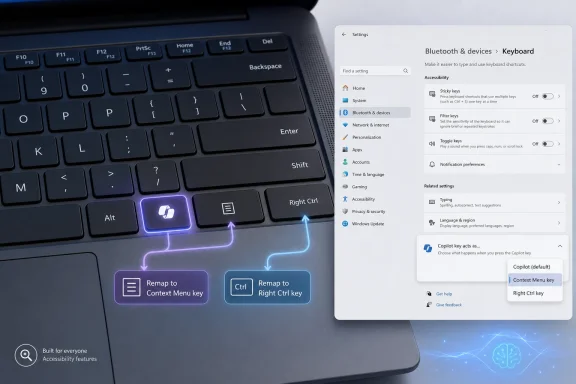
Microsoft is preparing a Windows 11 update for later in 2026 that will let users remap the dedicated Copilot key on newer PCs so it behaves as either the Context Menu key or the Right Ctrl key. That sounds like a small keyboard setting, but it is really an admission that Microsoft turned a familiar piece of PC hardware into an AI billboard before it had earned the right to do so. The coming fix matters because it restores something users should never have lost: the ability to decide whether a physical key serves their workflow or Microsoft’s product strategy.
When Microsoft announced the Copilot key in early 2024, the company framed it as the most significant change to the Windows keyboard in decades. The symbolism was obvious. Windows was no longer merely getting AI features; AI was being given a reserved seat on the keyboard, right beside the space bar, arrows, and modifier keys that define how people operate a PC.
But the keyboard is not the Start menu. It is not a taskbar icon, a promotional tile, or a bundled app that can be ignored after first boot. A key has weight because it is physical, repeatable, and deeply tied to muscle memory. Replacing Right Ctrl or the Context Menu key with a Copilot button did not just add a shortcut; on many devices, it removed an old one.
That distinction is why the backlash has lingered. The complaint was never simply that Microsoft was pushing Copilot. Windows users have lived through enough bundled services, defaults, assistants, widgets, and nudges to recognize the pattern. The sharper complaint was that Microsoft allowed an unfinished software bet to consume a hardware affordance that power users, accessibility users, developers, gamers, and left-handed mouse users may have relied on for years.
The support document now acknowledges the obvious in polite corporate language: some customers who depended on Right Ctrl or the Context Menu key experienced workflow problems. In ordinary English, Microsoft shipped PCs that broke habits and shortcuts for people who know exactly why those keys exist.
That is a legitimate product ambition. Microsoft has invested heavily in Copilot across Windows, Microsoft 365, Edge, GitHub, Azure, and its broader developer ecosystem. The company wants AI to become a routine interface layer rather than a novelty. A dedicated key is a powerful way to signal that transition to OEMs, buyers, reviewers, and ordinary users.
The problem is that a keyboard key carries a different social contract than a software feature. If a user dislikes a sidebar, they can close it. If they dislike a taskbar icon, they can unpin it. If they dislike a web app, they can ignore it. But if the key that used to serve as Right Ctrl now launches an assistant, the user has not been offered a feature; they have been asked to subsidize Microsoft’s strategy with their muscle memory.
That is why this remapping change feels both welcome and belated. Microsoft is not merely adding customization. It is retreating from the idea that the Copilot key should have a privileged relationship with Copilot alone.
But “rarely used by the median user” is not the same as “disposable.” Modifier keys are disproportionately important to people with specialized workflows. Developers use them in editors and terminal environments. Multilingual users may rely on right-side modifiers for layout-specific input. Gamers and creative professionals often build muscle memory around exact key positions. Accessibility tools and screen readers can depend on combinations that are invisible to casual users but essential to those who use them every day.
The Context Menu key occupies a similar category. It is unfashionable, easily forgotten, and absent from plenty of modern laptops. Yet for keyboard-first users, it remains a direct way to invoke the same contextual options that a right-click would expose. Removing it is not catastrophic for everyone, but it is disruptive for the people who specifically chose keyboard navigation over pointer-driven interaction.
That is the trap Microsoft fell into. The company appears to have measured the key by its visibility rather than by the intensity of the people who depend on it. In software, that mistake produces annoyance. In hardware, it produces a daily reminder that the machine was designed around someone else’s priorities.
It also improves on the earlier style of Copilot key customization. Microsoft had already allowed some users to redirect the key toward selected apps, search, or packaged app experiences, particularly as the Copilot app story evolved. But launching another app is not the same as restoring a modifier key. A user who lost Right Ctrl does not need the Copilot key to open Notepad, Teams, or a third-party utility. They need it to behave like the key that the laptop’s printed layout effectively deleted.
There is also an important difference between OS-level remapping and userland workarounds. Utilities such as PowerToys, AutoHotkey scripts, registry hacks, and small third-party tools have filled the gap, sometimes cleverly. But the Copilot key has not always behaved like a normal scancode-level key in the way users expect. On some systems it has been interpreted through combinations involving Windows, Shift, and an extended function key. That makes remapping less predictable, especially for modifier behavior.
A native Windows setting should reduce that uncertainty. It gives non-technical users a supported path, gives IT departments a cleaner baseline, and gives OEM support teams something better to recommend than “try this GitHub utility and hope it works after sleep resume.” For a keyboard change that shipped on mainstream laptops, that supportability matters.
Microsoft’s Copilot story on Windows has changed repeatedly. The old Windows Copilot sidebar gave way to app-based and Microsoft 365 Copilot Chat experiences. Commercial users with Entra accounts can encounter different behavior from consumers. Admins can use policy controls to manage the Copilot hardware key target, and Microsoft has been steering organizations toward app control mechanisms such as AppLocker for some Copilot scenarios.
That is a lot of machinery for a single key. The more Microsoft moves Copilot between web surfaces, native shells, Microsoft 365 containers, lightweight prompt boxes, and voice features, the more absurd it becomes to hardwire the physical keyboard around one moment in that product roadmap. Hardware should outlive software fashions. The Copilot key, as originally presented, inverted that relationship.
A native remap option gives administrators a pressure valve. In a heavily locked-down environment, the safest and least controversial answer may be to map the key back to Right Ctrl or Context Menu and treat Copilot access as a policy-managed application decision rather than a keyboard mandate. That does not solve every governance issue around AI in Windows, but it moves one part of the debate back where it belongs: into configuration, not plastic.
For a screen reader user, a keyboard-first user, or someone using adaptive workflows, the loss of a familiar key can be more than inconvenient. It can force retraining, break established shortcuts, or require a workaround that may not survive device changes or administrative restrictions. Even if only a minority of affected users encounter serious problems, Windows is big enough that “minority” can mean a very large number of people.
Microsoft has spent years positioning accessibility as a core Windows value. The company has often earned credit for serious work in inclusive design, from Narrator improvements to controller accessibility and adaptive hardware. That is precisely why the Copilot key decision felt so discordant. It treated an accessibility-relevant hardware change as if it were merely a branding opportunity.
The coming remap option does not erase that. It does, however, suggest that feedback from affected users finally reached the part of Microsoft that could act on it. The lesson should be obvious for future AI-era hardware experiments: if a new key replaces an old key, restoration must be a day-one feature, not a later concession.
Still, Linux users expose the larger design flaw. A keyboard is not supposed to be meaningful only when one vendor’s preferred software stack is present. If a key produces a sensible, standard input event, operating systems and desktop environments can decide what to do with it. If it behaves as a branded shortcut glued to a platform-specific assistant, it becomes less like a key and more like an advertisement.
This is particularly important because modern laptops often ship with hardware that outlives the preinstalled OS. Enthusiasts dual-boot. Developers install Linux. Enterprises reimage devices. Refurbished machines move between owners. A key that becomes useless or awkward outside Microsoft’s intended Copilot path is poor hardware design, even if it makes sense in a launch presentation.
Microsoft cannot be expected to optimize every Windows PC feature for every Linux distribution. But it can avoid making the keyboard more proprietary than it needs to be. Remapping to standard key behavior is the minimum viable compromise.
For enthusiasts, this has fed a familiar complaint: Microsoft is better at inserting AI touchpoints than explaining why the average Windows user should want them. The Copilot key became the most literal expression of that complaint. It was not a prompt asking users to try AI. It was a physical assertion that AI deserved a permanent place in the input layer.
That matters because Windows users already live with a lot of ambient Microsoft intent. Edge recommendations, OneDrive prompts, Microsoft account nudges, widgets, search integrations, Store apps, and default app prompts have all trained users to be suspicious when Microsoft says a change is for convenience. Sometimes it is. Often it is also distribution.
The Copilot key arrived in that climate. Even users who might eventually find Copilot useful saw the dedicated key as a little too eager, a little too soon, and a little too indifferent to existing workflows. The remap option will not change everyone’s mind about Copilot, but it removes one especially visible reason to resent it.
The result was uneven. Some devices replaced the Context Menu key. Some replaced Right Ctrl. Some implementations behaved differently enough that remapping guidance became device-dependent. That inconsistency is exactly what users hate about PC hardware transitions: the marketing message is unified, but the pain is distributed across individual models.
The coming Windows setting may smooth over part of that variance, but Microsoft’s own support language still warns that keyboard layouts, firmware, and hardware design can differ by manufacturer. There is even a caveat that some combinations involving the physical Left Shift key and remapped Right Ctrl may not work consistently on all keyboards, with Microsoft suggesting the physical Right Shift key as a workaround.
That caveat is small but revealing. It suggests that the original hardware and firmware assumptions were never as clean as the marketing implied. Turning a branded assistant key back into a true modifier is not always trivial if the key was not designed from the beginning to behave like one.
That version of the idea would have been easy to defend. Microsoft could have introduced a “smart key” or “assistant key” with Copilot as the default and remapping as a first-class feature. It could have told OEMs that replacing existing keys requires restoring them in Settings. It could have framed customization as proof that Windows remains the general-purpose computing platform, even in the AI era.
Instead, Microsoft led with Copilot first and flexibility later. That ordering is why the new setting feels corrective rather than visionary. It is useful, but it is not generous. It gives users back two specific functions that some devices took away.
Still, the update may open the door to a healthier model. If Microsoft learns the right lesson, the Copilot key can evolve from a fixed AI button into a configurable Windows hardware control. If it learns the wrong one, it will simply treat this as a PR patch and continue looking for new places to hardcode its services.
But the broader reading is more important. Microsoft misjudged the difference between adding access to AI and taking away access to established input conventions. The company is now correcting that mistake, but only after months of user workarounds, forum threads, third-party utilities, and avoidable frustration.
 Microsoft Put Its AI Strategy Where Muscle Memory Used to Live
When Microsoft announced the Copilot key in early 2024, the company framed it as the most significant change to the Windows keyboard in decades. The symbolism was obvious. Windows was no longer merely getting AI features; AI was being given a reserved seat on the keyboard, right beside the space bar, arrows, and modifier keys that define how people operate a PC.But the keyboard is not the Start menu. It is not a taskbar icon, a promotional tile, or a bundled app that can be ignored after first boot. A key has weight because it is physical, repeatable, and deeply tied to muscle memory. Replacing Right Ctrl or the Context Menu key with a Copilot button did not just add a shortcut; on many devices, it removed an old one.
That distinction is why the backlash has lingered. The complaint was never simply that Microsoft was pushing Copilot. Windows users have lived through enough bundled services, defaults, assistants, widgets, and nudges to recognize the pattern. The sharper complaint was that Microsoft allowed an unfinished software bet to consume a hardware affordance that power users, accessibility users, developers, gamers, and left-handed mouse users may have relied on for years.
The support document now acknowledges the obvious in polite corporate language: some customers who depended on Right Ctrl or the Context Menu key experienced workflow problems. In ordinary English, Microsoft shipped PCs that broke habits and shortcuts for people who know exactly why those keys exist.
The Copilot Key Was Always More Than a Shortcut
A dedicated key for Copilot was never just about saving users a click. Windows already has many ways to launch software: Start, taskbar pins, search, Win-key shortcuts, voice, widgets, app launchers, and enterprise-managed configurations. The Copilot key was about making AI feel native, inevitable, and close at hand.That is a legitimate product ambition. Microsoft has invested heavily in Copilot across Windows, Microsoft 365, Edge, GitHub, Azure, and its broader developer ecosystem. The company wants AI to become a routine interface layer rather than a novelty. A dedicated key is a powerful way to signal that transition to OEMs, buyers, reviewers, and ordinary users.
The problem is that a keyboard key carries a different social contract than a software feature. If a user dislikes a sidebar, they can close it. If they dislike a taskbar icon, they can unpin it. If they dislike a web app, they can ignore it. But if the key that used to serve as Right Ctrl now launches an assistant, the user has not been offered a feature; they have been asked to subsidize Microsoft’s strategy with their muscle memory.
That is why this remapping change feels both welcome and belated. Microsoft is not merely adding customization. It is retreating from the idea that the Copilot key should have a privileged relationship with Copilot alone.
The Right Ctrl Crowd Was Smaller Than the Windows Crowd, But Not Imaginary
For many casual users, Right Ctrl is a key they rarely notice. It sits on the lower-right edge of the keyboard, often ignored by people who type with both hands but rely mostly on left-side modifiers. That likely made it tempting territory for laptop makers looking for a place to put Microsoft’s new AI key without expanding the keyboard deck.But “rarely used by the median user” is not the same as “disposable.” Modifier keys are disproportionately important to people with specialized workflows. Developers use them in editors and terminal environments. Multilingual users may rely on right-side modifiers for layout-specific input. Gamers and creative professionals often build muscle memory around exact key positions. Accessibility tools and screen readers can depend on combinations that are invisible to casual users but essential to those who use them every day.
The Context Menu key occupies a similar category. It is unfashionable, easily forgotten, and absent from plenty of modern laptops. Yet for keyboard-first users, it remains a direct way to invoke the same contextual options that a right-click would expose. Removing it is not catastrophic for everyone, but it is disruptive for the people who specifically chose keyboard navigation over pointer-driven interaction.
That is the trap Microsoft fell into. The company appears to have measured the key by its visibility rather than by the intensity of the people who depend on it. In software, that mistake produces annoyance. In hardware, it produces a daily reminder that the machine was designed around someone else’s priorities.
Native Remapping Fixes the Practical Problem, Not the Original Mistake
The forthcoming Windows 11 option will live under Settings, Bluetooth & devices, Keyboard. Microsoft says it will allow the Copilot key to act as either the Context Menu key or Right Ctrl. That is a narrower fix than some users might want, but it is the fix that matters most for machines where those keys were displaced.It also improves on the earlier style of Copilot key customization. Microsoft had already allowed some users to redirect the key toward selected apps, search, or packaged app experiences, particularly as the Copilot app story evolved. But launching another app is not the same as restoring a modifier key. A user who lost Right Ctrl does not need the Copilot key to open Notepad, Teams, or a third-party utility. They need it to behave like the key that the laptop’s printed layout effectively deleted.
There is also an important difference between OS-level remapping and userland workarounds. Utilities such as PowerToys, AutoHotkey scripts, registry hacks, and small third-party tools have filled the gap, sometimes cleverly. But the Copilot key has not always behaved like a normal scancode-level key in the way users expect. On some systems it has been interpreted through combinations involving Windows, Shift, and an extended function key. That makes remapping less predictable, especially for modifier behavior.
A native Windows setting should reduce that uncertainty. It gives non-technical users a supported path, gives IT departments a cleaner baseline, and gives OEM support teams something better to recommend than “try this GitHub utility and hope it works after sleep resume.” For a keyboard change that shipped on mainstream laptops, that supportability matters.
The Enterprise Angle Is Less About AI and More About Control
For IT administrators, the Copilot key has always sat at the intersection of three headaches: user experience, app governance, and Microsoft’s shifting AI packaging. In managed environments, the question is not just whether a key launches Copilot. It is which Copilot experience it launches, under which account, with which data protections, and whether the organization even wants that entry point exposed.Microsoft’s Copilot story on Windows has changed repeatedly. The old Windows Copilot sidebar gave way to app-based and Microsoft 365 Copilot Chat experiences. Commercial users with Entra accounts can encounter different behavior from consumers. Admins can use policy controls to manage the Copilot hardware key target, and Microsoft has been steering organizations toward app control mechanisms such as AppLocker for some Copilot scenarios.
That is a lot of machinery for a single key. The more Microsoft moves Copilot between web surfaces, native shells, Microsoft 365 containers, lightweight prompt boxes, and voice features, the more absurd it becomes to hardwire the physical keyboard around one moment in that product roadmap. Hardware should outlive software fashions. The Copilot key, as originally presented, inverted that relationship.
A native remap option gives administrators a pressure valve. In a heavily locked-down environment, the safest and least controversial answer may be to map the key back to Right Ctrl or Context Menu and treat Copilot access as a policy-managed application decision rather than a keyboard mandate. That does not solve every governance issue around AI in Windows, but it moves one part of the debate back where it belongs: into configuration, not plastic.
Accessibility Was the Warning Microsoft Should Have Heard Earlier
The support document’s reference to assistive technologies is not a side note. It is central to why this controversy has sharper edges than a typical Windows preference dispute. Keyboard layouts are part of accessibility, and changes to them can have consequences that product teams underestimate if they treat keys as mere launch surfaces.For a screen reader user, a keyboard-first user, or someone using adaptive workflows, the loss of a familiar key can be more than inconvenient. It can force retraining, break established shortcuts, or require a workaround that may not survive device changes or administrative restrictions. Even if only a minority of affected users encounter serious problems, Windows is big enough that “minority” can mean a very large number of people.
Microsoft has spent years positioning accessibility as a core Windows value. The company has often earned credit for serious work in inclusive design, from Narrator improvements to controller accessibility and adaptive hardware. That is precisely why the Copilot key decision felt so discordant. It treated an accessibility-relevant hardware change as if it were merely a branding opportunity.
The coming remap option does not erase that. It does, however, suggest that feedback from affected users finally reached the part of Microsoft that could act on it. The lesson should be obvious for future AI-era hardware experiments: if a new key replaces an old key, restoration must be a day-one feature, not a later concession.
Linux Users Were Never the Target Audience, But They Proved the Point
The PiunikaWeb report notes that Linux users may still need third-party tools to make practical use of the Copilot key. That is unsurprising. A Windows-branded AI key on a laptop was never designed with Linux desktop workflows in mind, and OEM firmware implementations can vary in ways that make cross-platform behavior messy.Still, Linux users expose the larger design flaw. A keyboard is not supposed to be meaningful only when one vendor’s preferred software stack is present. If a key produces a sensible, standard input event, operating systems and desktop environments can decide what to do with it. If it behaves as a branded shortcut glued to a platform-specific assistant, it becomes less like a key and more like an advertisement.
This is particularly important because modern laptops often ship with hardware that outlives the preinstalled OS. Enthusiasts dual-boot. Developers install Linux. Enterprises reimage devices. Refurbished machines move between owners. A key that becomes useless or awkward outside Microsoft’s intended Copilot path is poor hardware design, even if it makes sense in a launch presentation.
Microsoft cannot be expected to optimize every Windows PC feature for every Linux distribution. But it can avoid making the keyboard more proprietary than it needs to be. Remapping to standard key behavior is the minimum viable compromise.
The Copilot Key Became a Referendum on Windows 11’s AI Push
The reaction to this change is also colored by broader frustration with Windows 11’s AI direction. Copilot has appeared in different forms, moved between taskbar, app, sidebar, web wrapper, Microsoft 365 entry point, and hardware shortcut, while users have sometimes struggled to understand what is local, what is cloud-backed, what is enterprise-protected, and what is simply another Microsoft service competing for attention.For enthusiasts, this has fed a familiar complaint: Microsoft is better at inserting AI touchpoints than explaining why the average Windows user should want them. The Copilot key became the most literal expression of that complaint. It was not a prompt asking users to try AI. It was a physical assertion that AI deserved a permanent place in the input layer.
That matters because Windows users already live with a lot of ambient Microsoft intent. Edge recommendations, OneDrive prompts, Microsoft account nudges, widgets, search integrations, Store apps, and default app prompts have all trained users to be suspicious when Microsoft says a change is for convenience. Sometimes it is. Often it is also distribution.
The Copilot key arrived in that climate. Even users who might eventually find Copilot useful saw the dedicated key as a little too eager, a little too soon, and a little too indifferent to existing workflows. The remap option will not change everyone’s mind about Copilot, but it removes one especially visible reason to resent it.
Hardware Vendors Got Pulled Into Microsoft’s Software Bet
OEMs are not innocent bystanders here. Laptop makers chose specific layouts, shipped specific implementations, and in some cases replaced keys that their customers still wanted. But Microsoft set the direction. Once the Copilot key became part of the Windows PC marketing push, especially around AI PCs and Copilot+ branding, manufacturers had a strong incentive to conform.The result was uneven. Some devices replaced the Context Menu key. Some replaced Right Ctrl. Some implementations behaved differently enough that remapping guidance became device-dependent. That inconsistency is exactly what users hate about PC hardware transitions: the marketing message is unified, but the pain is distributed across individual models.
The coming Windows setting may smooth over part of that variance, but Microsoft’s own support language still warns that keyboard layouts, firmware, and hardware design can differ by manufacturer. There is even a caveat that some combinations involving the physical Left Shift key and remapped Right Ctrl may not work consistently on all keyboards, with Microsoft suggesting the physical Right Shift key as a workaround.
That caveat is small but revealing. It suggests that the original hardware and firmware assumptions were never as clean as the marketing implied. Turning a branded assistant key back into a true modifier is not always trivial if the key was not designed from the beginning to behave like one.
The Best Version of the Copilot Key Is a User-Defined Key
There is a stronger product idea buried inside this controversy. A dedicated programmable key on Windows laptops could be genuinely useful. Users might map it to Copilot, Search, a terminal, an accessibility tool, a password manager, a macro launcher, a note app, a meeting mute toggle, or a custom workflow. Enterprises might map it to support portals, internal chat, secure browsers, or productivity hubs.That version of the idea would have been easy to defend. Microsoft could have introduced a “smart key” or “assistant key” with Copilot as the default and remapping as a first-class feature. It could have told OEMs that replacing existing keys requires restoring them in Settings. It could have framed customization as proof that Windows remains the general-purpose computing platform, even in the AI era.
Instead, Microsoft led with Copilot first and flexibility later. That ordering is why the new setting feels corrective rather than visionary. It is useful, but it is not generous. It gives users back two specific functions that some devices took away.
Still, the update may open the door to a healthier model. If Microsoft learns the right lesson, the Copilot key can evolve from a fixed AI button into a configurable Windows hardware control. If it learns the wrong one, it will simply treat this as a PR patch and continue looking for new places to hardcode its services.
The Small Keyboard Setting That Says Microsoft Overreached
The most concrete reading of this update is also the fairest one: Windows 11 users with affected keyboards are getting a supported way to restore important key behavior. That is good news. It is especially good for people who bought new hardware and discovered only afterward that their keyboard layout had been quietly redefined around Copilot.But the broader reading is more important. Microsoft misjudged the difference between adding access to AI and taking away access to established input conventions. The company is now correcting that mistake, but only after months of user workarounds, forum threads, third-party utilities, and avoidable frustration.
- Microsoft says a Windows 11 update later in 2026 will add native Copilot key remapping to Right Ctrl or the Context Menu key.
- The setting is expected to appear under Settings, Bluetooth & devices, Keyboard when it becomes available.
- The change is aimed at devices released since 2024 where the Copilot key replaced Right Ctrl or the Context Menu key.
- The fix is more useful than app-launch remapping because it restores keyboard behavior rather than merely redirecting the key to different software.
- Some hardware-specific limitations may remain, especially because Copilot key implementations vary by device maker and firmware design.
- The episode shows why AI-era hardware shortcuts need user control from day one, not after backlash.
References
- Primary source: PiunikaWeb
Published: Mon, 18 May 2026 12:18:32 GMT
Microsoft is finally going to add native Copilot key remapping to Windows 11
Microsoft has announced on a support page that you'll be able to customize your Copilot key in the future, and remap it to CTRL/Context Menu. piunikaweb.com
- Official source: support.microsoft.com
Understand updates to the Copilot key on Windows devices | Microsoft Support
Understand updates to the Copilot key on Windows devicessupport.microsoft.com - Related coverage: notebookcheck.net
Microsoft frees the Copilot key from AI - Notebookcheck News
Since 2024, Microsoft has almost forced laptop manufacturers to install a keyboard with a Copilot key. Until now, this key has been practically useless for users who did not want to use Microsoft's AI assistant. This is set to change later this year. www.notebookcheck.net
- Related coverage: windowscentral.com
NoCopilotKey fights Microsoft’s controversial keyboard change | Windows Central
Hate the Copilot dedicated button in Windows 11? A developer just gave you Ctrl again.www.windowscentral.com - Related coverage: tweaktown.com
Hate the dedicated Copilot key on your Windows 11 laptop? Tiny new tool can change it back to right Ctrl
Reverting the Copilot key to right CTRL should be an option provided by Microsoft - or indeed remapping it to something else - but it isn't. www.tweaktown.com
- Related coverage: pcworld.com
Windows 11 is packed with AI now. Here’s how to take back control | PCWorld
Microsoft wants to put AI everywhere on your PC, but you can take back control.www.pcworld.com
- Official source: learn.microsoft.com
Reprogram Copilot key - Microsoft Q&A
On my new Windows 11 computer, the right Ctrl button has been converted to a button that opens Copilot. I would like to reassign the button but to being a Ctrl button. There are a lot of posts out there about how the Copilot button is really a…learn.microsoft.com - Related coverage: windowsforum.com
Windows 11 2026 Update: Remap the Copilot Key to Right Ctrl or Context Menu | Windows Forum
Microsoft has confirmed that a Windows 11 update arriving later in 2026 will let users remap the dedicated Copilot key on newer PCs so it behaves as either...windowsforum.com - Related coverage: windowslatest.com
Windows 11 24H2 update will let you replace Copilot key with a context menu shortcut
Windows 11 might let you remap the Copilot key in future updates. This may help Microsoft avoid complaints from unsatisfied Copilot users. www.windowslatest.com
- Related coverage: dell.com
Please Remove or make the Copilot Key easily remappable to CTRL | DELL Technologies
This key is unnecessary, obtrusive, and actively reduces productivity: It cannot be reliably remapped to a useful function through Windows tools (PowerToys, SharkKeys) It is in the position of the ... www.dell.com
- Official source: techcommunity.microsoft.com
How To Map Context Key Now That WIN-C Is Disabled | Microsoft Community Hub
So, I got used to calling Co-Pilot from my Surface Laptop Studio 2 with my remapped Context Key via PowerToys. After a recent update, this no longer works... techcommunity.microsoft.com
- Official source: news.microsoft.com
- Related coverage: vendorcompliance.surf.nl
Manual advice on disabling Copilot applications in Microsoft products
PDF documentvendorcompliance.surf.nl
- Related coverage: doccompiler.ai
