

Windows 11 version 24H2 Home and Pro editions reach end of servicing on October 13, 2026, and Qualys is using that deadline to pitch TruRisk Eliminate as a way for enterprises to standardize upgrades across drifting Windows endpoint fleets. The date matters, but it is not the whole story. The sharper problem is that many organizations no longer run one Windows estate; they run several overlapping ones, each at a different servicing altitude. Qualys’ argument is really about turning Windows version management from a periodic scramble into a governed remediation workflow.
Microsoft’s lifecycle clock is simple enough on paper. Windows 11 24H2 has a support end date, and after that date the affected editions no longer receive the normal stream of security and quality updates. For unmanaged consumer PCs, Microsoft has increasingly leaned on automatic feature-update movement to keep devices within support.
Enterprise IT does not get to treat that as a comfort blanket. Managed devices are governed by policy, compatibility gates, application dependencies, maintenance windows, change boards, bandwidth limits, remote-site realities, and a long tail of exceptions that never quite fit the fleet diagram. The fact that Microsoft can move eligible consumer machines forward does not mean a bank, hospital, school district, manufacturer, or public agency can do the same without planning.
That is why the Qualys framing lands on version drift. In practice, the danger is rarely that no one knows Windows 11 24H2 expires. The danger is that the inventory says “Windows 11” while the details reveal 22H2, 23H2, 24H2, 25H2, Windows 10 holdouts, unsupported hardware, broken update clients, blocked feature updates, and pilot rings that became permanent neighborhoods.
The deadline is therefore less a cliff than an audit. It exposes whether the organization can answer three basic questions quickly: which machines are on which build, which machines are eligible for which upgrade path, and which machines are likely to fail before the rollout begins. If those answers require spreadsheets, ticket archaeology, and heroic scripting, the 24H2 date becomes a symptom of a larger operational weakness.
The upgrade from Windows 11 24H2 to 25H2 illustrates the better version of this model. Microsoft has treated that transition as an enablement-package-style move for supported baselines, meaning much of the underlying code is already present and the update acts more like a switch than a full operating system replacement. For administrators, that is the difference between a feature update that resembles a monthly patch and one that resembles a mini migration.
That does not make all Windows upgrades lightweight. The move from older Windows 11 versions to newer baselines can still require fuller feature-update payloads, and Windows 10-to-Windows 11 transitions remain a larger compatibility and readiness exercise. Even within Windows 11, a machine’s current state determines whether the shortest path is available.
This is where the marketing phrase “upgrade strategy” starts to mean something concrete. A single deployment method is attractive because it is simple to explain, but it is rarely accurate. A healthy estate may need enablement packages for one group, ISO-based feature updates for another, direct Windows 10 upgrades for a third, and remediation work for machines that fail readiness checks before any of those paths apply.
That distinction matters because Windows version drift is not a pure patching issue. It is a state-management issue. A device can be missing a monthly cumulative update, sitting on an expiring Windows release, blocked by a safeguard hold, failing disk-space checks, or running hardware that does not meet Windows 11 requirements. Those are related problems, but they are not the same problem.
TruRisk Eliminate is being positioned as a way to group those problems into executable paths. Qualys describes using QQL queries to identify enablement packages, locate Microsoft feature updates, create patch jobs, target asset groups, and use Custom Assessment and Remediation scripts for Windows 10-to-Windows 11 upgrades. The point is not that a query language is magic. The point is that the platform tries to make upgrade decisions flow from current endpoint state.
That is the right direction for enterprise Windows management. The old model treated feature updates as large scheduled events: inventory, test, pilot, deploy, chase failures, repeat. The newer model has to be more continuous because the estate is more fragmented and the security consequences of drift are more immediate. Version uniformity is no longer cosmetic; it affects patch eligibility, vulnerability exposure, supportability, and incident response confidence.
That is why Qualys calls it the preferred path. If an endpoint is already running a recent Windows 11 build that shares the right servicing foundation, administrators can often move it forward with a relatively low-impact package. In a world of remote workers, branch offices, metered links, and limited reboot tolerance, that is a real operational advantage.
But the enablement package is also a trap if it becomes the whole plan. It works only when the endpoint is already in the right neighborhood. The organizations that most need help with version drift are often the ones with machines outside that neighborhood: devices stuck on older builds, systems that missed prerequisite updates, Windows 10 machines waiting on business-app validation, and endpoints that have not checked in reliably for months.
The sensible approach is to treat enablement packages as the fast lane, not the road network. They should be used aggressively where eligible, because they reduce friction and failure rates. But the estate still needs routing logic for everything that cannot take that lane.
Still, ISO-based feature updates remain necessary when the endpoint cannot move through a lightweight path. That may be because Microsoft has not provided an enablement package for a particular transition, because the source version is too old, or because the deployment architecture requires a fuller update mechanism. Qualys notes the 23H2-to-24H2 transition as an example where the enablement-package story was not the universal answer.
That detail is important because it cuts against the comforting myth that Windows feature updates have become trivial. They have become more manageable in specific cases. They have not become irrelevant.
For administrators, the ISO path is where planning discipline shows. Bandwidth impact, content distribution, rollback planning, driver compatibility, encryption status, free disk space, and application testing all matter more when the payload is large and the change is closer to an operating-system replacement. A platform that can identify the right target group is useful, but it does not eliminate the need for change management.
A direct upgrade path is operationally attractive. Nobody wants to move a device from Windows 10 to one Windows 11 build, stabilize it, and then immediately move it again. Each hop adds user disruption, helpdesk noise, and another opportunity for something to fail.
But direct does not mean simple. Windows 10-to-Windows 11 is where hardware eligibility, TPM requirements, firmware settings, driver stacks, security tooling, and user data risk all converge. It is also where the organization’s asset data is most likely to be wrong, because the machines left behind are often the ones least consistently managed.
Qualys’ use of Custom Assessment and Remediation scripts for this class of work is telling. Patch catalogs are not enough when the task is really a readiness and remediation workflow. Administrators need to know whether a machine can upgrade, why it cannot, what can be fixed automatically, and which devices require human intervention or replacement.
There is substance underneath the pitch. Centralized targeting, patch-job creation, catalog visibility, asset grouping, query-driven identification, and remediation scripting are all practical capabilities for a Windows estate facing multiple upgrade paths. If an organization already uses Qualys for vulnerability and asset intelligence, folding Windows version movement into that environment may reduce tool sprawl.
The caveat is that Windows endpoint management rarely lives in one console. Microsoft Intune, Configuration Manager, Windows Server Update Services, Autopatch, Group Policy, third-party patch tools, EDR platforms, asset databases, helpdesk systems, and procurement workflows all touch the same machines. The question is not whether TruRisk Eliminate can do useful work. The question is where it becomes the system of action, where it remains an input, and how conflicts with existing management policy are prevented.
That is especially important for security teams. Vulnerability platforms are very good at showing risk, but endpoint teams are judged by successful change. The bridge between those worlds is where products like TruRisk Eliminate are trying to create value. It is also where organizations need clear ownership, approval flows, rollback procedures, and reporting that both security and operations teams trust.
That view is increasingly dangerous. Unsupported or soon-to-be-unsupported Windows versions narrow the margin for error when a vulnerability lands. They complicate emergency patching because IT must first establish whether the target machines are eligible for the fix. They also weaken incident response because responders cannot assume consistent logging behavior, security feature availability, or baseline configuration across the fleet.
The same applies to compliance. Auditors do not care that the Windows estate became fragmented for understandable reasons. They care whether systems are supported, patched, governed, and documented. An end-of-servicing date gives them an easy line to draw.
Version drift also has a hidden cost in engineering time. Every extra baseline multiplies testing. Every upgrade exception becomes a recurring meeting. Every unsupported device requires compensating controls, business justification, or a retirement plan. The organization pays for drift long before Microsoft turns off servicing.
An administrator needs to separate devices that are enablement-ready from those requiring fuller feature updates. Windows 10 machines need their own track. Devices that fail readiness checks need to be pulled out before the rollout becomes a helpdesk event. Machines that have not checked in recently need a different process from machines that are online and compliant but one version behind.
This segmentation should be tied to business context as well as technical state. A kiosk in a warehouse, a developer workstation, an executive laptop, a shared clinical machine, and a domain controller-adjacent admin jump box do not carry the same change risk. Treating them as merely “endpoints” is how technically successful deployments become politically expensive ones.
The best version of Qualys’ approach is therefore not mass deployment. It is controlled routing. The platform’s value depends on how well it helps administrators identify which machines should receive which action, in which order, with which preconditions satisfied.
Enablement packages help because they reduce downtime. That is not a minor detail. The difference between a short reboot and a long feature-update session can determine whether the business accepts a rollout window or forces IT into months of exception handling.
But reduced downtime can also produce overconfidence. A low-impact update still needs communication, deferral policy, reboot enforcement, and failure monitoring. The devices that miss the first window are often the ones that become the drift population six months later.
This is where centralized orchestration earns its keep. The job is not merely to start upgrades; it is to finish them. Completion status, failed-install diagnostics, reboot pending states, and post-upgrade validation are the parts of the work that separate a campaign from a checkbox.
For IT, the upside is real but conditional. If future Windows releases continue to share servicing foundations across adjacent versions, the annual feature-update burden could become lighter for well-maintained fleets. The organizations that stay close to current baselines will get the easiest path.
The penalty for falling behind may therefore increase. If the fast lane is available only to machines already on a recent release, drift becomes self-reinforcing. The older a device gets, the more likely it is to require a heavier update, and the heavier the update, the more likely the organization is to delay it again.
That is the strategic point Qualys is pressing. The best way to make future upgrades easy is to avoid needing heroic upgrades in the first place.
This is where many organizations discover the gap between deployment tooling and operational assurance. A console can report that an update was offered. Another can report that installation began. Another can report that the machine rebooted. The asset inventory may not update until later. The vulnerability scanner may not see the new state until its next cycle.
Qualys’ advantage, if implemented well, is that it can connect vulnerability context, asset grouping, remediation action, and post-action visibility inside a broader risk workflow. But that depends on disciplined integration and clean ownership. A powerful tool used casually becomes another source of partial truth.
The mature pattern is to define success before deployment begins. For Windows 11 24H2 EOL remediation, success should mean more than “the job ran.” It should mean the device is on a supported target version, has received required cumulative updates, has checked in after reboot, has no known blocking failures, and is no longer counted in the EOL risk population.
Campaigns are familiar. They produce project plans, status decks, escalation lists, and a flurry of cleanup work near the deadline. They can succeed, but they are expensive and brittle.
Capability is harder to build but cheaper to repeat. It means current inventory, automated readiness checks, path-based targeting, tested deployment rings, user communication templates, failure remediation, and executive reporting that explains risk in business terms. It also means accepting that some devices should be replaced rather than dragged through another forced upgrade.
That is the operational maturity curve behind the 24H2 date. The organizations that already know their fleet state will use the deadline as a scheduling exercise. The organizations that do not will use it as an expensive discovery process.
Qualys is right to emphasize multiple upgrade paths because that is what real environments require. Enablement packages are the preferred route when the source system qualifies. ISO-based feature updates remain necessary for heavier transitions. Windows 10 machines require direct upgrade workflows, readiness checks, or retirement plans.
The operational mistake would be to turn those paths into three disconnected projects. They should be branches of the same governance process, driven by inventory and measured by supportability. The goal is not merely to get past October 13, 2026. The goal is to make the next Windows deadline less dramatic.
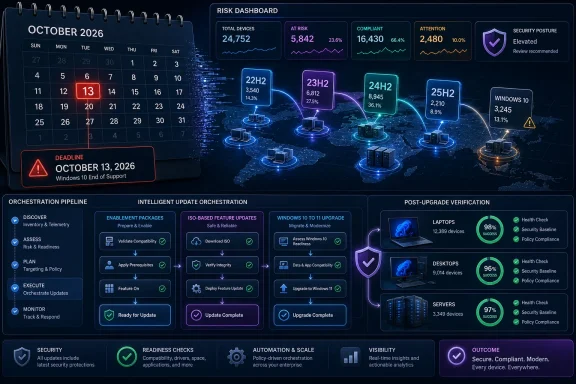 The 24H2 Deadline Is a Calendar Problem With an Inventory Problem Underneath
Microsoft’s lifecycle clock is simple enough on paper. Windows 11 24H2 has a support end date, and after that date the affected editions no longer receive the normal stream of security and quality updates. For unmanaged consumer PCs, Microsoft has increasingly leaned on automatic feature-update movement to keep devices within support.Enterprise IT does not get to treat that as a comfort blanket. Managed devices are governed by policy, compatibility gates, application dependencies, maintenance windows, change boards, bandwidth limits, remote-site realities, and a long tail of exceptions that never quite fit the fleet diagram. The fact that Microsoft can move eligible consumer machines forward does not mean a bank, hospital, school district, manufacturer, or public agency can do the same without planning.
That is why the Qualys framing lands on version drift. In practice, the danger is rarely that no one knows Windows 11 24H2 expires. The danger is that the inventory says “Windows 11” while the details reveal 22H2, 23H2, 24H2, 25H2, Windows 10 holdouts, unsupported hardware, broken update clients, blocked feature updates, and pilot rings that became permanent neighborhoods.
The deadline is therefore less a cliff than an audit. It exposes whether the organization can answer three basic questions quickly: which machines are on which build, which machines are eligible for which upgrade path, and which machines are likely to fail before the rollout begins. If those answers require spreadsheets, ticket archaeology, and heroic scripting, the 24H2 date becomes a symptom of a larger operational weakness.
Windows Servicing Has Become Easier and Stranger at the Same Time
Microsoft’s modern Windows servicing model has two competing personalities. On one side, feature updates are more predictable than they were in the Windows 10 era’s early years, with annual cadence and increasingly familiar lifecycle rules. On the other, the mechanics underneath can vary dramatically depending on the version pair, edition, hardware, policy state, and deployment channel.The upgrade from Windows 11 24H2 to 25H2 illustrates the better version of this model. Microsoft has treated that transition as an enablement-package-style move for supported baselines, meaning much of the underlying code is already present and the update acts more like a switch than a full operating system replacement. For administrators, that is the difference between a feature update that resembles a monthly patch and one that resembles a mini migration.
That does not make all Windows upgrades lightweight. The move from older Windows 11 versions to newer baselines can still require fuller feature-update payloads, and Windows 10-to-Windows 11 transitions remain a larger compatibility and readiness exercise. Even within Windows 11, a machine’s current state determines whether the shortest path is available.
This is where the marketing phrase “upgrade strategy” starts to mean something concrete. A single deployment method is attractive because it is simple to explain, but it is rarely accurate. A healthy estate may need enablement packages for one group, ISO-based feature updates for another, direct Windows 10 upgrades for a third, and remediation work for machines that fail readiness checks before any of those paths apply.
Qualys Wants to Move the Conversation From Patching to State Control
Qualys’ pitch for TruRisk Eliminate is not simply that it can deploy a Windows update. Most enterprise environments already have several tools that can push software, run scripts, or trigger update scans. The more interesting claim is that upgrade execution should be tied to asset intelligence and risk-based orchestration, rather than handled as a disconnected operations project.That distinction matters because Windows version drift is not a pure patching issue. It is a state-management issue. A device can be missing a monthly cumulative update, sitting on an expiring Windows release, blocked by a safeguard hold, failing disk-space checks, or running hardware that does not meet Windows 11 requirements. Those are related problems, but they are not the same problem.
TruRisk Eliminate is being positioned as a way to group those problems into executable paths. Qualys describes using QQL queries to identify enablement packages, locate Microsoft feature updates, create patch jobs, target asset groups, and use Custom Assessment and Remediation scripts for Windows 10-to-Windows 11 upgrades. The point is not that a query language is magic. The point is that the platform tries to make upgrade decisions flow from current endpoint state.
That is the right direction for enterprise Windows management. The old model treated feature updates as large scheduled events: inventory, test, pilot, deploy, chase failures, repeat. The newer model has to be more continuous because the estate is more fragmented and the security consequences of drift are more immediate. Version uniformity is no longer cosmetic; it affects patch eligibility, vulnerability exposure, supportability, and incident response confidence.
Enablement Packages Are the Best-Case Scenario, Not the Whole Strategy
For machines already on a suitable Windows 11 baseline, the enablement package is the elegant answer. It is smaller, faster, and less disruptive than a traditional feature update. It reduces the amount of data that has to move across the network and usually shortens the maintenance window that IT has to defend to the business.That is why Qualys calls it the preferred path. If an endpoint is already running a recent Windows 11 build that shares the right servicing foundation, administrators can often move it forward with a relatively low-impact package. In a world of remote workers, branch offices, metered links, and limited reboot tolerance, that is a real operational advantage.
But the enablement package is also a trap if it becomes the whole plan. It works only when the endpoint is already in the right neighborhood. The organizations that most need help with version drift are often the ones with machines outside that neighborhood: devices stuck on older builds, systems that missed prerequisite updates, Windows 10 machines waiting on business-app validation, and endpoints that have not checked in reliably for months.
The sensible approach is to treat enablement packages as the fast lane, not the road network. They should be used aggressively where eligible, because they reduce friction and failure rates. But the estate still needs routing logic for everything that cannot take that lane.
ISO-Based Feature Updates Are the Unfashionable but Necessary Fallback
The modern Windows story often tries to make ISO-based upgrades sound like a relic. In many cases, they should be. A full feature-update payload is heavier, more disruptive, and more likely to surface environmental problems than an enablement package.Still, ISO-based feature updates remain necessary when the endpoint cannot move through a lightweight path. That may be because Microsoft has not provided an enablement package for a particular transition, because the source version is too old, or because the deployment architecture requires a fuller update mechanism. Qualys notes the 23H2-to-24H2 transition as an example where the enablement-package story was not the universal answer.
That detail is important because it cuts against the comforting myth that Windows feature updates have become trivial. They have become more manageable in specific cases. They have not become irrelevant.
For administrators, the ISO path is where planning discipline shows. Bandwidth impact, content distribution, rollback planning, driver compatibility, encryption status, free disk space, and application testing all matter more when the payload is large and the change is closer to an operating-system replacement. A platform that can identify the right target group is useful, but it does not eliminate the need for change management.
Windows 10 Holdouts Are the Real Test of Upgrade Governance
The article’s most consequential claim may be the least flashy one: Windows 10 systems can be upgraded directly to Windows 11 25H2 without requiring a ladder of intermediate Windows 11 releases. That matters because many enterprises still have Windows 10 pockets that survived the formal end-of-support moment through exceptions, extended servicing arrangements, hardware refresh delays, or plain inertia.A direct upgrade path is operationally attractive. Nobody wants to move a device from Windows 10 to one Windows 11 build, stabilize it, and then immediately move it again. Each hop adds user disruption, helpdesk noise, and another opportunity for something to fail.
But direct does not mean simple. Windows 10-to-Windows 11 is where hardware eligibility, TPM requirements, firmware settings, driver stacks, security tooling, and user data risk all converge. It is also where the organization’s asset data is most likely to be wrong, because the machines left behind are often the ones least consistently managed.
Qualys’ use of Custom Assessment and Remediation scripts for this class of work is telling. Patch catalogs are not enough when the task is really a readiness and remediation workflow. Administrators need to know whether a machine can upgrade, why it cannot, what can be fixed automatically, and which devices require human intervention or replacement.
The Vendor Pitch Is Useful, but It Should Not Be Mistaken for the Whole Map
Qualys is writing from a vendor position, and that should be read plainly. TruRisk Eliminate is presented as the control plane that can standardize Windows upgrades, reduce drift, and execute across upgrade scenarios. That is the story any platform vendor wants to tell: the sprawling operational problem becomes manageable when routed through its product.There is substance underneath the pitch. Centralized targeting, patch-job creation, catalog visibility, asset grouping, query-driven identification, and remediation scripting are all practical capabilities for a Windows estate facing multiple upgrade paths. If an organization already uses Qualys for vulnerability and asset intelligence, folding Windows version movement into that environment may reduce tool sprawl.
The caveat is that Windows endpoint management rarely lives in one console. Microsoft Intune, Configuration Manager, Windows Server Update Services, Autopatch, Group Policy, third-party patch tools, EDR platforms, asset databases, helpdesk systems, and procurement workflows all touch the same machines. The question is not whether TruRisk Eliminate can do useful work. The question is where it becomes the system of action, where it remains an input, and how conflicts with existing management policy are prevented.
That is especially important for security teams. Vulnerability platforms are very good at showing risk, but endpoint teams are judged by successful change. The bridge between those worlds is where products like TruRisk Eliminate are trying to create value. It is also where organizations need clear ownership, approval flows, rollback procedures, and reporting that both security and operations teams trust.
Version Drift Is a Security Problem Wearing an Operations Jacket
It is tempting to treat Windows version drift as housekeeping. A few machines are behind. A few rings are messy. A few remote endpoints need attention. The dashboard is untidy, but the business runs.That view is increasingly dangerous. Unsupported or soon-to-be-unsupported Windows versions narrow the margin for error when a vulnerability lands. They complicate emergency patching because IT must first establish whether the target machines are eligible for the fix. They also weaken incident response because responders cannot assume consistent logging behavior, security feature availability, or baseline configuration across the fleet.
The same applies to compliance. Auditors do not care that the Windows estate became fragmented for understandable reasons. They care whether systems are supported, patched, governed, and documented. An end-of-servicing date gives them an easy line to draw.
Version drift also has a hidden cost in engineering time. Every extra baseline multiplies testing. Every upgrade exception becomes a recurring meeting. Every unsupported device requires compensating controls, business justification, or a retirement plan. The organization pays for drift long before Microsoft turns off servicing.
The Practical Enterprise Playbook Starts With Segmentation, Not Deployment
The correct first move is not to push an update. It is to segment the estate by current state and likely path. Qualys’ own framing begins there, and for good reason: deployment without classification creates noise.An administrator needs to separate devices that are enablement-ready from those requiring fuller feature updates. Windows 10 machines need their own track. Devices that fail readiness checks need to be pulled out before the rollout becomes a helpdesk event. Machines that have not checked in recently need a different process from machines that are online and compliant but one version behind.
This segmentation should be tied to business context as well as technical state. A kiosk in a warehouse, a developer workstation, an executive laptop, a shared clinical machine, and a domain controller-adjacent admin jump box do not carry the same change risk. Treating them as merely “endpoints” is how technically successful deployments become politically expensive ones.
The best version of Qualys’ approach is therefore not mass deployment. It is controlled routing. The platform’s value depends on how well it helps administrators identify which machines should receive which action, in which order, with which preconditions satisfied.
The Reboot Is Still the Political Unit of Windows Management
No matter how elegant the servicing model becomes, Windows upgrades still collide with the oldest endpoint-management problem: users hate interruption. Even a single restart can be a negotiation when the device belongs to a field worker, a sales team, a nurse, a student lab, or a factory line.Enablement packages help because they reduce downtime. That is not a minor detail. The difference between a short reboot and a long feature-update session can determine whether the business accepts a rollout window or forces IT into months of exception handling.
But reduced downtime can also produce overconfidence. A low-impact update still needs communication, deferral policy, reboot enforcement, and failure monitoring. The devices that miss the first window are often the ones that become the drift population six months later.
This is where centralized orchestration earns its keep. The job is not merely to start upgrades; it is to finish them. Completion status, failed-install diagnostics, reboot pending states, and post-upgrade validation are the parts of the work that separate a campaign from a checkbox.
The 25H2 Move Shows Microsoft’s Direction of Travel
The Windows 11 24H2-to-25H2 transition points to a future where Microsoft keeps more feature work staged through cumulative updates and uses enablement mechanisms to switch release identity when appropriate. That is attractive for Microsoft because it reduces deployment friction and keeps more devices on supported releases. It is attractive for users because it can make the annual update feel less like a disruptive event.For IT, the upside is real but conditional. If future Windows releases continue to share servicing foundations across adjacent versions, the annual feature-update burden could become lighter for well-maintained fleets. The organizations that stay close to current baselines will get the easiest path.
The penalty for falling behind may therefore increase. If the fast lane is available only to machines already on a recent release, drift becomes self-reinforcing. The older a device gets, the more likely it is to require a heavier update, and the heavier the update, the more likely the organization is to delay it again.
That is the strategic point Qualys is pressing. The best way to make future upgrades easy is to avoid needing heroic upgrades in the first place.
The Real Test Comes After the Patch Job Is Created
Creating a patch job is the beginning of the enterprise story, not the end. A credible Windows upgrade program needs evidence that the deployment completed, that the endpoint is now on the intended version, that security controls survived the transition, and that failed machines have been assigned a next action.This is where many organizations discover the gap between deployment tooling and operational assurance. A console can report that an update was offered. Another can report that installation began. Another can report that the machine rebooted. The asset inventory may not update until later. The vulnerability scanner may not see the new state until its next cycle.
Qualys’ advantage, if implemented well, is that it can connect vulnerability context, asset grouping, remediation action, and post-action visibility inside a broader risk workflow. But that depends on disciplined integration and clean ownership. A powerful tool used casually becomes another source of partial truth.
The mature pattern is to define success before deployment begins. For Windows 11 24H2 EOL remediation, success should mean more than “the job ran.” It should mean the device is on a supported target version, has received required cumulative updates, has checked in after reboot, has no known blocking failures, and is no longer counted in the EOL risk population.
The Deadline Forces a Choice Between Campaigns and Capability
The lazy way to read the Qualys post is as a vendor blog about upgrading Windows 11. The more useful reading is as a reminder that Windows servicing has become a recurring capability problem. Organizations can either treat each EOL date as a campaign, or they can build the machinery to move endpoints continuously.Campaigns are familiar. They produce project plans, status decks, escalation lists, and a flurry of cleanup work near the deadline. They can succeed, but they are expensive and brittle.
Capability is harder to build but cheaper to repeat. It means current inventory, automated readiness checks, path-based targeting, tested deployment rings, user communication templates, failure remediation, and executive reporting that explains risk in business terms. It also means accepting that some devices should be replaced rather than dragged through another forced upgrade.
That is the operational maturity curve behind the 24H2 date. The organizations that already know their fleet state will use the deadline as a scheduling exercise. The organizations that do not will use it as an expensive discovery process.
The Windows 11 24H2 Clock Rewards the Fleets That Stay Close to Current
The near-term lesson is straightforward, but not small. Windows 11 24H2 is not an island, and its end-of-servicing date is not just a consumer-PC concern. It is part of a broader cadence that rewards organizations for staying within supported baselines and punishes those that allow exceptions to become architecture.Qualys is right to emphasize multiple upgrade paths because that is what real environments require. Enablement packages are the preferred route when the source system qualifies. ISO-based feature updates remain necessary for heavier transitions. Windows 10 machines require direct upgrade workflows, readiness checks, or retirement plans.
The operational mistake would be to turn those paths into three disconnected projects. They should be branches of the same governance process, driven by inventory and measured by supportability. The goal is not merely to get past October 13, 2026. The goal is to make the next Windows deadline less dramatic.
The Upgrade Plan That Survives Contact With the Fleet
A practical 24H2 remediation effort should be judged by how quickly it turns mixed endpoint reality into controlled action. The cleanest plans will not be the ones with the prettiest architecture diagrams; they will be the ones that identify exceptions early and keep them from quietly becoming the next unsupported population.- Windows 11 24H2 Home and Pro editions reach end of servicing on October 13, 2026, so organizations should treat the date as a hard planning milestone.
- Enablement packages are the lowest-impact route where endpoints are already on a supported Windows 11 baseline that can move forward that way.
- ISO-based feature updates remain necessary for machines that cannot use an enablement package or need a fuller transition.
- Windows 10 holdouts should be handled as a distinct readiness and remediation track, not mixed casually into Windows 11 feature-update rings.
- Centralized orchestration is useful only if it produces verified post-upgrade state, not merely deployment activity.
- The long-term win is reducing version drift continuously, so every future Windows lifecycle deadline requires less emergency work.
References
- Primary source: Qualys
Published: Tue, 23 Jun 2026 06:14:47 GMT
Windows 11 24H2 EOL: Resolve Version Drift with TruRisk Eliminate | Qualys
Windows 11 version 24H2 reaches end of support on October 13, 2026. Learn how to classify systems, choose the right upgrade path (enablement packages, ISO, or direct Win10 → Win11), and execute at scale with Qualys TruRisk Eliminate.blog.qualys.com - Official source: learn.microsoft.com
Windows 11 Home and Pro - Microsoft Lifecycle | Microsoft Learn
Windows 11 Home and Pro follows the Modern Lifecycle Policy.learn.microsoft.com - Official source: support.microsoft.com
KB5054156: enablement パッケージを使用して、Windows 11 バージョン 25H2 に機能を更新する - Microsoft ̋
 support.microsoft.com
- Related coverage: allthings.how
Windows 11 support end dates — Home, Pro, Enterprise, and more
There’s no single cutoff; support depends on your edition and the specific Windows 11 version you’re running.allthings.how - Related coverage: windowslatest.com
Microsoft’s 2026 end-of-support wave includes Windows 11 24H2, Office 2021, and more
Microsoft plans to end support for several products in 2026, and the list of those products also includes Windows 11 24H2. www.windowslatest.com
- Related coverage: pcworld.com
These Windows and Office versions will be discontinued in 2026 | PCWorld
Microsoft will discontinue support for the following Windows and Office versions in 2026.www.pcworld.com
- Related coverage: tomshardware.com
Microsoft to force updates to Windows 11 25H2 for PCs with older Windows 11 OS versions — 'intelligent' update system uses machine learning to determine when a device is ready | Tom's Hardware
Microsoft forces 25H2 rollout ahead of 24H2 end-of-supportwww.tomshardware.com - Related coverage: windowscentral.com
10 things you must know about Windows 11 version 25H2 | Windows Central
Windows 11 version 25H2 shares its core with version 24H2, adds no new features, but extends support and comes through a lightweight enablement package. Here are all the facts you need to know.www.windowscentral.com - Related coverage: pureinfotech.com
Windows 11 lifecycle for Home and Pro - Pureinfotech
Windows 11 Home and Pro lifecycle for version 25H2 ends on 10/13/27, and the 24H2 lifecycle ends on 10/13/26. Enterprise and Education have longer support. pureinfotech.com
- Related coverage: windowsforum.com
Windows 11 25H2 Auto-Upgrade on Home Pro: 24H2 Support Deadline Explained | Windows Forum
Microsoft is now pushing Windows 11 version 25H2 onto unmanaged Home and Pro PCs that are still on 24H2, and the timing is driven by lifecycle math as much...windowsforum.com - Related coverage: mundobytes.com
Windows 11 End of Support: Dates by Version and Edition
Windows 11 end-of-support dates by version and edition, and options for upgrading and avoiding risks. Clear and straightforward guidance.mundobytes.com - Related coverage: pcgamer.com
Microsoft's big Windows 11 25H2 update is now available to download but in terms of new features it's a total nothing burger | PC Gamer
At least it'll be easy to install and (probably) won't break anything.www.pcgamer.com - Official source: techcommunity.microsoft.com
