

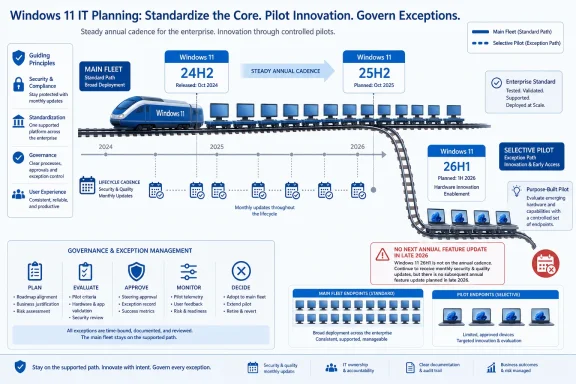
Enterprises planning a near-term Windows 11 refresh should standardize most purchases on Windows 11 24H2 or 25H2 hardware, while treating Windows 11 26H1 devices as selective pilots for specialized workloads because Microsoft explicitly positions 26H1 as hardware evaluation territory, not the default deployment branch. The practical decision is not “newer is better.” It is whether your organization wants the ordinary annual Windows servicing conveyor belt, or a narrower platform branch with different timing and a different planning burden.
The short version is blunt: buy 25H2-class hardware for fleet consistency, keep 24H2 in scope where procurement and imaging are already settled, and reserve 26H1-class machines for workloads that genuinely need the hardware platform they ship with. Windows 11 26H1 has support dates, monthly servicing, and a future update path, but it does not receive the next annual feature update in the second half of 2026. That makes it a lifecycle planning decision, not merely a device-spec decision.
The important fact about Windows 11 26H1 is not that it exists. The important fact is that Microsoft is telling enterprises not to treat it as the next general-purpose Windows version.
For IT administrators, Microsoft’s guidance keeps Windows 11 24H2 and 25H2 as the recommended enterprise deployment releases. Windows 11 26H1 is described as a targeted release for new device innovations coming in early 2026, with Microsoft framing it as something to evaluate selectively rather than a broad deployment target.
That wording matters because enterprise refresh decisions are often made months before devices land on desks. Procurement teams want a clean standard. Endpoint teams want one image, one servicing model, one upgrade ring structure, and one set of support dates to defend in audits.
Windows 11 26H1 complicates that simplicity. It may arrive on attractive new hardware, but Microsoft is not inviting IT departments to collapse the whole fleet onto it. The company is effectively saying: keep your mainstream Windows 11 program on 24H2 or 25H2, and only bring 26H1 into the estate where the hardware case is strong enough to justify the operational exception.
That is the decision tree. If you need predictable annual feature-update behavior, buy and deploy around 25H2. If you need specific next-generation hardware that ships with 26H1, pilot it deliberately and document why that branch exists in your environment.
But lifecycle planning is never just about the final date on the chart. Windows 11 25H2 remains on the standard annual cadence, with support ending October 12, 2027 for Home and Pro and October 10, 2028 for Enterprise and Education. For Enterprise and Education customers, that means 26H1’s listed end date is only about five months later than 25H2’s, while introducing a more unusual servicing path.
That difference cuts against the instinct to chase the newest branch. Enterprises usually care less about nominal freshness than about operational regularity. A version that stays on the normal annual track can be easier to manage than one with a slightly later end date but an atypical upgrade rhythm.
The 25H2 support window also aligns with Microsoft’s standard Windows 11 model: annual feature updates in the second half of the calendar year, with 24 months of support for Home and Pro and 36 months for Enterprise and Education. That cadence is familiar, budgetable, and easy to explain to risk committees.
For WindowsForum readers already tracking Windows 11 23H2 deadlines and 24H2-to-25H2 planning, the lesson should sound familiar. The safest Windows deployment is usually not the newest build you can obtain; it is the build whose lifecycle, servicing model, and next-hop upgrade path you can explain without footnotes.
That does not mean 26H1 is unsupported or abandoned. Microsoft says supported Windows 11 versions, including 26H1, continue to receive monthly security updates and non-security preview updates. But it does mean admins should not assume 26H1 behaves like a simple “25H2 plus one” deployment target.
This distinction is easy to miss because Windows version numbers imply a straight line. In ordinary fleet planning, 24H2 gives way to 25H2, and the next annual release follows in the second half of the next calendar year. Windows 11 26H1 interrupts that mental model because it is tied to new device support rather than being the normal broad feature update for existing machines.
That is why “Can we buy 26H1 hardware?” is the wrong question. The better question is: “Are we prepared to manage a Windows branch that is serviced, supported, and useful, but not riding the same annual feature-update path as the rest of the estate?”
If the answer is no, standardize on 25H2 hardware and avoid turning endpoint management into a science project. If the answer is yes, 26H1 belongs in a bounded pilot with named owners, defined workloads, and a clear re-evaluation date.
Windows 11 24H2 should not be treated as obsolete in this calculation. Microsoft still names 24H2 alongside 25H2 as a recommended enterprise deployment release. If your imaging, application validation, driver testing, and rollout rings are already built around 24H2, there may be no immediate reason to blow up that work just to chase a version label.
But 25H2 is the cleaner target for new purchases where you still have room to steer procurement. Its support runs to October 2028 for Enterprise and Education, and it remains on the standard cadence. That makes it easier to align device refresh, app certification, security baselines, and help-desk training around a familiar support model.
The danger is not that 26H1 devices will be bad. The danger is that a small number of exciting new devices become an unmanaged exception that slowly spreads. Once executives, developers, data teams, or field groups get special hardware, IT may find itself supporting a second Windows track without having formally agreed to do so.
That is how endpoint standards erode: not through a grand architectural decision, but through procurement exceptions that look harmless one invoice at a time.
If the device is being purchased because a specific new hardware platform materially changes the workload, 26H1 becomes more interesting. That is the kind of case where a targeted release makes sense: hardware enablement first, broad fleet standardization later.
The second branch is support planning. If your Windows estate depends on the normal second-half annual feature update to keep rings synchronized, 26H1 is a poor default. If you can tolerate a branch that does not receive the next annual feature update in the second half of 2026, it may be manageable.
The third branch is governance. A 26H1 pilot should not be a casual purchase category. It should have an owner, a device list, an application test matrix, a patching policy, and a date when the organization decides whether to expand, hold, or retire the pilot.
The fourth branch is communications. Users do not care whether their laptop is on an ordinary annual Windows branch or a targeted hardware-support branch until something behaves differently. Admins need to prepare the explanation before the help-desk tickets arrive.
That means limiting 26H1-class devices to groups with a clear hardware-driven reason to test them. It also means avoiding ambiguous pilot language. “We are evaluating this platform for special workloads” is a very different commitment from “This is the new laptop standard.”
A disciplined pilot should also keep lifecycle dates visible. Windows 11 26H1 support runs to March 13, 2029 for Enterprise and Education, but that date should not become an excuse to ignore the unusual upgrade path. The support window answers “How long will Microsoft service it?” It does not answer “How neatly does this fit into our annual Windows deployment process?”
The pilot should measure operational friction as much as device performance. Can your management tools report on it cleanly? Do your security policies behave the same way? Are application owners surprised by anything? Does procurement understand that this is not the default model?
If those answers are boring, 26H1 may earn a place in specialized hardware planning. If they are messy, the organization has learned something valuable before the exception became a fleet.
That later 26H1 date may look attractive, but the bigger issue is still the update path. If you want the ordinary Windows 11 release rhythm, 25H2 is the safer reference point. If you buy a 26H1 device, understand that it is not simply participating in the next annual feature update in the second half of 2026.
For home users, this may not matter much if Windows Update handles the practical details and the device stays secure. But for power users who image machines, test drivers, run specialized software, or maintain multiple PCs for family and work, the same caution applies: do not assume all Windows 11 version numbers map to the same branch behavior.
Small businesses should be especially careful. A five-device office can create enterprise-grade complexity surprisingly quickly if one or two machines follow a different servicing path and nobody is responsible for tracking it.
The less formal your IT process, the more you benefit from staying on the ordinary track.
That is a healthy correction to the way Windows updates are often discussed. Version numbers become shorthand for quality, readiness, and desirability, even when they mainly describe servicing branches and release timing. A higher number feels newer, and newer feels safer, even when the operational answer is more complicated.
Here, Microsoft is effectively separating hardware enablement from enterprise deployment strategy. Windows 11 26H1 exists to support new device innovations, while 24H2 and 25H2 remain the ordinary enterprise deployment choices. That split is the whole story.
The risk is that buyers see “26H1” in a spec sheet and assume it is the premium option. In reality, the premium enterprise option may be the one that produces fewer surprises in Intune, Configuration Manager, imaging workflows, driver validation, procurement standards, and help-desk scripts.
For WindowsForum’s audience, the point is not to fear 26H1. It is to stop treating version labels as a substitute for lifecycle analysis.
That is why 26H1 planning belongs in procurement conversations now, not in a panic memo later. A machine bought today has a support and upgrade story that will outlive the purchase order. If that story differs from the rest of the fleet, the exception needs to be intentional.
The Windows 11 23H2 lesson is not merely “upgrade before support ends.” It is that unsupported or poorly planned Windows versions create security, compliance, and operational pressure all at once. Enterprises that delay lifecycle thinking often end up accepting hurried deployment choices they would never have approved with more time.
Windows 11 26H1 is not a crisis. It is the opposite: a planning fork with enough runway to handle properly. That makes careless adoption harder to excuse.
The temptation will be to let hardware availability drive the calendar. A new device class appears, users want it, procurement likes it, and suddenly IT is asked to absorb the lifecycle consequences. That is backwards.
The better approach is to force every near-term device purchase into one of three buckets. It is either part of the mainstream 25H2 fleet, part of an existing 24H2 standard that remains supported and operationally stable, or part of a formally bounded 26H1 pilot. Anything else is drift.
This is where IT should be more assertive than usual. A Windows branch that does not receive the next annual feature update in the second half of 2026 is not just another SKU detail. It is a support-planning variable that belongs in the procurement approval process.
The right answer may still be “buy the 26H1 device.” But that answer should come with a sentence beginning “because,” not a shrug.
That is not anti-26H1. It is pro-governance. The release has a real support window, but it also has a real exception profile.
The short version is blunt: buy 25H2-class hardware for fleet consistency, keep 24H2 in scope where procurement and imaging are already settled, and reserve 26H1-class machines for workloads that genuinely need the hardware platform they ship with. Windows 11 26H1 has support dates, monthly servicing, and a future update path, but it does not receive the next annual feature update in the second half of 2026. That makes it a lifecycle planning decision, not merely a device-spec decision.
 Microsoft Has Turned 26H1 Into a Procurement Filter
The important fact about Windows 11 26H1 is not that it exists. The important fact is that Microsoft is telling enterprises not to treat it as the next general-purpose Windows version.For IT administrators, Microsoft’s guidance keeps Windows 11 24H2 and 25H2 as the recommended enterprise deployment releases. Windows 11 26H1 is described as a targeted release for new device innovations coming in early 2026, with Microsoft framing it as something to evaluate selectively rather than a broad deployment target.
That wording matters because enterprise refresh decisions are often made months before devices land on desks. Procurement teams want a clean standard. Endpoint teams want one image, one servicing model, one upgrade ring structure, and one set of support dates to defend in audits.
Windows 11 26H1 complicates that simplicity. It may arrive on attractive new hardware, but Microsoft is not inviting IT departments to collapse the whole fleet onto it. The company is effectively saying: keep your mainstream Windows 11 program on 24H2 or 25H2, and only bring 26H1 into the estate where the hardware case is strong enough to justify the operational exception.
That is the decision tree. If you need predictable annual feature-update behavior, buy and deploy around 25H2. If you need specific next-generation hardware that ships with 26H1, pilot it deliberately and document why that branch exists in your environment.
The Support Calendar Favors 25H2 More Than the Version Number Suggests
At first glance, 26H1 looks like the obvious “longer runway” option because it has a later version name and support dates stretching further into the future. Microsoft’s lifecycle page lists Windows 11 26H1 support through March 14, 2028 for Home and Pro, and March 13, 2029 for Enterprise and Education.But lifecycle planning is never just about the final date on the chart. Windows 11 25H2 remains on the standard annual cadence, with support ending October 12, 2027 for Home and Pro and October 10, 2028 for Enterprise and Education. For Enterprise and Education customers, that means 26H1’s listed end date is only about five months later than 25H2’s, while introducing a more unusual servicing path.
That difference cuts against the instinct to chase the newest branch. Enterprises usually care less about nominal freshness than about operational regularity. A version that stays on the normal annual track can be easier to manage than one with a slightly later end date but an atypical upgrade rhythm.
The 25H2 support window also aligns with Microsoft’s standard Windows 11 model: annual feature updates in the second half of the calendar year, with 24 months of support for Home and Pro and 36 months for Enterprise and Education. That cadence is familiar, budgetable, and easy to explain to risk committees.
For WindowsForum readers already tracking Windows 11 23H2 deadlines and 24H2-to-25H2 planning, the lesson should sound familiar. The safest Windows deployment is usually not the newest build you can obtain; it is the build whose lifecycle, servicing model, and next-hop upgrade path you can explain without footnotes.
26H1 Breaks the Comfortable Annual Conveyor Belt
The sharpest planning issue is that Windows 11 26H1 does not receive the next annual feature update in the second half of 2026. That places it outside the normal upgrade conveyor belt that enterprises use to move from one broadly deployed Windows release to the next.That does not mean 26H1 is unsupported or abandoned. Microsoft says supported Windows 11 versions, including 26H1, continue to receive monthly security updates and non-security preview updates. But it does mean admins should not assume 26H1 behaves like a simple “25H2 plus one” deployment target.
This distinction is easy to miss because Windows version numbers imply a straight line. In ordinary fleet planning, 24H2 gives way to 25H2, and the next annual release follows in the second half of the next calendar year. Windows 11 26H1 interrupts that mental model because it is tied to new device support rather than being the normal broad feature update for existing machines.
That is why “Can we buy 26H1 hardware?” is the wrong question. The better question is: “Are we prepared to manage a Windows branch that is serviced, supported, and useful, but not riding the same annual feature-update path as the rest of the estate?”
If the answer is no, standardize on 25H2 hardware and avoid turning endpoint management into a science project. If the answer is yes, 26H1 belongs in a bounded pilot with named owners, defined workloads, and a clear re-evaluation date.
The Near-Term Buying Decision Is Really About Standardization
For most organizations, the refresh decision should start with a boring preference: standardize on hardware that cleanly supports Windows 11 25H2. That gives IT the strongest combination of current support, expected annual cadence, and fleet consistency.Windows 11 24H2 should not be treated as obsolete in this calculation. Microsoft still names 24H2 alongside 25H2 as a recommended enterprise deployment release. If your imaging, application validation, driver testing, and rollout rings are already built around 24H2, there may be no immediate reason to blow up that work just to chase a version label.
But 25H2 is the cleaner target for new purchases where you still have room to steer procurement. Its support runs to October 2028 for Enterprise and Education, and it remains on the standard cadence. That makes it easier to align device refresh, app certification, security baselines, and help-desk training around a familiar support model.
The danger is not that 26H1 devices will be bad. The danger is that a small number of exciting new devices become an unmanaged exception that slowly spreads. Once executives, developers, data teams, or field groups get special hardware, IT may find itself supporting a second Windows track without having formally agreed to do so.
That is how endpoint standards erode: not through a grand architectural decision, but through procurement exceptions that look harmless one invoice at a time.
The Sensible Decision Tree Starts With Workload, Not Curiosity
A practical 26H1 decision tree should begin with the workload. If a device is being purchased for standard office productivity, browser apps, Microsoft 365, collaboration, line-of-business clients, endpoint management, and ordinary security controls, the answer is simple: stay with 24H2 or 25H2 hardware.If the device is being purchased because a specific new hardware platform materially changes the workload, 26H1 becomes more interesting. That is the kind of case where a targeted release makes sense: hardware enablement first, broad fleet standardization later.
The second branch is support planning. If your Windows estate depends on the normal second-half annual feature update to keep rings synchronized, 26H1 is a poor default. If you can tolerate a branch that does not receive the next annual feature update in the second half of 2026, it may be manageable.
The third branch is governance. A 26H1 pilot should not be a casual purchase category. It should have an owner, a device list, an application test matrix, a patching policy, and a date when the organization decides whether to expand, hold, or retire the pilot.
The fourth branch is communications. Users do not care whether their laptop is on an ordinary annual Windows branch or a targeted hardware-support branch until something behaves differently. Admins need to prepare the explanation before the help-desk tickets arrive.
The 26H1 Pilot Should Be Small Enough to Kill
The best 26H1 pilot is not the one that proves IT is adventurous. It is the one that is small enough to reverse.That means limiting 26H1-class devices to groups with a clear hardware-driven reason to test them. It also means avoiding ambiguous pilot language. “We are evaluating this platform for special workloads” is a very different commitment from “This is the new laptop standard.”
A disciplined pilot should also keep lifecycle dates visible. Windows 11 26H1 support runs to March 13, 2029 for Enterprise and Education, but that date should not become an excuse to ignore the unusual upgrade path. The support window answers “How long will Microsoft service it?” It does not answer “How neatly does this fit into our annual Windows deployment process?”
The pilot should measure operational friction as much as device performance. Can your management tools report on it cleanly? Do your security policies behave the same way? Are application owners surprised by anything? Does procurement understand that this is not the default model?
If those answers are boring, 26H1 may earn a place in specialized hardware planning. If they are messy, the organization has learned something valuable before the exception became a fleet.
Home and Pro Buyers Get a Simpler But Harsher Version of the Same Choice
For enthusiasts, small businesses, and unmanaged Home or Pro users, the same logic applies with fewer committees and less margin for error. Windows 11 25H2 Home and Pro support runs to October 12, 2027. Windows 11 26H1 Home and Pro support runs to March 14, 2028.That later 26H1 date may look attractive, but the bigger issue is still the update path. If you want the ordinary Windows 11 release rhythm, 25H2 is the safer reference point. If you buy a 26H1 device, understand that it is not simply participating in the next annual feature update in the second half of 2026.
For home users, this may not matter much if Windows Update handles the practical details and the device stays secure. But for power users who image machines, test drivers, run specialized software, or maintain multiple PCs for family and work, the same caution applies: do not assume all Windows 11 version numbers map to the same branch behavior.
Small businesses should be especially careful. A five-device office can create enterprise-grade complexity surprisingly quickly if one or two machines follow a different servicing path and nobody is responsible for tracking it.
The less formal your IT process, the more you benefit from staying on the ordinary track.
Microsoft’s Messaging Is Trying to Prevent a Repeat of Version-Number Thinking
Microsoft’s public posture around 26H1 is unusually direct by Windows standards. The company is not merely announcing a version; it is narrowing the audience for that version.That is a healthy correction to the way Windows updates are often discussed. Version numbers become shorthand for quality, readiness, and desirability, even when they mainly describe servicing branches and release timing. A higher number feels newer, and newer feels safer, even when the operational answer is more complicated.
Here, Microsoft is effectively separating hardware enablement from enterprise deployment strategy. Windows 11 26H1 exists to support new device innovations, while 24H2 and 25H2 remain the ordinary enterprise deployment choices. That split is the whole story.
The risk is that buyers see “26H1” in a spec sheet and assume it is the premium option. In reality, the premium enterprise option may be the one that produces fewer surprises in Intune, Configuration Manager, imaging workflows, driver validation, procurement standards, and help-desk scripts.
For WindowsForum’s audience, the point is not to fear 26H1. It is to stop treating version labels as a substitute for lifecycle analysis.
The 23H2 Deadline Is the Cautionary Tale Sitting in the Rearview Mirror
WindowsForum has already spent plenty of time around Windows 11 23H2 end-of-updates planning, and that discussion is relevant here because it shows how fast lifecycle dates move from background noise to operational urgency. Once a support deadline is close, the organization no longer has a strategy discussion. It has a migration problem.That is why 26H1 planning belongs in procurement conversations now, not in a panic memo later. A machine bought today has a support and upgrade story that will outlive the purchase order. If that story differs from the rest of the fleet, the exception needs to be intentional.
The Windows 11 23H2 lesson is not merely “upgrade before support ends.” It is that unsupported or poorly planned Windows versions create security, compliance, and operational pressure all at once. Enterprises that delay lifecycle thinking often end up accepting hurried deployment choices they would never have approved with more time.
Windows 11 26H1 is not a crisis. It is the opposite: a planning fork with enough runway to handle properly. That makes careless adoption harder to excuse.
The Calendar Should Drive the Fleet, Not the Other Way Around
A clean Windows fleet plan should map device buying to three dates: the current supported standard, the next expected standard, and the retirement date for each branch in use. For most organizations in this cycle, that means 24H2 where already standardized, 25H2 for new mainstream purchases, and 26H1 only where a selective hardware pilot is justified.The temptation will be to let hardware availability drive the calendar. A new device class appears, users want it, procurement likes it, and suddenly IT is asked to absorb the lifecycle consequences. That is backwards.
The better approach is to force every near-term device purchase into one of three buckets. It is either part of the mainstream 25H2 fleet, part of an existing 24H2 standard that remains supported and operationally stable, or part of a formally bounded 26H1 pilot. Anything else is drift.
This is where IT should be more assertive than usual. A Windows branch that does not receive the next annual feature update in the second half of 2026 is not just another SKU detail. It is a support-planning variable that belongs in the procurement approval process.
The right answer may still be “buy the 26H1 device.” But that answer should come with a sentence beginning “because,” not a shrug.
The Buying Rule Hidden Inside Microsoft’s Lifecycle Table
The practical guidance is narrow enough to write on the inside cover of a deployment runbook: use Windows 11 25H2 as the default target for new mainstream hardware, keep Windows 11 24H2 where it already supports your plan, and treat Windows 11 26H1 as a selective pilot branch for special hardware-driven workloads.That is not anti-26H1. It is pro-governance. The release has a real support window, but it also has a real exception profile.
- Standardize ordinary fleet purchases on Windows 11 25H2-class hardware when you want the clearest annual feature-update cadence and Enterprise/Education support through October 10, 2028.
- Keep Windows 11 24H2 in the deployment plan where it is already validated, because Microsoft still identifies 24H2 and 25H2 as recommended enterprise deployment releases.
- Buy Windows 11 26H1-class devices only when the hardware platform itself is the reason for the purchase, not because the version number looks newer.
- Plan 26H1 pilots around the fact that those devices do not receive the next annual feature update in the second half of 2026.
- Track the 26H1 support dates separately, because Home and Pro support runs to March 14, 2028, while Enterprise and Education support runs to March 13, 2029.
- Make every 26H1 exception visible in procurement, endpoint management, security operations, and lifecycle reporting before the device reaches a user.
References
- Primary source: learn.microsoft.com
Windows 11, version 26H1 for IT pros | Microsoft Learn
Learn more about Windows 11 version 26H1.learn.microsoft.com - Independent coverage: support.microsoft.com
- Primary source: WindowsForum
Windows 11 23H2 End of Updates: Plan Your Upgrade Before Nov 11, 2025 | Windows Forum
Microsoft has confirmed that Windows 11, version 23H2 will reach end of updates for Home and Pro editions on November 11, 2025, meaning devices still...windowsforum.com

