

Microsoft’s week of June 16–20, 2026 centered on Windows 11 version 26H2 becoming official, new Snapdragon X2-powered Surface Pro and Surface Laptop hardware, fresh Insider builds, unresolved update complaints, creative-app performance work, and a gaming slate led by Game Pass additions and GTA VI preorder news. The headline is not that Microsoft had a busy week; it is that the company’s Windows strategy now looks increasingly split between invisible servicing switches and very visible hardware bets. Windows is becoming less of a once-a-year event and more of a constantly managed platform whose biggest changes may arrive before the version number does. That is convenient for Microsoft, but it leaves users and IT departments doing the harder work of deciding what actually changed.
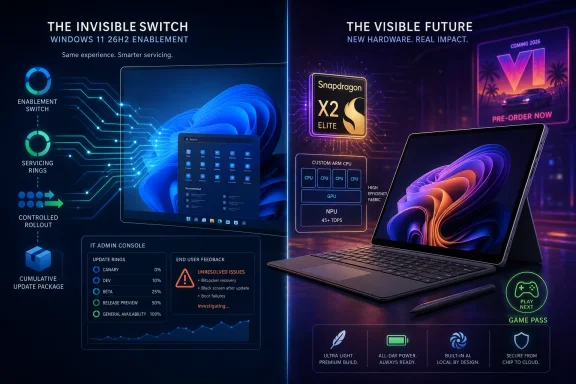
Windows 11 version 26H2 is now official, but Microsoft is not treating it like the old-school Windows launches many users still imagine when they hear “new version.” The company says the release will arrive later this year as an enablement package for devices already on recent Windows 11 releases, building on the same platform and servicing model used for 24H2 and 25H2. That is the important part: 26H2 is less a dramatic operating system replacement than a switch that lights up code already delivered through cumulative updates.
For administrators, that is mostly good news. Smaller enablement packages mean less deployment friction, fewer hours lost to in-place upgrade drama, and a better chance that app compatibility testing behaves like a monthly servicing exercise rather than a migration project. Microsoft has been trying to teach enterprises this rhythm for years: validate continuously, deploy in rings, and stop waiting for the annual feature update as if it were a meteor.
But the model also muddies the meaning of a Windows release. If features arrive through monthly updates, controlled rollouts, temporary enterprise controls, and dormant bits, the version number becomes more about support lifecycle and policy state than user-visible change. That is not inherently bad, but it does require a more mature relationship with Windows than many consumers — and some small businesses — have been trained to expect.
The practical consequence is that 26H2 will likely be judged less by launch-day fireworks and more by whether Microsoft can keep the servicing story boring. If it lands as a small, predictable update that resets support clocks and avoids breaking fleets, IT will accept the lack of spectacle. If it arrives amid a noisy pile of regressions, the enablement-package pitch will sound less like engineering discipline and more like marketing cover.
The Insider Program has become more than a place for enthusiasts to try unfinished UI ideas. It is now the staging ground for a servicing model where version identity, feature flags, and channel policy can be rearranged independently. That gives Microsoft a lot of flexibility, especially as it supports conventional PCs, Copilot+ PCs, Arm devices, and hardware-optimized releases at the same time.
The cost is legibility. The average Windows enthusiast can follow build numbers only so far before the map starts to blur. Canary, Dev, Experimental, Release Preview, 24H2, 25H2, 26H1, 26H2, enablement packages, and controlled rollouts all describe real distinctions, but not always ones that line up with how users experience their machines.
That is why Microsoft’s messaging to IT pros matters more than usual this cycle. The company needs to make clear which releases are broad feature updates, which are hardware-specific, and which are essentially servicing transitions. If it does not, the vacuum will be filled by forum lore, ISO hunting, and half-correct assumptions about what build number belongs on which PC.
This is not a radical industrial-design reset. Microsoft is not trying to make Surface look new so much as make the case that Arm Windows is no longer an experiment. The more interesting claim is internal: better CPU performance, better GPU performance, stronger NPU capability, and the promise that Copilot+ PC features and battery life can coexist in a premium Windows laptop.
That matters because Surface has a dual job. It must sell as a product, but it also has to serve as Microsoft’s reference argument for the Windows ecosystem. When Surface moves, OEMs and software vendors read the signal. With Snapdragon X2, Microsoft is telling the market that Arm is not a side branch reserved for thin-and-light curiosities; it is supposed to be a first-class Windows platform.
The risk is that premium pricing narrows the audience for the proof. If Surface becomes the elegant demonstration of what Windows on Arm can be, but not the machine most buyers can justify, the ecosystem lift may be slower than Microsoft wants. Arm Windows needs excellent halo devices, but it also needs boring, affordable, widely deployed devices that prove compatibility is no longer something users have to think about.
There are real reasons to care about local AI acceleration. On-device processing can reduce latency, preserve privacy in some workflows, and make background assistance less dependent on cloud round trips. For creative tools, accessibility features, live translation, search, and media workflows, dedicated AI hardware can eventually feel as normal as GPU acceleration.
But users do not buy TOPS. They buy time saved, battery life preserved, fan noise reduced, and workflows that stop feeling clumsy. Microsoft’s job is to turn Copilot+ from a badge into a set of habits users would miss if removed. That requires first-party features, but also third-party software that treats NPUs as practical compute resources rather than marketing checkboxes.
That is why the Adobe performance work mentioned this week is more important than it may look. If Windows performance improves in mainstream creative applications such as Photoshop, the platform story gets more credible. Microsoft does not need every user to run an AI demo; it needs the apps people already use to feel faster, smoother, and more native on modern Windows hardware.
That mix is familiar to anyone who follows Windows closely. Some reports become confirmed known issues, some turn out to be configuration-specific, and some fade into the background noise of a vast installed base. Still, the pattern matters because Microsoft is asking users and businesses to trust a more continuous update model.
When Windows servicing works, it is almost invisible. When it fails, it can affect boot, encryption, identity, files, productivity apps, or device recovery — exactly the layers users cannot casually route around. That asymmetry explains why even small update regressions can become reputation problems. A new Start menu feature is optional in emotional terms; a boot failure is not.
The Recycle Bin filename bug is minor compared with BitLocker or black-screen reports, but it is symbolically useful. It shows how even simple shell experiences can reveal seams in Windows’ internal machinery. Users do not want to see internal file identifiers when they are deleting something; they want the system to behave like a finished consumer product, not a diagnostic surface.
For IT departments, the lesson is unchanged but newly urgent. Patch rings, pilot groups, rollback plans, and clear communications are not bureaucratic theater. They are the operating cost of running Windows in an era when the OS is always changing, even when the version number appears stable.
This is especially relevant for small offices, hobbyists, and older PCs. The Windows 11 era has been defined not only by new features, but by eligibility rules, security baselines, and hardware requirements that changed the emotional contract around Windows upgrades. For enthusiasts, workarounds and tools can soften those edges. For normal users, the message is simpler: some machines are being left behind.
That puts more pressure on Microsoft’s current releases to feel worth the transition. If Windows 11 is merely the OS users must accept to stay supported, resentment lingers. If it becomes the OS that delivers better performance, stronger security, better laptop battery life, and less chaotic recovery, the argument improves.
The problem is that those benefits arrive unevenly. A new Snapdragon X2 Surface may show the future beautifully, while an older desktop wrestling with a cumulative update may experience only the friction. Microsoft’s challenge is not just to build the future of Windows, but to keep the present from feeling like collateral damage.
Rufus, meanwhile, remains popular because Windows installation and setup still generate demand for power-user control. Silent installation fixes, Arm-related patches, and OneDrive removal improvements are the kinds of changes that appeal to administrators, repair techs, and enthusiasts who want Windows deployment to behave predictably. That Rufus has become a standard part of the Windows toolkit tells us where Microsoft’s official paths still feel too constrained.
This is not necessarily a failure. One of Windows’ strengths has always been the surrounding ecosystem of utilities, shell replacements, deployment tools, and repair aids. But it does complicate Microsoft’s clean narrative. The more Windows becomes a managed, cloud-connected, policy-driven platform, the more some users reach for tools that restore local agency.
The healthiest version of this relationship is complementary. Microsoft handles security, servicing, hardware enablement, and baseline experiences; third-party utilities serve the niches and edge cases. The unhealthy version is adversarial, where users feel they need external tools to undo defaults, avoid account pressure, or make installation tolerable. Windows 11 has lived in both modes.
Game Pass remains the central lever. New additions such as EA Sports FC 26, Call of Duty: Vanguard, Junkster, Abyssus, and others keep the service feeling alive, while departures remind subscribers that the catalog is rented territory. The rhythm is now familiar: Microsoft sells abundance, users learn to watch the leaving-soon list, and the perceived value depends heavily on whether the next wave matches personal taste.
Forza Horizon 6’s temporary trouble with an Eliminator exploit is a more operational story. Live-service games live or die by economic integrity, and exploit fixes often require uncomfortable intervention. Taking an online mode down temporarily is disruptive, but leaving a farming exploit unchecked can distort progression and alienate players who follow the rules.
The GTA VI preorder and cover-art news sits outside Microsoft’s direct control, yet it matters to the Windows and Xbox audience because Rockstar releases have gravitational pull. A GTA launch reshapes hardware conversations, subscription value debates, storefront traffic, and console attention. Microsoft does not need to own GTA VI for it to matter enormously to Xbox.
That does not mean it is perfect. A simple software experience can be refreshing, but missing customization and advanced features can also make a niche device feel unfinished. Hardware quirks are charming only when the basics are solid.
Still, devices like this are useful antidotes to the sameness of the mainstream market. Microsoft’s Surface line increasingly advances by internal refinement: better chips, better NPUs, better trackpads, better performance per watt. A tiny e-reader with a physical dial reminds us that there is still room for hardware ideas that begin with a tactile habit rather than a silicon roadmap.
For WindowsForum readers, the lesson is not that a quirky e-reader matters as much as Windows 11 26H2. It is that computing culture is healthier when it includes both. The enterprise platform and the odd little gadget are part of the same landscape of people trying to make machines fit human routines.
That ambition is sensible. Modern operating systems cannot rely on giant annual reveals to stay secure, competitive, or compatible with new hardware. Apple, Google, Microsoft, and Linux vendors are all managing versions that are partly product, partly service, and partly delivery pipeline. Windows is simply doing this at enormous scale and with a uniquely messy legacy.
The danger is that disappearance can feel like opacity. If users cannot tell what changed, why it changed, which device qualifies, or whether a reported bug applies to them, the platform feels less calm rather than more. Invisible engineering is only comforting when trust is high.
This is where Microsoft’s communication burden grows. The company must explain not only new features but also the absence of visible change. It must tell administrators why 26H2 matters if it installs like a small update, tell consumers why Surface hardware deserves premium pricing, and tell power users why Windows defaults are moving in directions they may not have chosen.
 Microsoft Turns 26H2 Into a Servicing Argument
Windows 11 version 26H2 is now official, but Microsoft is not treating it like the old-school Windows launches many users still imagine when they hear “new version.” The company says the release will arrive later this year as an enablement package for devices already on recent Windows 11 releases, building on the same platform and servicing model used for 24H2 and 25H2. That is the important part: 26H2 is less a dramatic operating system replacement than a switch that lights up code already delivered through cumulative updates.For administrators, that is mostly good news. Smaller enablement packages mean less deployment friction, fewer hours lost to in-place upgrade drama, and a better chance that app compatibility testing behaves like a monthly servicing exercise rather than a migration project. Microsoft has been trying to teach enterprises this rhythm for years: validate continuously, deploy in rings, and stop waiting for the annual feature update as if it were a meteor.
But the model also muddies the meaning of a Windows release. If features arrive through monthly updates, controlled rollouts, temporary enterprise controls, and dormant bits, the version number becomes more about support lifecycle and policy state than user-visible change. That is not inherently bad, but it does require a more mature relationship with Windows than many consumers — and some small businesses — have been trained to expect.
The practical consequence is that 26H2 will likely be judged less by launch-day fireworks and more by whether Microsoft can keep the servicing story boring. If it lands as a small, predictable update that resets support clocks and avoids breaking fleets, IT will accept the lack of spectacle. If it arrives amid a noisy pile of regressions, the enablement-package pitch will sound less like engineering discipline and more like marketing cover.
The Insider Channels Are Now the Public Rehearsal Room
This week’s Insider activity reinforced the same point. Build 26300.8697 is now officially associated with Windows 11 version 26H2, while other Canary and Dev builds brought audio changes, Settings refinements, File Explorer work, Start menu tweaks, and the usual scatter of fixes. On paper, that sounds like normal pre-release churn. In practice, it is where Microsoft’s new Windows cadence becomes visible.The Insider Program has become more than a place for enthusiasts to try unfinished UI ideas. It is now the staging ground for a servicing model where version identity, feature flags, and channel policy can be rearranged independently. That gives Microsoft a lot of flexibility, especially as it supports conventional PCs, Copilot+ PCs, Arm devices, and hardware-optimized releases at the same time.
The cost is legibility. The average Windows enthusiast can follow build numbers only so far before the map starts to blur. Canary, Dev, Experimental, Release Preview, 24H2, 25H2, 26H1, 26H2, enablement packages, and controlled rollouts all describe real distinctions, but not always ones that line up with how users experience their machines.
That is why Microsoft’s messaging to IT pros matters more than usual this cycle. The company needs to make clear which releases are broad feature updates, which are hardware-specific, and which are essentially servicing transitions. If it does not, the vacuum will be filled by forum lore, ISO hunting, and half-correct assumptions about what build number belongs on which PC.
Surface Gets Faster, But the Bet Is Still Arm
The new Surface announcements gave Microsoft the hardware headline it wanted. The latest Surface Pro and Surface Laptop models move to Qualcomm’s Snapdragon X2 processors, with faster graphics, stronger neural processing capabilities, and designs that remain close to their 2024 predecessors. The Surface Laptop also gains a haptic trackpad, a small but meaningful quality-of-life improvement in a category where input feel matters every day.This is not a radical industrial-design reset. Microsoft is not trying to make Surface look new so much as make the case that Arm Windows is no longer an experiment. The more interesting claim is internal: better CPU performance, better GPU performance, stronger NPU capability, and the promise that Copilot+ PC features and battery life can coexist in a premium Windows laptop.
That matters because Surface has a dual job. It must sell as a product, but it also has to serve as Microsoft’s reference argument for the Windows ecosystem. When Surface moves, OEMs and software vendors read the signal. With Snapdragon X2, Microsoft is telling the market that Arm is not a side branch reserved for thin-and-light curiosities; it is supposed to be a first-class Windows platform.
The risk is that premium pricing narrows the audience for the proof. If Surface becomes the elegant demonstration of what Windows on Arm can be, but not the machine most buyers can justify, the ecosystem lift may be slower than Microsoft wants. Arm Windows needs excellent halo devices, but it also needs boring, affordable, widely deployed devices that prove compatibility is no longer something users have to think about.
Copilot+ PCs Need Apps More Than Slogans
The Surface refresh also lands in the shadow of Microsoft’s broader Copilot+ PC push. Faster NPUs and more efficient silicon are useful only if the software experience makes them feel necessary. That has been the unresolved tension since the first Copilot+ wave: the hardware story is often clearer than the everyday user story.There are real reasons to care about local AI acceleration. On-device processing can reduce latency, preserve privacy in some workflows, and make background assistance less dependent on cloud round trips. For creative tools, accessibility features, live translation, search, and media workflows, dedicated AI hardware can eventually feel as normal as GPU acceleration.
But users do not buy TOPS. They buy time saved, battery life preserved, fan noise reduced, and workflows that stop feeling clumsy. Microsoft’s job is to turn Copilot+ from a badge into a set of habits users would miss if removed. That requires first-party features, but also third-party software that treats NPUs as practical compute resources rather than marketing checkboxes.
That is why the Adobe performance work mentioned this week is more important than it may look. If Windows performance improves in mainstream creative applications such as Photoshop, the platform story gets more credible. Microsoft does not need every user to run an AI demo; it needs the apps people already use to feel faster, smoother, and more native on modern Windows hardware.
Windows Bugs Keep Undercutting the Calm Servicing Story
The less flattering side of the week came from update complaints. Users reportedly described problems after this month’s Windows 11 security updates, including BitLocker trouble, OneDrive oddities, black screens, and Office integration issues. Microsoft has not confirmed all of those reports, but it has acknowledged other bugs, including a Recycle Bin prompt issue that shows internal file names and a long-running JScript compatibility problem tied to security-focused engine changes.That mix is familiar to anyone who follows Windows closely. Some reports become confirmed known issues, some turn out to be configuration-specific, and some fade into the background noise of a vast installed base. Still, the pattern matters because Microsoft is asking users and businesses to trust a more continuous update model.
When Windows servicing works, it is almost invisible. When it fails, it can affect boot, encryption, identity, files, productivity apps, or device recovery — exactly the layers users cannot casually route around. That asymmetry explains why even small update regressions can become reputation problems. A new Start menu feature is optional in emotional terms; a boot failure is not.
The Recycle Bin filename bug is minor compared with BitLocker or black-screen reports, but it is symbolically useful. It shows how even simple shell experiences can reveal seams in Windows’ internal machinery. Users do not want to see internal file identifiers when they are deleting something; they want the system to behave like a finished consumer product, not a diagnostic surface.
For IT departments, the lesson is unchanged but newly urgent. Patch rings, pilot groups, rollback plans, and clear communications are not bureaucratic theater. They are the operating cost of running Windows in an era when the OS is always changing, even when the version number appears stable.
The Old Windows 10 Shadow Has Not Fully Lifted
The weekly recap also gestures toward Windows 10, and that shadow remains important. Even as Microsoft advances Windows 11 26H2, many users still measure the platform against the stability, familiarity, and hardware tolerance of Windows 10. Microsoft can move the roadmap forward, but it cannot make the installed base forget why some people resisted the upgrade.This is especially relevant for small offices, hobbyists, and older PCs. The Windows 11 era has been defined not only by new features, but by eligibility rules, security baselines, and hardware requirements that changed the emotional contract around Windows upgrades. For enthusiasts, workarounds and tools can soften those edges. For normal users, the message is simpler: some machines are being left behind.
That puts more pressure on Microsoft’s current releases to feel worth the transition. If Windows 11 is merely the OS users must accept to stay supported, resentment lingers. If it becomes the OS that delivers better performance, stronger security, better laptop battery life, and less chaotic recovery, the argument improves.
The problem is that those benefits arrive unevenly. A new Snapdragon X2 Surface may show the future beautifully, while an older desktop wrestling with a cumulative update may experience only the friction. Microsoft’s challenge is not just to build the future of Windows, but to keep the present from feeling like collateral damage.
Utilities Keep Filling the Gaps Microsoft Leaves Behind
The week’s update roundup included new releases for third-party tools such as Files and Rufus, and their presence says something about the Windows ecosystem. Files adding Tree View in preview is not just a nice feature for people who browse deeply nested directories. It is a reminder that many users still want a file-management experience Microsoft has not fully delivered in File Explorer.Rufus, meanwhile, remains popular because Windows installation and setup still generate demand for power-user control. Silent installation fixes, Arm-related patches, and OneDrive removal improvements are the kinds of changes that appeal to administrators, repair techs, and enthusiasts who want Windows deployment to behave predictably. That Rufus has become a standard part of the Windows toolkit tells us where Microsoft’s official paths still feel too constrained.
This is not necessarily a failure. One of Windows’ strengths has always been the surrounding ecosystem of utilities, shell replacements, deployment tools, and repair aids. But it does complicate Microsoft’s clean narrative. The more Windows becomes a managed, cloud-connected, policy-driven platform, the more some users reach for tools that restore local agency.
The healthiest version of this relationship is complementary. Microsoft handles security, servicing, hardware enablement, and baseline experiences; third-party utilities serve the niches and edge cases. The unhealthy version is adversarial, where users feel they need external tools to undo defaults, avoid account pressure, or make installation tolerable. Windows 11 has lived in both modes.
Gaming Remains Microsoft’s Most Chaotic Success Story
The gaming section of the week was busy in the way Microsoft gaming news often is: Game Pass additions, GeForce NOW updates, Forza Horizon 6 fixes, Epic giveaways, and Rockstar’s GTA VI marketing beat all competing for attention. Microsoft’s gaming business now sprawls across console, PC, subscription, cloud, storefronts, and third-party ecosystems. That breadth is a strength, but it also makes the story hard to summarize cleanly.Game Pass remains the central lever. New additions such as EA Sports FC 26, Call of Duty: Vanguard, Junkster, Abyssus, and others keep the service feeling alive, while departures remind subscribers that the catalog is rented territory. The rhythm is now familiar: Microsoft sells abundance, users learn to watch the leaving-soon list, and the perceived value depends heavily on whether the next wave matches personal taste.
Forza Horizon 6’s temporary trouble with an Eliminator exploit is a more operational story. Live-service games live or die by economic integrity, and exploit fixes often require uncomfortable intervention. Taking an online mode down temporarily is disruptive, but leaving a farming exploit unchecked can distort progression and alienate players who follow the rules.
The GTA VI preorder and cover-art news sits outside Microsoft’s direct control, yet it matters to the Windows and Xbox audience because Rockstar releases have gravitational pull. A GTA launch reshapes hardware conversations, subscription value debates, storefront traffic, and console attention. Microsoft does not need to own GTA VI for it to matter enormously to Xbox.
The Weird E-Reader Is a Reminder That Hardware Can Still Surprise
The DuRoBo Krono review was the week’s oddball hardware note: a phone-sized e-reader with an Apple Watch-like physical dial for page turning and adjustments. In a recap dominated by Windows servicing and premium Surface hardware, it stands out precisely because it is small, specific, and unapologetically strange. Not every device needs to be a platform strategy.That does not mean it is perfect. A simple software experience can be refreshing, but missing customization and advanced features can also make a niche device feel unfinished. Hardware quirks are charming only when the basics are solid.
Still, devices like this are useful antidotes to the sameness of the mainstream market. Microsoft’s Surface line increasingly advances by internal refinement: better chips, better NPUs, better trackpads, better performance per watt. A tiny e-reader with a physical dial reminds us that there is still room for hardware ideas that begin with a tactile habit rather than a silicon roadmap.
For WindowsForum readers, the lesson is not that a quirky e-reader matters as much as Windows 11 26H2. It is that computing culture is healthier when it includes both. The enterprise platform and the odd little gadget are part of the same landscape of people trying to make machines fit human routines.
The Real Story Is a Platform Learning to Disappear
The week’s announcements look scattered at first: an enablement package here, a Surface refresh there, some preview builds, some bugs, some game catalog changes, and a few utilities. The through-line is that Microsoft wants Windows to become less episodic and more ambient. Updates should be smaller, hardware should be more specialized, AI acceleration should become assumed, and services should keep users inside Microsoft’s orbit without demanding a single grand launch moment.That ambition is sensible. Modern operating systems cannot rely on giant annual reveals to stay secure, competitive, or compatible with new hardware. Apple, Google, Microsoft, and Linux vendors are all managing versions that are partly product, partly service, and partly delivery pipeline. Windows is simply doing this at enormous scale and with a uniquely messy legacy.
The danger is that disappearance can feel like opacity. If users cannot tell what changed, why it changed, which device qualifies, or whether a reported bug applies to them, the platform feels less calm rather than more. Invisible engineering is only comforting when trust is high.
This is where Microsoft’s communication burden grows. The company must explain not only new features but also the absence of visible change. It must tell administrators why 26H2 matters if it installs like a small update, tell consumers why Surface hardware deserves premium pricing, and tell power users why Windows defaults are moving in directions they may not have chosen.
The Week’s Windows Signal, Stripped of the Noise
This week’s Microsoft news is best read as a snapshot of transition rather than a pile of unrelated announcements. Windows is moving toward enablement-based releases, Surface is doubling down on Arm performance, and the surrounding ecosystem is still busy compensating for the rough edges.- Windows 11 version 26H2 is official, and its enablement-package delivery means administrators should prepare for a servicing transition more than a traditional upgrade event.
- The new Snapdragon X2 Surface Pro and Surface Laptop models are Microsoft’s clearest signal that Arm-based Windows PCs remain central to the company’s premium hardware strategy.
- Insider build activity shows that version numbers, channels, and feature delivery are now deeply intertwined, which makes Microsoft’s release messaging more important than ever.
- Reported and confirmed Windows bugs continue to complicate the argument that continuous servicing is less disruptive than older upgrade models.
- Third-party tools such as Files and Rufus remain important because Windows users still want more control over file management, installation, and default behaviors.
- Gaming news keeps Microsoft’s consumer ecosystem lively, but Game Pass churn and live-service fixes remind players that abundance and instability often travel together.
References
- Primary source: Neowin
Published: Sat, 20 Jun 2026 09:58:00 GMT
Microsoft Weekly: new Surface, Windows 11 26H2, and more - Neowin
Windows 11 version 26H2 is official, new Surface Pro and Laptop, GTA VI preorder, and more stories in this week's Microsoft Weekly news recap. www.neowin.net
- Related coverage: tomshardware.com
Microsoft debuts Surface Pro and Surface Laptop with new jade green color and Qualcomm Snapdragon X2 chips — refreshed devices start at $1,499 with 16GB of RAM | Tom's Hardware
The Laptop features Microsoft's new haptic touchpad.www.tomshardware.com - Related coverage: techradar.com
Microsoft reveals new Surface Pro and Surface Laptop with big graphics upgrades from Snapdragon X2 CPUs — but they're seriously pricey | TechRadar
Around an up to 50% boost in graphics performancewww.techradar.com - Related coverage: windowscentral.com
Surface will have Snapdragon X2 in business and consumer models — so what are the differences? | Windows Central
Surface for Business PCs will be available with Snapdragon X2 chips starting next month. Here's what separates those systems from their consumer-focused counterparts.www.windowscentral.com - Related coverage: tomsguide.com
Latest Microsoft Surface devices are more expensive — but there’s some good news | Tom's Guide
The consumer versions of the Microsoft Surface Laptop 8 and Surface Pro 12 are now available for $600 and $500 more than 2024's models.www.tomsguide.com - Related coverage: phonearena.com
Microsoft's 12th Gen Surface Pro is here with a 13-inch screen and Snapdragon X2 processing power - PhoneArena
Raw power and battery life are without a doubt the key selling points of the latest (overpriced) Surface Pro tablet.www.phonearena.com
- Official source: support.microsoft.com
Surface Laptop (8th Edition) features | Microsoft Support
Learn what features are included with Surface Laptop(8th Edition)support.microsoft.com - Official source: blogs.windows.com
Introducing the next Surface Pro and Surface Laptop, built for performance and flexibility
For more than 13 years, Surface has been shaped by the people who use it. Architects sketch buildings, developers train models, students build startups and field engineers solve problems that rarely make headlines. We didn't intend to design for onblogs.windows.com - Official source: learn.microsoft.com
What's new in Windows 11, version 25H2 for IT pros | Microsoft Learn
Learn more about what's new in Windows 11 version 25H2, including servicing updates.learn.microsoft.com - Related coverage: notebookcheck.net
New Microsoft Surface PCs launching with Qualcomm Snapdragon X2 in 2026 - Notebookcheck News
Microsoft has released Surface Laptop 8 and Surface Pro 12 devices globally. At the same time, the company has confirmed that Qualcomm Snapdragon X2 models are coming, but not until 'later this year'. www.notebookcheck.net
- Related coverage: windowslatest.com
Windows 11 26H2 confirmed for later this year, as references spotted on Windows Update page
If you're on Windows 11 25H2 or 24H2, you'll be getting Windows 11 26H2 later this year, likely around October 2026. www.windowslatest.com
- Related coverage: pcworld.com
Microsoft knows its new Surface PCs are expensive. That’s the point | PCWorld
The Snapdragon X2 Surface Pro and Surface Laptop are faster, pricier, and designed to push Windows on Arm forward — not chase cheaper PC rivals.www.pcworld.com - Official source: microsoft.com
- Official source: techcommunity.microsoft.com
