

Organizations should reserve Windows 11 26H2 Experimental for disposable, recoverable, and well-instrumented feature-validation devices. WindowsForum recommends using Beta for controlled compatibility work and retail servicing or a later, more stable preview path for production-like pilots.
Microsoft describes Experimental as a place for early ideas and features under active development. It can help organizations discover possible future behavior, but results from it should not be treated as proof that a feature or interface will ship unchanged.
WindowsForum’s coverage of Dev and Experimental flights shows why careful documentation matters. Forum users have repeatedly focused on features that appear, disappear, or look different across preview systems. Separate WindowsForum reports have also discussed a reported native Feature flags page intended to give testers more direct control over experiments. Those reports establish user interest and observed preview behavior, but they do not establish that every system receives the same controls or that a particular page remains available in every 2026 flight.
WindowsForum therefore recommends treating the complete observed configuration—not just the build number—as the test baseline. Record at least:
WindowsForum recommends excluding executive laptops, administrators’ only workstations, shared support PCs, emergency recovery machines, and any device holding unique data.
WindowsForum recommends Beta as the starting point when the organization needs:
Microsoft said on June 19, 2026, that users on the described 26H2 path could move from Beta to Experimental and later switch back to Beta without a full reinstall. That statement should not be treated as a universal rollback guarantee for every Experimental option, build relationship, or future channel configuration.
WindowsForum recommends retail servicing or an approved later preview path for this work. Experimental findings can inform a pilot plan, but Experimental devices should not constitute the production-like pilot.
Warning: Insider builds can require recovery or a clean installation. Back up required files and verify that applications, security software, and management components can be restored.
Several WindowsForum reports describe or show a native Feature flags control associated with Insider settings. One report places it under the Windows Update and Windows Insider Program area, while another describes it as hidden or still being prepared. Because the supplied reports do not establish universal availability, a permanent 2026 menu path, or exact rollout conditions, do not assume that Settings > Windows Update > Windows Insider Program > Feature flags exists on every device. Record the page only if it is actually visible on the tested build.
If a feature appears or disappears between observations, document what was seen, when it was seen, and whether the build or configuration changed. Do not infer the cause without supporting evidence.
WindowsForum recommends:
Experimental (Future Platforms) requires special handling. Microsoft directs users leaving that option to perform a clean Windows 11 installation because it is not aligned with a retail production build.
Warning: A clean installation erases applications, settings, and local files. Confirm backups, recovery credentials, installation media, drivers, and provisioning instructions before enrollment.
The June 19, 2026 Beta-to-Experimental switching statement applies to the described 26H2 path. It does not remove the clean-install requirement for Future Platforms.
Windows 11 26H2 Experimental is most useful when its purpose is narrow: feature discovery belongs on recoverable Experimental devices, compatibility work belongs in a controlled Beta lab under WindowsForum’s framework, and production-like validation should remain closer to retail servicing.
| Test objective | Approved device type | Recommended channel | Required recovery posture | Evidence to collect |
|---|---|---|---|---|
| Explore an early Windows feature | Disposable physical device or resettable VM | Experimental | Reimage-ready; no unique local data | Build, channel, displayed feature state, screenshots, logs, test results |
| Validate applications, drivers, policies, or peripherals | Representative lab hardware | Beta | Backed up with a tested recovery path | Build, platform branch, app and driver versions, policies, reproduction steps |
| Run a production-like pilot | Managed representative device | Retail servicing or an approved later preview path | Normal enterprise backup and recovery | Deployment, update, security, application, and support results |
| Explore Future Platforms | Dedicated lab device only | Experimental (Future Platforms) | Clean-install media and provisioning instructions ready | Complete inventory plus rebuild results |
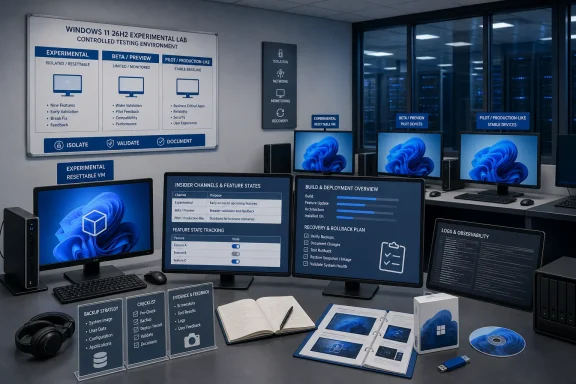 Why Experimental now requires change control
Microsoft describes Experimental as a place for early ideas and features under active development. It can help organizations discover possible future behavior, but results from it should not be treated as proof that a feature or interface will ship unchanged.WindowsForum’s coverage of Dev and Experimental flights shows why careful documentation matters. Forum users have repeatedly focused on features that appear, disappear, or look different across preview systems. Separate WindowsForum reports have also discussed a reported native Feature flags page intended to give testers more direct control over experiments. Those reports establish user interest and observed preview behavior, but they do not establish that every system receives the same controls or that a particular page remains available in every 2026 flight.
WindowsForum therefore recommends treating the complete observed configuration—not just the build number—as the test baseline. Record at least:
- Windows version and full OS build
- Insider channel and installed Windows version or platform branch
- Any displayed feature or experiment setting
- Policies, applications, drivers, and security configuration
- Whether an unsupported feature-enabling method was used
Which machines should enter Experimental?
Use separate device classes instead of placing every preview machine in the earliest available channel.Feature-validation devices: use Experimental selectively
WindowsForum recommends Experimental only for devices used to examine early Windows experiences or behavioral changes. Approve a device when all the following are true:- It is not required for daily production work.
- It can be reimaged without preserving local state.
- Its owner has a defined feature or scenario to evaluate.
- Applications and data on it are replaceable.
- The organization can document displayed experiment settings.
- Someone is responsible for updates, evidence, and eventual removal.
WindowsForum recommends excluding executive laptops, administrators’ only workstations, shared support PCs, emergency recovery machines, and any device holding unique data.
Compatibility devices: WindowsForum recommends Beta
Compatibility devices answer whether current applications, drivers, security agents, policies, peripherals, and workflows continue to work on a preview build.WindowsForum recommends Beta as the starting point when the organization needs:
- Repeatable application tests
- Driver and peripheral validation
- Policy regression checks
- Fewer deliberate configuration changes during reproduction
- A controlled step before any broader pilot
Microsoft said on June 19, 2026, that users on the described 26H2 path could move from Beta to Experimental and later switch back to Beta without a full reinstall. That statement should not be treated as a universal rollback guarantee for every Experimental option, build relationship, or future channel configuration.
Production-like pilots: stay out of Experimental
A production-like pilot should resemble the managed environment that will eventually receive a supported Windows release. It should exercise normal deployment, security, policy, application, update, support, and recovery processes.WindowsForum recommends retail servicing or an approved later preview path for this work. Experimental findings can inform a pilot plan, but Experimental devices should not constitute the production-like pilot.
How to make the channel decision
Complete this approval process before enrollment.- Write down the test objective.
Name the feature, application, device class, policy, peripheral, or workflow. “Testing 26H2” is too broad to produce an accountable result. - Classify the test.
Assign it to feature validation, compatibility validation, or production-like piloting. Under WindowsForum’s framework, only feature validation normally justifies Experimental. - Record the installed Windows version and build.
Open Settings > System > About and record the version and OS build under Windows specifications. Runwinveras a second check. - Check the platform boundary.
Microsoft’s published distinction places 26H1 on a different development and servicing basis from the 24H2, 25H2, and 26H2 branch. A 26H1 device cannot update directly to 26H2. Choose an eligible device or plan a rebuild. - Select an exit method.
Determine whether the device’s specific preview path permits a channel change or use of Stop Insider Preview Builds, or whether leaving requires a clean installation. Back up required data and retain installation media, recovery credentials, and provisioning instructions. - Assign an owner and review date.
The owner should install current flights, document changes, collect evidence, and remove or rebuild the device when testing ends. - Approve the asset.
Record the asset identifier, model, owner, test purpose, channel, installed Windows version or platform branch, expected duration, and recovery method.
How to enroll a controlled test device
These steps apply to an eligible Windows 11 device approved for preview use.Warning: Insider builds can require recovery or a clean installation. Back up required files and verify that applications, security software, and management components can be restored.
- Open Settings.
- Select Windows Update.
- Open Windows Insider Program.
- Confirm that the correct registered account is connected.
- Review the channels actually offered to the device.
- Select the channel approved in the change record.
- If moving an approved Beta device to Experimental, select Experimental only if that choice is available.
- Return to Windows Update.
- Select Check for updates.
- Install the offered update and restart when prompted.
- Open Settings > System > About.
- Record the version and full OS build under Windows specifications.
- Run
winverand compare its result with the Settings record. - Return to Settings > Windows Update > Windows Insider Program.
- Verify the connected account and selected channel.
- Run the predefined baseline tests before changing any exposed experiment setting.
Create a feature-state inventory
WindowsForum recommends a durable record for each Experimental device:| Field | Required entry |
|---|---|
| Asset | Device name or inventory identifier |
| Platform | Physical model or VM definition |
| Build state | Version, full OS build, installation date |
| Insider state | Channel and installed Windows version/platform branch |
| Feature or experiment | Displayed name and identifier, if available |
| Initial state | On, off, default, or unavailable |
| Change | Action taken, time, and operator |
| Approval | Ticket, change record, or approver |
| Test purpose | Feature or scenario evaluated |
| Evidence | Screenshots, logs, and reproduction steps |
| Expiry | Review date for any nondefault setting |
| Recovery | Reversal, channel change, or reimage plan |
If a feature appears or disappears between observations, document what was seen, when it was seen, and whether the build or configuration changed. Do not infer the cause without supporting evidence.
Separate exposed controls from unsupported methods
An exposed control is one presented in the Windows interface available on the tested device. An unsupported method is any third-party or undocumented procedure used to expose or activate a feature that the normal interface does not offer.WindowsForum recommends:
- Keep results from exposed controls separate from unsupported-method results.
- Do not turn an unsupported-method test into a production recommendation.
- Reproduce a defect in the default configuration before escalating it.
- Restore unsupported changes before establishing a new baseline.
- Compare devices only when their builds, channels, policies, and recorded feature states are known.
- State clearly when a result depends on a third-party utility or undocumented command.
Control feature-setting changes
Use a lightweight change process whenever a displayed setting is altered:- Capture the current build, channel, policies, and displayed feature states.
- Record the reason for the change.
- Identify one test owner and one approver.
- Change only one relevant variable when practical.
- Restart if Windows requests it.
- Repeat the predefined test cases.
- Capture the result and diagnostic evidence.
- Restore the initial setting and test again, if the control permits reversal.
- Set an expiry date for every nondefault configuration.
- Close the change after the device is restored, reassigned, or reimaged.
Plan the exit before an incident
Open Settings > Windows Update > Windows Insider Program > Stop Insider Preview Builds and document what the device actually offers. That option may be available only where the device’s specific preview path and current state permit it. Do not promise a no-reinstall exit unless the tested path explicitly supports one.Experimental (Future Platforms) requires special handling. Microsoft directs users leaving that option to perform a clean Windows 11 installation because it is not aligned with a retail production build.
Warning: A clean installation erases applications, settings, and local files. Confirm backups, recovery credentials, installation media, drivers, and provisioning instructions before enrollment.
The June 19, 2026 Beta-to-Experimental switching statement applies to the described 26H2 path. It does not remove the clean-install requirement for Future Platforms.
Verification and troubleshooting
After enrollment or a setting change:- Confirm the version and build in Settings > System > About.
- Confirm the result with
winver. - Verify the account and channel under Windows Insider Program.
- Check Windows Update for pending updates or restarts.
- Compare the result with the recorded baseline.
- Run the same predefined tests used before the change.
- Capture screenshots and logs before attempting recovery.
Keep preview devices current
WindowsForum recommends assigning every preview device an update schedule and owner. Check Windows Update, review known issues, investigate missed flights, and rebuild or retire devices whose owners have left. Do not retain inactive Experimental installations as long-term recovery images.Frequently Asked Questions
Should an organization upgrade its existing 26H1 test machines to 26H2?
No. Microsoft says 26H1 devices cannot update directly to 26H2 because they are on a different platform path. Use an eligible 24H2 or 25H2 device, or rebuild a designated test machine through an appropriate path.Can a Beta device return after testing 26H2 Experimental?
Microsoft said on June 19, 2026, that users on the described 26H2 path could switch from Beta to Experimental and later return to Beta without a full reinstall. Verify the exact options offered on the device before relying on that route. Experimental (Future Platforms) requires a clean installation to leave.Is the build number enough for a reproducible bug report?
No. WindowsForum recommends recording the full build, channel, installed Windows version or platform branch, displayed feature state, relevant policies, applications, drivers, and any unsupported feature-enabling method.Should IT enable every available experimental flag?
No. WindowsForum recommends changing only settings tied to an approved objective, documenting each change, and assigning an expiry date. Broad, untracked changes make results difficult to reproduce.Windows 11 26H2 Experimental is most useful when its purpose is narrow: feature discovery belongs on recoverable Experimental devices, compatibility work belongs in a controlled Beta lab under WindowsForum’s framework, and production-like validation should remain closer to retail servicing.
References
- Primary source: learn.microsoft.com
Deeper look at running Windows Insider Preview Builds - Windows Insider Program | Microsoft Learn
Understanding flighting, channels, and updateslearn.microsoft.com - Independent coverage: windowscentral.com
Windows 11 version 26H2: Everything you need to know Microsoft's next OS update coming this fall | Windows Central
Microsoft is hard at work on building the next version of Windows 11 that's expected to debut this fall. Here's what to expect, and when.www.windowscentral.com - Independent coverage: blogs.windows.com
Announcing new builds for 19 June 2026, version 26H2 for Experimental
Hello Windows Insiders, We have new releases today with builds across Beta and Experimental, including Windows 11, version 26H2 for Experimental. Windows 11, version 26H2 Windows 11, version 26H2 represents our yearly second halfblogs.windows.com - Primary source: WindowsForum
Windows 11 Dev Build 26300.8155 Feature Flags Page: Insider Control vs Rollout | Windows Forum
Microsoft’s latest Windows 11 Dev Channel flight has reignited a familiar debate inside the Windows Insider Program: how much control should testers have...windowsforum.com
