

Microsoft confirmed Windows 11 version 26H2 on June 19, 2026, with Insider Experimental Preview Build 26300.8697, an enablement-package update delivered on top of Windows 11 25H2 that updates Settings and winver to show the next annual Windows release for Experimental channel testers. The headline feature, though, is not the version number. It is Microsoft’s apparent decision to let users turn off web suggestions in Windows Search, a small toggle with outsized symbolic weight. For a company that has spent years treating the Start menu as a distribution surface for Bing, Microsoft Store prompts, cloud content, and AI-adjacent experiences, local-first search is less a feature than a concession.
Windows Search has long suffered from a basic trust problem. When a user presses the Windows key and types the name of a file, app, setting, or control panel item, the operating system should behave like an operating system. Too often in Windows 11, it behaves like a search portal that happens to have a desktop attached.
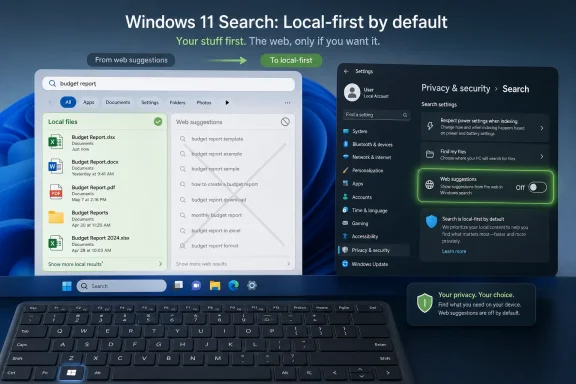
That is why March Rogers’ recent confirmation matters. Microsoft’s Partner Director of Design said that local files are prioritized in the new Search updates and that users will be able to turn off web suggestions entirely, reportedly through Settings under Privacy & security and Search. It is the kind of sentence Windows power users have wanted to hear for years: not a registry hack, not a Group Policy workaround, not a third-party shell replacement, but an exposed user-facing control.
The complaint has never been that Windows can search the web. The complaint is that Windows frequently chooses the web at the moment users are trying to search their own machines. A mistyped app name becomes a Bing query. A half-remembered document title competes with a cloud suggestion. A Start menu interaction that should last half a second turns into a reminder that Microsoft has business priorities beyond helping you open Notepad.
This is the difference between integration and intrusion. A web result is useful when the user wants the web. It is irritating when it displaces a local result, delays a local result, or creates uncertainty about whether the computer understood the request at all.
Enablement packages are Microsoft’s way of turning on already-staged code with a relatively small update rather than forcing a full in-place upgrade. For IT departments, that usually means less drama: faster installation, fewer moving parts, and a lower probability that a feature update turns into an all-hands troubleshooting exercise. For enthusiasts, it also means that 26H2 may feel evolutionary rather than revolutionary.
That context makes Search unusually important. If the annual Windows release is increasingly a switch-flip over a shared platform, the changes users notice most are not kernel glamour shots or build-number trivia. They are the daily papercuts: Start reliability, File Explorer polish, Settings behavior, taskbar fixes, and whether Search respects the boundary between the local PC and the internet.
Build 26300.8697’s official notes include smaller but practical work: Dark mode improvements for File Explorer’s Copy dialog, better Start menu reliability when reflecting newly installed or removed apps, a fix for the smaller taskbar option where the tray could be cut off, improved reliability for Startup settings, and fixes for virtualization-related bugchecks involving HYPERVISOR_ERROR and KMODE_EXCEPTION_NOT_HANDLED. These are not keynote features. They are the kind of repairs that make Windows feel less brittle.
Search sits in the same category, but with more emotional baggage. Nobody buys a PC because the Start menu search box is purer than before. But plenty of people lose patience with Windows because it keeps trying to answer local intent with web monetization.
That does not make it risk-free. It changes the type of risk. Instead of worrying only about setup failures and app compatibility regressions, administrators have to watch Microsoft’s increasingly complex feature rollout machinery. Controlled Feature Rollout means two machines on the same nominal build can behave differently because one has received a server-side enablement and another has not.
That is fine for consumer experimentation and miserable for fleet predictability. Help desk scripts depend on reproducibility. Security baselines depend on known states. User training depends on screenshots matching reality. If the new Search controls are staged gradually, IT teams will need to verify not just the OS version but the actual feature state before telling users what to expect.
The appearance of a proper Settings toggle would still be a win. Registry policies and unsupported tools have their place in the enthusiast world, but they are not how enterprises want to manage an experience that affects every user. A visible option under Privacy & security is easier to document, easier to audit, and easier to explain to users who want to know why their Start menu behaves differently after an update.
Microsoft’s challenge is consistency. If Search web suggestions can be disabled in Settings, the setting needs to be honored cleanly across Start, Search, taskbar entry points, and any new AI-inflected result surfaces. A half-toggle that removes one kind of Bing prompt while leaving another category of web promotion intact would only sharpen the criticism.
The Start menu is uniquely sensitive territory. It is not a browser tab. It is not a widget feed. It is the front door of the PC. When Microsoft injects web suggestions into that space, it changes the psychological contract of the operating system.
A web browser can suggest the web because that is what it is for. A launcher should launch. A file search tool should find files. A settings search box should expose settings. Once those distinctions blur, users start treating the OS itself as hostile, or at least as noisy.
This is why local-first search has become one of those “most requested” features that sounds absurd only if you ignore the last decade of Windows design. Nobody should have to request that the local operating system prioritize local content. The fact that users did request it, repeatedly and loudly, says something about how far Microsoft pushed its surfaces toward cloud-first engagement.
There is also a privacy dimension. Even when web search suggestions are benign, many users do not want Start menu queries leaving the context of the device. Search terms can be revealing: filenames, project names, internal tools, client references, medical words, legal terms, and fragments of private thoughts. The ability to disable web suggestions is not just a performance preference; for some users, it is a data-minimization control.
ViveTool is not magic. It flips feature flags. In the hands of experienced testers, that can surface hidden or staged components before Microsoft rolls them out broadly. In the hands of impatient users on production machines, it can create inconsistent states that are hard to support and harder to unwind.
The feature IDs reportedly associated with the new Search work include several separate flags, plus another dependency that may already be enabled on many Experimental installs. That is a clue in itself. Modern Windows features are no longer single binaries landing fully formed. They are packages of UI changes, service hooks, cloud controls, policy states, experimentation gates, and staged rollouts.
For WindowsForum readers, the practical advice is simple: do not confuse “can be forced on” with “ready for daily use.” Experimental channel builds exist to test ideas, and Microsoft is explicit that some previewed features may change, be removed, or never ship outside Insider rings. If you use ViveTool, use it on a sacrificial install, document exactly what you changed, and assume that the next flight may alter the behavior.
That caution does not diminish the significance of the discovery. Enthusiasts often find the shape of Windows before Microsoft is ready to announce it. In this case, they appear to be seeing a more disciplined Search surface taking form: local files first, web suggestions optional, and Search perhaps a little faster when the internet is no longer invited into every keystroke.
The harder win is trust. Users forgive slow software more readily than unpredictable software. If Search always searches locally first, and if web results appear only when users ask for them or explicitly allow them, Windows regains some of the muscle-memory confidence it lost.
Search is one of the most repeated interactions in a modern desktop OS. It is how users open apps, find documents, jump to settings, locate emails, and recover from the fact that nobody remembers where anything lives anymore. A small annoyance repeated fifty times a week becomes a defining trait of the product.
Microsoft has often treated Windows Search as a place to make the OS feel broader: connected to the web, tied to Microsoft services, aware of cloud files, and increasingly ready for AI experiences. That ambition is not inherently wrong. The problem is that breadth without discipline feels like clutter.
A better Search experience would not need to choose between local and cloud forever. It would need hierarchy. Local apps and files should be deterministic. Settings should be direct. Cloud content should be clearly labeled. Web results should be opt-in or at least easy to suppress. Anything else turns Search into a negotiation.
A user searching for an internal application should not be nudged toward the public web. A user typing the name of a confidential project should not have to wonder whether that query participates in web suggestion behavior. A help desk technician walking a user through opening a control panel should not have to say, “Ignore the thing at the top; click the local result underneath.”
Windows has existing privacy and search controls, including settings for cloud content and web search history. But what administrators and security-minded users want is not merely a pile of toggles. They want a coherent default posture for the PC as a local device first, with cloud expansion only where it is helpful and governed.
This is where Microsoft’s consumer and enterprise instincts often collide. The consumer Windows business is increasingly shaped by engagement surfaces: widgets, recommendations, Store prompts, Copilot entry points, account nudges, and service discovery. The enterprise Windows business, by contrast, is about predictability, manageability, and minimizing surprise.
Search is where those instincts meet every morning. A Start menu that behaves like a launcher is boring, but boring is exactly what many organizations pay for. A Start menu that behaves like a promotional surface may be more strategically valuable to Microsoft, but it is operationally expensive for everyone else.
But CFR also makes Windows feel less knowable. Two Insiders can install the same build on the same day and disagree about what is new because one has the relevant feature flag and the other does not. That ambiguity fuels rumor, tool-driven exploration, and frustration when a promised setting is not visible to everyone.
The new Feature flags page under Settings, Windows Update, and Windows Insider Program is Microsoft’s partial answer. It gives testers a more official way to opt into some staged features instead of relying entirely on hidden IDs. That is healthy, but it does not eliminate the culture that created ViveTool sleuthing in the first place.
Microsoft is trying to test Windows more like a web service while still shipping it as an operating system. That tension is now built into the Insider Program. The company wants telemetry-driven confidence, but users want a build number to mean something definite. Both sides have a point.
The Search toggle will be a good test of whether Microsoft can make staged experimentation feel sane. If the setting appears clearly, works reliably, and graduates into stable builds without becoming another region-limited or account-dependent oddity, it will look like progress. If it arrives fragmented across flags, policies, and A/B buckets, it will look like another example of Windows hiding the simple thing behind a rollout maze.
Some of those additions are useful. Some are harmless. Some are clearly strategic rather than user-driven. The cumulative effect is the issue. Windows 11 can feel like a desktop OS constantly trying to become a services dashboard.
That is why a Search setting lands differently from another File Explorer polish pass. It suggests Microsoft may be recognizing that user control is itself a feature. Not the fake kind of control buried in obscure policy templates, but visible control in Settings where normal users can find it.
The company does not need to abandon web integration to fix Search. It needs to stop treating integration as mandatory promotion. The difference is subtle in a product planning meeting and enormous at the keyboard.
Windows is still the default productivity environment for vast numbers of people who do not want to think about operating systems. They want the PC to respond quickly, accurately, and quietly. If 26H2 moves Windows even slightly back toward that ideal, it will matter more than its enablement-package modesty suggests.
Still, some changes are important precisely because they are basic. Letting users turn off web suggestions in Search acknowledges that a PC is not merely a thin client for Microsoft’s ecosystem. It is a machine with local intent, local data, local apps, and local work.
For enthusiasts, the change would reduce the need for hacks and shell replacements. For administrators, it could make standardized desktop behavior easier to support. For privacy-conscious users, it would make Windows Search less leaky by design. For Microsoft, it is a chance to show that feedback can still beat engagement metrics when the product experience is clearly worse.
The timing also helps. By tying the visible version shift to Build 26300.8697 and 26H2, Microsoft gives this work a narrative home. Even if the feature is being rolled out gradually and may evolve before general availability, it is now part of the next Windows 11 cycle rather than another rumor from the feature-flag underground.
 Microsoft Finally Admits Search Is Not a Billboard
Windows Search has long suffered from a basic trust problem. When a user presses the Windows key and types the name of a file, app, setting, or control panel item, the operating system should behave like an operating system. Too often in Windows 11, it behaves like a search portal that happens to have a desktop attached.That is why March Rogers’ recent confirmation matters. Microsoft’s Partner Director of Design said that local files are prioritized in the new Search updates and that users will be able to turn off web suggestions entirely, reportedly through Settings under Privacy & security and Search. It is the kind of sentence Windows power users have wanted to hear for years: not a registry hack, not a Group Policy workaround, not a third-party shell replacement, but an exposed user-facing control.
The complaint has never been that Windows can search the web. The complaint is that Windows frequently chooses the web at the moment users are trying to search their own machines. A mistyped app name becomes a Bing query. A half-remembered document title competes with a cloud suggestion. A Start menu interaction that should last half a second turns into a reminder that Microsoft has business priorities beyond helping you open Notepad.
This is the difference between integration and intrusion. A web result is useful when the user wants the web. It is irritating when it displaces a local result, delays a local result, or creates uncertainty about whether the computer understood the request at all.
26H2 Looks Small, Which Makes the Search Change Louder
Windows 11 26H2 is not shaping up as the kind of release that rewrites the OS from top to bottom. Microsoft’s own Insider notes frame Build 26300.8697 as an enablement-package release on top of Windows 11 25H2, and Flight Hub now identifies the 26300 series as Windows 11 version 26H2. That means the delivery model matters almost as much as the features.Enablement packages are Microsoft’s way of turning on already-staged code with a relatively small update rather than forcing a full in-place upgrade. For IT departments, that usually means less drama: faster installation, fewer moving parts, and a lower probability that a feature update turns into an all-hands troubleshooting exercise. For enthusiasts, it also means that 26H2 may feel evolutionary rather than revolutionary.
That context makes Search unusually important. If the annual Windows release is increasingly a switch-flip over a shared platform, the changes users notice most are not kernel glamour shots or build-number trivia. They are the daily papercuts: Start reliability, File Explorer polish, Settings behavior, taskbar fixes, and whether Search respects the boundary between the local PC and the internet.
Build 26300.8697’s official notes include smaller but practical work: Dark mode improvements for File Explorer’s Copy dialog, better Start menu reliability when reflecting newly installed or removed apps, a fix for the smaller taskbar option where the tray could be cut off, improved reliability for Startup settings, and fixes for virtualization-related bugchecks involving HYPERVISOR_ERROR and KMODE_EXCEPTION_NOT_HANDLED. These are not keynote features. They are the kind of repairs that make Windows feel less brittle.
Search sits in the same category, but with more emotional baggage. Nobody buys a PC because the Start menu search box is purer than before. But plenty of people lose patience with Windows because it keeps trying to answer local intent with web monetization.
The Enablement Package Is a Message to Administrators
For sysadmins, 26H2’s enablement-package approach is the part that should lower blood pressure. Microsoft has spent the Windows 11 era trying to make annual feature updates less like migration projects and more like monthly maintenance. In theory, a 25H2-to-26H2 move should be closer to applying a cumulative update than deploying a fresh OS image.That does not make it risk-free. It changes the type of risk. Instead of worrying only about setup failures and app compatibility regressions, administrators have to watch Microsoft’s increasingly complex feature rollout machinery. Controlled Feature Rollout means two machines on the same nominal build can behave differently because one has received a server-side enablement and another has not.
That is fine for consumer experimentation and miserable for fleet predictability. Help desk scripts depend on reproducibility. Security baselines depend on known states. User training depends on screenshots matching reality. If the new Search controls are staged gradually, IT teams will need to verify not just the OS version but the actual feature state before telling users what to expect.
The appearance of a proper Settings toggle would still be a win. Registry policies and unsupported tools have their place in the enthusiast world, but they are not how enterprises want to manage an experience that affects every user. A visible option under Privacy & security is easier to document, easier to audit, and easier to explain to users who want to know why their Start menu behaves differently after an update.
Microsoft’s challenge is consistency. If Search web suggestions can be disabled in Settings, the setting needs to be honored cleanly across Start, Search, taskbar entry points, and any new AI-inflected result surfaces. A half-toggle that removes one kind of Bing prompt while leaving another category of web promotion intact would only sharpen the criticism.
The Start Menu Has Become the Front Line of Windows Consent
The reason this story resonates is not just speed. It is consent. Windows users understand that Microsoft makes money from cloud services, advertising, Store distribution, and Bing traffic. What they resent is when core OS surfaces behave as if those business models outrank the user’s immediate task.The Start menu is uniquely sensitive territory. It is not a browser tab. It is not a widget feed. It is the front door of the PC. When Microsoft injects web suggestions into that space, it changes the psychological contract of the operating system.
A web browser can suggest the web because that is what it is for. A launcher should launch. A file search tool should find files. A settings search box should expose settings. Once those distinctions blur, users start treating the OS itself as hostile, or at least as noisy.
This is why local-first search has become one of those “most requested” features that sounds absurd only if you ignore the last decade of Windows design. Nobody should have to request that the local operating system prioritize local content. The fact that users did request it, repeatedly and loudly, says something about how far Microsoft pushed its surfaces toward cloud-first engagement.
There is also a privacy dimension. Even when web search suggestions are benign, many users do not want Start menu queries leaving the context of the device. Search terms can be revealing: filenames, project names, internal tools, client references, medical words, legal terms, and fragments of private thoughts. The ability to disable web suggestions is not just a performance preference; for some users, it is a data-minimization control.
ViveTool Is a Symptom, Not the Story
The Neowin report notes that the new Search experience is not yet available to every tester and that Windows enthusiast phantomofearth identified feature IDs that can be enabled with ViveTool. That is useful for Insiders who know exactly what they are doing. It is also a reminder that the Windows enthusiast ecosystem has become an unofficial observatory for Microsoft’s feature pipeline.ViveTool is not magic. It flips feature flags. In the hands of experienced testers, that can surface hidden or staged components before Microsoft rolls them out broadly. In the hands of impatient users on production machines, it can create inconsistent states that are hard to support and harder to unwind.
The feature IDs reportedly associated with the new Search work include several separate flags, plus another dependency that may already be enabled on many Experimental installs. That is a clue in itself. Modern Windows features are no longer single binaries landing fully formed. They are packages of UI changes, service hooks, cloud controls, policy states, experimentation gates, and staged rollouts.
For WindowsForum readers, the practical advice is simple: do not confuse “can be forced on” with “ready for daily use.” Experimental channel builds exist to test ideas, and Microsoft is explicit that some previewed features may change, be removed, or never ship outside Insider rings. If you use ViveTool, use it on a sacrificial install, document exactly what you changed, and assume that the next flight may alter the behavior.
That caution does not diminish the significance of the discovery. Enthusiasts often find the shape of Windows before Microsoft is ready to announce it. In this case, they appear to be seeing a more disciplined Search surface taking form: local files first, web suggestions optional, and Search perhaps a little faster when the internet is no longer invited into every keystroke.
Speed Is the Easy Win, Trust Is the Hard One
Reports that Search feels snappier after web suggestions are disabled are entirely plausible. Searching fewer places should be faster than searching more places, especially when one of those places involves network-backed suggestions, ranking logic, and cloud-fed result surfaces. But speed is only the obvious part.The harder win is trust. Users forgive slow software more readily than unpredictable software. If Search always searches locally first, and if web results appear only when users ask for them or explicitly allow them, Windows regains some of the muscle-memory confidence it lost.
Search is one of the most repeated interactions in a modern desktop OS. It is how users open apps, find documents, jump to settings, locate emails, and recover from the fact that nobody remembers where anything lives anymore. A small annoyance repeated fifty times a week becomes a defining trait of the product.
Microsoft has often treated Windows Search as a place to make the OS feel broader: connected to the web, tied to Microsoft services, aware of cloud files, and increasingly ready for AI experiences. That ambition is not inherently wrong. The problem is that breadth without discipline feels like clutter.
A better Search experience would not need to choose between local and cloud forever. It would need hierarchy. Local apps and files should be deterministic. Settings should be direct. Cloud content should be clearly labeled. Web results should be opt-in or at least easy to suppress. Anything else turns Search into a negotiation.
The Enterprise Case Is Stronger Than the Enthusiast Complaint
Power users have been mocking Bing-infused Start search for years, but the enterprise argument is more consequential. In managed environments, web suggestions can create compliance, productivity, and support concerns that go well beyond taste.A user searching for an internal application should not be nudged toward the public web. A user typing the name of a confidential project should not have to wonder whether that query participates in web suggestion behavior. A help desk technician walking a user through opening a control panel should not have to say, “Ignore the thing at the top; click the local result underneath.”
Windows has existing privacy and search controls, including settings for cloud content and web search history. But what administrators and security-minded users want is not merely a pile of toggles. They want a coherent default posture for the PC as a local device first, with cloud expansion only where it is helpful and governed.
This is where Microsoft’s consumer and enterprise instincts often collide. The consumer Windows business is increasingly shaped by engagement surfaces: widgets, recommendations, Store prompts, Copilot entry points, account nudges, and service discovery. The enterprise Windows business, by contrast, is about predictability, manageability, and minimizing surprise.
Search is where those instincts meet every morning. A Start menu that behaves like a launcher is boring, but boring is exactly what many organizations pay for. A Start menu that behaves like a promotional surface may be more strategically valuable to Microsoft, but it is operationally expensive for everyone else.
Microsoft’s Controlled Rollout Culture Cuts Both Ways
Microsoft’s Controlled Feature Rollout system is defensible. Rolling new Windows features to a subset of Insiders, measuring feedback, and gradually expanding availability is better than blasting unfinished UI changes to every tester simultaneously. The Windows hardware ecosystem is too large and strange for old-fashioned release certainty.But CFR also makes Windows feel less knowable. Two Insiders can install the same build on the same day and disagree about what is new because one has the relevant feature flag and the other does not. That ambiguity fuels rumor, tool-driven exploration, and frustration when a promised setting is not visible to everyone.
The new Feature flags page under Settings, Windows Update, and Windows Insider Program is Microsoft’s partial answer. It gives testers a more official way to opt into some staged features instead of relying entirely on hidden IDs. That is healthy, but it does not eliminate the culture that created ViveTool sleuthing in the first place.
Microsoft is trying to test Windows more like a web service while still shipping it as an operating system. That tension is now built into the Insider Program. The company wants telemetry-driven confidence, but users want a build number to mean something definite. Both sides have a point.
The Search toggle will be a good test of whether Microsoft can make staged experimentation feel sane. If the setting appears clearly, works reliably, and graduates into stable builds without becoming another region-limited or account-dependent oddity, it will look like progress. If it arrives fragmented across flags, policies, and A/B buckets, it will look like another example of Windows hiding the simple thing behind a rollout maze.
26H2 Is Becoming a Referendum on Restraint
The broader Windows 11 story has not been a lack of ambition. It has been a lack of restraint. Microsoft has spent the last several years adding layers: Teams chat, widgets, recommendations, Microsoft account prompts, Copilot, Store surfacing, Edge tie-ins, OneDrive nudges, AI features, and search experiences that blur the line between local and online.Some of those additions are useful. Some are harmless. Some are clearly strategic rather than user-driven. The cumulative effect is the issue. Windows 11 can feel like a desktop OS constantly trying to become a services dashboard.
That is why a Search setting lands differently from another File Explorer polish pass. It suggests Microsoft may be recognizing that user control is itself a feature. Not the fake kind of control buried in obscure policy templates, but visible control in Settings where normal users can find it.
The company does not need to abandon web integration to fix Search. It needs to stop treating integration as mandatory promotion. The difference is subtle in a product planning meeting and enormous at the keyboard.
Windows is still the default productivity environment for vast numbers of people who do not want to think about operating systems. They want the PC to respond quickly, accurately, and quietly. If 26H2 moves Windows even slightly back toward that ideal, it will matter more than its enablement-package modesty suggests.
The Local PC Gets a Small but Meaningful Victory
There is a temptation to overstate this change because it has been requested for so long. A Search toggle will not fix every complaint about Windows 11. It will not remove all recommendations, simplify every Settings page, undo every unwanted Copilot button, or settle the larger argument about Microsoft’s use of Windows as a funnel for services.Still, some changes are important precisely because they are basic. Letting users turn off web suggestions in Search acknowledges that a PC is not merely a thin client for Microsoft’s ecosystem. It is a machine with local intent, local data, local apps, and local work.
For enthusiasts, the change would reduce the need for hacks and shell replacements. For administrators, it could make standardized desktop behavior easier to support. For privacy-conscious users, it would make Windows Search less leaky by design. For Microsoft, it is a chance to show that feedback can still beat engagement metrics when the product experience is clearly worse.
The timing also helps. By tying the visible version shift to Build 26300.8697 and 26H2, Microsoft gives this work a narrative home. Even if the feature is being rolled out gradually and may evolve before general availability, it is now part of the next Windows 11 cycle rather than another rumor from the feature-flag underground.
The Windows Search Fix Is Small Enough to Ship and Big Enough to Matter
Here is the practical shape of the 26H2 Search story as it stands: Microsoft has confirmed the version, Insider builds are moving through the Experimental channel, and the long-requested ability to disable web suggestions appears to be on the way, though not uniformly available to all testers yet.- Windows 11 version 26H2 is now visible in Build 26300.8697 for Experimental channel Insiders, with the update delivered via an enablement package on top of Windows 11 25H2.
- Microsoft’s Search work reportedly prioritizes local files and adds a setting to turn off web suggestions entirely under Privacy & security and Search.
- The feature is still subject to staged rollout behavior, so not every Insider on the build should expect to see the same Search controls immediately.
- Enthusiast-discovered ViveTool IDs may expose the new experience early, but forcing hidden features remains risky and should be limited to test machines.
- For IT administrators, the most important question is whether Microsoft will provide predictable policy and Settings behavior when 26H2 approaches broader deployment.
- For everyday Windows users, the win is simple: typing into Start should feel more like searching the PC and less like feeding a web portal.
References
- Primary source: Neowin
Published: Sun, 21 Jun 2026 09:28:00 GMT
Microsoft confirms Windows 11 26H2 to finally get one of the most requested features - Neowin
Microsoft officially confirms Windows 11 26H2 will finally bring one of the platform's most requested features, and you can already try it out. www.neowin.net
- Related coverage: pcgamer.com
Windows 11 Search will soon see through your typos and actually find what you're looking for | PC Gamer
Dotting the 'i's, crossing the 't's.www.pcgamer.com - Official source: support.microsoft.com
Windows Search and Privacy | Microsoft Support
Learn how to connect Windows Search with your accounts in the cloud, manage your Windows Search and SafeSearch settings, clear search history, and more.support.microsoft.com - Related coverage: windowslatest.com
Windows 11 26H2 confirmed for later this year, as references spotted on Windows Update page
If you're on Windows 11 25H2 or 24H2, you'll be getting Windows 11 26H2 later this year, likely around October 2026. www.windowslatest.com
- Related coverage: techspot.com
Microsoft begins testing Windows 11 26H2 with major fixes and Copilot changes | TechSpot
Build 26300.7674 is the first public test of what's expected to become the major feature update for 2026. Unlike routine quality improvements, this new release is designed...www.techspot.com - Related coverage: windowscentral.com
Windows 11 version 26H2: Everything we know so far about Microsoft's next OS update coming this fall | Windows Central
Microsoft is now testing Windows 11 preview builds that are expected to make up the next version shipping this fall. Here's what we know.www.windowscentral.com
- Related coverage: htnovo.net
Windows 11 26H2 disponibile per gli Insider
Ecco le build 26300 rilasciate da Microsoft nel canale Dev del circuito di feedback e test di Windows 11 per lo sviluppo della nuova versione 26H2.www.htnovo.net
- Related coverage: tomshardware.com
Windows 11 25H2 ISOs released after delays — upgrade switches on some features, now available for insiders | Tom's Hardware
Microsoft has released ISO install media for Windows 11 version 25H2, the next feature update in its annual release cycle.www.tomshardware.com - Official source: learn.microsoft.com
Windows 11 - release information | Microsoft Learn
Learn release information for Windows 11 releaseslearn.microsoft.com - Related coverage: techbout.com
How to Disable Web Results in Windows Search - Techbout
You can disable Web Results in Windows Search (Taskbar or Start Menu Search Box) by creating a New Registry key on your computer.www.techbout.com - Related coverage: pcworld.com
Want to try the next Windows 11 version? It's now available to download | PCWorld
WIndows 11 25H2 is the next major version of Microsoft's operating system. The ISO file for it is now available to everyone as a free download.www.pcworld.com - Related coverage: computerbase.de
Windows 11: Was Microsoft mit Windows 26H1 und 26H2 plant - ComputerBase
Microsoft bereitet die großen Windows-11-Updates für das Jahr 2026 vor. Neben dem obligatorischen 26H2 kommt auch 26H1 für Arm-Plattformen.www.computerbase.de
- Related coverage: techradar.com
Is Microsoft finally going to de-spam Windows 11 search? It looks that way — and I'm shocked that my most-wanted change could be incoming | TechRadar
Another crowd-pleasing move from Microsoft (hopefully)www.techradar.com
