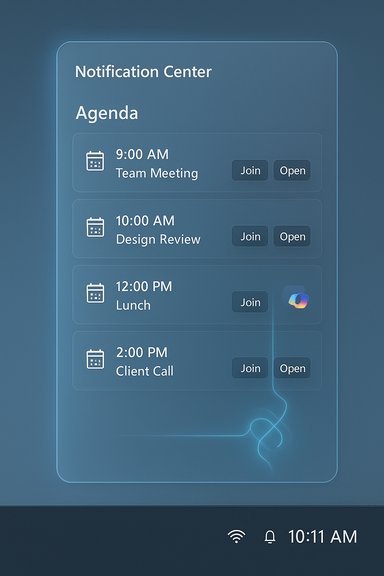
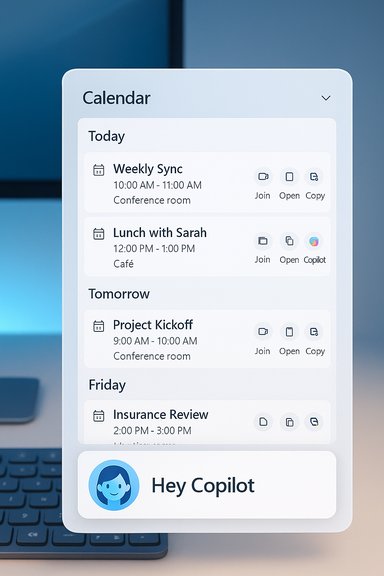
Microsoft is restoring the small-but-crucial Windows 10–style Agenda to Windows 11’s Notification Center — and this time it’s stitched directly into Outlook/Microsoft 365 with one-click meeting actions and Microsoft 365 Copilot hooks, a preview Microsoft says will begin rolling out to Windows Insiders in December 2025.
Windows 11 launched with a redesigned taskbar and a simplified Notification Center that dropped the compact, chronological agenda many users relied on in Windows 10. That omission spawned third‑party replacements and repeated user requests for a native return. Microsoft’s Ignite 2025 messaging framed Windows as an “agentic, AI‑native” platform and announced the Agenda view as a practical, productivity‑focused restoration inside the Notification Center.
The new Agenda is not merely a cosmetic comeback. It’s a deliberate reintroduction of a quick‑glance schedule surface with integrated actions and AI utilities. Microsoft’s public communications indicate the feature will be available in preview in December 2025 via Windows Insider channels, with a broader, staged rollout to follow. Treat the December preview target as Microsoft’s current public commitment; the company has not provided a firm general‑availability date beyond preview.
That said, the real test is execution. Key success factors include:
The Agenda preview’s arrival marks a pragmatic course correction for Windows 11: restore what worked, and fold in new productivity primitives where they add real value. As always, the balance between convenience and control will determine whether this change becomes a routine desktop improvement or another feature that enterprises approach with caution.
Source: Windows Latest Windows 11 is getting Windows 10-like Calendar Agenda in Notification Center with Outlook, and sadly AI features
 Background
Windows 11 launched with a redesigned taskbar and a simplified Notification Center that dropped the compact, chronological agenda many users relied on in Windows 10. That omission spawned third‑party replacements and repeated user requests for a native return. Microsoft’s Ignite 2025 messaging framed Windows as an “agentic, AI‑native” platform and announced the Agenda view as a practical, productivity‑focused restoration inside the Notification Center.The new Agenda is not merely a cosmetic comeback. It’s a deliberate reintroduction of a quick‑glance schedule surface with integrated actions and AI utilities. Microsoft’s public communications indicate the feature will be available in preview in December 2025 via Windows Insider channels, with a broader, staged rollout to follow. Treat the December preview target as Microsoft’s current public commitment; the company has not provided a firm general‑availability date beyond preview.
What the Agenda view is and how it works
The core experience
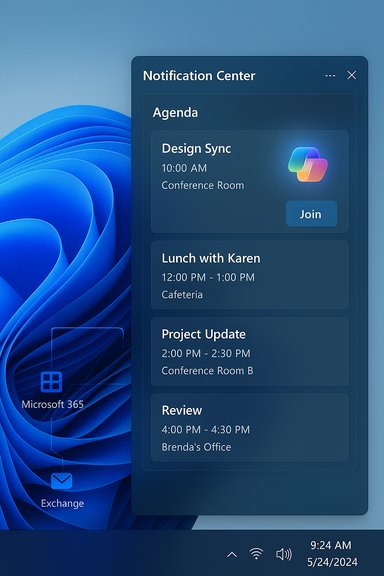
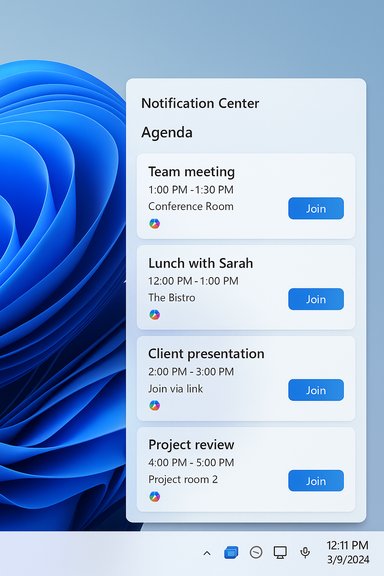
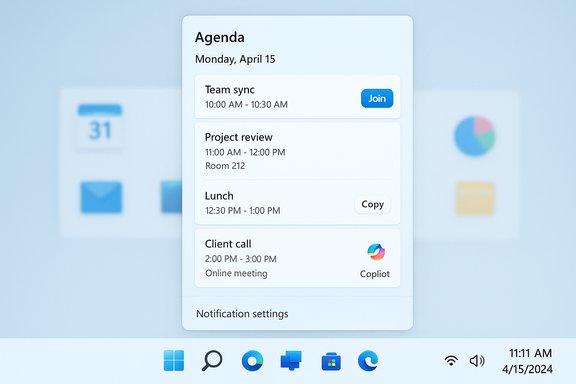
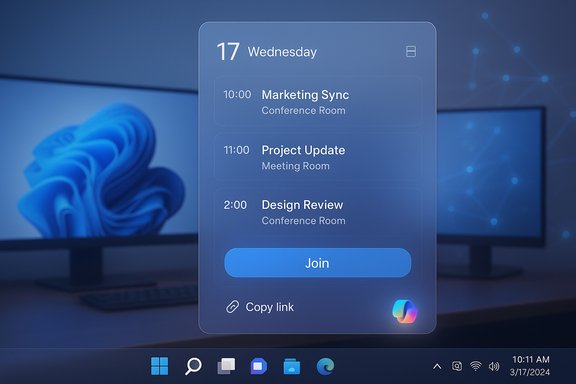
- The Agenda view appears inside the Notification Center calendar flyout (the panel shown when you click the taskbar date/time).
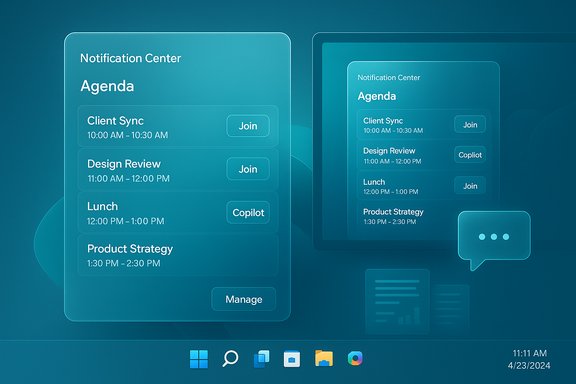
- It presents a scrollable, chronological list of upcoming events — meeting title, time, and location/meeting link metadata — in a compact, glanceable format.
- Each entry exposes interactive quick actions: join a meeting, copy the meeting link, open the event in Calendar/Outlook, or trigger Copilot‑driven prep and summaries.
Data plumbing and technical mechanics
- Primary data comes from Microsoft 365 (Exchange Online) calendars and any accounts surfaced via the local Calendar/Outlook apps using Microsoft Graph.
- Meeting metadata and join links are surfaced client‑side via Graph calls; quick actions are UI affordances that launch the appropriate handler (Teams, Zoom, Outlook, etc..
- Copilot actions invoked from agenda items will either route to Microsoft’s cloud Copilot services or to on‑device models on Copilot+ PCs, depending on hardware, tenant settings, and licensing. Some advanced Copilot behaviors may require tenant opt‑in and paid Copilot licensing.
Why this matters: productivity and UX
Restoring the agenda corrects a daily friction point. For users who live by their calendars, the Agenda view reduces context switching and unnecessary app launches.- One‑glance schedule awareness: see what’s next without opening Outlook, Calendar, or Teams.
- Faster meeting joins: one‑click Join for meeting links saves time searching emails or chat messages.
- Contextual prep with Copilot: generate quick meeting briefs, summarize recent emails tied to the event, or surface relevant attachments directly from the Agenda entry.
Copilot integration: convenience and complexity
What Microsoft promises
Microsoft has said Agenda entries will let users “engage with Microsoft 365 Copilot” — likely actions include meeting summaries, suggested talking points, and quick note generation tied to the meeting context. These Copilot shortcuts are a central differentiator for the new Agenda view.Practical implications
- On a Copilot‑enabled device, a click can surface a concise meeting brief assembled from recent emails, attachments, and calendar context.
- Where on‑device Copilot models exist (Copilot+ PCs), some processing may remain local to improve latency and privacy; otherwise, Copilot calls will route to Microsoft’s cloud services.
Licensing and admin gating
- Several public summaries emphasize that tenant‑grounded Copilot features will require appropriate licensing and admin opt‑in. Organizations should assume some Copilot capabilities will be gated behind Microsoft 365 subscriptions or Copilot add‑ons and that tenant administrators will have controls.
- Expect Intune and Microsoft 365 admin controls to manage what Copilot actions are allowed from the Agenda surface.
Cautionary note (unverified limitations)
Some reporting suggests Copilot features in Agenda may be limited initially to read/prep actions rather than white‑glove workflows (for example, inline editing or sharing of Copilot outputs). The precise set of Copilot capabilities, data retention policies for generated summaries, and export/retention behaviors are matters that require validation in the December Insider preview. Treat any claims about full Copilot feature parity across devices as provisional until verified in preview.Enterprise and IT considerations
This feature touches both the OS shell and Microsoft 365, so IT teams should plan proactively.Immediate steps for IT teams
- Enroll test devices in the Windows Insider Program and target a small pilot cohort to test Agenda preview behavior.
- Map licensing: determine which Agenda/Copilot actions require Microsoft 365 or Copilot entitlements and budget accordingly.
- Draft privacy, acceptable‑use, and DLP guidance for calendar and Copilot outputs — ensure Purview and DLP policies cover Copilot‑generated content.
- Validate behavior for shared and delegated calendars, private events, and third‑party calendar accounts (Google, iCloud).
Governance and risk areas
- Data surface expansion: Agenda exposes meeting metadata directly in the shell and allows Copilot to parse mailbox/calendar content. Review DLP and SIEM rules accordingly.
- Tenant‑gated rollouts: Microsoft is likely to gate the feature with server‑side toggles and admin controls; expect staggered availability even after a Windows update lands.
- Auditability: Ensure Copilot‑invoked flows are logged and that generated summaries are subject to retention and eDiscovery policies.
Privacy, security, and accessibility — what to watch for
Privacy
Bringing calendar metadata into the shell and connecting it to Copilot introduces new privacy touchpoints.- Confirm whether Agenda contents appear on locked or shared devices. This is a crucial policy point for front‑line or kiosk devices.
- Understand data residency: Copilot requests may route to cloud services; tenant settings may alter where processing occurs.
Security
- Ensure join links and meeting metadata are not inadvertently leaked via third‑party integrations or misconfigured telemetry.
- Validate that Copilot actions cannot exfiltrate sensitive attachments or data without appropriate admin controls.
Accessibility
- Test screen-reader and keyboard navigation support in the Agenda flyout. The preview will be the best time to surface accessibility gaps for Microsoft to address.
User experience: expectations and likely gaps
Microsoft’s initial messaging focuses on viewing and interacting with scheduled events rather than full event authoring in the Agenda flyout. Early preview behavior will likely prioritize:- Viewing and joining meetings.
- Copying meeting links.
- Invoking Copilot for quick prep or summaries.
Practical tips for enthusiasts and early adopters
- Join the Windows Insider Program on a test device to access the December preview and collect hands‑on feedback.
- Test multi‑account scenarios (work Microsoft 365, personal Outlook, Google, iCloud) to see how events merge and whether cross‑calendar sorting respects time zones.
- Validate meeting join flows for Teams, Outlook, Zoom, and Google Meet; confirm join links surface reliably from Agenda items.
- Check how the Agenda behaves on multi‑monitor setups and high‑DPI screens.
Risks, tradeoffs and potential user pushback
AI friction and opt‑out concerns
While many users will welcome quick Copilot prep, some will object to AI being automatically surfaced in a system UI. Microsoft will need robust opt‑out and admin controls; lack of clear controls could fuel resistance in privacy‑sensitive organizations.Third‑party parity
Third‑party calendar flyouts filled the gap for years and often support broader calendar ecosystems (Google Calendar, Meet). Microsoft’s native Agenda will be judged on parity — if it doesn’t offer reliable third‑party join flows or account support, power users may stick with external tools.Staged rollout headaches
Server‑side gating means some users will see the feature while others on the same update will not. That uneven availability complicates help desk guidance and rollout planning. IT should expect staggered visibility and prepare communications accordingly.Checklist — preparing for the Agenda preview (concise)
- Enroll pilot devices in Windows Insider channels.
- Inventory calendar sources and third‑party integrations.
- Map Copilot licensing and admin entitlements.
- Update DLP, Purview, and SIEM policies to cover Copilot‑generated outputs.
- Draft user guidance on Agenda behavior and privacy expectations for shared devices.
Final analysis: practical win, but the execution will decide its value
The Agenda view is exactly the kind of small, user‑facing fix that delivers disproportionate daily value. Restoring a glanceable, interactive schedule to the taskbar aligns Windows 11 with the expectations set by Windows 10 and competing platforms, and the Copilot hooks promise situational AI that could make pre‑meeting prep significantly faster.That said, the real test is execution. Key success factors include:
- Robust privacy and governance defaults for enterprise tenants.
- Reliable third‑party calendar and conferencing support.
- Clear licensing, admin controls, and audit trails for Copilot interactions.
The Agenda preview’s arrival marks a pragmatic course correction for Windows 11: restore what worked, and fold in new productivity primitives where they add real value. As always, the balance between convenience and control will determine whether this change becomes a routine desktop improvement or another feature that enterprises approach with caution.
Source: Windows Latest Windows 11 is getting Windows 10-like Calendar Agenda in Notification Center with Outlook, and sadly AI features