Microsoft’s push to make Windows 11 an “agentic” operating system took a visible step forward this week as Copilot and new AI agents were shown moving from background concept to taskbar-first features that users — and attackers — will watch closely.
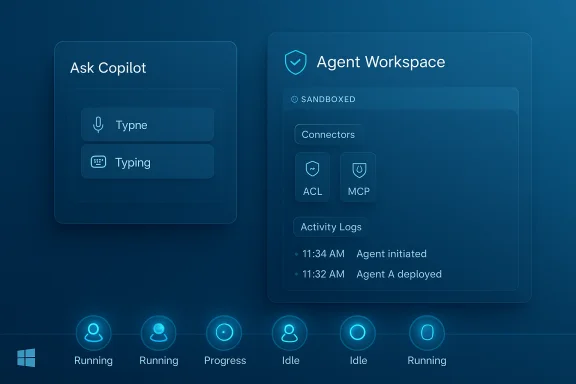
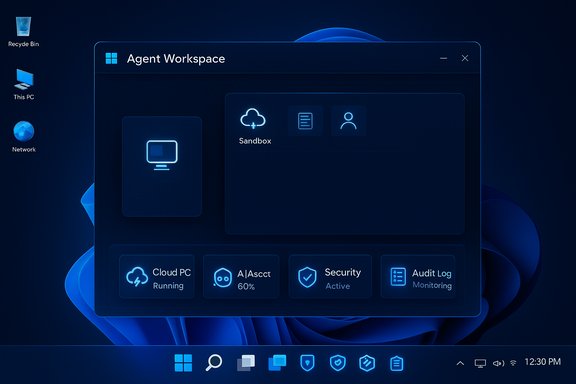
Microsoft used Ignite and recent Microsoft 365 announcements to outline a significant change in how Windows 11 will expose AI: agents that run autonomously on behalf of users and surface directly in the taskbar via Ask Copilot. These agents are more than chat windows — they run in a dedicated agentic workspace, can interact with apps and files in parallel to the user session, and will appear as taskbar icons that show status and progress. This architecture is intended to make long-running or multi-step workflows feel native to Windows and to let Copilot and third-party makers automate repetitive or research-heavy tasks without commandeering the primary desktop. At the same time, Microsoft is introducing refinements to Copilot itself: a new Ask Copilot composer on the taskbar that accepts voice, text, and vision inputs; tag-to-invoke semantics (type “@” to call specific agents); and tighter integration with Microsoft 365 Copilot, File Explorer, and Notification Center. Many of these features are being introduced to Windows Insiders first and will reach customers in staged previews and rollouts.
For consumers, the initial posture is cautious: these agentic features are off by default and will appear first in preview channels. For businesses, the promise of Windows 365 for Agents and Copilot Studio gives a safer route for deployment, but only if organizations treat agents like any other privileged automation: plan, harden, monitor, and audit.
The next year will show whether Microsoft can make agentic Windows both useful and safe at scale. For now, administrators should approach agentic features as a controlled capability to be adopted gradually, while users should expect a more active Copilot presence on the taskbar — a convenience that demands attention to permissions and awareness of the new security model built around agentic AI.
Source: Mezha Windows 11 will get AI agents on the taskbar and new Copilot features
 Background: the shift to an agentic Windows
Microsoft used Ignite and recent Microsoft 365 announcements to outline a significant change in how Windows 11 will expose AI: agents that run autonomously on behalf of users and surface directly in the taskbar via Ask Copilot. These agents are more than chat windows — they run in a dedicated agentic workspace, can interact with apps and files in parallel to the user session, and will appear as taskbar icons that show status and progress. This architecture is intended to make long-running or multi-step workflows feel native to Windows and to let Copilot and third-party makers automate repetitive or research-heavy tasks without commandeering the primary desktop. At the same time, Microsoft is introducing refinements to Copilot itself: a new Ask Copilot composer on the taskbar that accepts voice, text, and vision inputs; tag-to-invoke semantics (type “@” to call specific agents); and tighter integration with Microsoft 365 Copilot, File Explorer, and Notification Center. Many of these features are being introduced to Windows Insiders first and will reach customers in staged previews and rollouts. What Microsoft announced (clear, summarized)
- Ask Copilot on the taskbar becomes a single composer for voice and text queries and the starting point for agents. You’ll be able to call Copilot instantly via voice or the taskbar UI.
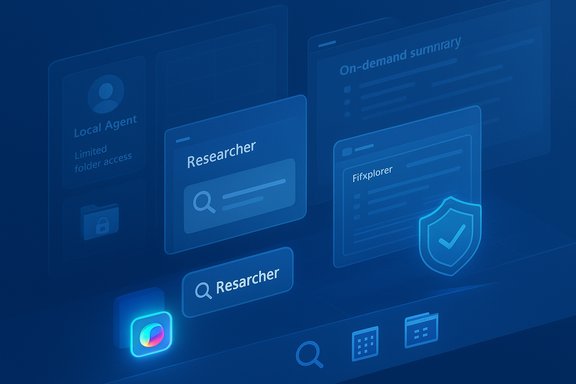
- Agents on the taskbar: long-running agents like Researcher will appear as taskbar icons, showing progress cards when hovered, and offering controls to pause, cancel, or take manual control. Agents can be invoked via the composer or by typing “@” in the Ask Copilot box.
- Agentic workspace (technical containment): agents run in a separate workspace or sandbox with their own local agent accounts and limited access to user folders when enabled. This is an opt-in feature that administrators must enable.
- File Explorer integration: hover over files in File Explorer Home to get on-demand summaries and assistance powered by Copilot. Microsoft says this will roll out before the end of the year.
- Agenda view in Notification Center: a compact, interactive schedule view that integrates Calendar and Copilot actions is scheduled for preview in December.
- Windows 365 for Agents & Copilot Studio: Microsoft is offering enterprise-grade plumbing — Windows 365 streamed environments and Copilot Studio controls — for building, monitoring, and securing agents at scale.
How agents will behave on the taskbar: a practical picture
Invoking and monitoring agents
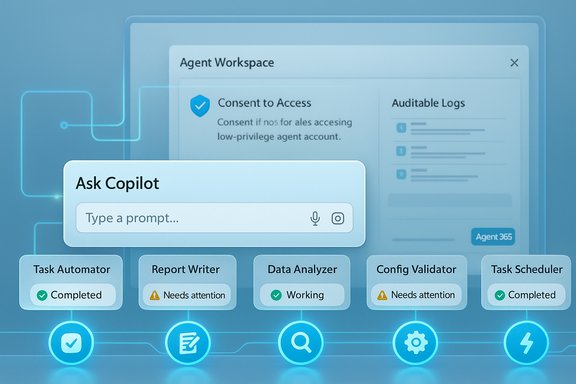
The taskbar composer — Ask Copilot — acts as the front door. A single waveform-style button replaces separate Vision and Voice buttons and opens a compact composer that accepts typed prompts, voice, and visual captures. Typing “@” inside the composer lists installed agents; selecting one launches it into an agent workspace where it executes steps on your behalf. While running, the agent appears on the taskbar like any other running app. Hovering that taskbar icon surfaces a progress card with a short status, the resources the agent is accessing, and quick controls.Parallel operation and user control
Agents are designed to operate in parallel — they can click through apps, open files, and perform background tasks without immediately interrupting the primary user session. However, Microsoft emphasizes transparency: agents must produce activity logs, explain planned multi-step actions, and ask for confirmation for decisions that have significant effects. Those safeguards are part of Microsoft’s stated design principles for agentic experiences.Local agent accounts and file access
A key technical detail: when the experimental agentic features are enabled, Windows will create local agent accounts with limited access to the user profile directory. If an agent is granted access, Windows will allow read/write access to common user folders such as Documents, Downloads, Desktop, Pictures, Videos, and Music. Microsoft frames this as controlled access, but the practical effect is that agents — if permitted — can read and edit your files while operating in their workspace. This behavior is enabled only via an admin toggle and is off by default.Copilot updates: what changes for daily use
Microsoft is continuing to fold Copilot deeper into the Windows UX while expanding its capabilities:- A single composer on the taskbar that blends local search hits with Copilot suggestions and the option to open a fuller Copilot chat. The composer prioritizes quick local results first, then Copilot for more complex reasoning.
- Voice improvements: “Hey Copilot” and Win+C voice hotkeys provide press-to-talk and wake-word options for conversational interaction. Microsoft is rolling voice features across its platforms and tying that capability into the taskbar composer.
- File-level assistance in File Explorer Home to surface summaries, context, or suggested next steps without leaving the file context. This aims to save time for people managing large numbers of documents.
- Enterprise features through Windows 365 for Agents and Copilot Studio, which include analytics, logging, XPIA protections, and admin controls for agent behavior. These are aimed at organizations that will deploy and govern agents at scale.
Security and privacy: the central tension
Bringing autonomous agents into an operating system creates a new attack surface. Microsoft explicitly acknowledges novel threats such as cross-prompt injection (XPIA) — where malicious content embedded in files, apps, or UI elements could override agent instructions — and other prompt-injection style attacks that can cause data exfiltration or unintended downloads. Microsoft’s documentation and blog posts warn that agentic features are off by default, require an admin to enable, and that agents will need to be observable and produce tamper-evident logs. Independent coverage and security analyses echo the warning: researchers point out that agents with the ability to access files and interact with apps can be tricked into performing harmful actions if prompt integrity is not secured. The practical risks include malware installation by a compromised agent, accidental data exposure, and the potential for sophisticated “zero-click” prompt-injection exploits that chain multiple vectors to bypass protections. Recent academic work and incident reports have shown that prompt injection is not theoretical; it has been exploited in real-world settings.Safeguards Microsoft plans to include
Microsoft’s stated mitigations include:- Opt-in admin control: agentic features are disabled by default and require an administrator to enable them for the device.
- Sandboxed agentic workspace: agents run in a separate workspace with limited privileges and their own local accounts.
- Activity logs and tamper-evident auditing: agents must produce logs of their activities, and Windows will maintain tamper-evident audit trails.
- Runtime protections and XPIA defenses: Copilot Studio and Microsoft’s defensive stack include real-time protection and classifiers that aim to block cross-prompt injection attempts. Teams and Microsoft Defender elements are being extended to detect suspicious agent interactions.
Critical analysis: benefits, friction, and systemic risks
The benefits — real productivity wins
- Multitasking at scale: Agents can run research, prepare drafts, or aggregate data in the background while users continue interactive work. This reduces context switching and time lost to repetitive tasks.
- Deeper file intelligence: File Explorer integration and on-demand summaries can dramatically speed up triage of documents and media, especially for knowledge workers.
- Enterprise orchestration: Windows 365 for Agents and Copilot Studio give IT more control, making agent deployment manageable in complex environments. For businesses, this can unlock automation use cases while centralizing governance.
The friction — UX and control tradeoffs
- Complex consent model: Agents need access to files and apps; balancing transparency with convenience requires thoughtful UX. Too many prompts will cause fatigue; too few will open doors to abuse. Microsoft must find the middle ground.
- Administrative overhead: Enabling, configuring, and auditing agents across fleets introduces operational work for IT teams, including new policies, logging, and training.
Systemic risks — why this matters beyond a single laptop
- New class of vulnerabilities: Agentic features transform prompt-injection from a product-specific nuisance into an OS-level security risk. An exploit here can reach beyond one app to the broader system and, potentially, corporate networks. Real-world research has shown that prompt injection can be chained to bypass defenses.
- Supply-chain and third-party agent risk: Microsoft envisions third-party agents running in this model. Each additional agent provider increases the trust surface and the number of potential weaknesses. Ensuring third-party agents meet security expectations will be a constant effort.
- User understanding and consent: Many users will not fully grasp the implications of granting an agent the ability to read and write files. The effectiveness of audit logs and prompts depends on clear, accessible UI and user education.
What IT admins and power users should do now
- Treat agentic features as a security project. Do not flip the admin toggle for agentic features without planning: map the expected use cases, define who can create agents, and decide which devices should be allowed to opt in.
- Enable principle-of-least-privilege for agents. Only grant agents the access they need; avoid blanket read/write grants to all user folders. Configure policies that limit agent permissions where possible.
- Require tamper-evident logging and review logs regularly. Make agent logs part of routine security monitoring and retention policies to enable post-incident analysis.
- Update endpoint defenses to understand agent behavior. Ensure Microsoft Defender and SIEMs have rules to flag unusual agent actions, such as unexpected downloads or mass file accesses.
- Pilot first with non-critical workloads. Use Windows Insiders and isolated test fleets or Windows 365 for Agents to trial agent workflows before broad deployment. Monitor for UX friction and security signals.
Developer and vendor implications
Third-party developers and ISVs planning to ship agents will need to prioritize secure-by-design models and be ready for increased scrutiny. That includes:- Building agents that explicitly enumerate required resources and provide clear, human-readable action plans before execution.
- Using Copilot Studio and Windows 365 for Agents for secure testing and policy integration so enterprise customers can adopt with confidence.
- Implementing robust input sanitization and XPIA defenses; relying on platform protections alone will not be sufficient against determined adversaries.
What we verified and what remains uncertain
Verified with official Microsoft communications and multiple independent outlets:- Windows 11 will introduce a taskbar-based Ask Copilot composer and support invoking agents directly from the taskbar.
- Agents will run in an "agentic workspace" and Microsoft plans to provide local agent accounts and controlled access to common user folders; this feature is off by default and requires an admin to enable.
- Microsoft explicitly warns about cross-prompt injection (XPIA) and other novel risks and is building protections in Copilot Studio and related services.
- Exact release timing for consumer rollout: Microsoft’s statements point to staged previews (Insiders and targeted pre-release channels) with some Explorer and Agenda features slated for preview or rollout before the end of the year or in December. These timelines are subject to change and may vary by region and device. Treat published rollout timelines as provisional until Microsoft confirms device-by-device availability.
- Third-party agent availability and ecosystem readiness: Microsoft listed early agent partners and enterprise scenarios, but wide availability of vetted third-party agents depends on developer readiness and marketplace governance, which is still in early stages. Exercise caution when relying on third-party agents for mission-critical workflows.
Bottom line: configurable power with new responsibility
Microsoft’s move to place AI agents on the Windows 11 taskbar and to bake agentic workflows into the OS represents a tectonic shift from helper tools to autonomous actors inside the operating system. The potential productivity gains — background research, document summarization, and automated multi-step workflows — are real and compelling. But they come with real and novel security risks that cannot be ignored.For consumers, the initial posture is cautious: these agentic features are off by default and will appear first in preview channels. For businesses, the promise of Windows 365 for Agents and Copilot Studio gives a safer route for deployment, but only if organizations treat agents like any other privileged automation: plan, harden, monitor, and audit.
The next year will show whether Microsoft can make agentic Windows both useful and safe at scale. For now, administrators should approach agentic features as a controlled capability to be adopted gradually, while users should expect a more active Copilot presence on the taskbar — a convenience that demands attention to permissions and awareness of the new security model built around agentic AI.
Source: Mezha Windows 11 will get AI agents on the taskbar and new Copilot features