

Microsoft used April 2026 Insider builds and Windows blog posts to preview a broad Windows 11 repair campaign, including a redesigned Insider Program, less coercive Windows Update behavior, reduced Copilot clutter, File Explorer performance work, quieter widgets, and scheduler tuning for better responsiveness.
The remarkable part is not that Windows 11 is getting fixes; operating systems always get fixes. The remarkable part is that Microsoft is now treating long-running user complaints as product defects rather than background noise. After years of asking users to accept Windows 11’s rough edges as the cost of modernization, Redmond is finally admitting that enthusiasm is a feature too.
Windows 11 has never lacked ambition. It arrived with a centered taskbar, softened corners, a redesigned Settings app, new security baselines, and a promise that Windows could feel calmer and more modern. But the lived experience often contradicted the pitch: missing taskbar options, intrusive update timing, inconsistent shell performance, unwanted feed content, and AI entry points scattered across apps that did not always need them.
That is why April’s batch of changes matters. Microsoft is not merely adding another novelty layer on top of Windows 11. It is touching the places where users have felt the most friction: updating, testing, navigating files, launching apps, and avoiding distractions.
The company’s new posture is defensive in the best sense. It is defending Windows as a daily tool, not just as a platform for Microsoft 365, Copilot, ads, widgets, or cloud services. That sounds obvious, but much of Windows 11’s reputation problem came from the sense that Microsoft was optimizing for every stakeholder except the person sitting in front of the PC.
There is still a long distance between an Insider preview and a broadly trusted release. But the direction is different enough to notice.
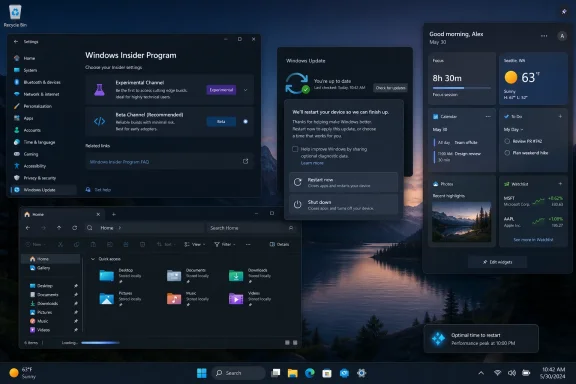
Microsoft’s April reset simplifies the public-facing structure around two primary channels: Experimental and Beta. Experimental is where early work appears first, while Beta is meant to be closer to shipping quality. Release Preview remains, but more as an advanced option for those tracking production-bound builds.
The most important change is not the naming. It is Microsoft’s decision to reduce the absurdity of announcing a feature to testers and then hiding it behind a controlled feature rollout that only some of them receive. Beta is supposed to become more predictable, while Experimental gains feature flags that let testers enable specific experiences.
That shift matters because it restores the basic bargain of preview software. If users accept instability to help test Windows, they should actually be able to test the thing Microsoft is talking about. Otherwise, the program becomes less a feedback channel than a lottery.
Microsoft is also promising easier movement between channels and better off-ramps from Insider builds without a clean reinstall in many cases. That is not glamorous, but it is exactly the kind of plumbing change that tells experienced users Microsoft has been listening to pain rather than merely harvesting telemetry.
The April changes are a meaningful course correction. The power menu will no longer force the user into an update just because a restart or shutdown is needed. Standard “Restart” and “Shut down” choices remain available, while update-specific options sit alongside them.
That seems small until you remember how many Windows frustrations are born in small moments. A user closing a laptop before travel does not want a firmware update. A gamer rebooting before a session does not want a surprise install. A sysadmin testing a machine does not want the state of the OS changed just because a power cycle was necessary.
The new pause model is similarly overdue. Users can pause updates up to 35 days and then extend that pause again, rather than hitting an arbitrary wall that assumes Microsoft knows the user’s schedule better than the user does. That is not an argument against patching; it is an argument for trust.
Microsoft is also coordinating more update types into a single monthly restart experience, including operating system, .NET, driver, and firmware updates where possible. If this works reliably, it could reduce one of Windows’ most persistent annoyances: the feeling that the machine is always one reboot away from doing something you did not ask it to do.
Removing redundant Copilot entry points from apps like Snipping Tool and Photos is not an anti-AI move. It is a pro-interface move. A screenshot tool does not become better because it advertises Copilot from every corner; it becomes better when capture, markup, OCR, sharing, and editing are fast and obvious.
The Notepad wording change is more subtle, and some skepticism is justified. Renaming or reframing AI features does not automatically make them less intrusive. Still, language matters in software, especially when users are trying to understand whether a command edits text locally, sends content elsewhere, invokes a cloud service, or simply opens another branded panel.
The broader lesson is that Windows users do not reject intelligence. They reject interruption disguised as intelligence. They reject buttons that feel like internal Microsoft strategy leaking into personal workspace.
If Microsoft wants Copilot to become part of Windows rather than an irritant bolted onto it, restraint will matter as much as capability. The best AI features in an operating system may be the ones that appear only when the user’s intent is unmistakable.
Microsoft’s April work includes architectural improvements aimed at reducing hangs, improving responsiveness, and making File Explorer feel more dependable. The company has also previewed launch-time improvements, dark-mode polish, reliability fixes around explorer.exe, and better consistency in folder views.
This is not the kind of change that produces a viral demo. Nobody buys a PC because File Explorer no longer flashes white in dark mode. But people absolutely lose confidence in an operating system when the file manager stutters during ordinary navigation.
That is why File Explorer is so important as a symbol. Windows 11’s problem was never just that it lacked some Windows 10 customization. It was that Microsoft sometimes seemed more interested in adding surfaces than finishing the old ones. Fixing Explorer suggests a healthier priority stack.
The risk, as always, is that Microsoft ships enough improvement to quiet the current criticism but not enough to change the long-term perception. File Explorer needs sustained attention, not a one-month tune-up.
The April previews move toward a widget-first experience by default, reducing the prominence of the feed. That is the correct direction. A widget surface should be personal, quiet, and useful; it should not feel like opening a tabloid sidebar by accident.
This matters because Windows has increasingly blurred the line between operating system and content portal. Search, widgets, Start recommendations, Edge prompts, and account nudges have all contributed to the sense that Windows is never fully at rest. It is always suggesting, promoting, surfacing, or cross-selling.
A quieter Widgets board is not merely a UI preference. It is a recognition that the desktop is not a captive audience. Users will tolerate optional discovery when the core experience respects their attention.
The open question is how far Microsoft is willing to go. A widget-only default is progress, but the real test is whether users can make the surface permanently theirs without periodic attempts to reintroduce engagement bait.
Modern Windows runs on a chaotic range of hardware: efficiency-core laptops, high-end desktops, handheld gaming PCs, enterprise fleets, virtual desktops, and aging machines that barely meet Windows 11’s requirements. Small scheduler and power-policy changes can have visible effects when they reduce latency at the moment a user opens an app, switches windows, resumes from sleep, or launches File Explorer.
Performance perception is not only about benchmarks. It is about whether the system responds when touched. A PC can score well and still feel sluggish if the shell hesitates, the Start menu lags, or background tasks wake at the wrong time.
Microsoft’s challenge is compounded by its own platform ambitions. Security features, AI models, richer UI frameworks, background indexing, cloud sync, and compatibility layers all want resources. The user, meanwhile, wants the machine to feel instant.
That is why scheduler and power-state work matters. It suggests Microsoft is looking below the surface rather than merely repainting it. Windows 11 does not need to win every benchmark to feel better; it needs to stop making users wait during ordinary tasks.
These are not nostalgic complaints from users who refuse change. They are practical objections from people who use Windows all day and notice when workflows get slower. Microsoft often treats simplification as modernization, but simplification becomes regression when it removes power without offering a better replacement.
The timing also matters. Windows 10’s end-of-support pressure has pushed many reluctant users toward Windows 11. That gives Microsoft a large audience, but not necessarily a willing one. A user who upgrades because the support clock ran out is not the same as a user who upgrades because the new OS is compelling.
April’s changes are therefore both product work and reputation work. Microsoft needs Windows 11 to feel less like an imposed destination and more like a platform that earned its place. The best way to do that is not with another marketing campaign; it is by fixing the annoyances people can name from memory.
If 2026 is not the year of Windows 12, it may become something more useful: the year Microsoft stops acting as if Windows 11’s critics are merely resistant to change.
Source: Neowin Microsoft details Windows 11 improvements it brought to Windows 11 in April
The remarkable part is not that Windows 11 is getting fixes; operating systems always get fixes. The remarkable part is that Microsoft is now treating long-running user complaints as product defects rather than background noise. After years of asking users to accept Windows 11’s rough edges as the cost of modernization, Redmond is finally admitting that enthusiasm is a feature too.
 Microsoft Has Started Fixing the Vibes, Not Just the Bugs
Windows 11 has never lacked ambition. It arrived with a centered taskbar, softened corners, a redesigned Settings app, new security baselines, and a promise that Windows could feel calmer and more modern. But the lived experience often contradicted the pitch: missing taskbar options, intrusive update timing, inconsistent shell performance, unwanted feed content, and AI entry points scattered across apps that did not always need them.That is why April’s batch of changes matters. Microsoft is not merely adding another novelty layer on top of Windows 11. It is touching the places where users have felt the most friction: updating, testing, navigating files, launching apps, and avoiding distractions.
The company’s new posture is defensive in the best sense. It is defending Windows as a daily tool, not just as a platform for Microsoft 365, Copilot, ads, widgets, or cloud services. That sounds obvious, but much of Windows 11’s reputation problem came from the sense that Microsoft was optimizing for every stakeholder except the person sitting in front of the PC.
There is still a long distance between an Insider preview and a broadly trusted release. But the direction is different enough to notice.
The Insider Program Finally Acknowledges Its Own Confusion
The Windows Insider Program was supposed to be Microsoft’s listening machine. In practice, it became a maze of channels, controlled rollouts, partial feature availability, and release notes that could describe a feature your PC still would not receive. For enthusiasts, that was annoying. For IT pros trying to understand the future of the platform, it was worse: it made Windows development feel opaque.Microsoft’s April reset simplifies the public-facing structure around two primary channels: Experimental and Beta. Experimental is where early work appears first, while Beta is meant to be closer to shipping quality. Release Preview remains, but more as an advanced option for those tracking production-bound builds.
The most important change is not the naming. It is Microsoft’s decision to reduce the absurdity of announcing a feature to testers and then hiding it behind a controlled feature rollout that only some of them receive. Beta is supposed to become more predictable, while Experimental gains feature flags that let testers enable specific experiences.
That shift matters because it restores the basic bargain of preview software. If users accept instability to help test Windows, they should actually be able to test the thing Microsoft is talking about. Otherwise, the program becomes less a feedback channel than a lottery.
Microsoft is also promising easier movement between channels and better off-ramps from Insider builds without a clean reinstall in many cases. That is not glamorous, but it is exactly the kind of plumbing change that tells experienced users Microsoft has been listening to pain rather than merely harvesting telemetry.
Windows Update Gets a Long-Overdue Lesson in Consent
For years, Windows Update has been the place where Microsoft’s security responsibilities and user patience collided. Microsoft’s argument was always partly correct: unpatched PCs are dangerous, and the Windows ecosystem is too large to rely entirely on user discipline. But the company often translated that truth into update behavior that felt paternalistic.The April changes are a meaningful course correction. The power menu will no longer force the user into an update just because a restart or shutdown is needed. Standard “Restart” and “Shut down” choices remain available, while update-specific options sit alongside them.
That seems small until you remember how many Windows frustrations are born in small moments. A user closing a laptop before travel does not want a firmware update. A gamer rebooting before a session does not want a surprise install. A sysadmin testing a machine does not want the state of the OS changed just because a power cycle was necessary.
The new pause model is similarly overdue. Users can pause updates up to 35 days and then extend that pause again, rather than hitting an arbitrary wall that assumes Microsoft knows the user’s schedule better than the user does. That is not an argument against patching; it is an argument for trust.
Microsoft is also coordinating more update types into a single monthly restart experience, including operating system, .NET, driver, and firmware updates where possible. If this works reliably, it could reduce one of Windows’ most persistent annoyances: the feeling that the machine is always one reboot away from doing something you did not ask it to do.
The Copilot Retrenchment Is a Bigger Signal Than the Buttons Themselves
Microsoft is not abandoning AI in Windows. It is too strategically committed to Copilot, too invested in the branding, and too convinced that local-plus-cloud AI will define the next generation of PC experiences. But April’s changes show that the company may finally understand the difference between useful AI integration and ambient product marketing.Removing redundant Copilot entry points from apps like Snipping Tool and Photos is not an anti-AI move. It is a pro-interface move. A screenshot tool does not become better because it advertises Copilot from every corner; it becomes better when capture, markup, OCR, sharing, and editing are fast and obvious.
The Notepad wording change is more subtle, and some skepticism is justified. Renaming or reframing AI features does not automatically make them less intrusive. Still, language matters in software, especially when users are trying to understand whether a command edits text locally, sends content elsewhere, invokes a cloud service, or simply opens another branded panel.
The broader lesson is that Windows users do not reject intelligence. They reject interruption disguised as intelligence. They reject buttons that feel like internal Microsoft strategy leaking into personal workspace.
If Microsoft wants Copilot to become part of Windows rather than an irritant bolted onto it, restraint will matter as much as capability. The best AI features in an operating system may be the ones that appear only when the user’s intent is unmistakable.
File Explorer Remains the Test of Whether Microsoft Means It
No Windows quality campaign can be taken seriously unless File Explorer gets better. It is one of the most used parts of the operating system and one of the places where Windows 11 has too often felt less polished than it looks. Hangs, flicker, slow folder loads, inconsistent search behavior, and shell process weirdness are not edge cases when the file manager is the front door to local work.Microsoft’s April work includes architectural improvements aimed at reducing hangs, improving responsiveness, and making File Explorer feel more dependable. The company has also previewed launch-time improvements, dark-mode polish, reliability fixes around explorer.exe, and better consistency in folder views.
This is not the kind of change that produces a viral demo. Nobody buys a PC because File Explorer no longer flashes white in dark mode. But people absolutely lose confidence in an operating system when the file manager stutters during ordinary navigation.
That is why File Explorer is so important as a symbol. Windows 11’s problem was never just that it lacked some Windows 10 customization. It was that Microsoft sometimes seemed more interested in adding surfaces than finishing the old ones. Fixing Explorer suggests a healthier priority stack.
The risk, as always, is that Microsoft ships enough improvement to quiet the current criticism but not enough to change the long-term perception. File Explorer needs sustained attention, not a one-month tune-up.
Widgets Without the MSN Megaphone Feel Like a Different Product
The Widgets board has long suffered from an identity crisis. In theory, it is a glanceable dashboard for weather, calendar, traffic, stocks, tasks, and other lightweight information. In practice, many users experienced it as a delivery vehicle for MSN content they did not ask for.The April previews move toward a widget-first experience by default, reducing the prominence of the feed. That is the correct direction. A widget surface should be personal, quiet, and useful; it should not feel like opening a tabloid sidebar by accident.
This matters because Windows has increasingly blurred the line between operating system and content portal. Search, widgets, Start recommendations, Edge prompts, and account nudges have all contributed to the sense that Windows is never fully at rest. It is always suggesting, promoting, surfacing, or cross-selling.
A quieter Widgets board is not merely a UI preference. It is a recognition that the desktop is not a captive audience. Users will tolerate optional discovery when the core experience respects their attention.
The open question is how far Microsoft is willing to go. A widget-only default is progress, but the real test is whether users can make the surface permanently theirs without periodic attempts to reintroduce engagement bait.
Performance Work Is the Least Flashy Part and Maybe the Most Important
Microsoft is also talking about responsiveness, app launch times, power tuning, and scheduler improvements that better account for processor power states. That sounds like engineering wallpaper, but it may be the most consequential category of the entire April push.Modern Windows runs on a chaotic range of hardware: efficiency-core laptops, high-end desktops, handheld gaming PCs, enterprise fleets, virtual desktops, and aging machines that barely meet Windows 11’s requirements. Small scheduler and power-policy changes can have visible effects when they reduce latency at the moment a user opens an app, switches windows, resumes from sleep, or launches File Explorer.
Performance perception is not only about benchmarks. It is about whether the system responds when touched. A PC can score well and still feel sluggish if the shell hesitates, the Start menu lags, or background tasks wake at the wrong time.
Microsoft’s challenge is compounded by its own platform ambitions. Security features, AI models, richer UI frameworks, background indexing, cloud sync, and compatibility layers all want resources. The user, meanwhile, wants the machine to feel instant.
That is why scheduler and power-state work matters. It suggests Microsoft is looking below the surface rather than merely repainting it. Windows 11 does not need to win every benchmark to feel better; it needs to stop making users wait during ordinary tasks.
The Missing Pieces Still Define the Upgrade Argument
Even with April’s improvements, Microsoft has not solved the Windows 11 debate. The taskbar still lacks some of the flexibility that longtime users expect. The Start menu remains a source of frustration for people who want denser layouts, fewer recommendations, and more direct control. Windows Search still has to overcome years of distrust around web results, indexing quality, and inconsistent behavior across surfaces.These are not nostalgic complaints from users who refuse change. They are practical objections from people who use Windows all day and notice when workflows get slower. Microsoft often treats simplification as modernization, but simplification becomes regression when it removes power without offering a better replacement.
The timing also matters. Windows 10’s end-of-support pressure has pushed many reluctant users toward Windows 11. That gives Microsoft a large audience, but not necessarily a willing one. A user who upgrades because the support clock ran out is not the same as a user who upgrades because the new OS is compelling.
April’s changes are therefore both product work and reputation work. Microsoft needs Windows 11 to feel less like an imposed destination and more like a platform that earned its place. The best way to do that is not with another marketing campaign; it is by fixing the annoyances people can name from memory.
If 2026 is not the year of Windows 12, it may become something more useful: the year Microsoft stops acting as if Windows 11’s critics are merely resistant to change.
April’s Windows Reset Gives Testers Concrete Things to Watch
The next few months will determine whether this is a genuine quality turn or just a burst of good optics. Insider builds are where the evidence will appear first, but the real judgment belongs to stable-channel users who simply want their PCs to behave.- Microsoft has simplified the Windows Insider Program around Experimental and Beta channels, with feature flags intended to make preview testing less random.
- Windows Update is gaining more user control, including repeatable pauses, clearer power-menu choices, and fewer restart events when updates can be coordinated.
- Copilot is being pulled back from some redundant app entry points, signaling that Microsoft may be learning to separate useful AI from clutter.
- File Explorer performance and reliability improvements are central to whether Windows 11 feels meaningfully better in daily use.
- The Widgets board is moving toward quieter defaults, which matters because attention has become one of Windows 11’s most contested resources.
- Scheduler, power, and responsiveness tuning could matter more than any single visible feature if they make the OS feel faster under real workloads.
Source: Neowin Microsoft details Windows 11 improvements it brought to Windows 11 in April
