

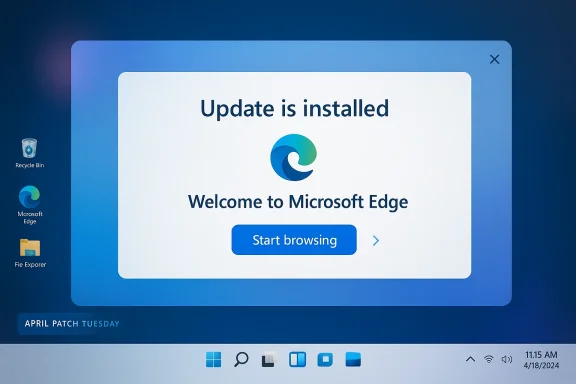
Microsoft’s latest Windows 11 April update has sparked a fresh round of criticism because, on some systems, it apparently launches Microsoft Edge immediately after the first reboot. Instead of a quiet confirmation that the patch installed successfully, users are reportedly dropped into a full-screen browser-based walkthrough that celebrates the update and nudges them toward exploring new Windows features. The result is an experience that feels less like standard maintenance and more like an ecosystem pitch. That is a sensitive line for Microsoft to cross, especially at a time when user trust in Windows Update is already highly dependent on predictability and restraint.
Windows updates have always done more than patch security holes. Over the years, Microsoft has increasingly used post-update and first-run experiences to introduce new features, steer users toward services, and explain what changed after a reboot. That has been true in both consumer and enterprise contexts, although the tone and delivery have often differed depending on device type, policy settings, and the specific build involved.
The April Patch Tuesday cycle is particularly important because it is one of the most visible monthly maintenance moments for Windows 11. Users expect bug fixes, security hardening, and the occasional feature tweak. They do not generally expect a browser window to appear uninvited and take over the screen after the machine comes back online. When that happens, it creates a very different emotional response than a standard update card inside Settings.
Microsoft has not been shy about using Edge as a strategic platform. The browser has been tied into Windows in ways that go beyond a simple app install, and Microsoft has consistently positioned it as the most integrated way to experience the operating system. The company also offers documentation on Edge startup behavior and auto-launch settings, which shows that browser startup is a known and carefully managed area of product design. But an update-triggered Edge launch is still a more aggressive experience than most users associate with routine servicing.
This matters because Windows users are used to a certain contract: updates may interrupt their day, but they should not feel like advertisements. Microsoft’s own support content for Windows updates emphasizes that after installation completes, the system may simply require a restart, with remaining work finishing in the background once the computer comes back up. That’s a very different promise from immediately opening a browser to walk the user through “what’s next.”
The design choice is what stands out. Rather than keeping the notification inside Windows, Microsoft appears to be serving the post-update experience through the browser itself. That means the user is moved out of the operating system shell and into Edge, where the UI language can feel more like onboarding, marketing, or a first-run tutorial than system maintenance. In a product ecosystem as closely watched as Windows 11, that distinction matters.
Reports also suggest the screen is not easy to dismiss. Users say there is no obvious close button, and the flow pushes them through multiple “Next” steps before ultimately landing on a “Start browsing” button that opens another tab. If accurate, that sequence creates friction at precisely the moment users are trying to finish an update and get back to work. That friction is the story, not just the fact that Edge opened.
That distinction is not merely cosmetic. Browser-based onboarding gives Microsoft more room for rich visuals, interaction, and sequential messaging. It also makes the process easier to tie to browser adoption goals, whether intentional or not. For users who already prefer Chrome, Firefox, or another browser, that can feel like an intrusive detour.
The company has also been careful to document how users can stop Edge from starting automatically, including a Windows setting that controls whether restartable apps are relaunched after sign-in. That support guidance is telling: Microsoft knows that some users find auto-launch behavior unwelcome, and it provides a way to reduce it. But that remedy is for general startup behavior, not necessarily for update-triggered promotional screens.
It is also worth remembering that Microsoft has historically used Edge as a bridge for transition moments. The move away from Internet Explorer, the push to modernize browsing, and the ongoing emphasis on integrated security and performance have all been framed through Edge. That makes browser-driven post-update messaging part of a longer corporate pattern rather than an isolated oddity.
The absence of an obvious dismiss option is what makes the experience controversial. If a user can close the panel immediately and return to the desktop, the behavior becomes a mild annoyance. If the user must click through several pages before escaping, it becomes a forced journey. Forced journeys are where trust erodes fastest.
Microsoft has previously used browser pages for update information, and Edge itself includes an update page that can be reached through settings or a direct internal path. The difference here is that the page appears automatically after a Windows update, without the user explicitly requesting browser help. That changes the implied consent model and makes the whole experience feel more assertive.
That tension has become more visible as Windows 11 has evolved. Microsoft has layered in more service connections, more feature discovery, and more cloud-aware experiences. Support content for Windows 11 now regularly references features that are delivered through Settings, Windows Update, or companion services, reinforcing the idea that Windows is as much a platform for guided experiences as it is a traditional desktop OS.
It also helps explain why Edge remains such a flashpoint. A browser is not just another app. It is the gateway through which users access competing services, alternative ecosystems, and their own work. When Microsoft places Edge at the center of a Windows update experience, critics naturally see a strategic move rather than a neutral system choice.
That is why even small UI decisions matter. A visible close button, a skip option, or an in-OS notification would make the experience feel much less contentious. Without those, the same content reads as pressure rather than guidance.
The experience may also create confusion for less technical users. A browser opening automatically after a restart can look like malware, a misconfiguration, or a system glitch if the user does not understand why it happened. Even when the intent is benign, the optics are risky. That is particularly true when the screen contains multiple navigation steps and no clear exit path.
At the same time, Microsoft may believe the feature discoverability benefit is worth the irritation cost. Many consumers never explore Windows’ newer functions unless they are shown. A guided post-update flow could, in theory, help people discover features they would otherwise miss. The question is whether that discovery should happen through coercive presentation.
Microsoft does provide administrative controls for some Edge startup behaviors, and that matters. Group policy and restart-related settings can reduce unwanted browser launches in some scenarios. But a Windows Update-triggered onboarding page could still create friction if it bypasses expected workflow assumptions.
There is also a communications angle. Enterprises often use Windows Update as a maintenance window, not an engagement opportunity. A browser-based feature tour may be harmless on a home laptop but unwelcome on a floor of shared office desktops or virtualized environments. That is why IT teams tend to judge such changes much more harshly than ordinary users do.
The problem is that usability is not just about presentation quality. It is also about timing, consent, and interruption cost. A great explanation delivered at the wrong moment can still feel hostile. If the user has just waited for an update and rebooted, the emotional expectation is closure, not a marketing sequence. That mismatch is what makes the feature controversial.
Microsoft may also be trying to align the update process with its broader AI- and feature-discovery narrative across Windows 11. The company has increasingly framed Windows as a living service where new capabilities appear gradually and are surfaced through guided experiences. That approach can work when users opt in, but it becomes much more delicate when the system imposes it.
There is also a reputational cost at the platform level. Windows is the operating system most people associate with flexibility and openness. When Microsoft appears to use Windows as a funnel for Edge, it invites criticism that the platform is not neutral. That perception can influence enterprise browser decisions just as much as consumer habits.
Still, Microsoft likely believes the upside is measurable. Browser defaults are powerful, and every extra session matters when a company is trying to reinforce ecosystem loyalty. The company has already shown a willingness to experiment with startup boost, update flows, and browser-first onboarding. This episode suggests those experiments are continuing, even if they irritate some users.
Microsoft’s own support and feature pages often blur the line between system maintenance and service adoption. From update notifications to browser restart behaviors to startup assistance, the messaging keeps returning to the idea that Microsoft wants users inside a managed, guided environment. That is not inherently bad. But it does mean that every new prompt is scrutinized as a potential nudge.
The company has been here before with Internet Explorer, and history matters. Every aggressive push toward Edge inevitably revives memories of prior browser wars and OS-bundling controversies. The more Microsoft leans into automatic launches, the more it risks reopening debates it would probably prefer to leave in the past.
The most important variable is control. If users and administrators can easily suppress the behavior, the controversy becomes manageable. If they cannot, then this will not just be a browser launch issue; it will become a trust issue for the entire Windows update stack. Microsoft has plenty of room to educate users about new features, but it should be careful not to turn maintenance into a sales funnel.
Source: Windows Report https://windowsreport.com/windows-11-april-update-auto-launches-edge-after-restart/
 Background
Windows updates have always done more than patch security holes. Over the years, Microsoft has increasingly used post-update and first-run experiences to introduce new features, steer users toward services, and explain what changed after a reboot. That has been true in both consumer and enterprise contexts, although the tone and delivery have often differed depending on device type, policy settings, and the specific build involved.The April Patch Tuesday cycle is particularly important because it is one of the most visible monthly maintenance moments for Windows 11. Users expect bug fixes, security hardening, and the occasional feature tweak. They do not generally expect a browser window to appear uninvited and take over the screen after the machine comes back online. When that happens, it creates a very different emotional response than a standard update card inside Settings.
Microsoft has not been shy about using Edge as a strategic platform. The browser has been tied into Windows in ways that go beyond a simple app install, and Microsoft has consistently positioned it as the most integrated way to experience the operating system. The company also offers documentation on Edge startup behavior and auto-launch settings, which shows that browser startup is a known and carefully managed area of product design. But an update-triggered Edge launch is still a more aggressive experience than most users associate with routine servicing.
This matters because Windows users are used to a certain contract: updates may interrupt their day, but they should not feel like advertisements. Microsoft’s own support content for Windows updates emphasizes that after installation completes, the system may simply require a restart, with remaining work finishing in the background once the computer comes back up. That’s a very different promise from immediately opening a browser to walk the user through “what’s next.”
What Happened
According to reporting cited by Windows Latest, the behavior appears on the first reboot after installing the April update. The machine finishes restarting, then Edge opens automatically and presents a completion or feature-highlights page that explains the update and invites the user to continue. In practice, that turns the first post-update login into a guided browsing session rather than a normal return to the desktop.The design choice is what stands out. Rather than keeping the notification inside Windows, Microsoft appears to be serving the post-update experience through the browser itself. That means the user is moved out of the operating system shell and into Edge, where the UI language can feel more like onboarding, marketing, or a first-run tutorial than system maintenance. In a product ecosystem as closely watched as Windows 11, that distinction matters.
Reports also suggest the screen is not easy to dismiss. Users say there is no obvious close button, and the flow pushes them through multiple “Next” steps before ultimately landing on a “Start browsing” button that opens another tab. If accurate, that sequence creates friction at precisely the moment users are trying to finish an update and get back to work. That friction is the story, not just the fact that Edge opened.
Why the experience feels different
Windows has long used built-in surfaces to surface “what’s new” messages. The difference here is the venue. When the operating system uses its own shell, the experience feels like part of Windows. When it opens a browser, the experience instantly looks like a product funnel, even if the content is technically informational.That distinction is not merely cosmetic. Browser-based onboarding gives Microsoft more room for rich visuals, interaction, and sequential messaging. It also makes the process easier to tie to browser adoption goals, whether intentional or not. For users who already prefer Chrome, Firefox, or another browser, that can feel like an intrusive detour.
Why Edge Is at the Center
Microsoft has spent years trying to strengthen Edge’s role in the Windows experience. The browser has gotten faster startup behavior, tighter system integration, and a stream of feature updates designed to keep it competitive. Microsoft’s own support documentation explains that Edge includes startup boost, which runs core browser processes in the background so Edge can launch faster when a device starts or when the browser is closed. That is an optimization feature, but it also shows how deeply Microsoft has been investing in making Edge feel immediate and ever-present.The company has also been careful to document how users can stop Edge from starting automatically, including a Windows setting that controls whether restartable apps are relaunched after sign-in. That support guidance is telling: Microsoft knows that some users find auto-launch behavior unwelcome, and it provides a way to reduce it. But that remedy is for general startup behavior, not necessarily for update-triggered promotional screens.
It is also worth remembering that Microsoft has historically used Edge as a bridge for transition moments. The move away from Internet Explorer, the push to modernize browsing, and the ongoing emphasis on integrated security and performance have all been framed through Edge. That makes browser-driven post-update messaging part of a longer corporate pattern rather than an isolated oddity.
The broader browser strategy
The browser market is unforgiving. Default placement matters, but so does user habit. Microsoft knows that if Edge becomes the first browser users see after a Windows update, some will leave it open simply because it is there. That may sound minor, but behavior at scale can translate into meaningful usage gains.- Edge visibility increases when it is launched by the OS.
- Habit formation becomes easier when users are nudged repeatedly.
- Feature discovery can improve when Microsoft controls the first screen.
- Perception risk rises when the nudge feels like coercion.
- Cross-service promotion becomes easier when the browser is the delivery vehicle.
How the Flow May Be Working
The current reports suggest the browser opens into a structured sequence that introduces Windows update highlights and advances only when the user clicks through. That is very similar to onboarding flows used in apps and services, where the goal is to teach features or collect signpost clicks. It is also very similar to how a product team would stage a feature discovery funnel.The absence of an obvious dismiss option is what makes the experience controversial. If a user can close the panel immediately and return to the desktop, the behavior becomes a mild annoyance. If the user must click through several pages before escaping, it becomes a forced journey. Forced journeys are where trust erodes fastest.
Microsoft has previously used browser pages for update information, and Edge itself includes an update page that can be reached through settings or a direct internal path. The difference here is that the page appears automatically after a Windows update, without the user explicitly requesting browser help. That changes the implied consent model and makes the whole experience feel more assertive.
Why users are reacting so strongly
People generally tolerate updates because they understand the tradeoff: downtime in exchange for security and stability. They are far less tolerant when the update process appears to be hijacked for product promotion. That’s especially true when the promotion arrives in a first-party browser that many people did not choose as their primary browser.- It interrupts a routine moment.
- It looks like marketing disguised as a system notice.
- It asks for attention at the wrong time.
- It can feel less neutral than an OS banner.
- It reinforces skepticism about Microsoft’s browser tactics.
Historical Context
This is not the first time Microsoft has faced criticism for aggressively surfacing its own products inside Windows. From default app prompts to browser selection nudges to “recommended” experiences, Microsoft has often been accused of using the OS as a distribution channel for its broader ecosystem. The company argues that integration improves usability, while critics argue that the line between helpfulness and self-promotion is often too thin.That tension has become more visible as Windows 11 has evolved. Microsoft has layered in more service connections, more feature discovery, and more cloud-aware experiences. Support content for Windows 11 now regularly references features that are delivered through Settings, Windows Update, or companion services, reinforcing the idea that Windows is as much a platform for guided experiences as it is a traditional desktop OS.
It also helps explain why Edge remains such a flashpoint. A browser is not just another app. It is the gateway through which users access competing services, alternative ecosystems, and their own work. When Microsoft places Edge at the center of a Windows update experience, critics naturally see a strategic move rather than a neutral system choice.
The role of user choice
Choice is the central issue here. Microsoft can argue that the experience is meant to help users discover new Windows features, and that may be true in a narrow product sense. But if the path is automatically triggered, browser-based, and difficult to dismiss, then the user’s actual choice is limited.That is why even small UI decisions matter. A visible close button, a skip option, or an in-OS notification would make the experience feel much less contentious. Without those, the same content reads as pressure rather than guidance.
Consumer Impact
For home users, the annoyance factor is obvious. Most people just want to reboot after an update and get back to their desktop, their browser, or their game. If the first thing they see is a full-screen Edge walkthrough, they may feel as though their system has been commandeered for Microsoft’s benefit. That reaction will be especially sharp among users who already use another browser as their default.The experience may also create confusion for less technical users. A browser opening automatically after a restart can look like malware, a misconfiguration, or a system glitch if the user does not understand why it happened. Even when the intent is benign, the optics are risky. That is particularly true when the screen contains multiple navigation steps and no clear exit path.
At the same time, Microsoft may believe the feature discoverability benefit is worth the irritation cost. Many consumers never explore Windows’ newer functions unless they are shown. A guided post-update flow could, in theory, help people discover features they would otherwise miss. The question is whether that discovery should happen through coercive presentation.
Consumer reactions likely to split
Some consumers will barely care. They may even appreciate a guided tour if it helps them learn the system. Others will view it as yet another example of Microsoft pushing too hard inside Windows 11. The split is likely to depend on whether the user already likes Edge and whether the update experience disrupted something important.- Power users will resent the interruption.
- Casual users may be mildly curious.
- Non-Edge users may see it as unwanted promotion.
- Support-conscious users may simply want clarity.
- Accessibility-minded users may be concerned about the flow.
Enterprise and IT Admin Impact
Enterprises are likely to see this differently from consumers, but not necessarily more positively. In managed environments, any post-update behavior that opens a browser automatically can complicate imaging, kiosk workflows, training environments, or shared-device setups. IT administrators usually want updates to be boring, predictable, and policy-driven.Microsoft does provide administrative controls for some Edge startup behaviors, and that matters. Group policy and restart-related settings can reduce unwanted browser launches in some scenarios. But a Windows Update-triggered onboarding page could still create friction if it bypasses expected workflow assumptions.
There is also a communications angle. Enterprises often use Windows Update as a maintenance window, not an engagement opportunity. A browser-based feature tour may be harmless on a home laptop but unwelcome on a floor of shared office desktops or virtualized environments. That is why IT teams tend to judge such changes much more harshly than ordinary users do.
Operational questions for admins
Admins will want to know three things right away: whether the behavior is universal or limited, whether it can be controlled centrally, and whether it affects automation or login scripts. If the answer to any of those is unclear, the change becomes a support burden rather than a feature.- Does it trigger on all editions?
- Can it be disabled by policy?
- Does it affect first sign-in only?
- Does it return after every update?
- Is there a registry or GPO mitigation?
Microsoft’s Usability Argument
To be fair, Microsoft has a plausible usability defense. Users often ignore release notes, and most operating system improvements go unnoticed unless they are presented in a more engaging way. A browser-based walkthrough can carry visuals, animation, and explanatory text more effectively than a small toast or Settings card. From a product-team perspective, that is a sensible delivery mechanism.The problem is that usability is not just about presentation quality. It is also about timing, consent, and interruption cost. A great explanation delivered at the wrong moment can still feel hostile. If the user has just waited for an update and rebooted, the emotional expectation is closure, not a marketing sequence. That mismatch is what makes the feature controversial.
Microsoft may also be trying to align the update process with its broader AI- and feature-discovery narrative across Windows 11. The company has increasingly framed Windows as a living service where new capabilities appear gradually and are surfaced through guided experiences. That approach can work when users opt in, but it becomes much more delicate when the system imposes it.
The line between education and promotion
A useful explanation should help the user understand what changed. A promotional flow should steer the user toward more engagement with a product. In this case, the two ideas overlap in uncomfortable ways, because the update page appears to teach while also funneling users toward Edge. That overlap is why so many observers immediately read it as advocacy rather than education.Competitive Implications
Any time Microsoft pushes Edge more visibly, competitors benefit from the backlash even if they are not directly mentioned. Users who feel nudged are more likely to harden their browser preferences, look for privacy-respecting alternatives, or disable Windows suggestions more aggressively. In that sense, forced visibility can backfire and increase resistance to the very product it is meant to promote.There is also a reputational cost at the platform level. Windows is the operating system most people associate with flexibility and openness. When Microsoft appears to use Windows as a funnel for Edge, it invites criticism that the platform is not neutral. That perception can influence enterprise browser decisions just as much as consumer habits.
Still, Microsoft likely believes the upside is measurable. Browser defaults are powerful, and every extra session matters when a company is trying to reinforce ecosystem loyalty. The company has already shown a willingness to experiment with startup boost, update flows, and browser-first onboarding. This episode suggests those experiments are continuing, even if they irritate some users.
Market signal for rivals
For Chrome, Firefox, and other browsers, the broader lesson is simple: Windows remains an important battleground. If Microsoft is willing to promote Edge after updates, then competing browsers cannot assume user inertia is enough. They need to remain easy to set, easy to launch, and easy to defend as defaults.- Default browser status still matters.
- User annoyance can shift loyalty.
- Platform messaging influences browser choice.
- Visibility is a competitive weapon.
- Trust can be as important as features.
Microsoft’s Pattern of Ecosystem Nudging
This update experience fits a broader Microsoft pattern. The company increasingly treats Windows, Edge, Microsoft account services, and cloud features as parts of one connected workflow. That can be useful when the integration is seamless, but it also means the OS can become a vehicle for ecosystem reinforcement.Microsoft’s own support and feature pages often blur the line between system maintenance and service adoption. From update notifications to browser restart behaviors to startup assistance, the messaging keeps returning to the idea that Microsoft wants users inside a managed, guided environment. That is not inherently bad. But it does mean that every new prompt is scrutinized as a potential nudge.
The company has been here before with Internet Explorer, and history matters. Every aggressive push toward Edge inevitably revives memories of prior browser wars and OS-bundling controversies. The more Microsoft leans into automatic launches, the more it risks reopening debates it would probably prefer to leave in the past.
A familiar playbook in a new wrapper
What has changed is not the strategy, but the packaging. Instead of a dialogue box urging a browser change, the message now arrives as a sleek, browser-native walkthrough. That makes the experience more polished, but not necessarily more welcome. Sometimes a better-designed prompt is still just a prompt.Strengths and Opportunities
There is a legitimate product case for helping users discover new Windows features, especially if Microsoft wants people to understand what changed after a major update. A browser-based flow can be visually rich, easy to iterate, and capable of explaining multiple feature areas in one place. The challenge is to keep the experience helpful without making it feel compulsory.- Better feature discovery for casual users
- A more polished way to explain update changes
- Potentially improved engagement with new Windows tools
- A familiar interface for users already comfortable with Edge
- Room for richer visuals and step-by-step guidance
- Easier to expand into future onboarding content
- Possible reduction in support questions about “what changed”
Risks and Concerns
The biggest risk is that Microsoft is trading convenience for trust. A forced browser launch after a reboot can feel intrusive, especially when it appears to function like a promotional sequence. If users think Windows Update is being used to market Edge, the company may create more resentment than adoption.- Perceived promotion disguised as system messaging
- Poor fit for users who prefer other browsers
- Confusion for less technical consumers
- Extra support load for enterprises and shared devices
- Accessibility concerns if dismissal is not obvious
- Reputational damage to Windows Update credibility
- Reinforcement of anti-Microsoft sentiment among power users
Looking Ahead
What happens next depends on whether this is a narrow experiment or a broader rollout. If Microsoft limits the behavior and softens the presentation, the backlash may fade into the usual background noise of Windows complaints. If it spreads more widely, though, it could become another example of the company testing how much ecosystem promotion users will tolerate inside the OS itself.The most important variable is control. If users and administrators can easily suppress the behavior, the controversy becomes manageable. If they cannot, then this will not just be a browser launch issue; it will become a trust issue for the entire Windows update stack. Microsoft has plenty of room to educate users about new features, but it should be careful not to turn maintenance into a sales funnel.
- Watch for Microsoft to clarify whether the behavior is intentional.
- Look for policy or registry controls that may disable the flow.
- Monitor whether the experience expands beyond the April update.
- Pay attention to enterprise feedback and admin workarounds.
- Track whether Microsoft changes the UI to include a close or skip option.
Source: Windows Report https://windowsreport.com/windows-11-april-update-auto-launches-edge-after-restart/
