

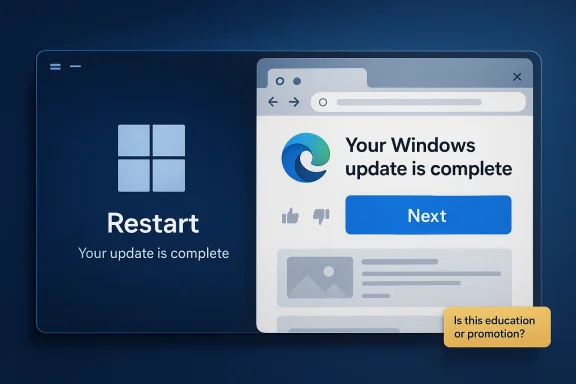
Microsoft’s latest Windows 11 update behavior is stirring an old and familiar argument: when does product education cross the line into product promotion? On some PCs, the mandatory April Patch Tuesday update is not just finishing silently in the background; after the first restart, it is launching Microsoft Edge and displaying a page that says “Your Windows update is complete,” then walking users through a multi-screen tour of “new” features. The problem, as many users will see it, is not that the browser opens, but that the presentation feels engineered to funnel people into Edge with minimal escape routes and plenty of persuasive design. That makes this more than a cosmetic annoyance; it is a useful case study in how Windows increasingly blends system messaging, browser delivery, and Microsoft’s own app ecosystem into one tightly controlled experience.
Windows has always used post-update messaging, but the format has changed dramatically over the years. In older releases, update completion was usually communicated through system notifications, a sign-in banner, or a change in the Windows Update page itself. In Windows 11, Microsoft has steadily expanded the use of in-product guidance, cloud-delivered content, and staged experiences to highlight new features as they become available. That broader strategy is visible in Microsoft’s own documentation, which emphasizes controlled feature rollouts, “get the latest updates as soon as they’re available,” and feature experiences surfaced through Windows Update settings rather than isolated system dialogs.
The current controversy is different because the experience is not staying inside Settings or a native Windows shell component. Instead, it is being opened in Edge, with a guided sequence that resembles a product onboarding flow more than a system status message. Windows Latest reports that the first page says the update is complete and invites users to see five “latest features,” with a prominent blue Next button and no obvious close control. Microsoft has not publicly framed this as an Edge promotion, but the user experience itself gives that impression because the tour is delivered through the browser that Microsoft is trying hardest to keep visible and relevant.
That distinction matters because Microsoft Edge is already deeply integrated into Windows 11. The browser receives updates through both its own updater and, in some cases, Windows Update, and Microsoft’s support documentation makes that coupling explicit. The company also continues to add Edge-specific experiences such as Copilot Mode, Game Assist, and other browser-first features that benefit from being introduced at moments of high visibility. So while the update flow may be technically just a web page, the strategic effect is to position Edge as the front door to Windows education itself.
There is also a timing issue. The feature cards shown in the reported sequence are not all genuinely new to the April 2026 cumulative update. Windows Latest notes that one of the highlights is taskbar clock seconds, which has been available to many users already, while Copilot-related summaries and some other items have existed for much longer. That makes the page feel less like a carefully curated changelog and more like a polished marketing reel, where “new” appears to mean “worth revisiting,” not necessarily “just shipped.”
What makes this especially sensitive is that Windows updates are no longer just maintenance events. They are now one of Microsoft’s main distribution channels for new experiences, browser features, and AI-enabled tools. The result is a platform where the line between operating system, browser, and marketing surface is increasingly blurred, and the Edge auto-open episode is simply the most visible example of that convergence.
That flow is especially awkward because it appears after a restart, which already places the user in a vulnerable mental state. People reboot after updates because they want normalcy back quickly, not a guided marketing walkthrough. A post-restart browser takeover risks feeling like the system is using its own maintenance window to deliver an unsolicited pitch, even if Microsoft’s intent is closer to education than coercion. That nuance matters, because irritation often comes not from the presence of content, but from the timing and the lack of choice.
There is also a credibility problem. When Microsoft labels something as “latest features,” users naturally assume they are seeing the freshest additions from the current patch. If several items are actually older features now being resurfaced, the page starts to feel more promotional than informational. That is a subtle but important distinction, because the trust cost of overstating novelty can be higher than the cost of simply admitting that the tour is a refresher.
The feature-tour model also fits Microsoft’s broader emphasis on AI, browser integration, and account-aware experiences. We have seen the company promote Copilot, AI Actions, Game Assist, and other feature surfaces across Windows and Edge. Once the browser becomes the showcase, the system update becomes the handoff point, and the browser becomes the stage. That is efficient from a product perspective, but it also makes the operating system feel less neutral.
That does not mean the strategy is automatically wrong. The company has every right to explain its own platform changes, and many users do appreciate guided tours when they are well done. But how those tours are delivered matters immensely. When the messaging is unavoidable, browser-based, and tied to a reboot event, the experience can be read as pushing a Microsoft product rather than assisting a Windows customer.
There is also an accessibility angle. If an interface depends on prominent buttons, hidden exits, and click-anywhere navigation, then it risks being more frustrating for keyboard users, screen reader users, and people who simply want to get back to work. Microsoft has made real investments in accessibility, so it should be especially careful not to let a promotional page undermine those gains with a clumsy interaction model. A good accessibility posture is not just about labels and screen readers; it is about predictability and control.
The page’s feedback buttons are another tell. Like/dislike controls can be useful when Microsoft wants to gauge satisfaction, but in this context they may read as performative. If a user clicks dislike and only gets a thank-you banner, without any immediate way to dismiss the experience more cleanly, the feedback loop feels cosmetic rather than empowering. That is exactly the kind of detail that turns a simple feature tour into an irritant.
This is where perception matters as much as implementation. Microsoft may argue that Edge is simply showing a web page and that users can close it at any time. But users do not evaluate technical possibility in isolation; they evaluate how the product makes them feel in the moment. If the behavior feels like an advertisement appended to a system restart, that feeling becomes the story.
That matters for rivals like Chrome, Firefox, and even smaller browsers because the browser wars are no longer fought only on speed or standards support. They are also fought on distribution, default placement, and moments of interruption. When a Windows update itself surfaces Edge, it adds one more moment where Microsoft can steer attention toward its own browser without requiring a user to actively choose it.
For consumers, the impact is more emotional and immediate. A home user is more likely to interpret the experience as Microsoft trying to sell them something than as a helpful reminder. That is especially true if the features being showcased are not obviously new or if the browser is already set to a different default. The result is a small but real trust tax on the Windows brand.
It is also telling that several of the highlighted capabilities are tied to Microsoft’s current product priorities. Copilot, AI Actions, and guided productivity are central to the company’s Windows story in 2025 and 2026. By contrast, returning taskbar seconds to the spotlight looks like filler, even if it is a nice quality-of-life change. The hierarchy of the tour tells users what Microsoft wants them to care about, and that hierarchy strongly favors the AI roadmap.
Microsoft may prefer web delivery because it is faster to update, easier to iterate, and more visually flexible. That is true, but it also means the company is trading native trust for content agility. That trade-off is not trivial, especially when the content is being delivered right after a forced restart and before the user has had a chance to recover their workflow.
This raises a broader question about default power inside the Windows ecosystem. When Microsoft owns the OS, the browser, the update channel, and the feature-tour content, users have very little room to interpret the experience as neutral. The technical argument that “it’s just a web page” sounds weaker when the surrounding context is so heavily controlled by the same vendor.
There is a difference between discovery and coercion, and Microsoft would do well to keep that difference visible. The more a browser launch looks like a compulsory continuation of a system process, the more it invites backlash from users who may otherwise be perfectly willing to try Edge. That is the irony here: the more aggressively Microsoft nudges, the more likely it is to push undecided users toward the very rival browser it wants them to avoid.
The better outcome would be a redesign that preserves the educational value while removing the sense of compulsion. Microsoft could move the experience into Settings, the Get Started app, or a clearly dismissible in-OS card. It could also make the feature list more honest, less promotional, and more tailored to what actually changed in the update.
Source: Windows Latest Windows 11’s mandatory update auto opens Microsoft Edge on some PCs after restart
 Overview
Windows has always used post-update messaging, but the format has changed dramatically over the years. In older releases, update completion was usually communicated through system notifications, a sign-in banner, or a change in the Windows Update page itself. In Windows 11, Microsoft has steadily expanded the use of in-product guidance, cloud-delivered content, and staged experiences to highlight new features as they become available. That broader strategy is visible in Microsoft’s own documentation, which emphasizes controlled feature rollouts, “get the latest updates as soon as they’re available,” and feature experiences surfaced through Windows Update settings rather than isolated system dialogs.The current controversy is different because the experience is not staying inside Settings or a native Windows shell component. Instead, it is being opened in Edge, with a guided sequence that resembles a product onboarding flow more than a system status message. Windows Latest reports that the first page says the update is complete and invites users to see five “latest features,” with a prominent blue Next button and no obvious close control. Microsoft has not publicly framed this as an Edge promotion, but the user experience itself gives that impression because the tour is delivered through the browser that Microsoft is trying hardest to keep visible and relevant.
That distinction matters because Microsoft Edge is already deeply integrated into Windows 11. The browser receives updates through both its own updater and, in some cases, Windows Update, and Microsoft’s support documentation makes that coupling explicit. The company also continues to add Edge-specific experiences such as Copilot Mode, Game Assist, and other browser-first features that benefit from being introduced at moments of high visibility. So while the update flow may be technically just a web page, the strategic effect is to position Edge as the front door to Windows education itself.
There is also a timing issue. The feature cards shown in the reported sequence are not all genuinely new to the April 2026 cumulative update. Windows Latest notes that one of the highlights is taskbar clock seconds, which has been available to many users already, while Copilot-related summaries and some other items have existed for much longer. That makes the page feel less like a carefully curated changelog and more like a polished marketing reel, where “new” appears to mean “worth revisiting,” not necessarily “just shipped.”
What makes this especially sensitive is that Windows updates are no longer just maintenance events. They are now one of Microsoft’s main distribution channels for new experiences, browser features, and AI-enabled tools. The result is a platform where the line between operating system, browser, and marketing surface is increasingly blurred, and the Edge auto-open episode is simply the most visible example of that convergence.
What Actually Happened
The reported behavior is straightforward on the surface. After installing the April Patch Tuesday update for Windows 11 and restarting, some users are seeing Edge launch automatically. The browser loads a Microsoft-hosted experience that tells them the update is complete and then steps them through a five-item feature tour, ending with a Start browsing prompt. Windows Latest says the page includes like and dislike buttons as well, which further reinforces the sense that this is a managed product journey rather than a plain update notice.The shape of the flow
The design details matter because they shape user interpretation. A big confirmation message, a large check mark, generous whitespace, and a single strong button are all classic onboarding techniques. They are effective because they encourage a default response, and the default response here is to continue through Edge. If a user clicks anywhere on the page, the tour advances; if they follow the obvious path, they get more feature cards; and when they reach the end, the browser offers another button to continue browsing in Edge.That flow is especially awkward because it appears after a restart, which already places the user in a vulnerable mental state. People reboot after updates because they want normalcy back quickly, not a guided marketing walkthrough. A post-restart browser takeover risks feeling like the system is using its own maintenance window to deliver an unsolicited pitch, even if Microsoft’s intent is closer to education than coercion. That nuance matters, because irritation often comes not from the presence of content, but from the timing and the lack of choice.
Why users are reacting sharply
The absence of an obvious close button is what turns annoyance into backlash. Users can of course close Edge or open a new tab, but the interface seems designed to nudge, not to offer an equal exit path. That makes it easy for critics to argue that Microsoft is exploiting user trust at a moment when the system looks authoritative, and the browser looks like part of the operating system itself.There is also a credibility problem. When Microsoft labels something as “latest features,” users naturally assume they are seeing the freshest additions from the current patch. If several items are actually older features now being resurfaced, the page starts to feel more promotional than informational. That is a subtle but important distinction, because the trust cost of overstating novelty can be higher than the cost of simply admitting that the tour is a refresher.
- The update opens Edge automatically after restart.
- The first page says the Windows update is complete.
- The tour uses a Next button and advances on broad click behavior.
- The final step promotes Start browsing in Edge.
- The featured items are not all genuinely new.
Microsoft’s Longer Update Strategy
This incident does not happen in a vacuum. Microsoft has spent the last several Windows 11 release cycles making updates more dynamic, more cloud-connected, and more user-facing. Official Windows documentation now routinely refers to feature updates, non-security preview releases, and staged rollouts that appear on the Windows Update settings page when a device is ready. In other words, Windows updates are increasingly used as a launch mechanism for both system improvements and guided discovery.The move toward guided experiences
Microsoft has clearly decided that many users will not discover new Windows features on their own. That is why the company now surfaces in-product prompts, update notes, and guided onboarding in places where users are already paying attention. For a product team, that is rational: if the update is the moment when attention peaks, it is the moment to explain what changed. The trouble is that attention capture and user consent are not the same thing.The feature-tour model also fits Microsoft’s broader emphasis on AI, browser integration, and account-aware experiences. We have seen the company promote Copilot, AI Actions, Game Assist, and other feature surfaces across Windows and Edge. Once the browser becomes the showcase, the system update becomes the handoff point, and the browser becomes the stage. That is efficient from a product perspective, but it also makes the operating system feel less neutral.
Why Edge becomes the chosen vehicle
Edge is an obvious vehicle for this messaging because it is already Microsoft’s browser, already Chromium-based, and already the place where the company can control the user experience most tightly. Microsoft documents Edge updates, restart behavior, and Windows Update delivery paths in support pages that leave little doubt about the browser’s privileged status in the Windows ecosystem. In enterprise terms, Edge is not just a browser; it is a managed endpoint for Microsoft’s web-delivered experiences.That does not mean the strategy is automatically wrong. The company has every right to explain its own platform changes, and many users do appreciate guided tours when they are well done. But how those tours are delivered matters immensely. When the messaging is unavoidable, browser-based, and tied to a reboot event, the experience can be read as pushing a Microsoft product rather than assisting a Windows customer.
- Windows Update is increasingly used to surface feature experiences.
- Microsoft favors guided discovery over passive changelogs.
- Edge is the browser Microsoft can most directly control.
- The strategy is efficient, but it narrows user choice.
- The delivery method shapes whether the message feels helpful or intrusive.
The User Experience Problem
The strongest criticism of the Edge auto-open flow is not ideological; it is experiential. Users are not objecting to learning what changed in Windows 11. They are objecting to the fact that the explanation arrives in a browser window that looks and feels like a mandatory continuation of the update process. That creates a subtle trust breach, because people assume the system is done when it says the update is complete.A system message should feel like a system message
A proper update completion notice should behave like a status confirmation, not a funnel. Windows already has native surfaces for this kind of guidance, including Settings, Start, and the built-in Get Started and Get Help apps. Those would feel more consistent with the operating system, and they would avoid the impression that Microsoft is using a browser launch to increase Edge exposure by stealth.There is also an accessibility angle. If an interface depends on prominent buttons, hidden exits, and click-anywhere navigation, then it risks being more frustrating for keyboard users, screen reader users, and people who simply want to get back to work. Microsoft has made real investments in accessibility, so it should be especially careful not to let a promotional page undermine those gains with a clumsy interaction model. A good accessibility posture is not just about labels and screen readers; it is about predictability and control.
The page’s feedback buttons are another tell. Like/dislike controls can be useful when Microsoft wants to gauge satisfaction, but in this context they may read as performative. If a user clicks dislike and only gets a thank-you banner, without any immediate way to dismiss the experience more cleanly, the feedback loop feels cosmetic rather than empowering. That is exactly the kind of detail that turns a simple feature tour into an irritant.
Why the no-close-button complaint resonates
The lack of a visible close button is more important than it first appears. A close button is not just a piece of UI chrome; it is a signal that the user is in control. Remove that signal and the experience becomes coercive in tone, even if the underlying software still allows escape through the browser’s own controls.This is where perception matters as much as implementation. Microsoft may argue that Edge is simply showing a web page and that users can close it at any time. But users do not evaluate technical possibility in isolation; they evaluate how the product makes them feel in the moment. If the behavior feels like an advertisement appended to a system restart, that feeling becomes the story.
- Update completion should feel final, not transitional.
- Native Windows surfaces would be less controversial.
- Accessibility depends on obvious exits and predictable controls.
- Feedback tools should lead to meaningful control changes.
- Perception often matters more than technical intent.
The Marketing and Platform Politics
The broader issue is that Windows has become a platform for Microsoft’s own product economics. Edge, Copilot, Microsoft 365, and other services all benefit when Microsoft can present them at the right moment and in the right place. That makes the operating system less like a neutral utility and more like a curated ecosystem where Microsoft continuously suggests what you should try next.Why rivals will see this as familiar
Competitors and regulators are unlikely to be shocked by the move, because Microsoft has a long history of pushing its own defaults and services inside Windows. Even the company’s own Edge documentation and Windows update support pages show how deeply the browser is tied into the maintenance fabric of the OS. The result is that every new “informational” prompt has to be judged not only as UX, but as platform leverage.That matters for rivals like Chrome, Firefox, and even smaller browsers because the browser wars are no longer fought only on speed or standards support. They are also fought on distribution, default placement, and moments of interruption. When a Windows update itself surfaces Edge, it adds one more moment where Microsoft can steer attention toward its own browser without requiring a user to actively choose it.
The enterprise angle
For enterprises, the story is different from the consumer backlash. IT admins generally care less about whether Edge opens once and more about whether such experiences can be managed, suppressed, or standardized. Microsoft’s enterprise documentation around Edge updates, progressive rollout, and Windows Update delivery shows that the company is very aware of managed environments and staged deployment. But an update tour like this still creates noise, support tickets, and a little more friction in environments that prize predictable user sessions.For consumers, the impact is more emotional and immediate. A home user is more likely to interpret the experience as Microsoft trying to sell them something than as a helpful reminder. That is especially true if the features being showcased are not obviously new or if the browser is already set to a different default. The result is a small but real trust tax on the Windows brand.
- Platform control can look like education from one angle and leverage from another.
- Browser promotion is now embedded in system moments.
- Enterprise users want manageability; consumers want simplicity.
- Rival browsers lose ground whenever Microsoft controls the attention point.
- Trust erosion accumulates through repeated minor annoyances.
The Features Microsoft Chose to Highlight
Perhaps the most revealing part of the reported flow is the feature selection itself. Windows Latest says the first card highlights the clock seconds option, which many users have already had for some time, while other cards showcase Emoji pinning, Copilot document summarization, Snipping Tool Quick markup, and File Explorer AI Actions. That is a mixed bag of genuinely useful tools, old news, and AI-forward messaging.A tour that mixes old and new
This mix is important because it suggests Microsoft is not simply trying to announce the April update. It is trying to reinforce a broader narrative about Windows 11: that the platform is modern, AI-infused, and full of features worth revisiting. From a marketing standpoint, that is understandable. From a user standpoint, it can feel like a bait-and-switch if the page frames everything as the “latest” when some items are anything but.It is also telling that several of the highlighted capabilities are tied to Microsoft’s current product priorities. Copilot, AI Actions, and guided productivity are central to the company’s Windows story in 2025 and 2026. By contrast, returning taskbar seconds to the spotlight looks like filler, even if it is a nice quality-of-life change. The hierarchy of the tour tells users what Microsoft wants them to care about, and that hierarchy strongly favors the AI roadmap.
Why the Get Started app would have been better
Windows already ships with the Get Started and Get Help apps, which are tailor-made for onboarding and support. Those apps are native to Windows, feel more consistent with the OS, and are easier to defend as legitimate guidance surfaces. Using Edge instead seems less like a necessity and more like a choice, and that choice is what invites skepticism.Microsoft may prefer web delivery because it is faster to update, easier to iterate, and more visually flexible. That is true, but it also means the company is trading native trust for content agility. That trade-off is not trivial, especially when the content is being delivered right after a forced restart and before the user has had a chance to recover their workflow.
- The tour blends new features with older ones.
- AI remains the clear strategic theme.
- Taskbar seconds is not a strong “new feature” headline.
- Native onboarding tools already exist in Windows.
- Web delivery is flexible but less trustworthy in this context.
Is This an Edge Promotion or a Windows Experience?
The most honest answer is that it is both. Microsoft is clearly using a Windows update moment to guide users through Windows features, but it is also choosing Edge as the vessel for that guidance. The browser is not an accidental bystander here; it is the surface that makes the interaction possible and gives Microsoft the most control over design, analytics, and follow-through.Why the distinction matters
If the page were displayed inside a native system dialog, it would be read as Windows messaging. Because it opens in Edge, it becomes inseparable from Microsoft’s browser ambitions. That is why users react so strongly: they are not just seeing a feature tour, they are seeing a company use one of its own apps to amplify another one of its own apps.This raises a broader question about default power inside the Windows ecosystem. When Microsoft owns the OS, the browser, the update channel, and the feature-tour content, users have very little room to interpret the experience as neutral. The technical argument that “it’s just a web page” sounds weaker when the surrounding context is so heavily controlled by the same vendor.
The line Microsoft should not cross
Microsoft can promote its own features, and it can use Windows Update to inform users about new capabilities. But it should avoid patterns that feel like dark design, especially when those patterns are tied to core system events. If the company wants users to embrace Edge, the better path is to make Edge compelling on its own merits, not to piggyback on the emotional authority of a completed update.There is a difference between discovery and coercion, and Microsoft would do well to keep that difference visible. The more a browser launch looks like a compulsory continuation of a system process, the more it invites backlash from users who may otherwise be perfectly willing to try Edge. That is the irony here: the more aggressively Microsoft nudges, the more likely it is to push undecided users toward the very rival browser it wants them to avoid.
- A browser-delivered tour is not neutral.
- The OS, browser, and content are all under Microsoft’s control.
- The experience reads as promotion because of context and timing.
- Edge would benefit more from voluntary adoption.
- Overreach can strengthen the case for competitors.
Strengths and Opportunities
Microsoft still has real strengths here, even if this particular execution is clumsy. The company has a large installed base, a highly integrated update system, and a browser that can deliver rich, responsive, web-based onboarding experiences. If it refines the presentation, this could become a genuinely useful way to help users learn what changed in Windows 11 without forcing them to dig through release notes or scattered blog posts. The opportunity is not to stop educating users, but to educate them in a way that feels respectful and opt-in.- Microsoft can use Windows Update as a high-attention teaching moment.
- Browser-based content is easier to refresh than static dialogs.
- Feature discovery may reduce confusion after major updates.
- New users may benefit from guided walkthroughs.
- AI and productivity features are easier to explain visually.
- A better-designed flow could improve feature adoption.
- Microsoft can measure engagement and refine content quickly.
Risks and Concerns
The risks are just as obvious. Any update-driven browser launch that appears forced will generate distrust, especially among experienced users who already see Windows as too eager to promote Microsoft services. If the page overstates novelty, hides the exit, or mixes unrelated features into a one-size-fits-all tour, it will feel less like help and more like a sales pitch. Worse, it could train users to dismiss future update prompts altogether, which would be the opposite of what Microsoft wants.- Users may perceive the flow as intrusive or manipulative.
- Older “new feature” cards weaken credibility.
- Forced browser launches can create support noise.
- The lack of a visible close control frustrates users.
- Enterprise IT may view it as unnecessary churn.
- The design may deepen anti-Edge sentiment.
- Repeated nudges can erode trust in Windows messaging.
Looking Ahead
What happens next will depend on whether Microsoft treats this as a one-off experiment or the start of a broader pattern. If the company continues to launch Edge after updates, it will need to justify the practice with better design, clearer opt-out behavior, and more accurate feature labeling. If it stops after this backlash, the episode may fade into the long history of Windows annoyances that never quite become policy.The better outcome would be a redesign that preserves the educational value while removing the sense of compulsion. Microsoft could move the experience into Settings, the Get Started app, or a clearly dismissible in-OS card. It could also make the feature list more honest, less promotional, and more tailored to what actually changed in the update.
- Watch whether Microsoft changes the update flow in a future cumulative release.
- Watch for a possible move from Edge to a native Windows surface.
- Watch whether Microsoft clarifies the novelty of the featured items.
- Watch for enterprise feedback on whether the behavior can be controlled.
- Watch for whether users increasingly associate Windows Update with browser promotion.
Source: Windows Latest Windows 11’s mandatory update auto opens Microsoft Edge on some PCs after restart
