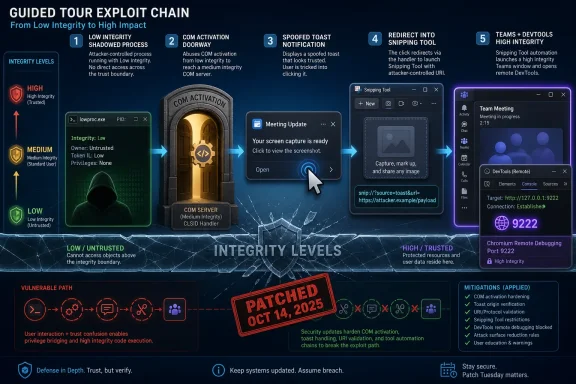
SafeBreach Labs uncovered a Windows 11 sandbox escape vulnerability dubbed Click Or Trick, reported by IT Brief Asia and tracked as CVE-2025-59199, that Microsoft fixed in October 2025 after researchers showed a one-click chain from low-integrity code to higher-integrity execution. The finding matters less because it is a flashy browser-breakout stunt than because it turns Windows itself into the attack surface. No exotic driver bug, kernel race, or dropped payload was required. The exploit path was built from COM activation, toast notifications, URI handlers, Snipping Tool, Teams, and Chromium debugging plumbing — the kind of trusted machinery defenders are trained to ignore.
Windows Mandatory Integrity Control is supposed to make compromise less catastrophic by dividing processes under the same user account into different trust levels. A low-integrity browser renderer, document viewer, or sandboxed helper can still execute code, but it should not be able to scribble across the user profile or launch meaningful activity as if it were a normal desktop app. That design accepts that bugs happen and tries to contain the blast radius.
Click Or Trick is uncomfortable because it did not smash through that boundary in the cinematic sense. It walked around it by persuading other Windows components to do ordinary things in the wrong order. The low-integrity process did not need administrator rights; it needed a path to make medium-integrity components act on its behalf.
That distinction is crucial for Windows administrators. A sandbox escape is often imagined as a single technical flaw that can be patched and forgotten. This one looks more like a supply-chain problem inside the operating system: too many privileged or semi-privileged components trusting that the previous layer already made the right decision.
The result was a practical escalation from restricted code to arbitrary write and higher-integrity execution after a user clicked a spoofed notification. That click is not incidental. It is the small piece of human participation that lets a chain of otherwise normal Windows behaviors become an exploit.
SafeBreach focused on LocalServer32 COM servers, which run out-of-process rather than inside the caller. That detail matters because a low-integrity process activating a separate COM server may create an opportunity for work to happen outside the original sandbox context. COM is not inherently a vulnerability; it is a trust broker. But trust brokers become interesting when policy decisions are distributed across registry metadata, app identity, user tokens, and historical compatibility assumptions.
The notable discovery was an AppID carrying an undocumented flag that allowed a low-integrity process to launch a medium-integrity server process using the user’s unmodified logon token. In plain English, that meant sandboxed code could cause Windows to start a process with more ambient authority than the sandboxed caller should have enjoyed.
This was not yet a full escape. It was a door into the hallway. But once a low-integrity process can trigger a medium-integrity component, the question shifts from “can it write outside the sandbox?” to “which trusted component will carry the message?”
That is where Click Or Trick becomes more than a COM story. It becomes a Windows composition story.
That is a nasty primitive because toast notifications occupy a privileged psychological position on Windows. Users are accustomed to seeing them as operating-system-mediated prompts rather than random web pop-ups. They appear in the corner of the desktop, inherit app identity cues, and often ask for exactly the kind of casual click that users have been trained to perform without deep inspection.
The vulnerability name, Click Or Trick, is apt. The click is not a phishing page in a browser or a macro warning in an Office document. It is a click inside a native Windows notification path, generated through built-in mechanisms and attached to trusted application identities.
This creates a detection problem as much as an exploitation problem. Security tools are better at flagging unsigned payloads, suspicious script interpreters, and obvious process injection than they are at judging whether a toast notification was too persuasive. When the launch path begins with Windows components doing Windows-looking things, the first suspicious artifact may appear late in the chain.
The bigger lesson is that user interaction is no longer a clean boundary between harmless and dangerous. “Requires a click” used to imply a meaningful mitigation. In a modern desktop full of notifications, deep links, URI handlers, and app-to-app handoffs, one click can authorize a surprisingly long chain of side effects.
Attackers like URI handlers for the same reason. They are bridges between contexts. If one app accepts a crafted parameter and another app forwards it without sufficiently narrowing what is allowed, the bridge becomes a routing layer for attacker-controlled behavior.
SafeBreach found that some Windows applications would accept appended command-line parameters when launched through notifications. That opened a path from spoofed toast to trusted app launch. An early proof point used Winget, Microsoft’s package manager, to install software chosen by the attacker after a single click.
That Winget route was serious but incomplete. Installing attacker-selected software is alarming, but it did not by itself provide the arbitrary code execution primitive the researchers needed for a clean sandbox escape. It did, however, prove the underlying weakness: a low-integrity process could steer built-in Windows software through a user-mediated notification path.
The more potent route came through Snipping Tool. That detail will feel odd to anyone who still thinks of Snipping Tool as a harmless screenshot utility. In Windows 11, it is also part of a modern app ecosystem, complete with URI-addressable behavior and documented endpoints.
This is the kind of issue that modern platform vendors struggle to classify. Snipping Tool doing a redirect is not inherently wrong. URI callbacks are common in authentication flows, onboarding experiences, and app discovery. The problem appears when a redirect feature accepts enough attacker-controlled input to cross a security boundary that the original caller could not cross directly.
The researchers first tested file URIs. That path allowed interpreted files, such as Python scripts, to run if they were placed in the LocalLow folder, one of the few locations writable by low-integrity processes. Native executables and batch files were blocked by Windows file association checks, which shows that some defenses did activate.
But partial blocking is not the same as containment. If interpreted content can be invoked from a writable low-integrity location, defenders still have to worry about which interpreters are installed, which file associations exist, and which enterprise images contain developer tools that make a user workstation more programmable than intended.
The file route was not enough for the final exploit. So the researchers looked for a different registered URI target that would accept useful parameters and produce a stronger primitive.
The chain used a crafted Teams URI passed through Snipping Tool’s redirect mechanism to inject the remote debugging switch. Once Teams opened with remote debugging enabled, the researchers could talk to the DevTools Protocol server locally. From there, they used protocol commands to change the download directory and download a file outside the sandbox.
That produced the arbitrary write primitive. In sandbox escape terms, arbitrary write is one of the milestones that changes a clever demo into a serious vulnerability. If sandboxed code can cause a medium-integrity app to write attacker-controlled content into locations the sandbox itself cannot access, containment has failed.
Again, Teams was not necessarily “the vulnerability” in isolation. Chromium’s remote debugging feature is legitimate in development and test contexts. Teams’ URI handling exists for deep links and collaboration workflows. Snipping Tool’s redirect behavior has documented uses. The exploit emerged because each component assumed the others had reduced the risk.
This is the heart of the story: Windows is no longer just an operating system in the old kernel-and-shell sense. It is an ecosystem of bundled apps, cloud-connected clients, protocol handlers, notification brokers, package managers, identity surfaces, and compatibility layers. Every one of those pieces may be defensible alone. Together, they can form an attack graph.
Living-off-the-land techniques are effective because they weaponize administrative normality. Winget installs packages. Teams opens links. Snipping Tool launches from URI parameters. Windows displays toast notifications. COM starts registered servers. A detection rule that simply says “this happened” will drown in false positives.
The more useful signals are relational and contextual. Did a low-integrity process trigger a medium-integrity COM server that then generated a toast? Did a notification launch path include unexpected command-line material? Did Snipping Tool invoke a redirect to a non-obvious URI scheme? Did Teams start with a remote debugging port outside a developer workstation baseline?
Those are harder questions, and many endpoint products are still better at identifying bad files than bad choreography. Click Or Trick is a choreography problem.
For enterprises, this should push telemetry design toward sequence analysis. A single process launch may be benign; a chain from low-integrity origin to notification broker to Snipping Tool to Teams with remote debugging enabled is not normal user behavior. The operating system already contains many of the events needed to see this kind of activity. The challenge is preserving enough context to connect them.
But CVSS is bad at capturing architectural discomfort. The score does not fully express how many Microsoft-maintained pieces participated in the path, nor how difficult such behavior can be to reason about across a fleet. A vulnerability that exposes a single unsafe function may be easier to patch than a vulnerability that reveals a habit of over-permissive app-to-app delegation.
Microsoft fixed the issue in October 2025, and that is the immediate operational answer. Patched Windows 11 systems should not be vulnerable to the disclosed chain. Yet the research raises a broader question that one monthly cumulative update cannot settle: how many similar combinations exist among Windows’ expanding inventory of inbox apps and URI-addressable workflows?
That question is uncomfortable because modern Windows deliberately ships with more batteries included. Users get package management, screen capture, collaboration hooks, cloud identity, widgets, store integration, notification surfaces, app installers, browser components, and cross-device features. Each addition improves convenience and increases the number of edges where trust can be confused.
Security architecture is often sold as layers. Click Or Trick shows that layers can become ladders.
That makes spoofing or abusing identity-adjacent mechanisms especially dangerous. A user who ignores a random executable prompt may click a notification that appears to come from a known Windows component. A security tool that would flag a strange process tree may allow an app-to-app handoff among signed Microsoft binaries. An administrator who blocks obvious scripting paths may not think to constrain deep-link parameters for inbox utilities.
Windows has been moving in this direction for years. Store apps, packaged apps, protocol activation, notification attribution, and identity-bound capabilities are all part of the modern platform. The problem is that identity systems often grow out of usability needs before they are treated as hard security boundaries.
If a low-integrity process can borrow enough identity to make a notification credible and enough routing authority to launch a medium-integrity app with attacker-influenced parameters, identity has become part of the exploit surface. That calls for stricter rules about which components may speak for which apps, what launch arguments may survive a boundary crossing, and how redirects are validated.
The answer is not to kill URI handlers or notifications. It is to stop treating them as mere UX glue.
But patching is only the first layer. Enterprises should also review whether normal users need broad access to optional interpreters, developer tooling, and app protocol surfaces on managed endpoints. The file URI testing in the research is a reminder that LocalLow is writable for a reason, but writable low-integrity locations become dangerous when associated interpreters can be launched by trusted apps.
Teams deserves attention too, not because Teams is uniquely reckless, but because Chromium-based desktop apps frequently inherit powerful command-line switches. Organizations that do not need remote debugging on production endpoints should look for ways to detect or restrict Chromium-family apps launching with debugging ports enabled. That signal is suspicious far beyond this one CVE.
Security teams should also tune detections around notification-to-process chains. A spoofed toast that launches a URI handler may not leave a single obvious “exploit” event, but it can create a recognizable pattern: unusual activation path, unexpected command-line material, and a resulting process running at a higher integrity level than the originator.
The most mature response is to threat-model the desktop as an integration platform. That means inventorying URI schemes, packaged app activation points, COM servers reachable from low integrity, and command-line switches exposed by bundled applications. It is tedious work, but Click Or Trick demonstrates why the tedious edges now matter.
Bundling is not inherently bad. Users expect Windows 11 to be useful immediately after installation, and enterprise IT often benefits when common tools are standardized and serviced through Microsoft’s update channels. A lean OS that forces every organization to bolt on its own screenshot tool, package manager, collaboration client, and notification framework would create a different kind of chaos.
The security debt appears when bundled components are allowed to trust each other too generously. A screenshot app should not become a general-purpose redirector in a low-to-medium integrity transition. A collaboration client should not casually accept dangerous debugging switches through deep-link activation. A notification broker should not make it easy for low-integrity code to produce a click path that inherits user trust.
The hard engineering problem is compatibility. Windows has decades of software expectations to preserve, and many app activation mechanisms exist precisely because older software needs flexible launch behavior. Locking everything down breaks workflows. Leaving everything flexible creates exploit chains.
Microsoft’s job is to make the secure path the default and the flexible path explicit, auditable, and constrained. Click Or Trick suggests there is still too much implicit trust hiding in the seams.
That sounds obvious, but it is hard to enforce in a platform as large as Windows. Every feature team can validate its own inputs, honor its own threat model, and still miss how an attacker will stitch the pieces together. The exploit chain crossed organizational and conceptual boundaries: licensing or edition upgrade code, notification UX, app launch infrastructure, screenshot tooling, collaboration software, and Chromium debugging.
The way forward is stricter provenance. When an action originates from a low-integrity process, that origin should remain attached to the request as it moves through brokers, redirects, and app activations. Components receiving the request should not merely ask “is this app signed?” or “is this URI registered?” They should ask whether the original caller was allowed to cause the requested side effect.
Windows already has pieces of this philosophy in integrity levels, app containers, brokered capabilities, and SmartScreen-style reputation systems. The failure mode is that provenance gets flattened as requests move through old compatibility layers and modern UX features. By the time the final app launches, the dangerous origin may be invisible.
For defenders, the same concept applies operationally. The goal is not to alert on every toast, every Teams launch, or every Snipping Tool invocation. The goal is to preserve enough causality to say: this medium-integrity action began with low-integrity code and arrived through an unusual chain.
Microsoft fixed the disclosed flaw, but the pressure will not ease as Windows becomes more integrated, more cloud-connected, and more dependent on bundled apps that speak to one another through invisible handoffs. The next sandbox escape may not look like an exploit at first glance; it may look like a normal Windows feature doing exactly what it was designed to do, just for the wrong caller.
 The Sandbox Boundary Failed at the Edges, Not the Wall
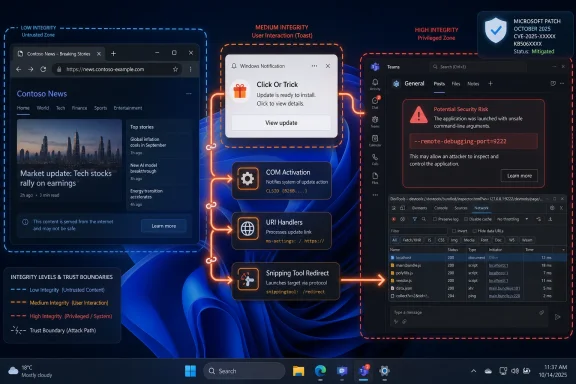
Windows Mandatory Integrity Control is supposed to make compromise less catastrophic by dividing processes under the same user account into different trust levels. A low-integrity browser renderer, document viewer, or sandboxed helper can still execute code, but it should not be able to scribble across the user profile or launch meaningful activity as if it were a normal desktop app. That design accepts that bugs happen and tries to contain the blast radius.Click Or Trick is uncomfortable because it did not smash through that boundary in the cinematic sense. It walked around it by persuading other Windows components to do ordinary things in the wrong order. The low-integrity process did not need administrator rights; it needed a path to make medium-integrity components act on its behalf.
That distinction is crucial for Windows administrators. A sandbox escape is often imagined as a single technical flaw that can be patched and forgotten. This one looks more like a supply-chain problem inside the operating system: too many privileged or semi-privileged components trusting that the previous layer already made the right decision.
The result was a practical escalation from restricted code to arbitrary write and higher-integrity execution after a user clicked a spoofed notification. That click is not incidental. It is the small piece of human participation that lets a chain of otherwise normal Windows behaviors become an exploit.
Microsoft’s Own Plumbing Became the Exploit Kit
The researchers began where many Windows escalation investigations begin: COM. Component Object Model is old, sprawling, and deeply embedded in Windows automation and application integration. It is also a frequent source of “wait, this object can be activated from there?” surprises.SafeBreach focused on LocalServer32 COM servers, which run out-of-process rather than inside the caller. That detail matters because a low-integrity process activating a separate COM server may create an opportunity for work to happen outside the original sandbox context. COM is not inherently a vulnerability; it is a trust broker. But trust brokers become interesting when policy decisions are distributed across registry metadata, app identity, user tokens, and historical compatibility assumptions.
The notable discovery was an AppID carrying an undocumented flag that allowed a low-integrity process to launch a medium-integrity server process using the user’s unmodified logon token. In plain English, that meant sandboxed code could cause Windows to start a process with more ambient authority than the sandboxed caller should have enjoyed.
This was not yet a full escape. It was a door into the hallway. But once a low-integrity process can trigger a medium-integrity component, the question shifts from “can it write outside the sandbox?” to “which trusted component will carry the message?”
That is where Click Or Trick becomes more than a COM story. It becomes a Windows composition story.
Toast Notifications Were the Social Engineering Layer Windows Supplied
The exploit’s user-facing trick was a toast notification. SafeBreach found a COM object tied to Windows edition upgrade functionality and identified a ShowToast function that could generate notifications on behalf of other applications. The researchers could also control a launch command appended when the user clicked the toast.That is a nasty primitive because toast notifications occupy a privileged psychological position on Windows. Users are accustomed to seeing them as operating-system-mediated prompts rather than random web pop-ups. They appear in the corner of the desktop, inherit app identity cues, and often ask for exactly the kind of casual click that users have been trained to perform without deep inspection.
The vulnerability name, Click Or Trick, is apt. The click is not a phishing page in a browser or a macro warning in an Office document. It is a click inside a native Windows notification path, generated through built-in mechanisms and attached to trusted application identities.
This creates a detection problem as much as an exploitation problem. Security tools are better at flagging unsigned payloads, suspicious script interpreters, and obvious process injection than they are at judging whether a toast notification was too persuasive. When the launch path begins with Windows components doing Windows-looking things, the first suspicious artifact may appear late in the chain.
The bigger lesson is that user interaction is no longer a clean boundary between harmless and dangerous. “Requires a click” used to imply a meaningful mitigation. In a modern desktop full of notifications, deep links, URI handlers, and app-to-app handoffs, one click can authorize a surprisingly long chain of side effects.
URI Handlers Turned App Convenience Into an Attack Router
The next move in the chain depended on app identities and URI handling. Windows applications routinely register custom URI schemes so links can open apps directly: mail clients, chat tools, app stores, screen capture tools, game launchers, device managers, and enterprise agents all participate in this ecosystem. The feature is useful because users expect an operating system to route intent across apps.Attackers like URI handlers for the same reason. They are bridges between contexts. If one app accepts a crafted parameter and another app forwards it without sufficiently narrowing what is allowed, the bridge becomes a routing layer for attacker-controlled behavior.
SafeBreach found that some Windows applications would accept appended command-line parameters when launched through notifications. That opened a path from spoofed toast to trusted app launch. An early proof point used Winget, Microsoft’s package manager, to install software chosen by the attacker after a single click.
That Winget route was serious but incomplete. Installing attacker-selected software is alarming, but it did not by itself provide the arbitrary code execution primitive the researchers needed for a clean sandbox escape. It did, however, prove the underlying weakness: a low-integrity process could steer built-in Windows software through a user-mediated notification path.
The more potent route came through Snipping Tool. That detail will feel odd to anyone who still thinks of Snipping Tool as a harmless screenshot utility. In Windows 11, it is also part of a modern app ecosystem, complete with URI-addressable behavior and documented endpoints.
Snipping Tool Was Not the Bug, But It Was the Pivot
SafeBreach used Snipping Tool’s URI-based launch behavior, specifically a documented discover endpoint with a redirect-uri argument. That redirect mechanism could send a callback to another registered application. In the exploit chain, Snipping Tool became an intermediate router: the spoofed notification opened Snipping Tool, and Snipping Tool redirected execution toward a second URI target chosen by the attacker.This is the kind of issue that modern platform vendors struggle to classify. Snipping Tool doing a redirect is not inherently wrong. URI callbacks are common in authentication flows, onboarding experiences, and app discovery. The problem appears when a redirect feature accepts enough attacker-controlled input to cross a security boundary that the original caller could not cross directly.
The researchers first tested file URIs. That path allowed interpreted files, such as Python scripts, to run if they were placed in the LocalLow folder, one of the few locations writable by low-integrity processes. Native executables and batch files were blocked by Windows file association checks, which shows that some defenses did activate.
But partial blocking is not the same as containment. If interpreted content can be invoked from a writable low-integrity location, defenders still have to worry about which interpreters are installed, which file associations exist, and which enterprise images contain developer tools that make a user workstation more programmable than intended.
The file route was not enough for the final exploit. So the researchers looked for a different registered URI target that would accept useful parameters and produce a stronger primitive.
Teams and Chromium Supplied the Sharp Edge
The target they settled on was Microsoft Teams. The desktop client is Chromium-based, and according to the research, it still exposed the Chromium--remote-debugging-port switch. That switch starts a Chrome DevTools Protocol server on a local port, a powerful interface intended for debugging but dangerous when exposed in the wrong context.The chain used a crafted Teams URI passed through Snipping Tool’s redirect mechanism to inject the remote debugging switch. Once Teams opened with remote debugging enabled, the researchers could talk to the DevTools Protocol server locally. From there, they used protocol commands to change the download directory and download a file outside the sandbox.
That produced the arbitrary write primitive. In sandbox escape terms, arbitrary write is one of the milestones that changes a clever demo into a serious vulnerability. If sandboxed code can cause a medium-integrity app to write attacker-controlled content into locations the sandbox itself cannot access, containment has failed.
Again, Teams was not necessarily “the vulnerability” in isolation. Chromium’s remote debugging feature is legitimate in development and test contexts. Teams’ URI handling exists for deep links and collaboration workflows. Snipping Tool’s redirect behavior has documented uses. The exploit emerged because each component assumed the others had reduced the risk.
This is the heart of the story: Windows is no longer just an operating system in the old kernel-and-shell sense. It is an ecosystem of bundled apps, cloud-connected clients, protocol handlers, notification brokers, package managers, identity surfaces, and compatibility layers. Every one of those pieces may be defensible alone. Together, they can form an attack graph.
The “No Malware Dropped” Detail Should Worry Defenders
SafeBreach emphasized that the attack used applications and services already present on a standard Windows 11 installation. That is not merely a rhetorical flourish. It means defenders cannot reduce the problem to blocking an unfamiliar binary hash or quarantining a suspicious installer.Living-off-the-land techniques are effective because they weaponize administrative normality. Winget installs packages. Teams opens links. Snipping Tool launches from URI parameters. Windows displays toast notifications. COM starts registered servers. A detection rule that simply says “this happened” will drown in false positives.
The more useful signals are relational and contextual. Did a low-integrity process trigger a medium-integrity COM server that then generated a toast? Did a notification launch path include unexpected command-line material? Did Snipping Tool invoke a redirect to a non-obvious URI scheme? Did Teams start with a remote debugging port outside a developer workstation baseline?
Those are harder questions, and many endpoint products are still better at identifying bad files than bad choreography. Click Or Trick is a choreography problem.
For enterprises, this should push telemetry design toward sequence analysis. A single process launch may be benign; a chain from low-integrity origin to notification broker to Snipping Tool to Teams with remote debugging enabled is not normal user behavior. The operating system already contains many of the events needed to see this kind of activity. The challenge is preserving enough context to connect them.
The CVSS Score Understates the Architectural Lesson
CVE-2025-59199 received a CVSS score of 7.8, which puts it in the high-severity range without making it sound apocalyptic. That is probably fair if one grades the bug as an individual vulnerability: it requires local code execution, user interaction, and a particular chain of installed components and registered handlers. It is not a wormable remote server bug.But CVSS is bad at capturing architectural discomfort. The score does not fully express how many Microsoft-maintained pieces participated in the path, nor how difficult such behavior can be to reason about across a fleet. A vulnerability that exposes a single unsafe function may be easier to patch than a vulnerability that reveals a habit of over-permissive app-to-app delegation.
Microsoft fixed the issue in October 2025, and that is the immediate operational answer. Patched Windows 11 systems should not be vulnerable to the disclosed chain. Yet the research raises a broader question that one monthly cumulative update cannot settle: how many similar combinations exist among Windows’ expanding inventory of inbox apps and URI-addressable workflows?
That question is uncomfortable because modern Windows deliberately ships with more batteries included. Users get package management, screen capture, collaboration hooks, cloud identity, widgets, store integration, notification surfaces, app installers, browser components, and cross-device features. Each addition improves convenience and increases the number of edges where trust can be confused.
Security architecture is often sold as layers. Click Or Trick shows that layers can become ladders.
App Identity Is Becoming a Security Boundary Whether Microsoft Says So or Not
One of the quieter themes in this exploit is app identity. The chain depended on generating notifications on behalf of applications, launching apps through registered identities, and using URI schemes associated with trusted software. In modern Windows, app identity is not just branding; it influences routing, permissions, user trust, and process behavior.That makes spoofing or abusing identity-adjacent mechanisms especially dangerous. A user who ignores a random executable prompt may click a notification that appears to come from a known Windows component. A security tool that would flag a strange process tree may allow an app-to-app handoff among signed Microsoft binaries. An administrator who blocks obvious scripting paths may not think to constrain deep-link parameters for inbox utilities.
Windows has been moving in this direction for years. Store apps, packaged apps, protocol activation, notification attribution, and identity-bound capabilities are all part of the modern platform. The problem is that identity systems often grow out of usability needs before they are treated as hard security boundaries.
If a low-integrity process can borrow enough identity to make a notification credible and enough routing authority to launch a medium-integrity app with attacker-influenced parameters, identity has become part of the exploit surface. That calls for stricter rules about which components may speak for which apps, what launch arguments may survive a boundary crossing, and how redirects are validated.
The answer is not to kill URI handlers or notifications. It is to stop treating them as mere UX glue.
Enterprise IT Has to Patch, But Also Baseline the Strange Stuff
For administrators, the first practical action is boring and correct: verify that October 2025 Windows security updates or later cumulative updates are deployed across affected Windows 11 systems. If Windows 10 or Windows Server SKUs appear in advisory scope through the Software Protection Platform component, those should be checked as well. The exact exposure depends on Microsoft’s fixed packages and the installed component set.But patching is only the first layer. Enterprises should also review whether normal users need broad access to optional interpreters, developer tooling, and app protocol surfaces on managed endpoints. The file URI testing in the research is a reminder that LocalLow is writable for a reason, but writable low-integrity locations become dangerous when associated interpreters can be launched by trusted apps.
Teams deserves attention too, not because Teams is uniquely reckless, but because Chromium-based desktop apps frequently inherit powerful command-line switches. Organizations that do not need remote debugging on production endpoints should look for ways to detect or restrict Chromium-family apps launching with debugging ports enabled. That signal is suspicious far beyond this one CVE.
Security teams should also tune detections around notification-to-process chains. A spoofed toast that launches a URI handler may not leave a single obvious “exploit” event, but it can create a recognizable pattern: unusual activation path, unexpected command-line material, and a resulting process running at a higher integrity level than the originator.
The most mature response is to threat-model the desktop as an integration platform. That means inventorying URI schemes, packaged app activation points, COM servers reachable from low integrity, and command-line switches exposed by bundled applications. It is tedious work, but Click Or Trick demonstrates why the tedious edges now matter.
Microsoft’s Bundled-App Strategy Carries a Security Debt
SafeBreach’s broader argument is that every dependency and bundled application expands the attack surface. That point will resonate with anyone who has watched Windows evolve from a relatively compact desktop OS into a platform carrying consumer apps, enterprise clients, AI features, cloud sync, app stores, and browser-derived runtimes.Bundling is not inherently bad. Users expect Windows 11 to be useful immediately after installation, and enterprise IT often benefits when common tools are standardized and serviced through Microsoft’s update channels. A lean OS that forces every organization to bolt on its own screenshot tool, package manager, collaboration client, and notification framework would create a different kind of chaos.
The security debt appears when bundled components are allowed to trust each other too generously. A screenshot app should not become a general-purpose redirector in a low-to-medium integrity transition. A collaboration client should not casually accept dangerous debugging switches through deep-link activation. A notification broker should not make it easy for low-integrity code to produce a click path that inherits user trust.
The hard engineering problem is compatibility. Windows has decades of software expectations to preserve, and many app activation mechanisms exist precisely because older software needs flexible launch behavior. Locking everything down breaks workflows. Leaving everything flexible creates exploit chains.
Microsoft’s job is to make the secure path the default and the flexible path explicit, auditable, and constrained. Click Or Trick suggests there is still too much implicit trust hiding in the seams.
The Real Patch Is a Smaller Trust Graph
The concrete lesson from Click Or Trick is not that Snipping Tool, Teams, COM, or toast notifications are bad. It is that security boundaries must survive composition. If a low-integrity process cannot do something directly, it should not be able to assemble five trusted helpers to do it indirectly.That sounds obvious, but it is hard to enforce in a platform as large as Windows. Every feature team can validate its own inputs, honor its own threat model, and still miss how an attacker will stitch the pieces together. The exploit chain crossed organizational and conceptual boundaries: licensing or edition upgrade code, notification UX, app launch infrastructure, screenshot tooling, collaboration software, and Chromium debugging.
The way forward is stricter provenance. When an action originates from a low-integrity process, that origin should remain attached to the request as it moves through brokers, redirects, and app activations. Components receiving the request should not merely ask “is this app signed?” or “is this URI registered?” They should ask whether the original caller was allowed to cause the requested side effect.
Windows already has pieces of this philosophy in integrity levels, app containers, brokered capabilities, and SmartScreen-style reputation systems. The failure mode is that provenance gets flattened as requests move through old compatibility layers and modern UX features. By the time the final app launches, the dangerous origin may be invisible.
For defenders, the same concept applies operationally. The goal is not to alert on every toast, every Teams launch, or every Snipping Tool invocation. The goal is to preserve enough causality to say: this medium-integrity action began with low-integrity code and arrived through an unusual chain.
The One-Click Windows Escape Leaves a Very Specific To-Do List
Click Or Trick is already patched, but the research leaves behind a practical checklist for anyone responsible for Windows endpoints. The story is not “panic about every notification.” The story is that modern Windows attack paths increasingly live between features, where ownership is blurry and telemetry is fragmented.- Organizations should confirm that October 2025 or later Microsoft security updates are installed on systems covered by CVE-2025-59199.
- Security teams should treat unexpected Chromium-family launches with remote debugging ports as high-signal behavior on ordinary user endpoints.
- Administrators should review which URI handlers are registered on managed images and whether business software introduces permissive deep-link activation paths.
- Detection teams should correlate low-integrity process activity with later medium-integrity app launches rather than evaluating each process in isolation.
- Endpoint baselines should account for interpreters and developer tools that make writable low-integrity locations more useful to an attacker.
- Software vendors shipping Windows desktop apps should validate launch parameters as if URI activation were an untrusted network boundary.
Microsoft fixed the disclosed flaw, but the pressure will not ease as Windows becomes more integrated, more cloud-connected, and more dependent on bundled apps that speak to one another through invisible handoffs. The next sandbox escape may not look like an exploit at first glance; it may look like a normal Windows feature doing exactly what it was designed to do, just for the wrong caller.
References
- Primary source: IT Brief Asia
Published: Mon, 01 Jun 2026 21:00:00 GMT
Windows 11 sandbox flaw lets attackers escape with one click
Microsoft patched a CVE-2025-59199 flaw in October after researchers showed a single click could let low-integrity code escape Windows 11's sandbox. itbrief.asia
- Related coverage: tomshardware.com
Windows 11 August 2025 security update is causing unintended UAC prompts to appear for non-admin users — some apps are crashing | Tom's Hardware
Windows 11's latest security update can wreak some havoc, but there are workarounds.www.tomshardware.com - Related coverage: techradar.com
Microsoft issues emergency Windows server security patch - update now or risk attack | TechRadar
Microsoft sounds the alarm after PoC emergeswww.techradar.com - Related coverage: labs.cloudsecurityalliance.org
Antigravity Sandbox Escape: Prompt Injection and Native Tool Abuse
PDF documentlabs.cloudsecurityalliance.org
- Related coverage: encyb.com