

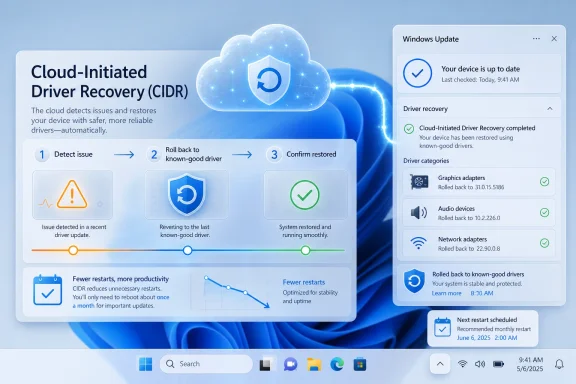
Microsoft is adding Cloud-Initiated Driver Recovery to Windows Update, a Windows 11 mechanism announced around WinHEC 2026 that lets Microsoft roll back faulty drivers delivered through Windows Update to a known-good version without waiting for users or PC makers to intervene. The feature arrives alongside a broader rethink of Windows Update controls: longer repeatable pauses, clearer driver labels, fewer forced reboot moments, and a cleaner split between shutting down and installing updates. The thesis is simple but uncomfortable for Redmond: Windows Update is no longer being treated merely as a delivery pipe, but as a system that must actively undo its own mistakes. That is progress, but it is also an admission that the old “ship it and let support sort it out” model has run out of road.
For years, the official Windows story has framed updates as hygiene: a necessary background process that keeps PCs secure, compatible, and modern. That framing was never entirely wrong, but it was incomplete. A bad GPU, Wi-Fi, audio, storage, or firmware update does not feel like hygiene to the person staring at a black screen, a missing sound device, or a laptop that suddenly cannot resume from sleep.
Cloud-Initiated Driver Recovery, or CIDR, is Microsoft’s attempt to close that gap. When a driver published through Windows Update is found to be problematic, Microsoft can initiate a rollback to a previously validated version on affected systems. The important phrase is not “rollback,” because Windows has had rollback mechanics in various forms for ages. The important phrase is cloud-initiated.
That changes the ownership model. Instead of every user discovering the fault independently, searching forums, opening Device Manager, locating the driver, choosing Roll Back Driver, or waiting for an OEM utility to catch up, Microsoft is building a path for the update service itself to perform damage control. In theory, a bad driver stops being a million separate support incidents and becomes a fleet-level remediation event.
The limitation matters just as much as the promise. CIDR applies to drivers distributed through Windows Update. If a user installs a driver directly from Nvidia, AMD, Intel, Realtek, Dell, HP, Lenovo, ASUS, or a peripheral vendor, Microsoft’s new cloud rollback system is not magically responsible for that entire ecosystem. But Windows Update has become such a central path for driver delivery that this is still a meaningful shift.
That is not cynicism; it is modern operating-system engineering. Windows runs across an absurd range of hardware combinations, OEM images, device firmware versions, regional models, docking stations, add-in cards, BIOS settings, and corporate configurations. No lab, however well funded, can fully model the messiness of the PC ecosystem.
But Microsoft has often underestimated how much users blame Windows for everything that enters the machine through Windows Update. If the driver came from a hardware vendor but arrived through Microsoft’s Settings app, the distinction is invisible to most people. Windows “broke the PC,” and for practical purposes that is true enough.
CIDR acknowledges this reality. It says the update channel has a duty not only to distribute certified content but to watch what happens after distribution and react when the ecosystem gets it wrong. That is a more honest model for Windows, and it is overdue.
The best version of this feature would be boring. A bad driver rolls out, telemetry spots the pattern, Microsoft stops offering it, affected devices quietly revert, and users never have to learn the name of the component that failed. The worst version would be another opaque background intervention that changes drivers without enough visibility, leaving power users and administrators wondering what happened overnight.
That sounds mundane until you remember how much of the Windows 10 and Windows 11 era has been defined by the opposite philosophy. Microsoft spent a decade pushing Windows toward service-like maintenance, where updates were mandatory in spirit even when users could defer them for a while. The security logic was strong, but the trust cost was real.
The new pause behavior is especially symbolic. Microsoft is not quite saying, “Ignore updates forever.” Security support lifecycles still exist, managed policies still matter, and eventually old builds fall out of support. But the practical change is that the user can keep extending the pause window rather than being forced into a hard stop after the familiar 35-day ceiling.
That is not a small concession. It turns the update pause from a countdown timer into a user-controlled state. For enthusiasts, testers, gamers, creators, and anyone with fragile hardware or production software, that changes the emotional texture of Windows Update. It becomes less of a trapdoor.
A firmware update, a cumulative update, a .NET update, and a driver update are different things to Microsoft’s servicing machinery. To the person trying to close a laptop before boarding a flight, they are all just “Windows wants to update again.” That mismatch has damaged trust more than any one individual bug.
Reducing the update experience to fewer restart moments attacks the irritation at its source. It does not make updates smaller, safer, or automatically better, but it makes them less chaotic. Predictability is a form of reliability.
This is where Microsoft seems to have learned from enterprise IT. Administrators do not merely want patches; they want windows, rings, deferrals, reporting, rollback plans, and a way to explain what will happen before it happens. Consumers rarely get that language, but they want the same emotional outcome: fewer surprises.
The old driver naming mess was not merely ugly; it discouraged informed choice. If every driver line looks like a vendor name, a version number, and a date that may or may not correspond to anything meaningful, users cannot make decisions. They can only accept or avoid the whole pile.
Clearer labels do not turn Windows Update into a professional driver management console. They do, however, reduce the amount of guesswork for power users and support technicians. When paired with better rollback behavior, they form a more coherent experience: Windows should say what it is changing, change it at a predictable time, and be able to reverse course if the change proves bad.
That is the baseline users should have had all along. The fact that it feels notable in 2026 tells you how low expectations have fallen.
Microsoft’s updated graphics driver publishing policy, moving from more granular hardware targeting to a different targeting model involving hardware IDs and computer hardware IDs, is part of the same trust repair effort. The company has effectively heard the complaint: Windows Update should not casually undo a working graphics stack, especially on systems where the user has intentionally installed a newer driver.
This is a difficult balance. OEM-specific graphics drivers may include tuning, power profiles, display routing, hybrid graphics behavior, or extension components that generic vendor packages do not. On laptops in particular, the latest driver is not always the best driver for that exact device.
But that nuance has been invisible to users. Windows Update needs to become better at respecting intent. If a user has gone out of their way to install a vendor driver, the operating system should be cautious about replacing it unless there is a strong security, stability, or compatibility reason. The operating system can be protective without being paternalistic.
Drivers occupy the most sensitive boundary in Windows. They connect the operating system to hardware, often with privileges and failure modes that ordinary apps do not have. A weak app crashes. A weak driver can take down the machine, drain the battery, break sleep, corrupt performance, or create a security exposure.
The industry has spent years moving more logic out of kernel mode where possible, improving class drivers, and tightening signing and compatibility requirements. Microsoft’s latest messaging fits that direction. The goal is not just to make bad drivers easier to remove, but to reduce the number of risky drivers that ever need such intervention.
Still, ecosystem initiatives can become corporate fog if they are not measured by user-visible outcomes. Windows users will not care that Microsoft held workshops with OEMs if their audio device disappears after Patch Tuesday. They will care if driver failures become rarer, clearer, and easier to recover from.
The unsettling part is control. Enterprise IT does not merely ask whether a fix works; it asks who initiated it, how it was approved, whether it can be audited, whether it respects rings and deferrals, and what happens to devices behind VPNs, proxies, metered links, or compliance constraints. A black-box rollback may be fine for a home laptop. It is harder to accept in a regulated environment.
Microsoft has already built cloud-based driver and firmware servicing controls through Windows Update for Business, Intune, and related deployment services. The open question is how elegantly CIDR plugs into that governance model. Administrators will want reporting that says which machines were affected, which driver was removed, which version replaced it, when it happened, and whether user disruption occurred.
The strongest version of CIDR for business would look less like consumer magic and more like an incident response workflow. Microsoft detects a bad driver, publishes the mitigation, exposes the blast radius, allows policy-aware deployment, and records the outcome. Anything less will help some admins while making others nervous.
That reality has not changed. If anything, the security argument for fast patching is stronger now than it was when Windows 10 launched. Microsoft’s challenge is that users stopped accepting security as an all-purpose excuse for disruption.
The new update model tries to square that circle. It gives users more flexibility while preserving the expectation that supported Windows devices should remain current. The phrase “secure by default” still appears in Microsoft’s framing, and it should. A Windows ecosystem where everyone pauses updates forever would be a disaster.
But security compliance depends on trust. If users believe updates are roulette, they will avoid them. If admins believe updates are unpredictable, they will slow-roll them. By making updates less disruptive and recovery more automatic, Microsoft may actually improve patch adoption more effectively than by tightening the screws.
That is real relief. It is not the same as full agency. Windows Update remains a system designed around broad population management, not bespoke user preference. Microsoft is still deciding what defaults protect the installed base, what telemetry matters, and when intervention is warranted.
Power users will continue to want more. They will want permanent driver exclusions, stronger “do not replace this driver” signals, richer update histories, easier exportable logs, and clearer explanations when Windows reverses a driver. Some of those requests are reasonable. Some collide with the messy reality of supporting a billion-plus devices.
The point is not that Microsoft has suddenly become a libertarian steward of the PC. It has not. The point is that Microsoft is beginning to concede that user control is itself a reliability feature.
Technically inclined users learned workarounds. They paused updates, hid drivers, used Group Policy, disabled automatic driver delivery, relied on OEM utilities, or kept images ready. Less technical users learned only that the update button was something to fear.
Microsoft’s new approach is interesting because it treats disruption as a first-class engineering target. Fewer restarts, clearer update categories, repeatable pauses, and automatic recovery are not glamorous platform features. They are trust infrastructure.
That matters more than another Settings redesign or Copilot entry point. The operating system earns loyalty when the basics feel dependable. For Windows, servicing is one of the basics.
Here is what will separate a genuine course correction from another round of update optimism:
The larger story is that Windows Update is becoming less like a conveyor belt and more like an operational system with feedback, restraint, and recovery. That is where it always needed to go. The PC ecosystem is too broad for perfection and too important for shrugging when updates break things, so the future of Windows servicing will be judged not by whether Microsoft can prevent every bad driver, but by how quickly, visibly, and respectfully it can recover when the next one slips through.
Source: Windows Central Windows Update is finally fighting back against buggy drivers — here’s how
Source: Engadget Windows Update will soon revert problematic drivers automatically - Engadget
 Microsoft Finally Admits the Driver Pipeline Is Part of the Product
For years, the official Windows story has framed updates as hygiene: a necessary background process that keeps PCs secure, compatible, and modern. That framing was never entirely wrong, but it was incomplete. A bad GPU, Wi-Fi, audio, storage, or firmware update does not feel like hygiene to the person staring at a black screen, a missing sound device, or a laptop that suddenly cannot resume from sleep.Cloud-Initiated Driver Recovery, or CIDR, is Microsoft’s attempt to close that gap. When a driver published through Windows Update is found to be problematic, Microsoft can initiate a rollback to a previously validated version on affected systems. The important phrase is not “rollback,” because Windows has had rollback mechanics in various forms for ages. The important phrase is cloud-initiated.
That changes the ownership model. Instead of every user discovering the fault independently, searching forums, opening Device Manager, locating the driver, choosing Roll Back Driver, or waiting for an OEM utility to catch up, Microsoft is building a path for the update service itself to perform damage control. In theory, a bad driver stops being a million separate support incidents and becomes a fleet-level remediation event.
The limitation matters just as much as the promise. CIDR applies to drivers distributed through Windows Update. If a user installs a driver directly from Nvidia, AMD, Intel, Realtek, Dell, HP, Lenovo, ASUS, or a peripheral vendor, Microsoft’s new cloud rollback system is not magically responsible for that entire ecosystem. But Windows Update has become such a central path for driver delivery that this is still a meaningful shift.
The New Rollback System Is a Safety Net, Not a Quality Strategy
The danger in talking about automatic recovery is that it can make failure sound solved. It is not solved. A rollback system is what you build when you accept that failure will happen at scale and that the platform needs a better way to survive it.That is not cynicism; it is modern operating-system engineering. Windows runs across an absurd range of hardware combinations, OEM images, device firmware versions, regional models, docking stations, add-in cards, BIOS settings, and corporate configurations. No lab, however well funded, can fully model the messiness of the PC ecosystem.
But Microsoft has often underestimated how much users blame Windows for everything that enters the machine through Windows Update. If the driver came from a hardware vendor but arrived through Microsoft’s Settings app, the distinction is invisible to most people. Windows “broke the PC,” and for practical purposes that is true enough.
CIDR acknowledges this reality. It says the update channel has a duty not only to distribute certified content but to watch what happens after distribution and react when the ecosystem gets it wrong. That is a more honest model for Windows, and it is overdue.
The best version of this feature would be boring. A bad driver rolls out, telemetry spots the pattern, Microsoft stops offering it, affected devices quietly revert, and users never have to learn the name of the component that failed. The worst version would be another opaque background intervention that changes drivers without enough visibility, leaving power users and administrators wondering what happened overnight.
The Windows Update Truce Is Being Renegotiated
CIDR is arriving at the same time Microsoft is testing a broader set of Windows Update changes that directly address the old user complaint: Windows chooses the timing, and the human just deals with it. The April Windows Insider announcement laid out a more flexible model. Users can skip updates during setup, extend update pauses repeatedly in 35-day increments, choose normal shutdown and restart options even when updates are pending, and see clearer descriptions of driver updates.That sounds mundane until you remember how much of the Windows 10 and Windows 11 era has been defined by the opposite philosophy. Microsoft spent a decade pushing Windows toward service-like maintenance, where updates were mandatory in spirit even when users could defer them for a while. The security logic was strong, but the trust cost was real.
The new pause behavior is especially symbolic. Microsoft is not quite saying, “Ignore updates forever.” Security support lifecycles still exist, managed policies still matter, and eventually old builds fall out of support. But the practical change is that the user can keep extending the pause window rather than being forced into a hard stop after the familiar 35-day ceiling.
That is not a small concession. It turns the update pause from a countdown timer into a user-controlled state. For enthusiasts, testers, gamers, creators, and anyone with fragile hardware or production software, that changes the emotional texture of Windows Update. It becomes less of a trapdoor.
One Monthly Reboot Is the Quietly Radical Part
The flashier headlines are about indefinite pauses and automatic driver rollback, but the more important everyday change may be Microsoft’s effort to coordinate driver, .NET, firmware, and quality updates around a single monthly restart. Windows users have long been conditioned to expect that the machine might ask for attention at inconvenient times for reasons that are technically distinct but experientially identical.A firmware update, a cumulative update, a .NET update, and a driver update are different things to Microsoft’s servicing machinery. To the person trying to close a laptop before boarding a flight, they are all just “Windows wants to update again.” That mismatch has damaged trust more than any one individual bug.
Reducing the update experience to fewer restart moments attacks the irritation at its source. It does not make updates smaller, safer, or automatically better, but it makes them less chaotic. Predictability is a form of reliability.
This is where Microsoft seems to have learned from enterprise IT. Administrators do not merely want patches; they want windows, rings, deferrals, reporting, rollback plans, and a way to explain what will happen before it happens. Consumers rarely get that language, but they want the same emotional outcome: fewer surprises.
Driver Labels Are a Small Fix for a Deep Transparency Problem
Microsoft is also adding device-class information to driver update titles, so users can more easily see whether a pending or installed driver applies to display, audio, battery, extension, HDC, or another class. This sounds almost comically modest until you have tried to determine whether a vague driver package in Windows Update is about to touch your GPU, your touchpad, your Bluetooth radio, or something buried in the chipset.The old driver naming mess was not merely ugly; it discouraged informed choice. If every driver line looks like a vendor name, a version number, and a date that may or may not correspond to anything meaningful, users cannot make decisions. They can only accept or avoid the whole pile.
Clearer labels do not turn Windows Update into a professional driver management console. They do, however, reduce the amount of guesswork for power users and support technicians. When paired with better rollback behavior, they form a more coherent experience: Windows should say what it is changing, change it at a predictable time, and be able to reverse course if the change proves bad.
That is the baseline users should have had all along. The fact that it feels notable in 2026 tells you how low expectations have fallen.
The Graphics Driver Fight Explains Why This Matters
Few update grievances are as persistent as Windows replacing or downgrading graphics drivers. Enthusiasts know the pattern: install a newer GPU driver from the vendor, tune a system for a game or creative workload, and then discover that Windows Update has decided a different package is “better” for the machine. Sometimes Windows is technically matching the OEM-supported configuration. Sometimes the user simply experiences it as sabotage.Microsoft’s updated graphics driver publishing policy, moving from more granular hardware targeting to a different targeting model involving hardware IDs and computer hardware IDs, is part of the same trust repair effort. The company has effectively heard the complaint: Windows Update should not casually undo a working graphics stack, especially on systems where the user has intentionally installed a newer driver.
This is a difficult balance. OEM-specific graphics drivers may include tuning, power profiles, display routing, hybrid graphics behavior, or extension components that generic vendor packages do not. On laptops in particular, the latest driver is not always the best driver for that exact device.
But that nuance has been invisible to users. Windows Update needs to become better at respecting intent. If a user has gone out of their way to install a vendor driver, the operating system should be cautious about replacing it unless there is a strong security, stability, or compatibility reason. The operating system can be protective without being paternalistic.
WinHEC 2026 Shows Microsoft Is Making This an Ecosystem Problem
Microsoft’s Driver Quality Initiative, introduced around WinHEC 2026 in Taipei, places the new rollback work inside a larger campaign. The company is talking about driver architecture, partner trust, lifecycle management, catalog hygiene, stronger quality measurements, and better use of telemetry. That is the correct scope, because bad drivers are not a single bug class; they are an ecosystem management problem.Drivers occupy the most sensitive boundary in Windows. They connect the operating system to hardware, often with privileges and failure modes that ordinary apps do not have. A weak app crashes. A weak driver can take down the machine, drain the battery, break sleep, corrupt performance, or create a security exposure.
The industry has spent years moving more logic out of kernel mode where possible, improving class drivers, and tightening signing and compatibility requirements. Microsoft’s latest messaging fits that direction. The goal is not just to make bad drivers easier to remove, but to reduce the number of risky drivers that ever need such intervention.
Still, ecosystem initiatives can become corporate fog if they are not measured by user-visible outcomes. Windows users will not care that Microsoft held workshops with OEMs if their audio device disappears after Patch Tuesday. They will care if driver failures become rarer, clearer, and easier to recover from.
Enterprise IT Will Like the Direction and Fear the Ambiguity
For managed environments, automatic rollback is both attractive and unsettling. The attraction is obvious: fewer tickets, faster remediation, and less reliance on manual intervention across fleets. If a bad driver hits a class of devices, a cloud-triggered recovery path could save administrators a grim week of scripts, remote sessions, and emergency communications.The unsettling part is control. Enterprise IT does not merely ask whether a fix works; it asks who initiated it, how it was approved, whether it can be audited, whether it respects rings and deferrals, and what happens to devices behind VPNs, proxies, metered links, or compliance constraints. A black-box rollback may be fine for a home laptop. It is harder to accept in a regulated environment.
Microsoft has already built cloud-based driver and firmware servicing controls through Windows Update for Business, Intune, and related deployment services. The open question is how elegantly CIDR plugs into that governance model. Administrators will want reporting that says which machines were affected, which driver was removed, which version replaced it, when it happened, and whether user disruption occurred.
The strongest version of CIDR for business would look less like consumer magic and more like an incident response workflow. Microsoft detects a bad driver, publishes the mitigation, exposes the blast radius, allows policy-aware deployment, and records the outcome. Anything less will help some admins while making others nervous.
Security Is the Argument Microsoft Cannot Abandon
There is a reason Microsoft resisted giving users unlimited control over updates for so long. Unpatched Windows systems are not just a personal risk; they are an ecosystem risk. Botnets, ransomware crews, commodity exploit kits, and opportunistic attackers thrive when large numbers of machines sit on old builds because updates were annoying.That reality has not changed. If anything, the security argument for fast patching is stronger now than it was when Windows 10 launched. Microsoft’s challenge is that users stopped accepting security as an all-purpose excuse for disruption.
The new update model tries to square that circle. It gives users more flexibility while preserving the expectation that supported Windows devices should remain current. The phrase “secure by default” still appears in Microsoft’s framing, and it should. A Windows ecosystem where everyone pauses updates forever would be a disaster.
But security compliance depends on trust. If users believe updates are roulette, they will avoid them. If admins believe updates are unpredictable, they will slow-roll them. By making updates less disruptive and recovery more automatic, Microsoft may actually improve patch adoption more effectively than by tightening the screws.
The Home User Gets Relief, but Not Full Agency
For ordinary Windows 11 users, the practical benefit is straightforward. If Microsoft gets this right, fewer people will have to diagnose a bad driver by trial and error. Fewer people will find that a restart installed an update they were trying to avoid. Fewer people will be surprised by a power menu that offers only update-flavored choices when they just want to shut down.That is real relief. It is not the same as full agency. Windows Update remains a system designed around broad population management, not bespoke user preference. Microsoft is still deciding what defaults protect the installed base, what telemetry matters, and when intervention is warranted.
Power users will continue to want more. They will want permanent driver exclusions, stronger “do not replace this driver” signals, richer update histories, easier exportable logs, and clearer explanations when Windows reverses a driver. Some of those requests are reasonable. Some collide with the messy reality of supporting a billion-plus devices.
The point is not that Microsoft has suddenly become a libertarian steward of the PC. It has not. The point is that Microsoft is beginning to concede that user control is itself a reliability feature.
The Windows Update Reputation Was Earned One Bad Restart at a Time
Windows Update’s reputation problem did not come from a single catastrophic failure. It accumulated through small betrayals: a reboot at the wrong moment, a driver that made Bluetooth unreliable, a printer that stopped working, a GPU driver that vanished, a laptop that woke hot in a bag, a message that said “working on updates” with no useful explanation.Technically inclined users learned workarounds. They paused updates, hid drivers, used Group Policy, disabled automatic driver delivery, relied on OEM utilities, or kept images ready. Less technical users learned only that the update button was something to fear.
Microsoft’s new approach is interesting because it treats disruption as a first-class engineering target. Fewer restarts, clearer update categories, repeatable pauses, and automatic recovery are not glamorous platform features. They are trust infrastructure.
That matters more than another Settings redesign or Copilot entry point. The operating system earns loyalty when the basics feel dependable. For Windows, servicing is one of the basics.
Redmond’s Repair Job Has a Short List of Proof Points
The next phase is not about whether Microsoft can announce better update behavior. It is about whether Windows users can observe it. The company has made many servicing promises over the years, and the PC ecosystem has a way of turning neat diagrams into edge cases.Here is what will separate a genuine course correction from another round of update optimism:
- Microsoft’s automatic driver rollback must be fast enough that most affected users are remediated before the workaround spreads through forums and support chats.
- Windows Update must clearly show when a driver rollback has happened, because silent repair without an audit trail will create a different kind of mistrust.
- The new pause model must remain understandable to normal users while still respecting the security boundaries of supported Windows releases.
- Driver update titles must become meaningfully clearer, not merely longer strings with another category label bolted on.
- Enterprise controls must expose enough policy, reporting, and rollback detail for administrators to treat CIDR as managed remediation rather than unexplained cloud behavior.
- Microsoft must keep reducing bad driver publication at the source, because recovery is valuable but prevention is cheaper.
The larger story is that Windows Update is becoming less like a conveyor belt and more like an operational system with feedback, restraint, and recovery. That is where it always needed to go. The PC ecosystem is too broad for perfection and too important for shrugging when updates break things, so the future of Windows servicing will be judged not by whether Microsoft can prevent every bad driver, but by how quickly, visibly, and respectfully it can recover when the next one slips through.
Source: Windows Central Windows Update is finally fighting back against buggy drivers — here’s how
Source: Engadget Windows Update will soon revert problematic drivers automatically - Engadget
