

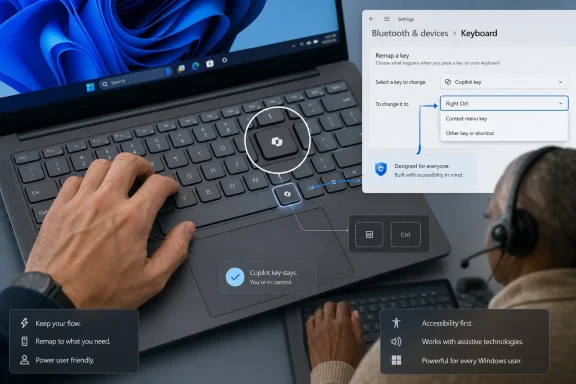
Microsoft’s April support document, updated in June 2026, says a future Windows 11 update will let users remap the dedicated Copilot key on newer PCs to Right Ctrl or the Context menu key. That is not a retreat from AI hardware, but it is a concession that Microsoft’s most visible Windows keyboard change in decades collided with real-world habits, accessibility needs, and muscle memory. The company is not removing the key from new PCs. It is admitting, in the careful language of support documentation, that a shortcut designed to make users more productive sometimes did the opposite.
The Copilot key was introduced with the confidence of a platform owner that believed it knew where Windows computing was headed. Starting in 2024, new Windows PCs began shipping with a dedicated key intended to summon Copilot, giving Microsoft’s AI assistant a physical place on the keyboard alongside icons that had survived for generations.
That decision was never just about convenience. It was a branding move, a hardware requirement, and a bet that AI would become common enough in daily Windows use to deserve a permanent key. Microsoft pitched it as the most significant change to the Windows keyboard in roughly three decades, a comparison that invited users to think of Copilot as the new Windows key.
The trouble is that the Windows key earned its place by becoming a general-purpose system modifier. It opened Start, anchored shortcuts, and became useful even to people who did not care about Microsoft’s branding. The Copilot key, by contrast, arrived tied to a specific product at a moment when the product itself was still changing shape.
That mismatch is the heart of the backlash. Microsoft treated Copilot as infrastructure before users had broadly accepted it as infrastructure. A key can be ignored, but it cannot be unseen; when it replaces Right Ctrl or the Context menu key, it also cannot be ignored by anyone whose workflow depended on what used to be there.
But Microsoft’s own support language points to something more concrete. The company says customers who rely on Right Ctrl or the Context menu key for shortcuts or assistive technologies, including screen readers, experienced workflow challenges on devices where those keys were replaced. That is not merely aesthetic irritation. It is a functional regression.
Right Ctrl is not the most glamorous key on a keyboard, but power users often build years of muscle memory around such unglamorous details. It appears in one-handed shortcuts, terminal workflows, virtual machine capture behavior, text navigation habits, accessibility tooling, and application-specific commands. The Context menu key has a similar role for users who prefer or require keyboard-driven interaction.
Replacing either with a Copilot launcher assumes that the value of instant AI access outweighs the value of established input patterns. For many users, that assumption was wrong. For accessibility users, it could be worse than wrong; it could interrupt the very workflows that make Windows usable.
The Copilot key is different because hardware has a longer half-life than software enthusiasm. A taskbar icon can be unpinned. A setup voice can be silenced. A browser prompt can be dismissed, even if users resent having to dismiss it repeatedly. A keycap remains in place for the life of the device.
That permanence changes the stakes. If Microsoft changes Copilot’s role in Windows, alters its app model, removes entry points, or rethinks the assistant’s integration, the keyboard does not change with it. Millions of laptops can be left advertising an experience that no longer works the way it did when the device was designed.
This is the quiet risk of turning product strategy into industrial design. Hardware is supposed to stabilize the user experience. In this case, it froze a moment in Microsoft’s AI marketing cycle onto machines that users may keep for five or seven years.
It matters that this is coming through Windows Settings rather than only through OEM utilities, registry edits, AutoHotkey scripts, or PowerToys workarounds. Third-party remapping has existed in various forms, but keyboard remapping is precisely the kind of thing that should not require a scavenger hunt through forums and GitHub repositories. A system-level change is cleaner for ordinary users and easier for IT departments to document.
The concession is narrow, though. Microsoft is not promising a fully programmable Copilot key, at least not in the language currently being reported. It is promising a way back to two legacy functions that were displaced. That makes the change less a liberation of the key than a restoration of damages.
Still, the symbolism is hard to miss. A dedicated AI key was supposed to demonstrate Microsoft’s confidence that Copilot would be essential. The remapping option demonstrates that Microsoft now has to account for people who see that key as an obstacle.
But Copilot’s Windows presence has been unusually fluid. Microsoft has experimented with sidebars, web experiences, app wrappers, taskbar placement, and feature-level entry points. The result has often felt less like a settled operating-system feature and more like a product trying on different costumes.
That instability weakens the case for a permanent hardware launcher. A physical key needs a stable destination. If pressing it mostly opens an app that behaves like a web-connected assistant, or routes through Edge-powered experiences, the hardware begins to feel disproportionate to the function.
This is where the criticism becomes more than anti-AI reflex. Users are not merely asking why Copilot exists. They are asking why this particular expression of Copilot deserved to replace keys with known, durable functions before the assistant’s own role had settled.
Admins care about predictability. If some laptops have Right Ctrl, some have Context menu, some have Copilot, and some can be remapped depending on Windows build or OEM utility, the keyboard stops being a neutral input device and becomes a configuration surface. That may sound small until a help desk has to support it across remote workers, accessibility requirements, virtual desktop users, and specialized software.
The accessibility angle is especially important. Organizations are already expected to support assistive technologies and reasonable accommodations. If a new machine removes a key used by a screen reader workflow or other keyboard-first interaction model, IT needs a sanctioned fix that does not depend on unsupported scripts.
Microsoft’s coming Settings toggle should reduce that friction. But it also confirms that the original rollout created work for customers. In enterprise Windows, a small design decision becomes a policy issue the moment it hits procurement.
The Copilot key served the first audience better than the second. It was visible on retail shelves and easy to explain in a keynote. It told buyers that this machine was built for the AI era. But for administrators and power users, it also looked like Microsoft using hardware partners to enforce a marketing priority.
That matters because trust is the scarce resource in Windows modernization. Windows users have spent years adjusting to interface churn, default app prompts, telemetry debates, account requirements, update behavior, and feature experiments. When Microsoft makes a change that looks like a product promotion at the expense of established workflows, even a small key can become a symbol of a larger grievance.
The best AI features will not need to hijack muscle memory. They will win because they save time, reduce cognitive load, or enable work that was previously tedious. A dedicated key can accelerate adoption only if users already want the destination.
That is why the remapping option does not end the story. Future PCs may still ship with the Copilot key, and existing PCs will still have the Copilot logo printed where another key used to be. Users can change the behavior, but they cannot change the semiotics without stickers, replacement keycaps, or a new keyboard.
For premium laptops, that is awkward. Industrial design is supposed to communicate refinement and intention. A key whose default purpose users immediately remap begins to look like a scar from a previous product strategy.
There is precedent here in the broader PC world. Dedicated media keys, vendor utility keys, and assistant buttons have come and gone. The difference is that Microsoft attempted to make this a platform-level symbol. If the key becomes widely remapped, the symbol remains, but the consensus behind it erodes.
But the delay is revealing. The Copilot key did not become problematic only after users complained. The risk was visible from the moment Microsoft and OEMs replaced existing keys rather than adding a genuinely optional one. If a key has established users, removing it is not neutral.
This is the recurring tension in modern Windows design. Microsoft often sees Windows as a distribution platform for the next strategic layer: search, cloud storage, accounts, assistants, AI. Users often see Windows as the substrate beneath their own work. When those views collide, Microsoft tends to call the change innovation and users tend to call it interference.
The remapping toggle is therefore both practical and philosophical. Practically, it restores missing input functions. Philosophically, it acknowledges that the keyboard belongs first to the person typing on it.
There is still room for a dedicated AI key in some markets. Some users may like it. Some businesses may standardize on Copilot-heavy workflows. Some future version of Windows may make local and cloud AI feel so natural that a keyboard shortcut becomes genuinely valuable.
But Microsoft has made that future harder to sell by moving before the value was self-evident. The key asked users to accept a conclusion Microsoft had not yet proved: that Copilot deserved a permanent place under their fingers. The remapping update is a tacit recognition that the proof did not arrive for everyone.
 Microsoft Put an AI Strategy Where a Workflow Used to Be
The Copilot key was introduced with the confidence of a platform owner that believed it knew where Windows computing was headed. Starting in 2024, new Windows PCs began shipping with a dedicated key intended to summon Copilot, giving Microsoft’s AI assistant a physical place on the keyboard alongside icons that had survived for generations.That decision was never just about convenience. It was a branding move, a hardware requirement, and a bet that AI would become common enough in daily Windows use to deserve a permanent key. Microsoft pitched it as the most significant change to the Windows keyboard in roughly three decades, a comparison that invited users to think of Copilot as the new Windows key.
The trouble is that the Windows key earned its place by becoming a general-purpose system modifier. It opened Start, anchored shortcuts, and became useful even to people who did not care about Microsoft’s branding. The Copilot key, by contrast, arrived tied to a specific product at a moment when the product itself was still changing shape.
That mismatch is the heart of the backlash. Microsoft treated Copilot as infrastructure before users had broadly accepted it as infrastructure. A key can be ignored, but it cannot be unseen; when it replaces Right Ctrl or the Context menu key, it also cannot be ignored by anyone whose workflow depended on what used to be there.
The Problem Was Never Just Accidental Launches
It is tempting to frame the Copilot key controversy as another case of users grumbling about a new button they did not ask for. There is some truth to that. Plenty of people simply do not want an AI assistant promoted from a taskbar icon to a piece of keyboard real estate.But Microsoft’s own support language points to something more concrete. The company says customers who rely on Right Ctrl or the Context menu key for shortcuts or assistive technologies, including screen readers, experienced workflow challenges on devices where those keys were replaced. That is not merely aesthetic irritation. It is a functional regression.
Right Ctrl is not the most glamorous key on a keyboard, but power users often build years of muscle memory around such unglamorous details. It appears in one-handed shortcuts, terminal workflows, virtual machine capture behavior, text navigation habits, accessibility tooling, and application-specific commands. The Context menu key has a similar role for users who prefer or require keyboard-driven interaction.
Replacing either with a Copilot launcher assumes that the value of instant AI access outweighs the value of established input patterns. For many users, that assumption was wrong. For accessibility users, it could be worse than wrong; it could interrupt the very workflows that make Windows usable.
A Physical Key Turns Product Enthusiasm Into Technical Debt
Microsoft has pushed products aggressively before. Cortana was woven into Windows 10 setup. Edge has been promoted through defaults, prompts, and system integration. OneDrive, Teams, widgets, Microsoft account nudges, and Bing-powered experiences have all had their turns as the thing Windows suddenly wanted users to notice.The Copilot key is different because hardware has a longer half-life than software enthusiasm. A taskbar icon can be unpinned. A setup voice can be silenced. A browser prompt can be dismissed, even if users resent having to dismiss it repeatedly. A keycap remains in place for the life of the device.
That permanence changes the stakes. If Microsoft changes Copilot’s role in Windows, alters its app model, removes entry points, or rethinks the assistant’s integration, the keyboard does not change with it. Millions of laptops can be left advertising an experience that no longer works the way it did when the device was designed.
This is the quiet risk of turning product strategy into industrial design. Hardware is supposed to stabilize the user experience. In this case, it froze a moment in Microsoft’s AI marketing cycle onto machines that users may keep for five or seven years.
Remapping Is a Fix, but Also an Admission
The promised Windows 11 setting will live under Settings, Bluetooth & devices, and Keyboard. Microsoft says it will allow the Copilot key to act as Right Ctrl or as the Context menu key. That is the practical repair users have been asking for: an official, supported way to restore the behavior many laptops removed.It matters that this is coming through Windows Settings rather than only through OEM utilities, registry edits, AutoHotkey scripts, or PowerToys workarounds. Third-party remapping has existed in various forms, but keyboard remapping is precisely the kind of thing that should not require a scavenger hunt through forums and GitHub repositories. A system-level change is cleaner for ordinary users and easier for IT departments to document.
The concession is narrow, though. Microsoft is not promising a fully programmable Copilot key, at least not in the language currently being reported. It is promising a way back to two legacy functions that were displaced. That makes the change less a liberation of the key than a restoration of damages.
Still, the symbolism is hard to miss. A dedicated AI key was supposed to demonstrate Microsoft’s confidence that Copilot would be essential. The remapping option demonstrates that Microsoft now has to account for people who see that key as an obstacle.
Copilot’s Software Story Moved Faster Than Its Keycap
The Copilot key made more sense when Copilot appeared to be burrowing deeper into Windows itself. If the assistant were becoming a persistent local control plane for settings, files, apps, and workflows, a hardware shortcut might have looked like a forward-looking convenience. The more Copilot became part of the operating system, the easier it was to argue that a key was justified.But Copilot’s Windows presence has been unusually fluid. Microsoft has experimented with sidebars, web experiences, app wrappers, taskbar placement, and feature-level entry points. The result has often felt less like a settled operating-system feature and more like a product trying on different costumes.
That instability weakens the case for a permanent hardware launcher. A physical key needs a stable destination. If pressing it mostly opens an app that behaves like a web-connected assistant, or routes through Edge-powered experiences, the hardware begins to feel disproportionate to the function.
This is where the criticism becomes more than anti-AI reflex. Users are not merely asking why Copilot exists. They are asking why this particular expression of Copilot deserved to replace keys with known, durable functions before the assistant’s own role had settled.
Enterprises See a Support Ticket Wearing a Keycap
For IT departments, the Copilot key is not just a matter of taste. It is another variable in fleet standardization, user training, accessibility accommodation, and support documentation. A keyboard layout change on consumer laptops is annoying; a keyboard layout change across a hardware refresh cycle can become operational noise.Admins care about predictability. If some laptops have Right Ctrl, some have Context menu, some have Copilot, and some can be remapped depending on Windows build or OEM utility, the keyboard stops being a neutral input device and becomes a configuration surface. That may sound small until a help desk has to support it across remote workers, accessibility requirements, virtual desktop users, and specialized software.
The accessibility angle is especially important. Organizations are already expected to support assistive technologies and reasonable accommodations. If a new machine removes a key used by a screen reader workflow or other keyboard-first interaction model, IT needs a sanctioned fix that does not depend on unsupported scripts.
Microsoft’s coming Settings toggle should reduce that friction. But it also confirms that the original rollout created work for customers. In enterprise Windows, a small design decision becomes a policy issue the moment it hits procurement.
The AI PC Needed Trust More Than Another Button
Microsoft’s broader AI PC campaign has always had two audiences. One is the consumer audience being told that new laptops are smarter, faster, and more helpful. The other is the professional audience being asked to trust that AI features will be manageable, secure, and worth the disruption.The Copilot key served the first audience better than the second. It was visible on retail shelves and easy to explain in a keynote. It told buyers that this machine was built for the AI era. But for administrators and power users, it also looked like Microsoft using hardware partners to enforce a marketing priority.
That matters because trust is the scarce resource in Windows modernization. Windows users have spent years adjusting to interface churn, default app prompts, telemetry debates, account requirements, update behavior, and feature experiments. When Microsoft makes a change that looks like a product promotion at the expense of established workflows, even a small key can become a symbol of a larger grievance.
The best AI features will not need to hijack muscle memory. They will win because they save time, reduce cognitive load, or enable work that was previously tedious. A dedicated key can accelerate adoption only if users already want the destination.
OEMs Are Left Holding the Layout
The Copilot key also exposes a strange asymmetry between Microsoft and PC makers. Microsoft can update Windows, adjust Copilot, rename experiences, and add remapping controls. OEMs, meanwhile, have already built keyboards, photographed product pages, shipped inventory, and locked in chassis designs.That is why the remapping option does not end the story. Future PCs may still ship with the Copilot key, and existing PCs will still have the Copilot logo printed where another key used to be. Users can change the behavior, but they cannot change the semiotics without stickers, replacement keycaps, or a new keyboard.
For premium laptops, that is awkward. Industrial design is supposed to communicate refinement and intention. A key whose default purpose users immediately remap begins to look like a scar from a previous product strategy.
There is precedent here in the broader PC world. Dedicated media keys, vendor utility keys, and assistant buttons have come and gone. The difference is that Microsoft attempted to make this a platform-level symbol. If the key becomes widely remapped, the symbol remains, but the consensus behind it erodes.
The Right Fix Arrives After the Wrong Assumption
Microsoft deserves some credit for adding an official path back to Right Ctrl and Context menu behavior. It is better to correct a bad assumption than to defend it indefinitely. Windows has too many users, too many hardware forms, and too many specialized workflows for a single layout decision to satisfy everyone.But the delay is revealing. The Copilot key did not become problematic only after users complained. The risk was visible from the moment Microsoft and OEMs replaced existing keys rather than adding a genuinely optional one. If a key has established users, removing it is not neutral.
This is the recurring tension in modern Windows design. Microsoft often sees Windows as a distribution platform for the next strategic layer: search, cloud storage, accounts, assistants, AI. Users often see Windows as the substrate beneath their own work. When those views collide, Microsoft tends to call the change innovation and users tend to call it interference.
The remapping toggle is therefore both practical and philosophical. Practically, it restores missing input functions. Philosophically, it acknowledges that the keyboard belongs first to the person typing on it.
The Keyboard Backlash Leaves Microsoft a Smaller Win
The concrete lesson from the Copilot key saga is not that Microsoft should stop integrating AI into Windows. It is that Windows users are more likely to accept AI when it behaves like capability rather than occupation. A helpful assistant can live in the taskbar, Start menu, app commands, or contextual workflows without displacing basic input conventions.There is still room for a dedicated AI key in some markets. Some users may like it. Some businesses may standardize on Copilot-heavy workflows. Some future version of Windows may make local and cloud AI feel so natural that a keyboard shortcut becomes genuinely valuable.
But Microsoft has made that future harder to sell by moving before the value was self-evident. The key asked users to accept a conclusion Microsoft had not yet proved: that Copilot deserved a permanent place under their fingers. The remapping update is a tacit recognition that the proof did not arrive for everyone.
The Copilot Key Becomes a Cautionary Tale in Five Keystrokes
The most useful way to read Microsoft’s upcoming change is not as a defeat for Copilot, but as a boundary marker for platform ambition. Windows can promote new experiences, but it cannot casually erase the old ones when those old ones carry decades of habit and accessibility value.- Microsoft says a future Windows 11 update will let users remap the Copilot key to Right Ctrl or the Context menu key.
- The change is aimed at users whose productivity or accessibility workflows were disrupted when newer PCs replaced existing keys.
- The Copilot key is expected to remain on new hardware, so this is a behavior change rather than a retreat from the physical key.
- The official Settings option should be easier to support than OEM utilities, scripts, or unofficial remapping tools.
- The episode shows the risk of turning a fast-changing AI product strategy into a permanent hardware design choice.
References
- Primary source: Windows Latest
Published: Tue, 16 Jun 2026 00:50:43 GMT
Microsoft reveals Windows 11's Copilot key may hurt your productivity, lets you remap it after years of backlash
Microsoft realized adding a dedicated Copilot key to new PCs wasn't a good idea for everyone, as it caused "disruption to productivity." www.windowslatest.com
- Related coverage: windowscentral.com
Microsoft admits Windows 11's dedicated Copilot key breaks certain workflows: Confirms plans to let users restore "Right Ctrl" or "Context menu" key later this year | Windows Central
Windows 11's special Copilot Key has not been the popular hit that Microsoft was hoping it would be, and has now confirmed plans to let users remap the button back to its old functionality.www.windowscentral.com - Official source: support.microsoft.com
Understand updates to the Copilot key on Windows devices | Microsoft Support
Understand updates to the Copilot key on Windows devicessupport.microsoft.com - Related coverage: techspot.com
Microsoft is finally letting you remap the Copilot key nobody asked for | TechSpot
In a recently updated support page, Microsoft has confirmed what keyboard enthusiasts have known for years: the Copilot key – a dedicated button for quickly launching Windows'...www.techspot.com - Official source: learn.microsoft.com
How to replace keyboard's Copilot button with CTRL button? - Microsoft Q&A
Hello, I recently bought a new laptop (Lenovo Yoga Slim 7i 14"), and I noticed that the right CTRL button is replaced with a Copilot button. I used to use right CTRL button when I am using an IDE, and also when completing URL's on the address bar…learn.microsoft.com - Related coverage: techradar.com
Microsoft's finally letting you change the Copilot key back to what it was before Windows 11's AI assistant existed | TechRadar
Taking back Right Controlwww.techradar.com
- Related coverage: tweaktown.com
Microsoft confirms Windows 11 update will let users remap the Copilot key back to Right Ctrl or Context Menu
The hardware is already out there, so a software fix is the natural solution, and it will be a godsend for anyone who relied on the Right Ctrl key. www.tweaktown.com
- Related coverage: windowsnews.ai
Windows 11 2026 Update Will Let Users Reassign Copilot Key to Classic Right Ctrl or Menu - Windows News
Windows 11 will soon let you remap the Copilot key to Right Ctrl or Context Menu. Here’s what the 2026 update means for power users and how it restores...windowsnews.ai - Related coverage: techtimes.com
Microsoft Expands Windows 11 Copilot Key Customization After User Backlash
Microsoft will soon allow Windows 11 users to remap the Copilot key as Right Ctrl or Context Menu for better accessibility.www.techtimes.com - Related coverage: business-standard.com
- Related coverage: tomsguide.com
Microsoft admits Windows users 'experienced some challenges' with the forced CoPilot key — now it's finally doing something about it | Tom's Guide
Microsoft has acknowledged the dedicated Copilot key on Windows hasn't been universally loved, and a future Windows 11 update will allow users to remap it.www.tomsguide.com - Official source: adoption.microsoft.com
