Hidden Windows 11 AI Components Page in Insider Build 26300.8553 (Phi Silica Uninstall)

Microsoft’s Windows 11 Insider Experimental Preview build 26300.8553, reported on June 3, 2026, includes a hidden Settings page for managing local AI components on Copilot+ PCs, showing model details and offering limited uninstall support for Phi Silica. The feature is not yet officially exposed, and researchers had to enable it manually, which makes it less a product launch than a signal flare. But it is still a revealing one: Microsoft appears to understand that Windows AI cannot remain a black box forever.

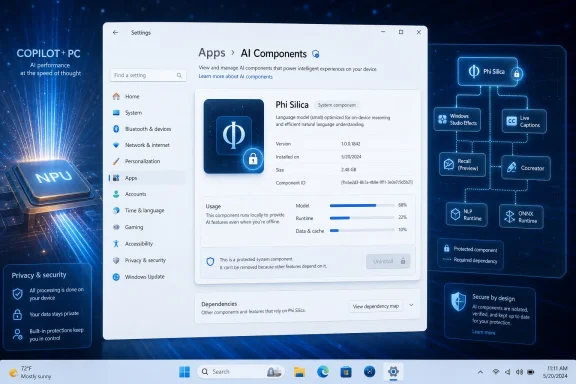
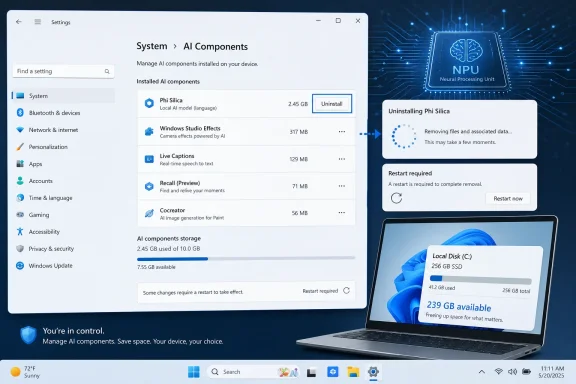
Windows settings page showing AI Components details for Phi Silica, with a neural/security tech diagram background.Microsoft Discovers That Local AI Needs a Control Panel​

For most of the Copilot+ PC era, Microsoft has described on-device AI as an architectural upgrade: faster, more private, more responsive, and better suited to features that should not round-trip everything through the cloud. That pitch is not wrong. A neural processing unit and a local model can do useful work when the operating system is designed to expose them responsibly.
The problem is that Windows users have been asked to trust a stack they cannot easily inspect. AI models arrive as part of the platform, sit somewhere between system component and application dependency, and often do not behave like ordinary optional software. Users can see the Copilot button, the Recall settings, or a Photos feature, but the actual local model layer has been mostly invisible.
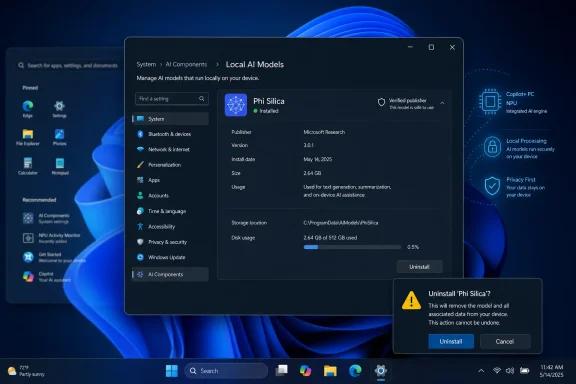
That is why the hidden AI Components page matters. A Settings surface that lists local AI models, shows their publisher, version, installation date, size, and usage, and offers at least one uninstall button is a small but meaningful concession to the way Windows has always been managed in the real world. Administrators and power users do not merely want features. They want inventory, control, and a way to say no.
This is the same old Windows tension in a new wrapper. Microsoft wants the operating system to feel modern and intelligent by default; users want the default to be explainable and reversible. The AI Components page is where those two expectations finally collide in the Settings app.

Phi Silica Becomes the Test Case for Reversible AI​

The only removable component reportedly exposed today is Phi Silica, Microsoft’s small on-device language model for Copilot+ PCs. That makes sense technically and politically. Phi Silica is prominent enough to prove the concept, but narrow enough that Microsoft can test uninstall behavior without immediately turning the entire Copilot+ platform into a pick-and-choose component store.
Phi Silica is not just another chatbot model hiding in a consumer app. Microsoft has positioned it as a shared local model used by Windows experiences and available through developer-facing AI APIs. It is intended to run on the NPU in Copilot+ PCs, which means it sits closer to the platform than a downloaded assistant app.
That platform role is precisely what makes uninstall support tricky. If a model powers multiple Windows features, removing it may degrade search, accessibility, content generation, developer APIs, or future inbox experiences that assume the model is present. Microsoft cannot treat every AI component like a casual Store app without also designing a dependency model users can understand.
The hidden page reportedly does not answer that larger question yet. It shows that Phi Silica can be removed, but not whether Windows will clearly explain what breaks afterward, whether the model can be reinstalled cleanly, or whether organizations will be able to enforce a policy across managed fleets. Those are the details that will determine whether this becomes real control or merely a decorative uninstall button.

Transparency Is Becoming a Windows Feature, Not a Courtesy​

Windows has trained generations of users to inspect what is installed. Device Manager, Programs and Features, Optional Features, Services, Task Manager, App execution aliases, startup apps, update history, and storage usage all exist because Windows is not a sealed appliance. It is a general-purpose operating system that people troubleshoot, audit, strip down, image, and manage at scale.
Local AI components need to join that tradition. If a model consumes several gigabytes, runs on dedicated silicon, updates through Windows, and supports multiple inbox experiences, it should not be hidden behind marketing names. It should have a version number, a publisher, a footprint, and an update path.
That is especially true for Copilot+ PCs, where Microsoft’s promise depends on local execution. The company has repeatedly argued that on-device AI can improve privacy because tasks can run locally rather than in the cloud. But privacy claims get weaker when users cannot see which models exist, why they exist, or how they are updated.
The reported AI Components page appears to move Windows toward a more honest model of disclosure. It does not settle the privacy debate, and it does not make every AI feature optional. But it acknowledges that local AI is an installed resource, not magic dust sprinkled across the shell.

The Hidden Flag Tells Us This Is Still a Negotiation​

The fact that the page is not officially available is not a minor detail. Insider builds are full of half-built interfaces, staged rollouts, and feature IDs that may never ship in their current form. A hidden Settings page is evidence of engineering work, not a promise.
Still, hidden work often reveals where Microsoft is preparing to move. The company rarely builds a Settings surface for an entire class of system components unless it expects users, support teams, or administrators to need it. The existence of fields like version, size, installation date, and usage suggests more than a one-off experiment.
It also suggests Microsoft is trying to standardize AI models as manageable Windows components. That would be a necessary step if Copilot+ PCs are going to host multiple local models for language, image generation, image processing, audio, vision, and developer workloads. Once those models multiply, pretending they are invisible becomes untenable.
The uncertainty is whether Microsoft will expose this page broadly, keep it limited to Insider and diagnostic scenarios, or ship it with uninstall support so constrained that it satisfies nobody. Windows history gives us examples of all three outcomes. The Settings app is full of surfaces that began as useful administrative affordances and later became simplified consumer panels with the real knobs buried elsewhere.

Copilot+ PCs Made the Old Bundling Debate More Expensive​

Bundled software has always been controversial on Windows, but bundled AI changes the scale of the argument. A preinstalled note app or media widget can annoy users. A local AI model can consume storage, require updates, use specialized hardware, and raise questions about data flow even when it operates locally.
That is why storage size and usage metrics matter. They turn AI from an abstract feature into something users can measure. A model that occupies meaningful disk space and is never used looks very different from one that actively powers a workflow the user values.
For enthusiasts, this is about autonomy. For administrators, it is about fleet consistency, compliance posture, supportability, and imaging. For security teams, it is about understanding what code and model artifacts exist on endpoints and how they are serviced. For developers, it is about whether Windows can provide a stable local AI substrate without surprising the people who own the machines.
Microsoft’s challenge is that Copilot+ PCs are supposed to feel differentiated. If users uninstall the components that make them “Copilot+,” the brand story weakens. But if Microsoft refuses to expose or remove those components, the platform starts to look like a forced march into AI infrastructure that many buyers never explicitly requested.
The AI Components page is the compromise Microsoft should have been heading toward from the beginning. Let the default include the AI stack, but make the stack legible. Let system-critical components say they are required, but make that requirement explicit. Let removable components be removed, and make reinstalling them boring.

The Uninstall Button Is Less Important Than the Dependency Map​

A simple uninstall button can be misleading. Windows users know this from decades of components that appear removable until another feature, cumulative update, or app dependency brings them back. If local AI models are going to be managed properly, the operating system needs more than a list and a trash icon.
It needs to explain dependencies. If Phi Silica is removed, Windows should say which features lose functionality. If an image model powers a Photos feature, Paint feature, and accessibility feature, that relationship should be visible before removal. If a model is required for a security or core OS scenario, Microsoft should say so plainly rather than hiding behind a disabled button.
The same applies to updates. A model management page should show whether an AI component is serviced through Windows Update, the Microsoft Store, an app package, or a runtime channel. Without that information, administrators cannot build reliable patching and compliance processes.
Usage reporting is also a delicate area. The reported page includes total usage, which could be useful for deciding whether a model is worth keeping. But Microsoft will need to define what “usage” means. Does it count local inference calls, app launches, feature invocations, developer API requests, or background indexing? A vague number risks becoming another telemetry-adjacent metric users distrust.
This is where Microsoft’s enterprise discipline needs to lead its consumer UX. Windows can make AI components approachable without making them mysterious. The page should not become a toy dashboard; it should become the visible front end of a coherent component model.

The Recall Hangover Still Shapes Every AI Decision​

Microsoft’s Windows AI push is still shadowed by the original Recall backlash. Even as the company revised the feature’s security model, delayed rollout, and made opt-in commitments, the episode changed the trust environment around Copilot+ PCs. Users learned to ask not only what an AI feature does, but how it arrives, what it stores, who can disable it, and whether Microsoft anticipated obvious objections.
The AI Components page should be read against that backdrop. It is not just a storage-management convenience. It is a response, whether explicit or not, to the credibility gap created when AI features appear to outrun the controls around them.
Local models are not inherently bad for privacy. In many cases, they are preferable to cloud-only designs. But local does not automatically mean transparent, and transparent does not automatically mean optional. Microsoft has sometimes blurred those distinctions in its enthusiasm to make Windows feel AI-native.
A visible model inventory helps separate the layers. Users can distinguish between a cloud assistant, an on-device model, a Windows feature, and a developer runtime. That distinction is essential if Microsoft wants serious users to evaluate AI features on their actual behavior rather than on brand suspicion.
The company’s best argument for Copilot+ PCs is that local AI can be practical infrastructure. Practical infrastructure needs controls. Otherwise, it looks like bloatware with better hardware acceleration.

Insiders Are Seeing the Future Before the Policy Exists​

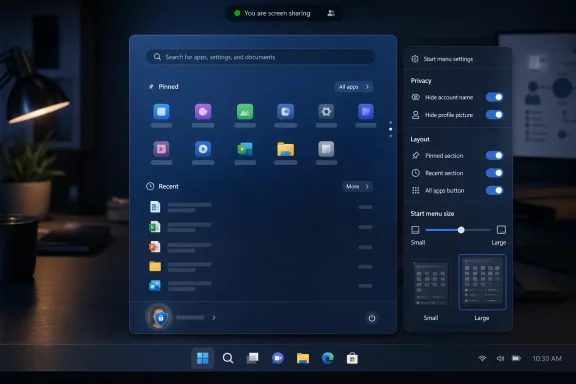
Build 26300.8553 reportedly includes more than the hidden AI page. It also brings visible experimentation around Start menu customization, improved search behavior with substring matching, and touch gestures for showing the Taskbar when it is docked in alternative positions. In isolation, those are ordinary Insider build notes. Together, they show Microsoft still tuning the shell while also laying groundwork for a more AI-aware operating system.
That split personality is typical of modern Windows development. One part of the organization is sanding down everyday usability issues; another is building the runtime layer for the next platform bet. The AI Components page sits between those worlds because it belongs in Settings, where ordinary users go, but it exposes artifacts that feel more like developer or administrator territory.
This is why Microsoft has to be careful with language. Calling these items “AI components” may be accurate, but it may not be sufficient. Users will want to know whether a component is a model, a runtime, a feature dependency, or a downloadable capability. Administrators will want identifiers, package names, policy hooks, and servicing documentation.
If the page ships only as a friendly consumer inventory, it will be useful but incomplete. If it ships with enterprise controls but hides them from regular users, it will feed the perception that Microsoft trusts organizations more than individuals. The best version does both: a clear Settings interface backed by policy, PowerShell, provisioning, and documentation.
Windows has been here before with optional features, language packs, capabilities, and app packages. AI models should not require an entirely new philosophy. They require Microsoft to apply the old philosophy consistently to a new class of component.

The Enterprise Question Is Who Gets to Decide​

The consumer version of this story is simple: can I remove an AI model I do not want? The enterprise version is harder: who decides what “not wanted” means across thousands of machines?
Organizations may want local AI models enabled for developers but disabled for regulated departments. They may want Copilot+ features on new hardware but not on shared workstations. They may want to prevent consumer-facing AI experiences while permitting approved on-device inference through managed applications. A single Settings page cannot express that entire policy landscape.
But it can be the front door. If Windows exposes installed AI components in a consistent way, management tools can follow. Inventory systems can report them. Compliance baselines can audit them. Security teams can ask whether a model version is present across a fleet. Help desks can troubleshoot missing or corrupted components without resorting to folklore.
The risk is that Microsoft treats uninstall support as a consumer gesture while keeping enterprise policy narrow. We have already seen versions of this with Copilot app removal, where the ability to uninstall can depend on edition, management state, install origin, and usage history. That kind of conditional control may make sense internally, but it often feels arbitrary to administrators who need predictable behavior.
For Microsoft, the right balance is not “everything removable.” Some components may genuinely be required for supported Windows experiences. The right balance is explicit classification: required, optional, removable, reinstallable, managed by policy, and used by these features. Give IT that map and the debate becomes operational. Withhold it and the debate becomes ideological.

Developers Need Stability More Than Magic​

Microsoft also has a developer problem to solve. If Phi Silica is part of the local AI story for Windows apps, developers need to know whether it is present, whether it can be removed, how to handle absence, and how to trigger installation or fallback. An uninstall button without a corresponding developer contract creates uncertainty.
That does not mean users should lose control because developers want convenience. It means the platform must make absence a supported state. Apps should be able to query model availability, request capabilities, degrade gracefully, and explain what is missing. Windows should avoid turning local models into hidden assumptions that break apps in confusing ways.
This is especially important because Microsoft is positioning Windows as a local AI development environment, not merely as a host for first-party features. Shared models can be attractive because they reduce duplication and give developers access to optimized local inference without shipping their own giant artifacts. But shared components only work when lifecycle management is predictable.
If a model can be removed, that removal must be part of the API story. If a model can be updated independently, version compatibility must be part of the API story. If the model is available only on Copilot+ PCs with certain NPUs, hardware detection must be part of the API story.
The hidden Settings page is therefore not just a user-control feature. It is a sign that Windows AI is maturing from demo layer to platform layer. Platforms need boring contracts more than flashy keynotes.

Microsoft’s Best AI Argument Is Control, Not Inevitability​

The least persuasive argument Microsoft can make is that AI is simply where Windows is going and users should adapt. That may be true at a strategic level, but it is a poor operating-system posture. Windows succeeds because it runs everywhere, serves contradictory audiences, and survives in environments Microsoft does not fully control.
A gamer with a Copilot+ laptop, a law firm with strict data rules, a school district with limited storage budgets, a developer experimenting with local inference, and an accessibility user relying on AI-assisted features do not need the same defaults. They need a platform that can explain itself.
The AI Components page moves Microsoft toward that better argument. It says, implicitly, that AI features are not beyond user governance. They are components with metadata. Some may be removable. Others may not. But they can at least be named.
That naming matters. The backlash against AI in Windows is not only about ideology or fear of change. It is also about Windows users noticing that features appear, consume resources, change workflows, and then resist normal methods of removal. Transparency lowers the temperature because it gives critics something concrete to evaluate.
Microsoft does not need to make Windows an anti-AI operating system to satisfy skeptics. It needs to make Windows an accountable AI operating system. That distinction will matter more as the number of local models grows.

The Settings App Becomes the Battleground for Trust​

The modern Settings app has long been a symbol of Microsoft’s unfinished migration away from Control Panel. It is cleaner, touch-friendlier, and more consumer-oriented, but it has often lagged behind the older administrative surfaces in depth. Adding AI model management to Settings is therefore both promising and risky.
It is promising because users should not need registry edits or third-party tools to understand what AI components are installed. If Microsoft wants AI to be mainstream, its controls must be mainstream too. Hiding model inventory in developer tooling would defeat the point.
It is risky because Settings pages can oversimplify. A polished card showing model size and version is useful, but not if the underlying dependency and servicing details remain hidden. Windows users have learned to distrust interfaces that show only the part Microsoft wants them to see.
The ideal design would let casual users make safe choices while letting advanced users drill down. A model card could show what the component does, how much storage it uses, when it was installed, when it last ran, and whether removing it affects specific Windows experiences. An advanced view could expose package identity, policy state, update channel, and repair options.
That is not overkill. That is the cost of making AI a first-class OS subsystem. If Microsoft can build elaborate onboarding flows for Copilot, it can build a competent component-management interface for the models that power it.

The First Real Win Would Be Reinstallation​

Uninstall support gets the headline, but reinstall support may matter more. Windows users are understandably cautious about removing components when the path back is unclear. If deleting Phi Silica requires a repair install, a feature update, or command-line spelunking, the uninstall button becomes a trap for enthusiasts and a support headache for everyone else.
A mature AI Components page should include repair and reinstall flows. If a model is optional, users should be able to remove it and later restore it from the same interface. If an app needs it, Windows should be able to offer installation at the point of need, with a clear description and size estimate.
This is how optional platform capabilities should work. Fonts, language packs, speech components, RSAT tools, and media features have all gone through versions of this lifecycle. AI models may be larger and more sensitive, but the user expectation is familiar.
Reinstallation also matters for system integrity. Local models can be corrupted, partially updated, or mismatched with runtimes. If Microsoft wants third-party apps to depend on shared AI components, Windows needs a way to validate and repair them.
Without that, the ecosystem will drift toward duplication. Developers will ship their own models. OEMs will preload their own stacks. Users will accumulate multiple AI runtimes with overlapping capabilities. The whole point of a shared Windows AI substrate is to prevent that mess.

The Signal From Build 26300.8553 Is Small, But the Direction Is Right​

This Insider discovery should not be oversold. The page is hidden. The uninstall support is limited. Microsoft has not announced a rollout date. The feature could change, disappear, or arrive in a narrower form than enthusiasts hope.
But it should not be dismissed either. Windows rarely exposes a new class of system inventory by accident. The fact that Microsoft is experimenting with a detailed AI Components page suggests the company knows it needs a visible management story for local models.
That story is overdue. Copilot+ PCs have shifted AI from a web service into the hardware-and-OS stack. Once models live locally, they become part of the endpoint. Endpoints are managed. They are audited. They are cleaned up. They are locked down. They are repaired.
Microsoft’s consumer messaging has often treated AI as an experience. The Windows installed base will treat it as infrastructure. Build 26300.8553 hints that Microsoft is beginning to meet users on that terrain.

A Small Button Points to a Bigger Contract​

The concrete lesson from this build is not that Windows 11 suddenly lets users de-AI their PCs. It does not. The lesson is that Microsoft appears to be prototyping the control surface it will need if local AI becomes as ordinary as graphics drivers, language packs, or media codecs.
For now, the practical reading is narrow:
  • The AI Components page is reportedly present in Windows 11 Insider Experimental Preview build 26300.8553 but is not officially enabled for normal users.
  • The page exposes more detailed information about installed local AI models, including publisher, version, installation date, size, and usage.
  • Phi Silica is currently the only AI component reportedly shown with uninstall support.
  • The feature is most relevant to Copilot+ PCs because those systems are designed to run local AI workloads on NPUs.
  • Microsoft has not publicly committed to a release timeline or said whether more AI components will become removable.
  • The long-term value of the page depends on whether Microsoft adds clear dependency information, reinstall options, and enterprise policy support.
That is not a revolution. It is the beginning of a contract. If Microsoft wants Windows users to accept local AI as part of the operating system, it must accept that users will manage it as part of the operating system.
The best version of Windows AI is not the one where every model is mandatory, nor the one where every component can be ripped out without consequence. It is the one where Microsoft tells users what is installed, why it is there, what depends on it, how much it costs in storage and activity, and what happens if it goes away. Build 26300.8553 does not deliver that future yet, but the hidden AI Components page shows the outline of a Windows that treats AI less like destiny and more like software — which is exactly what it has to become.

References​

  1. Primary source: gHacks
    Published: Wed, 03 Jun 2026 07:59:26 GMT
  2. Official source: support.microsoft.com
  3. Official source: learn.microsoft.com
  4. Official source: microsoft.com
  5. Official source: blogs.windows.com
  6. Related coverage: tomshardware.com
  1. Related coverage: windowscentral.com
  2. Related coverage: libraryfreedom.org
 

Microsoft is testing an uninstall button for Windows 11’s built-in Copilot+ AI model components in Insider build 26300.8553, with early screenshots showing Phi Silica removable from Settings after a reboot. That small button matters because it turns Microsoft’s local AI stack from an invisible platform assumption into something users can inspect, question, and potentially remove. The change does not mean Microsoft is retreating from AI in Windows. It means the company is learning that an operating system filled with gigabyte-scale models needs an escape hatch.

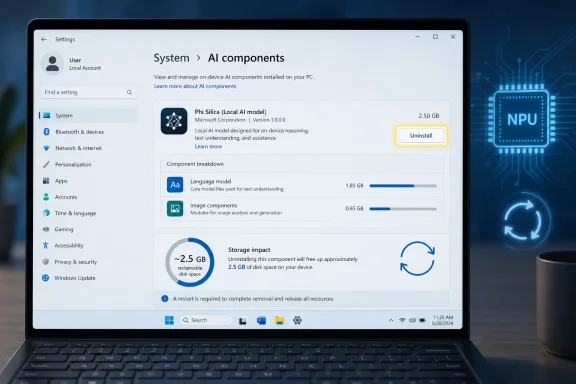
Windows settings page shows an AI components manager with “Phi Silica” model and storage impact details.Microsoft Discovers That Local AI Has a Weight​

For the last two years, Microsoft has sold on-device AI as the civilized alternative to sending everything to the cloud. Copilot+ PCs, we were told, would do more locally, respond faster, preserve more privacy, and make better use of the neural processing units now embedded in new laptops. That pitch is not wrong, but it has always skipped over a mundane constraint: local intelligence occupies local storage.
The newly spotted uninstall button makes that trade-off visible. Phi Silica, Microsoft’s small language model tuned for Copilot+ PCs, reportedly consumes more than 2.5GB on the system shown by Windows enthusiast PhantomofEarth. Other Windows AI components, including image creation, image processing, and image transformation models, can add more weight to the installation.
On a 1TB workstation, that may sound like accounting dust. On a 256GB Copilot+ laptop shared between Windows, recovery partitions, Office, browser caches, games, developer tools, OneDrive placeholders, and a few months of accumulated cruft, it is not nothing. Microsoft’s own Copilot+ baseline has normalized 16GB of memory and 256GB of storage, but the storage number is a floor, not a comfort zone.
This is the first important point: the controversy is not simply that Microsoft is putting AI into Windows. It is that Microsoft is putting models into Windows, and models behave more like apps, language packs, game assets, or optional feature payloads than like a traditional system DLL. They are large, hardware-sensitive, updated over time, and useful only if the user or installed apps actually call them.

The Button Is Small Because the Policy Shift Is Large​

Windows has always carried optional components, but Microsoft has often been reluctant to expose a clean remove button for features it considers strategic. Internet Explorer, Edge, Teams integrations, OneDrive hooks, widgets, web search, and Copilot have each, in their own era, tested the boundary between “part of Windows” and “Microsoft would prefer you not uninstall this.”
The AI model uninstall button sits directly on that fault line. If Phi Silica can be removed from Settings, then Microsoft is implicitly admitting that at least some of the Copilot+ substrate is modular. That is not the same as saying every AI feature can be deleted, but it weakens the old argument that these pieces are too deeply baked into the operating system to be user-serviceable.
The reported implementation is also telling. The button appears inside the Settings interface for the AI component and says removal completes after a restart. That is exactly the kind of familiar Windows lifecycle users understand: select component, uninstall, reboot, reclaim space. It makes AI model management look less like policy hacking and more like uninstalling a language pack.
That may sound obvious, but obvious design often arrives late in Windows. Microsoft tends to build platform capability first, management clarity second, and user trust third. The uninstall button suggests the company is trying to move the trust step earlier, likely because Copilot+ PCs are no longer a narrow launch stunt. They are becoming a mainstream hardware class across Qualcomm, AMD, and Intel systems.

Copilot+ Changed the Shape of a Windows Install​

The phrase Copilot+ PC has always been more than a sticker. It defines a class of Windows 11 machines with a neural processing unit capable of more than 40 TOPS, at least 16GB of RAM, and storage expectations far beyond the official baseline for ordinary Windows 11. The NPU is not just a marketing accelerator; it is the hardware premise behind features such as local language processing, live captions translation, image generation, image enhancement, and eventually more agent-like workflows.
That creates a split personality inside Windows 11. On a conventional PC, AI may be something reached through cloud services, browser sidebars, app buttons, or Microsoft 365 integration. On a Copilot+ PC, AI is also an operating-system payload: local runtimes, local models, local APIs, and feature plumbing that developers can call.
Phi Silica is the flagship example. It is Microsoft’s NPU-optimized local language model for Windows, designed to power text generation, rewriting, summarization, and related tasks without necessarily round-tripping everything through a remote service. The image components serve a parallel role for generating, analyzing, and transforming visual content.
That is a meaningful architectural turn. Windows is no longer merely hosting AI applications; it is becoming an AI application platform in its own right. The problem is that platforms accumulate mass. Once Microsoft ships local models, it must answer the same questions users ask about any other bundled payload: How much space does it take? What uses it? Can I remove it? Will it come back after an update?

Disk Space Is the Proxy Fight for Consent​

The Neowin report frames the new button as a possible disk-space saver, and that is the cleanest consumer angle. A few gigabytes reclaimed here and there can matter, especially on entry-level laptops or systems with soldered storage. But the deeper argument is about consent.
Most users do not audit model files. They discover the issue only when storage settings show several gigabytes assigned to components they did not knowingly request. At that point, even a technically reasonable feature can feel like encroachment. The machine has crossed a psychological boundary: it is no longer just receiving updates, it is reserving disk for a computing agenda the user may not share.
Microsoft has already learned this lesson the hard way with Recall. The original Recall rollout triggered a security and privacy backlash not because every user understood the implementation details, but because the feature sounded like the operating system was quietly remembering too much. Microsoft eventually reworked the feature around opt-in setup, Windows Hello, encryption, and clearer controls. The lesson was simple: AI features need visible governance.
Local models need a similar bargain. If Microsoft wants users to accept gigabytes of AI components as normal parts of Windows, the company must make them legible. Storage size, purpose, dependencies, and removal behavior cannot be hidden behind system mystique. The uninstall button is one piece of that bargain.

Microsoft Wants Developers to Treat Windows as the AI Runtime​

There is another audience for this change: developers. Microsoft’s Windows AI APIs and Microsoft Foundry on Windows strategy are meant to make local models available to app builders without each app shipping its own model stack. In theory, that is a better world. Instead of ten applications each bundling separate language or vision models, Windows supplies common models and acceleration paths.
That model has obvious advantages. It can reduce duplication, simplify hardware targeting, and let applications offer AI features that behave consistently across supported Copilot+ PCs. It also gives Microsoft a reason to keep improving the underlying model and runtime without requiring every developer to become an AI infrastructure team.
But shared platform components become a dependency. If a user removes Phi Silica, what happens to an app that expects local summarization? Does the app fall back to the cloud? Does it prompt to reinstall the model? Does it fail gracefully? Does enterprise policy prevent reinstallation? These are not edge cases; they are the basic contract of optional platform features.
The uninstall button therefore forces Microsoft to mature the AI platform story. A removable component needs discovery, reinstall, versioning, policy control, and developer guidance. Windows cannot simply expose a delete switch and hope the ecosystem guesses correctly.

The Chrome Comparison Is Uncomfortable for Microsoft​

The Neowin piece invokes Google Chrome’s local AI model footprint, reportedly around 4GB in a recent case, and the comparison is apt. Browsers and operating systems are converging around the same idea: ship local models once, use them across many features, and claim privacy and performance benefits. The result is that software once measured in hundreds of megabytes now quietly behaves like a game install.
For Google, the model lives inside a browser users can replace. For Microsoft, the model lives inside Windows, on hardware marketed around AI acceleration. That raises the stakes. A large Chrome component may annoy users; a large Windows component can feel like a tax on the whole PC.
Microsoft’s defenders will argue that Copilot+ buyers knowingly purchased AI PCs. That is partly fair. If you buy hardware advertised around local AI, you should expect some disk space to be used for local AI. But that argument has limits. A user can want Studio Effects and Live Captions without wanting every image-generation payload. A business can approve one local model for accessibility workflows while disallowing another for data-handling or compliance reasons.
Bundling everything together would be the lazy answer. Granular uninstall controls are the more mature one.

Enterprise IT Will See the Button and Ask for Policy​

Consumer users want a button. Enterprise administrators want policy. The moment AI components become removable in Settings, IT departments will ask whether those components can be inventoried, blocked, staged, repaired, or reinstalled through management tooling.
This is where Microsoft’s consumer-friendly experiment becomes a systems-management issue. If local AI models are part of Windows servicing, they need to appear in the places admins already look: Intune, Group Policy where applicable, Windows Update for Business controls, PowerShell inventory, DISM-style component management, and compliance reporting. If they are Store-delivered or separately serviced, that needs to be equally clear.
The risk is drift. One user removes Phi Silica to save space. Another keeps it installed. A line-of-business app silently uses it on one device but not another. A help desk script assumes the model exists. A privacy review assumes it does not. Before long, “AI-capable” becomes another ambiguous state administrators must decode.
Microsoft can avoid that by treating AI models as first-class managed components. The uninstall button should be the visible tip of a larger control plane, not a one-off concession to enthusiasts running hidden-feature tools.

Removing a Model Is Not the Same as Removing AI​

There is a danger of overreading this change. An uninstall button for Phi Silica does not mean Windows 11 is becoming an AI-free operating system. It does not remove Copilot from Microsoft’s product strategy. It does not stop cloud AI from appearing in Edge, Office, Windows search, Paint, Photos, Notepad, or future shell experiences.
What it does is separate one layer of the stack from the others. There is the Copilot app. There are AI buttons inside inbox apps. There are cloud-connected Microsoft 365 features. There are local Windows AI APIs. There are model packages such as Phi Silica and the image components. Users often collapse all of that into “AI in Windows,” but Microsoft does not build it as one thing.
That distinction matters because control over one layer should not be marketed as control over all layers. If Microsoft gives users a model uninstall button while continuing to surface cloud Copilot prompts elsewhere, critics will accuse the company of cosmetic compliance. If Microsoft explains the layers clearly, users can make more rational choices.
The best Settings page would not merely say “Uninstall.” It would say what the component does, which Windows features and apps may use it, how much storage it consumes, whether it runs locally, whether data leaves the device, and how to restore it. That is the difference between a button and a trust interface.

Windows Enthusiasts Are Once Again Doing Microsoft’s Product Discovery​

It is also worth pausing on how this feature surfaced. According to the report, Windows enthusiasts discovered the hidden option in an Insider build, as so often happens with Windows changes before Microsoft formally documents them. This has become a familiar rhythm: Microsoft ships latent code, the feature-hunting community finds it, tech outlets report it, and Microsoft either confirms, ignores, or later reframes the discovery.
That unofficial discovery pipeline is useful, but it is also messy. Hidden features are not promises. Screenshots from Insider builds can represent experiments, abandoned prototypes, staged rollouts, or region-specific behavior. Microsoft may alter the UI, change the component list, or remove the button before it reaches stable Windows.
Still, the existence of the control is newsworthy because it aligns with a broader direction. Microsoft has been under steady pressure to make Windows AI features more transparent and more optional. It has also been expanding local AI developer tooling, which makes model management increasingly unavoidable. Even if this exact Settings page changes, the underlying product problem will not disappear.
In that sense, enthusiasts did not merely find a button. They found a policy question Microsoft was always going to have to answer.

The Storage Math Will Get Worse Before It Gets Better​

Today’s 2.5GB example is manageable. Tomorrow’s AI platform may not be. As models become more capable, specialized, multilingual, multimodal, and hardware-optimized, the temptation will be to ship more of them. Language models, OCR models, image description models, segmentation models, super-resolution models, audio models, translation models, embedding models, and safety classifiers can all make plausible claims on local storage.
Compression and quantization help, but they do not abolish the trade-off. A useful local AI stack is not free. It consumes disk, memory, update bandwidth, battery, silicon area, and engineering attention. The industry’s marketing language tends to make “on-device AI” sound elegant and weightless. Users eventually meet it in Storage settings.
This is why a simple uninstall button is more important than it looks. It establishes the precedent that local models are not sacred. They are assets installed for capabilities, and capabilities can be removed when users do not value them enough to pay the storage cost.
Microsoft should lean into that precedent. Windows already lets users install optional features, language packs, speech packages, fonts, Hyper-V components, OpenSSH, developer tools, and media features. AI models belong in that family. The operating system should not pretend they are metaphysical extensions of the Start menu.

The AI PC Needs an Off-Ramp to Be Credible​

The irony of the AI PC push is that optionality may make it more successful, not less. Users distrust features they cannot remove. Administrators distrust components they cannot govern. Developers distrust platform dependencies that appear and disappear without clear contracts. An uninstall button, properly implemented, reduces all three anxieties.
Microsoft’s biggest challenge is that it is trying to sell AI as both ambient and intentional. Ambient AI is everywhere, embedded into the flow of work. Intentional AI is something the user invokes, configures, and understands. Windows cannot rely entirely on the first mode without triggering backlash; it cannot rely entirely on the second without making AI feel bolted on.
Model management is where those modes meet. A user may never think about Phi Silica while using a summarization feature, but that user should be able to discover why the model is installed. An administrator may allow image description for accessibility while blocking image generation. A developer may use the local model if present and degrade gracefully if removed. That is what a healthy platform looks like.
The worst version of Windows AI would be one where models arrive silently, consume space indefinitely, reappear after feature updates, and power experiences that are difficult to audit. The better version is one where Windows says: here are the local AI components, here is what they do, here is what they cost, and here is how to remove or restore them.

The Reboot Requirement Is a Reminder That This Is Still Windows​

The reported need to reboot after uninstalling the component is not surprising. These models may be loaded by system services, indexed as part of feature packages, tied into runtime registration, or protected by servicing mechanisms. Windows has spent decades teaching users that meaningful system changes often end with “Restart required.”
But the reboot detail also signals that this is not merely deleting a folder. It is component removal, presumably with system state changes that need to settle cleanly. That is good if it means Windows is tracking dependencies properly. It is bad if the process becomes opaque, fails silently, or leaves behind partially removed payloads.
The user experience should be boring. Click uninstall, see affected features, confirm, reboot, reclaim space. If an app later needs the component, Windows should offer a clear reinstall path rather than dumping the user into an error code or a Store mystery.
This is one of those moments where Microsoft’s history cuts both ways. The company has the servicing infrastructure to do this properly. It also has a long record of confusing users with overlapping Settings pages, legacy Control Panel paths, optional feature lists, app packages, Store updates, and Windows Update payloads. AI components should not become another scavenger hunt.

The First Button Should Not Be the Last​

The Phi Silica uninstall button should be treated as the beginning of a larger unbundling. If Windows ships multiple local AI components, each should have an intelligible lifecycle. Users should not need leaked screenshots or third-party scripts to understand which models live on their machines.
The same principle should apply across Microsoft’s inbox apps. If Paint, Photos, Notepad, Snipping Tool, or File Explorer relies on AI components, the dependency should be visible somewhere. If a feature uses the cloud instead, that should be visible too. The dividing line between local and cloud AI is one of the few distinctions ordinary users actually care about once it is explained clearly.
There is also a competitive angle. Apple has leaned heavily on privacy and on-device processing in its AI positioning, while Google is embedding Gemini-era capabilities across Android and ChromeOS. Microsoft’s differentiator on the PC could be manageability. Windows does not need to be the platform where AI is most aggressively inserted; it could be the platform where AI is most explicitly controlled.
That would be a very Windows kind of advantage. Not elegant, perhaps, but practical.

The Useful Lesson Hidden in a 2.5GB Model​

The immediate story is simple, but the implications are concrete:
  • Microsoft is testing a Settings-based uninstall path for at least one Windows 11 Copilot+ AI component discovered in Insider build 26300.8553.
  • Phi Silica is not just a Copilot brand flourish; it is a local NPU-optimized language model that can occupy gigabytes of disk space.
  • Removing local AI models may save storage, but it may also affect Windows features or third-party apps that rely on Windows AI APIs.
  • Copilot+ PCs make local AI part of the operating-system footprint, which means model management must become as normal as managing optional features.
  • Enterprise administrators will need policy, inventory, and deployment controls if AI components become removable at scale.
  • The uninstall button is promising only if Microsoft pairs it with clear explanations, reliable reinstall paths, and honest separation between local and cloud AI.
The real test is not whether Microsoft can hide or reveal a button in an Insider build. The test is whether Windows can absorb AI without repeating the old pattern of bundling first and explaining later.
Microsoft’s AI ambitions for Windows are not going away, and they probably should not; local models can make PCs more capable, more private, and less dependent on round trips to remote servers. But the company’s path to acceptance runs through control, not inevitability. If Copilot+ PCs are to become ordinary PCs, Microsoft must make their AI payloads ordinary too: visible, manageable, removable, and boring enough that users no longer have to wonder what their operating system is carrying on their behalf.

References​

  1. Primary source: Neowin
    Published: Wed, 03 Jun 2026 08:04:00 GMT
  2. Official source: support.microsoft.com
  3. Official source: learn.microsoft.com
  4. Related coverage: pcworld.com
  5. Official source: blogs.windows.com
  6. Official source: microsoft.com
 

Microsoft is testing a hidden Windows 11 Settings option in Insider build 26300.8553 that lets users uninstall on-device Copilot+ AI model components, including Phi Silica, with removal apparently completed after a reboot. The button is small, but the concession is not. It suggests Microsoft has finally run into the physical limits of its “AI everywhere” strategy: local models do not merely occupy marketing slides, they occupy disks, update channels, admin policies, and user patience.
The discovery, surfaced by Windows watchers PhantomOfEarth and techosarusrex and amplified by Neowin, is not yet a mainstream Windows feature. It is hidden, experimental, and therefore subject to the usual Insider-build caveats. But the direction is unmistakable. Microsoft is preparing for a world in which Windows ships not just with apps and services, but with model inventory — and in that world, uninstall buttons become a form of trust.

Windows AI Components settings screen shows uninstalling Phi Silica with restart required, alongside an NPU graphic.Microsoft’s AI PC Pitch Finally Meets the Storage Meter​

For most of Windows history, the operating system’s bloat arguments centered on apps, background services, telemetry, games, widgets, and the occasional deeply unloved assistant. The Copilot+ PC era changes the shape of that argument. AI features are not just UI affordances or cloud endpoints; they increasingly depend on local model files measured in gigabytes.
That matters because local AI was sold as the more private, responsive, and capable alternative to round-tripping every prompt to a server. If the model runs on the device, Microsoft can argue that sensitive input stays closer to the user, latency drops, and the NPU earns its place on the silicon floor plan. But local execution means local weight. The model must live somewhere.
The screenshot circulated by PhantomOfEarth reportedly shows the Phi Silica component consuming more than 2.5GB. That is not catastrophic on a 1TB workstation, but it is not trivial on a 256GB Copilot+ laptop once Windows, recovery partitions, hibernation files, user profiles, OneDrive caches, browser data, games, developer tools, and OEM utilities take their share. Storage pressure is not an abstract grievance for the class of thin-and-light machines Microsoft is trying to make synonymous with AI PCs.
The irony is that Copilot+ PCs already start with higher storage and memory requirements than ordinary Windows 11 machines. Microsoft’s own baseline for the category includes 16GB of RAM, 256GB of storage, and an NPU capable of more than 40 TOPS. That specification was meant to reassure buyers that these systems are meaningfully different from commodity PCs. It also creates an expectation that Windows will use those resources aggressively.
The uninstall button is therefore more than housekeeping. It is Microsoft acknowledging that on-device AI components are now first-class installed software, not invisible magic.

The Hidden Button Is a Small Feature With a Large Subtext​

The reported implementation appears straightforward: Windows Settings lists AI components, shows their storage footprint, and offers an Uninstall button that removes a component after reboot. That sounds almost boring, which is precisely why it matters. Boring controls are how experimental platform ambitions become administrable operating systems.
Windows users have long complained that Microsoft’s modern feature rollouts often arrive as fait accompli. Widgets, Teams integrations, Copilot entry points, Start menu promotions, Edge nudges, account prompts, and cloud backup banners have all produced variations of the same reaction: why is this here, and how do I remove it? The AI model uninstall button appears to answer a narrower but more technically important version of that complaint.
Model components are not the same as apps. A user can understand uninstalling Clipchamp or Copilot as a visible application choice. Removing Phi Silica is more complicated because Phi Silica is a platform component: Microsoft describes it as an NPU-optimized local language model used by Windows experiences and exposed through Windows AI APIs for developers. If it disappears, the breakage may not be obvious until a feature, app, or API call expects it.
That makes the Settings treatment important. If Microsoft is going to let people remove these components, Windows must explain what depends on them. The burden is not only on the user to know what Phi Silica is; it is on the platform to make dependency chains legible. A one-click uninstall button is welcome, but a one-click uninstall button without a clear reinstall path, dependency warning, and policy story could easily become another support trap.
Still, the presence of the button suggests Microsoft knows the old answer — “this is part of Windows” — will not be enough. AI models are too large, too visible, and too politically charged to hide behind that phrase forever.

Phi Silica Is Not Bloat in the Old Sense, Which Makes the Debate Harder​

Calling every unwanted component “bloat” is emotionally satisfying and technically lazy. Phi Silica is not a coupon app, a trial antivirus suite, or a consumer engagement widget. It is part of Microsoft’s attempt to turn Windows into a local AI runtime, one where developers can call on preinstalled models rather than bundling their own or sending every task to the cloud.
That is a serious platform play. If Windows provides local text generation, summarization, image analysis, OCR, background manipulation, and related AI primitives, developers can build features that feel native and avoid the cost and privacy tradeoffs of remote inference. The NPU becomes useful not because Microsoft puts a Copilot key on the keyboard, but because the OS gives software something productive to do with it.
This is the charitable reading of Microsoft’s strategy, and it should not be dismissed. A world in which every app downloads its own local model is worse for users. It duplicates storage, fragments updates, complicates security review, and creates a mess of vendor-specific runtimes. A shared Windows-managed model layer could be cleaner, safer, and more efficient.
But platform components still require consent and control. The more central Microsoft makes these models, the more the company must behave like a steward rather than a landlord. Users and administrators may accept preinstalled models if they understand why they are there, how large they are, when they update, what data they touch, and how to remove or restore them. They are less likely to accept them if Windows treats model storage as an entitlement.
That is where the uninstall button becomes strategically useful. It lets Microsoft argue that Windows is not trapping users inside the AI stack. It also gives AI skeptics a less destructive alternative to third-party debloaters, registry spelunking, and unsupported scripts.

Chrome’s Gemini Nano Flap Was a Warning Shot​

The timing is difficult to ignore. Recent reporting around Chrome’s local Gemini Nano model turned a browser AI component into a storage controversy, with users objecting to multi-gigabyte model files appearing for features they did not necessarily request. The exact technical and policy details differ between Google’s browser and Microsoft’s operating system, but the user reaction rhymes: local AI may be privacy-preserving, but it still feels invasive when it arrives silently and eats disk.
Windows is especially exposed to that backlash because it is the host environment. A browser can be uninstalled, swapped, or constrained. Windows, for most users, is the ground beneath everything else. When the operating system starts managing local AI models, it inherits the obligation to make that management visible.
Microsoft also has enterprise customers to satisfy. Consumer irritation can be managed with blog posts and gradual UI changes; enterprise distrust turns into procurement friction, baseline hardening, and group policy demands. If local AI models are installed and serviced like system components, IT departments will want to know how to inventory them, remove them, block them, approve them, and document them.
That is why the Settings button should not be viewed as a concession to a few X users who dislike AI. It is part of the normalization of AI as managed software. The same way Windows eventually needed clear controls for optional features, language packs, app execution aliases, and app permissions, it now needs controls for local models.
The difference is that model files are bigger, their behavior is more opaque, and their branding is more politically loaded.

Copilot+ PCs Split Windows Into Two Operating Realities​

Windows 11 version 24H2 made the split more visible: ordinary Windows PCs on one side, Copilot+ PCs on the other. The latter are not just faster laptops with a sticker. They are machines whose hardware profile allows Microsoft to light up experiences that older PCs cannot run, or cannot run efficiently enough to meet Microsoft’s promises.
That split is uncomfortable for Windows because the platform’s traditional strength has been breadth. Windows runs on cheap desktops, gaming towers, corporate laptops, classroom machines, industrial boxes, and enthusiast rigs assembled from parts. Copilot+ PCs introduce a more curated tier where the OS can assume an NPU of a certain class, modern memory, and enough storage to host AI components.
The uninstall button exposes a tension inside that tiering strategy. If Copilot+ features are part of what makes the device valuable, removing their model components might make the machine less “Copilot+” in practice. But if users cannot remove them, Microsoft risks turning Copilot+ into a synonym for mandatory AI payloads.
That tension is not easily resolved. Some buyers purchased Copilot+ PCs specifically for AI features such as local image generation, enhanced camera effects, Live Captions translation, Recall-related capabilities where available, and developer-facing AI APIs. Others bought them because the best new Windows laptops happened to meet the Copilot+ spec. The same hardware category contains enthusiasts, skeptics, corporate users, students, developers, and people who just wanted battery life.
A mature OS must serve all of them. That means AI components need to be modular enough to remove, durable enough to restore, and documented enough that removal does not become a guessing game.

The Real Enterprise Story Is Lifecycle Control​

For administrators, the most interesting part of the discovery is not the end-user button. It is what the button implies about componentization. If Windows can identify AI models as removable components in Settings, then those components likely sit somewhere in Microsoft’s servicing and provisioning model in a way that could eventually be exposed to policy, deployment tools, or management APIs.
That is the story enterprise IT will care about. A Fortune 500 endpoint team does not want to walk users through clicking Uninstall on Phi Silica. It wants a baseline. It wants an Intune setting, a CSP, a PowerShell command, a DISM-visible package, or a policy that says which AI components are allowed on which device groups.
The reasons vary. Some organizations will remove models to save storage on constrained devices. Others will disable them until legal, compliance, or security teams sign off. Some will keep Microsoft-managed models but block third-party model downloads. Others will do the opposite, preferring a sanctioned internal AI stack over consumer-facing Windows features.
The security questions are not science fiction. Local models can process sensitive data on-device, which is good if it prevents cloud leakage, but they can also enable new data flows inside applications. If an app can call a Windows-provided language model, administrators need to understand whether that interaction is logged, governed, permissioned, or available to any desktop app under the current user. Local does not automatically mean harmless.
A visible uninstall button is a consumer affordance. The enterprise requirement is a control plane.

Microsoft Needs to Avoid the Optional-Feature Trap​

Windows has a long history of components that are theoretically optional but practically sticky. Internet Explorer became removable in some senses but remained entangled for years. Edge can be hidden more easily than erased. OneDrive can be unlinked, uninstalled, reintroduced, or resurrected depending on edition, update path, and policy. Copilot has already moved through several identities: sidebar, app, web experience, Windows integration, and enterprise-controlled feature.
AI models could fall into the same trap if Microsoft is not careful. If Phi Silica can be removed but returns during a feature update, users will treat the button as theater. If uninstalling one model causes obscure errors in built-in apps, users will treat modularity as unsafe. If reinstalling requires a full OS repair or undocumented package retrieval, administrators will treat the feature as unfinished.
The better path is boring and explicit. Windows should show AI components with names, sizes, versions, publishers, last updated dates, dependent features, and reinstall options. It should let administrators export inventory. It should document whether a component is required for Windows security, accessibility, productivity features, or third-party developer APIs. It should separate model weights from runtime frameworks, because removing a model should not necessarily remove the entire AI substrate.
This is not just for skeptics. Enthusiasts who like local AI need these controls too. They may want to remove image generation but keep Phi Silica. They may want to reclaim space before travel, then reinstall models later. Developers may want to test app behavior when a model is absent. Sysadmins may want one baseline for executives with Copilot+ laptops and another for regulated departments.
Modularity is only valuable when users can predict the consequences.

The Disk-Space Argument Is Really a Trust Argument​

The headline number — more than 2.5GB for Phi Silica in the reported screenshot — is attention-grabbing but not the whole story. Windows users routinely tolerate large components when they believe those components are useful. Games install 100GB asset packs, development environments sprawl across disks, and creative apps cache enormous libraries without becoming culture-war symbols.
AI model storage feels different because the perceived benefit is unevenly distributed. A developer experimenting with Windows AI APIs may see Phi Silica as a free local capability. A student with a 256GB laptop and no interest in AI sees dead weight. A privacy-conscious user may prefer local models to cloud inference but still object to not being asked. An administrator may want local AI in principle but not before governance catches up.
That is why “huge disk space” is a proxy for agency. The complaint is not only that Microsoft used 2.5GB. It is that Microsoft used 2.5GB for a component many users cannot name, may not use, and might not have known existed. The uninstall button addresses that agency problem more than the storage problem.
Microsoft should understand this well. Windows survived decades of OEM crapware not because users liked it, but because power users knew how to remove it and enterprises knew how to image around it. The resentment grew when software became difficult to distinguish from the OS itself. AI risks repeating that mistake at a higher technical level.
The company’s challenge is to make AI feel like capability, not colonization.

Developers Get a Platform, but They Also Get a New Failure Mode​

For Windows developers, preinstalled AI models are attractive because they lower the barrier to adding local intelligence. If the OS supplies a supported local language model, a developer can build summarization, rewriting, extraction, classification, and assistive features without packaging a model or negotiating cloud costs. That is especially compelling for small developers who could not otherwise absorb the infrastructure burden of generative AI.
But any removable platform component creates a failure mode. Apps must detect whether Phi Silica or an image model is present, handle absence gracefully, and explain what the user needs to install. If Windows exposes these models through APIs, those APIs need clear capability checks and predictable error handling. “This feature requires a Copilot+ PC” is no longer precise enough; the PC may qualify, but the model may be gone.
That is not a reason to avoid removability. It is a reason to design for it. Windows already has a pattern here with optional capabilities, media features, language packs, and hardware-dependent APIs. Good apps query the system, adapt, and guide the user. Bad apps crash or display cryptic messages.
The difference is that AI features often sit directly in user-facing workflows. If an email client’s summarize button, a photo editor’s object removal tool, or a note app’s rewrite feature depends on a Windows model, the user will blame the app when it fails. Developers will then blame the platform if Windows does not make model state easy to inspect and restore.
An uninstall button starts the conversation. Developer ergonomics will determine whether the ecosystem can live with it.

AI Components Need Servicing Discipline, Not Just UI Polish​

Once Windows ships local models, Microsoft also takes on a servicing problem that looks more like browser security than traditional OS feature delivery. Models may need updates for quality, safety, performance, hardware compatibility, and bias mitigation. They may be tuned for Qualcomm, Intel, or AMD NPUs. They may be superseded by smaller or better versions. They may be implicated in vulnerabilities not because they are executable in the usual sense, but because model behavior can be manipulated or abused.
That makes versioning important. Users should not merely see “Phi Silica” as a blob. They should know which version is installed, whether it is hardware-specific, how it arrived, and whether it is current. Administrators should be able to approve or defer model updates separately from cumulative OS patches if the risk profile warrants it.
The Windows Update model may eventually absorb this cleanly. Microsoft already delivers drivers, feature experiences, Store app updates, Defender definitions, and optional components through different channels. AI models could become another managed payload. But if the plumbing is opaque, users will perceive models as mysterious disk growth rather than maintained components.
There is also a rollback question. If a model update degrades quality, breaks an app, or changes behavior in a regulated workflow, can an organization revert? Traditional software has binaries and versions. AI models have weights, prompts, safety layers, runtime dependencies, and hardware execution paths. Treating all of that as a black box will not satisfy serious customers.
The uninstall button is the first visible control. It cannot be the last.

The Backlash Is Not Anti-AI So Much as Anti-Ambush​

It is tempting for vendors to frame complaints about AI integration as resistance to progress. Sometimes that is true; there is a cohort of users who simply do not want generative AI anywhere near their machines. But the broader Windows reaction is more nuanced. Many users like local OCR, smarter search, camera effects, translation, background blur, and image repair. They object less to intelligence than to surprise.
Surprise has become Microsoft’s recurring Windows problem. Features appear after updates. Defaults shift. Cloud prompts become harder to avoid. Search boxes advertise. Start menu real estate changes hands. A new button arrives on the taskbar. Users wake up to discover that the operating system has been rearranged around a corporate strategy.
AI magnifies that sensitivity because the term itself now carries baggage. For some, it means productivity and accessibility. For others, it means slop, surveillance, job anxiety, environmental cost, hallucination, or yet another subscription funnel. Microsoft cannot assume that “AI” is a universally positive label, even on hardware sold as AI-ready.
A visible uninstall path is a way to lower the temperature. It says: this is here, this is what it costs, and you can remove it. That does not settle every privacy or policy concern, but it changes the posture from imposition to negotiation.
Windows needs more of that posture.

The AI PC Needs a Control Panel as Much as a Copilot Key​

The physical Copilot key was Microsoft’s symbolic bet that AI would become a new primary interaction layer on PCs. The hidden uninstall button is the less glamorous companion bet: if AI is going to be infrastructure, it needs management surfaces. The first is marketing. The second is operations.
This is where Microsoft’s consumer and enterprise worlds converge. Enthusiasts want to know what is installed. Sysadmins want to control it. Developers want stable APIs. Security teams want a threat model. Privacy teams want data-flow documentation. Ordinary users want disk space back. None of those demands are exotic.
The challenge is that Microsoft’s AI branding often compresses too many things into one word. Copilot the chat assistant is not the same as Phi Silica. Phi Silica is not the same as image generation. Local models are not the same as cloud services. Recall is not the same as Live Captions. An NPU is not a policy decision. Yet to many users, all of it arrives under the broad glow of “AI in Windows.”
A proper AI control surface would separate these layers. It would show cloud-connected features apart from local models, user-facing apps apart from developer runtimes, and removable components apart from required dependencies. It would let users make informed choices instead of forcing them to become Windows archaeologists.
The reported Settings button hints that Microsoft is moving in that direction. The question is whether it will move fast enough.

The Button That Makes Copilot+ More Credible​

The most concrete lesson from this Insider discovery is not that everyone should uninstall Phi Silica. Many Copilot+ PC owners should probably leave it alone, especially if they use Windows AI features or apps that rely on Microsoft’s local model stack. The lesson is that a credible AI platform must let users say no without breaking the machine.
That is counterintuitive in a launch culture obsessed with activation metrics. Vendors want features enabled, models present, and usage graphs climbing. But Windows is not a disposable app; it is a long-lived environment that must accommodate dissent, experimentation, compliance, scarcity, and repair. Optionality is not weakness. In Windows, optionality is often the difference between adoption and backlash.
The uninstall button also gives Microsoft a better answer to the inevitable storage criticism. Instead of arguing that 2.5GB is insignificant, the company can say the component is useful, explain what it powers, and let users remove it if they disagree. That is a stronger position because it treats users as owners of their devices rather than tenants in Microsoft’s roadmap.
The same logic should apply to every local AI model Windows ships. If the component is not essential to booting, securing, or maintaining the system, Microsoft should presume removability. If removal disables features, Windows should say so plainly. If the user changes their mind, reinstall should be obvious.
That is how AI becomes a Windows capability instead of another Windows argument.

What This Insider Toggle Tells Us About the Next Windows Fight​

The reported uninstall option is still hidden and experimental, so it should be treated as a signal rather than a promise. But the signal is strong enough to draw a few practical conclusions for WindowsForum readers watching the Copilot+ rollout.
  • Microsoft is beginning to expose local AI models as removable Windows components rather than pretending they are invisible parts of the operating system.
  • Phi Silica’s reported footprint of more than 2.5GB makes model storage a real concern on entry-level Copilot+ PCs with 256GB drives.
  • Removing AI components may disable Windows features or third-party app capabilities that depend on local model APIs, so Microsoft needs clear dependency warnings and reinstall paths.
  • Enterprise IT will care less about the Settings button itself than about whether the same control becomes available through policy, provisioning, inventory, and update management tools.
  • The broader fight is not simply about AI enthusiasm versus AI skepticism; it is about whether Windows users and administrators retain meaningful control over large, evolving model payloads.
If Microsoft follows through, the AI model uninstall button could become one of the more sensible additions to Windows 11’s Copilot+ era: not because everyone will use it, but because its existence makes the rest of the AI stack easier to trust. The future Windows PC may well include local models, NPU-first workflows, and developer APIs that make on-device intelligence feel ordinary. But that future will land better if the operating system remembers a very old rule of personal computing: the person who owns the disk should get a say in what lives on it.

References​

  1. Primary source: Neowin
    Published: 2026-06-03T08:10:17.721594
  2. Official source: microsoft.com
  3. Related coverage: tomshardware.com
  4. Related coverage: itdaily.com
  5. Related coverage: windowslatest.com
  6. Official source: support.microsoft.com
  1. Related coverage: itdaily.be
  2. Related coverage: software-supplies.co.uk
  3. Related coverage: windowscentral.com
  4. Related coverage: techradar.com
  5. Related coverage: pcgamer.com
  6. Official source: news.microsoft.com
  7. Related coverage: na.ingrammicro.com
  8. Related coverage: dandh.com
  9. Official source: learn.microsoft.com
  10. Related coverage: pcworld.com
  11. Official source: devblogs.microsoft.com
  12. Related coverage: venturebeat.com
  13. Official source: cdn-dynmedia-1.microsoft.com
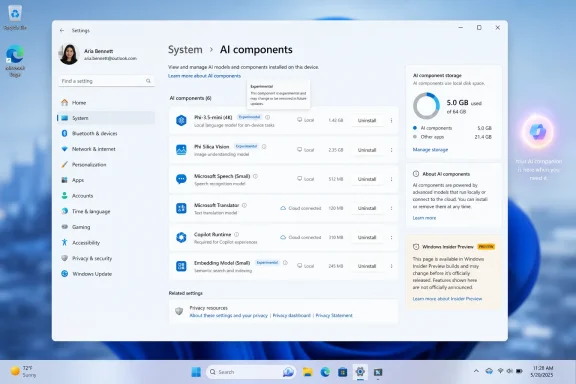
 

Microsoft is testing a hidden Windows 11 Settings option in Insider Experimental build 26300.8553 that would let users uninstall locally installed AI models from compatible PCs, according to findings shared June 1, 2026, by Windows feature watchers. The button is not a public commitment, and it may never ship. But the direction is unmistakable: Windows’ AI layer is becoming substantial enough that Microsoft now has to answer a very old Windows question in a very new context — who gets to remove the parts they do not want?
That is the real story behind a single “Uninstall” button. It is not merely a storage-saving convenience for Copilot+ PC owners. It is an early sign that Microsoft understands local AI cannot be treated as invisible plumbing forever, especially when models occupy gigabytes, trigger servicing events, require reboots, and sit close enough to the operating system that users reasonably ask whether they are features, dependencies, or baggage.

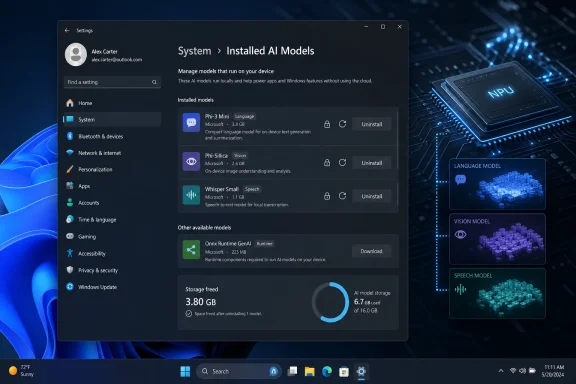
Windows settings screen showing installed on-device AI models with NPU hardware graphic background.Microsoft’s AI Layer Is Starting to Look Like a Windows Component​

The discovery appears in Windows 11 Insider Experimental Preview Build 26300.8553, a late-May 2026 build tied to Windows 11 version 25H2 testing. Microsoft’s published notes for the build focus on visible interface work such as Start menu changes, but the local AI uninstall work was reportedly found hidden beneath the surface in Settings. That distinction matters. Microsoft often stages code before it is ready for public testing, and hidden Settings pages can represent anything from an imminent feature to an abandoned experiment.
Still, the reported behavior is specific enough to be interesting. AI components in Settings now appear to have deeper subpages for installed models, and those subpages include an uninstall control. After removal, Windows reportedly asks for a reboot, which suggests these models are not being handled like ordinary Store apps or loose files in a user profile.
That reboot requirement is the tell. It implies Microsoft is treating at least some local models as serviced system components, possibly with registered dependencies, scheduled update behavior, or integration points used by shell features. A model that can be deleted like a downloaded video is one thing. A model that needs Windows to restart before removal is complete is something closer to a driver, language pack, feature-on-demand package, or framework dependency.
This is where Windows’ AI strategy becomes more than branding. Copilot started as a sidebar and a service. Copilot+ PCs moved the center of gravity toward local inference, NPUs, and system features that can work without sending every request to the cloud. Once AI models live on the machine and participate in operating-system experiences, they become part of Windows’ install footprint — and Windows users have decades of muscle memory around fighting that footprint.

The Button Exists Because Local AI Has Physical Weight​

Cloud AI is easy to market as a button, a chat box, or a subscription. Local AI is harder to hide because it has mass. It consumes disk space, requires update channels, depends on hardware acceleration, and may sit idle for users who never asked Windows to summarize, rewrite, recall, classify, or generate anything.
That physicality is especially visible on Copilot+ PCs. Microsoft’s new class of AI-forward Windows machines is built around neural processing units and on-device models. Features such as Recall, Click to Do, image generation, semantic search, and other shell-level intelligence rely on local model execution to reduce latency and keep some processing on the PC. That is the pitch: faster responses, less dependence on the network, and better privacy boundaries than cloud-only inference.
But those benefits are not universal. A developer with a 2TB workstation may barely notice several gigabytes of model assets. A student with a 256GB laptop absolutely will. A security-conscious administrator may care less about reclaimed storage and more about having a clear inventory of executable AI components. A home user who never uses Copilot may simply resent seeing disk space consumed by a feature category they did not choose.
Windows has always struggled when optional features become default infrastructure. Internet Explorer, Media Player, OneDrive, Teams, widgets, web search in Start, and Copilot have all passed through some version of the same argument: Microsoft sees integration; users see encroachment. Local AI makes the argument sharper because the components are not just icons or shortcuts. They are model packages, runtime dependencies, and hardware-facing experiences that can grow over time.

Settings Is the Right Battlefield for a Trust Problem​

If Microsoft ships this feature, putting it in Settings is more important than the button itself. Power users can already remove many Windows components through PowerShell, DISM, provisioning package tricks, policy, registry edits, or unofficial tooling. The problem is not that determined users lack tools. The problem is that ordinary users are often left with a choice between accepting Microsoft’s defaults or following risky advice from a forum thread.
A Settings-based uninstall path changes the legitimacy of the action. It says removal is supported, reversible or at least expected, and part of the product’s own management model. That matters for admins writing documentation, for help desks supporting mixed fleets, and for cautious users who do not want to break Windows just to reclaim space.
The setting also forces Microsoft to define what an “AI component” is. Today, that category can blur together several things: the Copilot app, cloud-connected assistants, local small language models, image models, OCR and vision models, semantic indexing, Windows Studio Effects, and developer-facing AI runtimes. A clean uninstall page would need to distinguish between components the user can safely remove, components required by specific features, and components Windows will reinstall because another feature depends on them.
That last point is where trust will be won or lost. If users click Uninstall and the model returns after the next cumulative update, Microsoft will have created yet another fake off switch. If removal persists, is documented, and clearly explains the consequences, the company will have taken a meaningful step toward treating AI as a manageable capability rather than an inevitability.

Copilot+ PCs Need Consent Mechanisms, Not Just Demos​

Microsoft’s Copilot+ PC push has been built around performance-per-watt gains, NPUs, and local AI experiences that the company argues make Windows more personal and capable. That pitch is not inherently unreasonable. Local inference can be genuinely useful, and Microsoft’s effort to move smaller models onto the device reflects where the broader industry is headed.
But Copilot+ also arrived under the shadow of Recall, the screenshot-based timeline feature that quickly became a case study in how not to introduce ambient AI into a desktop operating system. Microsoft revised Recall’s security model, made it opt-in, tightened authentication requirements, and reworked privacy controls, but the damage to the narrative was already done. For many users, Windows AI became associated not with convenience but with surveillance anxiety and loss of control.
An uninstall button for local AI models does not solve the Recall trust problem by itself. It does, however, move in the right direction. The more Windows does on-device, the more users will demand not only toggles for visible features but controls over the underlying assets that make those features work. Turning off a UI switch is not the same as removing the local model behind it.
This is particularly important because Microsoft’s AI roadmap is no longer limited to a single assistant. Recent Windows developer messaging has emphasized local models, Windows AI APIs, Foundry-style model distribution, and small language models such as Aion 1.0 designed for local or hybrid use. In that world, AI becomes a platform layer. Platform layers need administration.

Enterprise IT Will Read This as a Servicing Signal​

For consumers, the appeal of uninstalling local AI models may be straightforward: free up space, reduce clutter, avoid unused features. For enterprise IT, the more interesting question is lifecycle control. How are these models installed? How are they updated? Can they be inventoried? Can they be blocked? Can they be removed at scale without breaking supported Windows configurations?
The enterprise version of this story is not anti-AI. Many organizations are actively testing local AI because it promises lower latency, better data locality, and reduced cloud cost for certain workloads. The concern is governance. A model installed on thousands of endpoints is an asset, a potential attack surface, a compliance concern, and a patching obligation.
If Microsoft treats local AI models as individually removable components, it opens the door to more granular management. Admins could imagine policy that allows OCR models but blocks generative models, enables NPU-backed accessibility features but disables Recall-related assets, or permits developer machines to use local LLMs while keeping frontline devices lean. That kind of control is not just nice to have. It is how Windows remains acceptable in regulated environments.
The reboot requirement may be inconvenient, but it also suggests the kind of formal componentization enterprises prefer. A removable AI model that participates in Windows servicing is easier to audit than an opaque payload hidden inside a monolithic feature update. The question is whether Microsoft will expose that structure through Intune, Group Policy, PowerShell, DISM, Windows Update for Business, and inventory tooling — or whether Settings will remain the only visible surface.

The Storage Argument Is Real, but It Is Not the Whole Case​

The easiest way to explain this feature is storage. Local AI models can be large, and Windows PCs still ship with storage configurations that look stingy once you account for the operating system, recovery partitions, Office caches, game launchers, developer tools, phone backups, and the usual sediment of modern computing. A few gigabytes matter more than Microsoft sometimes seems willing to admit.
But storage is only the beginning. Local models also raise questions about updates, telemetry, power use, device performance, and user expectations. If a model is updated independently of a major Windows release, users and administrators need to know when that happens and why. If a model runs background preparation or indexing, users need to understand the cost. If a feature depends on an NPU, Windows needs to explain why behavior differs across otherwise similar PCs.
Microsoft has been here before with language packs, optional features, and inbox apps. The lesson should be obvious: users tolerate defaults better when removal is simple and consequences are clear. They resent defaults when removal feels like a trap, especially when the component is tied to a strategic priority the company is pushing across the product.
AI intensifies that resentment because it is culturally loaded. For some users, “AI” means productivity. For others, it means bloat, surveillance, job anxiety, hallucinations, or unwanted cloud integration. Microsoft cannot assume the label carries positive value. Giving users a supported way to remove local models is a small but useful acknowledgment that AI enthusiasm is not universal.

Hidden Does Not Mean Harmless, and Experimental Does Not Mean Imminent​

There is a temptation in Windows watching to treat every hidden feature as a product announcement. That is a mistake. Insider builds contain dormant code, A/B experiments, UI shells without backend support, abandoned prototypes, and features that only ship months later in altered form. Build 26300.8553 tells us Microsoft is testing an idea, not that Windows 11 stable builds are about to receive it next Patch Tuesday.
That caveat should cut both ways. Skeptics should not claim victory over Windows AI because a hidden uninstall button exists. Enthusiasts should not dismiss the discovery as meaningless simply because Microsoft has not announced it. Hidden work often reveals internal product pressure before marketing is ready to talk about it.
The pressure here is obvious. Microsoft wants Windows to be the AI PC platform. To do that credibly, it needs local models. To distribute local models broadly, it needs servicing. To service them responsibly, it needs controls. And once controls exist, users will expect them to be understandable, persistent, and available beyond Insider experiments.
The worst outcome would be a cosmetic control that removes a Settings entry but leaves the underlying model assets in place, or a button that works only until the next feature update rehydrates everything. The best outcome would be a clear model management page showing name, purpose, size, publisher, version, dependencies, last update, and removal impact. Windows does not need to become a package manager for casual users, but it does need to stop hiding strategic components behind vague labels.

Microsoft’s Broader AI Push Makes Removal More Necessary, Not Less​

The timing is instructive. Microsoft is expanding local AI work across Windows while also presenting ambitious next-generation computing narratives, from small local models to quantum hardware. Aion 1.0, described as a smaller and more efficient Windows-focused language model family, fits the company’s desire to make AI a native platform capability rather than a cloud-only service. The broader story is that Windows should become a host for agents, local reasoning, and model-powered app experiences.
That strategy almost guarantees more local model sprawl unless Microsoft imposes discipline early. Today’s model might power one shell feature. Tomorrow’s PC may have separate models for semantic search, screenshots, document understanding, image editing, audio cleanup, accessibility, developer tooling, and third-party app acceleration. Some may come from Microsoft. Some may come through frameworks, app stores, browsers, or OEM preload agreements.
Users will not parse all of that unless Windows gives them a coherent control plane. A model management page could become the AI equivalent of Storage settings, Optional features, or Startup apps: not something every user opens every day, but a place people know to look when they want to understand what the system is doing. That is how Windows can make AI feel less like an infestation and more like a set of capabilities.
The browser angle is especially relevant. Recent debate over local generative models in browsers has already shown that users react strongly when large AI payloads appear without obvious consent. Whether the payload belongs to Windows, Edge, Chrome, or a third-party app, the expectation is converging: large local AI components should be visible, manageable, and removable.

The Real Win Would Be Policy, Not Just a Pretty Button​

A consumer-facing uninstall button is useful. A policy-backed management model would be far more important. Microsoft’s enterprise credibility depends on giving administrators repeatable controls that survive updates, imaging, provisioning, and device refresh cycles.
That means the feature should not stop at Settings. It should have command-line equivalents, documented package identities, Intune configuration support, and Windows Update behavior that respects administrator intent. If Microsoft wants developers to build against local AI services, it also needs dependency reporting so an admin knows which applications or Windows experiences will degrade after a model is removed.
There is precedent for this. Windows has long exposed optional capabilities that can be added or removed by Settings, PowerShell, DISM, or enterprise management tools. Local AI models may not map perfectly onto that older framework, but the principle is the same. Capabilities that affect disk footprint, privacy posture, and supported functionality should not be managed only through hidden UI experiments.
Microsoft also needs plain-language explanations. “Phi Silica” or “Aion 1.0 Instruct” may mean something to developers and enthusiasts, but it means little to a normal Windows user deciding whether to reclaim space. A good Settings page would say what the model does, which features use it, how much space removal saves, and whether Windows will download it again if the user re-enables a feature.

A Small Button Carries a Large Admission​

If this feature ships, it will be an admission that the AI PC is not just a new class of hardware. It is a new maintenance burden. That does not make it bad. Every major Windows capability brings maintenance. Networking, printing, virtualization, language input, gaming services, Android subsystems, Linux subsystems, and security features have all added complexity in exchange for usefulness.
The issue is whether Microsoft lets users manage that complexity. Windows enthusiasts have a long memory for controls that disappear, defaults that reset, and features that return after removal. The company has improved in some areas, but its AI rollout still suffers from a credibility deficit created by aggressive branding and uneven communication.
An uninstall button can be a pressure valve. It tells users that opting out is a supported state, not a rebellion. It tells administrators that AI components may eventually be first-class inventory items rather than mysterious operating-system cargo. It tells Microsoft’s own product teams that local AI must compete for disk space and trust like everything else installed on a PC.
That is why this hidden feature matters even if it changes before release. It reframes Windows AI as something that can be administered. For a platform used by hobbyists, schools, governments, hospitals, developers, gamers, and multinational businesses, that is not a minor distinction.

The Windows AI PC Needs a Control Panel Before It Needs Another Demo​

The practical lessons from this build are narrower than the debate around AI, but they are concrete. Microsoft has not announced a public rollout, and nobody should buy or avoid a Copilot+ PC based solely on a hidden Insider control. But the discovery gives us a useful glimpse of where Windows management has to go next.
  • Windows 11 build 26300.8553 reportedly contains hidden Settings work that allows local AI models to be uninstalled from individual component pages.
  • The reported reboot requirement suggests Microsoft is treating at least some local AI models as deeper serviced Windows components rather than ordinary removable apps.
  • Copilot+ PC owners would benefit most immediately because their devices rely more heavily on local models for on-device AI experiences.
  • Storage savings are only part of the story, because model visibility, update control, privacy expectations, and enterprise governance are just as important.
  • Microsoft has not publicly committed to shipping the feature, and hidden Insider functionality can change, disappear, or arrive much later in a different form.
  • The feature will matter most if Microsoft backs it with policy, documentation, inventory, and update behavior that respects user and administrator choices.
For now, the reported uninstall button is a prototype-sized answer to a platform-sized question. Microsoft wants AI to become part of the Windows substrate, not merely another app pinned to the taskbar, and that ambition makes control more important rather than less. If the company is serious about the AI PC, it should treat local models the way serious platforms treat every powerful component: visible, documented, manageable, and removable when the owner of the machine says no.

References​

  1. Primary source: Windows Report
    Published: 2026-06-03T11:10:28.115562
  2. Official source: learn.microsoft.com
  3. Related coverage: windowscentral.com
  4. Official source: blogs.windows.com
  5. Official source: support.microsoft.com
  6. Related coverage: smhn.info
 

Microsoft is testing a hidden Windows 11 Settings control in Insider Preview Build 26300.8553 that appears to let users uninstall individual AI components or models from the operating system, according to reports published after testers found the option in early June 2026. The important word is appears, because Microsoft has not yet announced the feature in its official release notes. But even as an unadvertised experiment, the button says something larger about where Windows is heading. Microsoft is no longer merely adding AI to Windows; it is beginning to design escape hatches for users who do not want all of it.

Windows Settings page showing “AI components” with installed models and storage usage details.The Uninstall Button Is Small, but the Retreat Is Not​

The reported change lives in the least glamorous corner of Windows: Settings, under System, in an AI components area that most mainstream users have probably never opened. That is exactly why it matters. Microsoft tends to reveal its operating-system politics not in keynote demos, but in the quiet taxonomy of Settings pages, Group Policy entries, and toggles that say what the company considers optional.
The new subpages reportedly expose individual AI models or components and pair them with an uninstall button. That is a different posture from the familiar Microsoft pattern of giving users a visibility toggle while keeping the plumbing in place. Hiding Copilot from the taskbar was cosmetic. Removing a model package, if that is what this ultimately does, is architectural.
There is no evidence yet that this is a finished consumer feature. Insider builds are not promises, hidden features can vanish, and Microsoft’s public changelog for the build focused elsewhere. But Windows watchers have learned to take hidden Settings work seriously, because these experiments often reveal internal debates before marketing has settled on the language.
The larger story is that Microsoft seems to be learning that AI cannot be treated like wallpaper. A desktop operating system is not a web app where the vendor can keep rearranging the landing page and assume users will adapt. Windows sits between people and their files, credentials, workloads, battery life, storage, compliance rules, and patience. When AI features appear there, users ask harder questions.

Windows Users Have Always Known the Difference Between Features and Cargo​

The term “AI bloat” is imprecise, but it has stuck because it captures a real user experience. Many Windows 11 users did not ask for an expanding cast of assistants, agents, recall systems, context-menu actions, cloud-connected prompts, and model packages. They turned on a PC and found Microsoft increasingly eager to intermediate ordinary tasks through AI.
That does not mean every AI feature is useless. Local models can make search more forgiving, accessibility tools more capable, image editing faster, and system help less dependent on exact keywords. The problem is not that Windows contains AI; it is that Windows has often failed to make a clean distinction between useful capability and vendor ambition.
A button that uninstalls AI components would make that distinction more legible. It would tell users that some of these pieces are packages, not sacred organs. It would acknowledge that an operating system can offer intelligence without requiring everyone to carry every model, every integration, and every branded pathway.
This is especially important on new PCs, where the first-run experience has become a negotiation over defaults. A user who buys a laptop for school, gaming, accounting, field work, or development may not see local AI models as value. They may see them as occupied disk space, unexplained background complexity, or another Microsoft surface competing for attention.

The Storage Argument Is Really a Trust Argument​

Reports around the feature have naturally emphasized disk space. That is understandable, because local AI models can be large, and storage pressure remains real on budget laptops and compact business machines. A few gigabytes here and there matters when a device ships with a modest SSD and a recovery partition, update cache, OneDrive sync folder, and OEM utilities already eating into usable capacity.
But the storage angle understates the stakes. Users are not only asking whether an AI component consumes space. They are asking what it does, when it runs, what data it touches, whether it talks to the cloud, and whether removing it will break some future Windows feature. The uninstall button is meaningful because it turns an opaque system ingredient into something the user can make a decision about.
Microsoft has spent years telling users that Windows is a service. That framing helps explain frequent updates, cloud-linked accounts, and evolving features, but it also weakens the old expectation that a purchased PC is a stable appliance under the owner’s control. AI makes that tension sharper because it carries heavier implications than a weather widget or a redesigned Start menu.
If Microsoft wants users to accept AI in Windows, it has to make refusal boring. Not dramatic. Not registry-deep. Not dependent on third-party debloat scripts. Boring refusal means a visible setting, a plain description, a reversible action, and no punishment for saying no.

Insider Builds Are Where Microsoft Tests Product Philosophy​

Build 26300.8553 is an experimental Windows 11 build, and experimental builds are full of caveats. Features may be hidden behind flags. Screens may exist before backend behavior is complete. UI strings can appear months before they become real, and sometimes they are abandoned entirely.
Still, Microsoft’s Insider channels have become a live map of Windows strategy. The company tries interface ideas, measures telemetry, watches enthusiast reaction, and quietly decides which concepts are worth hardening. The fact that AI component uninstallation is being explored in Settings suggests that Microsoft is considering more granular management of AI payloads, even if the final shape changes.
That granularity matters because Windows AI is no longer a single thing. There is Copilot as an app. There are Copilot-branded experiences attached to Microsoft 365. There are AI actions in File Explorer and context menus. There are local models for semantic search and device-side inference. There are privacy-sensitive features like Recall on supported Copilot+ PCs. There are settings agents intended to translate natural language into system changes.
Lumping all of that under “AI” is convenient for marketing, but terrible for administration. A home user may want image-generation tools gone but keep accessibility improvements. A business may allow local semantic search but block cloud assistants. A school may want no generative AI entry points at all. An uninstall button per component begins to resemble the management model Windows should have had from the start.

Copilot Taught Microsoft That Presence Is Not Adoption​

Microsoft pushed Copilot hard because it saw a strategic opening: if AI assistants become the next application layer, Windows cannot afford to be merely the place where competing assistants run. The company wanted Copilot to be visible, available, and normalized. That explains the taskbar button, the keyboard key on new hardware, the sidebar experiments, and the steady branding creep across Microsoft products.
But visibility is not the same as adoption. A button users ignore becomes visual debt. A feature users disable becomes an argument against the next feature. Worse, an assistant that feels imposed can poison genuinely useful AI work elsewhere in the system.
The reported uninstall control reads like a correction to that overreach. Microsoft is not abandoning AI in Windows; that would be implausible, given the company’s investments and the industry’s direction. It is instead inching toward a more defensible model: install the parts that deliver value, expose them clearly, and let users remove the parts they do not trust or need.
This is how mature platforms absorb controversial capabilities. They stop pretending every new layer is universal. They add controls, policies, and packaging boundaries. They allow enthusiasts to opt out without turning every update cycle into a cat-and-mouse game.

Enterprise IT Will Care Less About the Button Than the Boundary​

For administrators, the existence of an uninstall button is less interesting than what sits behind it. If AI components become separable packages, they can potentially be inventoried, removed, blocked, staged, or audited. If they remain tangled into the OS image, a Settings button may be little more than theater.
Enterprise IT has specific worries that consumer coverage often compresses into “privacy.” Admins need to know whether AI components are per-user or per-machine, whether removal survives feature updates, whether dependencies reappear through cumulative updates, whether policies can enforce the state, and whether logs clearly show what changed. They also need to know whether a component is local-only or connected to Microsoft services.
The ideal outcome would be a Windows AI management model that looks boringly familiar. Components should have package identities. Policies should be documented. Removal should be scriptable. Servicing behavior should be predictable. Microsoft should describe what each component does in terms that a compliance team can understand, not merely in product adjectives.
That is not just an enterprise courtesy. It is how Microsoft avoids turning AI into the next long-running Windows trust dispute. Windows administrators have seen bundled browsers, consumer apps, telemetry settings, cloud account nudges, Teams integrations, and Start menu promotions come and go. They will not simply accept “AI” as a magic category exempt from normal governance.

The Consumer Version of Control Must Be Simpler Than the Admin Version​

The danger is that Microsoft solves this only for managed fleets. Group Policy, Intune settings, provisioning packages, and registry values are important, but they do not help the ordinary user staring at a new PC with limited storage and a growing list of unfamiliar AI surfaces. Consumer Windows needs plain controls too.
That does not mean every system component should be removable by casual clicking. Windows has dependencies, and Microsoft is right to avoid turning Settings into a self-destruct panel. But AI components are unusual because many of them are value-added experiences rather than core compatibility layers. If a model enables semantic search, Windows can explain that consequence. If an assistant powers suggested settings changes, Windows can say so before removal.
The key is specificity. “AI components” is not enough. Users need names, sizes, descriptions, and effects. They need to know whether uninstalling a component disables a feature, removes a model, stops background updates, or simply hides a UI entry. The more precise Microsoft is, the less the feature looks like an admission of guilt and the more it looks like competent platform design.
There is also a psychological benefit. Users who know they can remove something are often less hostile to trying it. Forced permanence turns optional software into a threat. Reversibility turns it into an experiment.

The AI PC Story Needs a User-Control Chapter​

Microsoft and its hardware partners have spent the past two years trying to make the AI PC feel inevitable. Neural processing units, Copilot+ branding, on-device models, and AI-enhanced workflows are now part of the premium PC sales pitch. The problem is that inevitability is not the same as desire.
Many buyers still evaluate PCs by battery life, keyboard quality, display, thermals, repairability, price, and whether Windows stays out of the way. AI features may eventually become as ordinary as GPU acceleration, but they are not there yet. They remain politically and practically charged because they are associated with surveillance fears, subscription upsell, cloud dependence, and unwanted interface churn.
That is why an uninstall button is not anti-AI. It may be the thing that makes AI in Windows more acceptable. A platform that lets users prune AI components is making a claim that its AI can stand on merit. A platform that hides removal behind unsupported tools is making the opposite claim.
The best version of Windows AI is modular. A gamer should not need the same AI footprint as a legal office. A developer workstation should not inherit every consumer assistant. A classroom laptop should be able to run with a locked-down configuration. A Copilot+ PC should be able to showcase local intelligence without making every feature feel mandatory.

Microsoft Has Been Here Before, and the Pattern Is Familiar​

Windows history is full of features that arrived as strategy and later became settings. Internet Explorer, Cortana, OneDrive integration, Teams chat, widgets, recommended content, search highlights, and promoted Start menu experiences all followed some version of this arc. Microsoft inserts a service layer, users and regulators push back, administrators demand controls, and eventually the company redraws the boundary between Windows and the bundled experience.
AI is more complicated because it is not one application. It is a capability layer that can attach to search, screenshots, file indexing, accessibility, shell commands, productivity apps, and the web. That makes the boundary harder to draw, but not impossible. In fact, it makes the boundary more necessary.
The reported Settings work suggests Microsoft may be moving from the “AI everywhere” phase to the “AI where it is justified” phase. That would be a healthier posture. The operating system should not be a billboard for the company’s strategic anxieties. It should be a platform that earns trust through clarity, performance, and restraint.
Restraint is not a fashionable word in AI product planning, but it is a valuable one in operating systems. Windows succeeds when it feels dependable. It fails when users suspect that every update is a delivery vehicle for someone else’s priorities.

The Real Test Will Be What Happens After Removal​

If this feature ships, the first wave of coverage will likely be simple: here is where the button is, here is what it removes, here is how much space you get back. That will be useful, but it will not answer the deeper question. The real test is whether removal is durable.
Windows has a habit of reintroducing components through major updates, feature enablement packages, inbox app refreshes, or Microsoft Store updates. A user removes something in June and sees it return in October. An admin strips a component from an image and finds it back after an upgrade. That pattern is what turns inconvenience into distrust.
For AI components, durability is essential. If a user uninstalls a local model, Windows should not silently restore it because a new search feature wants it. If Microsoft believes the model is necessary for a new capability, it should ask, explain, or provide policy-controlled behavior. Anything else will make the uninstall button feel performative.
There is also the question of dependencies. If one component supports multiple features, Microsoft needs to show that relationship. Removing a model might affect search, suggestions, or accessibility behavior. That is acceptable if the user is told. It is not acceptable if Windows quietly degrades and then leaves the user to troubleshoot.

A Better Settings Page Could Change the Tone of the Debate​

Imagine a Windows Settings page that treats AI the way a serious platform should. It lists installed AI components, their sizes, whether they run locally or use cloud services, what features depend on them, when they were last updated, and whether an administrator manages them. It offers uninstall, disable, repair, and reinstall where appropriate. It links privacy controls to the components that actually use them.
That would not satisfy every critic. Some users do not want Microsoft AI anywhere near the OS. Some administrators will still prefer image-level removal and strict policy enforcement. But it would move the debate out of the realm of suspicion and into the realm of configuration.
Right now, much of the frustration around Windows AI comes from diffusion. Controls are scattered. Branding overlaps. Copilot means different things in different places. A cloud assistant, a Microsoft 365 hub, a local model, and a shell integration can all appear to users as part of the same fog. A coherent AI components page would clear some of that fog.
The hidden uninstall button may be an early gesture toward that coherence. Or it may be a half-finished experiment that never ships. Either way, it points to the feature Windows needs if Microsoft intends to keep weaving AI into the OS.

The Button Microsoft Did Not Announce Says the Most​

For now, the reported AI uninstall control should be treated as a preview-build finding, not a production guarantee. It was not highlighted in Microsoft’s official notes for the build. It may require hidden feature IDs. It may change names, move locations, or disappear before ordinary users ever see it.
But Microsoft’s silence is part of the story. The company is happy to announce AI features when they demonstrate ambition. It is more cautious when the feature is about removal, retreat, or user refusal. That asymmetry reveals the tension inside Windows: Microsoft wants AI to be a selling point, while many users want it to be a choice.
A good operating system can survive that tension. It can ship ambitious features without pretending every user has the same appetite. It can promote new capabilities without making the opt-out path feel like sabotage. It can integrate AI deeply where it helps, and modularize it where it does not.
If Microsoft gets this right, the uninstall button will not be remembered as an anti-AI concession. It will be remembered as the moment Windows AI started growing up.

The Practical Reading for Windows 11 Users Right Now​

This is not yet a reason to reinstall Windows, join an Insider channel, or start ripping packages out of a production machine. It is a signpost. Microsoft is experimenting with a control that many users and administrators have been asking for in spirit, even if not always in the exact language of “AI components.”
The concrete takeaways are narrow but important:
  • The reported uninstall button is tied to an experimental Windows 11 Insider build, not a broadly available stable release.
  • Microsoft has not publicly committed to shipping this specific AI component removal interface.
  • The feature appears aimed at individual AI components or models, which would be more granular than simply hiding Copilot or removing a visible app.
  • Storage savings may be useful, but transparency, privacy confidence, and administrative control are the bigger stakes.
  • The value of the feature will depend on whether removal is documented, durable across updates, and manageable through enterprise tools.
  • Windows users should wait for official release notes or stable-channel confirmation before treating this as a supported cleanup method.
The quiet appearance of an uninstall button will not settle the argument over AI in Windows 11, but it does change the terms of that argument. Microsoft can keep insisting that AI is central to the future of the PC, and it may be right. But the future of the PC still has to leave room for the owner of the PC, and the next phase of Windows AI will be judged less by how loudly Microsoft promotes it than by how cleanly users can say no.

References​

  1. Primary source: PCWorld
    Published: Wed, 03 Jun 2026 15:28:00 GMT
  2. Official source: learn.microsoft.com
  3. Related coverage: windowscentral.com
  4. Related coverage: notebookcheck.net
  5. Related coverage: techcrunch.com
  6. Related coverage: pureinfotech.com
  1. Related coverage: techspot.com
  2. Related coverage: tomshardware.com
  3. Related coverage: techradar.com
  4. Related coverage: windowsforum.com
  5. Related coverage: ddxgroup.com
  6. Related coverage: libraryfreedom.org
  7. Related coverage: welcomehomevetsofnj.org
 

Back
Top