

Microsoft’s newest Windows 11 management story now has two very different faces: a first-party policy for removing selected inbox Microsoft Store apps on Enterprise and Education-class 25H2 systems, and a third-party utility, Winhance, that tries to make Windows cleanup, privacy tuning, and app removal survivable for ordinary users. The interesting part is not that either tool exists. It is that Windows has become complicated enough that a credible “clean” setup increasingly looks like a layered defense plan.
That is the useful frame for the ProVideo Coalition argument. Windows 11 is no longer just an operating system that receives security patches and feature upgrades. It is also a delivery vehicle for apps, prompts, recommendations, account nudges, telemetry defaults, and consumer-facing experiences that many power users and administrators never asked for. The practical question is not whether one can remove them once. The question is whether they stay removed after Microsoft, the Store, provisioning packages, feature updates, and new user profiles have had their say.
For years, Windows “debloating” lived in a gray zone between responsible administration and folk medicine. One script would strip provisioned AppX packages. Another would remove consumer apps for the current user. A third would disable scheduled tasks, services, Start menu suggestions, or telemetry-related settings. Some of these worked. Some worked until the next feature update. Some worked too well and broke components that looked disposable until Windows expected them to exist.
The new policy-based inbox app removal mechanism matters because it moves part of this work out of the script graveyard and into Windows’ own management surface. Microsoft’s documentation describes a policy for managed Enterprise and Education devices running Windows 11 version 25H2 or newer, allowing administrators to remove selected preinstalled Microsoft Store apps. The setting sits under App Package Deployment and can be configured through Group Policy, MDM, or Intune-style management.
That is a notable concession. Microsoft is not saying Windows 11 has too much “bloat” in the language critics prefer. But it is acknowledging that organizations need a supported way to prevent certain bundled Store apps from appearing on managed PCs. In enterprise language, this is not debloating; it is policy-based application control. In user language, it is a way to stop Windows from behaving like every profile is a new consumer marketing opportunity.
The distinction between Home, Pro, Education, Enterprise, LTSC Enterprise, and IoT Enterprise is where this gets politically interesting. Windows 11 Pro still includes the Local Group Policy Editor, and many policies still process normally. But Microsoft has a long history of limiting the effect of certain policies by edition, particularly around telemetry, Store control, consumer experiences, and enterprise-grade lockdown. The ProVideo Coalition article leans hard into that grievance, arguing that Pro is no longer “pro” enough for users who want the strongest controls.
That complaint is not just nostalgia. Windows Pro has often been marketed to small businesses, developers, creators, and technically literate users who do not necessarily run a domain, Intune tenant, or volume licensing program. If the most consequential privacy and app-removal controls are materially stronger on Education and Enterprise-class SKUs, Microsoft has created a two-tier Windows management world: one for organizations with real administrative leverage, and another for everyone else.
The key limitation is scope. The policy targets default Microsoft Store packages, not every built-in executable, service, advertising surface, system component, or cloud integration. It can help administrators remove selected inbox apps that Microsoft distributes as Store packages. It cannot turn Windows 11 into LTSC by force, and it cannot guarantee that every undesired experience will disappear from Settings, Search, Edge, Widgets, Copilot entry points, the Microsoft account flow, or future feature deployments.
That is why the policy is best understood as a provisioning and re-provisioning control. It is especially valuable when new users sign into a machine, when an organization is building a standard image, or when an update would otherwise restore a package that an administrator had removed manually. In that sense, the “outside bouncer” analogy works: it sets a rule at the door rather than waiting for a cleanup script to chase the same app after it has already entered the system.
But there is danger in overselling it. Administrators who interpret the policy as a comprehensive privacy and anti-advertising firewall will be disappointed. Store packages are only one class of annoyance in modern Windows. Microsoft’s promotional surfaces are spread across Start, Settings, notifications, lock screen content, Microsoft 365 prompts, Edge integration, cloud backup prompts, and account-related setup flows. Some can be controlled by policy. Some can be reduced by registry or MDM settings. Some are simply part of the current Windows experience unless Microsoft chooses to expose a switch.
The saner position is also the more damning one: Microsoft is finally providing official tools for a problem it spent years pretending was mostly a matter of user preference. If Windows 11 were cleanly separable into “the operating system” and “optional Microsoft experiences,” this policy would not feel like a breakthrough. It feels like one because the default install has become crowded enough that removal now requires governance.
That matters because the official Windows 11 settings model is fragmented by design history. Some controls live in Settings. Others remain in Control Panel. Some are in Group Policy. Others require PowerShell. Some are per-user. Some are per-device. Some work differently depending on edition. Some appear to be available but do little unless the machine is on Enterprise, Education, or Server. For users trying to make Windows less noisy, the experience is less like configuration and more like archaeology.
Winhance’s value proposition is therefore not merely that it can remove apps. Plenty of tools can do that. Its value is that it tries to make the process legible, reversible where possible, and ongoing. The ProVideo Coalition article praises Winhance for monitoring for the return of removed or blocklisted items after reboot and acting again if they reappear. That is the “inside bouncer” role: not the authoritative policy at the perimeter, but the active watcher inside the room.
The better third-party utilities in this category have learned from the mistakes of the old debloat-script era. They describe what a setting affects. They separate removal from disablement. They warn when a component cannot be easily restored. They lean on Windows’ own package and winget mechanisms rather than inventing reckless shortcuts. Winhance’s recent attention from Windows enthusiast media reflects that shift: the modern audience is less tolerant of mystery scripts that promise speed and privacy while leaving wreckage behind.
Still, the trust question never disappears. Any utility that changes system settings, removes packages, disables services, or installs third-party applications deserves scrutiny. Open source helps, but it does not automatically make a tool safe for every user. The safest posture is to treat Winhance as a convenience layer over actions you broadly understand, not as a priesthood that absolves you from knowing what Windows components your workflow depends on.
That frustration is not imaginary. Feature updates can reintroduce settings, restore bundled apps, change defaults, or expose new surfaces that did not exist when a machine was originally configured. Microsoft is not the only vendor guilty of this behavior, but Windows’ scale makes the effect uniquely visible. A small prompt experiment becomes a global irritant. A bundled app becomes a symbol. A Start menu recommendation becomes evidence in a decade-long prosecution of Microsoft’s priorities.
From Microsoft’s perspective, some of this is defensible. The company has to service an enormous installed base, support new inbox capabilities, patch dependencies, and keep consumer devices functional even when users remove things they later need. Store-packaged apps also let Microsoft update components independently of the OS image. That modularity is not inherently sinister.
But the user’s perspective is equally legitimate. If an administrator removes a consumer app from a managed workstation, that decision should not be treated as a temporary mood. If a creator workstation does not need gaming widgets, news feeds, shopping integrations, or consumer cloud prompts, the operating system should not repeatedly test the boundary. If Microsoft wants Windows to remain the default professional desktop, it has to respect the difference between servicing a system and reselling it.
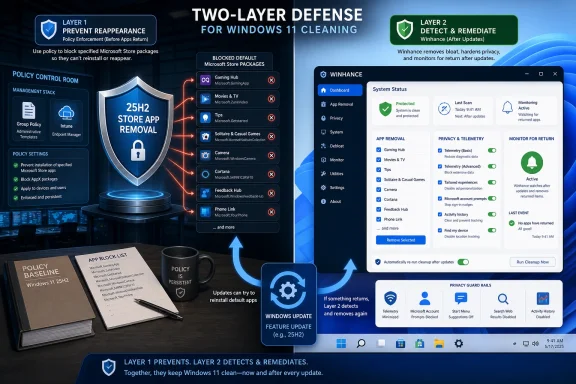
That is why a layered approach makes practical sense. Group Policy is the declarative intent: this class of app should not be present. Winhance is the local enforcement and convenience layer: this particular machine should stay tuned the way its owner configured it. Neither is perfect. Together, they reduce the number of times a user has to fight the same battle.
Windows Pro occupies an awkward middle ground. It is too expensive and feature-rich to be treated as a purely consumer SKU, but not privileged enough to receive every enterprise control. It is the edition many independent professionals, consultants, developers, labs, and small shops actually run. Those users are technically capable of managing their machines but often lack the licensing channel or administrative infrastructure Microsoft assumes for full governance.
That mismatch is especially visible with diagnostic data. Windows settings typically expose consumer-friendly choices such as required and optional diagnostic data. Enterprise and Education policies can go further, including diagnostic data off in supported scenarios. The result is a privacy hierarchy: the ability to say “no” most completely is reserved for the editions Microsoft associates with institutional customers.
Microsoft would argue that Enterprise and Education have compliance obligations that consumer and small-business editions do not. That is true as far as it goes. Schools, governments, regulated industries, and large organizations need stronger policy surfaces. But it does not explain why a professional user who paid for Windows Pro should be denied equivalent local control over telemetry levels or consumer experiences on a personally owned workstation.
The likely answer is business, not engineering. Microsoft has spent the Windows 10 and Windows 11 era making the operating system more cloud-connected, more account-aware, and more service-oriented. That model benefits from data, engagement, and cross-promotion. Enterprise customers can demand exceptions because they buy and manage at scale. Individual Pro users can complain loudly, but they do not negotiate.
There is a practical truth here. Windows Education has historically sat close to Enterprise in policy capability because schools need locked-down, privacy-conscious, centrally managed machines. If a user has legitimate access to an Education license, it can offer a noticeably better control surface than Home or Pro for certain policies. That is why enthusiasts talk about it alongside Enterprise LTSC and IoT Enterprise when the goal is a quieter Windows install.
But this is also where advice can drift into a licensing swamp. Cheap keys, gray-market resellers, academic eligibility, institutional agreements, and regional licensing rules are not the same thing. A key that activates Windows is not necessarily a license that grants proper usage rights. For a forum audience full of IT pros, that distinction matters. Activation is a technical state; licensing is a legal one.
There is also a support trade-off. Running an edition outside the normal consumer or small-business path can create edge cases in app availability, feature exposure, management expectations, and upgrade behavior. LTSC editions go even further by intentionally omitting or slowing some consumer-facing features, which is precisely why some users love them and why Microsoft does not position them as general-purpose enthusiast builds.
The safer editorial position is this: if you already have legitimate access to Education, Enterprise, or IoT Enterprise and you value policy control, those editions are more attractive than Pro for this specific problem. If you do not, chasing bargain keys to escape Start menu clutter is a risky way to solve a real annoyance.
That distinction is important in managed environments. An administrator wants repeatability, not artisanal cleanup. The right place to define a baseline is policy, MDM, provisioning, imaging, or configuration management. If every PC requires someone to click through a utility by hand, the process will eventually diverge. A good local tool can help inspect and adjust, but it should not become the only source of truth for a fleet.
For individual power users, the equation changes. They may not have Intune, Active Directory, Autopilot, or a formal device baseline. They may simply want a workstation that stops reinstalling apps they removed. In that context, Winhance is not a governance failure; it is a rational response to Microsoft hiding too many useful controls in too many places.
The ProVideo Coalition nightclub analogy captures the emotional logic of the setup, but the more technical metaphor is layered configuration. The first layer is the operating system edition and supported policy set. The second is the app provisioning state. The third is user-facing customization. The fourth is post-update monitoring. The more Windows behaves like a service, the more users need a way to reassert their desired state.
This is not exotic to IT pros. Desired state configuration has been a core principle in server and endpoint management for years. What is new is seeing ordinary Windows desktop users adopt the same posture because consumer Windows has become dynamic enough to require it. The desktop is learning the lesson cloud admins learned long ago: if a system can drift, you need drift correction.
Enterprise and Education policy can go further in supported configurations. The “Allow diagnostic data” policy can be set to “Diagnostic data off” on editions where Microsoft supports that value. That is why the ProVideo Coalition article treats this as a second major directive after app removal. It is one of the few places where the difference between a consumer privacy toggle and an administrative policy is stark.
The word “off,” however, needs careful handling. Even when diagnostic data is disabled under supported policy, Windows may still communicate with Microsoft services for activation, licensing, updates, Defender intelligence, Store infrastructure, time synchronization, certificate validation, or other operational functions depending on configuration. Turning off diagnostic data is not the same as air-gapping the machine. It is a reduction of a specific telemetry channel, not a vow of silence.
That nuance does not weaken the case for the policy. If anything, it makes the case more credible. Serious privacy work is about reducing categories of data flow, documenting exceptions, and understanding dependencies. It is not about pretending a modern operating system can remain fully serviced while never contacting its vendor.
For administrators, the practical takeaway is to document what each privacy policy actually governs. For enthusiasts, it is to avoid confusing privacy theater with privacy engineering. A tool that flips a dozen switches may be useful, but the authoritative controls still depend on edition, policy support, and the services you choose to keep enabled.
The current moment is more mature. The better question is no longer “How much can I remove?” It is “What should not be present on this class of machine, and what is the supported way to keep it that way?” That is the difference between revenge and administration.
A video-editing workstation, a school lab PC, a call-center endpoint, a developer laptop, and a kiosk do not need the same Windows footprint. The default consumer image is a compromise designed for maximum market breadth. It is unsurprising that professionals want to narrow it. The scandal is not that narrowing exists; the scandal is how much insider knowledge it takes to do it cleanly.
Winhance and the new policy-based app removal feature both point toward a better model. Microsoft should expose more of these choices during deployment and first-run setup, especially for Pro. Third-party tools should continue to make the existing maze understandable without encouraging blind destruction. Administrators should define baselines that are boring, documented, and reversible.
The phrase “affirmative defense” is theatrical, but it captures the psychology of users who feel Windows is no longer a neutral platform. They do not want to merely uninstall an app. They want to assert control against a system that may later reinterpret their silence as consent.
Store-packaged apps are a particularly tricky category. Calculator, Notepad, Photos, Paint, Terminal, Camera, Media Player, Clipchamp, Xbox components, Widgets, and other packages occupy very different positions in the user’s mental model. One person’s bloat is another person’s default tool. One organization’s forbidden consumer app is another department’s training dependency. The fact that something is Store-delivered does not automatically make it disposable.
The same applies to services. Turning off telemetry-related components may be desirable in a privacy-sensitive environment. Disabling update-related services, security plumbing, or identity components without understanding the consequences is a different matter. The line between “lean” and “fragile” is easy to cross when a tool makes every switch look equally tempting.
That is why snapshots, restore points, and documentation matter. A single enthusiast machine can tolerate experimentation. A production fleet cannot. If the machine is used for billable creative work, regulated data, client deliverables, or remote administration, the cleanup process should be treated like a change, not a vibe.
There is also a cultural risk. Calling Windows 11 “malicious,” as the source article does in passing, may feel satisfying, but it blurs useful distinctions. Microsoft is aggressive, commercially motivated, and often paternalistic in how it designs defaults. That is not the same as malware. The more precise criticism is stronger: Windows 11 increasingly mixes operating-system maintenance with engagement, promotion, and data collection in ways that erode user trust.
That is a more durable posture than chasing every new debloat guide. It also gives users a way to separate Microsoft’s real improvements from the noise around them. Windows 11 is not a static villain. It has meaningful security advances, better hardware security assumptions, stronger app isolation in some areas, useful management improvements, and a healthier terminal and package-management story than Windows had a decade ago. But those gains coexist with a consumer engagement layer that many serious users want controlled or removed.
The app-removal policy in 25H2 should be read as part of that duality. Microsoft is making Windows more manageable for institutions while keeping consumer Windows commercially expressive by default. Winhance exists because the gap between those worlds is wide enough for third-party software to become the interface Microsoft did not build.
That may be the most telling indictment. If a polished cleanup utility can attract attention simply by collecting scattered controls, explaining them clearly, and monitoring for drift, then the problem is not that users are too picky. The problem is that Windows has made “leave me alone” an advanced configuration scenario.
That is the useful frame for the ProVideo Coalition argument. Windows 11 is no longer just an operating system that receives security patches and feature upgrades. It is also a delivery vehicle for apps, prompts, recommendations, account nudges, telemetry defaults, and consumer-facing experiences that many power users and administrators never asked for. The practical question is not whether one can remove them once. The question is whether they stay removed after Microsoft, the Store, provisioning packages, feature updates, and new user profiles have had their say.
 Microsoft Quietly Admits That Debloating Needed a Real Control Plane
For years, Windows “debloating” lived in a gray zone between responsible administration and folk medicine. One script would strip provisioned AppX packages. Another would remove consumer apps for the current user. A third would disable scheduled tasks, services, Start menu suggestions, or telemetry-related settings. Some of these worked. Some worked until the next feature update. Some worked too well and broke components that looked disposable until Windows expected them to exist.The new policy-based inbox app removal mechanism matters because it moves part of this work out of the script graveyard and into Windows’ own management surface. Microsoft’s documentation describes a policy for managed Enterprise and Education devices running Windows 11 version 25H2 or newer, allowing administrators to remove selected preinstalled Microsoft Store apps. The setting sits under App Package Deployment and can be configured through Group Policy, MDM, or Intune-style management.
That is a notable concession. Microsoft is not saying Windows 11 has too much “bloat” in the language critics prefer. But it is acknowledging that organizations need a supported way to prevent certain bundled Store apps from appearing on managed PCs. In enterprise language, this is not debloating; it is policy-based application control. In user language, it is a way to stop Windows from behaving like every profile is a new consumer marketing opportunity.
The distinction between Home, Pro, Education, Enterprise, LTSC Enterprise, and IoT Enterprise is where this gets politically interesting. Windows 11 Pro still includes the Local Group Policy Editor, and many policies still process normally. But Microsoft has a long history of limiting the effect of certain policies by edition, particularly around telemetry, Store control, consumer experiences, and enterprise-grade lockdown. The ProVideo Coalition article leans hard into that grievance, arguing that Pro is no longer “pro” enough for users who want the strongest controls.
That complaint is not just nostalgia. Windows Pro has often been marketed to small businesses, developers, creators, and technically literate users who do not necessarily run a domain, Intune tenant, or volume licensing program. If the most consequential privacy and app-removal controls are materially stronger on Education and Enterprise-class SKUs, Microsoft has created a two-tier Windows management world: one for organizations with real administrative leverage, and another for everyone else.
The New App Removal Policy Is Powerful, but Narrower Than the Rhetoric
The strongest claim in the ProVideo Coalition piece is that the “Remove default Microsoft Store packages from the system” policy acts like an outside bouncer, preventing selected undesired apps from being reinstalled by Windows Update. That metaphor is directionally useful, but it needs discipline. The policy is real, supported, and significant. It is not a magic shield against every Windows component, every cloud prompt, or every future Microsoft design decision.The key limitation is scope. The policy targets default Microsoft Store packages, not every built-in executable, service, advertising surface, system component, or cloud integration. It can help administrators remove selected inbox apps that Microsoft distributes as Store packages. It cannot turn Windows 11 into LTSC by force, and it cannot guarantee that every undesired experience will disappear from Settings, Search, Edge, Widgets, Copilot entry points, the Microsoft account flow, or future feature deployments.
That is why the policy is best understood as a provisioning and re-provisioning control. It is especially valuable when new users sign into a machine, when an organization is building a standard image, or when an update would otherwise restore a package that an administrator had removed manually. In that sense, the “outside bouncer” analogy works: it sets a rule at the door rather than waiting for a cleanup script to chase the same app after it has already entered the system.
But there is danger in overselling it. Administrators who interpret the policy as a comprehensive privacy and anti-advertising firewall will be disappointed. Store packages are only one class of annoyance in modern Windows. Microsoft’s promotional surfaces are spread across Start, Settings, notifications, lock screen content, Microsoft 365 prompts, Edge integration, cloud backup prompts, and account-related setup flows. Some can be controlled by policy. Some can be reduced by registry or MDM settings. Some are simply part of the current Windows experience unless Microsoft chooses to expose a switch.
The saner position is also the more damning one: Microsoft is finally providing official tools for a problem it spent years pretending was mostly a matter of user preference. If Windows 11 were cleanly separable into “the operating system” and “optional Microsoft experiences,” this policy would not feel like a breakthrough. It feels like one because the default install has become crowded enough that removal now requires governance.
Winhance Succeeds Because Windows Settings Do Not
Winhance sits on the other side of the management divide. It is not a Microsoft product, not an enterprise policy framework, and not a substitute for understanding what a setting actually does. Its appeal is more basic: it gathers many of the scattered Windows cleanup, customization, app-management, and privacy switches into a coherent interface that looks less like a dare.That matters because the official Windows 11 settings model is fragmented by design history. Some controls live in Settings. Others remain in Control Panel. Some are in Group Policy. Others require PowerShell. Some are per-user. Some are per-device. Some work differently depending on edition. Some appear to be available but do little unless the machine is on Enterprise, Education, or Server. For users trying to make Windows less noisy, the experience is less like configuration and more like archaeology.
Winhance’s value proposition is therefore not merely that it can remove apps. Plenty of tools can do that. Its value is that it tries to make the process legible, reversible where possible, and ongoing. The ProVideo Coalition article praises Winhance for monitoring for the return of removed or blocklisted items after reboot and acting again if they reappear. That is the “inside bouncer” role: not the authoritative policy at the perimeter, but the active watcher inside the room.
The better third-party utilities in this category have learned from the mistakes of the old debloat-script era. They describe what a setting affects. They separate removal from disablement. They warn when a component cannot be easily restored. They lean on Windows’ own package and winget mechanisms rather than inventing reckless shortcuts. Winhance’s recent attention from Windows enthusiast media reflects that shift: the modern audience is less tolerant of mystery scripts that promise speed and privacy while leaving wreckage behind.
Still, the trust question never disappears. Any utility that changes system settings, removes packages, disables services, or installs third-party applications deserves scrutiny. Open source helps, but it does not automatically make a tool safe for every user. The safest posture is to treat Winhance as a convenience layer over actions you broadly understand, not as a priesthood that absolves you from knowing what Windows components your workflow depends on.
The Real Fight Is Over Reversibility
The most revealing word in this debate is not “bloat.” It is “return.” Users can tolerate some unwanted defaults if they can turn them off once and move on. What infuriates them is the sense that Windows keeps renegotiating the deal.That frustration is not imaginary. Feature updates can reintroduce settings, restore bundled apps, change defaults, or expose new surfaces that did not exist when a machine was originally configured. Microsoft is not the only vendor guilty of this behavior, but Windows’ scale makes the effect uniquely visible. A small prompt experiment becomes a global irritant. A bundled app becomes a symbol. A Start menu recommendation becomes evidence in a decade-long prosecution of Microsoft’s priorities.
From Microsoft’s perspective, some of this is defensible. The company has to service an enormous installed base, support new inbox capabilities, patch dependencies, and keep consumer devices functional even when users remove things they later need. Store-packaged apps also let Microsoft update components independently of the OS image. That modularity is not inherently sinister.
But the user’s perspective is equally legitimate. If an administrator removes a consumer app from a managed workstation, that decision should not be treated as a temporary mood. If a creator workstation does not need gaming widgets, news feeds, shopping integrations, or consumer cloud prompts, the operating system should not repeatedly test the boundary. If Microsoft wants Windows to remain the default professional desktop, it has to respect the difference between servicing a system and reselling it.
That is why a layered approach makes practical sense. Group Policy is the declarative intent: this class of app should not be present. Winhance is the local enforcement and convenience layer: this particular machine should stay tuned the way its owner configured it. Neither is perfect. Together, they reduce the number of times a user has to fight the same battle.
Windows 11 Pro Is Caught in an Identity Crisis
The ProVideo Coalition article’s sharpest institutional criticism is aimed at Windows 11 Pro. The argument is that Pro has been weakened because some of the strongest controls either do not exist, do not apply, or do not work with the same authority as they do on Education and Enterprise-class editions. Even where that claim needs case-by-case testing, the broader complaint lands.Windows Pro occupies an awkward middle ground. It is too expensive and feature-rich to be treated as a purely consumer SKU, but not privileged enough to receive every enterprise control. It is the edition many independent professionals, consultants, developers, labs, and small shops actually run. Those users are technically capable of managing their machines but often lack the licensing channel or administrative infrastructure Microsoft assumes for full governance.
That mismatch is especially visible with diagnostic data. Windows settings typically expose consumer-friendly choices such as required and optional diagnostic data. Enterprise and Education policies can go further, including diagnostic data off in supported scenarios. The result is a privacy hierarchy: the ability to say “no” most completely is reserved for the editions Microsoft associates with institutional customers.
Microsoft would argue that Enterprise and Education have compliance obligations that consumer and small-business editions do not. That is true as far as it goes. Schools, governments, regulated industries, and large organizations need stronger policy surfaces. But it does not explain why a professional user who paid for Windows Pro should be denied equivalent local control over telemetry levels or consumer experiences on a personally owned workstation.
The likely answer is business, not engineering. Microsoft has spent the Windows 10 and Windows 11 era making the operating system more cloud-connected, more account-aware, and more service-oriented. That model benefits from data, engagement, and cross-promotion. Enterprise customers can demand exceptions because they buy and manage at scale. Individual Pro users can complain loudly, but they do not negotiate.
Education Has Become the Enthusiast Escape Hatch
One of the more provocative parts of the ProVideo Coalition piece is its recommendation to move from Home or Pro to Windows 11 Education rather than Pro Education. The motivation is straightforward: Education often receives stronger enterprise-like policy controls while remaining obtainable through academic channels. For technically inclined users, that makes it an attractive escape hatch from consumer Windows defaults.There is a practical truth here. Windows Education has historically sat close to Enterprise in policy capability because schools need locked-down, privacy-conscious, centrally managed machines. If a user has legitimate access to an Education license, it can offer a noticeably better control surface than Home or Pro for certain policies. That is why enthusiasts talk about it alongside Enterprise LTSC and IoT Enterprise when the goal is a quieter Windows install.
But this is also where advice can drift into a licensing swamp. Cheap keys, gray-market resellers, academic eligibility, institutional agreements, and regional licensing rules are not the same thing. A key that activates Windows is not necessarily a license that grants proper usage rights. For a forum audience full of IT pros, that distinction matters. Activation is a technical state; licensing is a legal one.
There is also a support trade-off. Running an edition outside the normal consumer or small-business path can create edge cases in app availability, feature exposure, management expectations, and upgrade behavior. LTSC editions go even further by intentionally omitting or slowing some consumer-facing features, which is precisely why some users love them and why Microsoft does not position them as general-purpose enthusiast builds.
The safer editorial position is this: if you already have legitimate access to Education, Enterprise, or IoT Enterprise and you value policy control, those editions are more attractive than Pro for this specific problem. If you do not, chasing bargain keys to escape Start menu clutter is a risky way to solve a real annoyance.
Group Policy Is a Contract, Winhance Is a Negotiator
The strongest version of the “Group Policy plus Winhance” strategy is not that it makes Windows 11 pure. It is that it separates intent from remediation. Group Policy states the rule. Winhance helps implement, audit, and maintain the local preference.That distinction is important in managed environments. An administrator wants repeatability, not artisanal cleanup. The right place to define a baseline is policy, MDM, provisioning, imaging, or configuration management. If every PC requires someone to click through a utility by hand, the process will eventually diverge. A good local tool can help inspect and adjust, but it should not become the only source of truth for a fleet.
For individual power users, the equation changes. They may not have Intune, Active Directory, Autopilot, or a formal device baseline. They may simply want a workstation that stops reinstalling apps they removed. In that context, Winhance is not a governance failure; it is a rational response to Microsoft hiding too many useful controls in too many places.
The ProVideo Coalition nightclub analogy captures the emotional logic of the setup, but the more technical metaphor is layered configuration. The first layer is the operating system edition and supported policy set. The second is the app provisioning state. The third is user-facing customization. The fourth is post-update monitoring. The more Windows behaves like a service, the more users need a way to reassert their desired state.
This is not exotic to IT pros. Desired state configuration has been a core principle in server and endpoint management for years. What is new is seeing ordinary Windows desktop users adopt the same posture because consumer Windows has become dynamic enough to require it. The desktop is learning the lesson cloud admins learned long ago: if a system can drift, you need drift correction.
The Telemetry Switch Remains the Clearest Edition Divide
The diagnostic data policy is where the edition boundary becomes easiest to explain. In the standard Windows 11 interface, users are not generally presented with a simple “send nothing” option. They can usually choose between required and optional diagnostic data, with additional privacy-related toggles controlling tailored experiences, inking and typing personalization, activity history, and similar features.Enterprise and Education policy can go further in supported configurations. The “Allow diagnostic data” policy can be set to “Diagnostic data off” on editions where Microsoft supports that value. That is why the ProVideo Coalition article treats this as a second major directive after app removal. It is one of the few places where the difference between a consumer privacy toggle and an administrative policy is stark.
The word “off,” however, needs careful handling. Even when diagnostic data is disabled under supported policy, Windows may still communicate with Microsoft services for activation, licensing, updates, Defender intelligence, Store infrastructure, time synchronization, certificate validation, or other operational functions depending on configuration. Turning off diagnostic data is not the same as air-gapping the machine. It is a reduction of a specific telemetry channel, not a vow of silence.
That nuance does not weaken the case for the policy. If anything, it makes the case more credible. Serious privacy work is about reducing categories of data flow, documenting exceptions, and understanding dependencies. It is not about pretending a modern operating system can remain fully serviced while never contacting its vendor.
For administrators, the practical takeaway is to document what each privacy policy actually governs. For enthusiasts, it is to avoid confusing privacy theater with privacy engineering. A tool that flips a dozen switches may be useful, but the authoritative controls still depend on edition, policy support, and the services you choose to keep enabled.
The Debloat Movement Has Matured Past One-Click Vengeance
The earliest Windows 10 debloat culture had a punk-rock charm. Users were angry, PowerShell was available, and GitHub was full of scripts promising to rip out the junk. Some of them were clever. Some were reckless. Many treated all Microsoft components as equally disposable, which is a good way to discover that modern Windows is a dependency graph wearing a desktop shell.The current moment is more mature. The better question is no longer “How much can I remove?” It is “What should not be present on this class of machine, and what is the supported way to keep it that way?” That is the difference between revenge and administration.
A video-editing workstation, a school lab PC, a call-center endpoint, a developer laptop, and a kiosk do not need the same Windows footprint. The default consumer image is a compromise designed for maximum market breadth. It is unsurprising that professionals want to narrow it. The scandal is not that narrowing exists; the scandal is how much insider knowledge it takes to do it cleanly.
Winhance and the new policy-based app removal feature both point toward a better model. Microsoft should expose more of these choices during deployment and first-run setup, especially for Pro. Third-party tools should continue to make the existing maze understandable without encouraging blind destruction. Administrators should define baselines that are boring, documented, and reversible.
The phrase “affirmative defense” is theatrical, but it captures the psychology of users who feel Windows is no longer a neutral platform. They do not want to merely uninstall an app. They want to assert control against a system that may later reinterpret their silence as consent.
The Practical Risk Is Not Bloat, but Breakage
Every cleanup strategy has a failure mode. With Group Policy, the risk is assuming a policy applies when the edition, version, ADMX template, or deployment channel says otherwise. With Winhance, the risk is removing or disabling a component because a description sounds harmless, only to discover that a workflow depended on it.Store-packaged apps are a particularly tricky category. Calculator, Notepad, Photos, Paint, Terminal, Camera, Media Player, Clipchamp, Xbox components, Widgets, and other packages occupy very different positions in the user’s mental model. One person’s bloat is another person’s default tool. One organization’s forbidden consumer app is another department’s training dependency. The fact that something is Store-delivered does not automatically make it disposable.
The same applies to services. Turning off telemetry-related components may be desirable in a privacy-sensitive environment. Disabling update-related services, security plumbing, or identity components without understanding the consequences is a different matter. The line between “lean” and “fragile” is easy to cross when a tool makes every switch look equally tempting.
That is why snapshots, restore points, and documentation matter. A single enthusiast machine can tolerate experimentation. A production fleet cannot. If the machine is used for billable creative work, regulated data, client deliverables, or remote administration, the cleanup process should be treated like a change, not a vibe.
There is also a cultural risk. Calling Windows 11 “malicious,” as the source article does in passing, may feel satisfying, but it blurs useful distinctions. Microsoft is aggressive, commercially motivated, and often paternalistic in how it designs defaults. That is not the same as malware. The more precise criticism is stronger: Windows 11 increasingly mixes operating-system maintenance with engagement, promotion, and data collection in ways that erode user trust.
The Best Windows Setup Is Becoming a Baseline, Not a Mood
For Windows enthusiasts, the winning habit is to think in baselines. Decide what edition you are running and why. Decide which apps should be present for all users. Decide which privacy settings you can actually enforce. Decide which third-party tools you trust. Decide how you will verify that updates did not undo your work.That is a more durable posture than chasing every new debloat guide. It also gives users a way to separate Microsoft’s real improvements from the noise around them. Windows 11 is not a static villain. It has meaningful security advances, better hardware security assumptions, stronger app isolation in some areas, useful management improvements, and a healthier terminal and package-management story than Windows had a decade ago. But those gains coexist with a consumer engagement layer that many serious users want controlled or removed.
The app-removal policy in 25H2 should be read as part of that duality. Microsoft is making Windows more manageable for institutions while keeping consumer Windows commercially expressive by default. Winhance exists because the gap between those worlds is wide enough for third-party software to become the interface Microsoft did not build.
That may be the most telling indictment. If a polished cleanup utility can attract attention simply by collecting scattered controls, explaining them clearly, and monitoring for drift, then the problem is not that users are too picky. The problem is that Windows has made “leave me alone” an advanced configuration scenario.
The New Windows Survival Kit Has Two Layers
The realistic lesson from the Winhance-plus-Group-Policy approach is not that every user should copy one person’s exact checklist. It is that Windows 11 control now depends on matching the tool to the layer of the problem. Policy prevents some classes of reappearance. Local utilities make day-to-day cleanup and customization less painful. Neither excuses careless clicking.- Windows 11 version 25H2 introduces a supported policy path for removing selected default Microsoft Store packages on Enterprise and Education-class managed devices.
- Windows 11 Pro remains useful for many administrative tasks, but some of the strongest privacy and lockdown behaviors are still reserved for Enterprise, Education, or Server-class editions.
- Winhance is most defensible as a transparency and convenience layer, not as a substitute for understanding which Windows components your system actually needs.
- Diagnostic data controls are edition-sensitive, and “off” should be understood as a supported telemetry policy state rather than a promise that Windows will never contact Microsoft.
- The safest debloating strategy is repeatable, documented, reversible, and tested after updates, especially on machines used for work.
- The long-term fight is not about removing one app; it is about preserving user intent after Windows servicing, Store provisioning, and feature updates have had a chance to drift the machine.
References
- Primary source: ProVideo Coalition
Published: Mon, 25 May 2026 23:37:40 GMT
Tame Windows 11 with Winhance + Group Policy as your preventive Affirmative Defense against undesired advertising, bloat and espionage by Allan Tépper - ProVideo Coalition
In this article, we’ll review how to tame the wild, crazy and often malicious Windows 11 by combining two separate, powerful tools. This is not only to achieve an Affirmative Defense against undesired advertising, bloat and espionage in Windows 11, but also a preventive Affirmative...www.provideocoalition.com - Official source: learn.microsoft.com
Policy-based in-box app removal | Microsoft Learn
This article is most useful for IT administrators managing Windows Enterprise or Education devices who need to remove preinstalled Microsoft Store apps (in-box apps) at scale. It provides step-by-step guidance for enabling policy-based app removal via Intune or Group Policy, including...learn.microsoft.com - Related coverage: allthings.how
Remove Windows 11 bloatware using the built‑in policy (24H2/25H2)
Configure Group Policy or the Registry to strip default Store apps for new accounts.allthings.how - Related coverage: pureinfotech.com
How to use Group Policy settings to debloat Windows 11 - Pureinfotech
To remove bloatware on Windows 11, you can use Group Policy or Registry, but the native option only debloats new accounts from Store apps. pureinfotech.com
- Related coverage: techpress.net
Remove Default Microsoft Store Apps Using Group Policy
In this post, I will show you how to remove default Microsoft Store apps using Group Policy on Windows 11 devices. This is a new feature, introduced in thetechpress.net - Related coverage: bleepingcomputer.com
Microsoft: New policy removes pre-installed Microsoft Store apps
Microsoft now allows IT administrators to remove pre-installed Microsoft Store apps (also known as in-box apps) using a new app management policy.www.bleepingcomputer.com
- Related coverage: winhance.net
Winhance - Windows Enhancement Utility
Winhance is an easy-to-use tool designed to help you debloat, optimize, and customize your Windows 10 or 11 system. Enhance your Windows experience by effortlessly removing unwanted features, improving performance and allowing customization.winhance.net
- Related coverage: windowscentral.com
This Windows 11 debloater blends perfectly into the Settings UI
Winhance migrates to the WinUI 3 framework to blend with Windows 11's menus, offering batch bloatware removal and more. www.windowscentral.com
- Related coverage: newroman.net
- Related coverage: der-windows-papst.de
