

Microsoft used its Build developer conference on June 2, 2026, to introduce a developer-optimized Windows 11 setup that quiets notifications and recommendations, preconfigures common tools, adds Unix-style command utilities, previews an AI-assisted terminal, and pushes Windows as a safer host for local agents. The pitch is not subtle: Windows is trying to look less like the operating system developers tolerate and more like the workstation they would choose. But the most interesting part of the announcement is not any single feature. It is Microsoft’s apparent admission that the developer problem was never just missing tools — it was friction, distrust, and years of Windows getting in its own way.
For years, Windows has had the ingredients of a serious development platform without always feeling like one. It had Visual Studio, WSL, PowerShell, Windows Terminal, winget, Hyper-V, Dev Drive, GitHub, Azure integration, and a massive installed base. What it often lacked was the first-hour experience: the feeling that a clean Windows machine was ready to become a workbench rather than a consumer services billboard.
The developer-optimized Windows 11 experience announced at Build 2026 is Microsoft’s attempt to fix that first hour. It is not a new Windows SKU, and it is not quite a return of the old “Pro means professional” ideal. It is a configuration layer that changes defaults, installs expected tools, and sands down the consumer-facing edges that have annoyed precisely the users Microsoft most wants to court.
That distinction matters. Microsoft is not saying developers need a different operating system. It is saying Windows 11, as normally shipped, is not sufficiently aligned with how developers want to work. That is a quiet but meaningful concession from a company that has spent much of the Windows 11 era defending decisions users experienced as interruptions.
The headline-grabbing detail — dark mode on by default — is almost comically small. Yet it works because it captures the larger point. Developers are not asking for another ribbon of AI branding across the desktop; they are asking for an environment that respects attention, muscle memory, and the fact that a workstation is often a revenue-generating instrument rather than a lifestyle accessory.
Read that list carefully and the pattern becomes obvious: much of the new experience is not “new” in the sense of invention. It is Windows being configured the way many technical users configure it anyway, after they spend their first hour undoing defaults. Microsoft is productizing the ritual of making Windows less irritating.
That is both promising and damning. Promising, because defaults shape perception, and a machine that boots into a calm, legible, developer-friendly setup feels different immediately. Damning, because it validates the complaint that Windows 11’s out-of-box experience has become too noisy for people trying to do serious work.
The delivery mechanisms are revealing as well. Microsoft plans to make the experience available on new OEM developer machines, in Windows 365 Cloud PCs, through a downloadable script for existing Windows 11 systems, and via PowerToys. The per-user nature of the settings also suggests Microsoft understands that this is more like a profile than a platform fork.
That is the right call. A developer-optimized Windows that required a reinstall, a new license, or an enterprise provisioning ceremony would miss the point. The audience Microsoft needs to win back is allergic to ceremony. They expect a scriptable environment, portable preferences, and setup steps that can be inspected rather than trusted on faith.
The addition of 75 Unix core utilities, based on the Rust uutils project, is one of the clearest signals in the whole announcement. WSL already let developers live in Linux from within Windows. This move acknowledges that constantly crossing the boundary between Windows and Linux is itself a tax. If basic commands work natively in PowerShell, the shell becomes less of a border checkpoint.
That border has always been psychologically expensive. WSL was a breakthrough because it made Windows hospitable to Linux workflows. But it also highlighted the split personality of the platform. Developers could do modern work on Windows, provided they spent much of their time in a subsystem that existed because native Windows had not met them where they were.
The new WSL setup scripts, with familiar tools such as Homebrew, zsh, and Starship, push in the same direction. Microsoft is no longer pretending that developers should adapt themselves to Windows conventions first. It is trying to make Windows feel familiar to developers arriving from elsewhere.
That is strategically wise. The modern developer market is not won by arguing that your platform is philosophically purer. It is won by reducing the number of moments when a developer says, “Why is this different here?” Every jarring mismatch is an opportunity for macOS or Linux to feel like home again.
The new Linux containers feature extends that logic. A built-in CLI and API for spinning up Linux containers on Windows without third-party tooling is the kind of capability that speaks directly to backend developers, DevOps engineers, and platform teams. It suggests Microsoft understands that containers are not an optional accessory to modern development; they are part of the mental model.
The real target here is not Docker Desktop as a product, although third-party container tooling will certainly feel the pressure. The larger target is the assumption that container-native development feels more natural on Linux or macOS. If Windows can offer WSL, Linux containers, native Unix utilities, and a sane terminal experience without making developers assemble the pieces themselves, it becomes a more credible default machine.
Still, credibility is earned slowly. Developers remember abandoned initiatives. They remember Windows Store positioning shifts, UWP confusion, Project Reunion branding changes, and the long slog toward a modern app platform. WSL has succeeded in part because it solved a real problem and kept improving. The new developer experience will need the same boring consistency.
That may be Microsoft’s hardest challenge. Build announcements are easy. Five years of maintenance, documentation, bug fixing, and not changing the story every 18 months is the actual test.
This is obviously aimed at the same developer behavior that made AI-native terminals and coding agents popular. The current workflow is clumsy: a command fails, the developer copies the error, pastes it into a chat window, explains the environment, receives advice, and then returns to the shell. Microsoft is arguing that the terminal should already know enough context to make that loop shorter.
There is a good version of this future. A terminal that can explain obscure compiler failures, suggest missing dependencies, generate safe one-liners, and show its reasoning before execution could save time without turning the command line into a slot machine. The best terminal assistance is not magic; it is situational awareness attached to a place where developers already work.
There is also a bad version. A terminal that nags, guesses, or encourages users to run agent-generated commands they do not understand would be a security and reliability problem disguised as productivity. The command line is powerful precisely because it is close to the system. Putting an agent there raises the stakes.
Microsoft’s decision to ship Intelligent Terminal as an experimental branch is therefore sensible. It lowers the promise from “the future of terminals is here” to “help us figure out whether this belongs here.” That humility is rare in AI product launches, and it should be encouraged.
But the competitive angle is impossible to ignore. Warp helped popularize the idea that the terminal could be redesigned around modern collaboration and AI workflows. Microsoft can now bring a similar idea to the default Windows development story, backed by Windows Terminal’s existing legitimacy and the distribution advantage of the Microsoft Store. If the feature matures, third-party AI terminal vendors will have to justify their polish, model access, and cross-platform value against something Microsoft is effectively folding into the platform.
Microsoft Execution Containers, or MXC, are the centerpiece of that argument. The idea is to let developers declare what an agent can touch — files, network resources, processes — and have Windows enforce those policies at runtime. The isolation can reportedly range from lightweight process-level containment to full virtual machines and separately managed Cloud PCs.
That framing is important because “agent” is otherwise a dangerously vague word. A coding assistant that suggests a patch is one thing. A local agent that reads files, writes code, installs packages, opens network connections, and invokes tools is something closer to a junior operator with unclear permissions. The moment an agent can act, not merely advise, identity and containment become table stakes.
Microsoft is also assigning agents local IDs or cloud-provisioned Microsoft Entra IDs so their actions can be distinguished from human actions. For enterprises, that may matter more than the model itself. Security teams do not just need to know whether an agent produced a useful result; they need to know what it touched, what it changed, and whether those actions can be reviewed later.
The enterprise logic is strong. If agents become common in software development, IT departments will not want them running as invisible extensions of human users. They will want policy, logs, revocation, and separation of duties. In that sense, MXC fits Microsoft’s traditional strengths: identity, management, compliance, and Windows integration.
The open question is whether developers will see MXC as helpful infrastructure or another Microsoft abstraction to learn. The answer will depend on how well it works outside demos. If it integrates cleanly with existing development tools and imposes little friction, it could become a serious differentiator. If it feels like enterprise middleware wearing an AI badge, developers will route around it.
At Build, Microsoft expanded its Windows AI APIs beyond the NPU-focused world of Copilot+ PCs to include CPUs and GPUs. That is a necessary correction. The original Copilot+ framing made sense for showcasing new hardware, but it risked making Windows AI feel like a feature gated behind a narrow class of machines. Developers build for the installed base, not just for the newest marketing tier.
The new on-device speech recognition API, broader small-language-model support, and additional local models are part of a larger attempt to make Windows a practical target for AI-enabled applications. Aion 1.0 Instruct is positioned as a smaller and faster model for everyday text tasks, with open weights planned. Aion 1.0 Plan, a 14-billion-parameter reasoning and tool-calling model with a 32K context window, is the more ambitious piece.
That ambition raises hardware questions Microsoft has not fully answered in public. A 14-billion-parameter model is not a trivial payload, and useful local inference depends heavily on quantization, memory bandwidth, GPU availability, and acceptable latency. Shipping a model as part of Windows sounds powerful until users discover the disk, memory, and performance costs on ordinary PCs.
This is where Microsoft must be careful. Windows users are already sensitive to background processes, unexplained storage use, and features that appear through updates without a clear opt-in. If local AI becomes another thing consuming resources on machines that were sold with marginal specifications, the developer goodwill Microsoft is trying to build could evaporate quickly.
The better path is transparency. Let developers know what models are installed, where they run, what hardware they use, and how to disable or redirect them. Local intelligence is compelling when it feels like a capability. It becomes baggage when it feels like a system tax.
The skepticism is earned. Windows 11 has often felt like an operating system trying to serve too many masters at once: consumers, advertisers, Xbox users, enterprise administrators, cloud services, AI strategy, Microsoft account growth, and developers. The result has been a system that can be excellent after tuning but oddly presumptuous before tuning.
Developers notice those presumptions. They notice when recommendations appear in places that should be quiet. They notice when settings move. They notice when a machine wakes into prompts about services they did not ask for. They notice when basic customizations disappear and return years later as if they were innovations.
That is why the new configuration matters even when its components seem mundane. Turning off distractions is a philosophical choice. Making file extensions visible is a signal about who the machine is for. Supporting Unix commands in PowerShell is an acknowledgment that developer workflows are plural, not subordinate to Windows tradition.
But trust will not be restored by configuration alone. Microsoft must show that the calm developer experience is not a side lane while the main consumer Windows experience continues accumulating interruptions. If the developer mode becomes the escape hatch for people who know where to find it, Windows will still have a broader quality problem.
At the same time, IT departments will want governance. Which settings are changed? Which tools are installed? Which components update independently? How are WSL distributions managed? What happens when agent integrations are enabled on regulated endpoints? Can MXC policies be centrally defined, audited, and enforced?
The per-user nature of the developer configuration is a double-edged sword. It is friendly to individual developers and avoids stomping on shared machine settings. But enterprise administrators will want a way to express the same intent through policy, provisioning, and compliance tooling. A script is useful; a managed baseline is better.
The agent runtime story will require particular scrutiny. If an AI coding agent has its own identity and containment, that is a strong foundation. But enterprises will need clear answers about data flows, model providers, logs, local versus cloud execution, and how exceptions are handled. A safe agent platform is not defined by a keynote architecture diagram. It is defined by what happens when a developer tries to do something risky on a Friday afternoon.
Microsoft has an advantage here because enterprise IT already lives in its identity and management stack. If agent identities map naturally into Entra, if policies can be expressed through familiar tools, and if audit trails are readable rather than ornamental, Windows could become a genuinely attractive agent execution environment. If not, organizations will treat the features as experiments to disable until proven otherwise.
The Unix utilities, terminal improvements, shell customization, and WSL enhancements all speak to familiarity. They make Windows less alien for developers who have spent years in macOS or Linux environments. They also make Windows less annoying for Windows-first developers who still work across platforms.
But familiarity is not the whole story. Developers also respond to taste — the sense that a platform’s stewards understand what should be simple, what should be configurable, and what should be left alone. Apple has benefited from that perception even when macOS has its own developer frustrations. Linux benefits from a different kind of taste: transparency, composability, and control.
Windows has often struggled here because it is so many products at once. It must be friendly to novices, manageable by enterprises, compatible with old software, attractive to gamers, profitable for Microsoft services, and credible to developers. That complexity is real, but it does not excuse clutter.
The developer-optimized experience suggests Microsoft knows taste has become a competitive issue. A calm desktop, a capable shell, native-feeling tools, visible file extensions, and fewer interruptions are not luxuries. They are the texture of professional software work. They tell the user the machine is on their side.
That story goes like this: use Windows as your primary machine; configure it instantly for development; run Linux where needed; use a smarter terminal; let agents assist you safely; build native Windows apps with structured context; run local models when possible; scale into Windows 365 or Azure when necessary. It is a full-stack argument for Windows as the control plane of modern development.
That is ambitious, and it is more coherent than many past Windows developer pitches. Instead of asking developers to embrace a single app framework or packaging model, Microsoft is building around workflows. The operating system becomes valuable because it hosts the tools developers already use while adding security, identity, and AI capabilities around them.
The risk is that the bundle becomes too Microsoft-shaped. Developers may welcome VS Code and WSL but resist Copilot defaults. They may like local models but prefer non-Microsoft agents. They may appreciate MXC while building for AWS or Google Cloud. The more Windows feels like an open workbench, the better this strategy works. The more it feels like a funnel, the faster developers will recoil.
The early signs are mixed but encouraging. Allowing multiple agents in Intelligent Terminal is the right move. Basing Unix utilities on an open-source Rust project is the right move. Making Aion Instruct available with open weights is the right move. Those choices suggest Microsoft understands that developer love cannot be extracted through lock-in alone.
That baseline matters more than any one AI feature. Developers are not short of AI announcements. They are short of environments that feel fast, predictable, scriptable, and respectful. The new Windows 11 developer experience is important because it targets that emotional reality directly.
There are five concrete things to watch as this rolls out:
 Microsoft Has Finally Noticed the Developer Workstation Is a Product
For years, Windows has had the ingredients of a serious development platform without always feeling like one. It had Visual Studio, WSL, PowerShell, Windows Terminal, winget, Hyper-V, Dev Drive, GitHub, Azure integration, and a massive installed base. What it often lacked was the first-hour experience: the feeling that a clean Windows machine was ready to become a workbench rather than a consumer services billboard.The developer-optimized Windows 11 experience announced at Build 2026 is Microsoft’s attempt to fix that first hour. It is not a new Windows SKU, and it is not quite a return of the old “Pro means professional” ideal. It is a configuration layer that changes defaults, installs expected tools, and sands down the consumer-facing edges that have annoyed precisely the users Microsoft most wants to court.
That distinction matters. Microsoft is not saying developers need a different operating system. It is saying Windows 11, as normally shipped, is not sufficiently aligned with how developers want to work. That is a quiet but meaningful concession from a company that has spent much of the Windows 11 era defending decisions users experienced as interruptions.
The headline-grabbing detail — dark mode on by default — is almost comically small. Yet it works because it captures the larger point. Developers are not asking for another ribbon of AI branding across the desktop; they are asking for an environment that respects attention, muscle memory, and the fact that a workstation is often a revenue-generating instrument rather than a lifestyle accessory.
The New Default Is Less Windows, Not More Windows
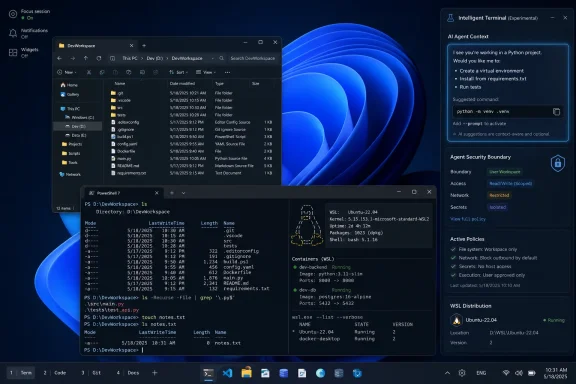
The developer configuration reportedly retunes more than 30 settings. Widgets are off. Notifications are quieted. In-product recommendations are removed or suppressed. File extensions are visible. Hidden files are shown. The taskbar can go where power users expect it to go. Git version control appears in File Explorer. VS Code, GitHub Copilot, WSL, and PowerShell 7 are preconfigured, while PowerToys, Oh My Posh, and Nerd Fonts are installed from the start.Read that list carefully and the pattern becomes obvious: much of the new experience is not “new” in the sense of invention. It is Windows being configured the way many technical users configure it anyway, after they spend their first hour undoing defaults. Microsoft is productizing the ritual of making Windows less irritating.
That is both promising and damning. Promising, because defaults shape perception, and a machine that boots into a calm, legible, developer-friendly setup feels different immediately. Damning, because it validates the complaint that Windows 11’s out-of-box experience has become too noisy for people trying to do serious work.
The delivery mechanisms are revealing as well. Microsoft plans to make the experience available on new OEM developer machines, in Windows 365 Cloud PCs, through a downloadable script for existing Windows 11 systems, and via PowerToys. The per-user nature of the settings also suggests Microsoft understands that this is more like a profile than a platform fork.
That is the right call. A developer-optimized Windows that required a reinstall, a new license, or an enterprise provisioning ceremony would miss the point. The audience Microsoft needs to win back is allergic to ceremony. They expect a scriptable environment, portable preferences, and setup steps that can be inspected rather than trusted on faith.
The Mac and Linux Shadow Is All Over the Announcement
Microsoft executives may not want to frame this as a campaign to win back developers from macOS and Linux, but the product choices do the talking. Native Unix-style utilities in PowerShell are not there for the lifelong Windows administrator who already knows the PowerShell way. They are there for people whose fingers typels, grep, and touch before their brains remember what operating system they are using.The addition of 75 Unix core utilities, based on the Rust uutils project, is one of the clearest signals in the whole announcement. WSL already let developers live in Linux from within Windows. This move acknowledges that constantly crossing the boundary between Windows and Linux is itself a tax. If basic commands work natively in PowerShell, the shell becomes less of a border checkpoint.
That border has always been psychologically expensive. WSL was a breakthrough because it made Windows hospitable to Linux workflows. But it also highlighted the split personality of the platform. Developers could do modern work on Windows, provided they spent much of their time in a subsystem that existed because native Windows had not met them where they were.
The new WSL setup scripts, with familiar tools such as Homebrew, zsh, and Starship, push in the same direction. Microsoft is no longer pretending that developers should adapt themselves to Windows conventions first. It is trying to make Windows feel familiar to developers arriving from elsewhere.
That is strategically wise. The modern developer market is not won by arguing that your platform is philosophically purer. It is won by reducing the number of moments when a developer says, “Why is this different here?” Every jarring mismatch is an opportunity for macOS or Linux to feel like home again.
WSL Has Become Too Important to Remain a Side Quest
The fact that Microsoft open-sourced WSL at Build 2025 now looks less like a goodwill gesture and more like preparation for a broader repositioning. WSL is no longer an accommodation for Linux users trapped on corporate Windows laptops. It is a core pillar of Microsoft’s argument that Windows can be the place where cross-platform development happens.The new Linux containers feature extends that logic. A built-in CLI and API for spinning up Linux containers on Windows without third-party tooling is the kind of capability that speaks directly to backend developers, DevOps engineers, and platform teams. It suggests Microsoft understands that containers are not an optional accessory to modern development; they are part of the mental model.
The real target here is not Docker Desktop as a product, although third-party container tooling will certainly feel the pressure. The larger target is the assumption that container-native development feels more natural on Linux or macOS. If Windows can offer WSL, Linux containers, native Unix utilities, and a sane terminal experience without making developers assemble the pieces themselves, it becomes a more credible default machine.
Still, credibility is earned slowly. Developers remember abandoned initiatives. They remember Windows Store positioning shifts, UWP confusion, Project Reunion branding changes, and the long slog toward a modern app platform. WSL has succeeded in part because it solved a real problem and kept improving. The new developer experience will need the same boring consistency.
That may be Microsoft’s hardest challenge. Build announcements are easy. Five years of maintenance, documentation, bug fixing, and not changing the story every 18 months is the actual test.
Intelligent Terminal Is Microsoft Chasing Warp, But With Windows Gravity
The experimental Intelligent Terminal may be the most symbolically important feature in the Build package. It takes Windows Terminal and adds an agent pane that can observe shell context, understand failed commands, and suggest fixes. Developers can choose agents such as Claude Code, OpenAI’s Codex, or Copilot, or disable the feature entirely.This is obviously aimed at the same developer behavior that made AI-native terminals and coding agents popular. The current workflow is clumsy: a command fails, the developer copies the error, pastes it into a chat window, explains the environment, receives advice, and then returns to the shell. Microsoft is arguing that the terminal should already know enough context to make that loop shorter.
There is a good version of this future. A terminal that can explain obscure compiler failures, suggest missing dependencies, generate safe one-liners, and show its reasoning before execution could save time without turning the command line into a slot machine. The best terminal assistance is not magic; it is situational awareness attached to a place where developers already work.
There is also a bad version. A terminal that nags, guesses, or encourages users to run agent-generated commands they do not understand would be a security and reliability problem disguised as productivity. The command line is powerful precisely because it is close to the system. Putting an agent there raises the stakes.
Microsoft’s decision to ship Intelligent Terminal as an experimental branch is therefore sensible. It lowers the promise from “the future of terminals is here” to “help us figure out whether this belongs here.” That humility is rare in AI product launches, and it should be encouraged.
But the competitive angle is impossible to ignore. Warp helped popularize the idea that the terminal could be redesigned around modern collaboration and AI workflows. Microsoft can now bring a similar idea to the default Windows development story, backed by Windows Terminal’s existing legitimacy and the distribution advantage of the Microsoft Store. If the feature matures, third-party AI terminal vendors will have to justify their polish, model access, and cross-platform value against something Microsoft is effectively folding into the platform.
The Agent Story Is Really a Security Story
No Build keynote in 2026 can escape AI agents, and Microsoft’s Windows announcements are no exception. But the more interesting claim is not that Windows will run agents. It is that Windows can run them with enforceable boundaries, identity, and auditability.Microsoft Execution Containers, or MXC, are the centerpiece of that argument. The idea is to let developers declare what an agent can touch — files, network resources, processes — and have Windows enforce those policies at runtime. The isolation can reportedly range from lightweight process-level containment to full virtual machines and separately managed Cloud PCs.
That framing is important because “agent” is otherwise a dangerously vague word. A coding assistant that suggests a patch is one thing. A local agent that reads files, writes code, installs packages, opens network connections, and invokes tools is something closer to a junior operator with unclear permissions. The moment an agent can act, not merely advise, identity and containment become table stakes.
Microsoft is also assigning agents local IDs or cloud-provisioned Microsoft Entra IDs so their actions can be distinguished from human actions. For enterprises, that may matter more than the model itself. Security teams do not just need to know whether an agent produced a useful result; they need to know what it touched, what it changed, and whether those actions can be reviewed later.
The enterprise logic is strong. If agents become common in software development, IT departments will not want them running as invisible extensions of human users. They will want policy, logs, revocation, and separation of duties. In that sense, MXC fits Microsoft’s traditional strengths: identity, management, compliance, and Windows integration.
The open question is whether developers will see MXC as helpful infrastructure or another Microsoft abstraction to learn. The answer will depend on how well it works outside demos. If it integrates cleanly with existing development tools and imposes little friction, it could become a serious differentiator. If it feels like enterprise middleware wearing an AI badge, developers will route around it.
Local AI Turns the PC Into a Cost Argument
Microsoft’s phrase about making every Windows machine a “token factory” is marketing, but it points to a real economic pressure. Cloud AI usage costs money, adds latency, and can create privacy concerns. Local models are attractive because the marginal token cost feels close to zero once the hardware is already on the desk.At Build, Microsoft expanded its Windows AI APIs beyond the NPU-focused world of Copilot+ PCs to include CPUs and GPUs. That is a necessary correction. The original Copilot+ framing made sense for showcasing new hardware, but it risked making Windows AI feel like a feature gated behind a narrow class of machines. Developers build for the installed base, not just for the newest marketing tier.
The new on-device speech recognition API, broader small-language-model support, and additional local models are part of a larger attempt to make Windows a practical target for AI-enabled applications. Aion 1.0 Instruct is positioned as a smaller and faster model for everyday text tasks, with open weights planned. Aion 1.0 Plan, a 14-billion-parameter reasoning and tool-calling model with a 32K context window, is the more ambitious piece.
That ambition raises hardware questions Microsoft has not fully answered in public. A 14-billion-parameter model is not a trivial payload, and useful local inference depends heavily on quantization, memory bandwidth, GPU availability, and acceptable latency. Shipping a model as part of Windows sounds powerful until users discover the disk, memory, and performance costs on ordinary PCs.
This is where Microsoft must be careful. Windows users are already sensitive to background processes, unexplained storage use, and features that appear through updates without a clear opt-in. If local AI becomes another thing consuming resources on machines that were sold with marginal specifications, the developer goodwill Microsoft is trying to build could evaporate quickly.
The better path is transparency. Let developers know what models are installed, where they run, what hardware they use, and how to disable or redirect them. Local intelligence is compelling when it feels like a capability. It becomes baggage when it feels like a system tax.
The Real Product Is Trust, Not Dark Mode
It is tempting to reduce the developer-optimized Windows experience to a long-overdue pile of quality-of-life fixes. That would be too small. The deeper issue is trust: whether developers believe Microsoft will keep making Windows better for them after the Build applause fades.The skepticism is earned. Windows 11 has often felt like an operating system trying to serve too many masters at once: consumers, advertisers, Xbox users, enterprise administrators, cloud services, AI strategy, Microsoft account growth, and developers. The result has been a system that can be excellent after tuning but oddly presumptuous before tuning.
Developers notice those presumptions. They notice when recommendations appear in places that should be quiet. They notice when settings move. They notice when a machine wakes into prompts about services they did not ask for. They notice when basic customizations disappear and return years later as if they were innovations.
That is why the new configuration matters even when its components seem mundane. Turning off distractions is a philosophical choice. Making file extensions visible is a signal about who the machine is for. Supporting Unix commands in PowerShell is an acknowledgment that developer workflows are plural, not subordinate to Windows tradition.
But trust will not be restored by configuration alone. Microsoft must show that the calm developer experience is not a side lane while the main consumer Windows experience continues accumulating interruptions. If the developer mode becomes the escape hatch for people who know where to find it, Windows will still have a broader quality problem.
Enterprise IT Will Like the Direction and Fear the Details
For sysadmins, the announcements land differently. A preconfigured developer setup could reduce onboarding time, especially for teams that already standardize on VS Code, GitHub, WSL, PowerShell, and Windows 365. A Cloud PC image with development defaults is attractive for contractors, secure projects, and fast-scaling engineering teams.At the same time, IT departments will want governance. Which settings are changed? Which tools are installed? Which components update independently? How are WSL distributions managed? What happens when agent integrations are enabled on regulated endpoints? Can MXC policies be centrally defined, audited, and enforced?
The per-user nature of the developer configuration is a double-edged sword. It is friendly to individual developers and avoids stomping on shared machine settings. But enterprise administrators will want a way to express the same intent through policy, provisioning, and compliance tooling. A script is useful; a managed baseline is better.
The agent runtime story will require particular scrutiny. If an AI coding agent has its own identity and containment, that is a strong foundation. But enterprises will need clear answers about data flows, model providers, logs, local versus cloud execution, and how exceptions are handled. A safe agent platform is not defined by a keynote architecture diagram. It is defined by what happens when a developer tries to do something risky on a Friday afternoon.
Microsoft has an advantage here because enterprise IT already lives in its identity and management stack. If agent identities map naturally into Entra, if policies can be expressed through familiar tools, and if audit trails are readable rather than ornamental, Windows could become a genuinely attractive agent execution environment. If not, organizations will treat the features as experiments to disable until proven otherwise.
Developers Want Familiarity, But They Also Want Taste
One of the more revealing lines from Microsoft’s pitch is the emphasis on respecting muscle memory. That is exactly right. Developers are often willing to learn hard things, but they have little patience for arbitrary differences that slow them down without offering power in return.The Unix utilities, terminal improvements, shell customization, and WSL enhancements all speak to familiarity. They make Windows less alien for developers who have spent years in macOS or Linux environments. They also make Windows less annoying for Windows-first developers who still work across platforms.
But familiarity is not the whole story. Developers also respond to taste — the sense that a platform’s stewards understand what should be simple, what should be configurable, and what should be left alone. Apple has benefited from that perception even when macOS has its own developer frustrations. Linux benefits from a different kind of taste: transparency, composability, and control.
Windows has often struggled here because it is so many products at once. It must be friendly to novices, manageable by enterprises, compatible with old software, attractive to gamers, profitable for Microsoft services, and credible to developers. That complexity is real, but it does not excuse clutter.
The developer-optimized experience suggests Microsoft knows taste has become a competitive issue. A calm desktop, a capable shell, native-feeling tools, visible file extensions, and fewer interruptions are not luxuries. They are the texture of professional software work. They tell the user the machine is on their side.
Microsoft Is Bundling the Future Into the Workbench
There is a strategic bundle hiding in the Build announcements. Microsoft is not merely improving Windows for developers. It is connecting the developer workstation, AI coding agents, local inference, cloud PCs, identity, containers, and Windows app development into a single story.That story goes like this: use Windows as your primary machine; configure it instantly for development; run Linux where needed; use a smarter terminal; let agents assist you safely; build native Windows apps with structured context; run local models when possible; scale into Windows 365 or Azure when necessary. It is a full-stack argument for Windows as the control plane of modern development.
That is ambitious, and it is more coherent than many past Windows developer pitches. Instead of asking developers to embrace a single app framework or packaging model, Microsoft is building around workflows. The operating system becomes valuable because it hosts the tools developers already use while adding security, identity, and AI capabilities around them.
The risk is that the bundle becomes too Microsoft-shaped. Developers may welcome VS Code and WSL but resist Copilot defaults. They may like local models but prefer non-Microsoft agents. They may appreciate MXC while building for AWS or Google Cloud. The more Windows feels like an open workbench, the better this strategy works. The more it feels like a funnel, the faster developers will recoil.
The early signs are mixed but encouraging. Allowing multiple agents in Intelligent Terminal is the right move. Basing Unix utilities on an open-source Rust project is the right move. Making Aion Instruct available with open weights is the right move. Those choices suggest Microsoft understands that developer love cannot be extracted through lock-in alone.
The Build 2026 Pitch Lives or Dies in the First Fifteen Minutes
The practical test for all of this will be brutally simple: what happens when a developer signs into a new Windows machine? If the answer is still “dismiss prompts, remove widgets, install tools, fix Explorer, configure the shell, disable noise, and then start working,” the announcement will have failed. If the answer is “open the terminal and build,” Microsoft will have changed the emotional baseline.That baseline matters more than any one AI feature. Developers are not short of AI announcements. They are short of environments that feel fast, predictable, scriptable, and respectful. The new Windows 11 developer experience is important because it targets that emotional reality directly.
There are five concrete things to watch as this rolls out:
- Microsoft is treating developer calm as a default configuration problem, not merely a documentation problem.
- Native Unix-style utilities in PowerShell are a direct attempt to reduce the macOS and Linux muscle-memory gap.
- Intelligent Terminal will be useful only if it remains assistive, inspectable, and easy to disable.
- Microsoft Execution Containers could become a serious enterprise differentiator if agent identity and policy enforcement work cleanly in practice.
- Local AI models on Windows will need transparent hardware requirements and resource controls to avoid becoming another source of user resentment.
References
- Primary source: The New Stack
Published: Tue, 02 Jun 2026 17:57:36 GMT
Microsoft really, really, really wants developers to love Windows again
Microsoft Build 2026 brings Windows 11 a developer mode with dark mode on by default, Unix utilities in PowerShell, an AI terminal, and on-device Aion models. thenewstack.io
- Related coverage: windowscentral.com
How to watch Microsoft Build 2026: Windows 11, NVIDIA RTX Spark, AI agents, and more | Windows Central
Build isn't just some boring developer conference. It showcases the future of Windows and computing.www.windowscentral.com - Related coverage: techradar.com
10 products that launched at Microsoft Build — and what happened to them | TechRadar
From Windows 8 to Copilot, here’s everything that was born at Buildwww.techradar.com - Official source: blogs.windows.com
Build 2026: Furthering Windows as the trusted platform for development
Build is one of our favorite moments each year - a chance to connect with the global developer community and share what we’ve been building. Over the past year, we have connected with many developers pushing the boundaries of what’s possible onblogs.windows.com - Official source: learn.microsoft.com
Settings for developers | Microsoft Learn
Activate Developer Mode on your PC to develop apps.learn.microsoft.com - Official source: developer.microsoft.com
Windows | Microsoft Developer
Leverage our tools and resources to tap into the expansive Windows user base.developer.microsoft.com
- Official source: news.microsoft.com
Microsoft Build 2026: esprimere se stessi al lavoro - Source EMEA
Di Kyle Daigle, COO, GitHub and CMO of Developer, Microsoft Le piattaforme evolvono quando a costruirle sono gli sviluppatori. Sono loro a esplorare, scegliere gli strumenti, immaginare, creare. Questa evoluzione porta con sé più informazioni che mai, disponibili a portata di mano...news.microsoft.com - Related coverage: phoronix.com
Microsoft Announces Open-Source "Intelligent Terminal" - Phoronix
Microsoft today announced their newest open-source creation..www.phoronix.com
- Related coverage: redmondmag.com
Microsoft Uses Build 2026 To Put AI Agents at the Center of Windows -- Redmondmag.com
Microsoft used Build 2026 to position Windows as a platform for building and running AI agents, expanding its developer focus beyond AI-assisted apps and into agents that can act across local devices, cloud environments and enterprise systems.redmondmag.com - Official source: support.microsoft.com
Windows Execution Provider components - Microsoft Support
 support.microsoft.com
- Official source: devblogs.microsoft.com
Announcing Intelligent Terminal 0.1 - Windows Command Line
Today we're announcing Intelligent Terminal version 0.1, an open-source experimental fork of Windows Terminal with native agent integration. Get starteddevblogs.microsoft.com - Related coverage: thewincentral.com
Developer-Optimized Windows 11 Experience Announced at Build 2026 - WinCentral
Microsoft unveils a developer-optimized Windows 11 experience with AI tools, WSL Containers, Coreutils, and secure agent technologies at Build 2026. - Read in Latest News on WinCentral thewincentral.com
- Related coverage: tomshardware.com
Microsoft promises to make Windows 11 the best operating system for gaming — says it will focus on background workloads, power and scheduling, graphics stack, and drivers | Tom's Hardware
We’re committed to making Windows the best place to playwww.tomshardware.com
