

Microsoft began rolling out Windows 11 Experimental Preview Build 26300.8493 on May 15, 2026, giving Windows Insiders the ability to place the taskbar at the bottom, top, left, or right edge of the screen and to enable a genuinely smaller taskbar. That sounds like a small settings change until you remember what Windows 11 took away at launch. The taskbar was not merely redesigned in 2021; it was narrowed, centralized, and stripped of habits that millions of Windows users had built over decades. Microsoft is now admitting, in the slow language of Insider builds, that the clean-slate taskbar was too clean for its own good.
The new taskbar controls are not yet a general Windows 11 update, and they are not even guaranteed to arrive unchanged. They are in the Experimental channel, Microsoft’s early-preview lane for features that may shift, stall, or disappear before production. But their existence matters because this is no longer a registry hack, a third-party Start menu workaround, or a “maybe someday” answer in a feedback thread.
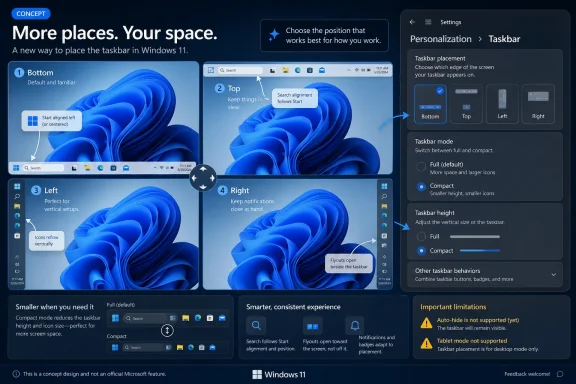
Users can now choose the taskbar edge from Settings, placing it at the bottom, top, left, or right. Microsoft says the supporting interface elements — Start, Search, tooltips, flyouts, and animations — are supposed to open relative to the chosen taskbar position. That last clause is the real engineering work, because a vertical taskbar is not just a horizontal taskbar rotated ninety degrees; every adjacent UI surface has to know where it lives.
The company is also adding alignment controls. A vertical taskbar can place icons toward the top or keep them centered, while a horizontal taskbar can keep them left-aligned or centered. That means Microsoft is not merely restoring the old Windows 10 behavior in the most literal sense; it is trying to reconcile the centered Windows 11 aesthetic with the workstation logic of older Windows desktops.
The smaller taskbar option is similarly more meaningful than the label suggests. Earlier Windows 11 preview work had reduced icon size without fully giving users back the denser bar they remembered. This new setting reduces both icons and taskbar height, making it closer to the old “small taskbar buttons” behavior that mattered on laptops, virtual machines, remote desktops, and any display where every vertical pixel has a job.
That distinction matters because Windows is not an appliance OS. It lives on ultrawide monitors, tiny notebooks, trading desks, classrooms, kiosks, gaming rigs, remote admin consoles, and enterprise fleets where “default” is rarely the same as “correct.” A taskbar on the left edge of a widescreen monitor can be a rational use of space. A smaller taskbar on a 13-inch laptop can be the difference between seeing one more row in Excel and constantly scrolling.
When Windows 11 launched, Microsoft also removed or delayed other familiar taskbar behaviors, including the ability to ungroup taskbar buttons and show labels. Those features eventually returned, but the pacing was telling. The company spent years rebuilding capabilities that had already existed, while users filled the gap with Start11, ExplorerPatcher, StartAllBack, registry edits, and a small cottage industry of “make Windows 11 behave like Windows again” utilities.
That is why the movable taskbar’s return carries emotional weight beyond the feature itself. Windows users are used to change, but they are less forgiving when change feels like the removal of agency. A desktop operating system can be opinionated, but when it becomes prescriptive about muscle memory, it starts to feel less like a platform and more like a showroom.
But from the user’s side, the engineering explanation never fully resolved the product problem. If Microsoft chose to ship a new taskbar before it could match the old one’s basic flexibility, then the missing features were not an unfortunate accident. They were part of the launch trade-off.
That trade-off aged poorly because Windows 11 did not arrive as a radical simplification of computing. It arrived as Windows, with the same Win32 apps, the same enterprise management needs, the same registry, the same shell heritage, and the same users who expected to put things where they wanted them. The more familiar the rest of the OS remained, the stranger the taskbar’s inflexibility looked.
The new Experimental build is therefore less a dramatic innovation than a repayment plan. Microsoft is restoring options that many users never accepted as optional. The company can frame this as listening to feedback, and that is fair enough, but it is also cleaning up a design debt incurred when Windows 11 prioritized polish over completeness.
A compact taskbar is not just about aesthetics. It creates more room for applications, reduces wasted chrome, and makes Windows feel less like it is reserving a strip of the display for itself. On small screens, that matters immediately; on large screens, it helps users who prefer dense layouts and lower visual friction.
The important detail is that Microsoft says this version reduces taskbar height as well as icon size. That is the difference between a cosmetic toggle and a functional one. A smaller icon inside the same oversized taskbar is not a compact mode; it is a visual mismatch. A shorter taskbar, by contrast, gives screen real estate back to the user.
The setting also does not require a restart or sign-out, which is how this kind of preference should work in 2026. Windows has too often treated shell changes as if they were infrastructure migrations. If Microsoft wants users to experiment with layout, density, and placement, those changes need to feel reversible and immediate.
Those omissions show why the feature took time and why it may still take more. A bottom taskbar is the path of least resistance for modern Windows shell design. Move it to the side and suddenly every assumption has to be tested: where the Start menu opens, how previews animate, how touch targets behave, how notification overflow works, and whether accessibility tooling reads the layout correctly.
For desktop traditionalists, the missing auto-hide support may sting most. Auto-hide and vertical placement often belong to the same class of user: someone trying to maximize workspace and minimize shell intrusion. A vertical taskbar without auto-hide is useful, but it is not the full return of classic flexibility.
For tablet and convertible users, the gap is different. Windows 11 has spent years trying to look more comfortable on touch devices without becoming Windows 8 again. A movable taskbar that does not yet mesh with touch gestures is a reminder that the desktop and tablet personalities of Windows still do not always evolve together.
That renaming is not trivial because Windows 11’s Start menu has long suffered from a trust problem. Users are more tolerant of local recency than opaque recommendation. A section that shows what you just installed or opened can be useful. A section that appears to mix usefulness, cloud suggestions, and Microsoft’s product priorities invites suspicion.
Giving users separate toggles is part of the same larger correction as the taskbar work. Microsoft is conceding that personalization cannot stop at wallpaper and accent colors. If Start is the launch surface and the taskbar is the persistent surface, both need to respect the user’s workflow instead of forcing everyone into a single house style.
Still, this is Microsoft, so skepticism is warranted. Windows 11 has repeatedly mixed genuine usability improvements with nudges toward Microsoft accounts, Edge, Bing, Widgets, Copilot, and cloud surfaces. The more control Microsoft gives users over Start and taskbar layout, the more visible any remaining promotional behavior becomes.
That matters for users tempted to jump into Experimental just to get a vertical or smaller taskbar. Insider builds are not merely early access; they are test environments. Microsoft explicitly reserves the right to change, remove, or never ship features that appear there. A machine you rely on for work should not be treated as a theme park ride for shell features.
The build itself is based on Windows 11 version 25H2 via an enablement package, with the Experimental build number 26300.8493. That versioning detail is useful because it places the taskbar work inside Microsoft’s broader 2026 Insider reshuffling, where channel names and build lines are changing. In other words, this is part of a larger preview-program transition, not a clean public release milestone.
For enthusiasts, that is manageable. For IT departments, it is another reason to wait for a stable channel and policy documentation. Custom taskbar positions sound like personal preference, but in managed environments, shell consistency affects training, support scripts, screenshots, help desk workflows, and user expectation.
Windows 10-era taskbar customization had years of institutional knowledge behind it. Windows 11 reset much of that practical memory. If Microsoft is now restoring flexibility, it needs to provide management surfaces that match the feature’s importance, not merely consumer-facing Settings toggles.
There is also a support angle around alternate positions. A vertical taskbar changes the location of Start, Search, system tray, notification affordances, and running apps. That can be wonderful for power users and maddening for help desks walking nontechnical users through a problem over the phone. The freedom is good; the administrative story determines whether it scales.
The same is true for the smaller taskbar. In a fleet of mixed display sizes, compact mode may be a quality-of-life improvement. In accessibility-sensitive environments, it may create smaller targets that are inappropriate for some users. Microsoft’s challenge is to make the feature flexible without turning it into another setting that enterprises have to chase reactively.
But third-party tools have never survived on one missing toggle alone. They offer deeper Start menu layouts, richer right-click behavior, classic Explorer affordances, configurable search experiences, and a level of shell control Microsoft is unlikely to expose. If anything, Microsoft’s slow restoration of individual features may clarify the difference between “I need the old taskbar position” and “I want a fundamentally different Windows shell.”
There is also a trust dimension. Some users moved to third-party tools because Microsoft removed features they depended on. Even if Microsoft brings those features back, those users may not immediately return to stock Windows. The lesson they learned was not merely that Windows 11 lacked a setting; it was that Microsoft was willing to remove one.
That is the reputational cost of redesign by subtraction. Restoring the feature repairs the product, but it does not automatically repair confidence. Power users remember how long they had to wait.
Those goals are not mutually exclusive, but Windows 11 often behaved as if they were. It confused fewer visible options with better design. It assumed that cleaning up the interface meant taking decisions away, rather than organizing them so ordinary users are not overwhelmed and advanced users are not blocked.
The new taskbar controls suggest a healthier model. Keep the default simple. Let the default remain centered, bottom-aligned, and visually modern. But do not pretend that the default is the only legitimate workflow.
This is especially important as Windows becomes more service-driven. The more Microsoft adds cloud search, AI surfaces, widgets, recommendations, account prompts, and ambient notification experiences, the more users need confidence that the desktop still belongs to them. Taskbar placement is a small arena for a much larger question: who gets final say over the shape of the workspace?
Microsoft’s movable and smaller taskbar is late, unfinished, and still fenced inside preview builds, but it is also a welcome correction to one of Windows 11’s most unnecessary self-inflicted wounds. If the company follows through into stable releases, with proper management controls and fewer arbitrary exclusions, this could mark a quieter but more important shift in Windows design: not a retreat to the past, but a renewed willingness to let the desktop be shaped by the people who actually use it.
Source: VideoCardz.com https://videocardz.com/newz/microso...1-users-move-the-taskbar-and-make-it-smaller/
 Microsoft Finally Reopens a Door It Nailed Shut
The new taskbar controls are not yet a general Windows 11 update, and they are not even guaranteed to arrive unchanged. They are in the Experimental channel, Microsoft’s early-preview lane for features that may shift, stall, or disappear before production. But their existence matters because this is no longer a registry hack, a third-party Start menu workaround, or a “maybe someday” answer in a feedback thread.Users can now choose the taskbar edge from Settings, placing it at the bottom, top, left, or right. Microsoft says the supporting interface elements — Start, Search, tooltips, flyouts, and animations — are supposed to open relative to the chosen taskbar position. That last clause is the real engineering work, because a vertical taskbar is not just a horizontal taskbar rotated ninety degrees; every adjacent UI surface has to know where it lives.
The company is also adding alignment controls. A vertical taskbar can place icons toward the top or keep them centered, while a horizontal taskbar can keep them left-aligned or centered. That means Microsoft is not merely restoring the old Windows 10 behavior in the most literal sense; it is trying to reconcile the centered Windows 11 aesthetic with the workstation logic of older Windows desktops.
The smaller taskbar option is similarly more meaningful than the label suggests. Earlier Windows 11 preview work had reduced icon size without fully giving users back the denser bar they remembered. This new setting reduces both icons and taskbar height, making it closer to the old “small taskbar buttons” behavior that mattered on laptops, virtual machines, remote desktops, and any display where every vertical pixel has a job.
The Windows 11 Taskbar Was Always a Productivity Argument
The fight over the Windows 11 taskbar was never really about nostalgia. It was about whether the operating system should assume that most people work the same way. Microsoft bet that a simplified, centered, visually consistent taskbar would make Windows 11 feel modern; many longtime users saw the same move as an avoidable regression dressed up as design discipline.That distinction matters because Windows is not an appliance OS. It lives on ultrawide monitors, tiny notebooks, trading desks, classrooms, kiosks, gaming rigs, remote admin consoles, and enterprise fleets where “default” is rarely the same as “correct.” A taskbar on the left edge of a widescreen monitor can be a rational use of space. A smaller taskbar on a 13-inch laptop can be the difference between seeing one more row in Excel and constantly scrolling.
When Windows 11 launched, Microsoft also removed or delayed other familiar taskbar behaviors, including the ability to ungroup taskbar buttons and show labels. Those features eventually returned, but the pacing was telling. The company spent years rebuilding capabilities that had already existed, while users filled the gap with Start11, ExplorerPatcher, StartAllBack, registry edits, and a small cottage industry of “make Windows 11 behave like Windows again” utilities.
That is why the movable taskbar’s return carries emotional weight beyond the feature itself. Windows users are used to change, but they are less forgiving when change feels like the removal of agency. A desktop operating system can be opinionated, but when it becomes prescriptive about muscle memory, it starts to feel less like a platform and more like a showroom.
Five Years Later, the Design Debt Comes Due
Microsoft’s delay was not necessarily laziness. Windows 11’s taskbar was substantially rebuilt, and the company has repeatedly implied that alternate taskbar positions were more complicated than flipping an old switch. The difficulty is believable: system trays, notification areas, flyouts, jump lists, live previews, window grouping, touch affordances, Widgets, Copilot entry points, and Search all have placement assumptions baked into them.But from the user’s side, the engineering explanation never fully resolved the product problem. If Microsoft chose to ship a new taskbar before it could match the old one’s basic flexibility, then the missing features were not an unfortunate accident. They were part of the launch trade-off.
That trade-off aged poorly because Windows 11 did not arrive as a radical simplification of computing. It arrived as Windows, with the same Win32 apps, the same enterprise management needs, the same registry, the same shell heritage, and the same users who expected to put things where they wanted them. The more familiar the rest of the OS remained, the stranger the taskbar’s inflexibility looked.
The new Experimental build is therefore less a dramatic innovation than a repayment plan. Microsoft is restoring options that many users never accepted as optional. The company can frame this as listening to feedback, and that is fair enough, but it is also cleaning up a design debt incurred when Windows 11 prioritized polish over completeness.
The Smaller Taskbar Is the Quietly Bigger Win
Moving the taskbar will get the attention because it is visible and symbolic. The smaller taskbar may have the broader day-to-day impact. For many users, especially laptop owners, the default Windows 11 taskbar has always felt too tall for the amount of information it carries.A compact taskbar is not just about aesthetics. It creates more room for applications, reduces wasted chrome, and makes Windows feel less like it is reserving a strip of the display for itself. On small screens, that matters immediately; on large screens, it helps users who prefer dense layouts and lower visual friction.
The important detail is that Microsoft says this version reduces taskbar height as well as icon size. That is the difference between a cosmetic toggle and a functional one. A smaller icon inside the same oversized taskbar is not a compact mode; it is a visual mismatch. A shorter taskbar, by contrast, gives screen real estate back to the user.
The setting also does not require a restart or sign-out, which is how this kind of preference should work in 2026. Windows has too often treated shell changes as if they were infrastructure migrations. If Microsoft wants users to experiment with layout, density, and placement, those changes need to feel reversible and immediate.
The Catch Is Written in the Unsupported Cases
This is still preview software, and the limitations are not minor. Microsoft says auto-hide is not yet supported in alternate taskbar positions. The tablet-optimized taskbar is also not supported there. Touch gestures are still being worked on, and Search boxes do not appear in alternate positions for now, with Windows falling back to a Search icon.Those omissions show why the feature took time and why it may still take more. A bottom taskbar is the path of least resistance for modern Windows shell design. Move it to the side and suddenly every assumption has to be tested: where the Start menu opens, how previews animate, how touch targets behave, how notification overflow works, and whether accessibility tooling reads the layout correctly.
For desktop traditionalists, the missing auto-hide support may sting most. Auto-hide and vertical placement often belong to the same class of user: someone trying to maximize workspace and minimize shell intrusion. A vertical taskbar without auto-hide is useful, but it is not the full return of classic flexibility.
For tablet and convertible users, the gap is different. Windows 11 has spent years trying to look more comfortable on touch devices without becoming Windows 8 again. A movable taskbar that does not yet mesh with touch gestures is a reminder that the desktop and tablet personalities of Windows still do not always evolve together.
Start Menu Changes Show Microsoft Is Still Renaming the Furniture
The same Insider update also adjusts the Start menu, adding separate toggles for Pinned, Recommended, and All sections. Microsoft is also renaming Recommended to Recent, a small change that reveals how awkward the original label had become. “Recommended” suggested judgment or promotion; “Recent” more accurately describes recently installed apps and recently opened files.That renaming is not trivial because Windows 11’s Start menu has long suffered from a trust problem. Users are more tolerant of local recency than opaque recommendation. A section that shows what you just installed or opened can be useful. A section that appears to mix usefulness, cloud suggestions, and Microsoft’s product priorities invites suspicion.
Giving users separate toggles is part of the same larger correction as the taskbar work. Microsoft is conceding that personalization cannot stop at wallpaper and accent colors. If Start is the launch surface and the taskbar is the persistent surface, both need to respect the user’s workflow instead of forcing everyone into a single house style.
Still, this is Microsoft, so skepticism is warranted. Windows 11 has repeatedly mixed genuine usability improvements with nudges toward Microsoft accounts, Edge, Bing, Widgets, Copilot, and cloud surfaces. The more control Microsoft gives users over Start and taskbar layout, the more visible any remaining promotional behavior becomes.
The Insider Channel Is a Promise With an Escape Clause
The most important practical warning is simple: this is not shipping to everyone today. It is rolling out to Windows Insiders in the Experimental channel, and Microsoft is using controlled feature rollout mechanisms. Even people on the right build may not see the same set of toggles at the same time.That matters for users tempted to jump into Experimental just to get a vertical or smaller taskbar. Insider builds are not merely early access; they are test environments. Microsoft explicitly reserves the right to change, remove, or never ship features that appear there. A machine you rely on for work should not be treated as a theme park ride for shell features.
The build itself is based on Windows 11 version 25H2 via an enablement package, with the Experimental build number 26300.8493. That versioning detail is useful because it places the taskbar work inside Microsoft’s broader 2026 Insider reshuffling, where channel names and build lines are changing. In other words, this is part of a larger preview-program transition, not a clean public release milestone.
For enthusiasts, that is manageable. For IT departments, it is another reason to wait for a stable channel and policy documentation. Custom taskbar positions sound like personal preference, but in managed environments, shell consistency affects training, support scripts, screenshots, help desk workflows, and user expectation.
Enterprise IT Will Care Less About Nostalgia Than Supportability
In business environments, the return of taskbar placement will be welcomed only if it can be controlled, documented, and deployed predictably. Administrators do not want a thousand bespoke desktops unless they have intentionally allowed them. They want to know whether these settings roam, whether they can be enforced, whether they break after feature updates, and whether they interact cleanly with existing Start and taskbar layout policies.Windows 10-era taskbar customization had years of institutional knowledge behind it. Windows 11 reset much of that practical memory. If Microsoft is now restoring flexibility, it needs to provide management surfaces that match the feature’s importance, not merely consumer-facing Settings toggles.
There is also a support angle around alternate positions. A vertical taskbar changes the location of Start, Search, system tray, notification affordances, and running apps. That can be wonderful for power users and maddening for help desks walking nontechnical users through a problem over the phone. The freedom is good; the administrative story determines whether it scales.
The same is true for the smaller taskbar. In a fleet of mixed display sizes, compact mode may be a quality-of-life improvement. In accessibility-sensitive environments, it may create smaller targets that are inappropriate for some users. Microsoft’s challenge is to make the feature flexible without turning it into another setting that enterprises have to chase reactively.
Third-Party Shell Tools Just Lost Some Leverage, Not Their Reason to Exist
The return of these features will not kill the custom Start menu ecosystem. It will, however, remove one of the easiest sales pitches those tools had. For years, the argument was blunt: install this utility if you want Windows 11 to stop fighting your taskbar preferences.But third-party tools have never survived on one missing toggle alone. They offer deeper Start menu layouts, richer right-click behavior, classic Explorer affordances, configurable search experiences, and a level of shell control Microsoft is unlikely to expose. If anything, Microsoft’s slow restoration of individual features may clarify the difference between “I need the old taskbar position” and “I want a fundamentally different Windows shell.”
There is also a trust dimension. Some users moved to third-party tools because Microsoft removed features they depended on. Even if Microsoft brings those features back, those users may not immediately return to stock Windows. The lesson they learned was not merely that Windows 11 lacked a setting; it was that Microsoft was willing to remove one.
That is the reputational cost of redesign by subtraction. Restoring the feature repairs the product, but it does not automatically repair confidence. Power users remember how long they had to wait.
The Real Test Is Whether Microsoft Stops Treating Choice as Clutter
The broader Windows 11 story has been a tug-of-war between simplicity and control. Microsoft wants an operating system that looks coherent in marketing images, works across input modes, and can carry new services like Copilot without feeling bolted together. Users want an operating system that gets out of the way, especially when they already know how they like to work.Those goals are not mutually exclusive, but Windows 11 often behaved as if they were. It confused fewer visible options with better design. It assumed that cleaning up the interface meant taking decisions away, rather than organizing them so ordinary users are not overwhelmed and advanced users are not blocked.
The new taskbar controls suggest a healthier model. Keep the default simple. Let the default remain centered, bottom-aligned, and visually modern. But do not pretend that the default is the only legitimate workflow.
This is especially important as Windows becomes more service-driven. The more Microsoft adds cloud search, AI surfaces, widgets, recommendations, account prompts, and ambient notification experiences, the more users need confidence that the desktop still belongs to them. Taskbar placement is a small arena for a much larger question: who gets final say over the shape of the workspace?
The Build That Finally Says “Your Desktop” Again
This preview does not finish the job, but it changes the direction of travel. The practical facts are straightforward, and they matter precisely because the feature has been missing for so long.- Windows 11 Experimental Preview Build 26300.8493 began rolling out on May 15, 2026, with alternate taskbar placement for the bottom, top, left, and right edges of the screen.
- The smaller taskbar option now reduces both icon size and taskbar height, making it more useful than earlier compact-icon behavior.
- Alternate positions currently have limitations, including no auto-hide support, no tablet-optimized taskbar support, unfinished touch gesture support, and Search icon fallback where the full Search box is unavailable.
- The update also brings Start menu controls for Pinned, Recent, and All sections, with Recommended being renamed to Recent.
- The feature is in the Experimental channel and subject to controlled rollout, so it should not be treated as a production guarantee or a reason to move a primary work PC onto Insider builds.
Microsoft’s movable and smaller taskbar is late, unfinished, and still fenced inside preview builds, but it is also a welcome correction to one of Windows 11’s most unnecessary self-inflicted wounds. If the company follows through into stable releases, with proper management controls and fewer arbitrary exclusions, this could mark a quieter but more important shift in Windows design: not a retreat to the past, but a renewed willingness to let the desktop be shaped by the people who actually use it.
Source: VideoCardz.com https://videocardz.com/newz/microso...1-users-move-the-taskbar-and-make-it-smaller/
