

Paul Thurrott said on June 23, 2026, that the next Windows 11 Field Guide update has shifted from a planned mini-edition for Windows 11 version 25H2 into a broader cleanup of the existing book, shrinking it below 103 MB and 985 pages. The news is not merely that a Windows book got shorter. It is that one of the Windows ecosystem’s longest-running independent reference projects is being forced to adapt to the same reality confronting users and IT departments: Windows 11 is no longer a single annual event, but a moving target with overlapping versions, feature rollouts, servicing branches, and hardware-specific wrinkles.
The interesting part is not the page count by itself, impressive as the drop is. It is the admission that the old method—waiting for a clean edition boundary, redesigning the format, then trying to impose order on Microsoft’s release cadence—was losing to the operating system’s own sprawl. Thurrott’s reset is a small publishing update with a larger Windows lesson hiding inside it: the only sane way to document modern Windows is to refactor continuously.
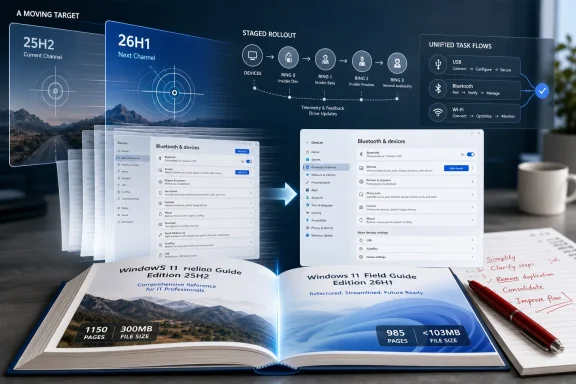
The headline number is tidy: the Windows 11 Field Guide has fallen from a former high of more than 300 MB and over 1,150 pages to under 103 MB and 985 pages. That kind of reduction would be notable for any technical book, but it is especially telling for a Windows 11 reference, where entropy is usually the default direction. Every settings pane Microsoft moves, every inbox app it redesigns, every Copilot integration it experiments with, and every feature it ships behind staged rollout logic tends to add explanatory weight.
Thurrott’s original plan was to publish an in-progress, redesigned, shorter subset focused on “what’s new in Windows 11 version 25H2.” That would have been a familiar move in the Windows-writing business: identify the next named release, wrap the coverage around it, and turn the edition boundary into a publishing boundary. But the plan slipped from April into May and then into June, at which point he abandoned the mini-edition and returned to the existing book.
That sounds like a retreat. It may actually be the more modern decision. Windows 11’s named versions still matter for support, deployment, and IT planning, but they no longer map neatly onto user experience. Features arrive through cumulative updates, app updates, Microsoft Store refreshes, cloud-controlled enablement, and hardware-dependent releases. A book that waits for the next grand edition risks being out of date in the places readers actually notice.
The result is that editing becomes architecture. Removing stale content, merging thin chapters, and replacing old screenshots are not cosmetic chores. They are the work of rebuilding a reference around how Windows now behaves: less like a boxed operating system and more like a serviced platform with a user interface attached.
A field guide does something different. It translates the product as users encounter it.
That distinction has become more important as Windows has become more layered. A sysadmin may need Microsoft’s release health dashboard to understand whether an upgrade block applies to a fleet. A power user may need an independent guide to understand why a setting moved, why a feature appears on one PC but not another, or why the same Start menu behaves differently after a monthly update. The official record and the practical map are not competitors; they solve different problems.
Thurrott’s book has always sat in that second category. Its value is not that it reproduces every Microsoft support page. Its value is that it gives shape to the experience of using Windows. That is why the shrinking of the book is more than an author’s housekeeping note. A reference that gets shorter while becoming more current is doing the hard work of deciding what no longer deserves reader attention.
Technical books often decay by accumulation. Old sections remain because deleting them feels risky. Screenshots stay because replacing them is tedious. Legacy explanations persist because they once solved a real problem. Eventually, the reader pays the price: more pages, more friction, and less confidence that the chapter in front of them reflects the machine on their desk.
But modern Windows version numbers are increasingly poor proxies for the work users care about. Version 25H2 shared much of its platform foundation with 24H2, while Microsoft continued to deliver changes through a mixture of enablement, staged feature rollouts, and monthly servicing. By 2026, Microsoft’s Windows versioning story had become even more bifurcated, with 26H1 emerging as a targeted, hardware-optimized release rather than the ordinary upgrade path for most existing PCs.
That makes a “what’s new in version X” book harder to write than the title implies. What is new because the OS version changed? What is new because Microsoft lit up a feature through controlled rollout? What is new because an inbox app updated? What is new only on new silicon? Those are not academic distinctions for administrators trying to support real users.
A traditional book edition wants a stable boundary. Windows now offers several unstable ones.
Thurrott’s reset tacitly acknowledges this. Instead of building a smaller book around a single release label, he is reducing the main body of the guide by consolidating areas of Windows that readers experience as unified tasks. Hardware devices are now treated together rather than spread across separate USB, Bluetooth, keyboard, mouse, and related chapters. Internet connectivity replaces separate treatments of Wi-Fi, Ethernet, cellular data, airplane mode, and mobile hotspot.
That is not just slimming. It is a choice to organize around user intent rather than Microsoft taxonomy.
The same logic applies to connectivity. Wi-Fi, Ethernet, cellular data, airplane mode, and mobile hotspot all have distinct technologies behind them, but Windows increasingly presents them through common settings surfaces and common network-state assumptions. Splitting each into a separate chapter can make sense for a deep protocol manual. For a field guide, it can force readers to assemble the larger picture themselves.
This is where technical writing resembles software maintenance. A codebase with too many single-purpose modules can be clean in theory and painful in practice. A book with too many narrowly scoped chapters can have the same problem. The user’s path through the material starts to reflect the author’s historical accretion rather than the product’s current shape.
The risk, of course, is that consolidation can become oversimplification. A sysadmin diagnosing Bluetooth driver failures does not want a breezy consumer overview. A user trying to share a cellular connection through mobile hotspot needs specifics. But the answer is not necessarily more chapters. It is better hierarchy inside fewer chapters, with sharper transitions and less duplication.
Thurrott’s update suggests he has reached that conclusion the hard way. He spent months looking for a new layout that would shrink the book without reducing its value. In the end, the more powerful lever was not page design. It was editorial structure.
That promise is increasingly fragile. Settings pages are reorganized, icons change, banners appear and disappear, Microsoft account prompts vary by region and edition, and feature availability depends on rollout state. A screenshot can become misleading long before a paragraph becomes false. Worse, screenshots bloat PDFs, especially when a book is image-heavy and covers the operating system at consumer-friendly depth.
Thurrott mentions “slimmer new screenshots” almost in passing, but that may be one of the most important practical changes. Reducing image weight is an obvious way to shrink a PDF, yet replacing screenshots also forces the author to revisit assumptions. If a settings page changed, the surrounding explanation may need changing too. If a feature was removed, buried, or replaced, the screenshot becomes the tripwire that exposes the stale text.
This is why the book’s file-size reduction matters alongside the page count. A 300 MB PDF is not merely inconvenient. It is a signal that the book has become heavy as an artifact, not just long as a text. It is harder to download, harder to sync, harder to search on some devices, and harder to treat as a living reference. A smaller file is more likely to be used.
For readers who live in documentation all day, that sounds mundane. But mundane usability is what determines whether a reference remains part of a workflow or becomes an archive folder souvenir.
But the per-year edition should probably be the output of continuous maintenance, not the mechanism that forces it. The danger of annual technical publishing is that it encourages big-bang revision. The author waits, the backlog grows, the product changes again, and eventually the new edition becomes both more urgent and harder to finish. Anyone who has maintained internal IT documentation will recognize the pattern.
The better model is closer to rolling documentation with periodic snapshots. Keep the main body healthy chapter by chapter. Remove what no longer applies. Consolidate where the product has consolidated. Rewrite where the user journey has changed. Then, when the yearly edition arrives, it is not a rescue mission; it is a release cut.
That is also how IT teams should think about their own Windows documentation. If your organization updates its Windows 11 build notes only when a named version rolls around, the documentation will miss the changes that users experience through monthly updates, Microsoft 365 integrations, endpoint-management policies, and hardware refreshes. The version number is a useful label. It is not the whole story.
This is the uncomfortable convergence between a public book and enterprise practice. Thurrott is dealing with the same phenomenon that administrators are: Windows is now a service boundary problem. The work is not just knowing what changed. The work is knowing which changes are relevant to which machines, which users, and which support scenarios.
The instinct to redesign is powerful because it feels strategic. A new layout, a new edition format, a new chapter model—these promise a clean break from accumulated complexity. But clean breaks are expensive, and they can become a way of postponing the unglamorous work that actually reduces complexity. In this case, that work was updating existing chapters, deleting old material, consolidating overlapping sections, and refreshing screenshots.
There is an IT operations parable in that. Many Windows shops would like to solve endpoint complexity with a new management platform, a new device standard, or a sweeping migration project. Sometimes that is necessary. More often, the gains come from pruning old policies, eliminating redundant configuration profiles, retiring obsolete scripts, and making the current environment legible again.
The Windows 11 Field Guide update is therefore less niche than it first appears. It is a case study in maintenance as progress. The book did not get smaller because Windows got simpler. It got smaller because the author stopped treating the next edition as the only place where simplification could happen.
That is a useful lesson for a platform whose complexity is not going away.
For a guide writer, that distinction is brutal. For a user, “Windows 11” sounds like one product. For an administrator, it can mean multiple support states, rollout channels, policy baselines, hardware dependencies, and feature sets. For Microsoft, this may be a reasonable engineering compromise. For documentation, it is a fragmentation machine.
That is why organizing the book by tasks may be more durable than organizing it by release drama. Users will still need to know what changed in 25H2 or 26H2, but they will more often arrive with a problem: connect this device, fix this network, configure this account, understand this security prompt, control this update behavior. A chapter structure that follows those tasks can survive Microsoft’s versioning twists better than one that chases every label.
The irony is that a smaller guide may be better equipped to handle a more complicated Windows. A sprawling guide tends to encode the history of the product. A leaner guide can encode the current operating model.
That distinction matters because Windows 11 is no longer new. The operating system has moved past its launch-era identity crisis and into the long middle age of a platform that must serve consumers, gamers, hybrid workers, schools, enterprises, developers, and hardware partners at once. In that phase, the challenge is not introducing the thing. It is keeping the map accurate as the territory keeps being repaved.
That is precisely why it remains useful.
Search is good at finding fragments. It is less good at guaranteeing that the fragment applies to the current version of Windows, the user’s edition, the device’s hardware, and the policy state of a managed PC. Generative answers can compress guidance quickly, but they are only as good as the underlying material and can blur version boundaries if the source ecosystem is stale. A human-maintained field guide has a different value proposition: judgment, continuity, and editorial responsibility.
That does not mean every reader will read 985 pages. Thurrott himself acknowledges that few people will read most of it. But reference works are not novels. Their success is not measured by linear completion. It is measured by whether the right page exists when the reader needs it, whether the explanation is current enough to trust, and whether the surrounding context prevents the reader from solving the wrong problem.
In the Windows world, that context is often the missing piece. A user does not just need to know where a toggle lives. They need to know why it may not be there, why Microsoft moved it, whether the old Control Panel route still matters, whether a policy can hide it, and whether the answer changed after the latest feature update. That is where independent guides earn their keep.
The work is tedious because the value is cumulative. No single screenshot replacement is heroic. No consolidated chapter changes the Windows ecosystem. But hundreds of those edits can turn a bloated artifact back into a living tool.
The Windows 11 Field Guide’s 2026 reset is a reminder that mature platforms are not documented once; they are continually reinterpreted. Microsoft will keep shipping Windows through named releases, monthly updates, app refreshes, staged rollouts, and hardware-specific branches, and the job of the independent guide will be to make that churn understandable without merely mirroring it. If Thurrott can turn a 300 MB, 1,150-page monument into a slimmer living reference, the result will say something useful not just about one book, but about how the Windows community should handle the next decade of Windows itself.
The interesting part is not the page count by itself, impressive as the drop is. It is the admission that the old method—waiting for a clean edition boundary, redesigning the format, then trying to impose order on Microsoft’s release cadence—was losing to the operating system’s own sprawl. Thurrott’s reset is a small publishing update with a larger Windows lesson hiding inside it: the only sane way to document modern Windows is to refactor continuously.
 The Book Got Smaller Because Windows Got Messier
The headline number is tidy: the Windows 11 Field Guide has fallen from a former high of more than 300 MB and over 1,150 pages to under 103 MB and 985 pages. That kind of reduction would be notable for any technical book, but it is especially telling for a Windows 11 reference, where entropy is usually the default direction. Every settings pane Microsoft moves, every inbox app it redesigns, every Copilot integration it experiments with, and every feature it ships behind staged rollout logic tends to add explanatory weight.Thurrott’s original plan was to publish an in-progress, redesigned, shorter subset focused on “what’s new in Windows 11 version 25H2.” That would have been a familiar move in the Windows-writing business: identify the next named release, wrap the coverage around it, and turn the edition boundary into a publishing boundary. But the plan slipped from April into May and then into June, at which point he abandoned the mini-edition and returned to the existing book.
That sounds like a retreat. It may actually be the more modern decision. Windows 11’s named versions still matter for support, deployment, and IT planning, but they no longer map neatly onto user experience. Features arrive through cumulative updates, app updates, Microsoft Store refreshes, cloud-controlled enablement, and hardware-dependent releases. A book that waits for the next grand edition risks being out of date in the places readers actually notice.
The result is that editing becomes architecture. Removing stale content, merging thin chapters, and replacing old screenshots are not cosmetic chores. They are the work of rebuilding a reference around how Windows now behaves: less like a boxed operating system and more like a serviced platform with a user interface attached.
A Field Guide Is Not a Manual, and That Is Why It Matters
Microsoft already produces official documentation for Windows 11, and for IT pros that documentation remains indispensable. It tells administrators which versions are supported, which policy controls exist, what changed in a release, and where known issues live. But official documentation is written from the vendor’s operating position. It explains the product as Microsoft needs it to be understood.A field guide does something different. It translates the product as users encounter it.
That distinction has become more important as Windows has become more layered. A sysadmin may need Microsoft’s release health dashboard to understand whether an upgrade block applies to a fleet. A power user may need an independent guide to understand why a setting moved, why a feature appears on one PC but not another, or why the same Start menu behaves differently after a monthly update. The official record and the practical map are not competitors; they solve different problems.
Thurrott’s book has always sat in that second category. Its value is not that it reproduces every Microsoft support page. Its value is that it gives shape to the experience of using Windows. That is why the shrinking of the book is more than an author’s housekeeping note. A reference that gets shorter while becoming more current is doing the hard work of deciding what no longer deserves reader attention.
Technical books often decay by accumulation. Old sections remain because deleting them feels risky. Screenshots stay because replacing them is tedious. Legacy explanations persist because they once solved a real problem. Eventually, the reader pays the price: more pages, more friction, and less confidence that the chapter in front of them reflects the machine on their desk.
The 25H2 Detour Shows the Trap in Microsoft’s Naming
The abandoned 25H2 mini-edition is the most revealing part of the update. On paper, Windows 11 version 25H2 was a natural anchor for a “what’s new” volume. It was the 2025 Windows 11 feature update, it had an IT pro story, and it gave the book a clean conceptual frame.But modern Windows version numbers are increasingly poor proxies for the work users care about. Version 25H2 shared much of its platform foundation with 24H2, while Microsoft continued to deliver changes through a mixture of enablement, staged feature rollouts, and monthly servicing. By 2026, Microsoft’s Windows versioning story had become even more bifurcated, with 26H1 emerging as a targeted, hardware-optimized release rather than the ordinary upgrade path for most existing PCs.
That makes a “what’s new in version X” book harder to write than the title implies. What is new because the OS version changed? What is new because Microsoft lit up a feature through controlled rollout? What is new because an inbox app updated? What is new only on new silicon? Those are not academic distinctions for administrators trying to support real users.
A traditional book edition wants a stable boundary. Windows now offers several unstable ones.
Thurrott’s reset tacitly acknowledges this. Instead of building a smaller book around a single release label, he is reducing the main body of the guide by consolidating areas of Windows that readers experience as unified tasks. Hardware devices are now treated together rather than spread across separate USB, Bluetooth, keyboard, mouse, and related chapters. Internet connectivity replaces separate treatments of Wi-Fi, Ethernet, cellular data, airplane mode, and mobile hotspot.
That is not just slimming. It is a choice to organize around user intent rather than Microsoft taxonomy.
Consolidation Is the Quiet Cure for Windows Sprawl
The new Hardware Device Basics chapter is a good example of why consolidation matters. USB, Bluetooth, keyboards, mice, and other device categories can each justify their own discussion if the goal is exhaustive coverage. But to a user, these are not separate civilizations. They are all part of the same practical question: how do I connect, configure, troubleshoot, and manage hardware in Windows 11?The same logic applies to connectivity. Wi-Fi, Ethernet, cellular data, airplane mode, and mobile hotspot all have distinct technologies behind them, but Windows increasingly presents them through common settings surfaces and common network-state assumptions. Splitting each into a separate chapter can make sense for a deep protocol manual. For a field guide, it can force readers to assemble the larger picture themselves.
This is where technical writing resembles software maintenance. A codebase with too many single-purpose modules can be clean in theory and painful in practice. A book with too many narrowly scoped chapters can have the same problem. The user’s path through the material starts to reflect the author’s historical accretion rather than the product’s current shape.
The risk, of course, is that consolidation can become oversimplification. A sysadmin diagnosing Bluetooth driver failures does not want a breezy consumer overview. A user trying to share a cellular connection through mobile hotspot needs specifics. But the answer is not necessarily more chapters. It is better hierarchy inside fewer chapters, with sharper transitions and less duplication.
Thurrott’s update suggests he has reached that conclusion the hard way. He spent months looking for a new layout that would shrink the book without reducing its value. In the end, the more powerful lever was not page design. It was editorial structure.
The Screenshot Problem Is Really a Windows Problem
Screenshots are the hidden tax in every Windows guide. They are easy to underestimate because they feel like illustrations rather than content. In reality, a screenshot in a Windows book is a promise: the interface looked like this when the author said it did.That promise is increasingly fragile. Settings pages are reorganized, icons change, banners appear and disappear, Microsoft account prompts vary by region and edition, and feature availability depends on rollout state. A screenshot can become misleading long before a paragraph becomes false. Worse, screenshots bloat PDFs, especially when a book is image-heavy and covers the operating system at consumer-friendly depth.
Thurrott mentions “slimmer new screenshots” almost in passing, but that may be one of the most important practical changes. Reducing image weight is an obvious way to shrink a PDF, yet replacing screenshots also forces the author to revisit assumptions. If a settings page changed, the surrounding explanation may need changing too. If a feature was removed, buried, or replaced, the screenshot becomes the tripwire that exposes the stale text.
This is why the book’s file-size reduction matters alongside the page count. A 300 MB PDF is not merely inconvenient. It is a signal that the book has become heavy as an artifact, not just long as a text. It is harder to download, harder to sync, harder to search on some devices, and harder to treat as a living reference. A smaller file is more likely to be used.
For readers who live in documentation all day, that sounds mundane. But mundane usability is what determines whether a reference remains part of a workflow or becomes an archive folder souvenir.
Per-Year Editions Still Make Sense, But They Cannot Be the Engine
Thurrott still wants to move to a per-year edition format. That makes sense. Yearly editions give readers a way to orient themselves, and they give the author a publishing rhythm. They also map, however imperfectly, onto Microsoft’s annual Windows servicing cadence for mainstream feature updates.But the per-year edition should probably be the output of continuous maintenance, not the mechanism that forces it. The danger of annual technical publishing is that it encourages big-bang revision. The author waits, the backlog grows, the product changes again, and eventually the new edition becomes both more urgent and harder to finish. Anyone who has maintained internal IT documentation will recognize the pattern.
The better model is closer to rolling documentation with periodic snapshots. Keep the main body healthy chapter by chapter. Remove what no longer applies. Consolidate where the product has consolidated. Rewrite where the user journey has changed. Then, when the yearly edition arrives, it is not a rescue mission; it is a release cut.
That is also how IT teams should think about their own Windows documentation. If your organization updates its Windows 11 build notes only when a named version rolls around, the documentation will miss the changes that users experience through monthly updates, Microsoft 365 integrations, endpoint-management policies, and hardware refreshes. The version number is a useful label. It is not the whole story.
This is the uncomfortable convergence between a public book and enterprise practice. Thurrott is dealing with the same phenomenon that administrators are: Windows is now a service boundary problem. The work is not just knowing what changed. The work is knowing which changes are relevant to which machines, which users, and which support scenarios.
The Author’s Reset Mirrors the Admin’s Reset
There is a familiar tone in Thurrott’s update: frustration at wasted months, followed by relief at discovering a more obvious path. That emotional arc will resonate with anyone who has tried to rationalize a messy Windows environment. You build a grand migration plan, then realize the better first step is cleaning up the current estate.The instinct to redesign is powerful because it feels strategic. A new layout, a new edition format, a new chapter model—these promise a clean break from accumulated complexity. But clean breaks are expensive, and they can become a way of postponing the unglamorous work that actually reduces complexity. In this case, that work was updating existing chapters, deleting old material, consolidating overlapping sections, and refreshing screenshots.
There is an IT operations parable in that. Many Windows shops would like to solve endpoint complexity with a new management platform, a new device standard, or a sweeping migration project. Sometimes that is necessary. More often, the gains come from pruning old policies, eliminating redundant configuration profiles, retiring obsolete scripts, and making the current environment legible again.
The Windows 11 Field Guide update is therefore less niche than it first appears. It is a case study in maintenance as progress. The book did not get smaller because Windows got simpler. It got smaller because the author stopped treating the next edition as the only place where simplification could happen.
That is a useful lesson for a platform whose complexity is not going away.
Windows 11’s 2026 Problem Is Not Just New Features
The 2026 Windows story is likely to be defined as much by branching as by features. Windows 11 version 26H1 has been described by Microsoft as a hardware-optimized release for specific next-generation silicon, not a normal feature update offered broadly through Windows Update. Meanwhile, the broader Windows 11 population continues to live on the main annual release track, with 25H2 already established and 26H2 expected to be the next ordinary waypoint for most PCs.For a guide writer, that distinction is brutal. For a user, “Windows 11” sounds like one product. For an administrator, it can mean multiple support states, rollout channels, policy baselines, hardware dependencies, and feature sets. For Microsoft, this may be a reasonable engineering compromise. For documentation, it is a fragmentation machine.
That is why organizing the book by tasks may be more durable than organizing it by release drama. Users will still need to know what changed in 25H2 or 26H2, but they will more often arrive with a problem: connect this device, fix this network, configure this account, understand this security prompt, control this update behavior. A chapter structure that follows those tasks can survive Microsoft’s versioning twists better than one that chases every label.
The irony is that a smaller guide may be better equipped to handle a more complicated Windows. A sprawling guide tends to encode the history of the product. A leaner guide can encode the current operating model.
That distinction matters because Windows 11 is no longer new. The operating system has moved past its launch-era identity crisis and into the long middle age of a platform that must serve consumers, gamers, hybrid workers, schools, enterprises, developers, and hardware partners at once. In that phase, the challenge is not introducing the thing. It is keeping the map accurate as the territory keeps being repaved.
Independent Windows Writing Still Has a Job
It is tempting to dismiss a book update as inside baseball. The broader web is full of quick Windows tips, AI-generated how-tos, copied support pages, and forum answers of wildly varying quality. In that environment, a carefully maintained Windows reference can feel old-fashioned.That is precisely why it remains useful.
Search is good at finding fragments. It is less good at guaranteeing that the fragment applies to the current version of Windows, the user’s edition, the device’s hardware, and the policy state of a managed PC. Generative answers can compress guidance quickly, but they are only as good as the underlying material and can blur version boundaries if the source ecosystem is stale. A human-maintained field guide has a different value proposition: judgment, continuity, and editorial responsibility.
That does not mean every reader will read 985 pages. Thurrott himself acknowledges that few people will read most of it. But reference works are not novels. Their success is not measured by linear completion. It is measured by whether the right page exists when the reader needs it, whether the explanation is current enough to trust, and whether the surrounding context prevents the reader from solving the wrong problem.
In the Windows world, that context is often the missing piece. A user does not just need to know where a toggle lives. They need to know why it may not be there, why Microsoft moved it, whether the old Control Panel route still matters, whether a policy can hide it, and whether the answer changed after the latest feature update. That is where independent guides earn their keep.
The work is tedious because the value is cumulative. No single screenshot replacement is heroic. No consolidated chapter changes the Windows ecosystem. But hundreds of those edits can turn a bloated artifact back into a living tool.
The Shrinking Field Guide Sends a Message to Everyone Maintaining Windows Knowledge
The practical lessons from this update are more concrete than the publishing diary framing suggests. Thurrott is not just reporting progress on a book; he is demonstrating a maintenance strategy that applies to anyone who documents Windows for other people.- A Windows reference should be organized around the tasks users perform, not only around the categories Microsoft happens to expose in a given release.
- A yearly edition is useful as a snapshot, but it should come from continuous maintenance rather than a last-minute rebuild.
- Old screenshots are technical debt because they can preserve obsolete assumptions long after the text around them still sounds plausible.
- Consolidating related topics can make a guide more useful when it reduces duplication and follows the way people actually troubleshoot Windows.
- Windows version numbers remain important for support and deployment, but they are no longer sufficient to explain the user experience on their own.
- A smaller reference can be more authoritative than a larger one if the reduction comes from pruning stale material rather than cutting necessary context.
The Windows 11 Field Guide’s 2026 reset is a reminder that mature platforms are not documented once; they are continually reinterpreted. Microsoft will keep shipping Windows through named releases, monthly updates, app refreshes, staged rollouts, and hardware-specific branches, and the job of the independent guide will be to make that churn understandable without merely mirroring it. If Thurrott can turn a 300 MB, 1,150-page monument into a slimmer living reference, the result will say something useful not just about one book, but about how the Windows community should handle the next decade of Windows itself.
References
- Primary source: thurrott.com
Published: Mon, 22 Jun 2026 17:08:04 GMT
Status Update: Windows 11 Field Guide 2026 Edition - Thurrott.com
This month's updates to the book have resulted in dramatically smaller filessizes and a much lower page count. And there's more to come.www.thurrott.com - Related coverage: techradar.com
Microsoft confirms Windows 11 26H2 is another boring update that does nothing — but here's why I'm happy about that | TechRadar
It's all about avoiding a repeat of the bug-fest that was 24H2www.techradar.com - Official source: learn.microsoft.com
What's new in Windows 11, version 25H2 for IT pros | Microsoft Learn
Learn more about what's new in Windows 11 version 25H2, including servicing updates.learn.microsoft.com - Official source: support.microsoft.com
Windows 11, versión 26H1 - Soporte técnico de Microsoft
 support.microsoft.com
- Related coverage: windowslatest.com
Microsoft releases Windows 11 26H1, but it's not for existing PCs. Windows 11 26H2 is coming for all PCs
Microsoft reached out to Windows Latest to confirm Windows 11 26H1 is real and rolling out. Existing PCs get version 26H2. www.windowslatest.com
- Related coverage: tomshardware.com
Microsoft confirms Windows 11 26H1 will be for Arm devices only at launch — Snapdragon X2-powered devices officially shipping with 26H1 | Tom's Hardware
It's 24H2 all over again, but with the caveat that 26H1 will only support specific hardware for its entire lifecycle. Devices running 26H1 will not be able to upgrade to 26H2.www.tomshardware.com
- Related coverage: windowscentral.com
Windows 11 version 26H1: Everything you need to know about Microsoft's special OS release now shipping on new hardware | Windows Central
Microsoft has confirmed that Windows 11 version 26H1 is now shipping exclusively on new PCs that ship with Qualcomm's new Snapdragon X2 SoC. Here's what you need to know.www.windowscentral.com - Official source: cdn-dynmedia-1.microsoft.com
- Related coverage: cyber.gov.au
