

 Windows 11 Is Finally Fixing One of Its Most Annoying Update Behaviors
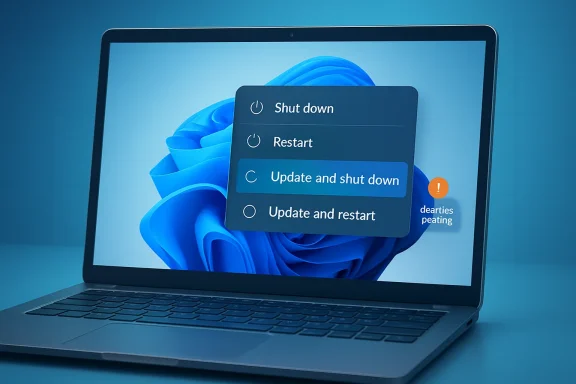
For years, Windows users have had a familiar complaint: you click Shut down, expecting the PC to shut down, only to discover Windows has decided that now is the perfect time to install updates. The same thing could happen with Restart. Even when the user clearly chose a normal power action, Windows sometimes treated that moment as an opportunity to apply pending updates anyway.Microsoft is now changing that behavior in Windows 11. The company is testing a more predictable Power menu that separates ordinary power actions from update-related power actions. In practical terms, Windows 11 will keep showing standard options such as Shut down and Restart, even when updates are pending, while also offering separate choices like Update and shut down and Update and restart when applicable. Microsoft announced these Windows Update experience changes on April 24, 2026, and Windows Latest tested the new behavior in Windows 11 Build 26300.8289.
That might sound like a small user-interface tweak, but it addresses a long-running source of frustration. The problem was never that Windows updates exist. Most users understand that security fixes, driver updates, servicing stack changes, and reliability improvements are necessary. The problem was that Windows often blurred the difference between “I want to power off now” and “I want to install updates now.” Those are not the same request.
With this new behavior, they finally become separate choices.
What is changing in the Windows 11 Power menu?
The change is simple: if updates are pending, Windows 11 can now show four clear options:- Shut down
- Restart
- Update and shut down
- Update and restart
Microsoft’s own description of the new behavior is that the Power menu should be more predictable. Instead of replacing normal power controls with update-focused ones, Windows is being adjusted so the user can decide whether this is the right moment to apply updates.
This matters because update timing is not just a convenience issue. It affects travel, meetings, exams, remote work, battery life, gaming sessions, virtual machines, and anyone who needs to shut down a laptop quickly before putting it in a bag. Many users have experienced the situation where Windows decides to start updating right when they are about to leave. Even worse, some update installations can take longer than expected, especially on older hardware, slower storage, or devices that have not been updated in a while.
A predictable Power menu gives the user a clearer contract: if you select the update action, Windows updates; if you select the plain power action, Windows powers down or restarts.
Why this was so frustrating
The old behavior felt like a trap because the wording did not always match the result. A user could pause updates, see that updates were pending, choose a normal shutdown option, and still end up watching Windows install updates. In other situations, Windows would pressure the user toward update-related shutdown options because the standard choices were missing, hidden, or effectively ignored.That is a bad experience because the user’s intent is clear. If someone clicks Update and restart, they are giving Windows permission to install updates. If they click Restart, they may simply need a fast reboot to fix a driver glitch, refresh a VPN connection, clear memory, or complete a software install. If they click Shut down, they may be packing a laptop away, boarding a flight, leaving an office, or trying to avoid draining the battery overnight.
The worst part is that the consequences were often discovered after the fact. Users would shut down before bed and later find the PC still on. Others would click an update-related shutdown option and discover that the device restarted instead of staying powered off. For laptop users, this could mean waking up to a dead battery or a warm device inside a bag.
Microsoft has already addressed part of that older problem. A separate fix for the long-standing Update and shut down issue, where the PC could update and then reboot instead of staying off, rolled out earlier to general users. Windows Latest previously reported that this fix appeared with Windows 11 25H2 Build 26200.7019 and Windows 11 24H2 Build 26100.7019, and that Microsoft planned broader rollout through Patch Tuesday.
The newly tested change is different. The earlier fix made Update and shut down behave more correctly. The newer change makes Shut down and Restart themselves behave more predictably when updates are waiting.
This is currently an Insider feature
There is an important catch: this specific Power menu change is still being tested. Windows Latest tested it in Windows 11 Build 26300.8289, and Microsoft’s blog says many of the new Windows Update control changes are beginning to roll out to devices in the Dev Channel and the new Experimental channel.That means most regular Windows 11 users should not expect to see the new behavior immediately. If you are on a stable public build, your PC may still behave the old way for now. As usual with Windows Insider features, rollout can be gradual, controlled, and subject to change before general availability.
Still, the direction is notable. Microsoft is not just fixing one isolated shutdown bug. It is changing the update experience so users have more direct control over when updates install.
Microsoft is also changing pause controls
The Power menu is only one part of the larger Windows Update change. Microsoft is also working on new pause controls that let users choose a specific pause end date from a calendar, up to 35 days at a time. More importantly, when that pause period is not enough, users will be able to extend the pause again, with no stated limit on how many times the pause end date can be reset.That is a major shift from the traditional Windows update model. Historically, Windows 10 and Windows 11 allowed pausing updates, but only within defined limits. Microsoft Learn documentation for Windows Update client policies describes existing controls where feature or quality updates can be paused for up to 35 days from a specified start date.
The new experience keeps the 35-day pause window but makes it repeatable. In practice, that gives users much more flexibility. Someone traveling for a week can pause updates until they return. Someone preparing for an exam or conference can pause until the busy period is over. Someone dealing with limited bandwidth can delay updates until they are back on a better connection.
Of course, there is a security tradeoff. Microsoft still recommends installing updates shortly after release because updates help protect devices and data. That part has not changed. What is changing is the level of user control.
Why more control does not mean updates are unimportant
It is easy to frame this as Microsoft “backing down” from forced updates, but the reality is more balanced. Windows updates remain critical. Monthly security updates fix vulnerabilities. Driver updates can address stability problems. Firmware updates can resolve hardware issues..NET updates can patch application platform problems. Out-of-band updates can respond to urgent issues that cannot wait for the next monthly release.The security argument for automatic updates is strong. Many users do not manually maintain their PCs. If Windows did not install updates automatically, a large number of consumer devices would remain vulnerable for months or years. That would be bad not only for individual users but also for the broader ecosystem.
At the same time, the user-control argument is also strong. A PC is a personal or work tool. The person using it usually knows whether this is a good moment to begin a potentially disruptive update. Microsoft’s problem has been finding the right balance between keeping devices secure and respecting the user’s immediate needs.
This new approach looks like a better compromise. Windows can continue to download updates, warn users, encourage installation, and keep security as the default priority. But when a user deliberately chooses a plain shutdown or restart, Windows should respect that choice.
Fewer update interruptions are also planned
Microsoft is not only changing power options and pause controls. It is also trying to reduce how often users are interrupted by update-related restarts. In its April 24 announcement, Microsoft said it is coordinating driver,.NET, and firmware updates with the monthly quality update so users see fewer separate restart events. The goal is to reduce the update experience to a single monthly restart in more cases.That could be just as important as the Power menu fix. One reason updates feel disruptive is that they can arrive in pieces. A user might install a Windows quality update, then later see a driver update, then later a firmware update, each with its own restart requirements. Even if each update is justified, the combined experience feels messy.
Coordinating them into a more unified update flow makes sense. If Windows can batch more update work into a predictable monthly maintenance moment, users may be less likely to resent updates. The best update experience is not just one that gives users more buttons. It is one that interrupts users less often in the first place.
Better update descriptions could help too
Microsoft is also adding more detail to driver update names. This is another small but useful improvement. Driver updates can be confusing because they often have vague or nearly identical titles. Users may see a list of pending updates and have no idea whether one applies to graphics, audio, Bluetooth, battery, chipset, storage, or another device class.Microsoft says it is adding device class information to driver titles so users can better understand what a driver update is for.
This is a good move, especially for enthusiasts and troubleshooting-minded users. If a display driver recently caused problems, a user may want to delay another graphics-related driver update. If an audio device is malfunctioning, a clearly labeled audio driver update may be worth installing sooner. More descriptive titles make update decisions less blind.
The OOBE update skip option is part of the same trend
Another related change is the ability to skip updates during the Windows out-of-box experience, also known as OOBE. This is the setup flow you see when configuring a new PC or freshly installed Windows device.Microsoft says users can choose to skip updates during setup and reach the desktop faster, while still having the option to install updates later. The company notes that this does not apply to some commercial scenarios where setup is managed or where updates are required for the device to function properly.
That is a practical change. Anyone who has set up a new PC knows the frustration of waiting through update checks before even reaching the desktop. In many cases, users want to get into Windows first, sign in, restore files, install apps, or verify that everything works. Updates can come afterward.
Again, this is about respecting timing. Installing updates during setup is often the right thing to do, but it should not always be mandatory for every consumer scenario.
What this means for regular users
For regular Windows 11 users, the most important takeaway is that Microsoft appears to be listening to update-related complaints more seriously. The Power menu change directly targets one of the most common annoyances: being pushed into installing updates when all you wanted was a normal shutdown or restart.Once the feature reaches stable builds, the experience should be easier to understand:
- Choose Shut down when you want the PC to turn off without installing updates.
- Choose Restart when you want a normal restart without installing updates.
- Choose Update and shut down when you are ready to install pending updates and then power off.
- Choose Update and restart when you are ready to install pending updates and reboot.
Users should still install security updates regularly. This change should not be treated as a reason to ignore Windows Update forever. But it should make it easier to install updates at a sensible time rather than at the worst possible time.
What this means for IT admins
For managed environments, the situation is more complicated. Business PCs may be controlled by Group Policy, Microsoft Intune, Windows Update for Business policies, WSUS, Configuration Manager, or other management tools. In those environments, end-user choices may be limited by compliance requirements.Microsoft’s existing Windows Update policy documentation already gives admins ways to manage update timing, deferrals, active hours, restart behavior, notifications, and deadlines. It also recommends compliance deadline policies for organizations that need devices to stay secure and current.
The consumer-focused Power menu improvement is still useful, but admins will need to see how Microsoft exposes controls for commercial customers. Microsoft says it will share more about commercial availability and admin controls later.
That part will matter. In businesses, too much user control can create compliance risk. Too little user control can cause productivity problems. The ideal approach is probably policy-aware: let users defer or choose power behavior within limits, while allowing admins to enforce deadlines for critical updates.
Why this feels like a shift in Microsoft’s update philosophy
Windows Update has always been one of the most controversial parts of modern Windows. Microsoft wants devices patched quickly. Users want control. Those goals often clash.The Windows 10 era pushed automatic updates hard. That helped improve baseline security, but it also created resentment. Users complained about forced restarts, poorly timed update prompts, long installation periods, driver problems, and unclear update messaging. Windows 11 improved parts of the experience, but many of the same complaints remained.
These new changes suggest Microsoft is trying to reduce friction rather than simply force compliance. The company is still keeping security as the default, but it is acknowledging that users need more say in timing. That is the right direction.
The most encouraging part is that the changes are not limited to one button. Microsoft is addressing several pain points at once:
- Skipping updates during setup.
- Extending pause periods repeatedly.
- Keeping normal shutdown and restart options available.
- Improving driver update descriptions.
- Coordinating different update types to reduce restarts.
- Continuing work on update size and installation time.
There are still questions
There are still plenty of unanswered questions. When will the new Power menu behavior reach stable Windows 11 builds? Will it arrive through a cumulative update, a controlled feature rollout, or a future feature update? Will all editions get the same behavior? How will managed business devices handle the new choices? Will Microsoft allow admins to hide or enforce certain options?There is also the question of whether Windows will always respect the plain Shut down and Restart choices under every condition. Microsoft’s blog says the Power menu will clearly separate normal power actions from update actions, but Windows servicing can be complicated. Some updates, especially urgent or recovery-related updates, may still involve special cases.
The important thing is that Microsoft is moving toward a clearer default. If the user picks a plain power action, Windows should not surprise them.
This is the kind of Windows 11 fix users actually notice
Not every Windows improvement needs to be flashy. In fact, some of the best operating system changes are the ones that simply remove friction. A Power menu that does what it says is not exciting in the same way as a redesigned Start menu or a new AI feature, but it affects real daily use.A laptop that shuts down when you choose shut down is better. A restart that does not unexpectedly become an update session is better. A pause control that can be extended when life gets busy is better. A setup screen that lets you reach the desktop before installing updates is better.
These are practical improvements, and Windows 11 needs more of them.
Microsoft has spent a lot of time promoting new features, AI integrations, design tweaks, and cloud-connected experiences. But many users still judge Windows by the basics: Does it boot quickly? Does File Explorer behave? Does the taskbar work? Does search find what I need? Does the PC sleep, wake, restart, and shut down properly? Does Windows Update respect my time?
This change directly addresses one of those basics.
The bottom line
Microsoft is testing a Windows 11 update experience that finally separates normal power actions from update actions. If updates are pending, users should still be able to choose Shut down or Restart without being forced into installation. Update-specific options remain available, but they are treated as explicit choices rather than hidden traps.The feature is currently being tested in Insider builds, including Build 26300.8289, and is not yet broadly available to all stable Windows 11 users. But combined with repeatable 35-day update pauses, OOBE update skipping, clearer driver update titles, and fewer separate restart events, it looks like Microsoft is making a serious attempt to fix some of the most annoying parts of Windows Update.
That does not mean users should ignore updates. Security patches still matter. But Windows should let people choose a reasonable time to install them.
What should Microsoft fix next in Windows 11? The Start menu? File Explorer performance? Search? Sleep and wake reliability? Driver updates? Or is Windows Update still the biggest problem even after these changes?
Source: Windows Latest Tested: Microsoft fixes the Windows 11 trap that installs updates when you want to shut down or reboot PC
