

Microsoft’s new Full Screen Experience (FSE) for Windows 11 is more than a UI tweak — it’s an engineering play that trims desktop overhead, reclaims memory, and stitches a console‑style front door onto the Windows platform in preparation for a more unified Xbox–PC future. Early measurements and OEM tests show consistent, measurable RAM and responsiveness gains on handhelds and compact PCs, while Microsoft’s staged Insider rollout signals a cautious, device‑gated path to a broader PC and console convergence.
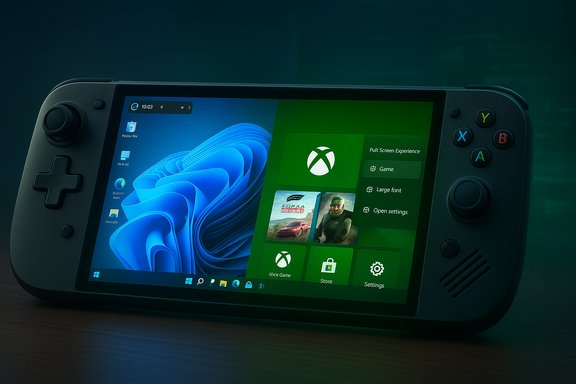
Microsoft’s Full Screen Experience is a session posture that boots a controller‑first, full‑screen home app — typically the Xbox PC app — in place of the Explorer desktop shell. Underneath that shell, the Windows 11 kernel, drivers, anti‑cheat stacks and installed apps continue to run, but many desktop‑oriented subsystems and startup agents are deferred or suppressed to free system resources for games. That design preserves Windows’ openness (Steam, Epic, Battle.net and other storefronts remain usable) while offering a plug‑and‑play, console‑like entry point for gamers. The feature first shipped as the out‑of‑box UX for the ASUS ROG Xbox Ally and ROG Xbox Ally X handhelds and is now being rolled into Windows Insider Preview builds so OEMs like MSI and others can enable it on additional handhelds, laptops, and desktops. Microsoft and partners are treating FSE as an optional, device‑gated experience rather than a hard replacement for the desktop.
Key questions for the next generation:
For handheld owners and Game Pass subscribers who value immediate access, reduced background noise and a console‑like shell, the Full Screen Experience is a meaningful and practical improvement. For desktop power users, it’s a welcome optional session for couch play, but not a wholesale replacement for the desktop. Across the ecosystem, FSE establishes a technical and UX foundation for the real long‑term payoff: a more seamless, cross‑device Xbox–PC library that follows the player — provided Microsoft, OEMs and partners continue to refine performance grooming, anti‑cheat compatibility and clear entitlements.
The Xbox Full Screen Experience is a conservative engineering step with outsized strategic implications: it trims the edges of Windows where needed for handheld play while leaving the platform’s openness intact. That compromise — practical, measurable, and OEM‑friendly — makes the vision of a unified Xbox–PC future more plausible, but it also underscores the critical work left to do: consistent telemetry, robust anti‑cheat validation, and clear OEM certification so the promise of “console simplicity, PC openness” becomes a reliable reality for mainstream players.
Source: NoobFeed Future of Xbox Hardware: Unified Gaming Through Full Screen Experience | NoobFeed
 Background / Overview
Microsoft’s Full Screen Experience is a session posture that boots a controller‑first, full‑screen home app — typically the Xbox PC app — in place of the Explorer desktop shell. Underneath that shell, the Windows 11 kernel, drivers, anti‑cheat stacks and installed apps continue to run, but many desktop‑oriented subsystems and startup agents are deferred or suppressed to free system resources for games. That design preserves Windows’ openness (Steam, Epic, Battle.net and other storefronts remain usable) while offering a plug‑and‑play, console‑like entry point for gamers. The feature first shipped as the out‑of‑box UX for the ASUS ROG Xbox Ally and ROG Xbox Ally X handhelds and is now being rolled into Windows Insider Preview builds so OEMs like MSI and others can enable it on additional handhelds, laptops, and desktops. Microsoft and partners are treating FSE as an optional, device‑gated experience rather than a hard replacement for the desktop. What the Full Screen Experience actually does
A session shell, not a new OS
- Boots directly into a full‑screen Xbox home app instead of Explorer/desktop.
- Defers non‑essential startup apps and cosmetic desktop services to reduce idle CPU wakeups and background memory usage.
- Keeps the Windows kernel, GPU drivers, DRM and kernel‑level anti‑cheat intact so most PC titles continue to work.
Concrete user‑facing changes
- A tile‑based, controller‑optimized home UI (Xbox as the default home app).
- Xbox button long‑press for fast task switching and an enhanced Game Bar for captures, performance toggles, and overlays.
- A Settings → Gaming → Full screen experience toggle and a Win + F11 shortcut for quick entry/exit.
- Optional “Enter full screen experience on startup” to boot directly into the Xbox shell.
Understanding the RAM savings and performance claims
Early reports and OEM tests consistently show that FSE reduces the Windows desktop’s memory footprint on many handheld and compact systems. Multiple hands‑on reviews and OEM notes have cited savings in the range of hundreds of megabytes up to around 2 GB depending on the device configuration, installed software, and startup agents. Microsoft’s official messaging describes the feature as minimizing background activity but deliberately avoids publishing a single guaranteed number.- What Microsoft documents: Windows Insider posts describe FSE as minimizing non‑essential background activity and deferring desktop subsystems to free resources for gameplay. The feature appears in Windows Insider Preview builds in the 26220.x family.
- What reviewers observe: Independent reviews and OEM hands‑on tests report reclaimed memory commonly in the 1–2 GB ballpark on handhelds, with variability across titles and configurations. Reported frame‑rate uplifts are headline‑dependent and can range from marginal to low double‑digit percent gains in thermally or memory‑constrained scenarios.
The MSI measurement: a closer look (and why to treat single numbers cautiously)
One widely circulated figure — a drop in system RAM usage from 8.6 GB to 7.88 GB (about 9% savings) reported as MSI‑confirmed — appears in some coverage and OEM commentary. That specific delta is consistent with hands‑on reporting on certain Claw models, but independent outlets and community tests report a range of outcomes: some OEMs and reviewers cite ~5% savings, others document ~1–2 GB reclaimed RAM depending on the pre‑FSE background load and installed apps. The differences stem from:- Variation in installed startup agents, overlays, and OEM utilities.
- Differences in firmware, driver versions and power/TDP settings.
- Test methodology (idle system measurement vs. in‑game memory footprint).
Devices, rollout and where you’ll see FSE first
The early hardware: ROG Xbox Ally family
ASUS’s ROG Xbox Ally and ROG Xbox Ally X launched with FSE enabled out of the box and act as Microsoft’s de‑facto testbed for real‑world tuning. ASUS and Xbox highlighted hardware features such as AMD Ryzen Z2 processors, handheld‑optimized game profiles, and integrated system features that tie into the Xbox app and Game Bar. The Ally X models include expanded memory configurations (24 GB on higher SKUs) and ship with boot‑to‑Xbox by default.The MSI Claw and other OEMs
Microsoft moved FSE into Windows 11 25H2 preview builds and enabled the feature in an entitlement‑gated way for specific OEM models. MSI published support notes and firmware updates for Claw handhelds; testers on Claw devices have reported both memory savings and modest FPS uplifts in demanding titles, with MSI materials suggesting savings in the low single‑digit percentages to ~1 GB ranges in typical scenarios. Other OEMs — Lenovo, Alienware, and smaller handheld makers — are testing the feature through Insider channels and will stagger availability as firmware and driver validation completes.How to get it (Insider path)
- Join the Windows Insider Program (Dev or Beta channels depending on the preview).
- Join the Xbox Insider Program and opt into the PC Gaming preview via the Xbox Insider Hub.
- Update to a Windows 11 Insider Preview build (26220.x family or later).
- Update the Xbox PC app from the Microsoft Store and enable Settings → Gaming → Full screen experience.
Strategic intent: why Microsoft is building FSE
The Full Screen Experience answers several strategic objectives simultaneously:- Deliver a console‑like “turn on and play” UX on Windows handhelds to better compete with SteamOS and Valve’s handheld proposition. FSE shortens the path to Game Pass discovery and cloud play from power‑on.
- Preserve Windows’ openness while making a controller‑first shell the default path for casual and handheld players; that keeps Steam, Epic and Battle.net viable without fragmenting the platform.
- Provide Microsoft and OEMs a consistent way to tune background services and power profiles for constrained APUs and battery‑sensitive hardware. Early updates already add optimizations like per‑title profiles, shader preloads, and NPU‑driven features on Ally X.
Competing with SteamOS and third‑party handhelds
SteamOS has long held a UX advantage for couch and TV‑style PC gaming because it’s a purpose‑built, console‑like OS with tight integration on the Steam Deck. But Windows’ tether to anti‑cheat systems and broad PC compatibility makes it a compelling alternative if the desktop clutter and background overhead can be reduced.- Advantage SteamOS: lightweight, consistent console UI, curated store integration and low overhead for many titles.
- Advantage Windows + FSE: broader compatibility with anti‑cheat protected titles (Call of Duty, Fortnite), deeper integration with Game Pass and Xbox services, and the ability to run native PC clients if needed.
Community observations, developer/anti‑cheat concerns and risks
What the community is noticing
- RAM numbers matter most on 16 GB devices and below; any reclaimed headroom can be significant on handhelds.
- Windows memory management can free or repurpose RAM on demand; the real problem is background processes that add jitter, CPU wakeups, and I/O spikes — and FSE’s primary value is trimming those nuisances.
Developer and anti‑cheat realities
Because FSE does not change Windows kernel behavior, kernel‑level anti‑cheat and DRM stacks remain intact — a deliberate choice that preserves compatibility with many competitive titles that fail on Linux distributions without kernel‑mode anti‑cheat workarounds. Developers and anti‑cheat vendors will still need to validate that their overlays, performance counters, and telemetry behave correctly in a session where Explorer and certain background services are deferred. That validation is ongoing and a key gating factor for wider consumer rollout.Risks and potential downsides
- Variable gains across hardware: FSE is effective on handhelds with heavy desktop startup loads, but benefits shrink on high‑RAM, high‑TDP desktops.
- Compatibility surprises: OEM utilities, cloud sync clients, or background recording tools that users rely on may not run until the desktop is restored unless explicitly whitelisted.
- Preview instability: the feature launches via Insiders and is gated per OEM; early adopters should expect driver and firmware updates to mature.
Practical guidance for buyers, testers and power users
- If primary use is handheld gaming and Game Pass integration is valuable, consider devices that ship with FSE enabled (ROG Xbox Ally family) or that have validated OEM support.
- Test critical multiplayer titles under FSE before competitive play; if a title requires desktop mode, keep a recovery path to revert quickly.
- For Insiders: use the official enablement path (Windows Insider + Xbox Insider + Settings → Gaming → Full screen experience) rather than community hacks; this reduces instability and preserves supportability.
- Back up important data and create a recovery USB before enrolling in Insiders.
- Update OEM drivers and system firmware first.
- Enable FSE and measure idle RAM, background process lists, and in‑game frame times across multiple runs.
- File feedback via Feedback Hub and track OEM release notes for driver fixes.
Looking ahead to 2026 and beyond — what FSE implies for the next Xbox
FSE is an incremental, tactical shift with bigger strategic consequences. If Microsoft standardizes the full‑screen, Xbox‑first session across Xbox consoles, handhelds and PCs, the result could be a genuinely unified Xbox–PC ecosystem where the same digital catalog and UI flows follow the player across form factors.Key questions for the next generation:
- Will Microsoft ship the next living‑room Xbox with a Windows layer beneath a TV‑optimized Xbox shell?
- Will console games be accessible through a subsystem on Windows devices, or will Microsoft adopt a boot‑to‑Xbox shell on retail consoles while preserving a switchable desktop?
- How will Microsoft and AMD’s co‑engineered silicon roadmap balance thermal and power targets across console, handheld, and PC form factors?
- OEM firmware and driver certification notes that explicity list FSE support and performance targets.
- Anti‑cheat vendor compatibility statements as more competitive multiplayer titles are tested in FSE sessions.
- Microsoft and Xbox leadership updates regarding storefront openness, Game Pass integration, and any formal announcement about the next Xbox’s OS posture.
Final analysis — strengths, limits and the pragmatic verdict
Strengths- Practical performance headroom: FSE reclaims meaningful memory and reduces background noise on handhelds, improving battery life and frame consistency in constrained scenarios.
- UX coherence: Provides a familiar, console‑style entry point into Game Pass and the Xbox ecosystem while keeping Windows openness intact.
- OEM differentiation: Hardware makers can market devices as “turn‑on‑and‑play” gaming handhelds without forking Windows.
- Device dependence: Memory and FPS uplifts vary significantly by installed software, drivers and firmware; single‑unit figures (e.g., 8.6 GB → 7.88 GB) illustrate potential but are not universal guarantees. Treat such numbers as device‑specific observations.
- Compatibility complexity: Certain background‑dependent workflows and uncommon enterprise configurations may be disrupted; IT administrators should validate before broad adoption.
- Preview maturity: The experience is in preview on many form factors and continues to require OEM tuning and anti‑cheat validation before global rollout.
For handheld owners and Game Pass subscribers who value immediate access, reduced background noise and a console‑like shell, the Full Screen Experience is a meaningful and practical improvement. For desktop power users, it’s a welcome optional session for couch play, but not a wholesale replacement for the desktop. Across the ecosystem, FSE establishes a technical and UX foundation for the real long‑term payoff: a more seamless, cross‑device Xbox–PC library that follows the player — provided Microsoft, OEMs and partners continue to refine performance grooming, anti‑cheat compatibility and clear entitlements.
The Xbox Full Screen Experience is a conservative engineering step with outsized strategic implications: it trims the edges of Windows where needed for handheld play while leaving the platform’s openness intact. That compromise — practical, measurable, and OEM‑friendly — makes the vision of a unified Xbox–PC future more plausible, but it also underscores the critical work left to do: consistent telemetry, robust anti‑cheat validation, and clear OEM certification so the promise of “console simplicity, PC openness” becomes a reliable reality for mainstream players.
Source: NoobFeed Future of Xbox Hardware: Unified Gaming Through Full Screen Experience | NoobFeed
