

Microsoft is placing a renewed, highly pragmatic bet on making Windows 11 the best platform for PC gaming by tackling the fundamentals: trimming background noise, tuning power and scheduling for modern silicon, optimizing the graphics stack (including DirectX advances), and pushing coordinated driver updates — work Microsoft says will unfold continuously through 2026 and beyond.
Microsoft’s recent platform messaging shifts the conversation from one-off features to systemic engineering: rather than shipping a single marquee capability, the company has committed to a multi-year program of incremental improvements across the OS, graphics APIs, drivers, and OEM合作 (partner) devices. The emphasis is on delivering consistent improvements to frame-time stability, input responsiveness, and battery/runtime behavior — the practical metrics that determine whether a game “feels” great, especially on handhelds and laptops.
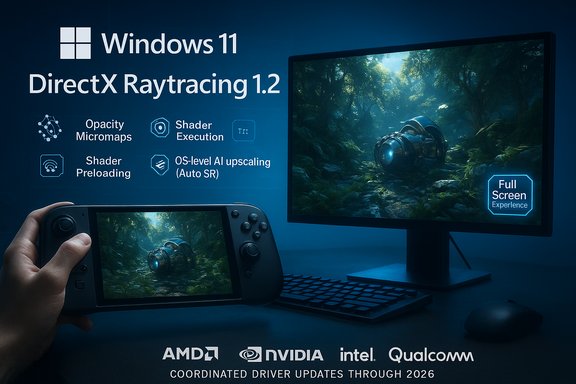
This initiative brings together several threads that have been maturing over the last 18–24 months: Windows session tuning (console‑style full‑screen modes for handhelds), DirectX graphics advances (DXR 1.2, shader model updates, cooperative vectors), OS‑level AI features (Automatic Super Resolution), and improved emulation and anti‑cheat coverage for Windows on Arm. The strategy is explicitly ecosystem‑first: Microsoft will coordinate with AMD, Intel, NVIDIA, Qualcomm, OEMs, and game developers so software and hardware changes land together.
Benefits:
Key characteristics:
The technical building blocks are already in motion — expanded Prism emulation, DXR 1.2 primitives, Advanced Shader Delivery, and Auto SR demonstrate that Microsoft’s roadmap is concrete. However, the magnitude and timing of benefits will depend on wide ecosystem adoption: GPU vendors, OEM firmware teams, engine developers, and anti‑cheat vendors must each deliver compatible updates. The next 12–24 months will be decisive: expect iterative wins now and meaningful, platform‑level improvements as the ecosystem aligns.
For Windows gamers and PC enthusiasts, the message is pragmatic optimism. The path to a measurably better Windows 11 gaming experience runs through coordinated engine support, driver maturity, and prudent device design — and Microsoft’s current plans are squarely focused on those fundamentals.
Source: extremetech.com Microsoft Promises to Refine Windows 11 Gaming With Better Performance, Power Tuning, and Graphics Optimizations
 Background
Microsoft’s recent platform messaging shifts the conversation from one-off features to systemic engineering: rather than shipping a single marquee capability, the company has committed to a multi-year program of incremental improvements across the OS, graphics APIs, drivers, and OEM合作 (partner) devices. The emphasis is on delivering consistent improvements to frame-time stability, input responsiveness, and battery/runtime behavior — the practical metrics that determine whether a game “feels” great, especially on handhelds and laptops.This initiative brings together several threads that have been maturing over the last 18–24 months: Windows session tuning (console‑style full‑screen modes for handhelds), DirectX graphics advances (DXR 1.2, shader model updates, cooperative vectors), OS‑level AI features (Automatic Super Resolution), and improved emulation and anti‑cheat coverage for Windows on Arm. The strategy is explicitly ecosystem‑first: Microsoft will coordinate with AMD, Intel, NVIDIA, Qualcomm, OEMs, and game developers so software and hardware changes land together.
Overview: what Microsoft says it will fix — and why it matters
Microsoft’s core areas of focus are fourfold:- Background workload management — reduce unnecessary desktop and system activity while gaming to free CPU cycles and RAM.
- Power and scheduling improvements — tune CPU frequency behavior, scheduler policies, and memory handling to extract better sustained performance across CPU and APU generations.
- Graphics stack optimizations — reduce driver and API overhead, embrace new DirectX features for raytracing and neural rendering, and shorten the input→visual feedback loop.
- Updated drivers and ecosystem coordination — regular, coordinated driver releases that include game‑specific fixes, emulator compatibility, and support for platform features such as anti‑cheat on Arm.
Background workload management: making every cycle count
The problem: desktop noise and wakeups
Modern Windows is incredibly flexible, but that flexibility comes at a cost: notification daemons, indexing, telemetry tasks, background updates, and shell components can all wake threads and steal cycles from a game. On desktop PCs with abundant thermal headroom the impact may be small, but on handhelds and ultraportables a few percent of CPU time — or a gigabyte of RAM — can materially change game behavior.Microsoft’s approach
Microsoft is expanding its session posture options for gaming. Rather than a one‑size‑fits‑all shell, Windows can now run a full screen experience that de‑emphasizes Explorer and defers non‑essential background services while a dedicated “home app” (for example, the Xbox app) runs. This is not a new OS; it’s a tuned session that preserves drivers, anti‑cheat, and compatibility while reducing desktop overhead.Practical effects and caveats
- Benefits are real on constrained hardware: testers and early device reviews commonly report reclaimed memory in the 1–2 GB range on handhelds, which translates to fewer texture evictions and less background contention.
- Gains are contextual: if a title is GPU‑bound, shaving desktop wakeups won’t raise average FPS dramatically. Where it helps most is sustained frame‑time consistency on thermally or memory‑limited devices.
- The Full Screen Experience is optional and reversible; it’s designed to be a usability choice rather than a forced change.
Power, scheduling, and CPU tuning: unlocking sustained responsiveness
Why frequency profiles and scheduler policies matter
CPU frequency governors and the OS scheduler determine how fast cores can run and for how long. Modern silicon has complex behavior — many chips now vary per‑core frequency, manage boost states dynamically, and include specialized efficiency cores or NPUs. Without coordinated OS tuning the platform may either throttle too aggressively (hurting performance) or overheat/overdraw (hurting battery and thermals).Microsoft’s intended fixes
Microsoft intends to tune CPU frequency profiles and memory behavior for each processor generation so Windows’s power policies and scheduler heuristics better match vendor silicon. The goal is to deliver more consistent “console‑like” responsiveness across form factors. On devices that co‑engineer with Microsoft and partners — notably the ROG Xbox Ally family — these optimizations are being used to tune responsiveness and battery life together.What to expect
- Per‑generation tuning that adjusts boost windows, valley timings for frequency transitions, and memory prefetch/retention heuristics.
- Better support for heterogeneous designs (big/little cores, NPUs) where work is steered to the right engine.
- Reduced thermal surprises and more predictable sustained clocks on thin handhelds.
Limits and risks
- The magnitude of gains will vary by hardware and firmware; firmware (UEFI/EC) remains a principal lever for thermals.
- Aggressive tuning must be validated across millions of shipping configurations to avoid regressions; expect staged rollouts.
Graphics stack: DXR 1.2, neural rendering, and input latency reductions
DirectX Raytracing 1.2 — performance primitives that matter
DirectX Raytracing 1.2 (DXR 1.2) introduces two immediate, developer‑facing features that can dramatically improve raytracing practicality: Opacity Micromaps (OMM) and Shader Execution Reordering (SER). OMM reduces shader work for alpha-tested geometry (foliage, fences, decals), while SER reorganizes shader execution to reduce divergence and improve GPU occupancy. Combined, they can yield substantial performance uplifts in raytraced renders — the demo numbers from controlled tests are eye‑catching, though real‑world gains depend on engine adoption and driver support.Cooperative vectors and neural rendering
A broader shift is happening: Microsoft is formalizing ML‑oriented instructions and runtime paths into the shader model and API surface (cooperative vectors). This makes it practical to run neural passes — texture compression, denoising, or neural upscaling — directly in the GPU/graphics pipeline. The practical result should be lower VRAM use, faster denoising or neural compression, and new hybrid rendering techniques that blend raster, raster‑plus‑neural, and raytracing.Input latency and shader overhead
Microsoft’s graphics roadmap emphasizes reducing CPU overhead in drivers and minimizing the time between player input and visible feedback. That means:- Trimming driver D3D call overhead and CPU→GPU batching inefficiencies.
- Reducing shader compile/install steps (more on that below).
- Lowering frame presentation latency through coordinated OS/driver tweaks.
Real‑world note
DXR 1.2 and cooperative vectors require ecosystem support: driver updates from GPU vendors, engine integration by studios, and sometimes hardware features. Early demo numbers are promising, but shipping impact will scale as suppliers complete their driver work and studios patch engines.Drivers, Advanced Shader Delivery, and OS‑level AI (Auto SR)
Advanced Shader Delivery (ASD)
One of the most practical sources of “first‑time play” hitching is shader compilation. Microsoft and partners are shipping an Advanced Shader Delivery system that precompiles or preloads shaders during game download. The result is dramatically reduced first‑play stutter and faster launch behavior for supported games.Benefits:
- Faster initial launch and smoother first‑play experience.
- Lower runtime shader compilation overhead, which reduces hitching in complex scenes.
- Requires the game and pipeline to support shipping precompiled shaders or shipping shader blobs; not every title will opt in initially.
Automatic Super Resolution (Auto SR)
Auto SR is Microsoft’s OS‑level neural upscaler: an NPU‑backed pipeline that upscales a lower internal render to the display resolution without per‑title integration. The promise is clear: on NPU‑equipped devices, you can lower GPU load and recover frame rate while preserving perceived image quality.Key characteristics:
- OS‑level and automatic for supported games (DX11/DX12).
- Offloads inference to the device NPU, freeing GPU cycles.
- Initially tied to devices labeled as having the required NPU hardware but planned to expand across silicon vendors.
- The quality/performance trade‑off depends on the NPU and driver maturity.
- Not a guaranteed replacement for developer‑tuned solutions like DLSS, but a convenient, broad‑reach tool for existing games.
Coordinated driver releases
Microsoft is augmenting the cadence and scope of driver releases from GPU vendors to include:- Game‑specific optimizations.
- Compatibility fixes for emulators (Prism) and other platform layers.
- Expanded support for anti‑cheat and platform features on Arm devices.
Windows on Arm: Prism emulator, anti‑cheat, and practical compatibility
Prism: closing the instruction‑set gap
Prism, Microsoft’s x86→Arm translation/emulation layer, has rapidly gained support for additional instruction sets (AVX, AVX2, BMI, FMA, etc.. This materially improves compatibility for x64 games on Arm hardware and expands the catalogue of games that can run locally rather than through streaming.Anti‑cheat on Arm
A major historical blocker for multiplayer titles on Arm was kernel‑level anti‑cheat incompatibility. Microsoft and partners have been working with anti‑cheat vendors to extend native or validated support on Arm platforms, which unlocks more multiplayer titles on Snapdragon and other Arm‑based Windows devices.What this means for gamers
- More titles will launch natively or under higher‑fidelity emulation on Arm devices.
- Multiplayer becomes feasible on Arm as anti‑cheat gets certified or reimplemented.
- Performance parity with x86 will not be instantaneous — emulation overhead and driver parity still create gaps — but compatibility is improving quickly.
Hardware partnerships and the ROG Xbox Ally example
Microsoft’s strategy is most visible on partner devices where hardware and software are co‑engineered. The ROG Xbox Ally family — a collaboration with ASUS — is an example of how platform features converge:- Dedicated Full Screen Experience on boot, reducing desktop overhead.
- Hardware tiers that include NPUs (on the Ally X) to enable Auto SR and other ML features.
- Marketing and launch bundles that showcase advanced shader delivery, AI highlights, and a console‑like home experience while remaining Windows.
Critical analysis: strengths, caveats, and the roadblocks
Notable strengths
- Systemic thinking: Microsoft is focusing on interplay between OS, drivers, and hardware rather than isolated features. That integration is the correct technical approach for platform‑level improvements.
- Practical wins first: Precompiled shaders, reduced background workloads, and coordinated driver updates produce immediate, measurable benefits for many games today.
- Future‑proofing graphics: DXR 1.2 and cooperative vectors create a pathway for neural rendering and more efficient raytracing, which should broaden the set of games that can afford advanced lighting.
- Arm progress: Prism and anti‑cheat work remove significant platform barriers and open new device form factors to PC gaming.
Important caveats and risks
- Demo numbers vs. shipping reality: DXR 1.2 and neural compression demos show large gains in controlled tests; real‑world results depend on hardware, drivers, engine work, and per‑title tuning — expect variability.
- Driver and firmware complexity: Changes to scheduler and power behavior can improve performance but also trigger regressions on devices with heterogeneous firmware ecosystems. Careful staging is essential.
- Ecosystem adoption time: For features like OMM and SER to benefit real games, engine developers must integrate them and vendors must ship drivers; adoption across the ecosystem takes months to years.
- NPU dependency: Auto SR and some neural features depend on on‑device NPUs. Not every user will have this hardware, and quality will vary by vendor.
- Emulation overhead: Prism expands compatibility but does not deliver native‑performance parity; CPU‑bound workloads and plugins may still run slower on Arm.
Risks for gamers and OEMs
- Expect phased improvements rather than a single leap. Users may need multiple hardware and driver updates to see the full benefits.
- OEM firmware and thermal design remain limiting factors; software can only tune so far if hardware thermals limit clocks.
- Anti‑cheat and DRM edge cases could still block titles even after broader compatibility work; localized regressions are possible on some titles.
Timelines and rollout expectations
Microsoft’s messaging indicates continuous improvements throughout 2026 and beyond. Practically, this means:- Immediate and near‑term: driver releases and ASD/voice patches will bring tangible wins for specific titles and devices now.
- Short term (quarters): DXR 1.2 preview features and Agility SDK enhancements will appear in developer tooling and engine updates; some early titles will adopt new APIs.
- Medium term (6–18 months): broader adoption of neural rendering pipelines, Auto SR expansion to more NPUs, and wider driver coverage across vendor ecosystems.
- Long term (18+ months): systemic benefits will accrue as engines, drivers, and OEMs converge around the new DirectX features and OS optimizations.
Practical advice for PC gamers and enthusiasts
- Keep drivers and Windows updated — coordinated driver releases are the primary vehicle for delivered improvements.
- On handhelds and thin laptops, try the Full Screen Experience or a dedicated game session posture to reduce desktop noise and reclaim memory.
- Use vendor tools (NVIDIA/AMD/Intel/Qualcomm control panels) to tune per‑title profiles; OS‑level improvements complement, not replace, per‑title tuning.
- For Arm users: watch the Prism compatibility lists and anti‑cheat status before expecting full parity for multiplayer titles; verify whether a game is supported under emulation.
- If you value input latency most (competitive play), monitor OS/driver updates and hardware latency benchmarks — responsiveness wins are often small latency savings aggregated across the stack.
What OEMs and developers should prioritize
- Work with Microsoft and driver teams to validate scheduler/power changes on device firmware early and often.
- Adopt Advanced Shader Delivery and test precompiled shader flows to eliminate first‑play hitching.
- Evaluate DXR 1.2 primitives (OMM, SER) for raytraced passes where applicable; the performance gains can be substantial for foliage and alpha‑heavy scenes.
- Test Auto SR and other neural features in representative workloads; on NPU‑equipped devices this can be a major performance lever.
- For developers targeting handhelds: prioritize frame‑time stability and input latency over peak benchmark FPS — perceived responsiveness matters most on small, mobile devices.
Conclusion
Microsoft’s refresh of Windows 11’s gaming priorities is notable for its realism: rather than promising one dramatic, universal feature, the company is committing engineering effort across the full stack — session posture, scheduler and power tuning, DirectX graphics primitives, driver coordination, and OS‑level AI features. For gamers, this should translate into smoother first‑time experiences, fewer hitching moments, improved responsiveness on handhelds, and a gradual expansion of Windows gaming across new device classes, including Arm.The technical building blocks are already in motion — expanded Prism emulation, DXR 1.2 primitives, Advanced Shader Delivery, and Auto SR demonstrate that Microsoft’s roadmap is concrete. However, the magnitude and timing of benefits will depend on wide ecosystem adoption: GPU vendors, OEM firmware teams, engine developers, and anti‑cheat vendors must each deliver compatible updates. The next 12–24 months will be decisive: expect iterative wins now and meaningful, platform‑level improvements as the ecosystem aligns.
For Windows gamers and PC enthusiasts, the message is pragmatic optimism. The path to a measurably better Windows 11 gaming experience runs through coordinated engine support, driver maturity, and prudent device design — and Microsoft’s current plans are squarely focused on those fundamentals.
Source: extremetech.com Microsoft Promises to Refine Windows 11 Gaming With Better Performance, Power Tuning, and Graphics Optimizations
