

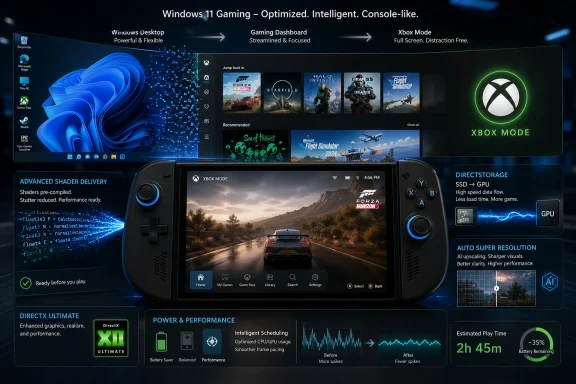
Microsoft is preparing a broad Windows 11 gaming push in 2026, expanding Xbox-style full-screen mode, Advanced Shader Delivery, DirectStorage improvements, Auto Super Resolution, and deeper performance work across scheduling, power management, background workloads, graphics, and drivers. The promise is simple enough: fewer stalls, faster first launches, better handheld behavior, and a Windows gaming stack that feels less like a desktop OS wearing a controller skin. The harder question is whether Microsoft can turn a collection of platform fixes into something players actually notice before they drift further toward SteamOS, consoles, or purpose-built gaming handhelds.
For most of the last decade, Microsoft’s public pitch for PC gaming has leaned on Windows’ incumbency. The games are there, the drivers are there, the storefronts are there, and the hardware ecosystem is overwhelmingly built around it. That has all been true, but it has also allowed Microsoft to treat the actual experience of gaming on Windows as a solved problem.
It is not solved. Anyone who has used a Windows handheld, launched a shader-heavy game for the first time, or watched background services nibble away at battery life knows the gap between “the game runs” and “the platform feels designed for play.” Windows remains the compatibility king, but compatibility is no longer enough when Valve has shown that a constrained, console-like Linux layer can feel more coherent than Microsoft’s flagship operating system on gaming-first hardware.
That is why Microsoft’s latest gaming work matters. The company is not merely adding another overlay or changing the Xbox app’s coat of paint. It is starting to acknowledge that gaming performance is shaped by the whole operating system: install pipelines, shader compilation, storage decompression, CPU scheduling, driver timing, memory behavior, controller input, update policy, and how much desktop cruft insists on waking up while a game is trying to hold frame time steady.
This is also why the story is bigger than one “massive update.” Microsoft is assembling a sequence of changes that look less like a single patch and more like a philosophical correction. Windows 11 has to become lighter, more predictable, and less needy if it wants to remain the default gaming platform in a world where the default is finally being challenged.
Microsoft’s Advanced Shader Delivery is aimed directly at that problem. Shader compilation has become one of modern PC gaming’s most visible irritants, particularly in games that need to translate a mountain of rendering work across different hardware configurations. Consoles avoid much of this chaos because the target hardware is fixed. PCs inherit flexibility, and then pay for it in pipeline complexity.
Advanced Shader Delivery tries to move more of that work out of the player’s first session. Instead of forcing every system to compile shaders at launch or during early gameplay, developers can prepare shader packages that are delivered through the platform. Microsoft has already claimed dramatic first-run load-time reductions in supported titles on Xbox-branded Windows handhelds, and at GDC 2026 it said the workflow is expanding to all game developers through the Xbox Store, with third-party studio trials expected to begin in May.
That does not mean every Steam game will suddenly become stutter-free. It does mean Microsoft is trying to industrialize a solution to a problem that has been handled inconsistently across studios, launchers, and graphics APIs. If it works at scale, the benefit will be less about headline FPS and more about trust: when players launch a newly installed game, they should not have to wonder whether the first hour is going to be a shader-compilation warm-up lap.
The catch is distribution. A shader system is only as useful as the developer tooling, storefront support, hardware detection, and update cadence behind it. If Advanced Shader Delivery remains strongest inside Microsoft’s own store and Xbox app ecosystem, it will help Microsoft’s corner of PC gaming but not necessarily Windows as a whole. If it spreads across hardware and storefront boundaries, it could become one of the more meaningful Windows gaming improvements in years.
Microsoft’s 2026 DirectStorage work is therefore less flashy than the original announcement, but more important. The addition of Zstandard compression support and the Game Asset Conditioning Library points to the unglamorous plumbing that makes platform promises usable. Developers do not just need a theoretical fast path from SSD to GPU; they need practical ways to package, condition, compress, decompress, and stream assets across a messy range of systems.
That matters because load times are only one part of the story. Asset streaming increasingly defines how responsive open-world and high-fidelity games feel once they are already running. If the storage stack can move larger assets with lower latency and less CPU overhead, developers can be more aggressive about world density, texture quality, and seamless traversal without turning every scene transition into a gamble.
The Windows angle is strategic. Consoles have fixed storage pipelines, and developers can optimize against known hardware. Windows PCs range from old SATA SSDs to bleeding-edge NVMe drives, with different CPUs, GPUs, memory speeds, drivers, and background workloads. Microsoft cannot make the PC fixed, but it can make the performance path less chaotic.
DirectStorage’s future depends on whether it becomes boring. The best platform technologies vanish into the assumptions of developers and engines. If Zstandard support and better asset-conditioning tools make DirectStorage easier to adopt, then its success will not be measured by whether players can name it. It will be measured by whether large games stop treating Windows storage as the slowest part of a fast machine.
Xbox full-screen experience, now expanding beyond handhelds to more Windows 11 form factors, is Microsoft’s attempt to carve out a gaming-first shell inside Windows without abandoning the desktop. It provides a controller-oriented interface for browsing libraries, launching games, using Game Bar, and switching apps. The point is not merely cosmetic. Microsoft says the experience is designed to minimize distractions and defer nonessential tasks.
That last phrase is the real news. A full-screen launcher is easy. A full-screen launcher that changes system behavior is more consequential. If Windows can recognize “this is a play session” and reduce background activity, suppress needless interruptions, improve frame pacing, and preserve battery, it begins to behave less like a laptop OS and more like a gaming device.
This is particularly important for handhelds. Devices such as the ROG Ally, Lenovo Legion Go, and Xbox-branded Ally models exposed the awkwardness of Windows at small screen sizes. Windows could run the games, but the surrounding experience often felt like a desktop squeezed through a controller. SteamOS, by contrast, succeeded not because it ran every game perfectly, but because the user experience had a clear hierarchy: play first, manage later.
Microsoft is now trying to graft that hierarchy onto Windows. The result will not be as clean as SteamOS because Windows must support far more hardware, software, anti-cheat systems, launchers, overlays, and peripheral combinations. But if Xbox mode becomes a reliable gaming state rather than a decorative shell, it could make Windows handhelds feel less like enthusiast projects and more like products.
Windows handhelds have always had one enormous advantage: compatibility. They can run Game Pass titles, anti-cheat-protected multiplayer games, older Windows software, competing launchers, mods, and utilities that SteamOS may struggle with. But they also carry the burden of Windows itself. Services run, updates interrupt, UI elements expect precision input, and performance tuning is left to OEM utilities that vary wildly in quality.
The Xbox Ally partnership with ASUS and AMD looks like Microsoft’s test bed for solving that problem. Microsoft has described work on tuned power management, CPU frequency behavior, unified memory handling on Ryzen APUs, lower CPU overhead across controller input and graphics services, and tighter collaboration with AMD drivers. Those are not glamorous features. They are the kinds of details that decide whether a handheld feels smooth at 15 watts.
This is where Microsoft has to be careful. A handheld-optimized Windows that only works properly on a handful of co-branded devices will not fix the broader ecosystem. PC gaming grew because Windows was a common target, not because every OEM built a private island. If the best gaming behavior depends on special sauce available only to select hardware partners, Microsoft risks recreating the fragmentation it is supposed to tame.
Still, handhelds are the right forcing function. They expose waste brutally. A background task that is invisible on a 750-watt desktop becomes a battery-life problem on a handheld. A small input delay that is tolerable at a desk becomes maddening on a couch. A clumsy update restart becomes a trust violation when the device is treated like a console. If Microsoft can make Windows disciplined enough for handhelds, desktops will benefit too.
The obvious pitch is better performance: render at a lower resolution, upscale to a sharper image, and gain smoother frame rates. That is familiar territory for anyone who has used DLSS, FSR, XeSS, or console reconstruction techniques. The difference is that Microsoft wants the operating system to participate directly, especially as NPUs become standard parts of Windows hardware.
There is promise here, but also risk. Graphics enthusiasts are rightly skeptical of any one-size-fits-all image processing layer. Upscaling quality depends on motion vectors, temporal stability, UI treatment, game genre, display size, latency sensitivity, and user tolerance for artifacts. A great result in one title can look smeary or unstable in another.
The more compelling use case may be handheld and low-power gaming. On a seven- or eight-inch screen, the trade-off between native rendering and smart upscaling can be more forgiving, and every watt saved matters. If Auto SR can make games playable at lower internal resolutions without developers doing anything, it becomes another tool for squeezing console-like behavior out of PC hardware.
Microsoft also has a broader platform motive. If Windows can expose NPUs as practical gaming accelerators rather than Copilot-branded checklist items, it gives silicon vendors a reason to care about AI hardware beyond productivity demos. That could matter as AMD, Intel, Qualcomm, and Nvidia compete not just on raw GPU throughput, but on the surrounding compute blocks that make modern rendering pipelines more flexible.
The industry is already moving there. Upscaling, denoising, frame generation, material enhancement, animation, and procedural content systems increasingly depend on neural techniques. The question is not whether games will use more machine learning. The question is whether those techniques will be portable, debuggable, performant, and standardized enough for developers who do not want to maintain separate paths for every vendor.
Microsoft’s advantage is DirectX’s central role in Windows gaming. If it can give developers reliable primitives for ML-driven rendering, it can shape how the next generation of graphics features reaches ordinary PCs. The alternative is a patchwork of vendor SDKs, engine-specific integrations, and feature names that look great on GPU boxes but fragment the developer workload.
That said, Microsoft cannot simply declare the ML era into existence. Developers will adopt these capabilities when they solve real production problems without creating support nightmares. Hardware vendors will push their own differentiators. Players will judge the results by image quality, latency, stability, and whether the feature breaks their favorite overlay.
The strategic point is that Microsoft is trying to keep Windows from becoming merely the place where GPU vendors fight it out. DirectX has to remain the layer that makes PC gaming coherent. If neural rendering becomes central to games, Microsoft needs the Windows graphics stack to be where that coherence lives.
That is why reports of Microsoft’s broader Windows “K2” effort are relevant. According to Windows Central, Microsoft is internally prioritizing performance, craft, and reliability, with attention to File Explorer, context menus, Start, memory use, gaming, and Windows Update behavior. The company reportedly wants Windows 11 to feel lighter and more dependable, and to reduce the number of restarts users actually experience.
If true, gaming is not a side quest. It is one of the clearest tests of whether Microsoft can fix Windows fundamentals. Games reveal latency, scheduling problems, background interference, driver issues, and memory pressure in ways office workloads often conceal. A system that can keep a demanding game smooth while staying responsive elsewhere is usually a healthier system overall.
The challenge is that Windows Update remains both essential and resented. Gamers need current GPU drivers, security fixes, anti-cheat compatibility, runtime updates, and platform improvements. They also hate surprise restarts, broken drivers, post-patch regressions, and the sense that every monthly update is a lottery ticket. Microsoft’s promise to refine background workload management and driver behavior will only matter if update delivery becomes more predictable.
Enterprise IT will watch this differently from consumers. A smoother gaming stack is nice, but the underlying changes touch drivers, scheduling, graphics, security, and power behavior. Those are areas where regressions can be expensive. Microsoft has to improve the consumer experience without making Windows administrators feel like they are beta-testing a console strategy on managed fleets.
Valve changed the terms of competition. SteamOS did not beat Windows on compatibility. It beat Windows on intent. The Steam Deck told players, from boot to suspend to library management, that the device existed for games. Windows handhelds told players that they had inherited all the power of the PC, along with the control panel, driver pop-ups, launcher sprawl, and occasional need to poke at settings with a fingertip.
Microsoft’s 2026 gaming work is therefore defensive in the best sense. It defends Windows by finally acknowledging that the platform has to feel intentional. Xbox mode, Advanced Shader Delivery, Auto SR, DirectStorage improvements, driver work, and background workload tuning all point toward the same idea: Windows should know when it is being used as a gaming system and behave accordingly.
The company also has a commercial reason to care. Game Pass, the Xbox app, the Microsoft Store, cloud gaming, cross-buy, Play Anywhere, and future Xbox hardware ambitions all depend on Windows remaining a credible gaming home. If high-end desktops stay on Windows but handheld and living-room PC gaming drift toward SteamOS, Microsoft loses influence over the fastest-growing shape of PC play.
But Microsoft cannot win by copying Valve superficially. A SteamOS clone inside Windows would miss the point. Windows’ advantage is openness: multiple stores, broad hardware support, legacy games, modding, accessibility tools, capture workflows, anti-cheat compatibility, and professional software living beside games. Microsoft’s job is to preserve that openness while reducing the tax it imposes.
That is not a small ask. Game development pipelines are already overloaded. Studios target consoles, multiple PC storefronts, varied GPUs, upscalers, anti-cheat systems, accessibility layers, localization, live-service updates, and day-one patches. A Microsoft platform feature has to be either easy enough to adopt casually or valuable enough to justify a production commitment.
The Xbox Store integration for Advanced Shader Delivery could help if it makes shader packaging part of a normal publishing workflow. But it also raises a familiar PC problem: storefront boundaries. If a studio has to support one shader-delivery path for Microsoft’s ecosystem and another for Steam, Epic, GOG, or direct distribution, the value proposition gets muddier. The PC is strongest when platform improvements become shared infrastructure, not store-specific perks.
DirectStorage has a similar adoption curve. Better compression and asset tools are useful, but engines and middleware matter. Unreal, Unity, proprietary engines, and asset-build systems will determine how quickly these improvements become normal. The less bespoke work required, the faster the benefits reach players.
Microsoft’s best move is to make these features boringly dependable. Developers should not have to market them. They should simply become the sensible way to ship Windows games. If Microsoft can make that happen, this gaming update will outlive the press cycle.
No one applauds when a background service does not wake up. No one writes a forum post when a driver update does not break VRR. No one notices when frame pacing is steady because the scheduler made the right decision. Platform quality is often experienced as silence.
That makes Microsoft’s challenge politically difficult inside its own product culture. Flashy features are easier to demo than fewer hitches. AI integrations produce keynote moments. Start menu ads produce revenue. Gaming fundamentals produce a user who simply complains less. For years, Windows seemed overly attracted to the first three and insufficiently disciplined about the fourth.
The 2026 effort suggests someone inside Microsoft understands the imbalance. The language around background workload management, power and scheduling improvements, graphics stack optimization, updated drivers, and reduced first-run stutter is the language of fundamentals. It is not sexy, but it is the work Windows needs.
The danger is overpromising. “Make PC games run way better” is a headline-friendly framing, but performance is conditional. Hardware, drivers, game engines, storefronts, settings, thermals, anti-cheat systems, and background software all matter. Microsoft can improve the platform beneath the game. It cannot magically fix every bad port, shader hitch, driver regression, or laptop cooling system.
Source: The Mirror https://www.mirror.co.uk/gaming/microsoft-make-pc-games-run-37091218/
 Microsoft Is No Longer Pretending Windows Gaming Is Fine
For most of the last decade, Microsoft’s public pitch for PC gaming has leaned on Windows’ incumbency. The games are there, the drivers are there, the storefronts are there, and the hardware ecosystem is overwhelmingly built around it. That has all been true, but it has also allowed Microsoft to treat the actual experience of gaming on Windows as a solved problem.It is not solved. Anyone who has used a Windows handheld, launched a shader-heavy game for the first time, or watched background services nibble away at battery life knows the gap between “the game runs” and “the platform feels designed for play.” Windows remains the compatibility king, but compatibility is no longer enough when Valve has shown that a constrained, console-like Linux layer can feel more coherent than Microsoft’s flagship operating system on gaming-first hardware.
That is why Microsoft’s latest gaming work matters. The company is not merely adding another overlay or changing the Xbox app’s coat of paint. It is starting to acknowledge that gaming performance is shaped by the whole operating system: install pipelines, shader compilation, storage decompression, CPU scheduling, driver timing, memory behavior, controller input, update policy, and how much desktop cruft insists on waking up while a game is trying to hold frame time steady.
This is also why the story is bigger than one “massive update.” Microsoft is assembling a sequence of changes that look less like a single patch and more like a philosophical correction. Windows 11 has to become lighter, more predictable, and less needy if it wants to remain the default gaming platform in a world where the default is finally being challenged.
The Real Enemy Is Not Low Frame Rate, but Bad Frame Time
Gamers talk about frames per second because it is easy to measure, easy to market, and easy to argue over. But the thing that makes a game feel broken is often not the average frame rate. It is the hitch, the pause, the one-second freeze after entering a new area, the first-run stutter that makes a powerful PC feel like it forgot how to be expensive.Microsoft’s Advanced Shader Delivery is aimed directly at that problem. Shader compilation has become one of modern PC gaming’s most visible irritants, particularly in games that need to translate a mountain of rendering work across different hardware configurations. Consoles avoid much of this chaos because the target hardware is fixed. PCs inherit flexibility, and then pay for it in pipeline complexity.
Advanced Shader Delivery tries to move more of that work out of the player’s first session. Instead of forcing every system to compile shaders at launch or during early gameplay, developers can prepare shader packages that are delivered through the platform. Microsoft has already claimed dramatic first-run load-time reductions in supported titles on Xbox-branded Windows handhelds, and at GDC 2026 it said the workflow is expanding to all game developers through the Xbox Store, with third-party studio trials expected to begin in May.
That does not mean every Steam game will suddenly become stutter-free. It does mean Microsoft is trying to industrialize a solution to a problem that has been handled inconsistently across studios, launchers, and graphics APIs. If it works at scale, the benefit will be less about headline FPS and more about trust: when players launch a newly installed game, they should not have to wonder whether the first hour is going to be a shader-compilation warm-up lap.
The catch is distribution. A shader system is only as useful as the developer tooling, storefront support, hardware detection, and update cadence behind it. If Advanced Shader Delivery remains strongest inside Microsoft’s own store and Xbox app ecosystem, it will help Microsoft’s corner of PC gaming but not necessarily Windows as a whole. If it spreads across hardware and storefront boundaries, it could become one of the more meaningful Windows gaming improvements in years.
DirectStorage Finally Starts Looking Like Infrastructure, Not a Demo
DirectStorage arrived with a grand premise: modern NVMe storage should let games move data quickly enough to change how worlds are built. The early reality was more restrained. Like many platform technologies, it needed developer adoption, tooling maturity, and real production use before players could feel the difference outside carefully chosen examples.Microsoft’s 2026 DirectStorage work is therefore less flashy than the original announcement, but more important. The addition of Zstandard compression support and the Game Asset Conditioning Library points to the unglamorous plumbing that makes platform promises usable. Developers do not just need a theoretical fast path from SSD to GPU; they need practical ways to package, condition, compress, decompress, and stream assets across a messy range of systems.
That matters because load times are only one part of the story. Asset streaming increasingly defines how responsive open-world and high-fidelity games feel once they are already running. If the storage stack can move larger assets with lower latency and less CPU overhead, developers can be more aggressive about world density, texture quality, and seamless traversal without turning every scene transition into a gamble.
The Windows angle is strategic. Consoles have fixed storage pipelines, and developers can optimize against known hardware. Windows PCs range from old SATA SSDs to bleeding-edge NVMe drives, with different CPUs, GPUs, memory speeds, drivers, and background workloads. Microsoft cannot make the PC fixed, but it can make the performance path less chaotic.
DirectStorage’s future depends on whether it becomes boring. The best platform technologies vanish into the assumptions of developers and engines. If Zstandard support and better asset-conditioning tools make DirectStorage easier to adopt, then its success will not be measured by whether players can name it. It will be measured by whether large games stop treating Windows storage as the slowest part of a fast machine.
Xbox Mode Is Microsoft’s Admission That the Desktop Is a Terrible Console
Windows has always been proud of being general-purpose. That is a strength on a desktop tower with a keyboard, mouse, three monitors, and a user who expects to alt-tab between Discord, a browser, OBS, Steam, and a spreadsheet. It is a weakness on a handheld where the player wants the system to wake, show games, respect the controller, and get out of the way.Xbox full-screen experience, now expanding beyond handhelds to more Windows 11 form factors, is Microsoft’s attempt to carve out a gaming-first shell inside Windows without abandoning the desktop. It provides a controller-oriented interface for browsing libraries, launching games, using Game Bar, and switching apps. The point is not merely cosmetic. Microsoft says the experience is designed to minimize distractions and defer nonessential tasks.
That last phrase is the real news. A full-screen launcher is easy. A full-screen launcher that changes system behavior is more consequential. If Windows can recognize “this is a play session” and reduce background activity, suppress needless interruptions, improve frame pacing, and preserve battery, it begins to behave less like a laptop OS and more like a gaming device.
This is particularly important for handhelds. Devices such as the ROG Ally, Lenovo Legion Go, and Xbox-branded Ally models exposed the awkwardness of Windows at small screen sizes. Windows could run the games, but the surrounding experience often felt like a desktop squeezed through a controller. SteamOS, by contrast, succeeded not because it ran every game perfectly, but because the user experience had a clear hierarchy: play first, manage later.
Microsoft is now trying to graft that hierarchy onto Windows. The result will not be as clean as SteamOS because Windows must support far more hardware, software, anti-cheat systems, launchers, overlays, and peripheral combinations. But if Xbox mode becomes a reliable gaming state rather than a decorative shell, it could make Windows handhelds feel less like enthusiast projects and more like products.
The Handheld Fight Is Really a Fight Over Operating System Discipline
Valve’s greatest contribution to PC gaming may not be the Steam Deck itself. It may be the proof that PC games can live inside a disciplined, appliance-like experience without giving up the spirit of PC gaming entirely. That proof put pressure on Microsoft in a way years of Windows complaints never did.Windows handhelds have always had one enormous advantage: compatibility. They can run Game Pass titles, anti-cheat-protected multiplayer games, older Windows software, competing launchers, mods, and utilities that SteamOS may struggle with. But they also carry the burden of Windows itself. Services run, updates interrupt, UI elements expect precision input, and performance tuning is left to OEM utilities that vary wildly in quality.
The Xbox Ally partnership with ASUS and AMD looks like Microsoft’s test bed for solving that problem. Microsoft has described work on tuned power management, CPU frequency behavior, unified memory handling on Ryzen APUs, lower CPU overhead across controller input and graphics services, and tighter collaboration with AMD drivers. Those are not glamorous features. They are the kinds of details that decide whether a handheld feels smooth at 15 watts.
This is where Microsoft has to be careful. A handheld-optimized Windows that only works properly on a handful of co-branded devices will not fix the broader ecosystem. PC gaming grew because Windows was a common target, not because every OEM built a private island. If the best gaming behavior depends on special sauce available only to select hardware partners, Microsoft risks recreating the fragmentation it is supposed to tame.
Still, handhelds are the right forcing function. They expose waste brutally. A background task that is invisible on a 750-watt desktop becomes a battery-life problem on a handheld. A small input delay that is tolerable at a desk becomes maddening on a couch. A clumsy update restart becomes a trust violation when the device is treated like a console. If Microsoft can make Windows disciplined enough for handhelds, desktops will benefit too.
Auto Super Resolution Turns the OS Into a Graphics Participant
Auto Super Resolution is one of Microsoft’s more interesting bets because it moves upscaling closer to the operating system. Instead of requiring every game to integrate a vendor-specific or engine-specific upscaler, Auto SR can apply AI-based upscaling to compatible DirectX games with no developer work required. It first appeared on Copilot+ PCs with Snapdragon X processors, and Microsoft has said a public preview is coming to the ROG Xbox Ally X using AMD’s Ryzen AI NPU.The obvious pitch is better performance: render at a lower resolution, upscale to a sharper image, and gain smoother frame rates. That is familiar territory for anyone who has used DLSS, FSR, XeSS, or console reconstruction techniques. The difference is that Microsoft wants the operating system to participate directly, especially as NPUs become standard parts of Windows hardware.
There is promise here, but also risk. Graphics enthusiasts are rightly skeptical of any one-size-fits-all image processing layer. Upscaling quality depends on motion vectors, temporal stability, UI treatment, game genre, display size, latency sensitivity, and user tolerance for artifacts. A great result in one title can look smeary or unstable in another.
The more compelling use case may be handheld and low-power gaming. On a seven- or eight-inch screen, the trade-off between native rendering and smart upscaling can be more forgiving, and every watt saved matters. If Auto SR can make games playable at lower internal resolutions without developers doing anything, it becomes another tool for squeezing console-like behavior out of PC hardware.
Microsoft also has a broader platform motive. If Windows can expose NPUs as practical gaming accelerators rather than Copilot-branded checklist items, it gives silicon vendors a reason to care about AI hardware beyond productivity demos. That could matter as AMD, Intel, Qualcomm, and Nvidia compete not just on raw GPU throughput, but on the surrounding compute blocks that make modern rendering pipelines more flexible.
DirectX Is Being Rebuilt for Neural Graphics Without Saying the Quiet Part Too Loudly
The 2026 gaming push is not just about today’s stutter and load times. Microsoft is also preparing DirectX for a rendering world in which machine learning is part of the graphics pipeline, not an afterthought. Linear algebra support in HLSL and Windows ML work for game developers point in that direction.The industry is already moving there. Upscaling, denoising, frame generation, material enhancement, animation, and procedural content systems increasingly depend on neural techniques. The question is not whether games will use more machine learning. The question is whether those techniques will be portable, debuggable, performant, and standardized enough for developers who do not want to maintain separate paths for every vendor.
Microsoft’s advantage is DirectX’s central role in Windows gaming. If it can give developers reliable primitives for ML-driven rendering, it can shape how the next generation of graphics features reaches ordinary PCs. The alternative is a patchwork of vendor SDKs, engine-specific integrations, and feature names that look great on GPU boxes but fragment the developer workload.
That said, Microsoft cannot simply declare the ML era into existence. Developers will adopt these capabilities when they solve real production problems without creating support nightmares. Hardware vendors will push their own differentiators. Players will judge the results by image quality, latency, stability, and whether the feature breaks their favorite overlay.
The strategic point is that Microsoft is trying to keep Windows from becoming merely the place where GPU vendors fight it out. DirectX has to remain the layer that makes PC gaming coherent. If neural rendering becomes central to games, Microsoft needs the Windows graphics stack to be where that coherence lives.
The Performance Pledge Has to Survive Contact With Windows Update
Microsoft’s gaming promises arrive against a credibility problem. Windows 11 has spent years accumulating user frustration over performance regressions, UI inconsistency, update reliability, ads, forced defaults, and AI features that often felt more important to Microsoft than to users. Gamers may be an unusually vocal audience, but their complaints overlap with those of sysadmins and ordinary desktop users: stop making the system heavier, stop interrupting work, and stop treating the OS as a billboard.That is why reports of Microsoft’s broader Windows “K2” effort are relevant. According to Windows Central, Microsoft is internally prioritizing performance, craft, and reliability, with attention to File Explorer, context menus, Start, memory use, gaming, and Windows Update behavior. The company reportedly wants Windows 11 to feel lighter and more dependable, and to reduce the number of restarts users actually experience.
If true, gaming is not a side quest. It is one of the clearest tests of whether Microsoft can fix Windows fundamentals. Games reveal latency, scheduling problems, background interference, driver issues, and memory pressure in ways office workloads often conceal. A system that can keep a demanding game smooth while staying responsive elsewhere is usually a healthier system overall.
The challenge is that Windows Update remains both essential and resented. Gamers need current GPU drivers, security fixes, anti-cheat compatibility, runtime updates, and platform improvements. They also hate surprise restarts, broken drivers, post-patch regressions, and the sense that every monthly update is a lottery ticket. Microsoft’s promise to refine background workload management and driver behavior will only matter if update delivery becomes more predictable.
Enterprise IT will watch this differently from consumers. A smoother gaming stack is nice, but the underlying changes touch drivers, scheduling, graphics, security, and power behavior. Those are areas where regressions can be expensive. Microsoft has to improve the consumer experience without making Windows administrators feel like they are beta-testing a console strategy on managed fleets.
Valve Forced Microsoft to Compete With Experience, Not Just Inventory
The great irony of Windows gaming is that Microsoft owns the dominant platform but has often behaved like an absentee landlord. Steam, Discord, GPU vendors, modding communities, and OEM utilities filled the experiential gaps. Microsoft supplied the foundation, then seemed surprised when users credited everyone else for the house.Valve changed the terms of competition. SteamOS did not beat Windows on compatibility. It beat Windows on intent. The Steam Deck told players, from boot to suspend to library management, that the device existed for games. Windows handhelds told players that they had inherited all the power of the PC, along with the control panel, driver pop-ups, launcher sprawl, and occasional need to poke at settings with a fingertip.
Microsoft’s 2026 gaming work is therefore defensive in the best sense. It defends Windows by finally acknowledging that the platform has to feel intentional. Xbox mode, Advanced Shader Delivery, Auto SR, DirectStorage improvements, driver work, and background workload tuning all point toward the same idea: Windows should know when it is being used as a gaming system and behave accordingly.
The company also has a commercial reason to care. Game Pass, the Xbox app, the Microsoft Store, cloud gaming, cross-buy, Play Anywhere, and future Xbox hardware ambitions all depend on Windows remaining a credible gaming home. If high-end desktops stay on Windows but handheld and living-room PC gaming drift toward SteamOS, Microsoft loses influence over the fastest-growing shape of PC play.
But Microsoft cannot win by copying Valve superficially. A SteamOS clone inside Windows would miss the point. Windows’ advantage is openness: multiple stores, broad hardware support, legacy games, modding, accessibility tools, capture workflows, anti-cheat compatibility, and professional software living beside games. Microsoft’s job is to preserve that openness while reducing the tax it imposes.
Developers Are Being Asked to Trust the Platform Again
For players, the success of this push will be measured in fewer stutters and better battery life. For developers, it will be measured in whether Microsoft’s tools reduce work instead of adding another certification maze. Advanced Shader Delivery, DirectStorage asset conditioning, DirectX ML-era features, and updated graphics paths all require studios to spend engineering time, testing time, or release-management attention.That is not a small ask. Game development pipelines are already overloaded. Studios target consoles, multiple PC storefronts, varied GPUs, upscalers, anti-cheat systems, accessibility layers, localization, live-service updates, and day-one patches. A Microsoft platform feature has to be either easy enough to adopt casually or valuable enough to justify a production commitment.
The Xbox Store integration for Advanced Shader Delivery could help if it makes shader packaging part of a normal publishing workflow. But it also raises a familiar PC problem: storefront boundaries. If a studio has to support one shader-delivery path for Microsoft’s ecosystem and another for Steam, Epic, GOG, or direct distribution, the value proposition gets muddier. The PC is strongest when platform improvements become shared infrastructure, not store-specific perks.
DirectStorage has a similar adoption curve. Better compression and asset tools are useful, but engines and middleware matter. Unreal, Unity, proprietary engines, and asset-build systems will determine how quickly these improvements become normal. The less bespoke work required, the faster the benefits reach players.
Microsoft’s best move is to make these features boringly dependable. Developers should not have to market them. They should simply become the sensible way to ship Windows games. If Microsoft can make that happen, this gaming update will outlive the press cycle.
The Best Windows Gaming Update May Be the One You Never Notice
There is a temptation to judge Microsoft’s gaming push by visible features: a full-screen Xbox interface, an Auto SR toggle, maybe a faster first launch in a supported game. Those are useful signals, but the deeper prize is invisibility. The best operating system performance work disappears into the absence of annoyance.No one applauds when a background service does not wake up. No one writes a forum post when a driver update does not break VRR. No one notices when frame pacing is steady because the scheduler made the right decision. Platform quality is often experienced as silence.
That makes Microsoft’s challenge politically difficult inside its own product culture. Flashy features are easier to demo than fewer hitches. AI integrations produce keynote moments. Start menu ads produce revenue. Gaming fundamentals produce a user who simply complains less. For years, Windows seemed overly attracted to the first three and insufficiently disciplined about the fourth.
The 2026 effort suggests someone inside Microsoft understands the imbalance. The language around background workload management, power and scheduling improvements, graphics stack optimization, updated drivers, and reduced first-run stutter is the language of fundamentals. It is not sexy, but it is the work Windows needs.
The danger is overpromising. “Make PC games run way better” is a headline-friendly framing, but performance is conditional. Hardware, drivers, game engines, storefronts, settings, thermals, anti-cheat systems, and background software all matter. Microsoft can improve the platform beneath the game. It cannot magically fix every bad port, shader hitch, driver regression, or laptop cooling system.
The Fine Print Behind the Frame-Rate Promise
The near-term story is encouraging, but Windows users should separate confirmed platform movement from marketing gravity. Microsoft is clearly investing in the gaming stack, and some of the improvements are already visible in handheld work and developer tooling. The actual payoff will depend on adoption, hardware support, and whether the company sustains the performance push after the first wave of headlines fades.- Microsoft’s 2026 gaming work is not one feature but a platform campaign spanning Xbox mode, shader delivery, storage, upscaling, DirectX, drivers, power behavior, and background task management.
- Advanced Shader Delivery is aimed at first-run shader stutter and load-time pain, but its broader value depends on developer and storefront adoption.
- Xbox full-screen experience matters most if it changes system behavior, not merely if it makes Windows look more like a console.
- Auto Super Resolution could be especially useful on handhelds and low-power PCs, though image quality will vary by game, hardware, and user expectations.
- DirectStorage improvements are becoming more practical as Microsoft focuses on compression, asset conditioning, and real production pipelines.
- The biggest test is trust: Windows 11 has to become more reliable and less intrusive, or gaming-specific improvements will be undermined by the same old operating-system friction.
Source: The Mirror https://www.mirror.co.uk/gaming/microsoft-make-pc-games-run-37091218/
